Solved HDD Refuses to Mount on the Machine that Initialized It

BuckSkin

Member
Power User
VIP
Local time
1:47 PM
Messages
523
A year or so ago, I purchased five 2TB WD Black Enterprise Storage HDDs

When I first received them, I initialized them, provided names and drive letters, and put them through a few copy/read/write tests to insure that all was well.

I did this using my Inateck toaster-style dual HDD adapter thingie.

I copied an entire years worth of photos and their folder tree structure onto each HDD and left them there.

Once I was satisfied all was well, I put the HDD in question in an Inateck HDD storage box and stored it safely away for future use.

Now, I need to put it to use.

I popped it in my toaster thingie and it shows up in Disk Management as "Offline" ; the label is correct but no drive letter.

The options are all greyed out and Disk Management won't allow me to do a thing.

I fired up EaseUS Partition Master, that is usually able to fix things when Disk Management won't even try.

When I attempt to add a drive letter, EaseUS Partition Master tells me "Unable to Mount Volume"

I tried the HDD in my front-loading HDD bay that is SATA-connected to the motherboard = still no go.

I installed it in an Inateck external enclosure and still no go.

All of this on the machine that initialized the disk and added the name and letter.

I moved the Inateck enclosure over to another Windows 7 machine and it immediately recognized it and all worked as it should without any need to mess with disk management tools.

Various other 2TB WD Blacks are working fine in all the ports/enclosures/bays where I tried the problem disk.

There is obviously nothing wrong with the HDD, it just will not mount in my machine.

How am I going to fix this ?

Thanks for reading.
 

My Computer My Computer

At a glance

Windows 7 Pro x64Intel Core Two Duo E8600 3.33 ghz8GBGigabyte Radeon R7 240
Computer type
PC/Desktop
Computer Manufacturer/Model Number
Dell Optiplex 780m "mini-tower"
OS
Windows 7 Pro x64
CPU
Intel Core Two Duo E8600 3.33 ghz
Motherboard
Whatever DELL put in it
Memory
8GB
Graphics Card(s)
Gigabyte Radeon R7 240
Monitor(s) Displays
HP 2159m
PSU
750 Watt Corsair CX750
Keyboard
Logitech Wireless
Mouse
Logitech Wireless
Browser
Chrome, Firefox, IE
Is your computer the Dell Optiplex 780m "mini-tower"?
Did you initialize the drives as MBR or GPT?

I can't think of any reason for your computer not mounting the drives, only a antivirus blocking access until full scan is complete.
 

My Computers My Computers

  • At a glance

    Windows 7 HP 64i5 6600K - 800MHz to 4200MHz4+4G GSkill DDR4 3000IG - Intel 530
    Computer type
    PC/Desktop
    Computer Manufacturer/Model Number
    custom build
    OS
    Windows 7 HP 64
    CPU
    i5 6600K - 800MHz to 4200MHz
    Motherboard
    GA-Z170-HD3P
    Memory
    4+4G GSkill DDR4 3000
    Graphics Card(s)
    IG - Intel 530
    Monitor(s) Displays
    Samsung 226BW
    Screen Resolution
    1680x1050
    Hard Drives
    (1) -1 SM951 – 128GB M.2 AHCI PCIe SSD drive for Windows 7 and Lubuntu
    (2) -1 WD SATA 3 - 1T for Data
    (3) -1 WD SATA 3 - 1T for backup
    PSU
    Thermaltake 450W TR2 gold
    Keyboard
    Old and good Chicony mechanical keyboard
    Mouse
    Logitech mX performance - 9 buttons (had to disable some)
    Internet Speed
    500Mb/s
    Browser
    Firefox 64
    Other Info
    TinyWall firewall
  • At a glance

    Windows 7 Proi7-4500U 800MHz to 3.0GHz(4+4)G DDR3 1600IG intel 4400 + NVIDIA GeForce GT 745M
    Computer type
    Laptop
    System Manufacturer/Model Number
    Asus Q550LF
    OS
    Windows 7 Pro
    CPU
    i7-4500U 800MHz to 3.0GHz
    Motherboard
    Asus Q550LF
    Memory
    (4+4)G DDR3 1600
    Graphics Card(s)
    IG intel 4400 + NVIDIA GeForce GT 745M
    Sound Card
    Realtek
    Monitor(s) Displays
    LG Display LP156WF4-SPH1
    Screen Resolution
    1920 x 1080
    Hard Drives
    BX500 120G SSD for Windows and programs +
    1T HDD for data
    Internet Speed
    500 Mb/s
    Browser
    Firefox
    Other Info
    TinyWall firewall
I popped it in my toaster thingie and it shows up in Disk Management as "Offline" ; the label is correct but no drive letter.
The options are all greyed out and Disk Management won't allow me to do a thing.....

Various other 2TB WD Blacks are working fine in all the ports/enclosures/bays where I tried the problem disk....

I moved the Inateck enclosure over to another Windows 7 machine and it immediately recognized it and all worked as it should

There is obviously nothing wrong with the HDD, it just will not mount in my machine.....

I can't think of any reason for your computer not mounting the drives....


I can, a disk signature collision. If so then it would explain why the drive can mount in any other machine, just not in the one that already has a drive with the same signature, as in this thread....

Two Seagate External Drives, one not recognised
 

My Computers My Computers

  • At a glance

    Windows 7 Home Premium x64AMD V1204GB
    Computer type
    Laptop
    Computer Manufacturer/Model Number
    Toshiba satellite C650D
    OS
    Windows 7 Home Premium x64
    CPU
    AMD V120
    Memory
    4GB
    Internet Speed
    150 Mbps
    Antivirus
    MSE
    Browser
    IE11, Edge, Firefox
    Other Info
    I also have W7 Pro on my System Two, and several W7 Hyper-V VMs. My other machines run Windows 10/11. Their specs are in my Ten Forums & Eleven Forum profiles.
  • At a glance

    Windows 7 Pro x64Intel i5-3320M8 GB
    Computer type
    Laptop
    System Manufacturer/Model Number
    Lenovo Thinkpad T430
    OS
    Windows 7 Pro x64
    CPU
    Intel i5-3320M
    Memory
    8 GB
    Hard Drives
    250GB Samsung SSD 860 EVO
    Antivirus
    MSE
I can, a disk signature collision. If so then it would explain why the drive can mount in any other machine, just not in the one that already has a drive with the same signature, as in this thread....

Two Seagate External Drives, one not recognised

Bree, that is a possibility. Haven't thought on signature collision because it's happening on five drives.

BuckSkin, did you clone one of your computer drive into the five drives?

If the drives were created and loaded on same computer, and were working and now aren't, what changed?
And all five drives with same disk signature collision?
 
Last edited:

My Computers My Computers

  • At a glance

    Windows 7 HP 64i5 6600K - 800MHz to 4200MHz4+4G GSkill DDR4 3000IG - Intel 530
    Computer type
    PC/Desktop
    Computer Manufacturer/Model Number
    custom build
    OS
    Windows 7 HP 64
    CPU
    i5 6600K - 800MHz to 4200MHz
    Motherboard
    GA-Z170-HD3P
    Memory
    4+4G GSkill DDR4 3000
    Graphics Card(s)
    IG - Intel 530
    Monitor(s) Displays
    Samsung 226BW
    Screen Resolution
    1680x1050
    Hard Drives
    (1) -1 SM951 – 128GB M.2 AHCI PCIe SSD drive for Windows 7 and Lubuntu
    (2) -1 WD SATA 3 - 1T for Data
    (3) -1 WD SATA 3 - 1T for backup
    PSU
    Thermaltake 450W TR2 gold
    Keyboard
    Old and good Chicony mechanical keyboard
    Mouse
    Logitech mX performance - 9 buttons (had to disable some)
    Internet Speed
    500Mb/s
    Browser
    Firefox 64
    Other Info
    TinyWall firewall
  • At a glance

    Windows 7 Proi7-4500U 800MHz to 3.0GHz(4+4)G DDR3 1600IG intel 4400 + NVIDIA GeForce GT 745M
    Computer type
    Laptop
    System Manufacturer/Model Number
    Asus Q550LF
    OS
    Windows 7 Pro
    CPU
    i7-4500U 800MHz to 3.0GHz
    Motherboard
    Asus Q550LF
    Memory
    (4+4)G DDR3 1600
    Graphics Card(s)
    IG intel 4400 + NVIDIA GeForce GT 745M
    Sound Card
    Realtek
    Monitor(s) Displays
    LG Display LP156WF4-SPH1
    Screen Resolution
    1920 x 1080
    Hard Drives
    BX500 120G SSD for Windows and programs +
    1T HDD for data
    Internet Speed
    500 Mb/s
    Browser
    Firefox
    Other Info
    TinyWall firewall
Is your computer the Dell Optiplex 780m "mini-tower"?

Yes and thanks.

I can, a disk signature collision. If so then it would explain why the drive can mount in any other machine, just not in the one that already has a drive with the same signature, as in this thread....

Two Seagate External Drives, one not recognised


Disk ID collision was exactly the problem.

I never knew until now that I could mouse over "Offline" and get the ID collision message; I may never have figured that out on my own.

I followed the instructions in the provided link and the links within the links; and, sure enough, I had two disks with identical IDs.

This really puzzles me as when I had all five up and running when I first got them, there was no collision then.

Luckily, before I got as far as using diskpart, I had already turned off all of my multitude of external disks; so, I only had the problem disk and the internals to deal with.

The conflicting disks had eight digits/characters ending with "4" ; instead of only changing one notch to "3" or "5", I changed the last character of the problem disk to "9".

Once I got this done and exited diskpart, disk management was still showing it as conflicting (it was not; we'll get to that in a minute) ; so, I went one-by-one, listing the ID for every connected disk and there were no conflicts.

Looking over the IDs of all of the disks, if someone randomly created an ID for a disk and ended up with a conflict, they should run and buy a lottery ticket and pick their own numbers --- it is that unlikely that you could ever accidentally create a conflict.

I am just anxious to see what happens when I start adding all of my other disks that I turned off into the mix.

Two things that would sure be helpful:

1. If there were a diskpart command to show the two conflicting disks instead of having to go through the motions of checking them one-by-one.

2. If diskpart provided more means of identifying the listed disks, such as including drive letters and volume names; it is impossible to identify a particular disk from several same brand/same size disks --- at least it is not obvious to me.

Okay, although I had changed the uniqueid of the problem disk, and checked and rechecked that the ID had actually changed, exited diskpart after each investigation, exited and restarted disk management several times, my newly identified disk was still showing as a conflict.

The fix was as simple as switching off the enclosure and then switching it back on; --- once it made the "KerThunk" noise of a new USB connection, an Explorer window opened and there was my disk/volume, complete with a drive letter and ready for action.


I very much appreciate you guys input and Bree for providing the solution to my situation.

This has been a learning experience for me.
 

My Computer My Computer

At a glance

Windows 7 Pro x64Intel Core Two Duo E8600 3.33 ghz8GBGigabyte Radeon R7 240
Computer type
PC/Desktop
Computer Manufacturer/Model Number
Dell Optiplex 780m "mini-tower"
OS
Windows 7 Pro x64
CPU
Intel Core Two Duo E8600 3.33 ghz
Motherboard
Whatever DELL put in it
Memory
8GB
Graphics Card(s)
Gigabyte Radeon R7 240
Monitor(s) Displays
HP 2159m
PSU
750 Watt Corsair CX750
Keyboard
Logitech Wireless
Mouse
Logitech Wireless
Browser
Chrome, Firefox, IE
Disk ID collision was exactly the problem.....
I very much appreciate you guys input and Bree for providing the solution to my situation.
This has been a learning experience for me.

:thumbsup: Glad I could help.
 

My Computers My Computers

  • At a glance

    Windows 7 Home Premium x64AMD V1204GB
    Computer type
    Laptop
    Computer Manufacturer/Model Number
    Toshiba satellite C650D
    OS
    Windows 7 Home Premium x64
    CPU
    AMD V120
    Memory
    4GB
    Internet Speed
    150 Mbps
    Antivirus
    MSE
    Browser
    IE11, Edge, Firefox
    Other Info
    I also have W7 Pro on my System Two, and several W7 Hyper-V VMs. My other machines run Windows 10/11. Their specs are in my Ten Forums & Eleven Forum profiles.
  • At a glance

    Windows 7 Pro x64Intel i5-3320M8 GB
    Computer type
    Laptop
    System Manufacturer/Model Number
    Lenovo Thinkpad T430
    OS
    Windows 7 Pro x64
    CPU
    Intel i5-3320M
    Memory
    8 GB
    Hard Drives
    250GB Samsung SSD 860 EVO
    Antivirus
    MSE
did you clone one of your computer drive into the five drives?

No; when I was initially testing them, I copied a years worth of photos on each of them and tested for read/write and corruption.

Three of the disks have been in action ever since then with no issues.

I just left the photos on the two disks that I stored, one of them being the problem disk in this situation.

And all five drives with same disk signature collision?

No; so far, just the two had somehow acquired identical IDs.

If the drives were created and loaded on same computer, and were working and now aren't, what changed?

I have no idea how it happened; it sure was a mysterious surprise to me.


I still have one of the five disks stored away.

I am curious now to see whether it is going to conflict or not when I try it.

Once I get past a problem, it seems like I never have that same problem again --- "Okay, I have dealt with this before and I know exactly what is going on and how to fix it" --- it is just one mystery after another.
 

My Computer My Computer

At a glance

Windows 7 Pro x64Intel Core Two Duo E8600 3.33 ghz8GBGigabyte Radeon R7 240
Computer type
PC/Desktop
Computer Manufacturer/Model Number
Dell Optiplex 780m "mini-tower"
OS
Windows 7 Pro x64
CPU
Intel Core Two Duo E8600 3.33 ghz
Motherboard
Whatever DELL put in it
Memory
8GB
Graphics Card(s)
Gigabyte Radeon R7 240
Monitor(s) Displays
HP 2159m
PSU
750 Watt Corsair CX750
Keyboard
Logitech Wireless
Mouse
Logitech Wireless
Browser
Chrome, Firefox, IE
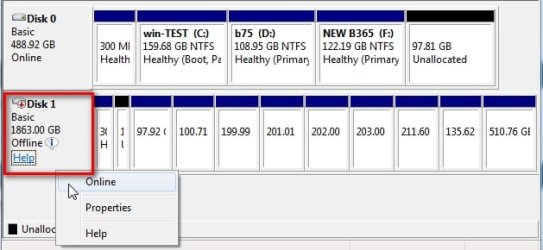
If there are two disks with the same sig, windows will not automatically bring the second disk online. If you rt click and select online, windows will bring the second disk online and change the sig.

It is not hard to do.
 

My Computers My Computers

  • At a glance

    7 X64i5 84002x8gb 3200mhz
    Computer type
    PC/Desktop
    OS
    7 X64
    CPU
    i5 8400
    Motherboard
    gigabyte b365m ds3h
    Memory
    2x8gb 3200mhz
    Hard Drives
    various
    PSU
    pure power 11 400w cm
    Case
    Coolermaster
    Cooling
    cryorig m9i
  • At a glance

    7x64g54008gb ddr4 2400
    Computer type
    PC/Desktop
    OS
    7x64
    CPU
    g5400
    Motherboard
    ga b365m ds3h
    Memory
    8gb ddr4 2400
    PSU
    xfx pro 450w
If there are two disks with the same sig, windows will not automatically bring the second disk online. If you rt click and select online, windows will bring the second disk online and change the sig.

It is not hard to do.

Where is this right-clicking done ?

In my situation, everything in the disk management right-click menu was greyed out and unresponsive.

The disk would not show up anywhere else.

Do I right-click the little area where is says the disk is offline ?

Thanks.
 

My Computer My Computer

At a glance

Windows 7 Pro x64Intel Core Two Duo E8600 3.33 ghz8GBGigabyte Radeon R7 240
Computer type
PC/Desktop
Computer Manufacturer/Model Number
Dell Optiplex 780m "mini-tower"
OS
Windows 7 Pro x64
CPU
Intel Core Two Duo E8600 3.33 ghz
Motherboard
Whatever DELL put in it
Memory
8GB
Graphics Card(s)
Gigabyte Radeon R7 240
Monitor(s) Displays
HP 2159m
PSU
750 Watt Corsair CX750
Keyboard
Logitech Wireless
Mouse
Logitech Wireless
Browser
Chrome, Firefox, IE
Do I right-click the little area where is says the disk is offline ?

yes
rt click anywhere in the bit I have outlined in red

disk-online.jpg
 

My Computers My Computers

  • At a glance

    7 X64i5 84002x8gb 3200mhz
    Computer type
    PC/Desktop
    OS
    7 X64
    CPU
    i5 8400
    Motherboard
    gigabyte b365m ds3h
    Memory
    2x8gb 3200mhz
    Hard Drives
    various
    PSU
    pure power 11 400w cm
    Case
    Coolermaster
    Cooling
    cryorig m9i
  • At a glance

    7x64g54008gb ddr4 2400
    Computer type
    PC/Desktop
    OS
    7x64
    CPU
    g5400
    Motherboard
    ga b365m ds3h
    Memory
    8gb ddr4 2400
    PSU
    xfx pro 450w
yes
rt click anywhere in the bit I have outlined in red

Thanks; that sure is a lot less involved than the diskpart method --- but not as much fun.....
 

My Computer My Computer

At a glance

Windows 7 Pro x64Intel Core Two Duo E8600 3.33 ghz8GBGigabyte Radeon R7 240
Computer type
PC/Desktop
Computer Manufacturer/Model Number
Dell Optiplex 780m "mini-tower"
OS
Windows 7 Pro x64
CPU
Intel Core Two Duo E8600 3.33 ghz
Motherboard
Whatever DELL put in it
Memory
8GB
Graphics Card(s)
Gigabyte Radeon R7 240
Monitor(s) Displays
HP 2159m
PSU
750 Watt Corsair CX750
Keyboard
Logitech Wireless
Mouse
Logitech Wireless
Browser
Chrome, Firefox, IE
Back
Top