Resident Evil 5 doesn't load profiles with Twin USB Joypad

mulambo

New member
Member
VIP
Local time
11:06 PM
Messages
110
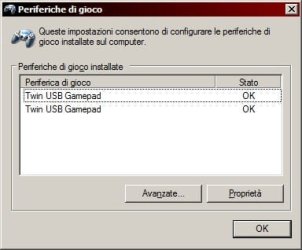
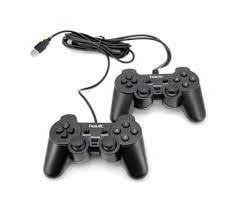
Hello, I'm playing RE5 and I have this problem, as I have a double joypad USB (two controllers connected to one usb plug like this images.jpg) bought for mistake, so I isolated the first one and use the second one (so in case it breaks, I can use the other one as backup).
If I start the game with keyboard input, it loads the savegame profile, but if I use the second joypad it doesn't (it asks me to choose "gamer profile" but when I click "Yes" it doesn't go anywhere, I can click yes endlessly or just "no" and proceed to game without saving options). I know it's because I use the second controller, because when I use the first one from the beginning it goes fine, here's the config.ini file content:
Code:
[JOYPAD]
ProductName=Twin USB Gamepad
A=3
B=1
X=2
Y=0
LEFT=POV
RIGHT=POV
UP=POV
DOWN=POV
START=9
BACK=8
LT=6
LB=4
RT=7
RB=5
LSTICK_PUSH=10
LSTICK_VERT=Y
LSTICK_HORZ=X
RSTICK_PUSH=11
RSTICK_VERT=RZ
RSTICK_HORZ=Z
ProductType=1
[GAME]
MouseBaseSpeed=2.000000
[GRAPHICS]
SLI=OFF
Stereo=OFF
HDR=LOW
MSAA=NONE
TextureFilter=ANISOTROPIC16X
TextureDetail=HIGH
MotionBlur=OFF
NormalMapping=ON
NormalUpdate=ON
Specular=ON
Lighting=HIGH
FilterQuality=HIGH
WaterQuality=HIGH
EffectQuality=HIGH
EffectVolume=HIGH
ShadowQuality=HIGH
LOD=HIGH
Joint=HIGH
Adhesion=HIGH
[DISPLAY]
Resolution=1280x720
RefreshRate=60Hz
FullScreen=ON
VSYNC=OFF
AdjustAspect=OFF
FrameRate=VARIABLE
[SOUNDS]
SeVoiceNum=128
ReverbQuality=LOW
CategoryEQ=ON
[CPU]
JobThread=1
RenderingThread=ON
 

My Computer My Computer

At a glance

Windows 7, 64bit pro
Computer type
PC/Desktop
OS
Windows 7, 64bit pro
Hi

not really my area, but a thought
Is it PNP or did it come with an installation CD....
Whichever it is is there a "share" option within the set-up
 

My Computer My Computer

At a glance

W7 home premium 32bit/W7HP 64bit/w10 tp insid...E5300 dual core3gbNvidia Geforce 7100 Nforce 630i
Computer type
PC/Desktop
Computer Manufacturer/Model Number
medionl/Aspire 6930G/acer x55a
OS
W7 home premium 32bit/W7HP 64bit/w10 tp insider ring
CPU
E5300 dual core
Motherboard
medion MS7366
Memory
3gb
Graphics Card(s)
Nvidia Geforce 7100 Nforce 630i
Monitor(s) Displays
avixc
Internet Speed
n (isp resticted to 72)
Antivirus
mse/pands
Browser
palemoon
Other Info
Belkin Fd7050 n USB using Railink RT2870 drivers, more upto date
Hi

not really my area, but a thought
Is it PNP or did it come with an installation CD....
Whichever it is is there a "share" option within the set-up

I found it already installed in an old hard drive I bought on eBay and all I know it automatically associates a joypad with an Xlive profile, which I don't have and it's strange because if I use the first joypad of the twin ensemble it loads "contents" (it says, I think it means the savegame from userdata/CAPCOM folder), but if I use the second joypad it automatically "thinks" that there's another profile to load. Yes, I tried duplicating the profile folder, to no avail as it seems it does it all automatically (even not letting me save if I play with the second joypad).

I've read somewhere else this game "needs" windows live drm... but honestly why all this mess if it's just a matter of joypads? Meh.

Anyway I'm playing it with the first one, but if anyone really into this has solved this issue, I'm all ears
 

My Computer My Computer

At a glance

Windows 7, 64bit pro
Computer type
PC/Desktop
OS
Windows 7, 64bit pro
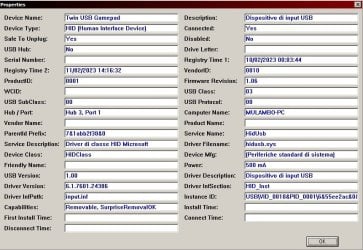
It could be the serial number to the USB device. This is one of those things where I'd have to be there at your computer to mess around with. If you run USBDeview, do you see two distinct serial numbers for these game pads or just one? I'm thinking since both were joined together one has a chip that has this serial number while the other does not. I think... It's possible the game is going by the unique serial number from the USB device. You could uninstall and reinstall all devices in USBDeview and reboot and see if that helps. I wouldn't uninstall the keyboard and mouse though. Sort the list by device type by clicking the column.

View any installed/connected USB device on your system

- - - Updated - - -

I don't know if this applies just to hard drives or not.


The Truth About USB Device Serial Numbers | SANS


Episode 107: The TWO Serial Numbers of a USB Device - Part 2 - YouTube

- - - Updated - - -

One more thing. Every time Microsoft gets their mitts on a game it becomes absolute DRM horse crap! They did that crap to GTA IV. I think back then that game could only be used with an Xbox controller and the game was tied to Games For Windows Live or what ever the hell it was.

I now have GTA IV in Steam and I don't think that BS DRM crap is there anymore. Though, I do use a Mad Catz USB Xbox controller...
 

My Computer My Computer

At a glance

Windows 7 Ultimate x64
Computer type
PC/Desktop
OS
Windows 7 Ultimate x64
It could be the serial number to the USB device. This is one of those things where I'd have to be there at your computer to mess around with. If you run USBDeview, do you see two distinct serial numbers for these game pads or just one? I'm thinking since both were joined together one has a chip that has this serial number while the other does not. I think... It's possible the game is going by the unique serial number from the USB device. You could uninstall and reinstall all devices in USBDeview and reboot and see if that helps. I wouldn't uninstall the keyboard and mouse though. Sort the list by device type by clicking the column.

View any installed/connected USB device on your system

- - - Updated - - -

I don't know if this applies just to hard drives or not.


The Truth About USB Device Serial Numbers | SANS


Episode 107: The TWO Serial Numbers of a USB Device - Part 2 - YouTube

- - - Updated - - -

One more thing. Every time Microsoft gets their mitts on a game it becomes absolute DRM horse crap! They did that crap to GTA IV. I think back then that game could only be used with an Xbox controller and the game was tied to Games For Windows Live or what ever the hell it was.

I now have GTA IV in Steam and I don't think that BS DRM crap is there anymore. Though, I do use a Mad Catz USB Xbox controller...


Thanks, I didn't know about that program, unfortunely on Windows it is shown as two joypads, but on usbdeview it is show as one device

Immagine.jpg

Immagine.jpg

I also noticed RE5 recognizes keyboard or the first joypad as main "profile":
- if I go through "Start Game" by using keyboard then use the second joypad, it loads the savegame correctly
- if I do that by using the second joypad, it doesn't load the savegame (bogus gamer profile prompt forcing to proceed without saving)
- if I do that by using the first joypad, it says "Control mode switched to joypad" then it loads the savegame correctly

I'm clueless, I guess the only way out of this is somebody who can release a patch or something like that, for non-steam versions (like Gold or something... I heard about "QOL" patch but it really wasn't my case as it didn't work).

And yeah, I also think that forcing player to a service that it's just temporary, as I've read somewhere it got discontinued, it's kinda of a dirty shot. I also don't like Xbox button layout which RE5 seems to refer to (while on PC it's just "button 1", "button 2", 3, etc... not "a,b,x,y,lt..."). Yeah, they kinda saying "play this game with an xbox360 controller, even if you don't own one"... kind of an arrogant development or commercial move, imho
 

My Computer My Computer

At a glance

Windows 7, 64bit pro
Computer type
PC/Desktop
OS
Windows 7, 64bit pro
It seems like you need to use an Xbox controller. There might be something there with the DRM, I don't know. Or it's just the dual USB gamepad you're using.
 

My Computer My Computer

At a glance

Windows 7 Ultimate x64
Computer type
PC/Desktop
OS
Windows 7 Ultimate x64
Yeah, they kinda saying "play this game with an xbox360 controller, even if you don't own one"... kind of an arrogant development or commercial move, imho

Because Direct input is more hassle to setup for coders and most people know that the de facto PC game controllers has always been the classic Xbox 360 controller and into the modern times.

So since like 2005 the classic Xinput Microsoft controller has been the go to and every PC gamer should have one even if they like other controllers because the Xbox controller has always had the most support since its conception.

We came from a time when HID devices and other PNP devices were notorious hard to get working unless they were branded think like sidewinder series etc, back then don't go near anything that was not branded. Logitech came out with some good ones but even still they had bad support at times or just didn't work in some games.

The Xbox pc controller came out and it was literally the saving grace of its time as it "just worked" on everything and anything. So i guess it is part throwback and because it has always had good support.

- - - Updated - - -

This also makes me think after all these years printers are still a pain in the to work with. Some worse than others we have come so far but yet the basic fundamentals are still very broken.
 

My Computers My Computers

  • At a glance

    10
    OS
    10
  • Computer type
    PC/Desktop
Because Direct input is more hassle to setup for coders and most people know that the de facto PC game controllers has always been the classic Xbox 360 controller and into the modern times. So since like 2005 the classic Xinput Microsoft controller has been the go to and every PC gamer should have one even if they like other controllers because the Xbox controller has always had the most support since its conception. We came from a time when HID devices and other PNP devices were notorious hard to get working unless they were branded think like sidewinder series etc, back then don't go near anything that was not branded. Logitech came out with some good ones but even still they had bad support at times or just didn't work in some games. The Xbox pc controller came out and it was literally the saving grace of its time as it "just worked" on everything and anything. So i guess it is part throwback and because it has always had good support. - - - Updated - - - This also makes me think after all these years printers are still a pain in the to work with. Some worse than others we have come so far but yet the basic fundamentals are still very broken.
I see the Xbox360 controller adaptation to PC as a commercial enforcement, guess why: games were running on a Microsoft OS and they "had" to be played with the controller of a Microsoft console... way to induct people to buy the console, or to "brand" them. I also remember a friend of mine using it and he had a lot of problems mapping it to the OS himself, while some really cheaper (yet a bit more faulty) PS2-shaped controllers were immediately recognizing (yet not always to their full extend, especially regarding vibration). Vibration itself doesn't seem to work on any game I tried so far... but in Device Manager they can be tested correctly.
 

My Computer My Computer

At a glance

Windows 7, 64bit pro
Computer type
PC/Desktop
OS
Windows 7, 64bit pro
I see the Xbox360 controller adaptation to PC as a commercial enforcement, guess why: games were running on a Microsoft OS and they "had" to be played with the controller of a Microsoft console... way to induct people to buy the console, or to "brand" them. I also remember a friend of mine using it and he had a lot of problems mapping it to the OS himself, while some really cheaper (yet a bit more faulty) PS2-shaped controllers were immediately recognizing (yet not always to their full extend, especially regarding vibration). Vibration itself doesn't seem to work on any game I tried so far... but in Device Manager they can be tested correctly.

Because Resident Evil 5 uses Direct X which is Microsoft API. Xinput and Direct Input are both Microsoft API's we are also talking about a game running on windows that uses Direct X.

Direct Input is old and somewhat legacy api all though it is still in use it really only shines for two reasons.

Direct Input:
- Supports more inputs 8 axes and up to 128 buttons
- Play station wants to use this as most likely all its buttons equal 14 or more.

XInput the newest API and is more of a standard over the older Direct Input

XInput:
- Supports 4 axes, D pad, 10 buttons, two triggers.
- Easier for cross platform applications which Resident Evil is cross platform. Xbox to PC etc.

It has nothing to do with making people conform its about less lines of code there is no incentive for them to code for Direct input when thy can just use the same code for Microsoft Xbox straight into a Microsoft Windows PC and the code will play the same between both hardware.

Ok somewhat it is a power move by Microsoft which is nothing new. Xbox Exclusives on the first Xbox were doing the same thing promoting Xbox and its Direct X nature and that it was the most powerful console for its time, it is also very loosely the Dreamcast 2 in some peoples opinion but that is getting to far out of context.

Microsoft don't own or control Capcom do they? Capcom could of add Direct Input but they didn't because there is no incentive for them to do that.
 

My Computers My Computers

  • At a glance

    10
    OS
    10
  • Computer type
    PC/Desktop
Because Resident Evil 5 uses Direct X which is Microsoft API. Xinput and Direct Input are both Microsoft API's we are also talking about a game running on windows that uses Direct X. Direct Input is old and somewhat legacy api all though it is still in use it really only shines for two reasons. Direct Input: - Supports more inputs 8 axes and up to 128 buttons - Play station wants to use this as most likely all its buttons equal 14 or more. XInput the newest API and is more of a standard over the older Direct Input XInput: - Supports 4 axes, D pad, 10 buttons, two triggers. - Easier for cross platform applications which Resident Evil is cross platform. Xbox to PC etc. It has nothing to do with making people conform its about less lines of code there is no incentive for them to code for Direct input when thy can just use the same code for Microsoft Xbox straight into a Microsoft Windows PC and the code will play the same between both hardware. Ok somewhat it is a power move by Microsoft which is nothing new. Xbox Exclusives on the first Xbox were doing the same thing promoting Xbox and its Direct X nature and that it was the most powerful console for its time, it is also very loosely the Dreamcast 2 in some peoples opinion but that is getting to far out of context. Microsoft don't own or control Capcom do they? Capcom could of add Direct Input but they didn't because there is no incentive for them to do that.
well then how come Tony Hawk HD and Saints Row 3 (not remastered) both also require an xbox 360 controller to be played? THHD with a different controller has 1st stick y-axis reversed (same goes for the d-pad)... while Saints Row 3 button layout for a generic USB controller is... just "drunk" is the correct word I can use to describe it (in fact, I think I'll just play it with keyboard). For both of them the only solution I've found on the internet was x360ce ... which didn't help because such program didn't even recognize c++ libraries correctly (or maybe it's coded for w10 ? )
 

My Computer My Computer

At a glance

Windows 7, 64bit pro
Computer type
PC/Desktop
OS
Windows 7, 64bit pro
well then how come Tony Hawk HD and Saints Row 3 (not remastered) both also require an xbox 360 controller to be played? THHD with a different controller has 1st stick y-axis reversed (same goes for the d-pad)... while Saints Row 3 button layout for a generic USB controller is... just "drunk" is the correct word I can use to describe it (in fact, I think I'll just play it with keyboard). For both of them the only solution I've found on the internet was x360ce ... which didn't help because such program didn't even recognize c++ libraries correctly (or maybe it's coded for w10 ? )

Because you are missing the point. Games lean either to supporting XInnput controllers or Direct Input or both but its not uncommon for games to be one or the other. Generally many older PC games like from the last 30 years on wards will be Direct Input where as games made after 2005 can be either Xinput or Direct where Xinput is the more common and more supported of the two.

If your Dinput controllers work on these games you mentioned great i guess but also poorly then they obvs handled them poorly for those ports. I know Saints row was a bad port on the PC.

So if any game already supports both XInput and Direct Input then good for people that want to play with non Xbox Controllers otherwise bad luck.

Again XInput is the dominate standard now on PC some games support Direct Input but its not as common.

- - - Updated - - -

You also have some amalgamation of a controller tbh these cheap Chinese Direct input controllers can be all kinds of messed up. Looking at that photo of the controller tbh you got what you payed for imo and it looks like Frankenstein the controller.
 

My Computers My Computers

  • At a glance

    10
    OS
    10
  • Computer type
    PC/Desktop
Because you are missing the point. Games lean either to supporting XInnput controllers or Direct Input or both but its not uncommon for games to be one or the other. Generally many older PC games like from the last 30 years on wards will be Direct Input where as games made after 2005 can be either Xinput or Direct where Xinput is the more common and more supported of the two. If your Dinput controllers work on these games you mentioned great i guess but also poorly then they obvs handled them poorly for those ports. I know Saints row was a bad port on the PC. So if any game already supports both XInput and Direct Input then good for people that want to play with non Xbox Controllers otherwise bad luck. Again XInput is the dominate standard now on PC some games support Direct Input but its not as common. - - - Updated - - - You also have some amalgamation of a controller tbh these cheap Chinese Direct input controllers can be all kinds of messed up. Looking at that photo of the controller tbh you got what you payed for imo and it looks like Frankenstein the controller.
I see... then all I need is an Xinput emulator. Anyway, how can this "interpreters" fragmentation be explained? I mean it didn't happen for joypads only, but obviously for video stuff like.... Directx, OpenGl, Vulcan... what else? How come, for example, there isn't just one video plugin for all games? Wouldn't it be simpler and less troubling for all PC gamers? And why only certain OS can support newer versions of such plugins, even if the video card supports them? I mean: what drives developers into relying on certain plugins instead of others? Sorry for these extra questions, but since I went missing the point about joypads, I think I miss the point about video stuff too
 

My Computer My Computer

At a glance

Windows 7, 64bit pro
Computer type
PC/Desktop
OS
Windows 7, 64bit pro
Questions like that are not easily answered as the scope is to dynamic. Code base becomes depreciated over time for several reasons.
Technology can evolve to a point where it needs new code and updating old code is not always a good idea, as tech innovates we see features we did not see in the past so old code works well up until it doesn't and should probably be rewritten for new tech.

For example you mentione OpenGL and Vulkan. OpenGL and Vulkan are directly related as OpenGL is Vulkan predecessor which is a good example here.

Vulkan is lower level API than OpenGL meaning it can work more closly with hardware in a more optimized manner it was the step forward in that sense that it was probably a lot easier for them to start fresh with Vulkan then to try and redesign years of work of OpenGL from the ground up which would take a long time and compromise OpenGL in all its integrity. Tech has evolved to a point where new API is warranted. Coding practices and infrastructure has also evolved considerably since 1992 also.

Computers and hardware change over time its not static if you were computing in the 90s or earlier then you would know that these were some strange times. There was no one standard for many things but it is also due to the fact that some computer nerds somewhere thought they could implement their vision better than someone else or one group better than the other group.

Like anything that is currently being invented/reinvented we have seen some pretty odd ball things in computing. the 90s is a good example of this as they were trying all sorts of weird things with computer tech because they didn't know unless they tried to innovate. I would say we have hit the pinnacle atm until quantum computing fully happens we don't have much further we ca go on our current trajectory its all just old or established tech/standards getting faster.
 

My Computers My Computers

  • At a glance

    10
    OS
    10
  • Computer type
    PC/Desktop
Questions like that are not easily answered as the scope is to dynamic. Code base becomes depreciated over time for several reasons. Technology can evolve to a point where it needs new code and updating old code is not always a good idea, as tech innovates we see features we did not see in the past so old code works well up until it doesn't and should probably be rewritten for new tech. For example you mentione OpenGL and Vulkan. OpenGL and Vulkan are directly related as OpenGL is Vulkan predecessor which is a good example here. Vulkan is lower level API than OpenGL meaning it can work more closly with hardware in a more optimized manner it was the step forward in that sense that it was probably a lot easier for them to start fresh with Vulkan then to try and redesign years of work of OpenGL from the ground up which would take a long time and compromise OpenGL in all its integrity. Tech has evolved to a point where new API is warranted. Coding practices and infrastructure has also evolved considerably since 1992 also. Computers and hardware change over time its not static if you were computing in the 90s or earlier then you would know that these were some strange times. There was no one standard for many things but it is also due to the fact that some computer nerds somewhere thought they could implement their vision better than someone else or one group better than the other group. Like anything that is currently being invented/reinvented we have seen some pretty odd ball things in computing. the 90s is a good example of this as they were trying all sorts of weird things with computer tech because they didn't know unless they tried to innovate. I would say we have hit the pinnacle atm until quantum computing fully happens we don't have much further we ca go on our current trajectory its all just old or established tech/standards getting faster.
All I see is those nerds turned into corporations, but the competition in "standards-definition" is still there. If it was for a matter of vision or ego before, now it's a simple matter of greed. I mean, compatibility issues existed in the 00's (when I had my first PC) and still exist nowadays. All I see as a very strange fact is that, if a particular joypad "had" to be promoted as a standard... why a console joypad? Because it was "versatile" enough?
 

My Computer My Computer

At a glance

Windows 7, 64bit pro
Computer type
PC/Desktop
OS
Windows 7, 64bit pro
Interesting, but somehow not really shocking. I've seen "simple" gaming controllers being used in any part of science, from robotics to surgery... yes, the shocking factor is that using them for a game is normal, but for an open-heart surgery (or a military operations where thousands of people can be involved) is a whole different level, where the "game over" or "mission failed" is way more serious than the one on the screen... Technically, with a mapper like joytokey, anything that's originally supposed to be done with a keyboard can be done with a joypad... so technically if a world leader maps a joypad to the password of a nuclear bomb launch, it would be like enter a cheat code in a videogame.
 

My Computer My Computer

At a glance

Windows 7, 64bit pro
Computer type
PC/Desktop
OS
Windows 7, 64bit pro
HAHAHA :D "Technically", launching a nuclear missile or calling out the B-2s, etc is a little bit more complex than that. At least in the United States. You'll note that the U.S. Navy only uses the controller for the periscope... Extreme crucial things that could cause WWIII or a global conflict of some kind are not going to be hinged on the apparatus of subpar untested mechanics and whatnot. There's all kinds of testing that has to be done just for the simplest of things. It's pretty much why the U.S company Fluke and their testing equipment is so relied upon for bona fide testing and certification purposes. There's a bit to that story but I don't feel like typing it out.
 

My Computer My Computer

At a glance

Windows 7 Ultimate x64
Computer type
PC/Desktop
OS
Windows 7 Ultimate x64
HAHAHA :D "Technically", launching a nuclear missile or calling out the B-2s, etc is a little bit more complex than that. At least in the United States. You'll note that the U.S. Navy only uses the controller for the periscope... Extreme crucial things that could cause WWIII or a global conflict of some kind are not going to be hinged on the apparatus of subpar untested mechanics and whatnot. There's all kinds of testing that has to be done just for the simplest of things. It's pretty much why the U.S company Fluke and their testing equipment is so relied upon for bona fide testing and certification purposes. There's a bit to that story but I don't feel like typing it out.
Seen the diplomatic disasters Trump made by just using Twitter, I wouldn't be surprised if some other president would make it worse by just using a joypad. "Anything goes", seems the way to go. But /offtopic... I may be just overly pessimistic.
 

My Computer My Computer

At a glance

Windows 7, 64bit pro
Computer type
PC/Desktop
OS
Windows 7, 64bit pro
Back
Top