Keyboard and mouse not working during soft boot

enxio27

New member
Member
Local time
11:57 AM
Messages
41
I recently upgraded the hard drive in my laptop and encountered a situation I never noticed before. When I perform a cold boot, the mouse and keyboard work just fine, including booting into the BIOS setup, but when I perform a warm boot (restart), the mouse and keyboard won't work AT ALL (including booting into BIOS) until I get to the OS login screen (Debian Linux 11 and Win7 Pro SP1, dual boot using GRUB). Once I get to the login, they're fine.

It's unrelated to Linux or GRUB, because I first noticed the issue when I was reinstalling Windows onto the new drive (first trying a clone, then a partition image, then finally a clean install). Whenever Windows ran into a booting issue, even when it gave me the recovery screen, I could not choose an option unless I was starting from a cold boot. The same thing happens whenever I've had occasion to boot to a flash drive or a DVD.

I've gone through all of the BIOS settings to see whether anything might be preventing it from immediately recognizing the mouse and keyboard during a soft boot but came up empty. It's possible that this started long before I started the hard drive upgrade, but I never noticed it until the issues with the Win7 reinstall on the new drive.

System is an HP ProBook 455 G3 using the built-in keyboard and a USB mouse. Onboard mouse pad is disabled (I hate them). I don't know whether it's related, but I know I need to get a replacement battery (I have to remove the battery and put it back in order to perform a cold boot).

Any ideas? It's really frustrating when I need to be able to quickly switch back and forth between Win7 and Linux.
 

My Computer

Computer type
Laptop
Computer Manufacturer/Model Number
HP ProBook
OS
Win7 Professional 64-bit SP1
CPU
AMD A10-8700P Radeon R6
Memory
16 GiB
typically, it's related with USB3/3.1 driver. (HP ProBook 455 G3 was a model, Year of 2015 ?)

re-install the driver and try again.
 

My Computers

System One System Two

  • Computer type
    PC/Desktop
    Computer Manufacturer/Model Number
    HP Elite 800 G5
    OS
    Windows 7 Pro 64-bit
    CPU
    I7-9700
    Memory
    32 GB
  • Computer type
    Laptop
    System Manufacturer/Model Number
    ASUS UX305C
    OS
    Windows 7 Pro 64-bit
I'm not sure that makes sense.

1. The keyboard (built-in, not USB) also doesn't work.

2. This happens during a warm boot but not a cold boot.

3. This happens BEFORE POST, before it ever gets to Windows or any other OS.

4. This happens even when booting to Linux, a (non-Windows) flash drive, or a DVD.
 

My Computer

Computer type
Laptop
Computer Manufacturer/Model Number
HP ProBook
OS
Win7 Professional 64-bit SP1
CPU
AMD A10-8700P Radeon R6
Memory
16 GiB
Hi

please note as your dual booting.... W7 hates being second in line and has been known to cause minor hiccups like your having
 

My Computer

Computer type
PC/Desktop
Computer Manufacturer/Model Number
medionl/Aspire 6930G/acer x55a
OS
W7 home premium 32bit/W7HP 64bit/w10 tp insider ring
CPU
E5300 dual core
Motherboard
medion MS7366
Memory
3gb
Graphics Card(s)
Nvidia Geforce 7100 Nforce 630i
Monitor(s) Displays
avixc
Internet Speed
n (isp resticted to 72)
Antivirus
mse/pands
Browser
palemoon
Other Info
Belkin Fd7050 n USB using Railink RT2870 drivers, more upto date

My Computers

System One System Two

  • Computer type
    PC/Desktop
    Computer Manufacturer/Model Number
    custom build
    OS
    Windows 7 HP 64
    CPU
    i5 6600K - 800MHz to 4200MHz
    Motherboard
    GA-Z170-HD3P
    Memory
    4+4G GSkill DDR4 3000
    Graphics Card(s)
    IG - Intel 530
    Monitor(s) Displays
    Samsung 226BW
    Screen Resolution
    1680x1050
    Hard Drives
    (1) -1 SM951 – 128GB M.2 AHCI PCIe SSD drive for Windows 7 and Lubuntu
    (2) -1 WD SATA 3 - 1T for Data
    (3) -1 WD SATA 3 - 1T for backup
    PSU
    Thermaltake 450W TR2 gold
    Keyboard
    Old and good Chicony mechanical keyboard
    Mouse
    Logitech mX performance - 9 buttons (had to disable some)
    Internet Speed
    500Mb/s
    Browser
    Firefox 64
    Other Info
    TinyWall firewall
  • Computer type
    Laptop
    System Manufacturer/Model Number
    Asus Q550LF
    OS
    Windows 7 Pro
    CPU
    i7-4500U 800MHz to 3.0GHz
    Motherboard
    Asus Q550LF
    Memory
    (4+4)G DDR3 1600
    Graphics Card(s)
    IG intel 4400 + NVIDIA GeForce GT 745M
    Sound Card
    Realtek
    Monitor(s) Displays
    LG Display LP156WF4-SPH1
    Screen Resolution
    1920 x 1080
    Hard Drives
    BX500 120G SSD for Windows and programs +
    1T HDD for data
    Internet Speed
    500 Mb/s
    Browser
    Firefox
    Other Info
    TinyWall firewall
Have you completely reset your CMOS? Pull battery/power type of reset? I have a couple minor issues with 7 and usb 3.1 when it wont see the mouse/keyboard and simply clearing the cmos fixes it.

So if you havent already, its worth a shot.

Its possible your previous install had the driver installed for the built in mouse pad, even though disabled, it still might have been doing something? Did you use the usb mouse and also have the built in mouse disable when you installed 7?
 

My Computer

Computer type
PC/Desktop
Computer Manufacturer/Model Number
Custom Build
OS
Windows 7 Ultimate x64
CPU
Ryzen 7 5800x
Motherboard
MSI Gaming Pro Carbon X570
Memory
Crucial Ballistix 3600 MHz DDR4
Graphics Card(s)
GIGABYTE Radeon RX 6600 XT Gaming OC
Monitor(s) Displays
4 displays, two 1080p, two 4k.
Screen Resolution
1080/4k
Hard Drives
Samsung 990 (OS drive), Samsung 980 Pro NVMe, Samsung 870 EVO
please note as your dual booting.... W7 hates being second in line and has been known to cause minor hiccups like your having

It displayed this behavior when Win7 was the ONLY OS on the system, so definitely not the dual boot.

- - - Updated - - -

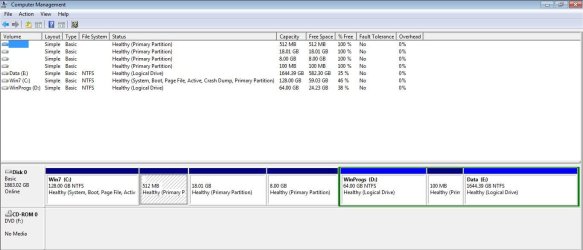
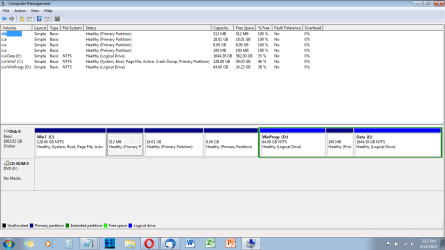
Please post a whole window Disk Manager image of your drives. Don't forget to expand the columns so we can read them. Disk Management - Post a Screen Capture Image

The non-NTFS partitions are Linux (/boot, /, /swap, and /home, respectively).

Disk Management Snapshot.jpg

- - - Updated - - -

Have you completely reset your CMOS? Pull battery/power type of reset? I have a couple minor issues with 7 and usb 3.1 when it wont see the mouse/keyboard and simply clearing the cmos fixes it.

This is a laptop, so I'm not sure how to access the CMOS battery. The laptop battery gets pulled and returned every time I have to cold-boot (it needs to be replaced).

Its possible your previous install had the driver installed for the built in mouse pad, even though disabled, it still might have been doing something? Did you use the usb mouse and also have the built in mouse disable when you installed 7?
Again, whatever is keeping the mouse and keypad from working happens before/during POST, long before it ever gets to Windows or Linux or even GRUB, but only on a warm boot. I can't even hit <ESC> to boot to the BIOS. It happens even when booting to a USB stick or a DVD. And yes, disabling the built-in mouse was one of the first things I did when I got the laptop, and I've been using a USB mouse (with the built-in keyboard) ever since.
 

Attachments

  • image_2023-04-16_141919802.png
    image_2023-04-16_141919802.png
    71.3 KB · Views: 2

My Computer

Computer type
Laptop
Computer Manufacturer/Model Number
HP ProBook
OS
Win7 Professional 64-bit SP1
CPU
AMD A10-8700P Radeon R6
Memory
16 GiB
Unplug the USB mouse once. Now do a warm boot. Can you access BIOS with the keyboard shortcut key without the mouse attached?

I find it very interesting that in order for you to boot to the other OS you need to remove the battery. That could be an issue in how the battery is interacting with BIOS. I'm not sure how it works, but with all the Dell laptops I ever had, BIOS would sometimes give me an error if it detected the wrong power adapter (non OEM). I sense now use real OEM power adapters for safety and to not harm the computer.

At any rate, if your battery is an issue, it could be doing some things in BIOS. Just a guess though.
 

My Computer

Computer type
PC/Desktop
OS
Windows 7 Ultimate x64
Unplug the USB mouse once. Now do a warm boot. Can you access BIOS with the keyboard shortcut key without the mouse attached?
No. Keyboard still doesn't work on a warm boot until it gets to the OS login screen (default is now to Linux but also happens when booting to other devices).
I find it very interesting that in order for you to boot to the other OS you need to remove the battery. That could be an issue in how the battery is interacting with BIOS. I'm not sure how it works, but with all the Dell laptops I ever had, BIOS would sometimes give me an error if it detected the wrong power adapter (non OEM). I sense now use real OEM power adapters for safety and to not harm the computer.

I have to unplug the adapter, remove and return the battery, and plug the adapter back in in order to do a cold boot AT ALL. The power switch won't work until I do so. This, along with the mouse/keyboard not working on a warm boot, long predates the hard drive upgrade and the installation of the dual boot.

An online search tells me issue is due to the battery getting old and needing to be replaced. I'm hoping to do that soon (today, if possible). Whether it will fix the keyboard/mouse issue remains to be seen, but it's definitely worth a shot. Now that I have dual boot, the lack of warm boot capability to easily switch between OSes is a show-stopper.

At any rate, if your battery is an issue, it could be doing some things in BIOS. Just a guess though.

That makes sense as a possibility. It's clearly not a driver issue. I'll post an update once I get the battery replaced.
 

My Computer

Computer type
Laptop
Computer Manufacturer/Model Number
HP ProBook
OS
Win7 Professional 64-bit SP1
CPU
AMD A10-8700P Radeon R6
Memory
16 GiB
I have a MB that has Fast Boot BIOS setting.
It disable loading BIOS driver during restart.
Check your BIOS settings.
 

My Computers

System One System Two

  • Computer type
    PC/Desktop
    Computer Manufacturer/Model Number
    custom build
    OS
    Windows 7 HP 64
    CPU
    i5 6600K - 800MHz to 4200MHz
    Motherboard
    GA-Z170-HD3P
    Memory
    4+4G GSkill DDR4 3000
    Graphics Card(s)
    IG - Intel 530
    Monitor(s) Displays
    Samsung 226BW
    Screen Resolution
    1680x1050
    Hard Drives
    (1) -1 SM951 – 128GB M.2 AHCI PCIe SSD drive for Windows 7 and Lubuntu
    (2) -1 WD SATA 3 - 1T for Data
    (3) -1 WD SATA 3 - 1T for backup
    PSU
    Thermaltake 450W TR2 gold
    Keyboard
    Old and good Chicony mechanical keyboard
    Mouse
    Logitech mX performance - 9 buttons (had to disable some)
    Internet Speed
    500Mb/s
    Browser
    Firefox 64
    Other Info
    TinyWall firewall
  • Computer type
    Laptop
    System Manufacturer/Model Number
    Asus Q550LF
    OS
    Windows 7 Pro
    CPU
    i7-4500U 800MHz to 3.0GHz
    Motherboard
    Asus Q550LF
    Memory
    (4+4)G DDR3 1600
    Graphics Card(s)
    IG intel 4400 + NVIDIA GeForce GT 745M
    Sound Card
    Realtek
    Monitor(s) Displays
    LG Display LP156WF4-SPH1
    Screen Resolution
    1920 x 1080
    Hard Drives
    BX500 120G SSD for Windows and programs +
    1T HDD for data
    Internet Speed
    500 Mb/s
    Browser
    Firefox
    Other Info
    TinyWall firewall
Back
Top