Why my PC pop out Windows Explorer error message at random times?

erik8svf

New member
Local time
12:46 PM
Messages
12
Here's the error message:
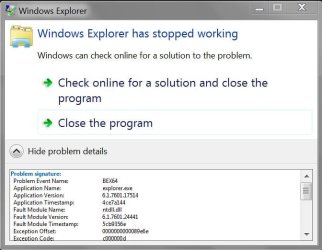
Capture.JPG

Problem Event Name: BEX64
Application Name: explorer.exe
Application Version: 6.1.7601.17514
Application Timestamp: 4ce7a144
Fault Module Name: ntdll.dll
Fault Module Version: 6.1.7601.24441
Fault Module Timestamp: 5cb9356e
Exception Offset: 0000000000089e6e
Exception Code: c000000d
Exception Data: 0000000000000000
OS Version: 6.1.7601.2.1.0.768.3
Locale ID: 1033
Additional Information 1: d6af
Additional Information 2: d6af87578f59531a48b8b10c6d515ca6
Additional Information 3: 419c
Additional Information 4: 419cfd3a806b584e46cfdd69003d826d
 

My Computer My Computer

At a glance

Windows 7 Home Premium 64bit
Computer type
PC/Desktop
OS
Windows 7 Home Premium 64bit
Open a CMD window as administrator and type:
chkdsk c: /f
It will say your disk is in use and ask if you want to schedule to next start = yes
Restart
Pay attention on the results, specially bad blocks, bad clusters, bad sectors etc

Back to Windows, open a CMD window as administrator and type:
sfc /scannow

If it finds any corrupted files, fixing or not, reboot and run again
 

My Computers My Computers

  • At a glance

    Windows 7 HP 64i5 6600K - 800MHz to 4200MHz4+4G GSkill DDR4 3000IG - Intel 530
    Computer type
    PC/Desktop
    Computer Manufacturer/Model Number
    custom build
    OS
    Windows 7 HP 64
    CPU
    i5 6600K - 800MHz to 4200MHz
    Motherboard
    GA-Z170-HD3P
    Memory
    4+4G GSkill DDR4 3000
    Graphics Card(s)
    IG - Intel 530
    Monitor(s) Displays
    Samsung 226BW
    Screen Resolution
    1680x1050
    Hard Drives
    (1) -1 SM951 – 128GB M.2 AHCI PCIe SSD drive for Windows 7 and Lubuntu
    (2) -1 WD SATA 3 - 1T for Data
    (3) -1 WD SATA 3 - 1T for backup
    PSU
    Thermaltake 450W TR2 gold
    Keyboard
    Old and good Chicony mechanical keyboard
    Mouse
    Logitech mX performance - 9 buttons (had to disable some)
    Internet Speed
    500Mb/s
    Browser
    Firefox 64
    Other Info
    TinyWall firewall
  • At a glance

    Windows 7 Proi7-4500U 800MHz to 3.0GHz(4+4)G DDR3 1600IG intel 4400 + NVIDIA GeForce GT 745M
    Computer type
    Laptop
    System Manufacturer/Model Number
    Asus Q550LF
    OS
    Windows 7 Pro
    CPU
    i7-4500U 800MHz to 3.0GHz
    Motherboard
    Asus Q550LF
    Memory
    (4+4)G DDR3 1600
    Graphics Card(s)
    IG intel 4400 + NVIDIA GeForce GT 745M
    Sound Card
    Realtek
    Monitor(s) Displays
    LG Display LP156WF4-SPH1
    Screen Resolution
    1920 x 1080
    Hard Drives
    BX500 120G SSD for Windows and programs +
    1T HDD for data
    Internet Speed
    500 Mb/s
    Browser
    Firefox
    Other Info
    TinyWall firewall
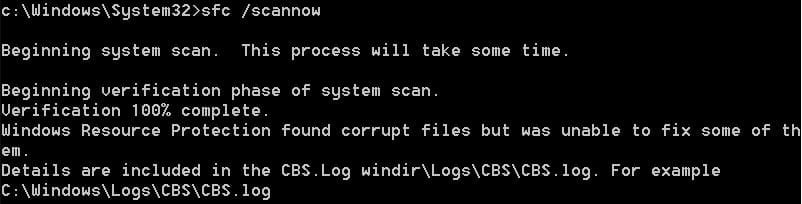
I ticked Automatically fix file system errors and Scan for attempt recovery of bad sectors from check disk options for C drive. After that, I ran sfc /scannow three times using CMD after reboots but the problem still exists. Here's the screenshot:
 

Attachments

  • Capture 3.JPG
    Capture 3.JPG
    28.2 KB · Views: 0

My Computer My Computer

At a glance

Windows 7 Home Premium 64bit
Computer type
PC/Desktop
OS
Windows 7 Home Premium 64bit
Please edit your profile with ALL your hardware specs. It will help us to help you
System Info - See Your System Specs

Did chkdsk find any bad block, bad sectors etc?


Try the Repair install. It will reinstall Windows keeping your Programs and data. A Data backup is always recommended.
You will need a Win 7 installation files and the Win 7 HP key

For the updates, use Simplix
 

My Computers My Computers

  • At a glance

    Windows 7 HP 64i5 6600K - 800MHz to 4200MHz4+4G GSkill DDR4 3000IG - Intel 530
    Computer type
    PC/Desktop
    Computer Manufacturer/Model Number
    custom build
    OS
    Windows 7 HP 64
    CPU
    i5 6600K - 800MHz to 4200MHz
    Motherboard
    GA-Z170-HD3P
    Memory
    4+4G GSkill DDR4 3000
    Graphics Card(s)
    IG - Intel 530
    Monitor(s) Displays
    Samsung 226BW
    Screen Resolution
    1680x1050
    Hard Drives
    (1) -1 SM951 – 128GB M.2 AHCI PCIe SSD drive for Windows 7 and Lubuntu
    (2) -1 WD SATA 3 - 1T for Data
    (3) -1 WD SATA 3 - 1T for backup
    PSU
    Thermaltake 450W TR2 gold
    Keyboard
    Old and good Chicony mechanical keyboard
    Mouse
    Logitech mX performance - 9 buttons (had to disable some)
    Internet Speed
    500Mb/s
    Browser
    Firefox 64
    Other Info
    TinyWall firewall
  • At a glance

    Windows 7 Proi7-4500U 800MHz to 3.0GHz(4+4)G DDR3 1600IG intel 4400 + NVIDIA GeForce GT 745M
    Computer type
    Laptop
    System Manufacturer/Model Number
    Asus Q550LF
    OS
    Windows 7 Pro
    CPU
    i7-4500U 800MHz to 3.0GHz
    Motherboard
    Asus Q550LF
    Memory
    (4+4)G DDR3 1600
    Graphics Card(s)
    IG intel 4400 + NVIDIA GeForce GT 745M
    Sound Card
    Realtek
    Monitor(s) Displays
    LG Display LP156WF4-SPH1
    Screen Resolution
    1920 x 1080
    Hard Drives
    BX500 120G SSD for Windows and programs +
    1T HDD for data
    Internet Speed
    500 Mb/s
    Browser
    Firefox
    Other Info
    TinyWall firewall
Exactly the same problem here.

Problem Event Name: BEX64
Application Name: explorer.exe
Fault Module Name: ntdll.dll
Exception Offset: 0000000000089e6e
Exception Code: c000000d

However, I have different version numbers (depending on the update status): explorer.exe, Version: 6.1.7601.17567 and ntdll.dll, Version: 6.1.7601.26561 or 6.1.7601.26623 (after installing the KB5028224).

It occurs on three computers so far: a desktop PC, a Dell notebook, a virtual machine (VMWare Player), all with Windows7 Prof. 64bit. Everywhere since July 13th, never before. Therefore, I would rule out a configuration error or a hardware issue as the cause.
Only on an HP notebook, which is actually configured the same way, the error did not occur so far (yet?).

The PaleMoon and Waterfox browsers are installed on all computers, but they were not updated in the same way everywhere.

The only recent change made to all installations is the regular update of Avast Free Antivirus.
So that's what I suspect: Avast recently shows more frequent ad inserts, spontaneously at irregular intervals.
Maybe this sometimes fails and generates this error message?

Therefore, it would be helpful to know if any of these programs are installed on your system as well.
 

My Computers My Computers

  • At a glance

    Windows 7 Professional x64
    Computer type
    PC/Desktop
    OS
    Windows 7 Professional x64
  • Computer type
    PC/Desktop
The only recent change made to all installations is the regular update of Avast Free Antivirus.
So that's what I suspect: Avast recently shows more frequent ad inserts, spontaneously at irregular intervals.
Maybe this sometimes fails and generates this error message?

Therefore, it would be helpful to know if any of these programs are installed on your system as well.

what version of Avast antivirus do you have installed?

best to contact Avast about the explorer errors in Win7
 

My Computer My Computer

At a glance

Windows 7 SP1 Home Premium 64bit [x64]Intel(R) Core(TM) i5-2310 CPU @ 2.90GHz6 GBIntel HD Graphics 2000
Computer type
PC/Desktop
Computer Manufacturer/Model Number
Dell Inspiron 620
OS
Windows 7 SP1 Home Premium 64bit [x64]
CPU
Intel(R) Core(TM) i5-2310 CPU @ 2.90GHz
Memory
6 GB
Graphics Card(s)
Intel HD Graphics 2000
Sound Card
Conexant CX20641 HD Audio
Hard Drives
Western Digital 1TB (1024GB) WD10EALX-759BA1
Internet Speed
Spectrum Cable Internet up to 100Mbps
Avast shows version 23.6.6070 build 23.6.8271.788 from June 20, 2023
At the moment it is not useful to contact Avast's support, because I cannot say for sure this is really the cause. If erik8svf does not have Avast on the computer, the cause must be somewhere else.

In addition, other Avast users should also have this problem, but so far I could not find any reports.
 

My Computers My Computers

  • At a glance

    Windows 7 Professional x64
    Computer type
    PC/Desktop
    OS
    Windows 7 Professional x64
  • Computer type
    PC/Desktop
Exactly the same problem here.
Problem Event Name: BEX64
Application Name: explorer.exe
Fault Module Name: ntdll.dll
Exception Offset: 0000000000089e6e
Exception Code: c000000d

However, I have different version numbers (depending on the update status): explorer.exe, Version: 6.1.7601.17567 and ntdll.dll, Version: 6.1.7601.26561 or 6.1.7601.26623 (after installing the KB5028224).

It occurs on three computers so far: a desktop PC, a Dell notebook, a virtual machine (VMWare Player), all with Windows7 Prof. 64bit. Everywhere since July 13th, never before. Therefore, I would rule out a configuration error or a hardware issue as the cause.
Only on an HP notebook, which is actually configured the same way, the error did not occur so far (yet?).

The PaleMoon and Waterfox browsers are installed on all computers, but they were not updated in the same way everywhere.

The only recent change made to all installations is the regular update of Avast Free Antivirus.
So that's what I suspect: Avast recently shows more frequent ad inserts, spontaneously at irregular intervals.
Maybe this sometimes fails and generates this error message?

Therefore, it would be helpful to know if any of these programs are installed on your system as well.

The first time I ran sfc /scannow using CMD, the scan result told me to reboot my PC. I noticed the Windows screen saying "Configuring Windows Update" after reboot. After that, I ran sfc /scannow the second and third time using CMD, the scan result didn't tell me to reboot my PC. There was no Windows screen saying "Configuring Windows Update"after reboots. In the end, the problem still exists. Does the problem solved after I install KB5028224 as you mentioned?

I'm also using the same version of Avast Free Antivirus. Is it the problem?

I found out after I copy and paste files to my external hard drive's Windows Explorer and I close it, my PC pop out Windows Explorer error message every day. I also found out after I downloaded file and open my PC's Windows Explorer to check it and close it, my PC pop out Windows Explorer error message.
 

My Computer My Computer

At a glance

Windows 7 Home Premium 64bit
Computer type
PC/Desktop
OS
Windows 7 Home Premium 64bit
The described behavior of sfc /scannow is normal. However, it can only fix errors that are due to missing system files.

KB5028224 is the regular Windows security update for July (officially no longer for Windows 7, but for related systems, see Windows 7 ESU getting extended to 2026 possibly. )

So it is not made specifically for the Explorer problem and did not fix it.

I also had the impression that the Explorer crashes occurred some seconds after I closed a folder, in which I edited or copied files. However, the problem could not be reproduced by doing so. The crashes do not always occur, only sometimes. So it could be coincidence.

Since we are actually both using the same version of Avast, it looks very much like it is the cause.
Unfortunately Avast does not offer support for free versions. I will try a request in the forum there Avast Free Antivirus / Premium Security (legacy Pro Antivirus, Internet Security, Premier)
 

My Computers My Computers

  • At a glance

    Windows 7 Professional x64
    Computer type
    PC/Desktop
    OS
    Windows 7 Professional x64
  • Computer type
    PC/Desktop
The described behavior of sfc /scannow is normal. However, it can only fix errors that are due to missing system files.

KB5028224 is the regular Windows security update for July (officially no longer for Windows 7, but for related systems, see Windows 7 ESU getting extended to 2026 possibly. )

So it is not made specifically for the Explorer problem and did not fix it.

I also had the impression that the Explorer crashes occurred some seconds after I closed a folder, in which I edited or copied files. However, the problem could not be reproduced by doing so. The crashes do not always occur, only sometimes. So it could be coincidence.

Since we are actually both using the same version of Avast, it looks very much like it is the cause.
Unfortunately Avast does not offer support for free versions. I will try a request in the forum there Avast Free Antivirus / Premium Security (legacy Pro Antivirus, Internet Security, Premier)
I just recently updated to version 23.7.6074 - build 23.7.8348.762 from July 20, 2023 but the problem still exists. If I disable Avast shield control, will Windows Explorer error message pop out after I close a folder?

I think the problem always occur. After I downloaded file and opened my PC's folder to check it and closed it, my PC popped out Windows Explorer error message several times.
 

My Computer My Computer

At a glance

Windows 7 Home Premium 64bit
Computer type
PC/Desktop
OS
Windows 7 Home Premium 64bit
If I disable Avast shield control, will Windows Explorer error message pop out after I close a folder?
Try it out, if you can trigger the error with a specific action. – I can't: My last explorer crash occurred while I just watched Avast downloading some extended definitions (for a system start scan). I didn't do anything at that time.

If the error always occurs with a specific folder, then I would have Windows check the drive for errors and then scan it with Avast.

In the meantime I have also updated to the new Avast version but the problem indeed persists. It would have been a coincidence if they had already discovered and fixed the bug.
My request in the Avast forum has had almost 100 visitors so far, but no answer yet... One can see that the number of Windows 7 users has decreased a lot.
 

My Computers My Computers

  • At a glance

    Windows 7 Professional x64
    Computer type
    PC/Desktop
    OS
    Windows 7 Professional x64
  • Computer type
    PC/Desktop
Try it out, if you can trigger the error with a specific action. – I can't: My last explorer crash occurred while I just watched Avast downloading some extended definitions (for a system start scan). I didn't do anything at that time.

If the error always occurs with a specific folder, then I would have Windows check the drive for errors and then scan it with Avast.

In the meantime I have also updated to the new Avast version but the problem indeed persists. It would have been a coincidence if they had already discovered and fixed the bug.
My request in the Avast forum has had almost 100 visitors so far, but no answer yet... One can see that the number of Windows 7 users has decreased a lot.
After I disable Avast shield control and copy and paste files to my external hard drive's folders for around one hour and I close it, the problem still exists. Are you sure it is related to the Avast problem? If not, I think it is time to switch to Windows 10 or 11.
 

My Computer My Computer

At a glance

Windows 7 Home Premium 64bit
Computer type
PC/Desktop
OS
Windows 7 Home Premium 64bit
After I disable Avast shield control and copy and paste files to my external hard drive's folders for around one hour and I close it, the problem still exists.
Disabling some modules does not mean that Avast is not still partially active in the background. Only a complete uninstall with reboot would disable Avast completely.
Are you sure it is related to the Avast problem?
I'm not sure, but it could be a plausible explanation.
In the Avast forum came the hint, Windows 7 could be missing an update that Avast relies on. It would be better not to install newer Avast versions on Windows 7. - This is also only a guess!

If the same folders are always affected, I would look for the error there: There may be a corrupt file in the folder. For example, an audio, video or pdf file that Explorer tries to create a thumbnail of and fails to do so. Or a problematic file name with that "emoji-fonts" or very foreign signs, generated by another operating system. – Switch explorer to detail view, then it doesn't generate thumbnails and maybe you can remove suspicious files.
If not, I think it is time to switch to Windows 10 or 11.
Windows 7 won't last forever, but if I had to choose between occasional Explorer crashes or Windows 10/11, I'd definitely prefer the Explorer crashes...
 

My Computers My Computers

  • At a glance

    Windows 7 Professional x64
    Computer type
    PC/Desktop
    OS
    Windows 7 Professional x64
  • Computer type
    PC/Desktop
Disabling some modules does not mean that Avast is not still partially active in the background. Only a complete uninstall with reboot would disable Avast completely.
I'm not sure, but it could be a plausible explanation.
In the Avast forum came the hint, Windows 7 could be missing an update that Avast relies on. It would be better not to install newer Avast versions on Windows 7. - This is also only a guess!

If the same folders are always affected, I would look for the error there: There may be a corrupt file in the folder. For example, an audio, video or pdf file that Explorer tries to create a thumbnail of and fails to do so. Or a problematic file name with that "emoji-fonts" or very foreign signs, generated by another operating system. – Switch explorer to detail view, then it doesn't generate thumbnails and maybe you can remove suspicious files.

Windows 7 won't last forever, but if I had to choose between occasional Explorer crashes or Windows 10/11, I'd definitely prefer the Explorer crashes...
Do you plan to uninstall Avast and switch to other antivirus?

I can't access the link provided by one user from your Avast post.

The problem still exists even I disabled thumbnail. I found out it usually occur after I copy and paste files to folders and then close them.

Why do you prefer Windows 7 instead of other Windows?
 

My Computer My Computer

At a glance

Windows 7 Home Premium 64bit
Computer type
PC/Desktop
OS
Windows 7 Home Premium 64bit
I can't access the link provided by one user from your Avast post.
This link leads to a privately uploaded setup file on a server in Russia. I do not consider it trustworthy.
But I found an old copy of an offline setup at my place that I might try. Maybe I'll have time to test that later today.

Do you plan to uninstall Avast and switch to other antivirus?
There is probably no more alternative antivirus software for Windows 7. Avast is the vendor that supports older operating systems still the best.
Why do you prefer Windows 7 instead of other Windows?
I do not like the user interfaces of the new Windows. And I do not like how Microsoft is acting more and more possessive: Until now I was the owner of my computer, my files and my personal data. With Windows 10/11, MS takes ownership of that and demotes me to a mere user.

- - - Updated - - -

My problem is that I can't specifically trigger the crashes: Sometimes after I copy files to a folder and close it, Explorer crashes. Most of the time, however, nothing unusual happens. I have not yet been able to figure out what exactly I must do to cause the crash.
So I can't say for sure if the problem still exists or not.

If you experience these crashes every time, you can - as a test - uninstall Avast completely and then see if the problem still occurs.
 

My Computers My Computers

  • At a glance

    Windows 7 Professional x64
    Computer type
    PC/Desktop
    OS
    Windows 7 Professional x64
  • Computer type
    PC/Desktop
This link leads to a privately uploaded setup file on a server in Russia. I do not consider it trustworthy.
But I found an old copy of an offline setup at my place that I might try. Maybe I'll have time to test that later today.
After I click on the link, the website is loading. Why you can access it but I can't? What is the latest version before the explorer problem? I'm waiting your test result.

There is probably no more alternative antivirus software for Windows 7. Avast is the vendor that supports older operating systems still the best.
What about AVG? If Avast support Windows 7, then why the explorer problem happens?

I do not like the user interfaces of the new Windows. And I do not like how Microsoft is acting more and more possessive: Until now I was the owner of my computer, my files and my personal data. With Windows 10/11, MS takes ownership of that and demotes me to a mere user.
I've been using Windows 7 for years on my PC and I haven't switch to Windows 10 or 11 until today. So, what you mean is Windows 10 or 11 doesn't have much freedom and control than Windows 7? You used Windows 10 or 11 before and you don't like it?


My problem is that I can't specifically trigger the crashes: Sometimes after I copy files to a folder and close it, Explorer crashes. Most of the time, however, nothing unusual happens. I have not yet been able to figure out what exactly I must do to cause the crash.
So I can't say for sure if the problem still exists or not.
I found out after I open the folder to check the new downloaded file (I notice there is a green progress bar running at the folder address for a while) and then I close the folder, the explorer problem happens.
 

My Computer My Computer

At a glance

Windows 7 Home Premium 64bit
Computer type
PC/Desktop
OS
Windows 7 Home Premium 64bit
In the meantime, several other affected persons should have reported in the Avast forum as well, saying "Me too". – However, this does not happen.
I would therefore not fixate too much on Avast as the cause.
For me, the error last occurred yesterday morning, after which I could not provoke it again.
I found out after I open the folder to check the new downloaded file (I notice there is a green progress bar running at the folder address for a while) and then I close the folder, the explorer problem happens.
If it always happens only to a particular folder, then, as mentioned, another cause is probable. If the green progress bar is visible for a longer time, it shows that Explorer must make an effort to scan the folder contents.

Are there a lot of files in the folder? Then you should move some of them somewhere else or at least create subfolders for them.
Or there are difficulties to read the data. Try to scan the drive for errors. There may also be a hardware defect.

It is difficult to make a remote diagnosis. If you don't know much about Windows, it's better to find someone in your area who can help you directly on your computer.

I've been using Windows 7 for years on my PC and I haven't switch to Windows 10 or 11 until today.
You should be well informed about the pros and cons before making the switch. Windows 10/11 is noticeably different from Windows 7. When you upgrade to Windows 11, you will most likely need a new computer.

For me, the crashing Explorer is currently acceptable as long as it does not occur more often. The setting "start Explorer in a separate process" (see here: How to start Explorer in a separate process in Windows 8.1, Windows 8 and Windows 7) reduces the consequences of the Explorer crashes to the mere message (that you can just click away and forget).
 

My Computers My Computers

  • At a glance

    Windows 7 Professional x64
    Computer type
    PC/Desktop
    OS
    Windows 7 Professional x64
  • Computer type
    PC/Desktop
In the meantime, several other affected persons should have reported in the Avast forum as well, saying "Me too". – However, this does not happen.
Can you link me the post?

If it always happens only to a particular folder, then, as mentioned, another cause is probable. If the green progress bar is visible for a longer time, it shows that Explorer must make an effort to scan the folder contents.
It isn't the particular folder problem. After I download, copy and paste any file to any folder and then i close it, the explorer problem happens.

Or there are difficulties to read the data. Try to scan the drive for errors. There may also be a hardware defect.
The problem isn't just happen to my external drive and also my local drive.

For me, the crashing Explorer is currently acceptable as long as it does not occur more often. The setting "start Explorer in a separate process" (see here: How to start Explorer in a separate process in Windows 8.1, Windows 8 and Windows 7) reduces the consequences of the Explorer crashes to the mere message (that you can just click away and forget).
Should I untick "Launch folder windows in a separate process" from Folder options? Will it solve the explorer problem?

But I found an old copy of an offline setup at my place that I might try. Maybe I'll have time to test that later today.
When you gonna test?
 

My Computer My Computer

At a glance

Windows 7 Home Premium 64bit
Computer type
PC/Desktop
OS
Windows 7 Home Premium 64bit
I can not test anything because the crashes do not come when I wait for it. Nothing has happened for the last 48 hours – without me changing anything.

But you can test, because on your computer the errors occur frequently. You will immediately see if a measure makes a difference.
Test this way:


  1. Download a copy of the Avast Installer from Avast (and from nowhere else!): Avast | Download Free Antivirus & VPN | 100% Free & Easy
  2. Do not start it, but put the file on your desktop. You will need it later.
  3. Uninstall Avast using Windows Control Panel, item Software. Select "Uninstall", not "Repair". Restart your PC.
  4. Ignore the warnings from Windows about the lack of virus protection. For a short time, there is no danger as long as you do not download anything from the Internet and you do not connect any external drives.
  5. See if the crashes continue to occur without Avast.
    –> Take some time for this test: After a reboot, Explorer is initially stable and all seems ok. But the longer Windows runs, the more likely it is that Explorer will crash.

  • If yes: Then Avast would indeed be the reason. Report this in the Avast forum Recently Explorer crashes with ntdll.dll
  • If no: Then Avast is not the cause. Reinstall Avast with the file downloaded in (1.) and let it perform a system scan right away.

» Should I untick "Launch folder windows in a separate process" from Folder options? «
No, if it's already checked, leave it that way. It reduces the extent of the Explorer crashes. (You can, of course, try out what the difference is if you uncheck the option.)
 
Last edited:

My Computers My Computers

  • At a glance

    Windows 7 Professional x64
    Computer type
    PC/Desktop
    OS
    Windows 7 Professional x64
  • Computer type
    PC/Desktop
I can not test anything because the crashes do not come when I wait for it. Nothing has happened for the last 48 hours – without me changing anything.

But you can test, because on your computer the errors occur frequently. You will immediately see if a measure makes a difference.
Test this way:


  1. Download a copy of the Avast Installer from Avast (and from nowhere else!): Avast | Download Free Antivirus & VPN | 100% Free & Easy
  2. Do not start it, but put the file on your desktop. You will need it later.
  3. Uninstall Avast using Windows Control Panel, item Software. Select "Uninstall", not "Repair". Restart your PC.
  4. Ignore the warnings from Windows about the lack of virus protection. For a short time, there is no danger as long as you do not download anything from the Internet and you do not connect any external drives.
  5. See if the crashes continue to occur without Avast.
    –> Take some time for this test: After a reboot, Explorer is initially stable and all seems ok. But the longer Windows runs, the more likely it is that Explorer will crash.


  • If yes: Then Avast would indeed be the reason. Report this in the Avast forum Recently Explorer crashes with ntdll.dll
  • If no: Then Avast is not the cause. Reinstall Avast with the file downloaded in (1.) and let it perform a system scan right away.
Your explorer problem doesn't happen even when you're using the last version of Avast? You don't have old version of Avast for me to download?


» Should I untick "Launch folder windows in a separate process" from Folder options? «
No, if it's already checked, leave it that way. It reduces the extent of the Explorer crashes. (You can, of course, try out what the difference is if you uncheck the option.)

The explorer problem doesn't happen after I untick the option. So is that mean the problem solved? Should I just leave it untick?
 

My Computer My Computer

At a glance

Windows 7 Home Premium 64bit
Computer type
PC/Desktop
OS
Windows 7 Home Premium 64bit
Back
Top