I want to replace the start menu user picture with...

barf

New member
Local time
10:41 AM
Messages
3
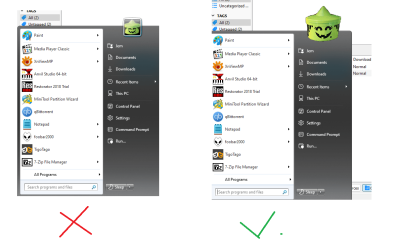
a big cool custom icon like this: Untitled hosted at ImgBB — ImgBB
I am able to remove the user pic, I am able to change the frame around the user pic, but alas, I can't replace the user pic with a different graphic like the one shown above. I even tried replacing 17013.bmp with a cool icon, but the user pic is still there behind it, lol

msstyle editor seems like it might hold the key but I don't really know how to use it
 

My Computers My Computers

  • At a glance

    Windows 7 Ultimate x64
    Computer type
    PC/Desktop
    OS
    Windows 7 Ultimate x64
  • Computer type
    PC/Desktop
a big cool custom icon like this: Untitled hosted at ImgBB — ImgBB
I am able to remove the user pic, I am able to change the frame around the user pic, but alas, I can't replace the user pic with a different graphic like the one shown above. I even tried replacing 17013.bmp with a cool icon, but the user pic is still there behind it, lol

msstyle editor seems like it might hold the key but I don't really know how to use it

Welcome to Seven Forums.

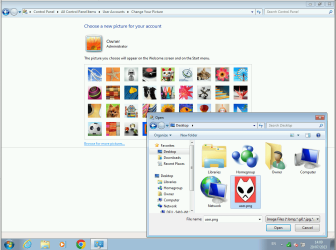
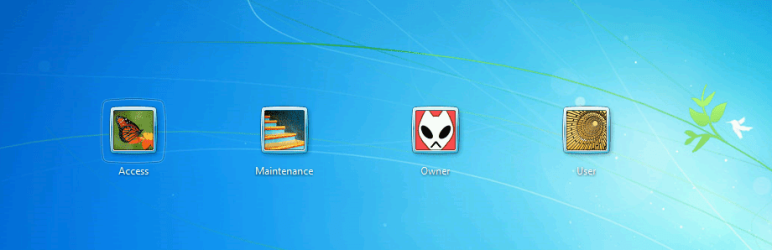
You should be able to pick any user picture you like from Control Panel > User Accounts > Change Your Picture. Just click Browse for more pictures.

image.png

image.png
 

My Computers My Computers

  • At a glance

    Windows 7 Home Premium x64AMD V1204GB
    Computer type
    Laptop
    Computer Manufacturer/Model Number
    Toshiba satellite C650D
    OS
    Windows 7 Home Premium x64
    CPU
    AMD V120
    Memory
    4GB
    Internet Speed
    150 Mbps
    Antivirus
    MSE
    Browser
    IE11, Edge, Firefox
    Other Info
    I also have W7 Pro on my System Two, and several W7 Hyper-V VMs. My other machines run Windows 10/11. Their specs are in my Ten Forums & Eleven Forum profiles.
  • At a glance

    Windows 7 Pro x64Intel i5-3320M8 GB
    Computer type
    Laptop
    System Manufacturer/Model Number
    Lenovo Thinkpad T430
    OS
    Windows 7 Pro x64
    CPU
    Intel i5-3320M
    Memory
    8 GB
    Hard Drives
    250GB Samsung SSD 860 EVO
    Antivirus
    MSE
my apologies I'm not trying to change my user picture
here is a picture of what I am trying to do example.png

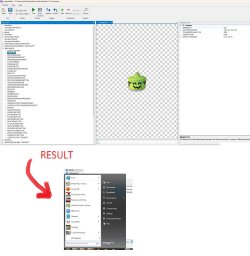
and here is my failed attempt to do it

failed method.jpg
Gp459RB

Gp459RB
 

My Computers My Computers

  • At a glance

    Windows 7 Ultimate x64
    Computer type
    PC/Desktop
    OS
    Windows 7 Ultimate x64
  • Computer type
    PC/Desktop
"%systemdrive%\ProgramData\Microsoft\User Account Pictures\user.bmp"
 

My Computers My Computers

  • At a glance

    7 X64i5 84002x8gb 3200mhz
    Computer type
    PC/Desktop
    OS
    7 X64
    CPU
    i5 8400
    Motherboard
    gigabyte b365m ds3h
    Memory
    2x8gb 3200mhz
    Hard Drives
    various
    PSU
    pure power 11 400w cm
    Case
    Coolermaster
    Cooling
    cryorig m9i
  • At a glance

    7x64g54008gb ddr4 2400
    Computer type
    PC/Desktop
    OS
    7x64
    CPU
    g5400
    Motherboard
    ga b365m ds3h
    Memory
    8gb ddr4 2400
    PSU
    xfx pro 450w
I located the user.bmp file... what should I do to it? I tried replacing it, renaming it, moving it, but nothing changes

there is also a second file called user.bmp in the winsxs folder

I was able to achieve a transparent user pic background using this guide, but it still has a black background on my start menu. I am using windows 7.msstyles with startallback for my start menu
 

My Computers My Computers

  • At a glance

    Windows 7 Ultimate x64
    Computer type
    PC/Desktop
    OS
    Windows 7 Ultimate x64
  • Computer type
    PC/Desktop
Back
Top