fix boot on cloned win 7 HDD on SSD

sjuliani

New member
Local time
4:32 PM
Messages
3
i just bought a new laptop (lenovo ideapad3) w ssd and windows 11. im trying to clone several partitions with different windows versions (windows 7 on a couple) from the harddrive on my old work laptop into the single ssd of the new laptop by creating new partitions and then cloning each partition using easeus. I should add i need all the new partitions to be bootable separately.
the problem i have now is fixing the boot sequence on the cloned partition.
Everytime i boot the cloned windows 7 partition i get the winload.efi not found/missing. i tried repairing the boot via command prompt by using a windows 11 usb but no luck. i tried making a win 7 bootable usb but have not bee able to boot into it without it crashing at the windows logo (apparently there is an issue with win7 booting on uefi and gpt based drive).
at this point i dont know what else to try.
any help would be much appreciated
 
Last edited:

My Computers My Computers

  • At a glance

    windows 11 win 7 win xp
    Computer type
    Laptop
    OS
    windows 11 win 7 win xp
  • Computer type
    PC/Desktop
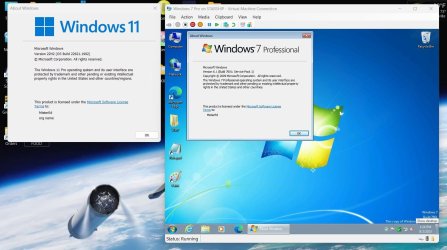
Is there a reason you need a physical Windows 7 computer? Would a virtual machine work for you?

Here a Windows 7 Pro VM running on my Windows 11 Pro laptop.

VM_Win7.jpg
 

My Computers My Computers

  • At a glance

    Windows 7 Home Premium 64-bitsAMD FX-8350GSKILL Ripjaw-X PC3 12800 8GB (2x4GB)ASUS ROG STRIX GTX 1060 6GB
    Computer type
    PC/Desktop
    Computer Manufacturer/Model Number
    Custom build
    OS
    Windows 7 Home Premium 64-bits
    CPU
    AMD FX-8350
    Motherboard
    Gigabyte GA-990FXA-UD3 (AM3+)
    Memory
    GSKILL Ripjaw-X PC3 12800 8GB (2x4GB)
    Graphics Card(s)
    ASUS ROG STRIX GTX 1060 6GB
    Sound Card
    Integrated
    Monitor(s) Displays
    Asus VE228H (21.5-in)
    Screen Resolution
    1920x1080 60Hz
    Hard Drives
    SAMSUNG 870 EVO 2.5 Inch SATA SSD (1TB)
    SAMSUNG 870 EVO 2.5 Inch SATA SSD (1TB)
    SAMSUNG 870 EVO 2.5 Inch SATA SSD (1TB)
    PSU
    Corsair RM750x (750 watts)
    Case
    Corsair Carbide Series 200R
    Cooling
    Corsair Hydro Series H60 (CWCH60)
    Keyboard
    Logitech Elite
    Mouse
    Logitech M510 Wireless Mouse
    Internet Speed
    Comcast Gigabit Extra (1200Mbps down / 35Mbps up)
    Antivirus
    Malwarebytes
    Browser
    Firefox, Edge, Chrome
    Other Info
    ASUS DRW-24B1ST DVD-RW (24X) optical drive
    Seagate Expansion Desk (5TB) external SATA/USB HDD
    Comcast XB8 Internet Gateway
  • At a glance

    Windows 7 Pro (64-bit)AMD Phenom II 960T X4Corsair XMS2 DDR2-800 8GB (4x2GB)ASUS ENGTX560 DCII OC/2DI/1GD5 1GB
    Computer type
    PC/Desktop
    System Manufacturer/Model Number
    Custom
    OS
    Windows 7 Pro (64-bit)
    CPU
    AMD Phenom II 960T X4
    Motherboard
    ASUS M4N82 Deluxe
    Memory
    Corsair XMS2 DDR2-800 8GB (4x2GB)
    Graphics Card(s)
    ASUS ENGTX560 DCII OC/2DI/1GD5 1GB
    Monitor(s) Displays
    Samsung 930B 19-inch LCD
    Screen Resolution
    1280x1024
    Hard Drives
    Samsung SSD 870 EVO 1000 GB (Windows 10)
    Seagate ST1000DM003 1000 GB (Windows 7)
    PSU
    Antec TruePower (new) TP-650
    Case
    Antec Three Hundred
    Cooling
    AMD stock cooler from FX8350
    Mouse
    Logitech M100
    Internet Speed
    Xfinity Gigabit Extra 1200/35 Mbps

My Computer My Computer

At a glance

win 8 32 bit
Computer type
PC/Desktop
OS
win 8 32 bit
I actually completely forgot about doing that. I should point out that the main use of the partitions are for automotive diagnostic software (GM, ford, etc...)
I know i can do the VM for 3-4 of the partitions but for the others due to the type of software it requires native installs. besides that some partitions are running windows 10, some windows 7 and other windows xp.
With that said the main softwares i need to use right at this moment I know i can use in vm (partition is on windows 7). Do you have any suggestions on how i would clone the partitions into a working VM ? I have vmware workstation but have never built a VM before.
Is there a reason you need a physical Windows 7 computer? Would a virtual machine work for you?

Here a Windows 7 Pro VM running on my Windows 11 Pro laptop.

View attachment 423106

- - - Updated - - -

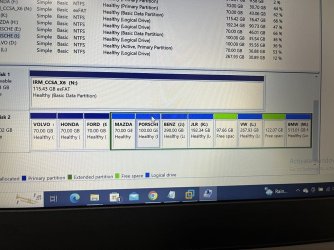
here is the photo of the drive and the many partitions. the one i use the most is the the porscheGM partition thats the one i need to create the VM for now
 

Attachments

  • IMG_3179.jpg
    IMG_3179.jpg
    137.6 KB · Views: 0

My Computers My Computers

  • At a glance

    windows 11 win 7 win xp
    Computer type
    Laptop
    OS
    windows 11 win 7 win xp
  • Computer type
    PC/Desktop
Is there a reason you have so many special partitions? Wouldn't individual folders work?
I suggest you at least try to set up a Virtual Machine to see if one would meet your needs.
There are several programs you can use to create a Virtual Machine. You might want to try

  • Hyper-V (requires Win 10/11 Pro)
  • VirtualBox
  • VMWare
If you are uncertain you could try VirtualBox. If you decide to try to create a Virtual Machine let me know so I could help you get started.


Hyper-V
If you have Windows Windows 11 Pro you can use Hyper-V. You can enable Hyper-V in "Windows features".

VirtualBox
Oracle VM VirtualBox
VirtualBox 7.0.10 platform package
https://download.virtualbox.org/virtualbox/7.0.10/VirtualBox-7.0.10-158379-Win.exe

VMware Workstation 17 Player (free for personal use)
Download VMware Workstation Player | VMware
Try Workstation 17 Player for Windows
https://www.vmware.com/go/getplayer-win
 

My Computers My Computers

  • At a glance

    Windows 7 Home Premium 64-bitsAMD FX-8350GSKILL Ripjaw-X PC3 12800 8GB (2x4GB)ASUS ROG STRIX GTX 1060 6GB
    Computer type
    PC/Desktop
    Computer Manufacturer/Model Number
    Custom build
    OS
    Windows 7 Home Premium 64-bits
    CPU
    AMD FX-8350
    Motherboard
    Gigabyte GA-990FXA-UD3 (AM3+)
    Memory
    GSKILL Ripjaw-X PC3 12800 8GB (2x4GB)
    Graphics Card(s)
    ASUS ROG STRIX GTX 1060 6GB
    Sound Card
    Integrated
    Monitor(s) Displays
    Asus VE228H (21.5-in)
    Screen Resolution
    1920x1080 60Hz
    Hard Drives
    SAMSUNG 870 EVO 2.5 Inch SATA SSD (1TB)
    SAMSUNG 870 EVO 2.5 Inch SATA SSD (1TB)
    SAMSUNG 870 EVO 2.5 Inch SATA SSD (1TB)
    PSU
    Corsair RM750x (750 watts)
    Case
    Corsair Carbide Series 200R
    Cooling
    Corsair Hydro Series H60 (CWCH60)
    Keyboard
    Logitech Elite
    Mouse
    Logitech M510 Wireless Mouse
    Internet Speed
    Comcast Gigabit Extra (1200Mbps down / 35Mbps up)
    Antivirus
    Malwarebytes
    Browser
    Firefox, Edge, Chrome
    Other Info
    ASUS DRW-24B1ST DVD-RW (24X) optical drive
    Seagate Expansion Desk (5TB) external SATA/USB HDD
    Comcast XB8 Internet Gateway
  • At a glance

    Windows 7 Pro (64-bit)AMD Phenom II 960T X4Corsair XMS2 DDR2-800 8GB (4x2GB)ASUS ENGTX560 DCII OC/2DI/1GD5 1GB
    Computer type
    PC/Desktop
    System Manufacturer/Model Number
    Custom
    OS
    Windows 7 Pro (64-bit)
    CPU
    AMD Phenom II 960T X4
    Motherboard
    ASUS M4N82 Deluxe
    Memory
    Corsair XMS2 DDR2-800 8GB (4x2GB)
    Graphics Card(s)
    ASUS ENGTX560 DCII OC/2DI/1GD5 1GB
    Monitor(s) Displays
    Samsung 930B 19-inch LCD
    Screen Resolution
    1280x1024
    Hard Drives
    Samsung SSD 870 EVO 1000 GB (Windows 10)
    Seagate ST1000DM003 1000 GB (Windows 7)
    PSU
    Antec TruePower (new) TP-650
    Case
    Antec Three Hundred
    Cooling
    AMD stock cooler from FX8350
    Mouse
    Logitech M100
    Internet Speed
    Xfinity Gigabit Extra 1200/35 Mbps
the programs are not all compatible with the same windows version.
I am ready to make a VM.
i did made a vhdx file using disk2vhd and then convert it to a vmdk using starwind v2v converter, but am having trouble configuring a vmx file from it.
with the current settings, when i start the vm it gives me an error "a disk read error occurred".
Do i need to install windows 7 on the VM drive? the harddrive i converted has windows 7 already installed


Is there a reason you have so many special partitions? Wouldn't individual folders work?
I suggest you at least try to set up a Virtual Machine to see if one would meet your needs.
There are several programs you can use to create a Virtual Machine. You might want to try

  • Hyper-V (requires Win 10/11 Pro)
  • VirtualBox
  • VMWare
If you are uncertain you could try VirtualBox. If you decide to try to create a Virtual Machine let me know so I could help you get started.


Hyper-V
If you have Windows Windows 11 Pro you can use Hyper-V. You can enable Hyper-V in "Windows features".

VirtualBox
Oracle VM VirtualBox
VirtualBox 7.0.10 platform package
https://download.virtualbox.org/virtualbox/7.0.10/VirtualBox-7.0.10-158379-Win.exe

VMware Workstation 17 Player (free for personal use)
Download VMware Workstation Player | VMware
Try Workstation 17 Player for Windows
https://www.vmware.com/go/getplayer-win
 

My Computers My Computers

  • At a glance

    windows 11 win 7 win xp
    Computer type
    Laptop
    OS
    windows 11 win 7 win xp
  • Computer type
    PC/Desktop
the programs are not all compatible with the same windows version.
I am ready to make a VM.
i did made a vhdx file using disk2vhd and then convert it to a vmdk using starwind v2v converter, but am having trouble configuring a vmx file from it.
with the current settings, when i start the vm it gives me an error "a disk read error occurred".
Do i need to install windows 7 on the VM drive? the harddrive i converted has windows 7 already installed

Did you figure out what you needed or do you still need to make a VM of this OS? The easiest way is probably to use the v6.2 (last one to support windows 7) of VMware vCenter Converter Standalone if that is your goal.

https://customerconnect.vmware.com/downloads/get-download?downloadGroup=CONV62 (just make a free account to get access to the file.)

Malcolm
 

My Computer My Computer

At a glance

10 Pro x64Ryzen 9 3900X64GB(4x16GB) DDR4EVGA 1080ti FTW3
Computer type
PC/Desktop
Computer Manufacturer/Model Number
Custom
OS
10 Pro x64
CPU
Ryzen 9 3900X
Motherboard
Asrock x370 Tachi
Memory
64GB(4x16GB) DDR4
Graphics Card(s)
EVGA 1080ti FTW3
Sound Card
ASUS Xonar Essence STX (V4 Bursons), ODAC rev B, NFB-11, O2
Monitor(s) Displays
3xASUS PB278Q/R, Optoma HD142X
Screen Resolution
3x1440p, 1080p
Hard Drives
512GB 850 EVO(OS, Programs)
4TB (Movies)
3TB (Downloads)
3TB (Programs)
1TB HDD (Games)
2x6TB R1 (videos)
PSU
AX760
Case
Fractal Define R5
Cooling
NH-D15S
Keyboard
Massdrop Ctrl with Box Navy's
Mouse
G903, Alioth XXL Mat
Internet Speed
280/40
Antivirus
MBAM, ESET
Browser
Canary 64 Bit
Other Info
I also own a Thinkpad P50 Xeon 4K, X220T, X1C5
Back
Top