Is anyone still using Windows 7?

Hi Hazel!

I still have Windows 7 on an old HD, on an old PC, more for sentimental reasons than anything else. For me, it serves no useful purpose.

I know one man who still used it every day, and gets mad at anyone who even suggests that he should do otherwise.

So, what are you up to these days?
:cool:
 

My Computer

Computer type
PC/Desktop
Computer Manufacturer/Model Number
Various
OS
Win 7 Pro, SP1, x86, Win-11/Pro/64
CPU
AMD
Motherboard
Various
Memory
8GB Crucial
Graphics Card(s)
Various
Sound Card
OnBoard
Monitor(s) Displays
Acer 21.5"
Hard Drives
Crucial SSD, 500 GB
PSU
OEM
Case
SFF Slim Line Case
Cooling
OEM
Keyboard
eMachines
Mouse
Logitech Wireless
Internet Speed
varies
Antivirus
Windows Defender/Super Anti-Spyware
Browser
Firefox
Sigo usando Windows 7 como SO principal en mi escritorio (i5 8Gb) y laptop (i3 8Gb). La razón es trabajo. Requiero usar productos de Adobe cuyo sustituto en Linux no tiene las prestaciones y facilidad que requiero. Cómo seguridad he establecido un esquema basado en Yandex y Kaspersky Cloud que función amuy bien. Pienso seguir usando Windows 7 hasta que la internet lo permita.

Translation

I'm still using Windows 7 as the primary OS on my desktop (i5 8Gb) and laptop (i3 8Gb). The reason is work. I need to use Adobe products whose substitute in Linux does not have the features and ease that I require. As a security I have established a scheme based on Yandex and Kaspersky Cloud that works very well. I plan to continue using Windows 7 until the internet allows it.
 

My Computers

System One System Two

  • OS
    Windows 7 SP1
  • Computer type
    PC/Desktop
Yes, on two machines along with windows 10 and one with windows 11.
 

My Computer

Computer type
PC/Desktop
Computer Manufacturer/Model Number
custom
OS
Windows 7 Home Premium x64
CPU
fx-6100
Motherboard
msi 970a-g46
Graphics Card(s)
geforce gt640
Hard Drives
wd-320
W7 Pro x64 is my main workstation, that will only happen when software and or hardware dictates otherwise.
I got 2 dell laptops that are factory w7 and 8.1 capable.
 

My Computers

System One System Two

  • Computer type
    PC/Desktop
    Computer Manufacturer/Model Number
    self build
    OS
    Windows 7 Pro x64
    CPU
    i5-9400F running at base clock 2.90 GHz
    Motherboard
    H310M S2V 2.0 (rev. 1.0)
    Memory
    Crucial Ballistix DDR4 16.0GB Single-Channel DDR4 @ 1334MHz
    Graphics Card(s)
    Asus AMD R5 230
    Sound Card
    Lexicon Alpha
    Monitor(s) Displays
    iiyama Prolite B2280WSD
    Screen Resolution
    1680X1050
    Hard Drives
    Crucial MX500 500gb ssd
  • Computer type
    PC/Desktop
I'm still running Win7 (at least the Pro edition, no more using Home editions) on my brother's old late 2010 Sony vaio laptop
it had pre-installed win7 home premium but upgraded it to win7 pro a few years ago
 

My Computer

Computer type
PC/Desktop
Computer Manufacturer/Model Number
Dell Inspiron 620
OS
Windows 7 SP1 Home Premium 64bit [x64]
CPU
Intel(R) Core(TM) i5-2310 CPU @ 2.90GHz
Memory
6 GB
Graphics Card(s)
Intel HD Graphics 2000
Sound Card
Conexant CX20641 HD Audio
Hard Drives
Western Digital 1TB (1024GB) WD10EALX-759BA1
Internet Speed
Spectrum Cable Internet up to 100Mbps
We still use Windows 7 at work because we control old Pocket PC devices using Windows Mobile Center. For some older devices we even use a virtual machine running XP. The only issue with Windows 7 is application compatibility. Microsoft Edge, Firefox and Chrome have stopped at a specific version, for example. This is not big deal yet, as you can open any website with these versions, but eventually you will have compatibility issues.
 

My Computer

Computer type
PC/Desktop
Computer Manufacturer/Model Number
custom
OS
Windows 7 Ultimate 64-bit (now 11 24H2)
CPU
Intel Core-i3 3770 3.5GHz
Motherboard
Asus P8H61
Memory
16GB DDR3 1600Mhz
Graphics Card(s)
nVidia Geforce RTX 3050
Sound Card
Realtek HD audio
Monitor(s) Displays
Sony 19" LCD TV via VGA
Screen Resolution
1440x900
Hard Drives
WD 1TB SATA III SSD
PSU
unknown
Case
unknown
Cooling
Intel's provided with CPU
Antivirus
Windows Defender (Windows 11)
Browser
Microsoft Edge
Other Info
Previously Windows 7 Ultimate, now Windows 11 24H2
I'm still using Win 7 Ultimate on my PC, simply because the Motherboard manufacturer (Gigabyte ga-x58-ud3r) didn't release any Windows 10 drivers for it.

I plan on buying a new PC in the next couple of months, that is going to be a big leap in some aspects. I am still not sure whether to go 10 or 11, although 10 is nearing it's time too.
 

My Computer

Computer type
PC/Desktop
Computer Manufacturer/Model Number
Homebuild
OS
Windows 7 Ultimate 64 bit SP1
CPU
DualCore Intel Pentium D 820, 2800 MHz (14 x 200)
Motherboard
Gigabyte EX58-UD3R
Memory
Kingston DDR3 (PC3-10700H) 6.0GB
Graphics Card(s)
AMD Radeon HD 6450
Sound Card
Realtek ALC882/D/M
Monitor(s) Displays
Samsung SyncMaster 2233SW
Screen Resolution
1920 x 1080
Hard Drives
Drive #1 - WDC WD2500JB-22REA0 (232 GB)
Drive #2 - WDC WD6400AAKS-65A7B0 (596 GB)
PSU
EVGA Supernova 750w G2 Gold
Cooling
5 x 80mm Generic Fans
Keyboard
Microsoft Comfort Curve 2000
Mouse
SteelSeries IKARI 62001-1 Laser or Microsoft Laser 6000
Internet Speed
1500/256
Antivirus
NOD32 v10.1.235.0
Browser
FireFox 59.0.2 X64bit
Other Info
Telstra Technicolor TG799vac Modem
LG HL-DT-ST DVDRAM GH20NS15 ATA Device
16X52X32X52 COMBO SCSI CDRom Device
Logitech Wave Keyboard
Microsoft 6000 Laser Mouse
which windows 10 drivers were you expecting ?
 

My Computers

System One System Two

  • Computer type
    PC/Desktop
    OS
    7 X64
    CPU
    i5 8400
    Motherboard
    gigabyte b365m ds3h
    Memory
    2x8gb 3200mhz
    Hard Drives
    various
    PSU
    pure power 11 400w cm
    Case
    Coolermaster
    Cooling
    cryorig m9i
  • Computer type
    PC/Desktop
    OS
    7x64
    CPU
    g5400
    Motherboard
    ga b365m ds3h
    Memory
    8gb ddr4 2400
    PSU
    xfx pro 450w
which windows 10 drivers were you expecting ?

Apologies, it was the Intel[SUP]®[/SUP] X58 + ICH10R Chipset driver that is not available to enable Windows 10 to be used.
 

My Computer

Computer type
PC/Desktop
Computer Manufacturer/Model Number
Homebuild
OS
Windows 7 Ultimate 64 bit SP1
CPU
DualCore Intel Pentium D 820, 2800 MHz (14 x 200)
Motherboard
Gigabyte EX58-UD3R
Memory
Kingston DDR3 (PC3-10700H) 6.0GB
Graphics Card(s)
AMD Radeon HD 6450
Sound Card
Realtek ALC882/D/M
Monitor(s) Displays
Samsung SyncMaster 2233SW
Screen Resolution
1920 x 1080
Hard Drives
Drive #1 - WDC WD2500JB-22REA0 (232 GB)
Drive #2 - WDC WD6400AAKS-65A7B0 (596 GB)
PSU
EVGA Supernova 750w G2 Gold
Cooling
5 x 80mm Generic Fans
Keyboard
Microsoft Comfort Curve 2000
Mouse
SteelSeries IKARI 62001-1 Laser or Microsoft Laser 6000
Internet Speed
1500/256
Antivirus
NOD32 v10.1.235.0
Browser
FireFox 59.0.2 X64bit
Other Info
Telstra Technicolor TG799vac Modem
LG HL-DT-ST DVDRAM GH20NS15 ATA Device
16X52X32X52 COMBO SCSI CDRom Device
Logitech Wave Keyboard
Microsoft 6000 Laser Mouse
7's my main OS still and I have no reason to leave it for what I do. Its such a good OS *pats* :P
 

My Computer

Computer type
PC/Desktop
Computer Manufacturer/Model Number
Custom Build
OS
Windows 7 Ultimate x64
CPU
Ryzen 7 5800x
Motherboard
MSI Gaming Pro Carbon X570
Memory
Crucial Ballistix 3600 MHz DDR4
Graphics Card(s)
GIGABYTE Radeon RX 6600 XT Gaming OC
Monitor(s) Displays
4 displays, two 1080p, two 4k.
Screen Resolution
1080/4k
Hard Drives
Samsung 990 (OS drive), Samsung 980 Pro NVMe, Samsung 870 EVO
Apologies, it was the Intel[SUP]®[/SUP] X58 + ICH10R Chipset driver that is not available to enable Windows 10 to be used.
Create a full disk backup (or clone that disk on a spare one) and then try upgrade from Windows 7 to 10. I think you won't need any extra drivers besides those of Windows 7.
 

My Computer

Computer type
PC/Desktop
Computer Manufacturer/Model Number
custom
OS
Windows 7 Ultimate 64-bit (now 11 24H2)
CPU
Intel Core-i3 3770 3.5GHz
Motherboard
Asus P8H61
Memory
16GB DDR3 1600Mhz
Graphics Card(s)
nVidia Geforce RTX 3050
Sound Card
Realtek HD audio
Monitor(s) Displays
Sony 19" LCD TV via VGA
Screen Resolution
1440x900
Hard Drives
WD 1TB SATA III SSD
PSU
unknown
Case
unknown
Cooling
Intel's provided with CPU
Antivirus
Windows Defender (Windows 11)
Browser
Microsoft Edge
Other Info
Previously Windows 7 Ultimate, now Windows 11 24H2
Yes, still using Win 7. There is no reason to 'upgrade' to a bloated, confusing, nothing works like it should, OS. Win7 does that I need a computer to do.
 

My Computers

System One System Two

  • Computer type
    PC/Desktop
    Computer Manufacturer/Model Number
    custom
    OS
    windows 7 64bit
    CPU
    AMD A12
    Motherboard
    Gigabyte AB350MD3H
    Memory
    16gig
    Graphics Card(s)
    built in
    Sound Card
    built in
    Monitor(s) Displays
    Asus
    Screen Resolution
    2560x1440
    Hard Drives
    Samsung 980 Pro NVMe
    Various other Samsung SSD drives
  • Computer type
    PC/Desktop
    Antivirus
    Yes
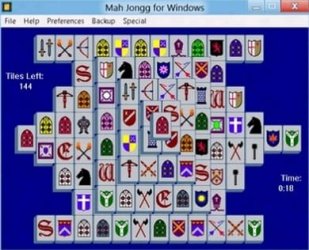
For many years, I've kept Win-7/Ultimate/x86 alive and well, on a very old eMachine. I fire it up occasionally, to upgrade the browser and AV/AS software and play a few games of Mahjongg, that I purchased on a floppy disk back in Windows 3.1 days.

Well, I got tired of having to fire up the old eMachine just to play Mahjongg, so here's what I did:

I pulled the old Samsung spinner containing Win-7 out of the OLD eMachine and transplanted it into my current Win-11/Pro/64 PC.
This is a Mid-Tower, Pacman Case, with many drive bays, so sticking in one more drive is no problem.

One commonality is that both PC's use AMD cpu's. That was likely my 'Saving Grace'.

Marvel of marvels, when I booted up to the Win-7 HD, the first time, it came up like it had been there all along. WOW!
Cept for, the LAN didn't work and the USB 3.0 ports didn't work.
But, that was not an insurmountable problem. Since this is a Gigabyte motherboard, with a few whiskers, I got out my old Gigabyte Drivers CD and ran it, installing the On-Board LAN and USB 3.0 drivers, into Win-7. On reboot, everything was running like it should.

Now, using the F12 boot option, I can run Windows 7/Ultimate/32 and play my old Mahjongg game, and never leave my Main PC.
And, on a normal boot, with no F12 option, my PC will boot into Windows 11, just like it always did.

It's the first time I've ever run two totally different OS's on my Main PC. And all that, just so I can play my 30 year old Mahjongg game on this PC.
MahJonggW7.jpg

F12 and I are no strangers, since I use that to allow me to boot the PC into my Ghost (backup/restore) Flash Drive, when I'm doing backups.
Once I got Win-7 all tweaked and tuned the way I want it, I used Ghost to back up the C: partition to the D:Storage partition.
But I did have to reformat that old Storage partition, to NTFS from FAT-32, so it would hold a backup of C:.
Now, everything is working GREAT!
Cheers Mates,
TM :cool:
 
Last edited:

My Computer

Computer type
PC/Desktop
Computer Manufacturer/Model Number
Various
OS
Win 7 Pro, SP1, x86, Win-11/Pro/64
CPU
AMD
Motherboard
Various
Memory
8GB Crucial
Graphics Card(s)
Various
Sound Card
OnBoard
Monitor(s) Displays
Acer 21.5"
Hard Drives
Crucial SSD, 500 GB
PSU
OEM
Case
SFF Slim Line Case
Cooling
OEM
Keyboard
eMachines
Mouse
Logitech Wireless
Internet Speed
varies
Antivirus
Windows Defender/Super Anti-Spyware
Browser
Firefox
Add me to the list of users still using Windows 7 = my main machine, the wife's main machine(both desktops), and three laptops serving various duties.

I am online constantly and use several power-hungry photography programs.

I turned off all updates years ago and have not had a single problem from doing so.

Although my browsers keep warning me that I am no longer supported, I can see no real difference in my online experiences.

I did have Linux Mint dual-booted on my personal desktop but I think I lost it when I had a SSD to give up the ghost and reinstalled my system via Macrium.

Likewise, I did have Linux Mint as a virtual machine and I think I lost it as well.

Although my Windows 7/Linux Mint dual-boot worked flawlessly, dual-boot anything is an absolute annoyance = just as soon as it settles into one O/S, you will need to be in the other.

It just occured to me that the wife's machine is dual-boot Windows 7 and Linux Zorin; I doubt it has been booted into Zorin in the last five or more years, but it's there if we ever need to.

If it comes down to me using Linux Mint again, I will put it on a second machine and keep them both fired up.

I hope there is a way to use the same mouse and keyboard seamlessly between the two.

I figure Windows 7 will work off-line until doomsday if it ever quits working online.


For years, although I am barely qualified, for whatever reason I have been my family/friend's go-to computer problem fixer guy; I always enjoyed trouble-shooting Windows 7 and getting them set back to rights; but now, they all naively allowed Windows 10 and now 11 to sneak in through the back door and I absolutely hate using them at all, let alone try to fix some problem they have gotten themselves into.
 

My Computer

Computer type
PC/Desktop
Computer Manufacturer/Model Number
Dell Optiplex 780m "mini-tower"
OS
Windows 7 Pro x64
CPU
Intel Core Two Duo E8600 3.33 ghz
Motherboard
Whatever DELL put in it
Memory
8GB
Graphics Card(s)
Gigabyte Radeon R7 240
Monitor(s) Displays
HP 2159m
PSU
750 Watt Corsair CX750
Keyboard
Logitech Wireless
Mouse
Logitech Wireless
Browser
Chrome, Firefox, IE
....Although my browsers keep warning me that I am no longer supported, I can see no real difference in my online experiences...
I have recently been having problems with Brave (my Chromium browser) not loading pages in certain, mostly financial websites. Get a frozen page and then a Page Unresponsive/WAIT dialog rendering it unusable. So I've had to revert to Firefox but I like it less well.

I've surfed & surfed on the Brave problem to no use, and have to assume it's got something to do with the non-support issue.
 

My Computer

Computer type
Laptop
Computer Manufacturer/Model Number
Dell Latitude E6540 Laptop
OS
Windows 7 Professional 64bit
CPU
Intel Core i7 4600M @ 2.90GHz
Motherboard
Dell Inc. 0CYT5F (SOCKET 0)
Memory
16.0GB Dual-Channel DDR3 @ 797MHz (11-11-11-28)
Graphics Card(s)
Intel HD Graphics 4600 (Dell) 2048MB ATI AMD Radeon HD 8790M
Sound Card
Realtek High Definition Audio
Monitor(s) Displays
HP ZR30w (2560x1600@60Hz)
Hard Drives
256GB LITEONIT LMT-256M6M-41 mm SATA (SSD)
1TB Samsung SSD 860 EVO mSATA SATA (SSD)
2TB USB 3.0 USB Device
115GB SanDisk Ultra Fit USB
Other Info
Multiple Dell E-Port Plus II Port Replicator/Docking Stations 0Y72NH USB 3.0 + 130W AC Adapters
I have recently been having problems with Brave (my Chromium browser) not loading pages in certain, mostly financial websites. Get a frozen page and then a Page Unresponsive/WAIT dialog rendering it unusable. So I've had to revert to Firefox but I like it less well.

I've surfed & surfed on the Brave problem to no use, and have to assume it's got something to do with the non-support issue.

I have Chrome, Pale Moon, and FireFox and so far all three work with no difference that I can see.

Neither FireFox nor Pale Mon have said a peep about me using Windows 7; whereas, Chrome, the one I use most, has notified me several times that I am no longer supported; support or not, it all still works.
 

My Computer

Computer type
PC/Desktop
Computer Manufacturer/Model Number
Dell Optiplex 780m "mini-tower"
OS
Windows 7 Pro x64
CPU
Intel Core Two Duo E8600 3.33 ghz
Motherboard
Whatever DELL put in it
Memory
8GB
Graphics Card(s)
Gigabyte Radeon R7 240
Monitor(s) Displays
HP 2159m
PSU
750 Watt Corsair CX750
Keyboard
Logitech Wireless
Mouse
Logitech Wireless
Browser
Chrome, Firefox, IE
I have recently been having problems with Brave (my Chromium browser) not loading pages in certain, mostly financial websites. Get a frozen page and then a Page Unresponsive/WAIT dialog rendering it unusable. So I've had to revert to Firefox but I like it less well.

I've surfed & surfed on the Brave problem to no use, and have to assume it's got something to do with the non-support issue.

Just the opposite for me; Firefox is constantly hanging, stalling, slowing (and always blaming the site). Can shut it down, go to same site with Brave and all is working fine. But Brave has become a nanny browser, constantly slapping your wrists, "you can go there", "you can't do this", and no way to override this on a case by case basis.

But excepting the rare "you need to update your browser" I get no complaints about the browser or OS.
 

My Computers

System One System Two

  • Computer type
    PC/Desktop
    Computer Manufacturer/Model Number
    custom
    OS
    win7 Pro SP1 x86
    CPU
    64x2 6000+
    Motherboard
    winfast
    Memory
    2gig
    Graphics Card(s)
    GTX950
    Antivirus
    Avast
    Browser
    Brave
  • Computer type
    PC/Desktop
    Antivirus
    Avast
Just the opposite for me; Firefox is constantly hanging, stalling, slowing (and always blaming the site). Can shut it down, go to same site with Brave and all is working fine. But Brave has become a nanny browser, constantly slapping your wrists, "you can go there", "you can't do this", and no way to override this on a case by case basis. But excepting the rare "you need to update your browser" I get no complaints about the browser or OS.
Must have to do with "settings" but despite that I've been computering since my Hayes 300baud modem daze (1970s) I have no appetite for trying to understand the myriad options of modern browsers.

Ticks me off that I can't find a browser platform that I am comfortable sticking-with.
 

My Computer

Computer type
Laptop
Computer Manufacturer/Model Number
Dell Latitude E6540 Laptop
OS
Windows 7 Professional 64bit
CPU
Intel Core i7 4600M @ 2.90GHz
Motherboard
Dell Inc. 0CYT5F (SOCKET 0)
Memory
16.0GB Dual-Channel DDR3 @ 797MHz (11-11-11-28)
Graphics Card(s)
Intel HD Graphics 4600 (Dell) 2048MB ATI AMD Radeon HD 8790M
Sound Card
Realtek High Definition Audio
Monitor(s) Displays
HP ZR30w (2560x1600@60Hz)
Hard Drives
256GB LITEONIT LMT-256M6M-41 mm SATA (SSD)
1TB Samsung SSD 860 EVO mSATA SATA (SSD)
2TB USB 3.0 USB Device
115GB SanDisk Ultra Fit USB
Other Info
Multiple Dell E-Port Plus II Port Replicator/Docking Stations 0Y72NH USB 3.0 + 130W AC Adapters
Yes. That has been my finding also. If you engage in financial transactions and sensitive data, good encryption also helps; but it isn't necessary. Linux provides a security base that is more than adequate for that sort of thing now. With Windoze breathing down one's neck at every turn with the newer tablet based operating systems you're better off using Linux in that regard.
Unfortunately both my credit unions now got a stick up their butts and have basically froze me out of online banking. With my previous credit union (Patelco), all I needed user name and password. With these two the latest&greatest browser is required, and I was unable to install Firefox 115 even temporarily on either LiveCDs. Tried to circumvent it by using the library computer, which worked, but then I found out the next hurdle was I had to play Secret Agent/I Spy with them. They required me to get a super-top-secret-ultra-classified-your-eyes-only code by text. Yeah, don't have a text phone, nor will I ever, so that was the dealbreaker.

I can however still do online shopping with Linux LiveCDs.
 

My Computers

System One System Two

  • Computer type
    PC/Desktop
    Computer Manufacturer/Model Number
    Dell OptiPlex 7010 Tower
    OS
    Windows 7 Pro 64-bit
    CPU
    i7-3770
    Memory
    16GB
    Graphics Card(s)
    onboard
    Monitor(s) Displays
    Dell
    Hard Drives
    1TB.
    Keyboard
    Wyse ku8933
    Mouse
    Microsoft optical
    Antivirus
    none
    Browser
    ComodoDragon, Basilisk, WaterFox, Brave, Chrome, Iridium
  • Computer type
    PC/Desktop
Firefox works fine for me.
 

My Computers

System One System Two

  • Computer type
    PC/Desktop
    OS
    7 X64
    CPU
    i5 8400
    Motherboard
    gigabyte b365m ds3h
    Memory
    2x8gb 3200mhz
    Hard Drives
    various
    PSU
    pure power 11 400w cm
    Case
    Coolermaster
    Cooling
    cryorig m9i
  • Computer type
    PC/Desktop
    OS
    7x64
    CPU
    g5400
    Motherboard
    ga b365m ds3h
    Memory
    8gb ddr4 2400
    PSU
    xfx pro 450w
Back
Top