Is anyone still using Windows 7?

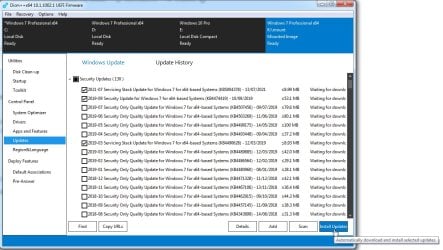
When you install certain updates (see link), you can also install dotNET framework 4.6 and 4.8. Since Windows Update is almost useless these days, you have to manually download some updates and install them, or you can use the WSUS offline updater. Download older version 1.9 for Windows 7:

Download Microsoft .NET Framework 4.6 (Offline Installer) for Windows Vista SP2, Windows 7 SP1, Windows 8, Windows 8.1, Windows Server 2008 SP2 Windows Server 2008 R2 SP1, Windows Server 2012 and Windows Server 2012 R2 from Official Microsoft Download Center

Microsoft .NET Framework 4.8 offline installer for Windows - Microsoft Support

WSUS Offline Update - Update Microsoft Windows and Office without an Internet connection

This tool downloads all updates in a folder and then you can apply them without being connected to the internet (hence the "offline" in the description). So you can use a much faster computer to download the updates, copy the folder to a USB flash drive and install them in the Windows 7 computer. If you have enabled ESU support for Windows 7 you get much more security updates than the last standard 2015 updates. Also Microsoft Security Essentials still works but lately doesn't update automatically the virus definitions. You can manually download them from here:

Latest security intelligence updates for Microsoft Defender Antivirus and other Microsoft antimalware - Microsoft Security Intelligence
 

My Computer

Computer type
PC/Desktop
Computer Manufacturer/Model Number
custom
OS
Windows 7 Ultimate 64-bit (now 11 24H2)
CPU
Intel Core-i3 3770 3.5GHz
Motherboard
Asus P8H61
Memory
16GB DDR3 1600Mhz
Graphics Card(s)
nVidia Geforce RTX 3050
Sound Card
Realtek HD audio
Monitor(s) Displays
Sony 19" LCD TV via VGA
Screen Resolution
1440x900
Hard Drives
WD 1TB SATA III SSD
PSU
unknown
Case
unknown
Cooling
Intel's provided with CPU
Antivirus
Windows Defender (Windows 11)
Browser
Microsoft Edge
Other Info
Previously Windows 7 Ultimate, now Windows 11 24H2
Last edited:

My Computers

System One System Two

  • Computer type
    PC/Desktop
    OS
    7 X64
    CPU
    i5 8400
    Motherboard
    gigabyte b365m ds3h
    Memory
    2x8gb 3200mhz
    Hard Drives
    various
    PSU
    pure power 11 400w cm
    Case
    Coolermaster
    Cooling
    cryorig m9i
  • Computer type
    PC/Desktop
    OS
    7x64
    CPU
    g5400
    Motherboard
    ga b365m ds3h
    Memory
    8gb ddr4 2400
    PSU
    xfx pro 450w
So did you actually try Ray's User Agent Switcher and Manager, as suggested?
No. As said, there is a limit to how many flaming hoops of the control freaks and Nannyites I'm willing to jump through, and that limit was reached. I simply no longer do online banking. Now it's in person or by phone. Out of curiosity, I just checked User Agent Switcher and Manager....it will not install on Waterfox, LibreWolf or Basilisk. I ditched Firefox some months ago, as none of the addons/extensions would install on the last version for Win7, making it a useless piece of drek.
 

My Computers

System One System Two

  • Computer type
    PC/Desktop
    Computer Manufacturer/Model Number
    Dell OptiPlex 7010 Tower
    OS
    Windows 7 Pro 64-bit
    CPU
    i7-3770
    Memory
    16GB
    Graphics Card(s)
    onboard
    Monitor(s) Displays
    Dell
    Hard Drives
    1TB.
    Keyboard
    Wyse ku8933
    Mouse
    Microsoft optical
    Antivirus
    none
    Browser
    ComodoDragon, Basilisk, WaterFox, Brave, Chrome, Iridium
  • Computer type
    PC/Desktop
No. As said, there is a limit to how many flaming hoops of the control freaks and Nannyites I'm willing to jump through, and that limit was reached. I simply no longer do online banking. Now it's in person or by phone. Out of curiosity, I just checked User Agent Switcher and Manager....it will not install on Waterfox, LibreWolf or Basilisk. I ditched Firefox some months ago, as none of the addons/extensions would install on the last version for Win7, making it a useless piece of drek.

Try R3DFOX. It is a fork of Firefox patched to run on Windows Vista and 7. It is like running current Firefox version on Windows 7 with slightly different interface. You don't need to change the user agent to access banking sites.

GitHub - Eclipse-Community/r3dfox: r3dfox is a modern Firefox based web browser for Windows Vista & 7. SourceForge link for downloading with older browsers. https://sourceforge.net/projects/r3dfox/
 

My Computer

Computer type
PC/Desktop
Computer Manufacturer/Model Number
custom
OS
Windows 7 Ultimate 64-bit (now 11 24H2)
CPU
Intel Core-i3 3770 3.5GHz
Motherboard
Asus P8H61
Memory
16GB DDR3 1600Mhz
Graphics Card(s)
nVidia Geforce RTX 3050
Sound Card
Realtek HD audio
Monitor(s) Displays
Sony 19" LCD TV via VGA
Screen Resolution
1440x900
Hard Drives
WD 1TB SATA III SSD
PSU
unknown
Case
unknown
Cooling
Intel's provided with CPU
Antivirus
Windows Defender (Windows 11)
Browser
Microsoft Edge
Other Info
Previously Windows 7 Ultimate, now Windows 11 24H2
Do sites with financial leanings - banks, investing, etc. - tolerate R3dfox?
Thank you.
 

My Computer

Computer Manufacturer/Model Number
Acer Aspire 5733
OS
Windows 7 Home Premium 64bit
CPU
13-380M
Memory
4gb
Hard Drives
500gb
Do sites with financial leanings - banks, investing, etc. - tolerate R3dfox?

Some do, some don't. Why not try it out for yourself? You can use the portable version of r3dfox without it making any changes to your system, and if it turns out not to work for you, just toss out the folder and you're right back to where you started, no harm done.

Success depends on how deeply the site in question sniffs out your underlying environment. I've come across one particular financial investment site that seems to use a java applet to query the underlying OS and the site will bail if it sees you're using Win7. Win7 will not work on that site regardless of browser.

More commonly, though, run-of-the-mill banks and credit card companies don't get that sophisticated and merely look at the browser's User-Agent string. For those companies you can spoof the UA string and fool the site into thinking you're using whatever OS, browser, and browser version you choose -- for instance, you can make it mimic Firefox 147 on Windows 10.

So do your own tests on the websites you're interested in. Download r3dfox portable, extract the portable folder from the download and temporarily place it on your desktop for convenience. Launch it, and install "Ray's User-Agent Switcher" extension in the browser. When installing the extension, don't forget to pin it to the browser taskbar in the last step so you'll have easy access. Then play around with the extension's choices and test visiting the websites you're interested in.

I've had excellent results with all of my financial sites except for that one aforementioned investment portfolio site.
 

My Computer

Computer type
PC/Desktop
Computer Manufacturer/Model Number
Dell Optiplex 7050
OS
Windows 7/8.1/10 multiboot
CPU
Intel Core i7-7700
Motherboard
Dell, Intel Q270 chipset
Memory
48GB (2x16GB Crucial DDR4-3200 + 2x8GB Hynix DDR4-2400)
Graphics Card(s)
Intel HD630 + AMD Radeon R7 450 PCIe
Monitor(s) Displays
Asus VC279 (27")
Screen Resolution
1920x1080
Hard Drives
Toshiba M.2 NVMe (256GB),
Samsung 960 Evo (500GB),
WD Red Plus 80EFBX (8TB)
In reply to dg1261:

Thanks very much. I'm OK for now. I have three sites, they all work.

If it gets to the point where 7 does not work, I'll do Linux, period, and I don't like Linux because it has all kinds of flaws which are probably welcomed by people with PhD's in Digital Magic, but for normal people, it's a minefield. It's like having to learn DOS, in German. I'm happy to read this forum, with all its valuable information.
 

My Computer

Computer Manufacturer/Model Number
Acer Aspire 5733
OS
Windows 7 Home Premium 64bit
CPU
13-380M
Memory
4gb
Hard Drives
500gb
Some do, some don't. Why not try it out for yourself? You can use the portable version of r3dfox without it making any changes to your system, and if it turns out not to work for you, just toss out the folder and you're right back to where you started, no harm done.

Success depends on how deeply the site in question sniffs out your underlying environment. I've come across one particular financial investment site that seems to use a java applet to query the underlying OS and the site will bail if it sees you're using Win7. Win7 will not work on that site regardless of browser.

More commonly, though, run-of-the-mill banks and credit card companies don't get that sophisticated and merely look at the browser's User-Agent string. For those companies you can spoof the UA string and fool the site into thinking you're using whatever OS, browser, and browser version you choose -- for instance, you can make it mimic Firefox 147 on Windows 10.

So do your own tests on the websites you're interested in. Download r3dfox portable, extract the portable folder from the download and temporarily place it on your desktop for convenience. Launch it, and install "Ray's User-Agent Switcher" extension in the browser. When installing the extension, don't forget to pin it to the browser taskbar in the last step so you'll have easy access. Then play around with the extension's choices and test visiting the websites you're interested in.

I've had excellent results with all of my financial sites except for that one aforementioned investment portfolio site.


For Greek banks, I just tested Eurobank. I put my credentials and it asked for confirmation using my smartphone Eurobank app. It then let me use ebanking. Alpha Bank and Piraeus Bank also worked. National Bank of Greece also worked. However, I hope you have a faster computer because it is rather slow using an old Intel Celeron with just 1.5GB RAM. You need a lot of patience.
 

My Computer

Computer type
PC/Desktop
Computer Manufacturer/Model Number
custom
OS
Windows 7 Ultimate 64-bit (now 11 24H2)
CPU
Intel Core-i3 3770 3.5GHz
Motherboard
Asus P8H61
Memory
16GB DDR3 1600Mhz
Graphics Card(s)
nVidia Geforce RTX 3050
Sound Card
Realtek HD audio
Monitor(s) Displays
Sony 19" LCD TV via VGA
Screen Resolution
1440x900
Hard Drives
WD 1TB SATA III SSD
PSU
unknown
Case
unknown
Cooling
Intel's provided with CPU
Antivirus
Windows Defender (Windows 11)
Browser
Microsoft Edge
Other Info
Previously Windows 7 Ultimate, now Windows 11 24H2
I haven't had any issues with my banks yet.
 

My Computers

System One System Two

Since R3DFOX is a fork of current version Firefox (modified version to run on Vista and Windows 7), it should open the same websites as regular Firefox. This compatibility is welcome in Windows 7 where the latest regular Firefox supported is 109 and ESR version 115. Microsoft Edge and Google Chrome standard versions also stop at version 109. My Pal is a fork of modern Chrome but I find it as slow as regular Chrome and several versions behind. So I will stick with R3DFOX which loads faster and opens all sites.
 

My Computer

Computer type
PC/Desktop
Computer Manufacturer/Model Number
custom
OS
Windows 7 Ultimate 64-bit (now 11 24H2)
CPU
Intel Core-i3 3770 3.5GHz
Motherboard
Asus P8H61
Memory
16GB DDR3 1600Mhz
Graphics Card(s)
nVidia Geforce RTX 3050
Sound Card
Realtek HD audio
Monitor(s) Displays
Sony 19" LCD TV via VGA
Screen Resolution
1440x900
Hard Drives
WD 1TB SATA III SSD
PSU
unknown
Case
unknown
Cooling
Intel's provided with CPU
Antivirus
Windows Defender (Windows 11)
Browser
Microsoft Edge
Other Info
Previously Windows 7 Ultimate, now Windows 11 24H2
Windows 7 is the furthest use of $100 that I've ever spent when I ordered it during the pre-release sale. I didn't initially use it much (not for a few years) but over the past 10 years or so it's the version of Windows that I've used the most.
 

My Computers

System One System Two

I don't think I'll ever leave Windows 7. I'm only worried about my browser's updates [Waterfox G6.0.20 (64-bit) (v115)] but so far everything is working and I don't have any unsolved problems.
I'll stay on Win7, mostly because Win10 consumes a lot of resources (CPU etc.) also is loaded with a lot of useless weights and garbage (bloatware etc.) which ultimately makes usage very laggy, even on modern computers. I don't even want to think about 11 which is even worse, and it looks like MS will continue like this.
 

My Computers

System One System Two

  • Computer type
    PC/Desktop
    OS
    W7U x64
    CPU
    AMD A4-6300 APU with Radeon(tm) HD Graphics 3.70 GHz
    Motherboard
    ASRock FM2A78M-DG3+
    Memory
    2x8GB
    Graphics Card(s)
    NVidia GT710 2GB DDR3
    Sound Card
    Tascam US-122L
    Monitor(s) Displays
    3
    Screen Resolution
    1920x1080 + (1280x1024 x2)
    Hard Drives
    HDDs
  • Computer type
    PC/Desktop
In theory you can disable all visual effects (transparency, animations, fades) and all startup applications and useless non-Microsoft Services to make Windows 10 and 11 faster. Not as much as Windows 7 but much better than without these changes. Of course this implies that you take the time to manually download all drivers from manufacturer including the chipset driver and install them. It makes a huge difference in performance compared to core-functionality drivers from Windows Update. You can even disable some features you don't use. However, I would avoid some clipped versions such as Tiny11. I prefer to manually disable or remove features so I know how to get back if I need them or if I break something. In the clipped versions is not easy to restore missing functionality and compatibility. I hate to sacrifice functionality and especially compatibility just to make my PC a little faster. That's why I upgraded my netbook from Windows 7 Starter to Windows 7 Ultimate 32-bit and then manually disabled some stuff to improve performance.
 

My Computer

Computer type
PC/Desktop
Computer Manufacturer/Model Number
custom
OS
Windows 7 Ultimate 64-bit (now 11 24H2)
CPU
Intel Core-i3 3770 3.5GHz
Motherboard
Asus P8H61
Memory
16GB DDR3 1600Mhz
Graphics Card(s)
nVidia Geforce RTX 3050
Sound Card
Realtek HD audio
Monitor(s) Displays
Sony 19" LCD TV via VGA
Screen Resolution
1440x900
Hard Drives
WD 1TB SATA III SSD
PSU
unknown
Case
unknown
Cooling
Intel's provided with CPU
Antivirus
Windows Defender (Windows 11)
Browser
Microsoft Edge
Other Info
Previously Windows 7 Ultimate, now Windows 11 24H2
I think a better question is how does anyone use Windows 11? Took me a better part of an hour just to turn it on without signing up for a microsoft account. Could not stand it so returned it to Microcenter. It was unusable. If you don't want to be tracked, surveilled or psychos coming to your door it is unwise to connect to the internet with Windows 11 as it puts out your identity everywhere and the Trump administration is selling your info and destroying net neutrality.
How do I use Windows 7? On a 14 year old pc with a decently fast 4 core I7 and Nvidia video card and SSD which boots in about 20 seconds always on a user account, firewalled and virus protected. Windows defender handles malware. Also have Microsoft Security Essentials for occasional virus scan.
 

My Computer

Computer type
PC/Desktop
OS
Windows 7 Home Premium 64bit
You can install Windows 11 and force a local Administrator account instead of using your Microsoft account. One easy way to do that is to create the Windows 11 Setup USB flash drive with Rufus and check the respective check boxes to bypass compatibility check and to create a local account. If you upgrade from Windows 10 to 11, then you are using your current account, you are not required to use a Microsoft account. Of course, Windows will ask you to convert your local account to Microsoft account, but you can deny and use your Microsoft account only for certain applications and games.

If you create Windows 11 Setup USB with Media Creation Tool and you manually bypass compatibility check or have a compliant PC, then you must NOT connect to the internet while configuring Windows 11 for the first time. You can then press SHIFT+F10 at any point and run this command to immediately go to the local Administrator account creation:

start ms-cxh:localonly

Running this command will also skip the rest of the OOBE (Out Of the Box Experience) configuration. Don't worry, you can configure these from Settings later.

Also you can use several utilities to disable unwanted telemetry in Windows 11. Such as Winaero Tweaker and O&O Windows 10 Shutup (it also works in Windows 11).

Winaero Tweaker

O&O ShutUp10 - O&O Software GmbH

Download Windows 11

Rufus - Create bootable USB drives the easy way
 

My Computer

Computer type
PC/Desktop
Computer Manufacturer/Model Number
custom
OS
Windows 7 Ultimate 64-bit (now 11 24H2)
CPU
Intel Core-i3 3770 3.5GHz
Motherboard
Asus P8H61
Memory
16GB DDR3 1600Mhz
Graphics Card(s)
nVidia Geforce RTX 3050
Sound Card
Realtek HD audio
Monitor(s) Displays
Sony 19" LCD TV via VGA
Screen Resolution
1440x900
Hard Drives
WD 1TB SATA III SSD
PSU
unknown
Case
unknown
Cooling
Intel's provided with CPU
Antivirus
Windows Defender (Windows 11)
Browser
Microsoft Edge
Other Info
Previously Windows 7 Ultimate, now Windows 11 24H2
I installed AtlasOS on Windows 10 and I would do so again. Its a set of scripts that disable a lot of fluff. AtlasOS - Optimized Windows, designed for enthusiasts.
The software used to deploy the scripts has others available. I haven't really looked into them though. I found that after installing AtlasOS. One is called privacy+. I would look into that. Ameliorated.io
 

My Computers

System One System Two

I prefer to manually disable/remove features so I know what to restore back in case of incompatibility or missing something I want. I don't like automatic scripts I don't know what they do and have no control of the process.
 

My Computer

Computer type
PC/Desktop
Computer Manufacturer/Model Number
custom
OS
Windows 7 Ultimate 64-bit (now 11 24H2)
CPU
Intel Core-i3 3770 3.5GHz
Motherboard
Asus P8H61
Memory
16GB DDR3 1600Mhz
Graphics Card(s)
nVidia Geforce RTX 3050
Sound Card
Realtek HD audio
Monitor(s) Displays
Sony 19" LCD TV via VGA
Screen Resolution
1440x900
Hard Drives
WD 1TB SATA III SSD
PSU
unknown
Case
unknown
Cooling
Intel's provided with CPU
Antivirus
Windows Defender (Windows 11)
Browser
Microsoft Edge
Other Info
Previously Windows 7 Ultimate, now Windows 11 24H2
Actually there are some options during installation and afterwards you find all kinds of bat files to enable and disable the kind of things you'd likely touch.
 

My Computers

System One System Two

Back
Top