Network adapter and USB ports not working

steve747

New member
Local time
3:12 AM
Messages
33
Hello. I have another issue. I reinstalled win 7and I don't have any network adapter access so I can't connect to the internet. I have looked at control panel, network and internet etc etc with no luck. Also the USB ports don't work. Thanks
 

My Computer My Computer

Computer type
PC/Desktop
Computer Manufacturer/Model Number
custom
OS
windows 7 home premium 64 bit
Browser
Firefox
We need information of your hardware.
Please edit your profile with ALL your hardware specs. It will help us to help you
System Info - See Your System Specs

I can see you can access the internet as you wrote the thread.
Go to the Motherboard manufacture page, find your MB model and download USB and LAN drivers to a USB drive and then install on the desktop.
 

My Computers My Computers

System One System Two

  • Computer type
    PC/Desktop
    Computer Manufacturer/Model Number
    custom build
    OS
    Windows 7 HP 64
    CPU
    i5 6600K - 800MHz to 4200MHz
    Motherboard
    GA-Z170-HD3P
    Memory
    4+4G GSkill DDR4 3000
    Graphics Card(s)
    IG - Intel 530
    Monitor(s) Displays
    Samsung 226BW
    Screen Resolution
    1680x1050
    Hard Drives
    (1) -1 SM951 – 128GB M.2 AHCI PCIe SSD drive for Windows 7 and Lubuntu
    (2) -1 WD SATA 3 - 1T for Data
    (3) -1 WD SATA 3 - 1T for backup
    PSU
    Thermaltake 450W TR2 gold
    Keyboard
    Old and good Chicony mechanical keyboard
    Mouse
    Logitech mX performance - 9 buttons (had to disable some)
    Internet Speed
    500Mb/s
    Browser
    Firefox 64
    Other Info
    TinyWall firewall
  • Computer type
    Laptop
    System Manufacturer/Model Number
    Asus Q550LF
    OS
    Windows 7 Pro
    CPU
    i7-4500U 800MHz to 3.0GHz
    Motherboard
    Asus Q550LF
    Memory
    (4+4)G DDR3 1600
    Graphics Card(s)
    IG intel 4400 + NVIDIA GeForce GT 745M
    Sound Card
    Realtek
    Monitor(s) Displays
    LG Display LP156WF4-SPH1
    Screen Resolution
    1920 x 1080
    Hard Drives
    BX500 120G SSD for Windows and programs +
    1T HDD for data
    Internet Speed
    500 Mb/s
    Browser
    Firefox
    Other Info
    TinyWall firewall
Did you install all of the drivers? Especially the chipset driver?
 

My Computer My Computer

Computer type
PC/Desktop
OS
Windows 7 Ultimate x64
Network adapter and internet connection problems

- - - Updated - - -

Hello guys. Thanks for the help. Firstly I access the internet using my phone not the problem computer. I can't download anything on my computer. I think it may be the network adapter problem. As far as I can tell my motherboard is a Gigabyte p76a-ud4- b3 8GB ram Intel processor i5-3570 cpu 64 bit operating system. Standard VGA graphics adapter. And without an internet connection iam unable to download a thing. Thanks again. By the way I connected to the internet using my phone and tethering by USB cable. I don't have wifi
 

My Computer My Computer

Computer type
PC/Desktop
Computer Manufacturer/Model Number
custom
OS
windows 7 home premium 64 bit
Browser
Firefox
So, when you say you can't download anything you mean files? Technically speaking, you are "downloading" now just loading a webpage. If I know what can't be downloaded I could help narrow down the issue.

Let me add by saying tethering a phone to a computer via USB is not really the greatest. If you could buy a USB or PCIe Wi-Fi network adapter or card that would be a whole lot better with tethering. You just setup the cellphone tether with Wi-Fi instead of a USB connection. Then on the computer with its Wi-Fi USB adapter or Wi-Fi PCIe card you connect via Wi-Fi to the phone's Wi-Fi hotspot name. Simple as that. I do this very thing from time to time. I have used USB in the past and it was a crapshoot.

I'm wondering something. If you go into your phone while connected to the computer via USB, is the option to "transfer data" or something like that used for the USB connection? You should have that option when you plug the USB cable to the computer and phone. You may need to swipe down on the phone to see the option. At least for Android. No idea about Apple unless I look it up.
 

My Computer My Computer

Computer type
PC/Desktop
OS
Windows 7 Ultimate x64
Internet connection and network adapter problem

Hello and thanks. My USB ports seem to be OK. I have been using a cable for years to tether my phone to my pc without any problems. I don't have wifi on my pc just my phone data. I don't really want to buy a wireless adapter and incur extra monthly charges on top of my phone charges. As I mentioned I can browse web pages on my phone but on the pc I can't connect to anything or any site whatsoever. I tried to reinstall the Gigabyte motherboard from the DVD but it said setup.exe not working. I called Gigabyte support and he said that it was a software problem. So I think that is all tied in with the no network adapter problem
 

My Computer My Computer

Computer type
PC/Desktop
Computer Manufacturer/Model Number
custom
OS
windows 7 home premium 64 bit
Browser
Firefox
We need information of your hardware.
Please edit your profile with ALL your hardware specs. It will help us to help you
System Info - See Your System Specs

Is the LAN enabled on BIOS?
If you have the installation DVD from Gigabyte motherboard the LAN driver is on it.
 

My Computers My Computers

System One System Two

  • Computer type
    PC/Desktop
    Computer Manufacturer/Model Number
    custom build
    OS
    Windows 7 HP 64
    CPU
    i5 6600K - 800MHz to 4200MHz
    Motherboard
    GA-Z170-HD3P
    Memory
    4+4G GSkill DDR4 3000
    Graphics Card(s)
    IG - Intel 530
    Monitor(s) Displays
    Samsung 226BW
    Screen Resolution
    1680x1050
    Hard Drives
    (1) -1 SM951 – 128GB M.2 AHCI PCIe SSD drive for Windows 7 and Lubuntu
    (2) -1 WD SATA 3 - 1T for Data
    (3) -1 WD SATA 3 - 1T for backup
    PSU
    Thermaltake 450W TR2 gold
    Keyboard
    Old and good Chicony mechanical keyboard
    Mouse
    Logitech mX performance - 9 buttons (had to disable some)
    Internet Speed
    500Mb/s
    Browser
    Firefox 64
    Other Info
    TinyWall firewall
  • Computer type
    Laptop
    System Manufacturer/Model Number
    Asus Q550LF
    OS
    Windows 7 Pro
    CPU
    i7-4500U 800MHz to 3.0GHz
    Motherboard
    Asus Q550LF
    Memory
    (4+4)G DDR3 1600
    Graphics Card(s)
    IG intel 4400 + NVIDIA GeForce GT 745M
    Sound Card
    Realtek
    Monitor(s) Displays
    LG Display LP156WF4-SPH1
    Screen Resolution
    1920 x 1080
    Hard Drives
    BX500 120G SSD for Windows and programs +
    1T HDD for data
    Internet Speed
    500 Mb/s
    Browser
    Firefox
    Other Info
    TinyWall firewall
Megahertz07 op specs are on post#4

realtek lan driver should be on the dvd.

As far as I can tell my motherboard is a Gigabyte p76a-ud4- b3 8GB ram Intel processor i5-3570 cpu 64 bit operating system. Standard VGA graphics adapter.
 

My Computers My Computers

System One System Two

  • Computer type
    PC/Desktop
    OS
    7 X64
    CPU
    i5 8400
    Motherboard
    gigabyte b365m ds3h
    Memory
    2x8gb 3200mhz
    Hard Drives
    various
    PSU
    pure power 11 400w cm
    Case
    Coolermaster
    Cooling
    cryorig m9i
  • Computer type
    PC/Desktop
    OS
    7x64
    CPU
    g5400
    Motherboard
    ga b365m ds3h
    Memory
    8gb ddr4 2400
    PSU
    xfx pro 450w

My Computers My Computers

System One System Two

  • Computer type
    PC/Desktop
    Computer Manufacturer/Model Number
    custom build
    OS
    Windows 7 HP 64
    CPU
    i5 6600K - 800MHz to 4200MHz
    Motherboard
    GA-Z170-HD3P
    Memory
    4+4G GSkill DDR4 3000
    Graphics Card(s)
    IG - Intel 530
    Monitor(s) Displays
    Samsung 226BW
    Screen Resolution
    1680x1050
    Hard Drives
    (1) -1 SM951 – 128GB M.2 AHCI PCIe SSD drive for Windows 7 and Lubuntu
    (2) -1 WD SATA 3 - 1T for Data
    (3) -1 WD SATA 3 - 1T for backup
    PSU
    Thermaltake 450W TR2 gold
    Keyboard
    Old and good Chicony mechanical keyboard
    Mouse
    Logitech mX performance - 9 buttons (had to disable some)
    Internet Speed
    500Mb/s
    Browser
    Firefox 64
    Other Info
    TinyWall firewall
  • Computer type
    Laptop
    System Manufacturer/Model Number
    Asus Q550LF
    OS
    Windows 7 Pro
    CPU
    i7-4500U 800MHz to 3.0GHz
    Motherboard
    Asus Q550LF
    Memory
    (4+4)G DDR3 1600
    Graphics Card(s)
    IG intel 4400 + NVIDIA GeForce GT 745M
    Sound Card
    Realtek
    Monitor(s) Displays
    LG Display LP156WF4-SPH1
    Screen Resolution
    1920 x 1080
    Hard Drives
    BX500 120G SSD for Windows and programs +
    1T HDD for data
    Internet Speed
    500 Mb/s
    Browser
    Firefox
    Other Info
    TinyWall firewall
Hello and thanks. My USB ports seem to be OK. I have been using a cable for years to tether my phone to my pc without any problems. I don't have wifi on my pc just my phone data. I don't really want to buy a wireless adapter and incur extra monthly charges on top of my phone charges. As I mentioned I can browse web pages on my phone but on the pc I can't connect to anything or any site whatsoever. I tried to reinstall the Gigabyte motherboard from the DVD but it said setup.exe not working. I called Gigabyte support and he said that it was a software problem. So I think that is all tied in with the no network adapter problem

You're not going to get quality support from these companies. I know that may sound silly, but people here who may know more than some company support Rep reading from a computer screen will help you a lot more. Trust me when I tell you if I were sitting in front of your computer I could have you up in no time.

Now, let me address a couple things here:

A) Wi-Fi is not something you pay for. It's not a cell tower Internet signal per say. So buying a Wi-Fi adapter so that you can use it to tether your phone to the computer via Wi-Fi will NOT incur extra charges. Using Wi-Fi to tether your phone to the computer is just a means in which to create a network between your computer and the phone.

B) Does your phone have tethering turned on? Does your cellphone company allow tethering? Sometimes you need to contact your cell carrier to turn on the ability to tether your phone to a computer.

Watch this video with the adorable little girl wallpaper. :D

USB tethering Windows 7 not working fix - YouTube

- - - Updated - - -

setup.exe not working sounds like another problem on its own. Do you even see a network adapter icon in the taskbar bottom right like the video shows?

Type in device manager in Windows search. In Device Manager do you see any yellow exclamation symbols? That would indicate you're missing a driver/s.

- - - Updated - - -

Here are two Wi-Fi adapters that I'm referring to when I say "Wi-Fi adapter."

https://www.amazon.com/Network-AWUS036ACS-Wide-Coverage-Dual-Band-High-Sensitivity/dp/B0752CTSGD


https://www.amazon.com/ALFA-802-11ac-MU-MIMO-Adapter-AWUS036ACU/dp/B08WZGHNHK
 

My Computer My Computer

Computer type
PC/Desktop
OS
Windows 7 Ultimate x64
Internet connection problem

Hello all. Up until a week ago I have been able to tether my phone to my pc for years without any problems. Then I had to reinstall windows 7 from the cd. The Lan is enabled. I bought a wireless adapter but it didn't work as it doesn't support 4g. Yes I did contact gigabyte support and he said about setup.exe not working is a software problem so I can't reinstall the motherboard drivers. I know how to turn tethering on my phone on, been doing it for years. Now there is no network adapter to connect.
 

My Computer My Computer

Computer type
PC/Desktop
Computer Manufacturer/Model Number
custom
OS
windows 7 home premium 64 bit
Browser
Firefox
Okay, now I have a better understanding of what's going on. Your drivers are on the Internet. When ever you build a PC (or acquire one), go to the manufacturer's website to get the latest drivers.

Go here: GA-P67A-UD4-B3 (rev. 1.1) Support | Motherboard - GIGABYTE Global

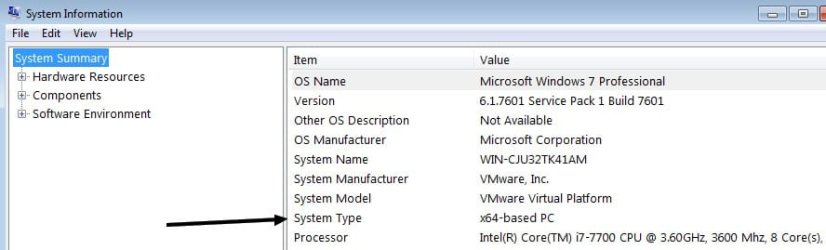
Chose Windows 7 32 bit or 64 bit depending on what you have there. To find out type system information in Windows search. Now find where it says "system type."

- - - Updated - - -

fdcgbhdfg.jpg
 

My Computer My Computer

Computer type
PC/Desktop
OS
Windows 7 Ultimate x64
any chance of a pic of setup.exe failure point screenshot, and why did you re-install??
 
Last edited:

My Computer My Computer

Computer type
PC/Desktop
Computer Manufacturer/Model Number
medionl/Aspire 6930G/acer x55a
OS
W7 home premium 32bit/W7HP 64bit/w10 tp insider ring
CPU
E5300 dual core
Motherboard
medion MS7366
Memory
3gb
Graphics Card(s)
Nvidia Geforce 7100 Nforce 630i
Monitor(s) Displays
avixc
Internet Speed
n (isp resticted to 72)
Antivirus
mse/pands
Browser
palemoon
Other Info
Belkin Fd7050 n USB using Railink RT2870 drivers, more upto date
Network adapter connection problem

Hello. The whole problem is I can't go to any website at all to download drivers as there is no connection when I tether my phone via a USB cable, using phone data. It says no connection. I put the gigabyte cd in and it says setup not working. I'm not sure if I log onto gigabytes server on my phone and then download the drivers to it. This site won't let me upload a a photo. It says failed. The photo was simply going to say setup.exe not working when I put the gigabyte cd in
 

My Computer My Computer

Computer type
PC/Desktop
Computer Manufacturer/Model Number
custom
OS
windows 7 home premium 64 bit
Browser
Firefox
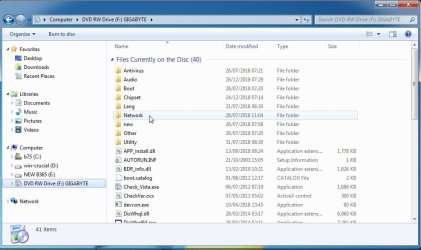
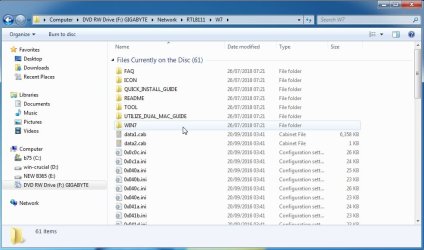
have a look on the cd for the realtek lan driver.


you shouldnt need to run setup

- - - Updated - - -

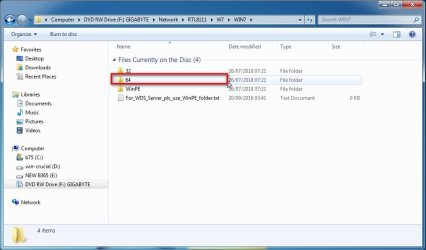
I have just done it - different model gigabyte but the cd contents should be similar

gigabyte-cd-1.jpg

gigabyte-cd-1-A.jpg

gigabyte-cd-2.jpg

gigabyte-cd-3.jpg

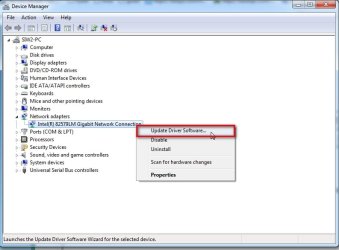
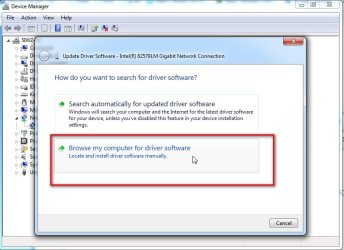
when you have located the 64 folder, open device manager, rt clcik the network adpater, select update driver , select browse., then browse to the Network Realtek ( or it might say RTL8111 ) 64 folder you found on the cd

gigabyte-cd-4.jpg


gigabyte-cd-5.jpg
 

My Computers My Computers

System One System Two

  • Computer type
    PC/Desktop
    OS
    7 X64
    CPU
    i5 8400
    Motherboard
    gigabyte b365m ds3h
    Memory
    2x8gb 3200mhz
    Hard Drives
    various
    PSU
    pure power 11 400w cm
    Case
    Coolermaster
    Cooling
    cryorig m9i
  • Computer type
    PC/Desktop
    OS
    7x64
    CPU
    g5400
    Motherboard
    ga b365m ds3h
    Memory
    8gb ddr4 2400
    PSU
    xfx pro 450w
Network adapter not working

Thanks. I'll give your suggestions a try and let you know. I managed to upload a photo by reducing the size, hope it works

- - - Updated - - -

Hello SIW2. I followed your screen shots and I opened up the files on my gigabyte motherboard cd and it doesn't display anywhere a network folder. Thanks.
 

Attachments

  • IMG_20230930_165614.jpg
    IMG_20230930_165614.jpg
    286.5 KB · Views: 0
Last edited:

My Computer My Computer

Computer type
PC/Desktop
Computer Manufacturer/Model Number
custom
OS
windows 7 home premium 64 bit
Browser
Firefox
When you insert a DVD it can autorun a program. In your case it is trying to run Setup. Cancel.
SIW2 has given you a description on how to load the LAN driver.
- Open Device manager (C:\Windows\System32\devmgmt.msc) and search for the driver on the DVD.
 

My Computers My Computers

System One System Two

  • Computer type
    PC/Desktop
    Computer Manufacturer/Model Number
    custom build
    OS
    Windows 7 HP 64
    CPU
    i5 6600K - 800MHz to 4200MHz
    Motherboard
    GA-Z170-HD3P
    Memory
    4+4G GSkill DDR4 3000
    Graphics Card(s)
    IG - Intel 530
    Monitor(s) Displays
    Samsung 226BW
    Screen Resolution
    1680x1050
    Hard Drives
    (1) -1 SM951 – 128GB M.2 AHCI PCIe SSD drive for Windows 7 and Lubuntu
    (2) -1 WD SATA 3 - 1T for Data
    (3) -1 WD SATA 3 - 1T for backup
    PSU
    Thermaltake 450W TR2 gold
    Keyboard
    Old and good Chicony mechanical keyboard
    Mouse
    Logitech mX performance - 9 buttons (had to disable some)
    Internet Speed
    500Mb/s
    Browser
    Firefox 64
    Other Info
    TinyWall firewall
  • Computer type
    Laptop
    System Manufacturer/Model Number
    Asus Q550LF
    OS
    Windows 7 Pro
    CPU
    i7-4500U 800MHz to 3.0GHz
    Motherboard
    Asus Q550LF
    Memory
    (4+4)G DDR3 1600
    Graphics Card(s)
    IG intel 4400 + NVIDIA GeForce GT 745M
    Sound Card
    Realtek
    Monitor(s) Displays
    LG Display LP156WF4-SPH1
    Screen Resolution
    1920 x 1080
    Hard Drives
    BX500 120G SSD for Windows and programs +
    1T HDD for data
    Internet Speed
    500 Mb/s
    Browser
    Firefox
    Other Info
    TinyWall firewall
Network adapter not working

Hello Megahertz07. I tried your suggestion but no luck. There is no devmgmt.msc file. There is devmgmt only and it just takes me to the device manager and I can right click on my computer to get to that. In network adapters in device manager it says this device is working properly and yet I can't connect to any internet. Thanks
 

My Computer My Computer

Computer type
PC/Desktop
Computer Manufacturer/Model Number
custom
OS
windows 7 home premium 64 bit
Browser
Firefox
It has probably installed the old realtek driver that comes already included win7 installation media. It will accept a more recent realtek driver if you point at it from device manager. I have done it many times.
 

My Computers My Computers

System One System Two

  • Computer type
    PC/Desktop
    OS
    7 X64
    CPU
    i5 8400
    Motherboard
    gigabyte b365m ds3h
    Memory
    2x8gb 3200mhz
    Hard Drives
    various
    PSU
    pure power 11 400w cm
    Case
    Coolermaster
    Cooling
    cryorig m9i
  • Computer type
    PC/Desktop
    OS
    7x64
    CPU
    g5400
    Motherboard
    ga b365m ds3h
    Memory
    8gb ddr4 2400
    PSU
    xfx pro 450w
Network adapter not working

Hello SIW2. In device manager under network adapter it shows Microsoft ISATAP and this device is working properly. Yet I can't go to any information if it involves an internet connection. The gigabyte motherboard cd which would possibly have the drivers on it and as shown in the screen shot setup.exe not working. So I'm going around in circles.
 

My Computer My Computer

Computer type
PC/Desktop
Computer Manufacturer/Model Number
custom
OS
windows 7 home premium 64 bit
Browser
Firefox
Back
Top