If the system partition was not already active it needs to be marked active on an mbr style disk.
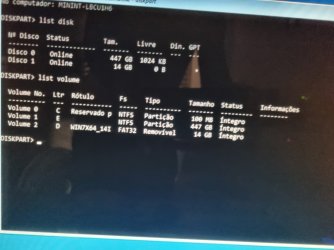
in you screenshot the 100mb system partition has letter c
the large windows partition has letter e
therefore
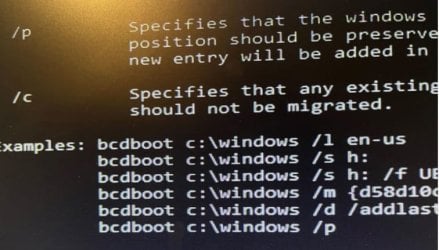
bcdboot e:\windows /s c:
When I use "bcdboot e:\windows /s c:" it returns "success" but the problem continues..
So researching more about I was testing:
bootrec /fixmbr -->success
bootrec /fixboot -->success
bootrec /rebuildbcd -->"Cannot find the requested system device"
what do you suggest..
thank you very much
- - - Updated - - -
I decided to format the 100MB partition and then run "bcdboot e:\windows /s c:" but now I get a new error when restarting "Bootmgr is missing", I'm looking for solutions, if you have any tips...If anything, if I need to, I can format the 100mb partition again and start from the beginning.
- - - Updated - - -
I did the following, I entered Windows with two HDs, my current one and the one with a boot problem, so I formatted the 100MB partition in NTFS mode (default).
So now we have the volume with the Windows System and another formatted where the Boot was.
I turned on the computer with just the HD and recovery pendrive, opened CMD and typed bcdboot e:\windows /s c:, it returned success.
However, in some videos I saw that the person then typed /bcdedit (just to check if everything is ok), but when I tried this command it returned that it could not be found.
In my partition where there is Boot (100mb) there are now these files:
E:\EFI E:\EFI\Boot E:\EFI\Microsoft E:\EFI\Boot\bootx64.efi E:\EFI\Microsoft\Boot E:\EFI\Microsoft\Recovery E:\EFI\Microsoft\Boot\BCD E:\EFI\Microsoft\Boot\bootmgfw.efi E:\EFI\Microsoft\Boot\bootmgr.efi E:\EFI\Microsoft\Boot\cs-CZ E:\EFI\Microsoft\Boot\da-DK E:\EFI\Microsoft\Boot\de-DE E:\EFI\Microsoft\Boot\el-GR E:\EFI\Microsoft\Boot\en-US E:\EFI\Microsoft\Boot\es-ES E:\EFI\Microsoft\Boot\fi-FI E:\EFI\Microsoft\Boot\Fonts E:\EFI\Microsoft\Boot\fr-FR E:\EFI\Microsoft\Boot\hu-HU E:\EFI\Microsoft\Boot\it-IT E:\EFI\Microsoft\Boot\ja-JP E:\EFI\Microsoft\Boot\ko-KR E:\EFI\Microsoft\Boot\memtest.efi E:\EFI\Microsoft\Boot\nb-NO E:\EFI\Microsoft\Boot\nl-NL E:\EFI\Microsoft\Boot\pl-PL E:\EFI\Microsoft\Boot\pt-BR E:\EFI\Microsoft\Boot\pt-PT E:\EFI\Microsoft\Boot\ru-RU E:\EFI\Microsoft\Boot\sv-SE E:\EFI\Microsoft\Boot\tr-TR E:\EFI\Microsoft\Boot\zh-CN E:\EFI\Microsoft\Boot\zh-HK E:\EFI\Microsoft\Boot\zh-TW E:\EFI\Microsoft\Boot\cs-CZ\bootmgfw.efi.mui E:\EFI\Microsoft\Boot\cs-CZ\bootmgr.efi.mui E:\EFI\Microsoft\Boot\da-DK\bootmgfw.efi.mui E:\EFI\Microsoft\Boot\da-DK\bootmgr.efi.mui E:\EFI\Microsoft\Boot\de-DE\bootmgfw.efi.mui E:\EFI\Microsoft\Boot\de-DE\bootmgr.efi.mui E:\EFI\Microsoft\Boot\el-GR\bootmgfw.efi.mui E:\EFI\Microsoft\Boot\el-GR\bootmgr.efi.mui E:\EFI\Microsoft\Boot\en-US\bootmgfw.efi.mui E:\EFI\Microsoft\Boot\en-US\bootmgr.efi.mui E:\EFI\Microsoft\Boot\en-US\memtest.efi.mui E:\EFI\Microsoft\Boot\es-ES\bootmgfw.efi.mui E:\EFI\Microsoft\Boot\es-ES\bootmgr.efi.mui E:\EFI\Microsoft\Boot\fi-FI\bootmgfw.efi.mui E:\EFI\Microsoft\Boot\fi-FI\bootmgr.efi.mui E:\EFI\Microsoft\Boot\Fonts\chs_boot.ttf E:\EFI\Microsoft\Boot\Fonts\cht_boot.ttf E:\EFI\Microsoft\Boot\Fonts\jpn_boot.ttf E:\EFI\Microsoft\Boot\Fonts\kor_boot.ttf E:\EFI\Microsoft\Boot\Fonts\wgl4_boot.ttf E:\EFI\Microsoft\Boot\fr-FR\bootmgfw.efi.mui E:\EFI\Microsoft\Boot\fr-FR\bootmgr.efi.mui E:\EFI\Microsoft\Boot\hu-HU\bootmgfw.efi.mui E:\EFI\Microsoft\Boot\hu-HU\bootmgr.efi.mui E:\EFI\Microsoft\Boot\it-IT\bootmgfw.efi.mui E:\EFI\Microsoft\Boot\it-IT\bootmgr.efi.mui E:\EFI\Microsoft\Boot\ja-JP\bootmgfw.efi.mui E:\EFI\Microsoft\Boot\ja-JP\bootmgr.efi.mui E:\EFI\Microsoft\Boot\ko-KR\bootmgfw.efi.mui E:\EFI\Microsoft\Boot\ko-KR\bootmgr.efi.mui E:\EFI\Microsoft\Boot\nb-NO\bootmgfw.efi.mui E:\EFI\Microsoft\Boot\nb-NO\bootmgr.efi.mui E:\EFI\Microsoft\Boot\nl-NL\bootmgfw.efi.mui E:\EFI\Microsoft\Boot\nl-NL\bootmgr.efi.mui E:\EFI\Microsoft\Boot\pl-PL\bootmgfw.efi.mui E:\EFI\Microsoft\Boot\pl-PL\bootmgr.efi.mui E:\EFI\Microsoft\Boot\pt-BR\bootmgfw.efi.mui E:\EFI\Microsoft\Boot\pt-BR\bootmgr.efi.mui E:\EFI\Microsoft\Boot\pt-BR\memtest.efi.mui E:\EFI\Microsoft\Boot\pt-PT\bootmgfw.efi.mui E:\EFI\Microsoft\Boot\pt-PT\bootmgr.efi.mui E:\EFI\Microsoft\Boot\ru-RU\bootmgfw.efi.mui E:\EFI\Microsoft\Boot\ru-RU\bootmgr.efi.mui E:\EFI\Microsoft\Boot\sv-SE\bootmgfw.efi.mui E:\EFI\Microsoft\Boot\sv-SE\bootmgr.efi.mui E:\EFI\Microsoft\Boot\tr-TR\bootmgfw.efi.mui E:\EFI\Microsoft\Boot\tr-TR\bootmgr.efi.mui E:\EFI\Microsoft\Boot\zh-CN\bootmgfw.efi.mui E:\EFI\Microsoft\Boot\zh-CN\bootmgr.efi.mui E:\EFI\Microsoft\Boot\zh-HK\bootmgfw.efi.mui E:\EFI\Microsoft\Boot\zh-HK\bootmgr.efi.mui E:\EFI\Microsoft\Boot\zh-TW\bootmgfw.efi.mui E:\EFI\Microsoft\Boot\zh-TW\bootmgr.efi.mui E:\EFI\Microsoft\Recovery\BCD
It appears to be missing: (These files were before formatting and recreating the bot)
The files below are no longer present after formatting and recreating the bot partition (100mb)
BOOT\EFI BOOT\Boot\cs-CZ BOOT\Boot\da-DK BOOT\Boot\de-DE BOOT\Boot\el-GR BOOT\Boot\en-US BOOT\Boot\es-ES BOOT\Boot\fi-FI BOOT\Boot\Fonts BOOT\Boot\fr-FR BOOT\Boot\hu-HU BOOT\Boot\it-IT BOOT\Boot\ja-JP BOOT\Boot\ko-KR BOOT\Boot\memtest.exe BOOT\Boot\nb-NO BOOT\Boot\nl-NL BOOT\Boot\pl-PL BOOT\Boot\pt-BR BOOT\Boot\pt-PT BOOT\Boot\ru-RU BOOT\Boot\sv-SE BOOT\Boot\tr-TR BOOT\Boot\zh-CN BOOT\Boot\zh-HK BOOT\Boot\zh-TW BOOT\Boot\cs-CZ\bootmgr.exe.mui BOOT\Boot\da-DK\bootmgr.exe.mui BOOT\Boot\de-DE\bootmgr.exe.mui BOOT\Boot\el-GR\bootmgr.exe.mui BOOT\Boot\en-US\bootmgr.exe.mui BOOT\Boot\en-US\memtest.exe.mui BOOT\Boot\es-ES\bootmgr.exe.mui BOOT\Boot\fi-FI\bootmgr.exe.mui BOOT\Boot\Fonts\chs_boot.ttf BOOT\Boot\Fonts\cht_boot.ttf BOOT\Boot\Fonts\jpn_boot.ttf BOOT\Boot\Fonts\kor_boot.ttf BOOT\Boot\Fonts\wgl4_boot.ttf BOOT\Boot\fr-FR\bootmgr.exe.mui BOOT\Boot\hu-HU\bootmgr.exe.mui BOOT\Boot\it-IT\bootmgr.exe.mui BOOT\Boot\ja-JP\bootmgr.exe.mui BOOT\Boot\ko-KR\bootmgr.exe.mui BOOT\Boot\nb-NO\bootmgr.exe.mui BOOT\Boot\nl-NL\bootmgr.exe.mui BOOT\Boot\pl-PL\bootmgr.exe.mui BOOT\Boot\pt-BR\bootmgr.exe.mui BOOT\Boot\pt-BR\memtest.exe.mui BOOT\Boot\pt-PT\bootmgr.exe.mui BOOT\Boot\ru-RU\bootmgr.exe.mui BOOT\Boot\sv-SE\bootmgr.exe.mui BOOT\Boot\tr-TR\bootmgr.exe.mui BOOT\Boot\zh-CN\bootmgr.exe.mui BOOT\Boot\zh-HK\bootmgr.exe.mui BOOT\Boot\zh-TW\bootmgr.exe.mui BOOT\Recovery\Logs\BootUX (1).sqml BOOT\Recovery\Logs\BootUX (2).sqml BOOT\Recovery\Logs\Reload.xml
*When I post something on this forum, the line wrap doesn't work properly and the text gets messed up, so it gets a little jumbled.
I've been dedicating all day today to solving this problem, I'm creating VMS and testing things but its hard.If you or anyone has any tips please post in this thread, thank you



 .
. for your interactions and help in the topic helped to resolve.


