Steam ends support for Windows 7, 8 and 8.1 on January 1, 2024

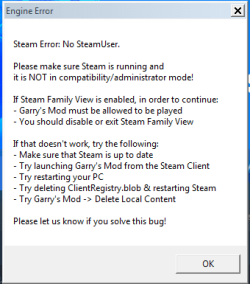
ThumpieBunnyEve if you can play "new" games on steam that get updates, i need help as every new game i have show this message
image.png

i dont have the latest version of steam but i want to stop this message showing and play

- - - Updated - - -

Oh wait nevermind, this does not work on Other games
only from Valve games that get updates
 

My Computers My Computers

  • At a glance

    Windows 7 Ultimate x64Intel Core I5 7th gen6gb RAMAXELAMD Radeon (TM) 530 and intergrated Intel(R) ...
    Computer type
    Laptop
    Computer Manufacturer/Model Number
    Lenovo IdeaPad 320
    OS
    Windows 7 Ultimate x64
    CPU
    Intel Core I5 7th gen
    Memory
    6gb RAMAXEL
    Graphics Card(s)
    AMD Radeon (TM) 530 and intergrated Intel(R) HD Graphics 620
    Hard Drives
    ST1000LM035 Sea gate Mobile HDD 1TB
    Antivirus
    AVG Anti virus
    Browser
    Google Chrome
  • Computer type
    PC/Desktop
    Antivirus
    AVG anti virus
check your personal messages here on the sevenforums scout, and we'll see what we can work out together.

- - - Updated - - -

I just learned about this, making upgrade from 7, for steam, to 10/11 impossible for current 7 users who Must upgrade to keep using steam on their sys...
Microsoft Kills Free Windows 7 to Windows 11 Upgrade Option | PCMag
short of it is, microsoft won't let you upgrade from 7 to -anything- any more.

Clearly they - H A T E - the power and freedom they offered 7 users, even though the 7-disk itself came with malware-and-spyware, it wasn't Nearly as much of it as they wanted to inject for control over their revenue.

Anytime there is a push -this- hard to change its because the SUS corporate reason has yet to be revealed.

In this case its likely subscription os model for 12, and im sure with all the licencing agreements for 10/11, that the subscription model will drag in the 10 and 11 users like chained slaves to 12. I just dread to think softwares and websites will get a 'break' or even 'paid' to do things like prevent windows7 users from viewing or doing transactions under the guise of "security" concerns. Losing steam, is a big one, but its just the hard front edge of the storm.

Atlas OS, and Linux, is the only super-user way forward.
 

My Computers My Computers

  • At a glance

    Windows 7 Ultimate x64i7 990x48GB DDR3 RAM @1600MHZ 9-9-9-24 CL9Sea Hawk NVIDIA GeForce GTX 1080 HD
    Computer type
    PC/Desktop
    Computer Manufacturer/Model Number
    Custom
    OS
    Windows 7 Ultimate x64
    CPU
    i7 990x
    Motherboard
    ASUS E6356_P6X58-E_Pro
    Memory
    48GB DDR3 RAM @1600MHZ 9-9-9-24 CL9
    Graphics Card(s)
    Sea Hawk NVIDIA GeForce GTX 1080 HD
    Hard Drives
    YES
    Antivirus
    NotTelling
    Browser
    Varies
  • Computer type
    PC/Desktop
@ThumpieBunnyEve
Forget about the game problem i have with "garry's mod"
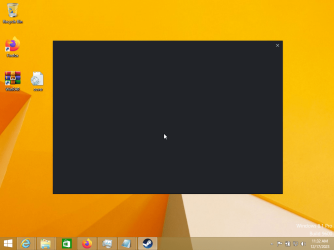
I got a problem for the steam version i have for windows 8.1, it only works for windows 7 but for windows 8 or 8.1 it shows this gray screen when opening the app
From my research they found a fix for linux users but for windows 8.1 i am not sure
VirtualBox_Windows 8.1 (Operation 8.1 on steam)_17_12_2023_23_32_10.png
Hopefully you have a fix for this
 

My Computers My Computers

  • At a glance

    Windows 7 Ultimate x64Intel Core I5 7th gen6gb RAMAXELAMD Radeon (TM) 530 and intergrated Intel(R) ...
    Computer type
    Laptop
    Computer Manufacturer/Model Number
    Lenovo IdeaPad 320
    OS
    Windows 7 Ultimate x64
    CPU
    Intel Core I5 7th gen
    Memory
    6gb RAMAXEL
    Graphics Card(s)
    AMD Radeon (TM) 530 and intergrated Intel(R) HD Graphics 620
    Hard Drives
    ST1000LM035 Sea gate Mobile HDD 1TB
    Antivirus
    AVG Anti virus
    Browser
    Google Chrome
  • Computer type
    PC/Desktop
    Antivirus
    AVG anti virus
i don't have test versions of win8.# to experiment with, but my guess is that is the chromium problem, with it being out of date and such, that steam warned would be the case when support drops for win 7/8 in 2024.
The http elements of that window are not loading. can you directly run a game if you double click a link to a game from your desktop?

I advise also blocking ports related to steam, which i mention up at the beginning of the OP. this way if things request an update from the steam network or try to fetch an update, it just times out and no downloads happen unbenounced to you, sneakily waiting till you next startup steam again. If you don't block the ports, steam does and will, try to fetch the updates to the steam client and apply them on next restart of steam.

Im not saying block all the downloads for the games. JUST and only the sites related to the steam client software updates. One of my early posts in this thread mention a bunch of sites to block using your c:/windows/system32/drivers/etc/hosts file. I haven't done great at narrowing the list honestly. not all of what i posted needs to be blocked, but i don't know which ones relate to just the steam client updating. so i blanket-blocked a bunch and haven't had an update come through since march 24'th 2023.
 

My Computers My Computers

  • At a glance

    Windows 7 Ultimate x64i7 990x48GB DDR3 RAM @1600MHZ 9-9-9-24 CL9Sea Hawk NVIDIA GeForce GTX 1080 HD
    Computer type
    PC/Desktop
    Computer Manufacturer/Model Number
    Custom
    OS
    Windows 7 Ultimate x64
    CPU
    i7 990x
    Motherboard
    ASUS E6356_P6X58-E_Pro
    Memory
    48GB DDR3 RAM @1600MHZ 9-9-9-24 CL9
    Graphics Card(s)
    Sea Hawk NVIDIA GeForce GTX 1080 HD
    Hard Drives
    YES
    Antivirus
    NotTelling
    Browser
    Varies
  • Computer type
    PC/Desktop
The curious thing is that Steam on Windows 7 still works properly for me, and even receives updates.
I am subscribed to the "Steam Beta Update" program, and beta updates come regularly, I don't know now if the final version has been locked, however, the Beta versions still seem to work for Windows 7.
I wouldn't be surprised if Valve made all this falsehood to scare users to upgrade to windows 10/11.
 

My Computers My Computers

  • At a glance

    Windows 7 Ultimate x646 GB RAM DDR2Nvidia GT 1030
    Computer type
    PC/Desktop
    Computer Manufacturer/Model Number
    OEM
    OS
    Windows 7 Ultimate x64
    Memory
    6 GB RAM DDR2
    Graphics Card(s)
    Nvidia GT 1030
    Hard Drives
    500 GB
    500 GB
    Antivirus
    Microsoft security essentials
    Browser
    Microsoft Edge
  • Computer type
    PC/Desktop
    Antivirus
    Microsoft Security Essentials
checking in on that. hi Scoob!
Yes despite the Scare-Tactics steam used, Steam-Client is working for me too on the latest version. FOR NOW.

I have however included the no-update lines in my steam config file. Valve decided in "Official posts" to indicate they would do nothing beyond 'stop making updates for windows 7" this is in line with XP, and Vista EoL, but they sure didn't do anything to ease the nerves of all those whom they made panic with that countdown and its wording... The scare seemed quite deliberate as they could have altered it at any time to be a link rather then a warning banner that "Steam will stop working on windows 7 in # days". Valve, is what stopped working on windows 7 .... in their Dev office. not Steam.

Im quite sick of the scare-ware, Out of Support, does not mean Unsafe, or Does Not Work.

Anyway for now, I've got the December 19'st version of steam, and i made a backup of it on wayback machine ( Wayback Machine )

As for that config file i mentioned, C:\Program Files (x86)\Steam\steam.cfg has the line
BootStrapperInhibitAll=enable

which actually disables steam (Client) updates. my windows 7 has the SHA or whatever its called, KB update, which i installed for NoMansSky quite a long time ago.

Hopefully all will continue to operate indefinitely. But if Steam client for some reason changes communication security, or our .acf keys have to update to, i don't know, a 512 bit key or something silly like that... Then access could still fall into "offline mode only". For -now- Friends List works. And that is -usually- the first thing to stop working when they dick about with updates.

Its why i keep various versions of steam backed up on my pc, so i have plenty i can go back to and muck with, hoping there remains some legacy support some where to fall back on. We will see how it goes when everyone is forced into windows12-subscriptions automatically through "updates". "Updates" are the new gen swear words.

The real hell, will begin when individual game developers, comfortable with Valves abandonment of 7, start updating their own Games to exclusively remove support for windows 7. Then your at the mercy of writing each dev with a game you play, to ask them to please put up a "last known working beta" of that game so you can opt in and continue playing. (Unless you live in Offline mode for the rest of time, in which updates don't matter)

I've a 16TB hdd with copies of all my installed game folders. And there is some janky stuff you can do, to trick Online mode steam into not updating games.
Firstly is alter ALL your appmanifest_#####.acf files (the ones for games), (yours are likely in C:\Program Files (x86)\Steam\\steamapps\ ) changing
"AutoUpdateBehavior" "#"
to
"AutoUpdateBehavior" "1"

This will set them all to "Update on launch" instead of trying to fetch updates regularly. Then once you launch a game, you can wait till the download is complete, and copy paste in your game into the folder from your backup drive. the appmanafest file will have its update, but your game folder ocntent won't actually be updated. .... pretty wasteful measure really.. but its 'a way' to preserve your current working game version when said game stops running thanks to 'forced updates'.

I used notepad++ to set all the variables mentioned above, it was tedious... I've 1238 games! But there are some other apps like FAR which can edit all the files at once (If you set the setting to allow editing of all files in its settings, as its kinda designed for only 1 file type by default) FAR - Find And Replace download | SourceForge.net
you'll need to poke at it a little as im not writing a tutorial for it. I just wish i had learned about FAR before using notepad++ to waste my time doing the same X_X;


anyway heres a great reference https://blog.lightwo.net/steam-client-downgrades-survival-kit.html
lightwo made a great survival guide bringing a lot of data together.
great guy, annnd a linux user.

He recommends if you _MUST_ upgrade away from win7, its in your best interest to migrate over to Linux, and after long discussion,

i agree. Though there is Atlas OS as an alternative ( AtlasOS - An optimized modification of Windows, designed for gamers. ) its still a windows 11, which requires a windows 11 purchase. And i really don't want to give M$ any more money. They do all the wrong things with it. A note to other readers, Windows 7/8 is outside the Upgrade window now, so you cant get a 'free upgrade' from a 7/8 os any more.

And really you probably shouldn't. upgrading from one os to another seldom ever went well even from xp to 7. it was always always more safe to just get your key and reformat rather then actually 'upgrade'. Upgrading bricked more devices then i care to fetch info on. My tablet is one of them.

according to Lightwo, put linux on stuff. Linux Mint is a good distro for windows users, its updated less often then Ubuntu, as Ubuntu is updated so often it can feel unstable. Then use wine or other win-emulator for your windows 7/8/10/Atlas OS instillation's going forward this is truly the only way to maintain the best stability and resist the erosion of ownership that companies are obsessed over.

Anyway, anyone who visits here, feel free to ask (on topic) questions about how to set up or what to do. We all just have each other now to rely on. Guru's lead the way!

 

My Computers My Computers

  • At a glance

    Windows 7 Ultimate x64i7 990x48GB DDR3 RAM @1600MHZ 9-9-9-24 CL9Sea Hawk NVIDIA GeForce GTX 1080 HD
    Computer type
    PC/Desktop
    Computer Manufacturer/Model Number
    Custom
    OS
    Windows 7 Ultimate x64
    CPU
    i7 990x
    Motherboard
    ASUS E6356_P6X58-E_Pro
    Memory
    48GB DDR3 RAM @1600MHZ 9-9-9-24 CL9
    Graphics Card(s)
    Sea Hawk NVIDIA GeForce GTX 1080 HD
    Hard Drives
    YES
    Antivirus
    NotTelling
    Browser
    Varies
  • Computer type
    PC/Desktop
Yes it has to be said that valve played quite dirty this time, giving a false end of support apparently, for now yes, the latest builds seem to work properly even on Windows 7 and 8.1, do any of you happen to know if it is possible to remove the red writing "steam will no longer work with windows 7 in 0 days", besides making me laugh XD it also annoys.
 

My Computers My Computers

  • At a glance

    Windows 7 Ultimate x646 GB RAM DDR2Nvidia GT 1030
    Computer type
    PC/Desktop
    Computer Manufacturer/Model Number
    OEM
    OS
    Windows 7 Ultimate x64
    Memory
    6 GB RAM DDR2
    Graphics Card(s)
    Nvidia GT 1030
    Hard Drives
    500 GB
    500 GB
    Antivirus
    Microsoft security essentials
    Browser
    Microsoft Edge
  • Computer type
    PC/Desktop
    Antivirus
    Microsoft Security Essentials
I'm out of town for 3 h. More, but your answer is yes. Ill teach how when home, its a start peramiter fir steam. -pretendos-w10. Or somthimng like that, google it, ill answer more precicely clearly when I get home

- - - Updated - - -

ok so my shortcut to launch steam without the banner, is

Code:
[SIZE=3][B]%steamRoot%\Steam\Steam.exe -console -pretendeol-w10[/B][/SIZE]

-pretendeol-w10 causes steam to launch pretending its End Of Life is for windows 10, which at this time, is not a set var for steam client. they planned to introduce a var for that, some time nearer to oct. 2025.
 

My Computers My Computers

  • At a glance

    Windows 7 Ultimate x64i7 990x48GB DDR3 RAM @1600MHZ 9-9-9-24 CL9Sea Hawk NVIDIA GeForce GTX 1080 HD
    Computer type
    PC/Desktop
    Computer Manufacturer/Model Number
    Custom
    OS
    Windows 7 Ultimate x64
    CPU
    i7 990x
    Motherboard
    ASUS E6356_P6X58-E_Pro
    Memory
    48GB DDR3 RAM @1600MHZ 9-9-9-24 CL9
    Graphics Card(s)
    Sea Hawk NVIDIA GeForce GTX 1080 HD
    Hard Drives
    YES
    Antivirus
    NotTelling
    Browser
    Varies
  • Computer type
    PC/Desktop
I tried starting steam this way and the annoying banner disappeared, thank you!
 

My Computers My Computers

  • At a glance

    Windows 7 Ultimate x646 GB RAM DDR2Nvidia GT 1030
    Computer type
    PC/Desktop
    Computer Manufacturer/Model Number
    OEM
    OS
    Windows 7 Ultimate x64
    Memory
    6 GB RAM DDR2
    Graphics Card(s)
    Nvidia GT 1030
    Hard Drives
    500 GB
    500 GB
    Antivirus
    Microsoft security essentials
    Browser
    Microsoft Edge
  • Computer type
    PC/Desktop
    Antivirus
    Microsoft Security Essentials
The curious thing is that Steam on Windows 7 still works properly for me, and even receives updates.

It eventually won't, and it's not a scare tactic. I've already mentioned this before. It's due to Steam using Chromium code for their crap interface. Spoticrap (Spotify) does the same thing and God only knows what other lazy Devs do as well. So Google is in fact calling the shots on what OS YOU can use with their code. No conspiracy theory or tactics involved. It's like the Rockefeller's and the steel tycoons and whatnot of the industrial revolution...

Eventually you simply won't be able to run Steam on Windows 7. And a modern day browser for that matter...

I have tested the aforementioned Atlas OS scripts talked about in this thread with Windows 10 Pro in a virtual machine using VMware Workstation Player and I was very pleasantly surprised. Not only with its capabilities and how the code is constructed, but at getting rid of the sure volume of CRAP from Windows 10! I ran a network sniffer on the VMware NIC (Network InterfaceController) while I installed Winblows 10 and there was just a torrent of telemetry poring out of the network while installing and using Winblows 10 prior to running the Atlas 10 playbook install mechanism. Of course I ran everything through a VPN. After Atlas OS did its clean up job and I rebooted, the telemetry was gone! Zero, zilch, it was just ^&%!@* gone! Not only that, but all that Ad crap and whatnot in the start menu was gone as well and now gives room for your own damn stuff to be placed in the start menu.

Atlas OS does deactivate Windows updates because an update will just reinstate all that crap right back again (total BS!), but I'm actually a Windows/PC user that doesn't use updates unless it's needed for hardware or software. Besides, when you do install Atlas OS it'll make sure you do have the latest updates. So there's that. Atlas OS does disable System Restore for what ever odd reason. But you can go into System Protection and turn it right back on. I personally like having System Restore as a last ditch effort to help fix a real wrench in the gears that I just can't figure out. It's not often I use it, but on a very rare occasion it's saved me like some bearded dude on a mountain top... :D Other than that, I do make full 1:1 disk clones, but since those are month apart I'd rather try a system restore first.

Atlas OS is for a NEW install of Winblows 10. Don't use it with a current install. And you will need a Winblows 10 license key. There is no hack ISO crap and whatnot here. It's certainly not for everyone, but for this user it's the best thing ever in my opinion. I absolutely REFUSE to use Winblows 10 in its current state. And I have no plans on using 11 anytime soon either. I'm waiting to see how bad 12 will be... LOL! I mean, come on! A MacOS look? Da faq?! At this point Microsoft isn't even trying to suck. They ARE the suck! Damn shame, too. In my opinion XP was a fine OS. It just needed code improvements. But in company like fashion they add crap on top of core code and sell it as a product.

Winblows 10 was designed like a freaking tablet OS and not a PC OS and I can't quite understand that marketing decision. If they (Microsoft) want to go that route, then do I dare say make two OSs? One for PCs and one for the smart device crap? I realize this would be a real PITA, but hey! As a decades long PC user I feel the latest incarnations of the Window OS since 8 has gone down hill bad. And I'm sure as hell not the only one that has this opinion. I've see many people reach my website from Google using the search terms: "why is Windows 10 a piece of shit." I have an old running topic at my website about all the Window 10 suckery. I haven't updated that topic now in sometime though. And it appears Google may be suppressing my search engine results because I have not seen a Google hit to that topic in a long time. Probably because the Bastards are filtering results to show more of Reddit than traditional forums like mine and this website. You Google anything anymore and I'll bet you a box of fine cigars that 90% of the time your first three results will be some Reddit post. That's not a coincidence, it's on purpose and done for a reason. Google owns the search engine and they can show what ever results they so desire. And by this they own the Internet because they can make or break your website. Just another reason why I use Matomo for analytics and refuse to use Google fonts on my website. And they make or break a browser too with web Dev idiots using things like Google Web Components and whatnot which don't work too will in niche alternative browsers like Pale Moon. Some websites are coded so bad you actually have to use Chrome. The website functionality simply wouldn't work in Firefox. Only Chrome. That's absolutely ridiculous.

Anyway, there's a lot, and I mean a lot of bullshit shenanigans going around these days. My personal picks are of the following: big league tech companies, big Pharma, rich punks, politicians and the media companies. All collude with one another to control us all in one facet or another. It's not even about money anymore at this point. We're far and away from that. For some reason all bipedal chimps want money, power and control. It's like built into our BS DNA. And their geneticists know it, too! The sick bastards are right now hard at work trying to figure out how to make a DNA weapon that can eradicate certain people, races, et cetera. That's how far and away this grotesque malevolent crap is. You wonder why the world is such a shithole. Just ask George Carlin. Truth is stranger than fiction and art does have an uncanny ability to imitate reality.

Anyway, I yield back the balance of my time.
 

My Computer My Computer

At a glance

Windows 7 Ultimate x64
Computer type
PC/Desktop
OS
Windows 7 Ultimate x64
@F22 Simpilot

You all the way through, are right about it all in your above post. but you dip a bunch rant'y-conspiracy'esque at the end there. lets not give readers reason to think we are a bunch of paranoid jaded users afraid of change. WE ARE, but they use it to discredit us. I think it best if we just stick to reporting our software related findings, tweaks, fixes, so those who want to preserve or alter their experiences can do so succinctly without manditory enlightenment to the jade and scars we long term users have endured to get here.

Yes the corporate paradigm should be resisted, protested, and changed. But people who are already learned in such strife are those who come here. Preaching to the choir just slows down any good they could be doing with that time. A little bit is okay to remind viewers and enlighten, but, you kinda made it half your post. X_X; Yes Microsoft and Chrome are 100% diabolical in their efforts to control the cyberscape it is true but if anything, try to stick to what we can DO about it, more then re-illustrating what even modern people living under a rock are on their own being forced to realize. I was a bit too rant-y in some of my earlier posts in this thread myself. Lets focus on how we the pioneers will fix it for other pilgrims coming to explore this path in their futures.

Im super excited to hear that Atlas OS is in fact the right path to take! I have -not yet- followed its scripts to modify win10 or 11, that info you provided about the no-telemetry, was GREAT NEWS! thank you for that tidbit! and good warnings about the update situation too. I have "heard" that it disables restore points, because core elements of system restore request access to programs that are effected by the script labotomy of win10/11.

This was in fact true for my Original "Windows10 AME" install i did back in i think 2021, on a pc i needed to remote into from across country to maintain. That is what Atlas OS was based off of. its basically the prior version of Atlas OS. and i had to system-file-checker to get programs from the win10 restore disk, onto the system so systemRestore could do its magic. But having restored those files i did not actively 'see' any of the telemetry or anything more then the mtf and system volume information folders get written to more often.

1:1 backups, with robocopy, or folder sync, or disk imaging, or raid. is really the best way.

The "Magic" of system restore is just a copy of the registry, and changes registered with your installed programs lists. and maybe a few EXE's and DLL's in key folders like c:/windows or c:/users/ other places you specify beyond that. It can be useful exactly as you say, but is no protection from drive corruption, and a virulent virus (Who even gets these any more? be more sus of what you DL and open!) will ruin your other softwares on disk or even attack the mainboard of the pc or disk itself. you'll want those full backups in such a case! If you love it, Back It Up! System Restore, is a bandaid, it only works on the surface, and not even on all surfaces. compared to a whole clone body when something goes wrong inside.. Grab an offline duplicator dock. I had to buy this one. Amazon.com (±32$usd External Hard Drive Bay, USB 3.0 to SATA IDE Dual Bay, Dock Offline Clone Support 20TB 6Gbps for 2.5in 3.5in HDD SSD IDE US Plug) as my old star-tech version was only able to handle 10tb drives. To some its costly to clone, and learning to use raid can be cheaper. But it costs SOO much more to drive-recover with some place you have to mail your drives to.... Once i used a company called "300 dollar data recovery" and they did actually recover my data, but the total cost was like 530$ ish, because i had to buy a new drive anyway, and pay shipping back and forth. So if your data is precious... it better be on more then 1 drive! Compressed or imaged or just raw copied!

Anyway, If you learn more useful key points fiddling around with Atlas OS, or how to preserve the use of Steam on win7 rigs, we will be waiting to hear it! ⋆^-^⋆ <3 We are here for each other, and everyone new who comes in to aid the cause of stability with our ageing OS(s)!

Speaking of that, here is the robocopy batch script i use for backing up my ram-drive, I've a different one for actual Shutdown, but its -mostly- the same. my ram-drive is used mostly for a cash of all the things that Constantly write to disk, like chrome portable temp files, 7zip temp files, firefox portable temp files, some of my game and chat browser temp files, my windows swap file, and just basically everything that would wear out SSD ink, or slow down the system from constant HDD arm writes. As well as the occasional steam game of choice so i get the fastest load times. Don't use this straight as is, just get good ideas for your own from it! I Share from my experiences! ⋆^-^⋆

Code:
 @[URL="https://www.sevenforums.com/members/echo.html"]echo[/URL] off

SETLOCAL EnableDelayedExpansion


set src=Z:


set dst=C:\Zb


set log=E:\Za


set ttl=Z-2-Zb


set ymd=%DATE:/=-%


set tim=%TIME::=;%


cd /D "!src!"

for /F %%^" in ("""") do (


  echo %%~" %~nx0 run from %%~" %0, Starting...


)


REM to Escape Echos special chars:  %%  ^^  ^&  ^<  ^>  ^|  ^'  ^`  ^, ^;  ^=  ^(  ^)  [for  !  its  ^^! ]


echo RoboCopy /Mir "!src!"  -^>  "!dst!"  Log@  "!log!\RoboCopy_!ttl!_%ymd%@%tim%.log"


REM skip temp fldrs: ROBOCOPY "!src!" "!dst!" /MIR /A-:SH /TBD /R:5 /W:5 /NP /V /XD "!src!\$RECYCLE.BIN" "!src!\.Trash-1000" "!src!\Temp" "!src!\Tmp" "!src!\System Volume Information" /XF "!src!\swapfile.sys" "!src!\pagefile.sys" >"!log!\RoboCopy_!ttl!_%ymd%@%tim%.log"


ROBOCOPY "!src!" "!dst!" /MIR /A-:SH /TBD /R:5 /W:5 /NP /V /XD "!src!\$RECYCLE.BIN" "!src!\.Trash-1000" "!src!\System Volume Information" /XF "!src!\swapfile.sys" "!src!\pagefile.sys" >"!log!\RoboCopy_!ttl!_%ymd%@%tim%.log"


echo Dir "!dst!" Log@ "!dst!\FolDIR_%ymd%@%tim%.txt"


dir "!dst!" /d /x /s >"!dst!\FolDIR_%ymd%@%tim%.txt"


timeout /T 2 >NUL


echo attrib will be skipped at this time, due to my recurring errors with select files damaged parts of the destination disk.


echo .


echo .


echo .


REM echo attrib  C:\Zb  inprogress...


REM attrib -r -s -h C:\Zb /s /d


REM echo attrib  C:\Zb  Complete.


for /F %%^" in ("""") do (


  echo %%~" %~nx0 run from %%~" %0, Complete.  Exiting in 10 seconds...


)


echo .


echo .


echo .


echo see C:\Windows\System32\GroupPolicy\Machine\Scripts\Shutdown\@ShutdownZ2c-Zb.bat for the robocopy batch backup process that occurs during shutdown.


timeout /T 10 >NUL


exit


---UPDATE----------2025-01-01@01;18EST--------------
Goodmorning 2025!
October 14, 2025 win10 users will be next to learn that Steam no longer supports their OS.
The instructions here in this thread continue to work for windows7 users at this time, but hopfully will be useful to windows 10 users as well in October.

Im still using win7 and steam version:
Steam Client Build Date: Thu, Dec 7 19:36 UTC -08:00
Steam Web Build Date: Fri, Dec 8 18:30 UTC -08:00
Steam API Version: SteamClient021
Find it with wayback or steam cmd. Read through the instructions in this thread or others. And continue to enjoy your games your way without a new os, for as long as you can. GLHF!
 
Last edited:

My Computers My Computers

  • At a glance

    Windows 7 Ultimate x64i7 990x48GB DDR3 RAM @1600MHZ 9-9-9-24 CL9Sea Hawk NVIDIA GeForce GTX 1080 HD
    Computer type
    PC/Desktop
    Computer Manufacturer/Model Number
    Custom
    OS
    Windows 7 Ultimate x64
    CPU
    i7 990x
    Motherboard
    ASUS E6356_P6X58-E_Pro
    Memory
    48GB DDR3 RAM @1600MHZ 9-9-9-24 CL9
    Graphics Card(s)
    Sea Hawk NVIDIA GeForce GTX 1080 HD
    Hard Drives
    YES
    Antivirus
    NotTelling
    Browser
    Varies
  • Computer type
    PC/Desktop
Back
Top