Solved How to fix boot when grub is installed and grub is broken?

sdowney717

New member
Power User
VIP
Local time
8:02 AM
Messages
705
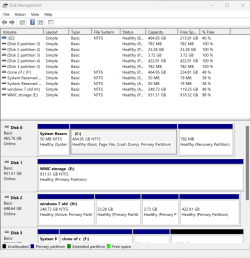
Situation is I have a PC with windows 11 and windows 7 and linux, all on different drives

years ago, a boot drive got corrupted containing grub and at boot it only gives grubrescue> prompt, when that drive is selected in bios to boot from. And that drive with installed grub is my windows 7 hard drive with linix.

I normally boot fine from bios selected drive into win 11.
I can only now get into win 7 when booting from supergrub rescue disc in the usb port and selecting windows 7

There must be a way to fix the boot record in windows 7?
Right now I am in win 7 posting this here

- - - Updated - - -

perhaps easy way is reinstall Mint on one of the partitions
 

My Computer My Computer

At a glance

Windows 7 Ultimate x64
OS
Windows 7 Ultimate x64

I thought of using that before.
I am a little concerned if will it also write grub into all the other 3 drives, as "I dont want that to happen

Currently I can only boot that disk using supergrub disk. But also I plan to look thru this old win7 and see if anything is worth keeping.
I might wipe the disk and install win10 pro as the hardware already uses win 11 pro activated by hardware id


image.png

- - - Updated - - -

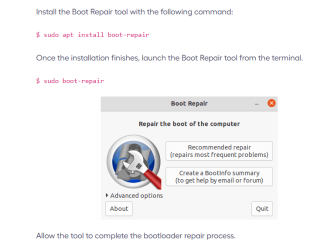
Boot-Repair - Community Help Wiki (ubuntu.com)

does say it can remove grub and restore mbr to windows
Boot-Repair also has advanced options to back up table partitions, back up bootsectors, create a Boot-Info (to get help by email or forum), or change the default repair parameters: configure GRUB, add kernel options (acpi=off ...), purge GRUB, change the default OS, restore a Windows-compatible MBR, repair a broken filesystem, specify the disk where GRUB should be installed, etc.

- - - Updated - - -

may also try this here
How to reinstall GRUB to a different boot drive - Ask Ubuntu
 

My Computer My Computer

At a glance

Windows 7 Ultimate x64
OS
Windows 7 Ultimate x64
By the time you figure out how to solve this with Boot Repair, Grub Rescue etc. , you could have reinstalled mint. what does it take, 20 minutes or so? Take the easy way. Unless you want to learn how to solve these problems.

The best rescue program I have found is Rescatux. It should solve this one way or another. It even can set a new windows password. Very handy.

Rescatux
 

My Computer My Computer

At a glance

Windows 7 x64 SP1AMD Athlon 64 X2 6000+ / 3.0 GHz6 GB
Computer type
PC/Desktop
Computer Manufacturer/Model Number
Gateway GT5656
OS
Windows 7 x64 SP1
CPU
AMD Athlon 64 X2 6000+ / 3.0 GHz
Motherboard
NVIDIA GeForce 6150 SE
Memory
6 GB
Monitor(s) Displays
Lenovo LED
Screen Resolution
1920 X 1080
Hard Drives
Windows on 500 GB spinner; Ubuntu 16 on Sandisk 250GB SSD; Bodhi5 on Samsung 250GB SSD; another old spinner for fooling around.
PSU
Original that came with computer
Keyboard
Logitech wireless
Mouse
Logitech wireless
Antivirus
Microsoft Sec Essentials
Browser
Vivaldi
By the time you figure out how to solve this with Boot Repair, Grub Rescue etc. , you could have reinstalled mint. what does it take, 20 minutes or so? Take the easy way. Unless you want to learn how to solve these problems.

The best rescue program I have found is Rescatux. It should solve this one way or another. It even can set a new windows password. Very handy.

Rescatux
Maybe will try it later.
Yeah, a learning experience, just don't wish to learn the hard way, but this disk has nothing super important
Softwares on it is a history disk sort of, surviving transfers and clones. I have had it long time through several upgrades from earlier windows versions going way back, yet have not viewed contents in a few years.

Because of that, I have kept it as I did not want to go thru it all, been busy.
 

My Computer My Computer

At a glance

Windows 7 Ultimate x64
OS
Windows 7 Ultimate x64
I'm unclear as to your precise configuration. It sounded like you have Widows 11 and mint on the same drive. Best to have dedicated drives, but you certainly can do it the other way. just more potential problems.

I have had it happen that in order to boot an OS, another drive had to be connected. So part of the boot process involved that drive. No idea how that happened. But it did. Also, sometimes when reinstalling, something may be messed-up on the Linux partition. To be sure, it's a good idea to just delete that partition, so you have only Win 11 on that drive. No other partitions. Then just install reinstall Mint, and it should be fine.
 

My Computer My Computer

At a glance

Windows 7 x64 SP1AMD Athlon 64 X2 6000+ / 3.0 GHz6 GB
Computer type
PC/Desktop
Computer Manufacturer/Model Number
Gateway GT5656
OS
Windows 7 x64 SP1
CPU
AMD Athlon 64 X2 6000+ / 3.0 GHz
Motherboard
NVIDIA GeForce 6150 SE
Memory
6 GB
Monitor(s) Displays
Lenovo LED
Screen Resolution
1920 X 1080
Hard Drives
Windows on 500 GB spinner; Ubuntu 16 on Sandisk 250GB SSD; Bodhi5 on Samsung 250GB SSD; another old spinner for fooling around.
PSU
Original that came with computer
Keyboard
Logitech wireless
Mouse
Logitech wireless
Antivirus
Microsoft Sec Essentials
Browser
Vivaldi
I'm unclear as to your precise configuration. It sounded like you have Widows 11 and mint on the same drive. Best to have dedicated drives, but you certainly can do it the other way. just more potential problems.
I have had it happen that in order to boot an OS, another drive had to be connected. So part of the boot process involved that drive. No idea how that happened. But it did. Also, sometimes when reinstalling, something may be messed-up on the Linux partition. To be sure, it's a good idea to just delete that partition, so you have only Win 11 on that drive. No other partitions. Then just install reinstall Mint, and it should be fine.

I have 4 drives, main one win 11 pro
Another drive has win7 ultimate, mint and ubuntu
the other 2 drives are data drives, one for WMC running off win 11 pro, the other a cloned copy on win 11

grub is only installed on disk 2, like to keep it like that

image.png


My Computer My Computer

At a glance

Windows 7 Ultimate x64
OS
Windows 7 Ultimate x64
Another thing to try would be to use Easy BCD, and set it up to recognize the Linux partitions. however, I have a feeling it would not work.
You probably need to reinstall Grub on either the mint or the Ubuntu partition. If that doesn't work, you may need to write a whole new boot sector. I had to do that once. A bit complicated, but I just found a good tutorial and it worked.

This is definitely fixable, you just need to keep trying different approaches until you find one that works. The mint or Ubuntu forums would also be a good way to get advice. I would use the Mint one personally.
 

My Computer My Computer

At a glance

Windows 7 x64 SP1AMD Athlon 64 X2 6000+ / 3.0 GHz6 GB
Computer type
PC/Desktop
Computer Manufacturer/Model Number
Gateway GT5656
OS
Windows 7 x64 SP1
CPU
AMD Athlon 64 X2 6000+ / 3.0 GHz
Motherboard
NVIDIA GeForce 6150 SE
Memory
6 GB
Monitor(s) Displays
Lenovo LED
Screen Resolution
1920 X 1080
Hard Drives
Windows on 500 GB spinner; Ubuntu 16 on Sandisk 250GB SSD; Bodhi5 on Samsung 250GB SSD; another old spinner for fooling around.
PSU
Original that came with computer
Keyboard
Logitech wireless
Mouse
Logitech wireless
Antivirus
Microsoft Sec Essentials
Browser
Vivaldi
Another thing to try would be to use Easy BCD, and set it up to recognize the Linux partitions. however, I have a feeling it would not work.
You probably need to reinstall Grub on either the mint or the Ubuntu partition. If that doesn't work, you may need to write a whole new boot sector. I had to do that once. A bit complicated, but I just found a good tutorial and it worked.

This is definitely fixable, you just need to keep trying different approaches until you find one that works. The mint or Ubuntu forums would also be a good way to get advice. I would use the Mint one personally.
That worked real well....

Cant upload pics here but here are the total fails both programs are that people say fixes all grub issues
and running apt-get failed to get the needed files, they dont exist at zerobounce.net...

Shared album - Scott Downey - Google Photos

Shared album - Scott Downey - Google Photos

- - - Updated - - -

I did reinstall mint finally and that fixed grub
 

My Computer My Computer

At a glance

Windows 7 Ultimate x64
OS
Windows 7 Ultimate x64
Like I said, by the time you try this or that fix, you could have reinstalled Mint. Reinstalling Linux is not a big deal. Reinstalling windows another story!

The various tools to fix grub usually do work. but usually means not always. Your situation was one of the "not-always" ones.
 

My Computer My Computer

At a glance

Windows 7 x64 SP1AMD Athlon 64 X2 6000+ / 3.0 GHz6 GB
Computer type
PC/Desktop
Computer Manufacturer/Model Number
Gateway GT5656
OS
Windows 7 x64 SP1
CPU
AMD Athlon 64 X2 6000+ / 3.0 GHz
Motherboard
NVIDIA GeForce 6150 SE
Memory
6 GB
Monitor(s) Displays
Lenovo LED
Screen Resolution
1920 X 1080
Hard Drives
Windows on 500 GB spinner; Ubuntu 16 on Sandisk 250GB SSD; Bodhi5 on Samsung 250GB SSD; another old spinner for fooling around.
PSU
Original that came with computer
Keyboard
Logitech wireless
Mouse
Logitech wireless
Antivirus
Microsoft Sec Essentials
Browser
Vivaldi
Like I said, by the time you try this or that fix, you could have reinstalled Mint. Reinstalling Linux is not a big deal. Reinstalling windows another story!The various tools to fix grub usually do work. but usually means not always. Your situation was one of the "not-always" ones.

Solved only by a reinstall, not ideal.
And that one program cannot get needed file updates as the website referenced errored the apt get command.
I know win 11 an easy way to reinstall, clone a drive of the same version, home or oem. Put the clone into another PC that already had windows 11 or 10 installed. It boots up as win 11 and is activated after redetecting all hardware. 10 or 11 keys for now MS considers the same and activation is dependent on hardware ID, not software based in the OS
.
Worked for me from an AMD desktop to an Intel Dell laptop. And all the installed programs are ready to go on the changed hardware.
And it is pretty quick for windows to be back up and running.
 

My Computer My Computer

At a glance

Windows 7 Ultimate x64
OS
Windows 7 Ultimate x64
Solved only by a reinstall, not ideal.
And that one program cannot get needed file updates as the website referenced errored the apt get command.
I know win 11 an easy way to reinstall, clone a drive of the same version, home or oem. Put the clone into another PC that already had windows 11 or 10 installed. It boots up as win 11 and is activated after redetecting all hardware. 10 or 11 keys for now MS considers the same and activation is dependent on hardware ID, not software based in the OS
.
Worked for me from an AMD desktop to an Intel Dell laptop. And all the installed programs are ready to go on the changed hardware.
And it is pretty quick for windows to be back up and running.
That's pretty cool! Something like it is s possible on Linux. you just make a system image with, for example, Clonezilla, which can then be restored. Done it many times, but that method you described is very nifty.
 

My Computer My Computer

At a glance

Windows 7 x64 SP1AMD Athlon 64 X2 6000+ / 3.0 GHz6 GB
Computer type
PC/Desktop
Computer Manufacturer/Model Number
Gateway GT5656
OS
Windows 7 x64 SP1
CPU
AMD Athlon 64 X2 6000+ / 3.0 GHz
Motherboard
NVIDIA GeForce 6150 SE
Memory
6 GB
Monitor(s) Displays
Lenovo LED
Screen Resolution
1920 X 1080
Hard Drives
Windows on 500 GB spinner; Ubuntu 16 on Sandisk 250GB SSD; Bodhi5 on Samsung 250GB SSD; another old spinner for fooling around.
PSU
Original that came with computer
Keyboard
Logitech wireless
Mouse
Logitech wireless
Antivirus
Microsoft Sec Essentials
Browser
Vivaldi
Back
Top