Solved Brave Browser Help

LevelBest

New member
Member
VIP
Local time
4:04 PM
Messages
268
I've recently downloaded Brave as an alternative to Chrome which I want to uninstall at some point. I really like Brave and it runs smoothly. There are two things that I'm trying to do: does anyone have the line to delete in the registry to get rid of the reminder about 'to get future updates you'll need windows 10.'

Secondly, the only thing Brave won't do is let me download a video from Youtube. I can't seem to find another browser that does this, Citrio takes me to a broken link page. Anyone know of a suitable browser for a laptop that can do this (apart from Chrome, Edge or Firefox).
 

My Computer

Computer type
Laptop
Computer Manufacturer/Model Number
Samsung S3511
OS
Windows 7 Home Premium 64 Bit (Service Pack 1)
CPU
Premium Dual Core P6200
Motherboard
Samsung S3511
Memory
4 GB
Graphics Card(s)
Intel (R) HD Graphic
Sound Card
Realtek High Definition Audio
Screen Resolution
1366 x 768
Hard Drives
C: D: E: (NTFS)
Cooling
Drive temperature: 38 / 100
Mouse
Wired Logitech B100
Antivirus
McAfee Total Protection
Browser
Supermium Portable and r3dfox
Winaero Tweaker can disable the upgrade warnings or you should be able to google the specific reg entries pretty easily.
Browsers are usually pretty flaky for downloading YouTube videos and the addons made for it usually are bad or don't work. Use something like Jdownloader 2 or ytdlp there is several apps that are good, those 2 work well,

Winaero Tweaker
There is a rouge hit for winareao that is ranked number 1 in the search engines, That is the real program

Sorry i am assuming that you mean the windows warnings, if brave has warnings then i have no idea not familiar with Brave.
 

My Computers

System One System Two

  • OS
    10
  • Computer type
    PC/Desktop
Thanks, I'll have a look at the video downloaders.

Yes, it is the windows 10 warning in the Brave browser I am trying to get rid of. "To get future Brave updates you'll need Windows 10 or later". I have seen a lot of discussions about getting rid of this by deleting a registry key but not the specific line for Brave or where it actually is in the registry.
 

My Computer

Computer type
Laptop
Computer Manufacturer/Model Number
Samsung S3511
OS
Windows 7 Home Premium 64 Bit (Service Pack 1)
CPU
Premium Dual Core P6200
Motherboard
Samsung S3511
Memory
4 GB
Graphics Card(s)
Intel (R) HD Graphic
Sound Card
Realtek High Definition Audio
Screen Resolution
1366 x 768
Hard Drives
C: D: E: (NTFS)
Cooling
Drive temperature: 38 / 100
Mouse
Wired Logitech B100
Antivirus
McAfee Total Protection
Browser
Supermium Portable and r3dfox
it is the windows 10 warning in the Brave browser I am trying to get rid of. "To get future Brave updates you'll need Windows 10 or later". I have seen a lot of discussions about getting rid of this by deleting a registry key but not the specific line for Brave or where it actually is in the registry.

; for Google Chrome
[HKEY_LOCAL_MACHINE\SOFTWARE\Policies\Google\Chrome]
"SuppressUnsupportedOSWarning"=dword:00000001

; for Brave
[HKEY_LOCAL_MACHINE\SOFTWARE\Policies\BraveSoftware\Brave]
"SuppressUnsupportedOSWarning"=dword:00000001
 

My Computer

Computer type
PC/Desktop
Computer Manufacturer/Model Number
Dell Optiplex 7050
OS
Windows 7/8.1/10 multiboot
CPU
Intel Core i7-7700
Motherboard
Dell, Intel Q270 chipset
Memory
48GB (2x16GB Crucial DDR4-3200 + 2x8GB Hynix DDR4-2400)
Graphics Card(s)
Intel HD630 + AMD Radeon R7 450 PCIe
Monitor(s) Displays
Asus VC279 (27")
Screen Resolution
1920x1080
Hard Drives
Toshiba M.2 NVMe (256GB),
Samsung 960 Evo (500GB),
WD Red Plus 80EFBX (8TB)
There are issues with the latest version of brave for 7 that they won't fix. You might want to read this thread: I'm unable to install Brave

There is another Chromium based fork being developed with support for 7 that is updated. You might want to look into it. Supermium 121 - Updated Chromium browser for Windows 7

Google some time ago blocked downloading from youtube. You can only do so with browser plugins (already mentioned).
 

My Computers

System One System Two

Yeah I agree I wouldn't even bother with brave focus a browser that is actually targeting windows 7 there is a few or use one that has a LTS version.
 

My Computers

System One System Two

  • OS
    10
  • Computer type
    PC/Desktop
; for Brave
[HKEY_LOCAL_MACHINE\SOFTWARE\Policies\BraveSoftware\Brave]
"SuppressUnsupportedOSWarning"=dword:00000001[/QUOTE]

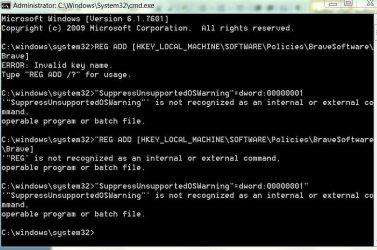
Thank you. I am trying to run this from the command line but something's not working. I've attached a screenshot of the error messages.

[FONT=&quot]I was able to install Brave easily and to be honest, given the trouble I had with Firefox and a few other browsers, Brave is working like a dream and my laptop seems happier running it. I will need a second browser at some point, so I will look into the Chromium browser.[/FONT]
 

Attachments

  • Capture reg message.JPG
    Capture reg message.JPG
    96.7 KB · Views: 0

My Computer

Computer type
Laptop
Computer Manufacturer/Model Number
Samsung S3511
OS
Windows 7 Home Premium 64 Bit (Service Pack 1)
CPU
Premium Dual Core P6200
Motherboard
Samsung S3511
Memory
4 GB
Graphics Card(s)
Intel (R) HD Graphic
Sound Card
Realtek High Definition Audio
Screen Resolution
1366 x 768
Hard Drives
C: D: E: (NTFS)
Cooling
Drive temperature: 38 / 100
Mouse
Wired Logitech B100
Antivirus
McAfee Total Protection
Browser
Supermium Portable and r3dfox
Please read this thread if you really want to get rid of that browser notification:

https://www.sevenforums.com/browser...notification-microsoft-edge.html?#post3517276

Forget browser extensions, this is a tiny, portable app I have been using for years to download Youtube videos. No ads, malware or other garbage.

Enjoy new opportunities! - 3DYD Soft

You should try an updated browser since Brave stopped supporting Windows 7. Here's another updated Windows 7 Chromium browser.

Releases . Alex313031/thorium-legacy . GitHub
 

My Computer

Computer type
PC/Desktop
OS
Windows 7 Pro x64
does anyone have the line to delete in the registry to get rid of the reminder about 'to get future updates you'll need windows 10.'

[HKEY_LOCAL_MACHINE\SOFTWARE\Policies\BraveSoftware\Brave]
"SuppressUnsupportedOSWarning"=dword:00000001

I am trying to run this from the command line but something's not working.

Those aren't commands to enter from the command line. From your first post, I thought you were familiar with working in the regedit console, so my post gave you the registry key name and value you need to add while in the console.

If you're not comfortable mucking around in regedit, you can automate it by using notepad to copy/paste the following lines into a plain text file, and naming it brave.reg (make sure to change the filename extension from .txt to .reg). Then double-click the brave.reg file and Windows should automatically add it the proper place in your registry.

Code:
Windows Registry Editor Version 5.00

[HKEY_LOCAL_MACHINE\SOFTWARE\Policies\BraveSoftware\Brave]
"SuppressUnsupportedOSWarning"=dword:00000001
 

My Computer

Computer type
PC/Desktop
Computer Manufacturer/Model Number
Dell Optiplex 7050
OS
Windows 7/8.1/10 multiboot
CPU
Intel Core i7-7700
Motherboard
Dell, Intel Q270 chipset
Memory
48GB (2x16GB Crucial DDR4-3200 + 2x8GB Hynix DDR4-2400)
Graphics Card(s)
Intel HD630 + AMD Radeon R7 450 PCIe
Monitor(s) Displays
Asus VC279 (27")
Screen Resolution
1920x1080
Hard Drives
Toshiba M.2 NVMe (256GB),
Samsung 960 Evo (500GB),
WD Red Plus 80EFBX (8TB)
Thanks, I have read many different threads about this, one of which reported they'd done this successfully from the command line. It did partially work as there was a Brave folder under policies where there wasn't one before. I have since deleted it as it didn't include the line about suppressing the warning. I tried to do this from command line as I don't feel comfortable with registry. I have found notebook (didn't even know it was there!) so will try your suggestion. The only thing that's concerning me is that I have seen different posts stating that Brave does not show under Policies and that is the case with my laptop, it's not there, so I don't know if the MACHINE\SOFTWARE\Policies is the correct command as there is no \BraveSoftware\Brave] software there.
 

My Computer

Computer type
Laptop
Computer Manufacturer/Model Number
Samsung S3511
OS
Windows 7 Home Premium 64 Bit (Service Pack 1)
CPU
Premium Dual Core P6200
Motherboard
Samsung S3511
Memory
4 GB
Graphics Card(s)
Intel (R) HD Graphic
Sound Card
Realtek High Definition Audio
Screen Resolution
1366 x 768
Hard Drives
C: D: E: (NTFS)
Cooling
Drive temperature: 38 / 100
Mouse
Wired Logitech B100
Antivirus
McAfee Total Protection
Browser
Supermium Portable and r3dfox
The only thing that's concerning me is that I have seen different posts stating that Brave does not show under Policies and that is the case with my laptop, it's not there

That's correct. Nothing's there unless you deliberately put it there.

The proof is in the pudding -- add it and then launch your Brave, and see if it suppresses the upgrade nag.
 

My Computer

Computer type
PC/Desktop
Computer Manufacturer/Model Number
Dell Optiplex 7050
OS
Windows 7/8.1/10 multiboot
CPU
Intel Core i7-7700
Motherboard
Dell, Intel Q270 chipset
Memory
48GB (2x16GB Crucial DDR4-3200 + 2x8GB Hynix DDR4-2400)
Graphics Card(s)
Intel HD630 + AMD Radeon R7 450 PCIe
Monitor(s) Displays
Asus VC279 (27")
Screen Resolution
1920x1080
Hard Drives
Toshiba M.2 NVMe (256GB),
Samsung 960 Evo (500GB),
WD Red Plus 80EFBX (8TB)
Thanks, I understand. I'll give it a go over the weekend. I've also been looking at the Supermium Browser and I'm going to download that and give it a test drive. At least that will solve the problem of getting the update issue.
 

My Computer

Computer type
Laptop
Computer Manufacturer/Model Number
Samsung S3511
OS
Windows 7 Home Premium 64 Bit (Service Pack 1)
CPU
Premium Dual Core P6200
Motherboard
Samsung S3511
Memory
4 GB
Graphics Card(s)
Intel (R) HD Graphic
Sound Card
Realtek High Definition Audio
Screen Resolution
1366 x 768
Hard Drives
C: D: E: (NTFS)
Cooling
Drive temperature: 38 / 100
Mouse
Wired Logitech B100
Antivirus
McAfee Total Protection
Browser
Supermium Portable and r3dfox
I've also been looking at the Supermium Browser and I'm going to download that and give it a test drive. At least that will solve the problem of getting the update issue.

Just to make sure we're clear, the "problem" that is solved by the Brave registry edit above is to prevent the "upgrade your OS to Win10" nag banner in Brave. That won't do anything about websites that complain about you using an old OS or browser, which websites will still know from the browser's User-Agent string Brave sends to every website.

The User-Agent string tells websites what browser, browser version, OS, and OS version you're using. Some websites, such as banks and credit card companies, for instance, will use that information to try and bar you from using Win7. To solve this problem, you can add a browser extension like Ray's "User-Agent Switcher and Manager", which tells your browser to fake the OS and browser being reported in the User-Agent string.

Since you're shifting the topic to Supermium, note that Supermium (as well as Thorium, mentioned upthread) address the latter problem by automatically faking the User-Agent string for you, without having to install Ray's extension. Even if you're using Win7, Supermium 122 and Thorium 122 will tell websites you're using Chrome 122 on Win10.

I just wanted to make it clear that the Brave registry edit and the use of Supermium/Thorium 122 are addressing two different problems.
 

My Computer

Computer type
PC/Desktop
Computer Manufacturer/Model Number
Dell Optiplex 7050
OS
Windows 7/8.1/10 multiboot
CPU
Intel Core i7-7700
Motherboard
Dell, Intel Q270 chipset
Memory
48GB (2x16GB Crucial DDR4-3200 + 2x8GB Hynix DDR4-2400)
Graphics Card(s)
Intel HD630 + AMD Radeon R7 450 PCIe
Monitor(s) Displays
Asus VC279 (27")
Screen Resolution
1920x1080
Hard Drives
Toshiba M.2 NVMe (256GB),
Samsung 960 Evo (500GB),
WD Red Plus 80EFBX (8TB)
Thanks for that, I appreciate we're talking two different subjects. I haven't tried the regedit again as I downloaded Supermium this morning as that would enable me to have an up to date browser, and get rid of the W10 nag I downloaded it successfully but noticed it came up with a message to say 'this programme may not have installed correctly and reinstall with recommended settings.' I don't know if that is a standard message that comes up however, it installed OK and I was able to import bookmarks. I was disappointed that it's based on Chrome as I am trying to get away from chrome/google. I can't download youtube videos and after having done a system restore, chrome no longer allows me to do this despite having done it before. I think I unintentionally removed the extension that let me do this. I seemed to have ended up with three browsers, none of which do what I would like. For now supermium is uninstalled until I can do further research. I think a few previous posters put some workarounds for downloading youtube videos so I will revisit. It will have to be a work in progress as this all takes time and back to work tomorrow. Thanks to everyone for their input.
 

My Computer

Computer type
Laptop
Computer Manufacturer/Model Number
Samsung S3511
OS
Windows 7 Home Premium 64 Bit (Service Pack 1)
CPU
Premium Dual Core P6200
Motherboard
Samsung S3511
Memory
4 GB
Graphics Card(s)
Intel (R) HD Graphic
Sound Card
Realtek High Definition Audio
Screen Resolution
1366 x 768
Hard Drives
C: D: E: (NTFS)
Cooling
Drive temperature: 38 / 100
Mouse
Wired Logitech B100
Antivirus
McAfee Total Protection
Browser
Supermium Portable and r3dfox
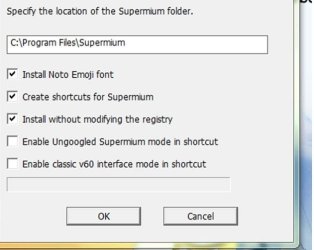
I’m going to reinstall Supermium, however, does anyone know what this means when downloading “ Enable Ungoogled Supermium mode in shortcut.” Would this give me an ungoogled version which looks and acts the same as the normal version?
 

Attachments

  • Supermium.jpg
    Supermium.jpg
    44.4 KB · Views: 32

My Computer

Computer type
Laptop
Computer Manufacturer/Model Number
Samsung S3511
OS
Windows 7 Home Premium 64 Bit (Service Pack 1)
CPU
Premium Dual Core P6200
Motherboard
Samsung S3511
Memory
4 GB
Graphics Card(s)
Intel (R) HD Graphic
Sound Card
Realtek High Definition Audio
Screen Resolution
1366 x 768
Hard Drives
C: D: E: (NTFS)
Cooling
Drive temperature: 38 / 100
Mouse
Wired Logitech B100
Antivirus
McAfee Total Protection
Browser
Supermium Portable and r3dfox
Don't hold me to this but I think that the biggest difference with ungoogled chromium is no google extensions. Read this: Ungoogled Chromium If you want a Firefox based up to date browser go with r3dfox r3dfox, modern Firefox for Windows 7! You still won't be able to download from Youtube directly but there are extensions. Keep in mind Google completely blocked that years ago. As you stated you previously had an extension. Technically I don't think that we can help with that due to the rules.
 

My Computers

System One System Two

Thank you. "The biggest difference with ungoogled chromium is no google extensions." That is just what I'm after although Firefox doesn't agree with my computer. I've created a restore point, made a system image and when I get an opportunity, I'll download Supermium with that 'ungoogled' part ticked and see what happens. I'll update the thread with the results.
 

My Computer

Computer type
Laptop
Computer Manufacturer/Model Number
Samsung S3511
OS
Windows 7 Home Premium 64 Bit (Service Pack 1)
CPU
Premium Dual Core P6200
Motherboard
Samsung S3511
Memory
4 GB
Graphics Card(s)
Intel (R) HD Graphic
Sound Card
Realtek High Definition Audio
Screen Resolution
1366 x 768
Hard Drives
C: D: E: (NTFS)
Cooling
Drive temperature: 38 / 100
Mouse
Wired Logitech B100
Antivirus
McAfee Total Protection
Browser
Supermium Portable and r3dfox
what do you mean Firefox doesn't agree with your computer? You sounded like you didn't like Googled based (chromium). It's now either that or Firefox based (Gecko) unless you have a Mac. r3dfox isn't exactly Firefox but it's close.
 

My Computers

System One System Two

When I installed Firefox I couldn't open WIndows Explorer and generally my computer became sluggish. I saw a few posts about the WE problem but the one and only response I could find from FF was that there was no problem!

Ideally I wanted something that isn't google based/related but I think I can get round it by installing DuckDuckGo search engine which won't track as long as I don't sign into Google which won't be a problem as I don't have a Google account. At least SM will give me an up to date browser without the W10 nag.

Update:
I've installed Supermium, ticking that essential box and I believe I have ungoogled version. I'm not sure how you actively test it but on Chrome on the top right hand side you have 'gmail, images and an icon with all the google apps' - that part is missing on Supermium. Also Google is missing from the search engine options. Just need to run it for a few days to ensure everything works ok.
 
Last edited:

My Computer

Computer type
Laptop
Computer Manufacturer/Model Number
Samsung S3511
OS
Windows 7 Home Premium 64 Bit (Service Pack 1)
CPU
Premium Dual Core P6200
Motherboard
Samsung S3511
Memory
4 GB
Graphics Card(s)
Intel (R) HD Graphic
Sound Card
Realtek High Definition Audio
Screen Resolution
1366 x 768
Hard Drives
C: D: E: (NTFS)
Cooling
Drive temperature: 38 / 100
Mouse
Wired Logitech B100
Antivirus
McAfee Total Protection
Browser
Supermium Portable and r3dfox
Back
Top