
Not able to remove black mark from my laptop screen

Debby

New member
Member
VIP
Local time
12:45 PM
Messages
164
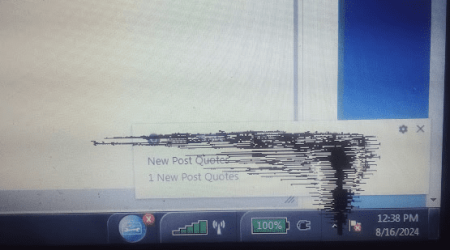
Hi! I'm not able to remove a black mark that is on my computer screen on the lower right corner. It's not dirt or anything. It's been there before I last reinstalled windows 7 and after it. I remember when the mark was created. But I was unable to remove it as I couldn't figure out how to do so. I can't send a picture of it to you as a printscreen picture, as my snipping tool won't copy it, though it successfully copies other things for me. Do you have any idea how to get rid of this black mark? What do you suggest I do to try to remove it? Thanks!
 

My Computer My Computer

At a glance

Windows 7Intel(R) Core(TM)2 Duo CPU T5870 @ 2.00GHzIntel(R) Core(TM)2 Duo CPU T5870 @ 2.00GHzIntel(R) Core(TM)2 Duo CPU T5870 @ 2.00GHz
Computer type
Laptop
Computer Manufacturer/Model Number
HP
OS
Windows 7
CPU
Intel(R) Core(TM)2 Duo CPU T5870 @ 2.00GHz
Motherboard
Intel(R) Core(TM)2 Duo CPU T5870 @ 2.00GHz
Memory
Intel(R) Core(TM)2 Duo CPU T5870 @ 2.00GHz
Graphics Card(s)
Intel(R) Core(TM)2 Duo CPU T5870 @ 2.00GHz
Sound Card
Intel(R) Core(TM)2 Duo CPU T5870 @ 2.00GHz
Monitor(s) Displays
Intel(R) Core(TM)2 Duo CPU T5870 @ 2.00GHz
Screen Resolution
Intel(R) Core(TM)2 Duo CPU T5870 @ 2.00GHz
Hard Drives
Intel(R) Core(TM)2 Duo CPU T5870 @ 2.00GHz
PSU
Intel(R) Core(TM)2 Duo CPU T5870 @ 2.00GHz
Case
Intel(R) Core(TM)2 Duo CPU T5870 @ 2.00GHz
Cooling
Intel(R) Core(TM)2 Duo CPU T5870 @ 2.00GHz
Keyboard
Intel(R) Core(TM)2 Duo CPU T5870 @ 2.00GHz
Mouse
Intel(R) Core(TM)2 Duo CPU T5870 @ 2.00GHz
Internet Speed
Intel(R) Core(TM)2 Duo CPU T5870 @ 2.00GHz
Antivirus
Windows Defender
Browser
Google Chrome
Other Info
Intel(R) Core(TM)2 Duo CPU T5870 @ 2.00GHz
Hi! I'm not able to remove a black mark that is on my computer screen on the lower right corner. It's not dirt or anything. It's been there before I last reinstalled windows 7 and after it. I remember when the mark was created. But I was unable to remove it as I couldn't figure out how to do so. I can't send a picture of it to you as a printscreen picture, as my snipping tool won't copy it, though it successfully copies other things for me. Do you have any idea how to get rid of this black mark? What do you suggest I do to try to remove it? Thanks!
Have you tried using a phone camera to take a picture of your screen?

Have you spayed anything on the screen while trying to clean it. A friend of mine did that and damaged his laptop screen. He could see a black bar about an inch in width on the right side of his screen. Since it was screen his only option was to replace the screen. Since his laptop was really old he used an external monitor and keyboard with his laptop for maybe a year. He then bought a new laptop.

BTW, the actual size and position on any other screen damage depends on exactly where the damage is.
 

My Computers My Computers

  • At a glance

    Windows 7 Home Premium 64-bitsAMD FX-8350GSKILL Ripjaw-X PC3 12800 8GB (2x4GB)ASUS ROG STRIX GTX 1060 6GB
    Computer type
    PC/Desktop
    Computer Manufacturer/Model Number
    Custom build
    OS
    Windows 7 Home Premium 64-bits
    CPU
    AMD FX-8350
    Motherboard
    Gigabyte GA-990FXA-UD3 (AM3+)
    Memory
    GSKILL Ripjaw-X PC3 12800 8GB (2x4GB)
    Graphics Card(s)
    ASUS ROG STRIX GTX 1060 6GB
    Sound Card
    Integrated
    Monitor(s) Displays
    Asus VE228H (21.5-in)
    Screen Resolution
    1920x1080 60Hz
    Hard Drives
    SAMSUNG 870 EVO 2.5 Inch SATA SSD (1TB)
    SAMSUNG 870 EVO 2.5 Inch SATA SSD (1TB)
    SAMSUNG 870 EVO 2.5 Inch SATA SSD (1TB)
    PSU
    Corsair RM750x (750 watts)
    Case
    Corsair Carbide Series 200R
    Cooling
    Corsair Hydro Series H60 (CWCH60)
    Keyboard
    Logitech Elite
    Mouse
    Logitech M510 Wireless Mouse
    Internet Speed
    Comcast Gigabit Extra (1200Mbps down / 35Mbps up)
    Antivirus
    Malwarebytes
    Browser
    Firefox, Edge, Chrome
    Other Info
    ASUS DRW-24B1ST DVD-RW (24X) optical drive
    Seagate Expansion Desk (5TB) external SATA/USB HDD
    Comcast XB8 Internet Gateway
  • At a glance

    Windows 7 Pro (64-bit)AMD Phenom II 960T X4Corsair XMS2 DDR2-800 8GB (4x2GB)ASUS ENGTX560 DCII OC/2DI/1GD5 1GB
    Computer type
    PC/Desktop
    System Manufacturer/Model Number
    Custom
    OS
    Windows 7 Pro (64-bit)
    CPU
    AMD Phenom II 960T X4
    Motherboard
    ASUS M4N82 Deluxe
    Memory
    Corsair XMS2 DDR2-800 8GB (4x2GB)
    Graphics Card(s)
    ASUS ENGTX560 DCII OC/2DI/1GD5 1GB
    Monitor(s) Displays
    Samsung 930B 19-inch LCD
    Screen Resolution
    1280x1024
    Hard Drives
    Samsung SSD 870 EVO 1000 GB (Windows 10)
    Seagate ST1000DM003 1000 GB (Windows 7)
    PSU
    Antec TruePower (new) TP-650
    Case
    Antec Three Hundred
    Cooling
    AMD stock cooler from FX8350
    Mouse
    Logitech M100
    Internet Speed
    Xfinity Gigabit Extra 1200/35 Mbps
No I didn't spray anything on it

Hi! No, I didn't spray anything on it. It happened some time back by directing the laptop pointer to a spot on the screen.

image.png That's what it looks like.
 

My Computer My Computer

At a glance

Windows 7Intel(R) Core(TM)2 Duo CPU T5870 @ 2.00GHzIntel(R) Core(TM)2 Duo CPU T5870 @ 2.00GHzIntel(R) Core(TM)2 Duo CPU T5870 @ 2.00GHz
Computer type
Laptop
Computer Manufacturer/Model Number
HP
OS
Windows 7
CPU
Intel(R) Core(TM)2 Duo CPU T5870 @ 2.00GHz
Motherboard
Intel(R) Core(TM)2 Duo CPU T5870 @ 2.00GHz
Memory
Intel(R) Core(TM)2 Duo CPU T5870 @ 2.00GHz
Graphics Card(s)
Intel(R) Core(TM)2 Duo CPU T5870 @ 2.00GHz
Sound Card
Intel(R) Core(TM)2 Duo CPU T5870 @ 2.00GHz
Monitor(s) Displays
Intel(R) Core(TM)2 Duo CPU T5870 @ 2.00GHz
Screen Resolution
Intel(R) Core(TM)2 Duo CPU T5870 @ 2.00GHz
Hard Drives
Intel(R) Core(TM)2 Duo CPU T5870 @ 2.00GHz
PSU
Intel(R) Core(TM)2 Duo CPU T5870 @ 2.00GHz
Case
Intel(R) Core(TM)2 Duo CPU T5870 @ 2.00GHz
Cooling
Intel(R) Core(TM)2 Duo CPU T5870 @ 2.00GHz
Keyboard
Intel(R) Core(TM)2 Duo CPU T5870 @ 2.00GHz
Mouse
Intel(R) Core(TM)2 Duo CPU T5870 @ 2.00GHz
Internet Speed
Intel(R) Core(TM)2 Duo CPU T5870 @ 2.00GHz
Antivirus
Windows Defender
Browser
Google Chrome
Other Info
Intel(R) Core(TM)2 Duo CPU T5870 @ 2.00GHz
Go into Bios and see if that issue still shows in that area. If it does then its a hardware issue like an actual issue with the screen. If it is not visable and it looks like there is no issue at all when in the bios screen then its probably some issue to do with windows.
 

My Computers My Computers

  • At a glance

    10
    OS
    10
  • Computer type
    PC/Desktop
Hi! No, I didn't spray anything on it. It happened some time back by directing the laptop pointer to a spot on the screen.

​View attachment 423981 That's what it looks like.
Another thing that can cause damage to a laptop screen is putting too much pressure on it. Did you apply any excessive pressure to the screen?
 

My Computers My Computers

  • At a glance

    Windows 7 Home Premium 64-bitsAMD FX-8350GSKILL Ripjaw-X PC3 12800 8GB (2x4GB)ASUS ROG STRIX GTX 1060 6GB
    Computer type
    PC/Desktop
    Computer Manufacturer/Model Number
    Custom build
    OS
    Windows 7 Home Premium 64-bits
    CPU
    AMD FX-8350
    Motherboard
    Gigabyte GA-990FXA-UD3 (AM3+)
    Memory
    GSKILL Ripjaw-X PC3 12800 8GB (2x4GB)
    Graphics Card(s)
    ASUS ROG STRIX GTX 1060 6GB
    Sound Card
    Integrated
    Monitor(s) Displays
    Asus VE228H (21.5-in)
    Screen Resolution
    1920x1080 60Hz
    Hard Drives
    SAMSUNG 870 EVO 2.5 Inch SATA SSD (1TB)
    SAMSUNG 870 EVO 2.5 Inch SATA SSD (1TB)
    SAMSUNG 870 EVO 2.5 Inch SATA SSD (1TB)
    PSU
    Corsair RM750x (750 watts)
    Case
    Corsair Carbide Series 200R
    Cooling
    Corsair Hydro Series H60 (CWCH60)
    Keyboard
    Logitech Elite
    Mouse
    Logitech M510 Wireless Mouse
    Internet Speed
    Comcast Gigabit Extra (1200Mbps down / 35Mbps up)
    Antivirus
    Malwarebytes
    Browser
    Firefox, Edge, Chrome
    Other Info
    ASUS DRW-24B1ST DVD-RW (24X) optical drive
    Seagate Expansion Desk (5TB) external SATA/USB HDD
    Comcast XB8 Internet Gateway
  • At a glance

    Windows 7 Pro (64-bit)AMD Phenom II 960T X4Corsair XMS2 DDR2-800 8GB (4x2GB)ASUS ENGTX560 DCII OC/2DI/1GD5 1GB
    Computer type
    PC/Desktop
    System Manufacturer/Model Number
    Custom
    OS
    Windows 7 Pro (64-bit)
    CPU
    AMD Phenom II 960T X4
    Motherboard
    ASUS M4N82 Deluxe
    Memory
    Corsair XMS2 DDR2-800 8GB (4x2GB)
    Graphics Card(s)
    ASUS ENGTX560 DCII OC/2DI/1GD5 1GB
    Monitor(s) Displays
    Samsung 930B 19-inch LCD
    Screen Resolution
    1280x1024
    Hard Drives
    Samsung SSD 870 EVO 1000 GB (Windows 10)
    Seagate ST1000DM003 1000 GB (Windows 7)
    PSU
    Antec TruePower (new) TP-650
    Case
    Antec Three Hundred
    Cooling
    AMD stock cooler from FX8350
    Mouse
    Logitech M100
    Internet Speed
    Xfinity Gigabit Extra 1200/35 Mbps
Looking at that damage, there is no possibility I can think of that that can't be a graphics driver issue or something hitting your laptop
 

My Computers My Computers

  • At a glance

    Win7
    Computer type
    Laptop
    Computer Manufacturer/Model Number
    Dell Latitude E5430
    OS
    Win7
    Browser
    Vivaldi
  • Computer type
    PC/Desktop
Back
Top