Solved Will New AMD x570 chipset mobos have Win 7 Chipset Drivers?!

Oobe

New member
Local time
5:05 PM
Messages
24
Location
Egypt

My Computer My Computer

At a glance

Windows XP 64-bit SP2FX-8370 (Died) Now: FX-61002 x 8GB Kingston KVR16N11/8manli gtx 960
Computer type
PC/Desktop
Computer Manufacturer/Model Number
Custom
OS
Windows XP 64-bit SP2
CPU
FX-8370 (Died) Now: FX-6100
Motherboard
MSI 970a Sli krait (Died & killed my CPU) Now: Asus M5a87
Memory
2 x 8GB Kingston KVR16N11/8
Graphics Card(s)
manli gtx 960
Sound Card
The Venerable Emu10k Sound Blaster Live! CT4780
Monitor(s) Displays
Dell P2014H IPS Monitor
Screen Resolution
1600 x 900
PSU
S12II 430W 80 PLUS Bronze Certified
Cooling
Covers removed... Leave the Case Opened ;)
Browser
360 Extreme Browser, Brave, Vivaldi, Waterfox, Serpent

My Computer My Computer

At a glance

Windows 7 SP1 Home Premium 64bit [x64]Intel(R) Core(TM) i5-2310 CPU @ 2.90GHz6 GBIntel HD Graphics 2000
Computer type
PC/Desktop
Computer Manufacturer/Model Number
Dell Inspiron 620
OS
Windows 7 SP1 Home Premium 64bit [x64]
CPU
Intel(R) Core(TM) i5-2310 CPU @ 2.90GHz
Memory
6 GB
Graphics Card(s)
Intel HD Graphics 2000
Sound Card
Conexant CX20641 HD Audio
Hard Drives
Western Digital 1TB (1024GB) WD10EALX-759BA1
Internet Speed
Spectrum Cable Internet up to 100Mbps

My Computer My Computer

At a glance

Windows 7 Professional 64bitIntel i7-5960X64GB Corsair Dominator 2400MHz3 EVGA GTX980's
Computer type
PC/Desktop
Computer Manufacturer/Model Number
custom build
OS
Windows 7 Professional 64bit
CPU
Intel i7-5960X
Motherboard
EVGA X99 Classified
Memory
64GB Corsair Dominator 2400MHz
Graphics Card(s)
3 EVGA GTX980's
Sound Card
on board
Monitor(s) Displays
3 Dell E2715H 27"
Screen Resolution
1920x1080 (5760x1080)
Hard Drives
Samsung 950 Pro 1TB M.2 SSD,
Western Digital Black 2TB HDD's x5
Western Digital Black 1TB HDD's x3
PSU
Corsair AX1200i
Case
Corsair 750D
Cooling
Corsair H110i GT
Keyboard
Corsair K70
Mouse
Corsair M45
Internet Speed
250 down/10 up
Antivirus
Microsoft Security Essentials
Browser
IE 11, Google Chrome
Yes AMD says/Have-to-say only win10 is supported, since AMD is a Microsoft Partner...

with Ryzen 3000 you have the same issue you had with Ryzen 1000/2000 on windows 7

Windows 7 lacks Ryzen USB 3.x Drivers, in the case of Ryzen the usb controllers are inside the CPU itself...

The solution was to use a PS/2 Keyboard & to install the chipset drivers which do support Windows 7 (Ryzen 1000/2000) Or Slipstream USB3/nvme/xahci drivers into Win7 ISO b4 installing (using ASUS EZ installer & Gigabytes Windows USB Installation Tool)

ok what about installing a Ryzen 3000 on a B350/X370/B450/X470 motherboard (ofcourse after you update bios)??? again the USB 3.x controllers are inside the CPU but this time, there are NO ryzen3000 drivers for windows7!!! is there a solution???

Here is the answer :p
I '''fixed''' Windows 7 USB support for Matisse / Ryzen 3000 on X370 / X470 (and others too). Here'''s how to do it: : Amd

alright, now what about the Ryzen 3000 + x570 Mobtherboards! on win7???

I have great news for you! it is possible! but the above solution wont work, or may not be enough

Here what you will need:

1. PS/2 Keyboard/Mouse (If your x570 motherboard does NOT have a PS/2 you will need to buy a PCI express x1 to USB 2.0 adapter) there is absolutely no need to use USB3.0 adapter EVEN if you have USB3 installed or slipstreamed! just use USB2 it will 100% work without any drivers... that adapter is cheap ;)

2. after logging into Winows 7 you will need to install the latest AMD Chipset Drivers from AMD's Website
there is a note here! on ASUS website they say this:

Version 1.7.29.0115
2019/08/0249.87 MBytes
AMD Chipset driver
- Fixed Destiny 2 application launch issues.
- Updated AMD Ryzen Balanced power plan
- Update AMD chipset driver 19.10.xx first before update this driver <------- so you may need to install 19.10 before latest one!

3. after installing AMD Chipset Drivers now we need the modded Drivers :p all that was needed is to change the Device id's & it will work flawlessly, any skilled one can do that!
just like installing Mouse Drivers like Logitech's Setpoint Drivers for your non-Logitech mouse which are far superior to windows7 native drivers from 2006!!! both have different id's but it will work flawlessly! (i'll make an article about this later)

Now there is a very kind person from Win-Raid Forums & SMXDIY canonkong who made all this for you ;)

you can download all the modded drivers for Ryzen3000+X570 for Windows7 here
Forum - [Solution] Win7 drivers for USB 3.0/3.1 Controllers of new AMD X570 mainboard.


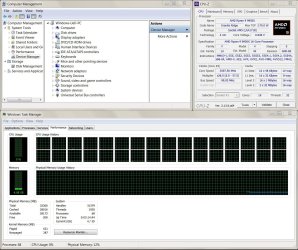
from the picture he shared of what seems to be an x570 motherboard with Ryzen 3700x there are no Yellow (!) marks, which means all hardware/devices are recognized by windows 7
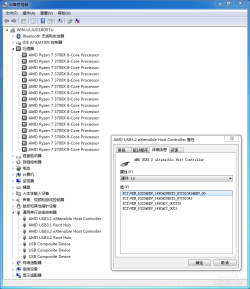
095905er8ndkr6bkzzpp4e.png

Will there be BSODs like those that plagued Ryzen 1000 & Ryzen 2000 at the beginings on win7 & earlier builds of win10, which seem to have been fixed with Bios + Chipset Drivers + later win10 versions
What about win7??? do people still get those PCI BSODs?! i really don't know the answer because i don't have a Ryzen system, It will be my next system & i plan to still use win7!
I have a friend who returned a Ryzen 1000 system & purchased an older intel system because of those frequent BSODs...
I hope it's not the case now...

So, can you u Enjoy the latest Ryzen System capabilities while still using Win7???

I'm very happy to say the answer appears to be yes :)

is it trouble free? no bsods or issues?

I don't know, I hope not! but time will tell, anyone here who purchased a x570 mobo + ryzen 3000 would help us alot by sharing their experience...

 

My Computer My Computer

At a glance

Windows XP 64-bit SP2FX-8370 (Died) Now: FX-61002 x 8GB Kingston KVR16N11/8manli gtx 960
Computer type
PC/Desktop
Computer Manufacturer/Model Number
Custom
OS
Windows XP 64-bit SP2
CPU
FX-8370 (Died) Now: FX-6100
Motherboard
MSI 970a Sli krait (Died & killed my CPU) Now: Asus M5a87
Memory
2 x 8GB Kingston KVR16N11/8
Graphics Card(s)
manli gtx 960
Sound Card
The Venerable Emu10k Sound Blaster Live! CT4780
Monitor(s) Displays
Dell P2014H IPS Monitor
Screen Resolution
1600 x 900
PSU
S12II 430W 80 PLUS Bronze Certified
Cooling
Covers removed... Leave the Case Opened ;)
Browser
360 Extreme Browser, Brave, Vivaldi, Waterfox, Serpent
UPDATE

The AMD Subreddit page i linked above titled:

I 'fixed' Windows 7 USB support for Matisse / Ryzen 3000 on X370 / X470 (and others too). Here's how to do it

Got deleted by the MODs!!!!! & now shows this:

Removed, sorry. Take it up with the mods ¯\_(ツ)_/¯

but don't worry HERE IT IS :D


Posted by u/Boxman90
3 days ago


I 'fixed' Windows 7 USB support for Matisse / Ryzen 3000 on X370 / X470 (and others too). Here's how to do it:

renderTimingPixel.png


News

My Ryzen 9 3900X works fine on Windows 7, however I seemed to have lost all my USB ports on the back of my motherboard since the on-die Matisse USB 3.0 controller is not supported on Windows 7 and has no drivers from AMD.
However, with a bit of hacky-whacky, I managed to get it working by tricking Windows 7 into using the Ryzen 1000/2000 driver anyway. I figured AMD wouldn't have changed the on-die USB controller significantly. It should work on all pre-x570 motherboards, since the controller is standalone and on-die. I'll tell you how to do it, however;
DISCLAIMER: This workaround is at your own risk. I have not extensively tested it except for that it now works and I'm typing this post in Windows 7 on the Matisse USB 3.0 Controller.
Now, without further ado:
Foolproof Matisse Windows 7 USB tutorial:

  • Plug keyboard/mouse in front-usb so you can navigate Windows 7
  • Download the latest AMD Chipset Windows 7 drivers from AMD: www.amd.com/en/support/chipsets/amd-socket-am4/x370
  • Start the installation such that the installer extracts its contents into C:\AMD. You don't need to finish the installation, but it can't do harm either.
  • Browse to C:\AMD\Chipset_Driver_Installer\AMD_Chipset_Drivers\MSIFiles\program files\AMD\Chipset_IODrivers\USBController Driver\Win7\x64 and open 'amdxhc.inf' in notepad.
  • We're going to trick Windows into installing drivers for Ryzen 1- and 2000 for the 3000 series. Find this block:
[AMD.NTamd64]
%AMDXHCI.DeviceDesc% = AMDXHCI, PCI\VEN_1022&DEV_145C
%AMDXHCI.DeviceDesc% = AMDXHCI, PCI\VEN_1022&DEV_15E0
%AMDXHCI.DeviceDesc% = AMDXHCI, PCI\VEN_1022&DEV_15E1
%AMDXHCI.DeviceDesc% = AMDXHCI, PCI\VEN_1022&DEV_145F
  • Change DEV_145C to DEV_149C, resulting in
[AMD.NTamd64]
%AMDXHCI.DeviceDesc% = AMDXHCI, PCI\VEN_1022&DEV_149C
%AMDXHCI.DeviceDesc% = AMDXHCI, PCI\VEN_1022&DEV_15E0
%AMDXHCI.DeviceDesc% = AMDXHCI, PCI\VEN_1022&DEV_15E1
%AMDXHCI.DeviceDesc% = AMDXHCI, PCI\VEN_1022&DEV_145F
  • Go to device manager, right click the unrecognized USB controller "Universal Serial Bus (USB) Controller" and choose "Update driver software"
  • Choose "Browse my computer for driver software"
  • Click "Browse" and direct it to C:\AMD, and make sure to check the checkbox "Include subfolders". It should now search for your modified .inf file. Alternatively, you can direct it all the way to C:\AMD\Chipset_Driver_Installer\AMD_Chipset_Drivers\MSIFiles\program files\AMD\Chipset_IODrivers\USBController Driver\Win7\x64
  • You will be prompted to install the driver software. Choose "Install anyway"
You're done. USB works.


30 CommentsShare
SaveHideReport

84% Upvoted

VIEW ENTIRE DISCUSSION (30 COMMENTS)


doesn't those Mods know?! what goes on the internet, NEVER DIES!!!

HAHAHAA :D
 

My Computer My Computer

At a glance

Windows XP 64-bit SP2FX-8370 (Died) Now: FX-61002 x 8GB Kingston KVR16N11/8manli gtx 960
Computer type
PC/Desktop
Computer Manufacturer/Model Number
Custom
OS
Windows XP 64-bit SP2
CPU
FX-8370 (Died) Now: FX-6100
Motherboard
MSI 970a Sli krait (Died & killed my CPU) Now: Asus M5a87
Memory
2 x 8GB Kingston KVR16N11/8
Graphics Card(s)
manli gtx 960
Sound Card
The Venerable Emu10k Sound Blaster Live! CT4780
Monitor(s) Displays
Dell P2014H IPS Monitor
Screen Resolution
1600 x 900
PSU
S12II 430W 80 PLUS Bronze Certified
Cooling
Covers removed... Leave the Case Opened ;)
Browser
360 Extreme Browser, Brave, Vivaldi, Waterfox, Serpent
Windows 7 on Ryzen 3900x X570 Boards

I found this video, where the guy installs Win7 on the new Ryzen chipset with a 3900x. Seems like he tried it as an experiment, but looks like it worked!

YouTube
 

My Computer My Computer

At a glance

Windows 7
Computer type
PC/Desktop
OS
Windows 7
Ryzen 3900X does work on Windows 7

I have been using Window 7 on a Ryzen 3900X with a MSI x570 Gaming plus motherboard successfully now for about a month and a half. The AMD X470 Windows 7 drivers here https://www.amd.com/en/support/chipsets/amd-socket-am4/x470 work in conjunction with the beta X570 drivers in the description from this YouTube video: YouTube to provide all of the necessary drivers for Windows 7 to operate correctly.

Here are some screenshots:

Ryzen-Device-Manager — imgbb.com

Computer-Properties — imgbb.com

P.S. The Windows Experience Index in the screenshot above was from before I updated my graphics card.
 
Last edited:

My Computer My Computer

At a glance

Windows 7 64 bitRyzen 9950XG.Skill Trident Z5 6000Radeon RX 6650XT
Computer type
PC/Desktop
Computer Manufacturer/Model Number
Custom
OS
Windows 7 64 bit
CPU
Ryzen 9950X
Motherboard
MSI X670E Tomahawk
Memory
G.Skill Trident Z5 6000
Graphics Card(s)
Radeon RX 6650XT
Hard Drives
Aorus 1T

My Computer My Computer

At a glance

windows 7 sp1 x64 ultimate4690k16Gb Hyper X Savage KingstonRadeon 6850
Computer type
PC/Desktop
Computer Manufacturer/Model Number
custom
OS
windows 7 sp1 x64 ultimate
CPU
4690k
Motherboard
Gigabyte Z97X Gaming 5
Memory
16Gb Hyper X Savage Kingston
Graphics Card(s)
Radeon 6850
Sound Card
Asus Xonar DX
Monitor(s) Displays
Benq GW2232
Screen Resolution
1080p
Hard Drives
4Tb HGST HDN724040ALE6400
Sandisk X300>Samsung 850 Evo
WD EARS 2Tb
WD EACS 1Tb
Seagate ST350064 1AS 500Gb
Sandisk Extreme USB 3.0 Flash Drive
Pico USB 2.0 Flash Drive
PSU
Corsair HX850
Case
Antec P180
Cooling
Prolimatec Megahelim
Keyboard
Logitech G15 + Wolfking
Mouse
G6900 Gigabyte
Internet Speed
60Mb/3Mb
Antivirus
Spybot S & D, Spyware Blaster
Browser
Firefox
Other Info
http://www.doomiii.pwp.blueyonder.co.uk/system-spec.html
Thanks Oobe. That worked for me. X570/Ryzen 5

I made the changes to the .inf file and uninstalled the usb host controller device from device manager, scanned for hardware changes and I now appear to have all USB devices working fine.


Windows 7/64 Pro, ASUS Prime X570-P Ryzen 5 3600XT.


I already had a PCI-E Transcend USB3 2 port expansion card in the machine. I plugged a USB 2.0 4 port hub into it with mouse and keyboard into this. That made making the change much easier.


Regards.
 
Last edited:

My Computer My Computer

At a glance

Windows 7 Pro 64 Windows 10 Pro 64 XP 32Ryzen 5 3500XT / 9350 (XP)4*2G Corsair XMS3 @2023 / 16G Corsair V LPX 3...Gigabyte Geforce GTX 970 G1
Computer type
PC/Desktop
Computer Manufacturer/Model Number
custom
OS
Windows 7 Pro 64 Windows 10 Pro 64 XP 32
CPU
Ryzen 5 3500XT / 9350 (XP)
Motherboard
ASUS M5A99X EVO and ASUS 570XT
Memory
4*2G Corsair XMS3 @2023 / 16G Corsair V LPX 3200 DDR4 cl 16
Graphics Card(s)
Gigabyte Geforce GTX 970 G1
Sound Card
Creative X-Fi Titanium PCI-E
Monitor(s) Displays
2* Samsung Syncmaster 2ms 22"
Screen Resolution
1920*1080
Hard Drives
2*Crucial MX500 1Tb SSD
1* OCZ Vertex4 128Gb (XP machine)
1*sata 3 HDD 2 Tb 7200rpm.
Others
PSU
OCZ 1250
Cooling
liquid
Keyboard
Logitech G105
Mouse
Logitech M570
Internet Speed
212/20
Antivirus
Kaspersky Total 2021
Browser
Various
Other Info
Wacom Tablet Pen and touch
Logitech Surround 5.1
Logitech c920 HD cam
Not quite there but pretty good.

I must admit, not everything (USB) works fine. Almost everything seems fine until I get an error (usually a 'data error') or a device inserting and uninserting constantly. I guess the workaround isn't perfect, but has certainly been adequate for me so far. It does depend a lot on which USB socket you plug into. I've not analysed it much yet.
One thing which does concern me is WinPE based boot CD/DVD disks and one linux based CD/DVD can no longer 'recognise' the hardware and fail. I just get black screen and have to reset.
 

My Computer My Computer

At a glance

Windows 7 Pro 64 Windows 10 Pro 64 XP 32Ryzen 5 3500XT / 9350 (XP)4*2G Corsair XMS3 @2023 / 16G Corsair V LPX 3...Gigabyte Geforce GTX 970 G1
Computer type
PC/Desktop
Computer Manufacturer/Model Number
custom
OS
Windows 7 Pro 64 Windows 10 Pro 64 XP 32
CPU
Ryzen 5 3500XT / 9350 (XP)
Motherboard
ASUS M5A99X EVO and ASUS 570XT
Memory
4*2G Corsair XMS3 @2023 / 16G Corsair V LPX 3200 DDR4 cl 16
Graphics Card(s)
Gigabyte Geforce GTX 970 G1
Sound Card
Creative X-Fi Titanium PCI-E
Monitor(s) Displays
2* Samsung Syncmaster 2ms 22"
Screen Resolution
1920*1080
Hard Drives
2*Crucial MX500 1Tb SSD
1* OCZ Vertex4 128Gb (XP machine)
1*sata 3 HDD 2 Tb 7200rpm.
Others
PSU
OCZ 1250
Cooling
liquid
Keyboard
Logitech G105
Mouse
Logitech M570
Internet Speed
212/20
Antivirus
Kaspersky Total 2021
Browser
Various
Other Info
Wacom Tablet Pen and touch
Logitech Surround 5.1
Logitech c920 HD cam

My Computer My Computer

At a glance

Windows 7 64 bitRyzen 9950XG.Skill Trident Z5 6000Radeon RX 6650XT
Computer type
PC/Desktop
Computer Manufacturer/Model Number
Custom
OS
Windows 7 64 bit
CPU
Ryzen 9950X
Motherboard
MSI X670E Tomahawk
Memory
G.Skill Trident Z5 6000
Graphics Card(s)
Radeon RX 6650XT
Hard Drives
Aorus 1T
Thanks for that, very much. Trawling around I've found two archives related to this. 'Ryzen 3000 Serise_149_drivers_for Win7_2019.12.12.7z and AMD_AM$_X399_TRX40_drivers_86_Win7_8.1_SHA256.7z. I'm suspecting the first is the right one, but would like to confirm? It's a bit unfortunate the spelling mistake in the name, but that's life lol.
Kindest regards, and thanks for the heads-up.
Dave.
 

My Computer My Computer

At a glance

Windows 7 Pro 64 Windows 10 Pro 64 XP 32Ryzen 5 3500XT / 9350 (XP)4*2G Corsair XMS3 @2023 / 16G Corsair V LPX 3...Gigabyte Geforce GTX 970 G1
Computer type
PC/Desktop
Computer Manufacturer/Model Number
custom
OS
Windows 7 Pro 64 Windows 10 Pro 64 XP 32
CPU
Ryzen 5 3500XT / 9350 (XP)
Motherboard
ASUS M5A99X EVO and ASUS 570XT
Memory
4*2G Corsair XMS3 @2023 / 16G Corsair V LPX 3200 DDR4 cl 16
Graphics Card(s)
Gigabyte Geforce GTX 970 G1
Sound Card
Creative X-Fi Titanium PCI-E
Monitor(s) Displays
2* Samsung Syncmaster 2ms 22"
Screen Resolution
1920*1080
Hard Drives
2*Crucial MX500 1Tb SSD
1* OCZ Vertex4 128Gb (XP machine)
1*sata 3 HDD 2 Tb 7200rpm.
Others
PSU
OCZ 1250
Cooling
liquid
Keyboard
Logitech G105
Mouse
Logitech M570
Internet Speed
212/20
Antivirus
Kaspersky Total 2021
Browser
Various
Other Info
Wacom Tablet Pen and touch
Logitech Surround 5.1
Logitech c920 HD cam
Yes, Windows 7 works fine on the X570 chips. I've been running it with a Ryzen 3900X since Nov 2019. The reason I'm posting to what is now a very old thread is to let anyone who still runs across these posts know that Windows 7 can be made to work on the new AMD 7000 series processors. Canonkong has modified drivers which allow the use of a 7950X on the MSI MAG B650M Mortar.

https://winraid.level1techs.com/t/s...trollers-of-new-amd-chipset-systems/33603/780
 

My Computer My Computer

At a glance

Windows 7 64 bitRyzen 9950XG.Skill Trident Z5 6000Radeon RX 6650XT
Computer type
PC/Desktop
Computer Manufacturer/Model Number
Custom
OS
Windows 7 64 bit
CPU
Ryzen 9950X
Motherboard
MSI X670E Tomahawk
Memory
G.Skill Trident Z5 6000
Graphics Card(s)
Radeon RX 6650XT
Hard Drives
Aorus 1T
My experience with this:

been using asus prime X370-PRO and ryzen 5 2600 on win7 for a long time. worked perfect.

decided to upgrade to ryzen 5 5600. flashed latest bios and installed.

run into problems with amd usb driver installation.
yellow question mark in device manager and GPU not working/driver crashing at start-up (amd rx 6800).

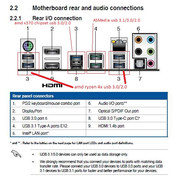
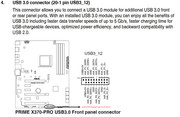
the rest USBs on main-board work without problem. this is what I gathered from my research for this main-board:


it has 3 types of controllers.

I proceeded trying to fix amd usb issue by using driver from winraid page (AMD USB 3.0 Controller & Hub v2.0.0.60 WHQL) and edited .inf like mentioned here in this thread (DEV_145C to DEV_149C). after that I was able to install usb controller without problems.

after testing these 4 ports my conclusion is this:
- seems that only 1 port (of 4 in the back) is working properly. with other 3 I get hangs when copying data to usb stick.
- keyboard and mouse seems to be working properly.
- usb headphones have a problem with crackling sound, when moved to chipset usb port, no problem detected.

pic of the working/not working port (with usb stick data copy):


my question for you is, If I just stop using these 4 ports should that be enough for not experiencing some additional problems down the line aka are these drivers used in some other way by the system/with other devices or something similar?

I would maybe buy additional USB PCIe controller and just use that when needed because for everyday usage the ports I have without these 4 are more than enough (keyboard, mouse, usb headphones, usb cable for mobile and 1 or 2 usb sticks. problem is for 2 usb docks for HDDs I use for wich I need good and stable USB 3.0 speeds so that's why I would maybe get this addition controller.

Another solution I could try is those modded drivers from user canonkong from winraid, but I'm afraid of mentioned BSOD loops and I'm not sure can I just unpack his set of drivers and use only this specific usb controller drivers or I have to use the whole set?

Is there anyone that actually used r5 5600 with this x370 board with win7 successfully?
would I have better luck with r5 3600 or I would face the same issue?

thanks.
 

My Computers My Computers

  • At a glance

    win7
    Computer type
    PC/Desktop
    OS
    win7
  • Computer type
    PC/Desktop
Ask canonkong.
 

My Computers My Computers

  • At a glance

    7 X64i5 84002x8gb 3200mhz
    Computer type
    PC/Desktop
    OS
    7 X64
    CPU
    i5 8400
    Motherboard
    gigabyte b365m ds3h
    Memory
    2x8gb 3200mhz
    Hard Drives
    various
    PSU
    pure power 11 400w cm
    Case
    Coolermaster
    Cooling
    cryorig m9i
  • At a glance

    7x64g54008gb ddr4 2400
    Computer type
    PC/Desktop
    OS
    7x64
    CPU
    g5400
    Motherboard
    ga b365m ds3h
    Memory
    8gb ddr4 2400
    PSU
    xfx pro 450w
Ryzen 9950X on Windows 7

I know this is an old thread, but I thought anyone coming across it might be interested in knowing that Windows 7 can still be installed with the Ryzen 9000 series processors.

I just finished upgrading to a MSI Tomahawk X670E with a 9950X and so far the computer has been as stable as it was with my 3900X.

First the good news:

Windows 7 boots normally and is as fast in Cinebench, Passmark, and OCCT as it is in Windows 10 21H2 LTSC (dual boot).

Major day to day programs still work well: Firefox, VLC Player, Photoshop CS4, HW Monitor, and Macrium Reflect 8.to name a few.

All of items in Device Manager have drivers with the exception of the built in Wi-Fi card (AMD Wi-Fi 6E) which can be disabled in the bios.

And before anyone says about security, Windows 7 is still receiving MS security updates through Jan 2026.

Now the bad news:

Passmark 9 shows much lower memory speeds than Passmark 10 and 11, however Passmark 10 and 11 have extremely low 2D scores (43) which may not be related to Windows 7 at all as a Google search turns up many instances of the very low 2D scores on Windows 10 and 11 as well.

In the newer bios, hardware loading of the CPU no longer uses the traditional method, and instead adopts ACPI0007 so that the CPU no longer appears in Device Manger meaning that programs which rely on that data no longer work, or work incorrectly.

SuperPI freezes (hangs during setup)

Core Temp 1.18.1 can not show idle frequencies correctly.

In summary if a fix can be found for the CPU information not being loaded into Device Manager, Windows 7 should be as fast and reliable as any newer version of Windows on the X670 chipsets with 9000 series processors.

Ryzen 9950X System.JPG
 

My Computer My Computer

At a glance

Windows 7 64 bitRyzen 9950XG.Skill Trident Z5 6000Radeon RX 6650XT
Computer type
PC/Desktop
Computer Manufacturer/Model Number
Custom
OS
Windows 7 64 bit
CPU
Ryzen 9950X
Motherboard
MSI X670E Tomahawk
Memory
G.Skill Trident Z5 6000
Graphics Card(s)
Radeon RX 6650XT
Hard Drives
Aorus 1T
I replaced a ASUS Prime X370-Pro motherboard with a ASUS ROG Strix B550-F Gaming WiFi II one. I replaced the AMD Ryzen 7 3700X CPU with a Ryzen 7 5700X3D one. The new motherboard only had drivers for Windows 10 (64bit) and Windows 11. Windows 7 was not even considered. This motherboard doesn't have a PS/2 port but does have 2 x USB 2.0 ports on the back panel.

I used the ASUS Prime X370-Pro motherboard on another computer to replace its old motherboard/CPU which had failed. The replacement motherboard has an AMD Ryzen 7 1700X CPU. I have a spare Ryzen 7 3700X but I haven't decided whether to use it in this computer. The old computer had dual-boot Windows 10 Pro and Windows 7 Home. This motherboard did had drivers for Windows 7, 8, 8.1, 10 and 11. I didn't realize this would be a problem until after I tried to boot into Windows 7. Since all of the front and back USB ports were USB 3.0 or USB 3.1 neither the keyboard or mouse worked. Like another poster I had to use an old PS/2 keyboard until I could install the chipset driver which added support for USB 3.0. The motherboard did have headers for USB 2.0 ports but I didn't have a spare USB 2.0 bracket. I have since gotten a 4-port USB 2.0 bracket so that will not be a problem in the future. Note the motherboard also has 2 x USB 3.0/3.1 ports but they required a separate Asmedia USB 3.0/3.1 driver.

I have an even older ASUS M4N82 Deluxe motherboard. It has a Phenom II 960T CPU. It is a dual-boot of Windows 10 Home/Windows 7 Pro. This motherboard only has USB 2.0 ports. I installed a PCIe card to add USB 3.0 ports to it. The card includes drivers for Windows XP, Vista and 7.
 

My Computers My Computers

  • At a glance

    Windows 7 Professional 64bit / Windows 10 Hom...AMD FX-8350GSKILL Ripjaw-X PC3 12800 12GB (2x4GB, 2x2GB)ASUS ENGTX560 DCII OC/2DI/1GD5 1GB
    Computer type
    PC/Desktop
    Computer Manufacturer/Model Number
    Custom build
    OS
    Windows 7 Professional 64bit / Windows 10 Home 64bit
    CPU
    AMD FX-8350
    Motherboard
    Gigabyte GA-990FXA-UD3 (AM3+) Rev. 4.0
    Memory
    GSKILL Ripjaw-X PC3 12800 12GB (2x4GB, 2x2GB)
    Graphics Card(s)
    ASUS ENGTX560 DCII OC/2DI/1GD5 1GB
    Sound Card
    Integrated
    Monitor(s) Displays
    Asus VE228H (21.5-in)
    Screen Resolution
    1920x1080 60Hz
    Hard Drives
    SAMSUNG 870 EVO 1TB (2.5" SATA SSD)
    SAMSUNG 870 EVO 500GB (2.5" SATA SSD)
    PSU
    Antec TruePower (new) TP-650 (650 watts)
    Case
    Antec Three Hundred
    Cooling
    AMD stock (plan to upgrade to Cooler Master Hyper 212 EVO)
    Keyboard
    Logitech K540 (wireless)
    Mouse
    Logitech M310 (wireless)
    Internet Speed
    Comcast Gigabit X2 Internet (2100Mbps down / 300Mbps up)
    Browser
    Firefox, Edge, Chrome
    Other Info
    Optical drive: ASUS DRW-24B3ST/BLK/G (Black) (24X)
    External hard drives: 2TB & 6TB
    Internet Gateway: Comcast XB8
  • Computer type
    PC/Desktop
MisterEd,

I'm glad to see someone else using Windows 7 on more modern hardware. It looks like you did a fine job. By the way I did the same thing you did, and bought an older USB 2-PCIe card years ago from eBay to have a mouse and keyboard just in case the USB 3 drivers had a problem, or didn't install correctly when my installation was moved from my previous computer.
 

My Computer My Computer

At a glance

Windows 7 64 bitRyzen 9950XG.Skill Trident Z5 6000Radeon RX 6650XT
Computer type
PC/Desktop
Computer Manufacturer/Model Number
Custom
OS
Windows 7 64 bit
CPU
Ryzen 9950X
Motherboard
MSI X670E Tomahawk
Memory
G.Skill Trident Z5 6000
Graphics Card(s)
Radeon RX 6650XT
Hard Drives
Aorus 1T
MisterEd,

I'm glad to see someone else using Windows 7 on more modern hardware. It looks like you did a fine job. By the way I did the same thing you did, and bought an older USB 2-PCIe card years ago from eBay to have a mouse and keyboard just in case the USB 3 drivers had a problem, or didn't install correctly when my installation was moved from my previous computer.
I had been using a 4-port USB bracket for the ASUS Prime X370-Pro motherboard but I moved it to the ASUS ROG Strix B550-F Gaming WiFi II motherboard.

I had ordered another bracket from Amazon but never received it. I just happened to check my credit card and noticed the transaction from seller had been refunded. Strangely the seller never notified Amazon because Amazon thinks the order was completed. The seller wouldn't respond to my inquiries. I ended up buying a bracket from another seller on Amazon.

I have been building PCs since 1995. I got rid of a lot of computer parts from back then but still have some. This includes a old keyboards and mice that use the PS/2 port. I also have monitors that support DVI or VGA video because they are still useful. Eventually, there will only be a need for USB keyboards and mice and HDMI for video. That will probably happen when I retire my computers with Windows 7. That probably won't happen for a few years.

USB 3.0 is very useful on a computer with Windows 7 especially if you are using an external hard drive. Copying data to and from the drive is very slow using USB 2.0. I was a little slow about doing something about the computer with a motherboard with only USB 2.0 ports that I first bought in 2009. I didn't add the PCIe card with USB 3.0 ports until last week.

BTW, I have several computers running Windows XP. Back in June 2023 I finally replaced their IDE hard drives with SATA ones. Now that it is 2025 I changed my mind and decided to retire all my computers with Windows XP. Because of health reasons it was becoming too hard to keep up with all my computers. Not to worry. I still have 3 desktop and 2 laptop computers that have a mix of Windows 7, 10 and 11. That is enough to keep me busy.

Some people have given up on Windows and moved to Linux. Between 1997 and 2012 I had a dual-boot of Windows and Linux. I eventually removed Linux and stuck with Windows. Now I think about Linux I power up one of my Raspberry Pis. Note the Raspberry Pi has the Raspberry Pi OS. The Raspberry Pi OS is based upon an Arm port of Debian Linux.
 

My Computers My Computers

  • At a glance

    Windows 7 Professional 64bit / Windows 10 Hom...AMD FX-8350GSKILL Ripjaw-X PC3 12800 12GB (2x4GB, 2x2GB)ASUS ENGTX560 DCII OC/2DI/1GD5 1GB
    Computer type
    PC/Desktop
    Computer Manufacturer/Model Number
    Custom build
    OS
    Windows 7 Professional 64bit / Windows 10 Home 64bit
    CPU
    AMD FX-8350
    Motherboard
    Gigabyte GA-990FXA-UD3 (AM3+) Rev. 4.0
    Memory
    GSKILL Ripjaw-X PC3 12800 12GB (2x4GB, 2x2GB)
    Graphics Card(s)
    ASUS ENGTX560 DCII OC/2DI/1GD5 1GB
    Sound Card
    Integrated
    Monitor(s) Displays
    Asus VE228H (21.5-in)
    Screen Resolution
    1920x1080 60Hz
    Hard Drives
    SAMSUNG 870 EVO 1TB (2.5" SATA SSD)
    SAMSUNG 870 EVO 500GB (2.5" SATA SSD)
    PSU
    Antec TruePower (new) TP-650 (650 watts)
    Case
    Antec Three Hundred
    Cooling
    AMD stock (plan to upgrade to Cooler Master Hyper 212 EVO)
    Keyboard
    Logitech K540 (wireless)
    Mouse
    Logitech M310 (wireless)
    Internet Speed
    Comcast Gigabit X2 Internet (2100Mbps down / 300Mbps up)
    Browser
    Firefox, Edge, Chrome
    Other Info
    Optical drive: ASUS DRW-24B3ST/BLK/G (Black) (24X)
    External hard drives: 2TB & 6TB
    Internet Gateway: Comcast XB8
  • Computer type
    PC/Desktop
Back
Top