Solved Dual-boot and its license issue

siliconbeaver

New member
@MisterEd

It's noticed that your computer runs dual-boot. I would like to know how you to deal its license issue.

  1. MSFT OS: requests two licenses. usually not a big problem as computer manufacturer can help.
  2. MSFT Office: requests two licenses too. that causes to double expense. If one OS without Office, then it's NOT useful while taking much OS partition room. no worth.
Any way run a dual-boot computer with one Office license? In reality, only one OS in use on dual-boot computer anytime.

In practice, within one of dual-boot OS, I installed an out-of-date copy of Office. but still NOT very useful. just better than nothing.

Over the the last week I changed the motherboards on two computers Note the 1st was dual-boot. Computer #1 (dual-boot)
Computer #1a:
  • Windows 10 Pro
  • Office Pro 2010
Computer #1b:
  • Windows 7 Home Premium
  • Office Standard 2007
 

My Computers

System One System Two

  • Computer type
    PC/Desktop
    Computer Manufacturer/Model Number
    HP Elite 800 G5
    OS
    Windows 7 Pro 64-bit
    CPU
    I7-9700
    Memory
    32 GB
  • Computer type
    Laptop
    System Manufacturer/Model Number
    ASUS UX305C
    OS
    Windows 7 Pro 64-bit
Office licensing is based upon a per install use (not OS). If you have office installed on both system than each is going to need to be activated. I don't know if any way around that.
 

My Computers

System One System Two

Update

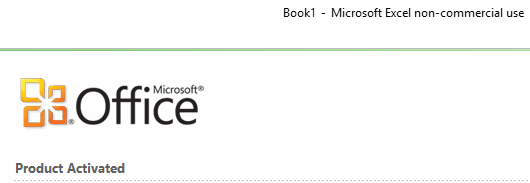
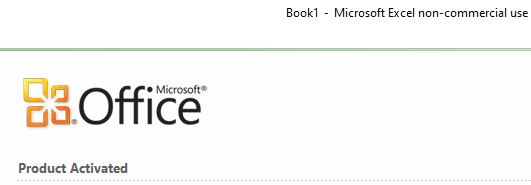
My Office 2010, activated once this week, is presently running on dual-boot computer. W11/W10.

This was an old issue. my computer was running W7/W11 dual-boot. Office2010 was activated and running on W7. W11 couldn't run Office2010 as no license (my post#1).

This week, I changed OS W7 to W10. new dual-boot computer with W10/W11. and installed Office2010 but it was NOT working on either OS, W10 or W11. it requested activate.
I rang Microsoft Office and got it activated on W10. (input 6x9 digit blocks. reply/re-fill 6x8 digit blocks).

When test, it's noticed that the Office 2010 is presently activated and running on both OS. W11/W10.
Microsoft server must have changed its activation registration management.

on Windows 11
image.png

on Windows 10
image.png
 

My Computers

System One System Two

  • Computer type
    PC/Desktop
    Computer Manufacturer/Model Number
    HP Elite 800 G5
    OS
    Windows 7 Pro 64-bit
    CPU
    I7-9700
    Memory
    32 GB
  • Computer type
    Laptop
    System Manufacturer/Model Number
    ASUS UX305C
    OS
    Windows 7 Pro 64-bit
This was an old issue. my computer was running W7/W11 dual-boot. Office2010 was activated and running on W7. W11 couldn't run Office2010 as no license (my post#1).

This week, I changed OS W7 to W10. new dual-boot computer with W10/W11. and installed Office2010 but it was NOT working on either OS, W10 or W11. it requested activate.
I rang Microsoft Office and got it activated on W10. (input 6x9 digit blocks. reply/re-fill 6x8 digit blocks).

When test, it's noticed that the Office 2010 is presently activated and running on both OS. W11/W10.
Microsoft server must have changed its activation registration management....
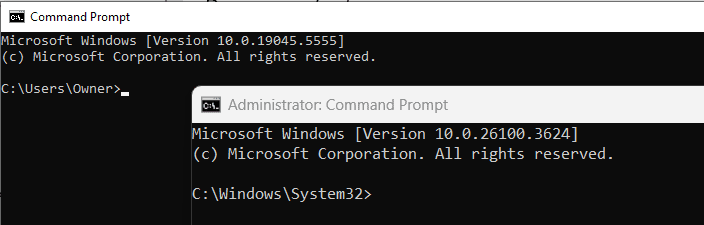
No, it's not that. Both Windows 10 and Windows 11 identify themselves as version 10.0.mmmmm.nnnn.
Your Office 2010 cannot tell the difference between W10 and W11, for licensing purposes it sees W11 as just a higher build of W10.

image.png

Your Windows 7 on the other hand was version 6.1.7601, a completely different OS as far as Office 2010 licensing was concerned.

image.png
 

My Computers

System One System Two

  • Computer type
    Laptop
    Computer Manufacturer/Model Number
    Toshiba satellite C650D
    OS
    Windows 7 Home Premium x64
    CPU
    AMD V120
    Memory
    4GB
    Internet Speed
    150 Mbps
    Antivirus
    MSE
    Browser
    IE11, Edge, Firefox
    Other Info
    I also have W7 Pro on my System Two, and several W7 Hyper-V VMs. My other machines run Windows 10/11. Their specs are in my Ten Forums & Eleven Forum profiles.
  • Computer type
    Laptop
    System Manufacturer/Model Number
    Lenovo Thinkpad T430
    OS
    Windows 7 Pro x64
    CPU
    Intel i5-3320M
    Memory
    8 GB
    Hard Drives
    250GB Samsung SSD 860 EVO
    Other Info
    Antivirus: MSE
You can be right.

But I just reiterated my Office2010 license status. Didn’t reiterate it as a Rule or a legal method on dual-boot computer.

One thing I believe, Microsoft server must have changed its activation registration management.
In past, when I upgraded SSD from smaller size to bigger size. restored image then it would be running. No need to re-activate Office2010 (please read my old posts, it’s was part of my re-install practice).

But this time (after Feb 2025), it didn’t go this way. Indeed the W10 was imaged back onto a new SSD with dual-boot setup. It’s noticed its Office2010 requested re-activate. (by Feb 2025 or early, my log showed Office2010 was running without re-activation on same computer but different SSD).

btw, the dual-boot W10/W11 is Windows 10 22H2/Windows 11 24H2.
 

My Computers

System One System Two

  • Computer type
    PC/Desktop
    Computer Manufacturer/Model Number
    HP Elite 800 G5
    OS
    Windows 7 Pro 64-bit
    CPU
    I7-9700
    Memory
    32 GB
  • Computer type
    Laptop
    System Manufacturer/Model Number
    ASUS UX305C
    OS
    Windows 7 Pro 64-bit
Sorry I missed your post...Dual-boot computers are treated like two computers. Each computer has to have its own set of licenses. The same goes for virtual machines. Each virtual machine has to have its own licenses for Windows and other software.

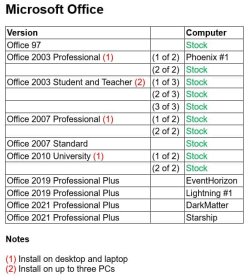
I have enough Windows and Office licenses for all my dual-boot computers. However, I don't have enough for my virtual machines. I usually let Windows 7, 10, and 10 go unactivated. The only downside is that I can't personalize the logins. Windows XP is special in that it won't let you log in if you don't activate it within 30 days. I have licenses for it but but it is not worth the time to call Microsoft for this. Instead I use an offline method as a workaroud. Normally this is frowned upon on these forums but does anyone, even Microsoft, care about Windows XP anymore?

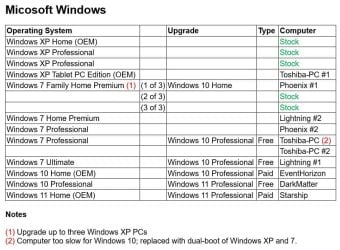
As best I remember here are the Windows and Office licenses I have:

Windows Licenses.jpg

Office Licenses.jpg

@MisterEd

It's noticed that your computer runs dual-boot. I would like to know how you to deal its license issue.

  1. MSFT OS: requests two licenses. usually not a big problem as computer manufacturer can help.
  2. MSFT Office: requests two licenses too. that causes to double expense. If one OS without Office, then it's NOT useful while taking much OS partition room. no worth.
Any way run a dual-boot computer with one Office license? In reality, only one OS in use on dual-boot computer anytime.

In practice, within one of dual-boot OS, I installed an out-of-date copy of Office. but still NOT very useful. just better than nothing.
 

My Computers

System One System Two

  • Computer type
    PC/Desktop
    Computer Manufacturer/Model Number
    Custom build
    OS
    Windows 7 Home Premium 64-bits
    CPU
    AMD FX-8350
    Motherboard
    Gigabyte GA-990FXA-UD3 (AM3+)
    Memory
    GSKILL Ripjaw-X PC3 12800 8GB (2x4GB)
    Graphics Card(s)
    ASUS ROG STRIX GTX 1060 6GB
    Sound Card
    Integrated
    Monitor(s) Displays
    Asus VE228H (21.5-in)
    Screen Resolution
    1920x1080 60Hz
    Hard Drives
    SAMSUNG 870 EVO 2.5 Inch SATA SSD (1TB)
    SAMSUNG 870 EVO 2.5 Inch SATA SSD (1TB)
    SAMSUNG 870 EVO 2.5 Inch SATA SSD (1TB)
    PSU
    Corsair RM750x (750 watts)
    Case
    Corsair Carbide Series 200R
    Cooling
    Corsair Hydro Series H60 (CWCH60)
    Keyboard
    Logitech Elite
    Mouse
    Logitech M510 Wireless Mouse
    Internet Speed
    Comcast Gigabit Extra (1200Mbps down / 35Mbps up)
    Antivirus
    Malwarebytes
    Browser
    Firefox, Edge, Chrome
    Other Info
    ASUS DRW-24B1ST DVD-RW (24X) optical drive
    Seagate Expansion Desk (5TB) external SATA/USB HDD
    Comcast XB8 Internet Gateway
  • Computer type
    PC/Desktop
    System Manufacturer/Model Number
    Custom
    OS
    Windows 7 Pro (64-bit)
    CPU
    AMD Phenom II 960T X4
    Motherboard
    ASUS M4N82 Deluxe
    Memory
    Corsair XMS2 DDR2-800 8GB (4x2GB)
    Graphics Card(s)
    ASUS ENGTX560 DCII OC/2DI/1GD5 1GB
    Monitor(s) Displays
    Samsung 930B 19-inch LCD
    Screen Resolution
    1280x1024
    Hard Drives
    Samsung SSD 870 EVO 1000 GB (Windows 10)
    Seagate ST1000DM003 1000 GB (Windows 7)
    PSU
    Antec TruePower (new) TP-650
    Case
    Antec Three Hundred
    Cooling
    AMD stock cooler from FX8350
    Mouse
    Logitech M100
    Internet Speed
    Xfinity Gigabit Extra 1200/35 Mbps
Looks you have a big warehouse for computers (some are really old :p) and hardware as well.
And a stockroom for MSFT software, Windows and Office.

Frankly, my problem on them is similar. My solution has taken an easy way.


  • Windows XP. My OS selects the released VL iso. Its activation is waived as the MSFT XP server gone. my post on XP [Solved] Activate XP on VirtualBox | My Digital Life Forums
  • Windows 7/10/11. It’s NOT easy to obtain Windows 7 CD-key any more. My computers are mainly selecting HP computers. HP computer when HP install media, no need of OS activation (no matter W7/10/11). An easy solution for me. A big saving in CD-key and W7 activation procedure.
  • Office. It’s a headache. Have to deal with it. Office2013 or higher are all cloud-based. Bulky and sluggish. I gave up them after test (according to test time). My main Office are Office2010, Office97 (fastest. But nearly extinct. No support). Some Office2013/07/03/365 but seldom in use. My tasks on RTD and excel macro need Office. And hope to run as quick as possible.

Sorry I missed your post...
I have enough Windows and Office licenses for all my dual-boot computers. However, I don't have enough for my virtual machines. I usually let Windows 7, 10, and 10 go unactivated. The only downside is that I can't personalize the logins. Windows XP is special in that it won't let you log in if you don't activate it within 30 days. I have licenses for it but but it is not worth the time to call Microsoft for this. Instead I use an offline method as a workaroud. Normally this is frowned upon on these forums but does anyone, even Microsoft, care about Windows XP anymore?
 

My Computers

System One System Two

  • Computer type
    PC/Desktop
    Computer Manufacturer/Model Number
    HP Elite 800 G5
    OS
    Windows 7 Pro 64-bit
    CPU
    I7-9700
    Memory
    32 GB
  • Computer type
    Laptop
    System Manufacturer/Model Number
    ASUS UX305C
    OS
    Windows 7 Pro 64-bit
Looks you have a big warehouse for computers (some are really old :p) and hardware as well.
And a stockroom for MSFT software, Windows and Office.
I actually live in a small house (~900sqft). I store some things in a detached garage. I have a spare bedroom set up for my 3 desktop computers. Until 6 months ago it was 5 desktop computers. I retired the 2 desktops with Windows XP Pro. I really didn't use them much anymore. At my age 3 desktop computers is more than enough to keep up with.

I have had home computers since 1979. However, I did not buy a PC compatible one until 1995. I had or built several computers between 1995 and 2002. They all became obsolete so ended up in my garage. I threw them all in the garbage after some encouragement from my wife to do so. All the computers I have now are ones I either bought or built since late 2002.

BTW, since 2018 I have also bought 3 Raspberry Pis. They are a Raspberry Pi 3B+, a Raspberry Pi 4B, and a Raspberry Pi 5.
Frankly, my problem on them is similar. My solution has taken an easy way.


  • Windows XP. My OS selects the released VL iso. Its activation is waived as the MSFT XP server gone. my post on XP [Solved] Activate XP on VirtualBox | My Digital Life Forums
  • Windows 7/10/11. It’s NOT easy to obtain Windows 7 CD-key any more. My computers are mainly selecting HP computers. HP computer when HP install media, no need of OS activation (no matter W7/10/11). An easy solution for me. A big saving in CD-key and W7 activation procedure.
  • Office. It’s a headache. Have to deal with it. Office2013 or higher are all cloud-based. Bulky and sluggish. I gave up them after test (according to test time). My main Office are Office2010, Office97 (fastest. But nearly extinct. No support). Some Office2013/07/03/365 but seldom in use. My tasks on RTD and excel macro need Office. And hope to run as quick as possible.
Since it got to be such a hassle to call Microsoft to activate Windows XP I have been using an offline method to activate Windows XP. It is discussed in this Windows XP Forums thread: Windows XP activation algorithm cracked

The online supply of Windows 7 keys dried up about the time free upgrades of Windows 7/8 to Windows 10 ended in September 2023. I don't think that was a coincidence.

I still have to deal with Windows activation on my two main laptop computers. The embedded keys are for Windows 10 and 11 Home but I upgraded each to Windows Pro which required activation using the keys I got with them.

This forum hardly has any activity now. I guess most people have moved on from Windows 7 like they did with Windows XP.

Why do you say that Office is all cloud-based? That is only true if you have a subscription to Microsoft 365 or are using the free version of Office called Office on the Web (includes web applications (Word, Excel and PowerPoint).

I use Office 2019 Pro Plus and Office 2021 Pro Plus most of the time. They have perpetual licenses just like Office 2003 - Office 2016. They are installed on my computers and do not require web access. Note in each I can log onto my Microsoft account but that is not required.
 

My Computers

System One System Two

  • Computer type
    PC/Desktop
    Computer Manufacturer/Model Number
    Custom build
    OS
    Windows 7 Home Premium 64-bits
    CPU
    AMD FX-8350
    Motherboard
    Gigabyte GA-990FXA-UD3 (AM3+)
    Memory
    GSKILL Ripjaw-X PC3 12800 8GB (2x4GB)
    Graphics Card(s)
    ASUS ROG STRIX GTX 1060 6GB
    Sound Card
    Integrated
    Monitor(s) Displays
    Asus VE228H (21.5-in)
    Screen Resolution
    1920x1080 60Hz
    Hard Drives
    SAMSUNG 870 EVO 2.5 Inch SATA SSD (1TB)
    SAMSUNG 870 EVO 2.5 Inch SATA SSD (1TB)
    SAMSUNG 870 EVO 2.5 Inch SATA SSD (1TB)
    PSU
    Corsair RM750x (750 watts)
    Case
    Corsair Carbide Series 200R
    Cooling
    Corsair Hydro Series H60 (CWCH60)
    Keyboard
    Logitech Elite
    Mouse
    Logitech M510 Wireless Mouse
    Internet Speed
    Comcast Gigabit Extra (1200Mbps down / 35Mbps up)
    Antivirus
    Malwarebytes
    Browser
    Firefox, Edge, Chrome
    Other Info
    ASUS DRW-24B1ST DVD-RW (24X) optical drive
    Seagate Expansion Desk (5TB) external SATA/USB HDD
    Comcast XB8 Internet Gateway
  • Computer type
    PC/Desktop
    System Manufacturer/Model Number
    Custom
    OS
    Windows 7 Pro (64-bit)
    CPU
    AMD Phenom II 960T X4
    Motherboard
    ASUS M4N82 Deluxe
    Memory
    Corsair XMS2 DDR2-800 8GB (4x2GB)
    Graphics Card(s)
    ASUS ENGTX560 DCII OC/2DI/1GD5 1GB
    Monitor(s) Displays
    Samsung 930B 19-inch LCD
    Screen Resolution
    1280x1024
    Hard Drives
    Samsung SSD 870 EVO 1000 GB (Windows 10)
    Seagate ST1000DM003 1000 GB (Windows 7)
    PSU
    Antec TruePower (new) TP-650
    Case
    Antec Three Hundred
    Cooling
    AMD stock cooler from FX8350
    Mouse
    Logitech M100
    Internet Speed
    Xfinity Gigabit Extra 1200/35 Mbps
Salute the veteran in computer/IT.
 

My Computers

System One System Two

  • Computer type
    PC/Desktop
    Computer Manufacturer/Model Number
    HP Elite 800 G5
    OS
    Windows 7 Pro 64-bit
    CPU
    I7-9700
    Memory
    32 GB
  • Computer type
    Laptop
    System Manufacturer/Model Number
    ASUS UX305C
    OS
    Windows 7 Pro 64-bit
Back
Top