Microsoft stop offering MSE definitions in Windows Update?

SGvagon

Member
Hello,

I have MSE (Microsoft Security Essentials) installed on my Windows 7 PRO x64bit machines. It works perfectly, but today MSE icon was orange and program said, that I hadn't got the newest definitions (the latest what I had was from 26.2.2025 1.423.125.0 ) . So I tried check new updates in Windows Update, but nothing offered.

That last option was manually download Definitions from MS website here https://www.microsoft.com/en-us/wdsi/defenderupdates , there are still the latest definitons version from today ( 5.3.2025 ) .

Do you have same issues with this on MSE on Windows 7 ?

I check now another Windows 7 machine, where I have only internal Windows Defender , and there was old definitions too. So I had to update by mynually download actual version of definitions from Microsoft website.

Thank you in advance.
 
Last edited:

My Computer

Computer type
Laptop
Computer Manufacturer/Model Number
Lenovo Y50-70 (20378)
OS
Windows 7 Professional x64
CPU
Intel Core i5-4210H
Memory
2x Kingston 8GB DDR3 1600 CL11
Graphics Card(s)
Nvidia GeForce GTX960M 4GB
Sound Card
Sound Blaster PLAY! 3
Monitor(s) Displays
2
Screen Resolution
2x 1920x1080
Hard Drives
Crucial MX500 500GB SSD
Cooling
Deepcool Multi Core X6
Keyboard
Yenkee YKB 1002 CS USB
Mouse
Crono CM645 Wired optical mouse
Internet Speed
95 Mb/s Down 95 Mb/s Up
Antivirus
MSE
Browser
Firefox 91.13.0esr x64bit
just checked/updated mine,, current version is 1 423 245

upated "inside MSE" NOT windows upate
 

My Computer

Computer type
PC/Desktop
Computer Manufacturer/Model Number
medionl/Aspire 6930G/acer x55a
OS
W7 home premium 32bit/W7HP 64bit/w10 tp insider ring
CPU
E5300 dual core
Motherboard
medion MS7366
Memory
3gb
Graphics Card(s)
Nvidia Geforce 7100 Nforce 630i
Monitor(s) Displays
avixc
Internet Speed
n (isp resticted to 72)
Antivirus
mse/pands
Browser
palemoon
Other Info
Belkin Fd7050 n USB using Railink RT2870 drivers, more upto date

My Computers

System One System Two

  • Computer type
    PC/Desktop
    OS
    7 X64
    CPU
    i5 8400
    Motherboard
    gigabyte b365m ds3h
    Memory
    2x8gb 3200mhz
    Hard Drives
    various
    PSU
    pure power 11 400w cm
    Case
    Coolermaster
    Cooling
    cryorig m9i
  • Computer type
    PC/Desktop
    OS
    7x64
    CPU
    g5400
    Motherboard
    ga b365m ds3h
    Memory
    8gb ddr4 2400
    PSU
    xfx pro 450w
I have MSE (Microsoft Security Essentials) installed on my Windows 7 PRO x64bit machines. It works perfectly, but today MSE icon was orange and program said, that I hadn't got the newest definitions (the latest what I had was from 26.2.2025 1.423.125.0 ) . So I tried check new updates in Windows Update, but nothing offered.

....Do you have same issues with this on MSE on Windows 7 ?

Yes.

Bree said:
I have four Win7 machines, two are VMs and two are the laptops in my specs below. Of the four, three of them don't find any AV update beyond 1.423.125.0, while one of the laptops (System One) always finds the latest update. This when checking for updates in Windows Update and in MSE.
Microsoft Security Essentials Acting Strange - post #7
 

My Computers

System One System Two

  • Computer type
    Laptop
    Computer Manufacturer/Model Number
    Toshiba satellite C650D
    OS
    Windows 7 Home Premium x64
    CPU
    AMD V120
    Memory
    4GB
    Internet Speed
    150 Mbps
    Antivirus
    MSE
    Browser
    IE11, Edge, Firefox
    Other Info
    I also have W7 Pro on my System Two, and several W7 Hyper-V VMs. My other machines run Windows 10/11. Their specs are in my Ten Forums & Eleven Forum profiles.
  • Computer type
    Laptop
    System Manufacturer/Model Number
    Lenovo Thinkpad T430
    OS
    Windows 7 Pro x64
    CPU
    Intel i5-3320M
    Memory
    8 GB
    Hard Drives
    250GB Samsung SSD 860 EVO
    Other Info
    Antivirus: MSE

My Computer

Computer type
Laptop
Computer Manufacturer/Model Number
Lenovo Y50-70 (20378)
OS
Windows 7 Professional x64
CPU
Intel Core i5-4210H
Memory
2x Kingston 8GB DDR3 1600 CL11
Graphics Card(s)
Nvidia GeForce GTX960M 4GB
Sound Card
Sound Blaster PLAY! 3
Monitor(s) Displays
2
Screen Resolution
2x 1920x1080
Hard Drives
Crucial MX500 500GB SSD
Cooling
Deepcool Multi Core X6
Keyboard
Yenkee YKB 1002 CS USB
Mouse
Crono CM645 Wired optical mouse
Internet Speed
95 Mb/s Down 95 Mb/s Up
Antivirus
MSE
Browser
Firefox 91.13.0esr x64bit
This is the article from which the Easyfix 51044 can be downloaded. It fixes MSE being able to find the latest updates, Windows Update still doesn't see them though. So always check for update from within MSE.

Microsoft said:
Update to enable TLS 1.1 and TLS 1.2 as default secure protocols in WinHTTP in Windows

About this update

Applications and services that are written by using WinHTTP for Secure Sockets Layer (SSL) connections that use the WINHTTP_OPTION_SECURE_PROTOCOLS flag can't use TLS 1.1 or TLS 1.2 protocols. This is because the definition of this flag doesn't include these applications and services.

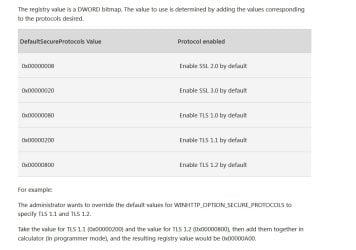
This update adds support for DefaultSecureProtocols registry entry that allows the system administrator to specify which SSL protocols should be used when the WINHTTP_OPTION_SECURE_PROTOCOLS flag is used.

This can allow certain applications that were built to use the WinHTTP default flag to be able to leverage the newer TLS 1.2 or TLS 1.1 protocols natively without any need for updates to the application.
Update to enable TLS 1.1 and TLS 1.2 as default secure protocols in WinHTTP in Windows - Microsoft Support
 

My Computers

System One System Two

  • Computer type
    Laptop
    Computer Manufacturer/Model Number
    Toshiba satellite C650D
    OS
    Windows 7 Home Premium x64
    CPU
    AMD V120
    Memory
    4GB
    Internet Speed
    150 Mbps
    Antivirus
    MSE
    Browser
    IE11, Edge, Firefox
    Other Info
    I also have W7 Pro on my System Two, and several W7 Hyper-V VMs. My other machines run Windows 10/11. Their specs are in my Ten Forums & Eleven Forum profiles.
  • Computer type
    Laptop
    System Manufacturer/Model Number
    Lenovo Thinkpad T430
    OS
    Windows 7 Pro x64
    CPU
    Intel i5-3320M
    Memory
    8 GB
    Hard Drives
    250GB Samsung SSD 860 EVO
    Other Info
    Antivirus: MSE
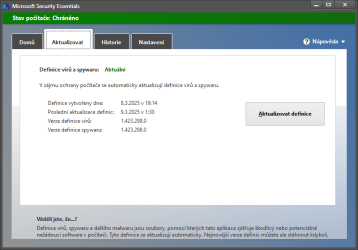
I think, MSE can check new definition itself every day without manual checking new definition. We will see in the future :-) .

- - - Updated - - -

obrazek.png
Yes, it auto updated today 9.3.2025 on 1.423.298.0 :-) .
 
Last edited:

My Computer

Computer type
Laptop
Computer Manufacturer/Model Number
Lenovo Y50-70 (20378)
OS
Windows 7 Professional x64
CPU
Intel Core i5-4210H
Memory
2x Kingston 8GB DDR3 1600 CL11
Graphics Card(s)
Nvidia GeForce GTX960M 4GB
Sound Card
Sound Blaster PLAY! 3
Monitor(s) Displays
2
Screen Resolution
2x 1920x1080
Hard Drives
Crucial MX500 500GB SSD
Cooling
Deepcool Multi Core X6
Keyboard
Yenkee YKB 1002 CS USB
Mouse
Crono CM645 Wired optical mouse
Internet Speed
95 Mb/s Down 95 Mb/s Up
Antivirus
MSE
Browser
Firefox 91.13.0esr x64bit
winhttp.jpg
 

My Computers

System One System Two

  • Computer type
    PC/Desktop
    OS
    7 X64
    CPU
    i5 8400
    Motherboard
    gigabyte b365m ds3h
    Memory
    2x8gb 3200mhz
    Hard Drives
    various
    PSU
    pure power 11 400w cm
    Case
    Coolermaster
    Cooling
    cryorig m9i
  • Computer type
    PC/Desktop
    OS
    7x64
    CPU
    g5400
    Motherboard
    ga b365m ds3h
    Memory
    8gb ddr4 2400
    PSU
    xfx pro 450w
MSE has not updated for me since Feb / Mar 25, across 5 different ThinkPads running W7P-64. I will check out the other thread.
 

My Computer

Computer type
Laptop
Computer Manufacturer/Model Number
ThinkPad T61
OS
Win 7 Pro 64 (all systems except W530 which has W10 P /64
CPU
T7700 or T8300 orT8500
Memory
8GB
Graphics Card(s)
Intel Intergrated
Hard Drives
Hitachi TavelStar 500GB
Antivirus
MSE
Browser
Firefox or Chrome
on my w7 LIVE test rig... updated on the 14th and 1 minute ago 1 435 236 0
 

My Computer

Computer type
PC/Desktop
Computer Manufacturer/Model Number
medionl/Aspire 6930G/acer x55a
OS
W7 home premium 32bit/W7HP 64bit/w10 tp insider ring
CPU
E5300 dual core
Motherboard
medion MS7366
Memory
3gb
Graphics Card(s)
Nvidia Geforce 7100 Nforce 630i
Monitor(s) Displays
avixc
Internet Speed
n (isp resticted to 72)
Antivirus
mse/pands
Browser
palemoon
Other Info
Belkin Fd7050 n USB using Railink RT2870 drivers, more upto date
Strangely enough on this system, a ThinkPadT61, my main machine, after running the mpam-fe program and waiting , I re-opened MSE and it updated! Since 4 of my other 5 W7 systems are virtually identical to this one, I'm hoping for some better outcomes since this past March. Otherwise, it's the easyfix msi.
 

My Computer

Computer type
Laptop
Computer Manufacturer/Model Number
ThinkPad T61
OS
Win 7 Pro 64 (all systems except W530 which has W10 P /64
CPU
T7700 or T8300 orT8500
Memory
8GB
Graphics Card(s)
Intel Intergrated
Hard Drives
Hitachi TavelStar 500GB
Antivirus
MSE
Browser
Firefox or Chrome
correct:D, evn tho i've never had to use it
 

My Computer

Computer type
PC/Desktop
Computer Manufacturer/Model Number
medionl/Aspire 6930G/acer x55a
OS
W7 home premium 32bit/W7HP 64bit/w10 tp insider ring
CPU
E5300 dual core
Motherboard
medion MS7366
Memory
3gb
Graphics Card(s)
Nvidia Geforce 7100 Nforce 630i
Monitor(s) Displays
avixc
Internet Speed
n (isp resticted to 72)
Antivirus
mse/pands
Browser
palemoon
Other Info
Belkin Fd7050 n USB using Railink RT2870 drivers, more upto date
MSE has not updated for me since Feb / Mar 25, across 5 different ThinkPads running W7P-64. I will check out the other thread.
See the EasiFix link in post #6
Since running the EasyFix MSE can find AV definitons again, it even updates itself automatically.
 

My Computers

System One System Two

  • Computer type
    Laptop
    Computer Manufacturer/Model Number
    Toshiba satellite C650D
    OS
    Windows 7 Home Premium x64
    CPU
    AMD V120
    Memory
    4GB
    Internet Speed
    150 Mbps
    Antivirus
    MSE
    Browser
    IE11, Edge, Firefox
    Other Info
    I also have W7 Pro on my System Two, and several W7 Hyper-V VMs. My other machines run Windows 10/11. Their specs are in my Ten Forums & Eleven Forum profiles.
  • Computer type
    Laptop
    System Manufacturer/Model Number
    Lenovo Thinkpad T430
    OS
    Windows 7 Pro x64
    CPU
    Intel i5-3320M
    Memory
    8 GB
    Hard Drives
    250GB Samsung SSD 860 EVO
    Other Info
    Antivirus: MSE
See the EasiFix link in post #6
Since running the EasyFix MSE can find AV definitons again, it even updates itself automatically.
OK so I spot this thread today and look at my Windows Updates History and it shows no updates for MSE since 2/27/2025. Then I goto that link and download EasyFix and install it, after which I open MSE and look at the Update tab and it says "Definitions last updated 8/17/2025 at 4:14 PM" and my last version is 1.435.236.0.

So my MSE WAS ALREADY up-to-date before applying the referenced EasyFix, it's just that there have been no records of it posted to my Windows Updates History!? So what did running EasyFix actually do if anything, and why shouldn't I do a System Restore to before running it?

After having run EasyFix I clicked on the link for Info on it, and it talked about TLS 1.2 and 1.3 but nothing about MSE!?!?!?!?!

EDIT: OK I see Bree addressed this in the other thread--I guess I'm OK with it. Very confusing though, and troubling that the EasyFix I applied cannot be found anywhere that I know of i.e. update history or progs & features.
 

My Computer

Computer type
Laptop
Computer Manufacturer/Model Number
Dell Latitude E6540 Laptop
OS
Windows 7 Professional 64bit
CPU
Intel Core i7 4600M @ 2.90GHz
Motherboard
Dell Inc. 0CYT5F (SOCKET 0)
Memory
16.0GB Dual-Channel DDR3 @ 797MHz (11-11-11-28)
Graphics Card(s)
Intel HD Graphics 4600 (Dell) 2048MB ATI AMD Radeon HD 8790M
Sound Card
Realtek High Definition Audio
Monitor(s) Displays
HP ZR30w (2560x1600@60Hz)
Hard Drives
256GB LITEONIT LMT-256M6M-41 mm SATA (SSD)
1TB Samsung SSD 860 EVO mSATA SATA (SSD)
2TB USB 3.0 USB Device
115GB SanDisk Ultra Fit USB
Other Info
Multiple Dell E-Port Plus II Port Replicator/Docking Stations 0Y72NH USB 3.0 + 130W AC Adapters
OK so I spot this thread today and look at my Windows Updates History and it shows no updates for MSE since 2/27/2025. Then I goto that link and download EasyFix and install it, after which I open MSE and look at the Update tab and it says "Definitions last updated 8/17/2025 at 4:14 PM" and my last version is 1.435.236.0.

So my MSE WAS ALREADY up-to-date before applying the referenced EasyFix, it's just that there have been no records of it posted to my Windows Updates History!? So what did running EasyFix actually do if anything, and why shouldn't I do a System Restore to before running it?

After having run EasyFix I clicked on the link for Info on it, and it talked about TLS 1.2 and 1.3 but nothing about MSE!?!?!?!?!
Once you have installed the Easyfix, then MSE can use TLS 1.2/1.3 (which is now required to find and download the updates). MSE can check on its own, not relying on Windows Update (which still can't find the AV updates).

MSE will now do this automatically. I usually find that as soon as I boot up a W7 machine that hasn't been used for a while, MSE has already updated.
 

My Computers

System One System Two

  • Computer type
    Laptop
    Computer Manufacturer/Model Number
    Toshiba satellite C650D
    OS
    Windows 7 Home Premium x64
    CPU
    AMD V120
    Memory
    4GB
    Internet Speed
    150 Mbps
    Antivirus
    MSE
    Browser
    IE11, Edge, Firefox
    Other Info
    I also have W7 Pro on my System Two, and several W7 Hyper-V VMs. My other machines run Windows 10/11. Their specs are in my Ten Forums & Eleven Forum profiles.
  • Computer type
    Laptop
    System Manufacturer/Model Number
    Lenovo Thinkpad T430
    OS
    Windows 7 Pro x64
    CPU
    Intel i5-3320M
    Memory
    8 GB
    Hard Drives
    250GB Samsung SSD 860 EVO
    Other Info
    Antivirus: MSE
Definition updates still going strong.... currently 249 on mine
 

My Computer

Computer type
PC/Desktop
Computer Manufacturer/Model Number
medionl/Aspire 6930G/acer x55a
OS
W7 home premium 32bit/W7HP 64bit/w10 tp insider ring
CPU
E5300 dual core
Motherboard
medion MS7366
Memory
3gb
Graphics Card(s)
Nvidia Geforce 7100 Nforce 630i
Monitor(s) Displays
avixc
Internet Speed
n (isp resticted to 72)
Antivirus
mse/pands
Browser
palemoon
Other Info
Belkin Fd7050 n USB using Railink RT2870 drivers, more upto date
Once you have installed the Easyfix, then MSE can use TLS 1.2/1.3 (which is now required to find and download the updates). MSE can check on its own, not relying on Windows Update (which still can't find the AV updates).
MSE will now do this automatically. I usually find that as soon as I boot up a W7 machine that hasn't been used for a while, MSE has already updated.
Clear and concise Bree--many thanks.
 

My Computer

Computer type
Laptop
Computer Manufacturer/Model Number
Dell Latitude E6540 Laptop
OS
Windows 7 Professional 64bit
CPU
Intel Core i7 4600M @ 2.90GHz
Motherboard
Dell Inc. 0CYT5F (SOCKET 0)
Memory
16.0GB Dual-Channel DDR3 @ 797MHz (11-11-11-28)
Graphics Card(s)
Intel HD Graphics 4600 (Dell) 2048MB ATI AMD Radeon HD 8790M
Sound Card
Realtek High Definition Audio
Monitor(s) Displays
HP ZR30w (2560x1600@60Hz)
Hard Drives
256GB LITEONIT LMT-256M6M-41 mm SATA (SSD)
1TB Samsung SSD 860 EVO mSATA SATA (SSD)
2TB USB 3.0 USB Device
115GB SanDisk Ultra Fit USB
Other Info
Multiple Dell E-Port Plus II Port Replicator/Docking Stations 0Y72NH USB 3.0 + 130W AC Adapters
Hi, I suppose no one of you try to install MSE on Windows 7 Ultimate 32-bit!
I try many things but never work.
Never able to update.
 

My Computer

OS
Windows 7 Ultimate 64-bit
CPU
Intel Core 2 Duo CPU E8400 3.00 GHz
Motherboard
S775 ASUS Maximus Formula x38 PCIe
Memory
2x OCZ 1066 MHz DDR2 No-ECC 4096MO Reaper Kit
Graphics Card(s)
BFG PCIe GF9 GeForce 9800 GX2 1024M
Sound Card
PCI Express X-Fi Titanium Fatal1ty Pro Series
Monitor(s) Displays
SamSung SyncMaster 2493 HM
Hard Drives
4 x Seagate ST3500320AS
PSU
Antec Sonata Plus 550 Watts
Case
Antec Sonata Plus 550
Cooling
Passive (Motherboard)
If anyone needs to download and save and manually install the definition updates for Microsoft Security Essentials 4.10.209.0, THIS site has been working well for me.
 

My Computer

Computer type
PC/Desktop
Computer Manufacturer/Model Number
Dell OptiPlex 9020
OS
Windows 7 Professional SP1 64-bit
CPU
Intel Core i7-4790 3.60 GHz
Memory
32 GB DDR3-1600 MHz
Graphics Card(s)
Integrated Intel HD Graphics 4600
Monitor(s) Displays
Viewsonic 32" LCD
Hard Drives
Kingston SATA 3 240 GB SSD
Internet Speed
Spectrum Internet 1000 Mbps
I'm digital as a dog, but followed the various advice above, and got it fixed in 5 minutes. Thanks for the advice, everyone.
 

My Computer

Computer Manufacturer/Model Number
Acer Aspire 5733
OS
Windows 7 Home Premium 64bit
CPU
13-380M
Memory
4gb
Hard Drives
500gb
Back
Top