
Take Ownership Shortcut

Add "Take Ownership" to Context Menu of Files, Folders, and Drives in Windows


   Information
This tutorial will show you how to add Take Ownership to the context menu of all files, folders, and drives for all users in Windows.

This will allow you to be able to instantly take ownership of a file, folder (and all contents), or drive (and all contents) by changing the owner to the current user and grant the Owner_Rights SID (current owner) full access permission.

You must be an administrator to be able to add, remove, and use the "Take Ownership" context menu.

   Note
Application files (ex: EXE, CMD, MSI) will continue to have Run as administrator instead of Take Ownership in their context menu.


When you right click or press and hold on a file, folder, or drive, and click/tap on Take Ownership, you may be prompted by UAC for permission to do so first.

If a user is logged in as an administrator, then the user would just click/tap on Yes to approve and take ownership. The owner of the file, folder, or drive would be changed to the current administrator user account. Permissions would be set to allow the Owner_Rights SID (current owner) full control of the file, folder, or drive.

If a user is logged in as a standard user, then the user would need to enter a selected administrator's password to approve and take ownership. The owner of the file, folder, or drive would be changed to the selected administrator account, and not the standard user. Permissions would be set to allow the Owner_Rights SID (current owner) full control of the file, folder, or drive.


The Take Ownership context menu will not be available when you right click on the C: drive, C:\Program Files folder, C:\Program Files (x86) folder, C:\ProgramData folder, C:\Users folder, and C:\Windows folder. This was done because taking ownership of these system folders can make Windows unstable since it would also take ownership of all the folder's content at the same time.

You will still be able to use the Take Ownership context menu of files inside the folder locations above.

If you would like to have a custom location(s) of your own to not have the context menu, then please feel free to post a request in this tutorial thread. I'll be happy to post back with a custom .reg file for it.

   Warning
This context menu will only work with English Windows installations.

If you have a different language, then please post a reply with what language you have instead. I'll be happy to post back a translated version for you.


EXAMPLE: Take Ownership in Context Menu
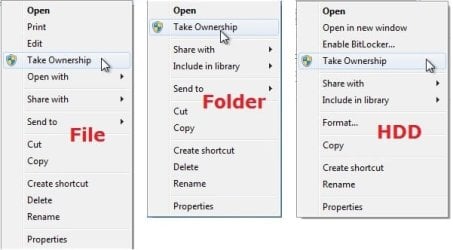
example.jpg


Here's How:

1. Do step 2, 3, or 4 below for what you would like to do.


2. To Add "Take Ownership" to Context Menu

   Note
Application files (ex: EXE, CMD, MSI) will still have Run as administrator instead of Take Ownership in the context menu when you use this step.

A) Click/tap on the Download button below to download the file below, and go to step 5 below.

Add_Take_Ownership_to_context_menu


Download


3. To Add "Take Ownership" with Pause to Context Menu

   Note
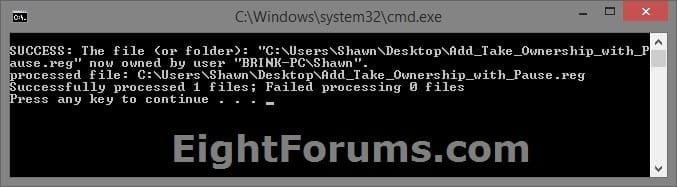
This option pauses the command when you use the "Take Ownership" context menu to be able to see the command results. This can be handy to verify setting ownership and permissions was successful or not.

Application files (ex: EXE, CMD, MSI) will still have Run as administrator instead of Take Ownership in the context menu when you use this step.


Take_Ownership_Pause.jpg


A) Click/tap on the Download button below to download the file below, and go to step 5 below.

Add_Take_Ownership_with_Pause_to_context_menu.reg


Download


4. To Remove "Take Ownership" from Context Menu

   Note
This is the default setting, and will also restore the default Run as administrator for .exe files.


A) Click/tap on the Download button below to download the file below, and go to step 5 below.

Remove_Take_Ownership_from_context_menu.reg


Download


5. Save the .reg file to your Desktop.

6. Double click on the downloaded .reg file to merge it.

7. If prompted, click on Run, Yes (UAC), Yes, and OK to approve the merge.

8. When finished, you can delete the downloaded .reg file if you like.


That's it,
Shawn


Attachments

Last edited:
I didn't have it but I downloaded from tenforums and it worked. Thanks for that.

The problem with the context menu shown in my previous post still persists though.

Addendum:
I turned off Test Mode and rebooted. My assumption was correct. Even in normal mode, "Run as administrator" does not show up when right-clicking the Command Prompt shortcut, or any shortcut.
 
Last edited:

My Computer My Computer

At a glance

Windows 7 Professional x64Intel Core i7 @ 3.20GHz 3.60GHz32GB (Crucial Hyper)EVGA GTX 960 4GB
Computer type
PC/Desktop
Computer Manufacturer/Model Number
Custom build
OS
Windows 7 Professional x64
CPU
Intel Core i7 @ 3.20GHz 3.60GHz
Motherboard
Gigabyte GA-X79-UD3
Memory
32GB (Crucial Hyper)
Graphics Card(s)
EVGA GTX 960 4GB
Hard Drives
Seagate ST375064ONS (Windows 7)
Seagate ST375064ONS (Windows XP [I dual boot])
5 x HGST HUS724020ALE640
Antivirus
Avast
Browser
Firefox
I didn't have it but I downloaded from tenforums and it worked. Thanks for that.

The problem with the context menu shown in my previous post still persists though.

I'm not sure why the menu item is gone while using Test Mode.
 

My Computer My Computer

At a glance

64-bit Windows 11 Pro for WorkstationsIntel i7-8700K OC'd to 5 GHz64 GB (4x16GB) G.SKILL TridentZ RGB DDR4 3600...ASUS ROG-STRIX-GTX1080TI-O11G-GAMING
Computer type
PC/Desktop
Computer Manufacturer/Model Number
Self built custom
OS
64-bit Windows 11 Pro for Workstations
CPU
Intel i7-8700K OC'd to 5 GHz
Motherboard
ASUS ROG Maximus XI Formula Z390
Memory
64 GB (4x16GB) G.SKILL TridentZ RGB DDR4 3600 MHz
Graphics Card(s)
ASUS ROG-STRIX-GTX1080TI-O11G-GAMING
Sound Card
Integrated
Monitor(s) Displays
2 x Samsung Odyssey G7 27"
Screen Resolution
2560x1440
Hard Drives
1TB Samsung 990 PRO M.2,
4TB Samsung 990 PRO PRO M.2,
TerraMaster F8 SSD Plus NAS
PSU
Seasonic Prime Titanium 850W
Case
Thermaltake Core P3
Cooling
Corsair Hydro H115i
Keyboard
Logitech wireless K800
Mouse
Logitech MX Master 4
Internet Speed
2 Gb/s Download and 100 Mb/s Upload
Antivirus
Malwarebyte Anti-Malware Premium
Browser
Google Chrome
Other Info
Logitech Z625 speaker system,
Logitech BRIO 4K Pro webcam,
HP Color LaserJet Pro MFP M477fdn,
APC SMART-UPS RT 1000 XL - SURT1000XLI,
Galaxy S23 Plus phone
Whoops! Can't edit/delete the addendum now.
As it says, problem still occurs in normal mode.
 

My Computer My Computer

At a glance

Windows 7 Professional x64Intel Core i7 @ 3.20GHz 3.60GHz32GB (Crucial Hyper)EVGA GTX 960 4GB
Computer type
PC/Desktop
Computer Manufacturer/Model Number
Custom build
OS
Windows 7 Professional x64
CPU
Intel Core i7 @ 3.20GHz 3.60GHz
Motherboard
Gigabyte GA-X79-UD3
Memory
32GB (Crucial Hyper)
Graphics Card(s)
EVGA GTX 960 4GB
Hard Drives
Seagate ST375064ONS (Windows 7)
Seagate ST375064ONS (Windows XP [I dual boot])
5 x HGST HUS724020ALE640
Antivirus
Avast
Browser
Firefox

My Computer My Computer

At a glance

64-bit Windows 11 Pro for WorkstationsIntel i7-8700K OC'd to 5 GHz64 GB (4x16GB) G.SKILL TridentZ RGB DDR4 3600...ASUS ROG-STRIX-GTX1080TI-O11G-GAMING
Computer type
PC/Desktop
Computer Manufacturer/Model Number
Self built custom
OS
64-bit Windows 11 Pro for Workstations
CPU
Intel i7-8700K OC'd to 5 GHz
Motherboard
ASUS ROG Maximus XI Formula Z390
Memory
64 GB (4x16GB) G.SKILL TridentZ RGB DDR4 3600 MHz
Graphics Card(s)
ASUS ROG-STRIX-GTX1080TI-O11G-GAMING
Sound Card
Integrated
Monitor(s) Displays
2 x Samsung Odyssey G7 27"
Screen Resolution
2560x1440
Hard Drives
1TB Samsung 990 PRO M.2,
4TB Samsung 990 PRO PRO M.2,
TerraMaster F8 SSD Plus NAS
PSU
Seasonic Prime Titanium 850W
Case
Thermaltake Core P3
Cooling
Corsair Hydro H115i
Keyboard
Logitech wireless K800
Mouse
Logitech MX Master 4
Internet Speed
2 Gb/s Download and 100 Mb/s Upload
Antivirus
Malwarebyte Anti-Malware Premium
Browser
Google Chrome
Other Info
Logitech Z625 speaker system,
Logitech BRIO 4K Pro webcam,
HP Color LaserJet Pro MFP M477fdn,
APC SMART-UPS RT 1000 XL - SURT1000XLI,
Galaxy S23 Plus phone
It was worth a try but unfortunately still no dice. I even tried removing it and running it again.

- - - Updated - - -

The culprit was Zip Genius.
Won't be installing that again.
 

My Computer My Computer

At a glance

Windows 7 Professional x64Intel Core i7 @ 3.20GHz 3.60GHz32GB (Crucial Hyper)EVGA GTX 960 4GB
Computer type
PC/Desktop
Computer Manufacturer/Model Number
Custom build
OS
Windows 7 Professional x64
CPU
Intel Core i7 @ 3.20GHz 3.60GHz
Motherboard
Gigabyte GA-X79-UD3
Memory
32GB (Crucial Hyper)
Graphics Card(s)
EVGA GTX 960 4GB
Hard Drives
Seagate ST375064ONS (Windows 7)
Seagate ST375064ONS (Windows XP [I dual boot])
5 x HGST HUS724020ALE640
Antivirus
Avast
Browser
Firefox
It was worth a try but unfortunately still no dice. I even tried removing it and running it again.

- - - Updated - - -

The culprit was Zip Genius.
Won't be installing that again.

Glad you found the cause, and now have it sorted.
 

My Computer My Computer

At a glance

64-bit Windows 11 Pro for WorkstationsIntel i7-8700K OC'd to 5 GHz64 GB (4x16GB) G.SKILL TridentZ RGB DDR4 3600...ASUS ROG-STRIX-GTX1080TI-O11G-GAMING
Computer type
PC/Desktop
Computer Manufacturer/Model Number
Self built custom
OS
64-bit Windows 11 Pro for Workstations
CPU
Intel i7-8700K OC'd to 5 GHz
Motherboard
ASUS ROG Maximus XI Formula Z390
Memory
64 GB (4x16GB) G.SKILL TridentZ RGB DDR4 3600 MHz
Graphics Card(s)
ASUS ROG-STRIX-GTX1080TI-O11G-GAMING
Sound Card
Integrated
Monitor(s) Displays
2 x Samsung Odyssey G7 27"
Screen Resolution
2560x1440
Hard Drives
1TB Samsung 990 PRO M.2,
4TB Samsung 990 PRO PRO M.2,
TerraMaster F8 SSD Plus NAS
PSU
Seasonic Prime Titanium 850W
Case
Thermaltake Core P3
Cooling
Corsair Hydro H115i
Keyboard
Logitech wireless K800
Mouse
Logitech MX Master 4
Internet Speed
2 Gb/s Download and 100 Mb/s Upload
Antivirus
Malwarebyte Anti-Malware Premium
Browser
Google Chrome
Other Info
Logitech Z625 speaker system,
Logitech BRIO 4K Pro webcam,
HP Color LaserJet Pro MFP M477fdn,
APC SMART-UPS RT 1000 XL - SURT1000XLI,
Galaxy S23 Plus phone
I can take ownership of files or folders but no selection to do a drive. Maybe because my drive is partitioned?
 

My Computer My Computer

At a glance

W7 Pro 64Ryzen 1500XG Skill 2400 - 8GBHD 6450
Computer type
PC/Desktop
Computer Manufacturer/Model Number
Custom
OS
W7 Pro 64
CPU
Ryzen 1500X
Motherboard
Gigabyte AX370 - Gaming
Memory
G Skill 2400 - 8GB
Graphics Card(s)
HD 6450
Sound Card
Realtek onboard
Monitor(s) Displays
Dell 19 square, Dell 17 square, Dell 15 square, Element 24
Hard Drives
Samsung 970 nvme 120 GB, WD 1TB 7200
Keyboard
MS ERGO 4000 mostly
Mouse
Dell standard optical
Internet Speed
15 Mbps
Antivirus
AVG, MS firewall
Browser
firefox mostly
I can take ownership of files or folders but no selection to do a drive. Maybe because my drive is partitioned?
Hello, :-)

If this is for the Windows "C" drive, then "Take ownership" will not be available for it by design to prevent breaking the OS.

Otherwise, it should be for any other non system drive.
 

My Computer My Computer

At a glance

64-bit Windows 11 Pro for WorkstationsIntel i7-8700K OC'd to 5 GHz64 GB (4x16GB) G.SKILL TridentZ RGB DDR4 3600...ASUS ROG-STRIX-GTX1080TI-O11G-GAMING
Computer type
PC/Desktop
Computer Manufacturer/Model Number
Self built custom
OS
64-bit Windows 11 Pro for Workstations
CPU
Intel i7-8700K OC'd to 5 GHz
Motherboard
ASUS ROG Maximus XI Formula Z390
Memory
64 GB (4x16GB) G.SKILL TridentZ RGB DDR4 3600 MHz
Graphics Card(s)
ASUS ROG-STRIX-GTX1080TI-O11G-GAMING
Sound Card
Integrated
Monitor(s) Displays
2 x Samsung Odyssey G7 27"
Screen Resolution
2560x1440
Hard Drives
1TB Samsung 990 PRO M.2,
4TB Samsung 990 PRO PRO M.2,
TerraMaster F8 SSD Plus NAS
PSU
Seasonic Prime Titanium 850W
Case
Thermaltake Core P3
Cooling
Corsair Hydro H115i
Keyboard
Logitech wireless K800
Mouse
Logitech MX Master 4
Internet Speed
2 Gb/s Download and 100 Mb/s Upload
Antivirus
Malwarebyte Anti-Malware Premium
Browser
Google Chrome
Other Info
Logitech Z625 speaker system,
Logitech BRIO 4K Pro webcam,
HP Color LaserJet Pro MFP M477fdn,
APC SMART-UPS RT 1000 XL - SURT1000XLI,
Galaxy S23 Plus phone
Hello, :-)

If this is for the Windows "C" drive, then "Take ownership" will not be available for it by design to prevent breaking the OS.

Otherwise, it should be for any other non system drive.
I read that part. This is for a separate storage hd not C. This has come up before. When I swap to a different pc using that same storage hd word suddenly says it has no permission to save files. I can do individual files when I hit that, but I would like to take ownership of the whole drive. Maybe something is going on specifically with word that causes this.
 

My Computer My Computer

At a glance

W7 Pro 64Ryzen 1500XG Skill 2400 - 8GBHD 6450
Computer type
PC/Desktop
Computer Manufacturer/Model Number
Custom
OS
W7 Pro 64
CPU
Ryzen 1500X
Motherboard
Gigabyte AX370 - Gaming
Memory
G Skill 2400 - 8GB
Graphics Card(s)
HD 6450
Sound Card
Realtek onboard
Monitor(s) Displays
Dell 19 square, Dell 17 square, Dell 15 square, Element 24
Hard Drives
Samsung 970 nvme 120 GB, WD 1TB 7200
Keyboard
MS ERGO 4000 mostly
Mouse
Dell standard optical
Internet Speed
15 Mbps
Antivirus
AVG, MS firewall
Browser
firefox mostly
I read that part. This is for a separate storage hd not C. This has come up before. When I swap to a different pc using that same storage hd word suddenly says it has no permission to save files. I can do individual files when I hit that, but I would like to take ownership of the whole drive. Maybe something is going on specifically with word that causes this.
Depending on the size of the drive, you could format it using say FAT32 instead of NTFS file system to avoid NTFS permissions not allowed on other computers by default.

Have you already tried manually taking ownership and allowing permissions for the drive?

Change Owner of File, Folder, Drive, or Registry Key in Windows 10 | Tutorials

Change Permissions of Objects for Users and Groups in Windows 10 | Tutorials
 

My Computer My Computer

At a glance

64-bit Windows 11 Pro for WorkstationsIntel i7-8700K OC'd to 5 GHz64 GB (4x16GB) G.SKILL TridentZ RGB DDR4 3600...ASUS ROG-STRIX-GTX1080TI-O11G-GAMING
Computer type
PC/Desktop
Computer Manufacturer/Model Number
Self built custom
OS
64-bit Windows 11 Pro for Workstations
CPU
Intel i7-8700K OC'd to 5 GHz
Motherboard
ASUS ROG Maximus XI Formula Z390
Memory
64 GB (4x16GB) G.SKILL TridentZ RGB DDR4 3600 MHz
Graphics Card(s)
ASUS ROG-STRIX-GTX1080TI-O11G-GAMING
Sound Card
Integrated
Monitor(s) Displays
2 x Samsung Odyssey G7 27"
Screen Resolution
2560x1440
Hard Drives
1TB Samsung 990 PRO M.2,
4TB Samsung 990 PRO PRO M.2,
TerraMaster F8 SSD Plus NAS
PSU
Seasonic Prime Titanium 850W
Case
Thermaltake Core P3
Cooling
Corsair Hydro H115i
Keyboard
Logitech wireless K800
Mouse
Logitech MX Master 4
Internet Speed
2 Gb/s Download and 100 Mb/s Upload
Antivirus
Malwarebyte Anti-Malware Premium
Browser
Google Chrome
Other Info
Logitech Z625 speaker system,
Logitech BRIO 4K Pro webcam,
HP Color LaserJet Pro MFP M477fdn,
APC SMART-UPS RT 1000 XL - SURT1000XLI,
Galaxy S23 Plus phone
Back
Top