Solved Windows Virtual pc and windows xp mode

ReXolR

New member
Member
Local time
4:19 PM
Messages
24
i have windows 7 and i have been wanting windows virtual pc and xp mode to try it out but i cant find it since both got removed from the microsoft website, is there a way i can get windows virtual pc and xp mode, i know there is virtualbox and vmware but i just want to try virtual pc and xp mode.
 

My Computer My Computer

At a glance

Winows 7 Ultimateintel core i5 33308GB Of DDR3 RAMASUS GTX 960 2GB
Computer type
PC/Desktop
Computer Manufacturer/Model Number
unkown
OS
Winows 7 Ultimate
CPU
intel core i5 3330
Motherboard
Gigabyte GA-B75M-D3H
Memory
8GB Of DDR3 RAM
Graphics Card(s)
ASUS GTX 960 2GB
Sound Card
Integrated
Monitor(s) Displays
Samsung S24D340
Screen Resolution
1920x1080
Hard Drives
1TB HDD

My Computer My Computer

At a glance

Windows 7 Professional 64-bitDesktop i5; Acers i5 & i7desktop 16GB; 1 Acer 8GB & 1 Acer 16GB
Computer type
PC/Desktop
Computer Manufacturer/Model Number
Antec desktop; Acer Aspire laptops
OS
Windows 7 Professional 64-bit
CPU
Desktop i5; Acers i5 & i7
Memory
desktop 16GB; 1 Acer 8GB & 1 Acer 16GB
Hard Drives
1TB split into 2 equal partitions [OS and data] usable by RJS
Internet Speed
AT&T DSL
Browser
FF, GChrome, msIE
Other Info
Windows 7 Firewall, Emsisoft AM/AV, MSE [scan-only], SpywareBlaster, Ruiware/BillP combine
i need windows xp mode now, virtual pc and windows xp mode
 

My Computer My Computer

At a glance

Winows 7 Ultimateintel core i5 33308GB Of DDR3 RAMASUS GTX 960 2GB
Computer type
PC/Desktop
Computer Manufacturer/Model Number
unkown
OS
Winows 7 Ultimate
CPU
intel core i5 3330
Motherboard
Gigabyte GA-B75M-D3H
Memory
8GB Of DDR3 RAM
Graphics Card(s)
ASUS GTX 960 2GB
Sound Card
Integrated
Monitor(s) Displays
Samsung S24D340
Screen Resolution
1920x1080
Hard Drives
1TB HDD

My Computer My Computer

At a glance

Windows 7/8.1/10 multibootIntel Core i7-770048GB (2x16GB Crucial DDR4-3200 + 2x8GB Hynix ...Intel HD630 + AMD Radeon R7 450 PCIe
Computer type
PC/Desktop
Computer Manufacturer/Model Number
Dell Optiplex 7050
OS
Windows 7/8.1/10 multiboot
CPU
Intel Core i7-7700
Motherboard
Dell, Intel Q270 chipset
Memory
48GB (2x16GB Crucial DDR4-3200 + 2x8GB Hynix DDR4-2400)
Graphics Card(s)
Intel HD630 + AMD Radeon R7 450 PCIe
Monitor(s) Displays
Asus VC279 (27")
Screen Resolution
1920x1080
Hard Drives
Toshiba M.2 NVMe (256GB),
Samsung 960 Evo (500GB),
WD Red Plus 80EFBX (8TB)
i have Windows 7 Ultimate
 

My Computer My Computer

At a glance

Winows 7 Ultimateintel core i5 33308GB Of DDR3 RAMASUS GTX 960 2GB
Computer type
PC/Desktop
Computer Manufacturer/Model Number
unkown
OS
Winows 7 Ultimate
CPU
intel core i5 3330
Motherboard
Gigabyte GA-B75M-D3H
Memory
8GB Of DDR3 RAM
Graphics Card(s)
ASUS GTX 960 2GB
Sound Card
Integrated
Monitor(s) Displays
Samsung S24D340
Screen Resolution
1920x1080
Hard Drives
1TB HDD
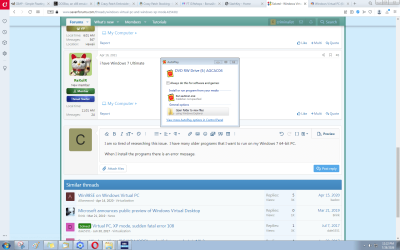
I am so tired of researching this issue. I have many older programs that I want to run on my Windows 7 64-bit PC. I have read so many articles and watched way too many videos.

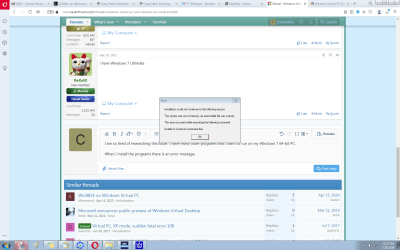
When I install the programs there is an error message.

This time it is Installation could not continue for the following reason: The system was out of memory, an executibale file is corrupt, Tihs error occurred while executing the following command: Unabale to construct command line.

I simply want to run my purchased software on my Windows 7 PC. Some of the programs are for creating designs and are much easier to use the the current versions of photoshop, paintshop, paint 3D, etc...

I have read about Steam and Windows Virtual PC and Microsoft Windows Compatibility Kit, etc...

What exactly do I need to run older programs on my Windows 7 64-bit PC.
 

Attachments

  • old game install.PNG
    old game install.PNG
    90.3 KB · Views: 1
  • old game not install.PNG
    old game not install.PNG
    74.3 KB · Views: 1

My Computers My Computers

  • At a glance

    Windows 7 Professional 64AMD Phenom II X4 840 3.2GHzBallistix Sport 16GB (2 x 8GB) DDR3 1600NVIDIA GeForce GT 610
    Computer type
    PC/Desktop
    Computer Manufacturer/Model Number
    Me
    OS
    Windows 7 Professional 64
    CPU
    AMD Phenom II X4 840 3.2GHz
    Motherboard
    MSI 970A-G43 Plus
    Memory
    Ballistix Sport 16GB (2 x 8GB) DDR3 1600
    Graphics Card(s)
    NVIDIA GeForce GT 610
    Hard Drives
    ST2000DM 008-2FR102 SATA Disk Device
  • At a glance

    Windows 10i5-45908GB DDR3Intel HD 4600
    Computer type
    PC/Desktop
    System Manufacturer/Model Number
    Dell Optiplex 3020
    OS
    Windows 10
    CPU
    i5-4590
    Motherboard
    0WMJ54
    Memory
    8GB DDR3
    Graphics Card(s)
    Intel HD 4600
    Monitor(s) Displays
    Samsung
    Hard Drives
    WD5000AAKX ATA Device
I tried installing xp compatibility mode once but couldn't get it to work. However I have a license key for xp so I probably didn't put much effect into it since I can just build a virtual machine at any time. I don't even like the virtual pc for windows 7 interface. If you can get a hold of a license key you can build a virtual machine. I'm using virtual box now. The latest supported version for Windows 7 is 6 although I read here that someone got version 7 to work. I used to use vmware 12 but I lost the key so I can't use it anymore. The newest version is for Windows 8 and higher. You can try going into the installer's properties and selecting compatibility mode for XP and see if that works. Without knowing the software it's hard to help any further. Have you tried a support forum for whatever you're trying to install? If it's really old it might not be possible to run it on 7 especially if it's 16-bit and you're trying to run it on 7 64-bit which has removed support for 16-bit applications.
 

My Computers My Computers

  • At a glance

    Windows 7 pro/Windows 10 ProIntel i7 860 Quad core 2.8 ghz8 gbATI Radeon HD 5770 1 gb ram
    Computer type
    PC/Desktop
    Computer Manufacturer/Model Number
    HP Pavillion Elite HPE-250f
    OS
    Windows 7 pro/Windows 10 Pro
    CPU
    Intel i7 860 Quad core 2.8 ghz
    Memory
    8 gb
    Graphics Card(s)
    ATI Radeon HD 5770 1 gb ram
    Monitor(s) Displays
    Alienware 25 AW2521HF & Viewsonic
    Screen Resolution
    1920 x1080 & 1680x1050
    Hard Drives
    WD blue 1 tb & 500 gb.
    Browser
    FF of course.
    Other Info
    https://www.bestbuy.com/site/hp-pavilion-elite-desktop-intel-core-i7-processor-8gb-memory-1tb-hard-drive/9921493.p?skuId=9921493
  • At a glance

    Windows 2012 R2 Data center/Linux Minti3 9100 3.6GHz, 8M cache, 4C/4T8GB 2666MT/s DDR4 ECC UDIMM
    Computer type
    PC/Desktop
    System Manufacturer/Model Number
    Dell Poweredge T140
    OS
    Windows 2012 R2 Data center/Linux Mint
    CPU
    i3 9100 3.6GHz, 8M cache, 4C/4T
    Memory
    8GB 2666MT/s DDR4 ECC UDIMM
    Monitor(s) Displays
    Viewsonic
    Screen Resolution
    1680x1050
    Hard Drives
    1 TB & 750 GB
    Other Info
    https://www.dell.com/en-us/work/shop/productdetailstxn/poweredge-t140?~ck=bt
I have many older programs that I want to run on my Windows 7 64-bit PC. [...]

What exactly do I need to run older programs on my Windows 7 64-bit PC.

Your screenshot shows "AGCAC04", which pointed me to the archive.org page for "American Greetings CreatACard", with an iso download for the original CD.

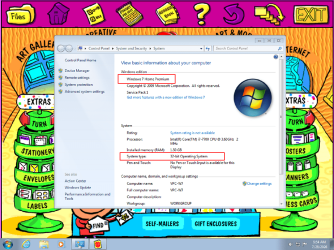
The problem is that software is so old it is not comaptible with 64-bit operating systems. It does work on a 32-bit OS, as shown in my screenshot of it running in a Win7x32 virtual machine.

There are many ways to get a virtualization platform running on your Win7x64 host (Virtual PC, VirtualBox, WMWare, et al), but that's only the first step. The second step is getting a guest operating system installed in a VM created on that platform. That's trickier because if it's a Windows OS you're trying to install, it will require its own Windows license, which can be problematic to come by these days.

But all that is at least doable. The bigger problem you're going to have (with this softeare, anyway) is that a guest OS in a virtual machine will not have access to your host machine's hardware, including your printer. So you'll be able to create banners and greeting cards, but you won't be able to print them.


AGCAC04.png
 

My Computer My Computer

At a glance

Windows 7/8.1/10 multibootIntel Core i7-770048GB (2x16GB Crucial DDR4-3200 + 2x8GB Hynix ...Intel HD630 + AMD Radeon R7 450 PCIe
Computer type
PC/Desktop
Computer Manufacturer/Model Number
Dell Optiplex 7050
OS
Windows 7/8.1/10 multiboot
CPU
Intel Core i7-7700
Motherboard
Dell, Intel Q270 chipset
Memory
48GB (2x16GB Crucial DDR4-3200 + 2x8GB Hynix DDR4-2400)
Graphics Card(s)
Intel HD630 + AMD Radeon R7 450 PCIe
Monitor(s) Displays
Asus VC279 (27")
Screen Resolution
1920x1080
Hard Drives
Toshiba M.2 NVMe (256GB),
Samsung 960 Evo (500GB),
WD Red Plus 80EFBX (8TB)
Back
Top