Easy Transfer - USB Problem

StuS

New member
Local time
4:03 AM
Messages
4
Hi

Brand new & searching for help!!!

Installed Windows 7 last night on my XP machine. Installation went through fine & is running like a dream. BUT I've got an issue recovering files via Easy Transfer...

Used it in XP to transfer files onto my 4g memory stick - used up about 2.4g. When it came to moving the files back over to Windows 7 via Easy Transfer I get an error message saying "Can't connect to Files".

Is this something to do with drivers? I'm at a loss! Help!

Ps - not particularly techy so please speak slowly and give clear simple instructions lol!!! ;)
 

My Computer

OS
Windows 7
Hi

Brand new & searching for help!!!

Installed Windows 7 last night on my XP machine. Installation went through fine & is running like a dream. BUT I've got an issue recovering files via Easy Transfer...

Used it in XP to transfer files onto my 4g memory stick - used up about 2.4g. When it came to moving the files back over to Windows 7 via Easy Transfer I get an error message saying "Can't connect to Files".

Is this something to do with drivers? I'm at a loss! Help!

Ps - not particularly techy so please speak slowly and give clear simple instructions lol!!! ;)

Did you use the XP Easy Tranfer OR the NEW Windows Easy Tranfer?
 

My Computer

OS
ME/XP/Vista/Win7
Hi theog

Followed the instructions on the setup disc...downloaded easytransfer as per the instructions...:huh:
 

My Computer

OS
Windows 7
Hi theog

Followed the instructions on the setup disc...downloaded easytransfer as per the instructions...:huh:


If you still have problems try this:
Reformat & scan your memory stick.
 

My Computer

OS
ME/XP/Vista/Win7
If you still have problems try this:
Reformat & scan your memory stick.

If I am interpreting the OP's situation correctly his XP system has been upgraded, so if he reformats the memory stick he will forever lose the files he wants to transfer, no?
 

My Computer

Computer Manufacturer/Model Number
Dell Vostro 420
OS
Windows 7 Pro x64
CPU
3.00 GHz Intel Core2 Quad Q9650
Memory
4 GB
Graphics Card(s)
ATI Radeon HD 3400 Series
Monitor(s) Displays
DELL 2405FPW
Screen Resolution
1920x1200
Hard Drives
System: 80GB WDC WD800JD-22MSA1
Data: 500GB Hitachi HDP725050GLA360
Internet Speed
Verizon FiOS 20/5 mbps
Other Info
Computing is primarily business use with off-time troubleshooting practice: Remote desktop, scanning and producing invoices, some minor graphics work.
Hi Beech,

Yes, I'm now running Windows 7 perfectly well, it's just these damn files on the USB stick that won't come over on easy transfer...

Can I just drag them over anyway?

Thanks for the help folks!
 

My Computer

OS
Windows 7
Hi Beech,

Yes, I'm now running Windows 7 perfectly well, it's just these damn files on the USB stick that won't come over on easy transfer...

Can I just drag them over anyway?

Thanks for the help folks!

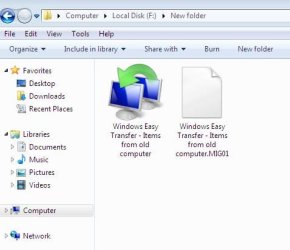
What type of files are there?
 

Attachments

  • Capture 002.JPG
    Capture 002.JPG
    21.3 KB · Views: 4
  • Capture 001.JPG
    Capture 001.JPG
    30.3 KB · Views: 17

My Computer

OS
ME/XP/Vista/Win7
Just the easy transfer ones...nothing else...

Really frustrating this...have tried on both vista AND xp pc's to take the files back - just not being recognised - although the data is sitting there on the stick!

Can't do a screen shot at the moment as sat in work!

Cheers for the help.

Stu
 

My Computer

OS
Windows 7
Just the easy transfer ones...nothing else...

Really frustrating this...have tried on both vista AND xp pc's to take the files back - just not being recognised - although the data is sitting there on the stick!

Can't do a screen shot at the moment as sat in work!

Cheers for the help.

Stu

You are running Easy Transfer on the WIn7 side right ? Those files are stored in an archive format used by ET. You cannot access them directly. When running ET you will need to select the location of the files on the USB stick and go from there..
 

My Computer

OS
Win7 x64 Ultimate
Back
Top