Theme - Customize Custom Themes

Theme - Customize custom themes
wcbg95.png

   Information
This tutorial will show you how to customize a custom theme with custom taskbar, start menu etc.
   Note
To do this you need:

  • ·A pre made custom theme from DeviantArt, in this tutorial I will be using one called Dark7mix
  • ·Restorator (Shareware) or any other editor that is able to edit the msstyles file
  • ·Photo editing software, Photoshop, Fireworks, paint.net, Gimp etc.
  • ·Basic Photo Editing experience


Now go to Dark7mix Theme UPDATED by ~adrianodj25 on deviantART to download the pre made theme.


Unpack the rar/zip file, using winrar or a similar tool.

Now move the folder including the themepack file to: (Your drive letter):\Windows\Resources\Themes)

Now that you got the theme, go to the msstyles file (Inside the dark7mix folder, there should be a file called dark7mix)
Open that file with Restorator (or similar) and extract it to a new folder on your desktop.
Now all the images needed will be located in the new folder on your desktop (The one called IMAGE)

HOW TO APPLY THE CHANGED IMAGES:
To apply the images to the theme, switch to the windows 7 default theme, log off, log on, go to the theme folder (C:\Windows\Resources\Themes) Open the msstyles file, and edit the images as you wish to. Now hit save. Now go select the theme (right click, Personalization) and apply. If you have done it right the changes should show. When you want to apply a new change, do this step over again.

CUSTOMIZING TASKBAR:
The taskbar images in this theme are 921 and 1166. Customize these as you wish to.

START MENU:
The start menu pictures are the following: 870, 871, 872, 873, 875, 876, 880, 881, 882, 883, 884.
Customize these as you wish.

SCROLL BARS:
These are the scroll bar images: 769 (Vertical) and 770 (Horizontal)
Customize these as you wish.


Now you got the basics location of the files, try to mess around with these and more, usually you can easy figure out which image is where. If you got any questions or need a particular image location, give me a PM or ask a question in the thread and I will try to help you.

Have fun :)

Useful links:
Adobe Photoshop CS4 30-Day Trial: Adobe - Downloads

Paint.net (Freeware): www.paint.net

Gimp (Freeware): GIMP - The GNU Image Manipulation Program


Last edited by a moderator:
Fabulous keep up the great tutorials Sergio.
 

My Computer

Computer Manufacturer/Model Number
HP Compaq Presario/SR5113WM
OS
Windows 7 Ultimate x64/ Windows Vista Ultimate x64
CPU
AMD Athlon 64 X2 3600+ 1.9Ghz
Motherboard
Asus M2N68-LA
Memory
PNY Optima Memory DDR2 2GB 2x1 kit
Graphics Card(s)
PNY Nvidia 8400 GS 256MB
Sound Card
On board RealTek
Monitor(s) Displays
Acer X163W LCD
Screen Resolution
1366x768
Hard Drives
Western Digital 160 GB SATA 3G (3.0Gb/sec)
7200 rpm
Western Digital 160 GB IDE
PSU
Dynex 400w
Case
Nothin Special
Cooling
Stock
Keyboard
Standard 102 key with volume and sleep buttons
Mouse
Wireless Logitech LX7
Internet Speed
Comcrap 10mb cable
Other Info
Insignia 2.1 speakers, wireless Xbox 360 controller w/plug n play charger, Belkin wireless G + mimo usb network adapter.
Just wanted to share..

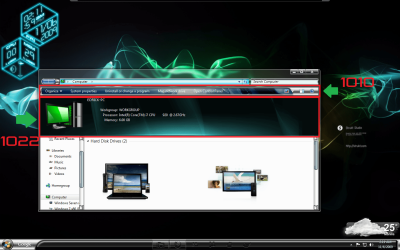
the command module is number 1010
and the preview pane is number 1022

;)

Untitled.png
 

My Computer

OS
Windows 7 Home Premium SP1 64-bit
CPU
Intel™ Core™ i7 920 2.66 ghz
Motherboard
Asus P6T Deluxe V2
Memory
OCZ 6gb (triple 2gb) ddr3-1333 (Gold Edition)
Graphics Card(s)
Nvidia 9800 GT 1GB - x2 SLI
Sound Card
On board
Monitor(s) Displays
19" LCD Wide Screen / Built-in TV Tuner
Screen Resolution
1440x900
Hard Drives
250 GB Maxtor
+
1 TB Seagate
PSU
Corsair GX 800 (800watts)
Case
Thermaltake Level 10 GT
Cooling
Antec Kuhler 920
Mouse
CM Storm Sentinel Advanced
Internet Speed
1MBps
Shame the numbers arent all the same for every theme, it makes it alot harder to modify.
 

My Computer

Computer Manufacturer/Model Number
Custom Build
OS
W7 RTM Ultimate x64
CPU
Intel Q8400 @ 2.66GHZ
Motherboard
Gigabyte GA-EG45M-UD2H
Memory
4GB DDR2-800
Graphics Card(s)
Gainward GTS 450 GLH 1GB Edition
Sound Card
Integrated 8 Channel
Monitor(s) Displays
AOC 23.6 Inch Widescreen LCD
Screen Resolution
1920x1080
Hard Drives
Seagate 500GB Internal
Western Digital 1TB Internal

Hitachi 1TB External
PSU
Apevia Java Power 500W
Case
Cooler Master HAF 922 Black
Cooling
Stock Intel CPU Fan
Keyboard
HP SK-2960 Multimedia Keyboard
Mouse
Logitech M350 Wireless Gaming Mouse
Internet Speed
1.5MB
I think it gives the same numbers for VSB users ;)
 

My Computer

OS
Windows 7 Home Premium SP1 64-bit
CPU
Intel™ Core™ i7 920 2.66 ghz
Motherboard
Asus P6T Deluxe V2
Memory
OCZ 6gb (triple 2gb) ddr3-1333 (Gold Edition)
Graphics Card(s)
Nvidia 9800 GT 1GB - x2 SLI
Sound Card
On board
Monitor(s) Displays
19" LCD Wide Screen / Built-in TV Tuner
Screen Resolution
1440x900
Hard Drives
250 GB Maxtor
+
1 TB Seagate
PSU
Corsair GX 800 (800watts)
Case
Thermaltake Level 10 GT
Cooling
Antec Kuhler 920
Mouse
CM Storm Sentinel Advanced
Internet Speed
1MBps
VSB has different sections like Taskbar, Buttons, boxes etc so it is a lot easier to use than doing it this way
 
it is, but its still confusing :( everytime i edit something, it comes out in NON aero form :(
 

My Computer

Computer Manufacturer/Model Number
Custom Build
OS
W7 RTM Ultimate x64
CPU
Intel Q8400 @ 2.66GHZ
Motherboard
Gigabyte GA-EG45M-UD2H
Memory
4GB DDR2-800
Graphics Card(s)
Gainward GTS 450 GLH 1GB Edition
Sound Card
Integrated 8 Channel
Monitor(s) Displays
AOC 23.6 Inch Widescreen LCD
Screen Resolution
1920x1080
Hard Drives
Seagate 500GB Internal
Western Digital 1TB Internal

Hitachi 1TB External
PSU
Apevia Java Power 500W
Case
Cooler Master HAF 922 Black
Cooling
Stock Intel CPU Fan
Keyboard
HP SK-2960 Multimedia Keyboard
Mouse
Logitech M350 Wireless Gaming Mouse
Internet Speed
1.5MB
Just wanted to share..

the command module is number 1010
and the preview pane is number 1022

;)

View attachment 35152


Do you mind uploading your theme? And your explorerframe if it's x64. I tried moding my frames but when I log off and log on explorrer won't run and I get an error.
 

My Computer

Computer Manufacturer/Model Number
HP dv7t 1000 CTO
OS
Windows 7 Ultimate 7600 RTM - Windows Server 2008 R2 7600 RTM Dual Boot
CPU
Intel Core Duo
Memory
4 gigs
Graphics Card(s)
NVIDIA 9600 GT
Sound Card
IDT HD Audio
Monitor(s) Displays
Generic 1680x1050
Screen Resolution
1680x1050
Hard Drives
TOSHIBA MK2552GSX ATA Device 320 gigs
Mouse
Synaptics Port Device PS/2
can anybody tell me where to find a restorator like program thats free?
 

My Computer

Computer Manufacturer/Model Number
Gateway T-1628
OS
windows 7 home premium sp1 x86
CPU
AMD Turion 64 x2 Mobile Technology 2.0 GHz
Motherboard
GATEWAY (Socket M2/S1G1) ATI RS690/RS690M Chipset
Memory
3gb DDR2 RAM
Graphics Card(s)
ATI Radeon x1200 series
Sound Card
SigmaTel High Def audio
Monitor(s) Displays
Generic PnP Monitor
Screen Resolution
1280x800
Hard Drives
250gb Western Digital
thanks
 

My Computer

Computer Manufacturer/Model Number
Gateway T-1628
OS
windows 7 home premium sp1 x86
CPU
AMD Turion 64 x2 Mobile Technology 2.0 GHz
Motherboard
GATEWAY (Socket M2/S1G1) ATI RS690/RS690M Chipset
Memory
3gb DDR2 RAM
Graphics Card(s)
ATI Radeon x1200 series
Sound Card
SigmaTel High Def audio
Monitor(s) Displays
Generic PnP Monitor
Screen Resolution
1280x800
Hard Drives
250gb Western Digital
does anyone know what number the power button is on mr. grim's neon theme?
 

My Computer

Computer Manufacturer/Model Number
Gateway T-1628
OS
windows 7 home premium sp1 x86
CPU
AMD Turion 64 x2 Mobile Technology 2.0 GHz
Motherboard
GATEWAY (Socket M2/S1G1) ATI RS690/RS690M Chipset
Memory
3gb DDR2 RAM
Graphics Card(s)
ATI Radeon x1200 series
Sound Card
SigmaTel High Def audio
Monitor(s) Displays
Generic PnP Monitor
Screen Resolution
1280x800
Hard Drives
250gb Western Digital
First post, but a long time lurker.

This tutorial is helpful but I have a few questions. I currently have a theme that I like and I don't like the Dark7mix theme. The theme I am using doesn't have a custom background for the start menu like Dark7mix does.

Is it possible for me to add the customized start menu png from the Dark7mix theme into the theme I'm currently using? And how do I do so?

Any help would be GREATLY appreciated.

Thanks. :)
 

My Computer

OS
Windows Home Premium 64bit
i've try this but it's not working,,
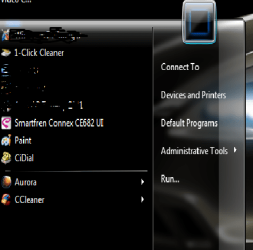
I tried to change the image in the start menu (in black background) to be transparent, but had no effect,,

here the screen shot..
 

Attachments

  • Untitled.png
    Untitled.png
    24.4 KB · Views: 411

My Computer

OS
windows 7 ultimate 32 bit
Back
Top