Recovery partion "D". What do I do with it?

mtbarbee

New member
Local time
8:13 AM
Messages
4
Hi folks. I have a question that i cant seem to find the answer to. I am ready to install Win7 on my HP Pavillion that came with a recovery partition that is the D drive. I should not need this any more since it would take me back to the factory state with Vista if I was to use it after Win7 install. How do I get rid of it? Will the new install give me the option to delete it? Or would Win7 make its own recovery partition if needed? I plan to do the custom installation by wiping the C drive clean. When I am at that state can I delete both? Thanks in advance from a new forum user and hope to be perusing this place alot in future. Also, I just ran a full back up to 10 DVDs for music, photos, vids, etc. Would I need the recovery partition to re-install these items? That is something that very much concerns me.
 
Last edited:

My Computer My Computer

At a glance

windows 7AMD Athlon 64 Z2 dual core3062 gignvidia L6150 on board
Computer Manufacturer/Model Number
HP Pavillion a1710n
OS
windows 7
CPU
AMD Athlon 64 Z2 dual core
Motherboard
Asus leonite 5.0
Memory
3062 gig
Graphics Card(s)
nvidia L6150 on board
Sound Card
reltek ALC888
Monitor(s) Displays
Acer 19" LCD
PSU
350watt
Case
stock
Cooling
stock fan
Internet Speed
broadband, it varies
Yes I think you will be able to delete it during installation. Or perhaps try to delete it before installation by using Disk Management.
 

My Computer My Computer

At a glance

XP, Seven, 2008R2AMD, Intel, VIACorsair, Kingston, etc.ATI, NVIDIA
Computer Manufacturer/Model Number
Too many to list.
OS
XP, Seven, 2008R2
CPU
AMD, Intel, VIA
Motherboard
Various
Memory
Corsair, Kingston, etc.
Graphics Card(s)
ATI, NVIDIA
Monitor(s) Displays
Samsung
Hard Drives
Maxtor, Western Digital
Keyboard
qwerty
Internet Speed
22 Mb/s @ home, 1 Gb/s @ server
Other Info
All of my systems still run fastest on XP 32-bit for the most part. Win7 is fun to play with, but I still prefer XP for raw speed, security, and functionality.
Make sure you burn the Vista installation DVDs from the recovery partition. It takes 3 DVDs. Just in case you ever want/need to reinstall your Vista.
For your files on the DVDs, you do not need the recovery partition. Just make sure the DVDs work. An external disk or a bigger USB stick would have been a better deal for backup.
 

My Computer My Computer

At a glance

Vista, Windows7, Mint Mate, Zorin, Windows 8from 1.6GHz Duo to i7
Computer Manufacturer/Model Number
HP, Dell, Gateway, Toshiba - 4 laptops and 2 desktops
OS
Vista, Windows7, Mint Mate, Zorin, Windows 8
CPU
from 1.6GHz Duo to i7
Monitor(s) Displays
2x HP w2207
Hard Drives
5x HDD, 7x SSD, 12x Externals
Keyboard
with trackball - no mices
Mouse
Trackball mice
Internet Speed
DSL 6000
Also, I just ran a full back up to 10 DVDs for music, photos, vids, etc. Would I need the recovery partition to re-install these items? That is something that very much concerns me.

No, the recovery partition is pretty much useless except for what whs pointed out.
 

My Computer My Computer

At a glance

XP, Seven, 2008R2AMD, Intel, VIACorsair, Kingston, etc.ATI, NVIDIA
Computer Manufacturer/Model Number
Too many to list.
OS
XP, Seven, 2008R2
CPU
AMD, Intel, VIA
Motherboard
Various
Memory
Corsair, Kingston, etc.
Graphics Card(s)
ATI, NVIDIA
Monitor(s) Displays
Samsung
Hard Drives
Maxtor, Western Digital
Keyboard
qwerty
Internet Speed
22 Mb/s @ home, 1 Gb/s @ server
Other Info
All of my systems still run fastest on XP 32-bit for the most part. Win7 is fun to play with, but I still prefer XP for raw speed, security, and functionality.
You can create your own primary Recovery partition after installing Win7 by using it's excellent Backup Imaging utlity to save an image there which can reimage your HDD in 15 minutes flawlessly, making reinstalls never again necessary.

Be sure to back up the image to an external drive in case of HDD failure.
 
I have a recovery partition on my machine as well (it never came with a recovery disk or driver disk or anything), how do you burn a partition to a disk?
 

My Computer My Computer

At a glance

Windows 7 Home Premium2 AMD Athlon 64 X2NVIDIA GeForce 8200M G graphics
Computer Manufacturer/Model Number
Compaq Presario CQ60-215DX
OS
Windows 7 Home Premium
CPU
2 AMD Athlon 64 X2
Graphics Card(s)
NVIDIA GeForce 8200M G graphics
I have a recovery partition on my machine as well (it never came with a recovery disk or driver disk or anything), how do you burn a partition to a disk?

If you are asking how to burn recovery disks from that recovery partition, you need to look through your Program files to find the utility which does this. Check programs under the manufacturer's name, Recovery, make recovery disks, etc.

If you cannot find these after a thorough search and read of your manuals, call your manufacturer's tech support to ask how to do it.
 
thanks so much for the quick replies. That was the only question keeping me from installing Win7. Gonna pull that trigger this a.m. see ya guys soon nuff!
 

My Computer My Computer

At a glance

windows 7AMD Athlon 64 Z2 dual core3062 gignvidia L6150 on board
Computer Manufacturer/Model Number
HP Pavillion a1710n
OS
windows 7
CPU
AMD Athlon 64 Z2 dual core
Motherboard
Asus leonite 5.0
Memory
3062 gig
Graphics Card(s)
nvidia L6150 on board
Sound Card
reltek ALC888
Monitor(s) Displays
Acer 19" LCD
PSU
350watt
Case
stock
Cooling
stock fan
Internet Speed
broadband, it varies
On many makes of PCs, you can type RECOVERY into the start/search field and "Recovery Disk Creation" will turn up. This is the wizard which will guide you. Have 3 DVDs handy.
 

My Computer My Computer

At a glance

Vista, Windows7, Mint Mate, Zorin, Windows 8from 1.6GHz Duo to i7
Computer Manufacturer/Model Number
HP, Dell, Gateway, Toshiba - 4 laptops and 2 desktops
OS
Vista, Windows7, Mint Mate, Zorin, Windows 8
CPU
from 1.6GHz Duo to i7
Monitor(s) Displays
2x HP w2207
Hard Drives
5x HDD, 7x SSD, 12x Externals
Keyboard
with trackball - no mices
Mouse
Trackball mice
Internet Speed
DSL 6000
I have a recovery partition on my machine as well (it never came with a recovery disk or driver disk or anything), how do you burn a partition to a disk?

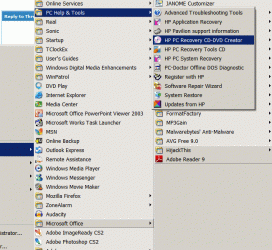
For a HP/Compaq .. look in Programs >> PC Help n Tools ... (Or something like this) ..
And find the recovery DVD creator.
 

Attachments

  • Clipboard.gif
    Clipboard.gif
    97.3 KB · Views: 61

My Computer My Computer

At a glance

XP MCE .... XP Pro 64 .... W7 U x64E6750, 2.67GHz C2D4GB, PC2 6400GeForce 9400GT
Computer Manufacturer/Model Number
HP d4996t (upgraded)
OS
XP MCE .... XP Pro 64 .... W7 U x64
CPU
E6750, 2.67GHz C2D
Memory
4GB, PC2 6400
Graphics Card(s)
GeForce 9400GT
Monitor(s) Displays
Twin Samsung 2443BWT
Screen Resolution
1920x1200
Hard Drives
Many .. 3 Installed
PSU
460W
Internet Speed
Cable
Well, I erased Windows.old a couple of days ago, and I never knew how to do this before, so I never transferred over the program that creates recovery disks. So, it got blown away.
 

My Computer My Computer

At a glance

Windows 7 Home Premium2 AMD Athlon 64 X2NVIDIA GeForce 8200M G graphics
Computer Manufacturer/Model Number
Compaq Presario CQ60-215DX
OS
Windows 7 Home Premium
CPU
2 AMD Athlon 64 X2
Graphics Card(s)
NVIDIA GeForce 8200M G graphics
Use Win7 backup imaging to create a backup image of your HDD stored externally and you will never have to reinstall either anyway. Just boot into the Win7 installer repair console and recover using the image in 15 minutes.

If you ever do need the old recov disks, order them then, or borrow a Vista disk which will work as well.
 
Unfortunately, I don't have an external hard drive.
 

My Computer My Computer

At a glance

Windows 7 Home Premium2 AMD Athlon 64 X2NVIDIA GeForce 8200M G graphics
Computer Manufacturer/Model Number
Compaq Presario CQ60-215DX
OS
Windows 7 Home Premium
CPU
2 AMD Athlon 64 X2
Graphics Card(s)
NVIDIA GeForce 8200M G graphics
The next best thing then is to create a primary formatted partition and have Win7 Backup imaging save the image there. Then if you need to reimage your HDD, just boot from the WIn7 installer or repair disk, choose "Recover using an image" and your HDD will be reimaged flawlessly in 15 minutes.

The risk without an external backup is if your HDD fails and the image isn't detectable by WIn7 repair console. But you can do that later when you get an external, or use multiple DVD's (RW will allow you to refresh image periodically) or even save the image to another location on your network.
 
Last edited:
Unfortunately, I don't have an external hard drive.
There are only two types of Computers made nowadays ...
Those that have got corrupted, or crashed .. And those that will.

Depending on which one you have ... You will probably wish you had got one.
 

My Computer My Computer

At a glance

XP MCE .... XP Pro 64 .... W7 U x64E6750, 2.67GHz C2D4GB, PC2 6400GeForce 9400GT
Computer Manufacturer/Model Number
HP d4996t (upgraded)
OS
XP MCE .... XP Pro 64 .... W7 U x64
CPU
E6750, 2.67GHz C2D
Memory
4GB, PC2 6400
Graphics Card(s)
GeForce 9400GT
Monitor(s) Displays
Twin Samsung 2443BWT
Screen Resolution
1920x1200
Hard Drives
Many .. 3 Installed
PSU
460W
Internet Speed
Cable
How much do they cost? I'm saving up for other things at the moment...
 

My Computer My Computer

At a glance

Windows 7 Home Premium2 AMD Athlon 64 X2NVIDIA GeForce 8200M G graphics
Computer Manufacturer/Model Number
Compaq Presario CQ60-215DX
OS
Windows 7 Home Premium
CPU
2 AMD Athlon 64 X2
Graphics Card(s)
NVIDIA GeForce 8200M G graphics
thanks so much for the quick replies. That was the only question keeping me from installing Win7. Gonna pull that trigger this a.m. see ya guys soon nuff!

Well mt, how'd it go? We havent seen you for a few days, please tell us your experience...
 

My Computer My Computer

At a glance

Windows 7 Ultimate 64 bit Steve Ballmer Signa...Intel Core 2 Quad - Q9550 - 2.83GHz stock - O...4GB DDR2 800MHz (PC6400) OCZ ReaperNvidia GE Force 8800 GTS
Computer Manufacturer/Model Number
Homebrew PC - "Alpha_Dawg"
OS
Windows 7 Ultimate 64 bit Steve Ballmer Signature Edition
CPU
Intel Core 2 Quad - Q9550 - 2.83GHz stock - OC'd to 3.6GHz
Motherboard
Gigabyte EP45-UD3P
Memory
4GB DDR2 800MHz (PC6400) OCZ Reaper
Graphics Card(s)
Nvidia GE Force 8800 GTS
Sound Card
Asus Xonar DX
Monitor(s) Displays
Samsung SyncMaster 2333HD
Screen Resolution
1920 x 1080
Hard Drives
WD Caviar Black 750GB - 7200RPM - 32MB cache
WD Caviar Green 1.5TB - 5400RPM - 64MB cache
WD Caviar Green 2.0TB - 5400RPM - 64MB cache
PSU
PC Power & Cooling Silencer 750
Case
Gigabyte 3D Aurora
Cooling
Case is Air - 5ea. 120mm fans (mix of Arctic and Xigmatec)
Keyboard
MS Natural Wireless KB
Mouse
MS Wireless Mouse
Internet Speed
50 mbps down/5 mbps up
Other Info
AVerMedia - AVerTVHD G2 Dual Tuner Card
How much do they cost? I'm saving up for other things at the moment...

I build my own.
I get an Enclosure .. Something like one of These ...
Put a HDD of my choice in it .. Maybe This or This ..
And top it off with some good Backup Software.

There's a big advantage of being able to get to the HDD in the enclosure.
 

My Computer My Computer

At a glance

XP MCE .... XP Pro 64 .... W7 U x64E6750, 2.67GHz C2D4GB, PC2 6400GeForce 9400GT
Computer Manufacturer/Model Number
HP d4996t (upgraded)
OS
XP MCE .... XP Pro 64 .... W7 U x64
CPU
E6750, 2.67GHz C2D
Memory
4GB, PC2 6400
Graphics Card(s)
GeForce 9400GT
Monitor(s) Displays
Twin Samsung 2443BWT
Screen Resolution
1920x1200
Hard Drives
Many .. 3 Installed
PSU
460W
Internet Speed
Cable
Back
Top