LAN doesn't have a valid IP configuration! (ICS prob.)

tonibgd

New member
Local time
5:40 PM
Messages
14
I have instaled Windows 7 Ultimate 32bit on my new computer. (Dual boot with XP). On my old computer there was installed XP... so the problem is:
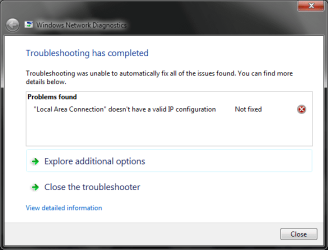
When i tryed to share Internet connection Windows 7 gave me an error:
"Local Area Connection" doesn't have a valid IP configuration
but files were shared and i could transfer files from one computer to the other... (only Internet didnt work)...
So i got back to win XP and tried to share connection ( XP vs XP ) and it worked great...
Then i thought: maybe windows 7 and windows XP cant share internet connection... and i installed windows 7 on the old computer (win7 vs win7)...
But then both computers came up with the same error ("Local Area Connection" doesn't have a valid IP configuration).

I tried winXP on the new comp and windows 7 on the old... and it worked great!!!
I figured out thet something is wrong with windows 7 on my new computer and i did a clean installation 3 times and the same error came up...

I tried all this things and nothing worked:

1)Disable/enable NIC
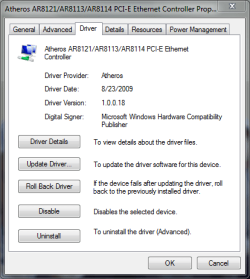
2)Install latest drivers for my NIC
3)Roll back the drivers
4)cmd -> ipconfig /refresh /release
5)Disabled ip v6
6) netsh winsock reset catalog
7)tried to manually enter IP
8)tried automatic IP
9)disabled Firewall
10)Bonjour is not instaled on my windows

I really dont know what else to do so somebody PLZ HELP!!!!

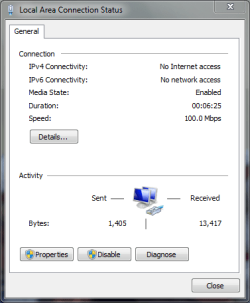
CPU: Intel Core2Duo E8400 (3.00 GHz) Motherboard: Asus P5Q SE Memory: 2GB Kingston DDR2 Graphics Card: GeForce 9800 GTNIC: Atheros AR8121/AR8113/AR8114 PCI-E Ethernet Controller
(i downloaded drivers for NIC at ASUSTeK Computer Inc.)I attached some screenshots and my IPCONFIG


Attachments
  • p1.PNG
    p1.PNG
    14.4 KB · Views: 112
  • p2.PNG
    p2.PNG
    11.9 KB · Views: 140
  • p3.PNG
    p3.PNG
    15.4 KB · Views: 89
  • IP CONFIG.txt
    IP CONFIG.txt
    1.8 KB · Views: 925
Last edited:

My Computer

OS
Windows 7 Ultimate (64 bit)
CPU
Intel Core2Duo E8400 (3.00 GHz)
Motherboard
Asus P5Q SE
Memory
2GB Kingston DDR2
Graphics Card(s)
GeForce 9800 GT
Sound Card
Realtek High Definition Audio
Monitor(s) Displays
SyncMaster 940BF
Hard Drives
Western Digital 300GB
Case
CoolerMaster Centurion 590 Mid tower
Cooling
Cooler Master
Keyboard
Logitech Classic Keyboard
Mouse
Logitech MX518
Internet Speed
3 Mbps
Not advisable to be posting that .txt online. It has your specific hardware info in it that can be abused by hackers. Especially because you connect directly to internet.

Try setting up static ip addresses for your machines and disable the mode/router's DHCP server.

Edit hosts file for each machine accordingly.
 

My Computer

Computer Manufacturer/Model Number
self built
OS
7600.20510 x86
CPU
P4 550 3.4 GHz HT running at 3.5 GHz
Motherboard
MSI PM8M3-V (MS-7211 v1.x) Micro-ATX mainboard
Memory
OCZ 2 GB(2x1GB) DDR400mHz running @ 414 mHz
Graphics Card(s)
HIS Radeon HD 3850 IceQ 3 Turbo HDMI Dual DL-DVI AGP
Sound Card
MOTU Traveler firewire studio interface 192 kHz 24 bit
Monitor(s) Displays
22" widescreen Acer X223W LCD, 17" Compaq P75 CRT
Screen Resolution
1680x1050 and 1280x1024
Hard Drives
SATA I x2 WD, 400 GB and 120 GB, SATA 2 WD Caviar Black 1 TB
PSU
350W generic
Case
Cybertronpc, it glows blue
Cooling
stock cpu fan, Ice-Q 3 gpu and system, many case fans
Keyboard
Logitch Classical Keyboard 200
Mouse
Logitech Mediaplay cordless
Internet Speed
1792/448 kbits/sec
Other Info
SATA II PCI fake RAID adapter, 1 GB Readyboost, original ATI Remote Wonder (even works with WMC perfectly), Logitech Rumblepad 2 game controller x2
Last edited:

My Computer

OS
Windows 7 Ultimate (64 bit)
CPU
Intel Core2Duo E8400 (3.00 GHz)
Motherboard
Asus P5Q SE
Memory
2GB Kingston DDR2
Graphics Card(s)
GeForce 9800 GT
Sound Card
Realtek High Definition Audio
Monitor(s) Displays
SyncMaster 940BF
Hard Drives
Western Digital 300GB
Case
CoolerMaster Centurion 590 Mid tower
Cooling
Cooler Master
Keyboard
Logitech Classic Keyboard
Mouse
Logitech MX518
Internet Speed
3 Mbps
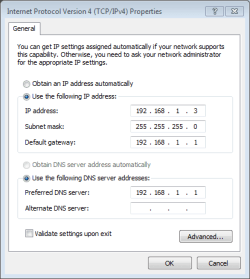
i set up a stactic ip addresses on both computers (i used this guide Get A Static IP! How to set a static ip address for your computer (for p2p, web servers, bittorrent, etc) for Linux, Windows, and Mac.)...
but im not sure how to disable the ,,mode/router's DHCP server''

How exactly did you configured your static IPs? screenshot your ipv4/6.

As for changing auto DHCP to Static IP, your router's control panel has these setting which you should select.

But if you have applied static IP to your machine (ipv4/6), that setting is void, per machine that you have set it as static ip.
 

My Computer

Computer Manufacturer/Model Number
Lenovo ThinkPad T60
OS
Windows 7 Ultimate 64Bit
CPU
GenuineIntel Intel(R) Core(TM) DuoCore T2400 @ 1.83GHz
Motherboard
Intel(R) 82801G (ICH7 Family)
Memory
2.00 GB
Graphics Card(s)
Mobile Intel(R) 945 Express Chipset
Sound Card
SoundMAX Integrated Digital HD Audio
Monitor(s) Displays
ThinkPad Display
Screen Resolution
1400x1050
Hard Drives
100Gb SATA
Keyboard
Standard Keyboard
Mouse
HID-compliant Mouse
Internet Speed
Cable Broadband - 54Mbps
Other Info
Intel(R) PRO/1000 PL Network Connection
11a/b/g Wireless LAN Mini PCI Express Adapter
file sharing still works great but ICS does not...
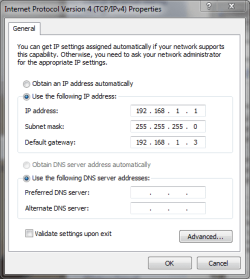
here are the screens...
 

Attachments

  • old cumputer.PNG
    old cumputer.PNG
    8.8 KB · Views: 91
  • new computer.PNG
    new computer.PNG
    14.3 KB · Views: 114

My Computer

OS
Windows 7 Ultimate (64 bit)
CPU
Intel Core2Duo E8400 (3.00 GHz)
Motherboard
Asus P5Q SE
Memory
2GB Kingston DDR2
Graphics Card(s)
GeForce 9800 GT
Sound Card
Realtek High Definition Audio
Monitor(s) Displays
SyncMaster 940BF
Hard Drives
Western Digital 300GB
Case
CoolerMaster Centurion 590 Mid tower
Cooling
Cooler Master
Keyboard
Logitech Classic Keyboard
Mouse
Logitech MX518
Internet Speed
3 Mbps
Your default is 192.168.1.1, why two same screens?
 

My Computer

Computer Manufacturer/Model Number
Lenovo ThinkPad T60
OS
Windows 7 Ultimate 64Bit
CPU
GenuineIntel Intel(R) Core(TM) DuoCore T2400 @ 1.83GHz
Motherboard
Intel(R) 82801G (ICH7 Family)
Memory
2.00 GB
Graphics Card(s)
Mobile Intel(R) 945 Express Chipset
Sound Card
SoundMAX Integrated Digital HD Audio
Monitor(s) Displays
ThinkPad Display
Screen Resolution
1400x1050
Hard Drives
100Gb SATA
Keyboard
Standard Keyboard
Mouse
HID-compliant Mouse
Internet Speed
Cable Broadband - 54Mbps
Other Info
Intel(R) PRO/1000 PL Network Connection
11a/b/g Wireless LAN Mini PCI Express Adapter
Your default is 192.168.1.1, why two same screens?

im confused right now...
i will appreciated it if you can you just post 2 screenshots of how should it look (one for IP for new and one for old computer)
 

My Computer

OS
Windows 7 Ultimate (64 bit)
CPU
Intel Core2Duo E8400 (3.00 GHz)
Motherboard
Asus P5Q SE
Memory
2GB Kingston DDR2
Graphics Card(s)
GeForce 9800 GT
Sound Card
Realtek High Definition Audio
Monitor(s) Displays
SyncMaster 940BF
Hard Drives
Western Digital 300GB
Case
CoolerMaster Centurion 590 Mid tower
Cooling
Cooler Master
Keyboard
Logitech Classic Keyboard
Mouse
Logitech MX518
Internet Speed
3 Mbps
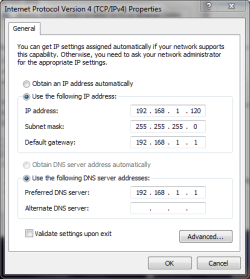
Default gateway and dns server for both machines = 192.168.1.1

subnet mask for both machines = 255.255.255.0

Ip address of both machines = 192.168.1.xxx

Change xxx for each machine to something different.

Example:

COMPUTERA 192.168.1.120
COMPUTERB 192.168.1.121

(Disclaimer - xxx is not like 42nd street in the mid 80s)
 

My Computer

Computer Manufacturer/Model Number
self built
OS
7600.20510 x86
CPU
P4 550 3.4 GHz HT running at 3.5 GHz
Motherboard
MSI PM8M3-V (MS-7211 v1.x) Micro-ATX mainboard
Memory
OCZ 2 GB(2x1GB) DDR400mHz running @ 414 mHz
Graphics Card(s)
HIS Radeon HD 3850 IceQ 3 Turbo HDMI Dual DL-DVI AGP
Sound Card
MOTU Traveler firewire studio interface 192 kHz 24 bit
Monitor(s) Displays
22" widescreen Acer X223W LCD, 17" Compaq P75 CRT
Screen Resolution
1680x1050 and 1280x1024
Hard Drives
SATA I x2 WD, 400 GB and 120 GB, SATA 2 WD Caviar Black 1 TB
PSU
350W generic
Case
Cybertronpc, it glows blue
Cooling
stock cpu fan, Ice-Q 3 gpu and system, many case fans
Keyboard
Logitch Classical Keyboard 200
Mouse
Logitech Mediaplay cordless
Internet Speed
1792/448 kbits/sec
Other Info
SATA II PCI fake RAID adapter, 1 GB Readyboost, original ATI Remote Wonder (even works with WMC perfectly), Logitech Rumblepad 2 game controller x2
I did everything you said.
Now there is no more error but ICS still doesn't work.
File sharing still works great...

Any other ideas?
 

Attachments

  • compA.PNG
    compA.PNG
    13.8 KB · Views: 67
  • compB.PNG
    compB.PNG
    8.8 KB · Views: 49

My Computer

OS
Windows 7 Ultimate (64 bit)
CPU
Intel Core2Duo E8400 (3.00 GHz)
Motherboard
Asus P5Q SE
Memory
2GB Kingston DDR2
Graphics Card(s)
GeForce 9800 GT
Sound Card
Realtek High Definition Audio
Monitor(s) Displays
SyncMaster 940BF
Hard Drives
Western Digital 300GB
Case
CoolerMaster Centurion 590 Mid tower
Cooling
Cooler Master
Keyboard
Logitech Classic Keyboard
Mouse
Logitech MX518
Internet Speed
3 Mbps
Start menu search box. Copy and paste services.msc to it. Hit enter. Look at Internet Connection Sharing (ICS) service. Set it to automatic and start it too.
 

My Computer

Computer Manufacturer/Model Number
self built
OS
7600.20510 x86
CPU
P4 550 3.4 GHz HT running at 3.5 GHz
Motherboard
MSI PM8M3-V (MS-7211 v1.x) Micro-ATX mainboard
Memory
OCZ 2 GB(2x1GB) DDR400mHz running @ 414 mHz
Graphics Card(s)
HIS Radeon HD 3850 IceQ 3 Turbo HDMI Dual DL-DVI AGP
Sound Card
MOTU Traveler firewire studio interface 192 kHz 24 bit
Monitor(s) Displays
22" widescreen Acer X223W LCD, 17" Compaq P75 CRT
Screen Resolution
1680x1050 and 1280x1024
Hard Drives
SATA I x2 WD, 400 GB and 120 GB, SATA 2 WD Caviar Black 1 TB
PSU
350W generic
Case
Cybertronpc, it glows blue
Cooling
stock cpu fan, Ice-Q 3 gpu and system, many case fans
Keyboard
Logitch Classical Keyboard 200
Mouse
Logitech Mediaplay cordless
Internet Speed
1792/448 kbits/sec
Other Info
SATA II PCI fake RAID adapter, 1 GB Readyboost, original ATI Remote Wonder (even works with WMC perfectly), Logitech Rumblepad 2 game controller x2
Start menu search box. Copy and paste services.msc to it. Hit enter. Look at Internet Connection Sharing (ICS) service. Set it to automatic and start it too.

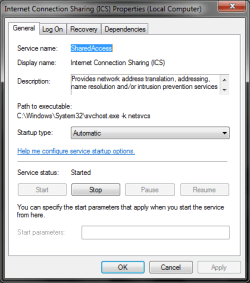
It was already started and set to automatic.
 

Attachments

  • ICS.PNG
    ICS.PNG
    14.1 KB · Views: 78

My Computer

OS
Windows 7 Ultimate (64 bit)
CPU
Intel Core2Duo E8400 (3.00 GHz)
Motherboard
Asus P5Q SE
Memory
2GB Kingston DDR2
Graphics Card(s)
GeForce 9800 GT
Sound Card
Realtek High Definition Audio
Monitor(s) Displays
SyncMaster 940BF
Hard Drives
Western Digital 300GB
Case
CoolerMaster Centurion 590 Mid tower
Cooling
Cooler Master
Keyboard
Logitech Classic Keyboard
Mouse
Logitech MX518
Internet Speed
3 Mbps
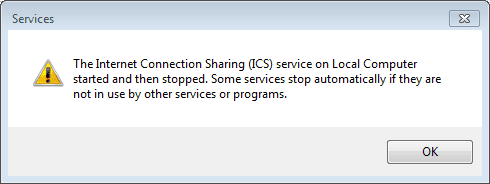
I think i found a problem...
One my old computer ICS service was not started and when i tried to start it this error came up.
 

Attachments

  • problem.PNG
    problem.PNG
    3.4 KB · Views: 45

My Computer

OS
Windows 7 Ultimate (64 bit)
CPU
Intel Core2Duo E8400 (3.00 GHz)
Motherboard
Asus P5Q SE
Memory
2GB Kingston DDR2
Graphics Card(s)
GeForce 9800 GT
Sound Card
Realtek High Definition Audio
Monitor(s) Displays
SyncMaster 940BF
Hard Drives
Western Digital 300GB
Case
CoolerMaster Centurion 590 Mid tower
Cooling
Cooler Master
Keyboard
Logitech Classic Keyboard
Mouse
Logitech MX518
Internet Speed
3 Mbps
This might help.

Windows XP's Internet Connection Sharing opens up client connectivity options with Server Publishing

Specifically,

t01220020121shi01_B.gif


Make sure Windows Firewall is running on both machines too.
 

My Computer

Computer Manufacturer/Model Number
self built
OS
7600.20510 x86
CPU
P4 550 3.4 GHz HT running at 3.5 GHz
Motherboard
MSI PM8M3-V (MS-7211 v1.x) Micro-ATX mainboard
Memory
OCZ 2 GB(2x1GB) DDR400mHz running @ 414 mHz
Graphics Card(s)
HIS Radeon HD 3850 IceQ 3 Turbo HDMI Dual DL-DVI AGP
Sound Card
MOTU Traveler firewire studio interface 192 kHz 24 bit
Monitor(s) Displays
22" widescreen Acer X223W LCD, 17" Compaq P75 CRT
Screen Resolution
1680x1050 and 1280x1024
Hard Drives
SATA I x2 WD, 400 GB and 120 GB, SATA 2 WD Caviar Black 1 TB
PSU
350W generic
Case
Cybertronpc, it glows blue
Cooling
stock cpu fan, Ice-Q 3 gpu and system, many case fans
Keyboard
Logitch Classical Keyboard 200
Mouse
Logitech Mediaplay cordless
Internet Speed
1792/448 kbits/sec
Other Info
SATA II PCI fake RAID adapter, 1 GB Readyboost, original ATI Remote Wonder (even works with WMC perfectly), Logitech Rumblepad 2 game controller x2

My Computer

OS
Windows 7 Ultimate (64 bit)
CPU
Intel Core2Duo E8400 (3.00 GHz)
Motherboard
Asus P5Q SE
Memory
2GB Kingston DDR2
Graphics Card(s)
GeForce 9800 GT
Sound Card
Realtek High Definition Audio
Monitor(s) Displays
SyncMaster 940BF
Hard Drives
Western Digital 300GB
Case
CoolerMaster Centurion 590 Mid tower
Cooling
Cooler Master
Keyboard
Logitech Classic Keyboard
Mouse
Logitech MX518
Internet Speed
3 Mbps
Does anybody know how to start ICS service if i have this error?????

,,The Internet Connection Sharing (ICS) service on Local Computer started and then stopped. Some services stop automatically if they are not in use by other services or programs''
 

My Computer

OS
Windows 7 Ultimate (64 bit)
CPU
Intel Core2Duo E8400 (3.00 GHz)
Motherboard
Asus P5Q SE
Memory
2GB Kingston DDR2
Graphics Card(s)
GeForce 9800 GT
Sound Card
Realtek High Definition Audio
Monitor(s) Displays
SyncMaster 940BF
Hard Drives
Western Digital 300GB
Case
CoolerMaster Centurion 590 Mid tower
Cooling
Cooler Master
Keyboard
Logitech Classic Keyboard
Mouse
Logitech MX518
Internet Speed
3 Mbps
This is definitely the weirdest problem i ever had with my computer... :huh:
But i found a solution :D
I connected my modem to the old computer and then enabled ICS on it...
After that both computers had internet... :shock:
i was shocked that it worked... :sarc:

I still don't know what the problem was but the important thing is that ICS works now.

THX EVERYBODY FOR YOUR HELP I REALLY APPRECIATED IT! :)
 

My Computer

OS
Windows 7 Ultimate (64 bit)
CPU
Intel Core2Duo E8400 (3.00 GHz)
Motherboard
Asus P5Q SE
Memory
2GB Kingston DDR2
Graphics Card(s)
GeForce 9800 GT
Sound Card
Realtek High Definition Audio
Monitor(s) Displays
SyncMaster 940BF
Hard Drives
Western Digital 300GB
Case
CoolerMaster Centurion 590 Mid tower
Cooling
Cooler Master
Keyboard
Logitech Classic Keyboard
Mouse
Logitech MX518
Internet Speed
3 Mbps
I hate it when some one fixes their computer and never reports the fix, so here is what worked for me.

First of all I live in a Best Western Hotel (not a motel) and they have EXCELLENT tech support. The BW tech support guy unblocked me from wherever he lives at the other end of the phone. Here's what happened and what he did.

The Problem
My computer's wireless and Ethernet adapters were physically blocked from the router. I had an Unknown network and got the dreaded 651 error and the message, “Local area connection doesn't have a valid IP configuration.”

How'd that happen?
I was using an add-on to Firefox to check my bookmarks for dead links. I can't remember which add-on it was because I reverted to an earlier version of my OS in an attempt to fix it. When it reverted it deleted the add-on. Today when I went to find it again, it is not available. Wonder why??? The kicker to all this is that I was watching my computer when the problem happened. It was like someone flipped a switch turning off my Ethernet adapter. I was on the wired connection (Ethernet) and switched to the wireless with no problems...until I tried to check my dead links again. Again the switch flipped off but for my Wireless adapter. RIGHT IN FRONT OF ME! Then I was really dead in the water. The problem was that the Best Western firewall saw my computer checking my bookmarks. The computer checked more than 300 websites within 1 minute and the firewall thought my computer had a virus. Thinking it had a virus the firewall blocked the physical address of my Ethernet adapter (first) and my wireless adapter (second) from further connections.

The Fix

  1. Start by running cmd from the start menu
  2. Type “ipconfig /all” without the quotes
  3. Write down the physical address of which ever connection is/are not working. If you are hard wired to your router, then use the Ethernet adapter physical address. If you are running wireless, then use the Wireless LAN adapter. I had to do this for both.
  4. Go to your router's firewall and find the physical addresses of the connections.
  5. Find the physical address(s) of your blocked adapter(s) and unblock it.

Sorry I can't be more specific for everyone's router but that is the general idea. I'm using Win 7 but I don't think it makes any difference.

YOUR problem
If you did not do anything unnatural that a firewall might have picked up as a virus, then you might have an actual virus that your outbound firewall blocked.
 

My Computer

Computer Manufacturer/Model Number
HP Pavillion m9040n
OS
Windows 7
Hi guys!

I have had the same problem for a few days now, and have searched numerous forums and gone through hell and high water to fix it. nothing helped until I found the ultimate solution that will help everyone:

CALL YOUR ISP, TELL THEM WHAT HAPPENED AND THEY CAN CONFIGURE A NEW IP ADDRESS FOR YOUR CONNECTION. IT ONLY TAKES ABOUT HALF AN HOUR.

During this time you must keep your router/modem turned off, and after the ISP has fixed the problem (in my case it took half an hour) you must restart your machine with the router/modem on and connected. From then on it should be like nothing ever happened.

Just for the fun of it, here's a list of things I have tried without results:

release/renew ipconfig
restarting modem/router and computer about a zillion times
changing LAN card
creating a static IP
resetting winsock in command prompt
reinstalling Win7
reinstalling XP (I had a dual boot and I did both, losing all installations)
manually entering IP address
disabling/enabling local area connection
plugging and unplugging LAN cable
uninstalling and reinstalling LAN card driver
resetting modem/router using the reset button

And after all this, all it took was just a phone call.
This is because your ISP is THE ONLY authority when it comes to configuring your IP address. In this case, it can only be done from the outside. This is also the reason why Microsoft didn't announce any patches or fixes for this problem, because it is not their problem and responsibility.

Only one question remains, WHY is this happening? Noone has been able to answer this, and I have read tons of forum posts about it. Maybe even the guys that made Windows 7 don't know it.

I am going to copy this post on several other forums because I have seen the trouble that people are having with this problem.

If you find out why this is happening, please post it here.
 

My Computer

Computer Manufacturer/Model Number
Gigabyte
OS
XP SP2
CPU
Intel
Motherboard
Gigabyte
Memory
Kingston
Graphics Card(s)
Gigabyte
Sound Card
Gigabyte
Monitor(s) Displays
Adi
Hard Drives
Maxtor
PSU
Thermal take
Case
Thermal take
Cooling
Thermal take
Error 1075 on W7HP

I'm trying to get ICS to work so I can share the internet from my laptop with my Xbox 360. I'm getting this error, and it says that "The dependency service does not exist or has been marked for deletion. How do I fix this?
 

My Computer

OS
Windows 7 Home Premium 64-Bit
Back
Top