Show Us Your WEI

Status
Not open for further replies.
Hello Giac, welcome to Seven Forums!


I'm sure someone here will have an answer for you.
 

My Computer

Computer Manufacturer/Model Number
* BFK Customs *
OS
W 7 64-bit Ultimate
CPU
Intel Q9550 Yorkfield
Motherboard
ASUS P5Q Pro
Memory
8GB Dominator 8500C5D
Graphics Card(s)
ATI : XFX 5870
Sound Card
Realtek HD Audio 7-1
Monitor(s) Displays
1x 47" LCD HDMI & 3x 26" LCD HDMI
Screen Resolution
1920x1080P & 1920x1200
Hard Drives
1x 80GB Intel X25-M G2 SSD : 1x 500GB & 1x 640GB WD Caviar Black(s)
PSU
Corsair 620HX
Case
Cooler Master RC-690
Cooling
Tuniq Tower 120, 2x 140mm and 3x 120mm case fans
Keyboard
Microsoft 500
Mouse
Razer Diamondback 3G
Internet Speed
14 Mb/s
Other Info
1x Koutech 3Gb/s SATA HDD Hot Swap Rack
agree those Intel ssd's are great, 2 Intel SSD's in raid 0 outperform 3 OCZ Vertex's in raid 0.
I need a little more OC, but Win 7 doesn't inable my USB keyboard until after it's passed the Bios enter screen, so until I get a regulay keyboard, I'm locked out of Bios.

can you get hold of a PS2 keyboard? there will more than likely be a setting somewhere in the bios 'usb keyboard support' or something along those lines, hopefully if there is and you enable it it may fix your issue. i know both my 790i boards have that setting somewhere in them.
 

My Computer

Computer Manufacturer/Model Number
Mad Customs #4
OS
Windows 7 7600 x64 (16385) Ultimate,Windows Vista x64 Ultimate
CPU
Intel Quad core Q9550 [email protected](AS5 lapped)(1845FSB)
Motherboard
EVGA 790i FTW DIGITAL PWM (AS5 re-pasted)
Memory
2gbx4 GSkill1600MHz9/9/9/24/2T-1.8v@1677MHz9/9/9/18/1T-1.8v
Graphics Card(s)
x2 Leadtek 9800GX2 Quad SLI(re-pasted/no cases)755/1120/1820
Sound Card
Crapative XF-i Plat
Monitor(s) Displays
Chimei22"ws(DVI)/LG32"LCD(HDMI)/Samsung 40"LCD(HDMI)
Screen Resolution
1680x1050/1360x768/1920x1080 (1080P)
Hard Drives
Seagate 1TB "40NS" 32mb sata2, Hitachi 500gb 16mb sata2 (backup storage), Sandisk 16gb micro SD (mobile storage)
PSU
Zalman 850-HP 850watt x6 12v@18A
Case
Tiled floor (nice and cold-usually 18c idle)
Cooling
fan forced 120 Xtreme (lapped)with push/pull setup
Keyboard
Logitech Di Novo Edge
Mouse
MX 1100
Internet Speed
Bigpond 17mbit/s cable=Max witnessed 2.5Mbyte/s down 30kb up
Other Info
Enzotech SLF-1+Enzotech CNB-EVGAi chipset coolers/Sunbeamtech Rheobus Extreme 30 Watt x 6 channel fan controller/Zalman ZM-MFC2 fan controller-Watt meter/Logitech G25 Racing Wheel/Logitech cordless number pad/OCZ NIA//HTPC:7600 x64/[email protected]/2x2Gb ST Proj.X DDR3 1800 9-9-9-24/Nvidia 8400GS 512Mb/Asus HDAV1.3 Delux(changed OPAmps to OPA627)/250Gb 16Mb 7200/480W PSU/Custom made cardboard box!!
agree those Intel ssd's are great, 2 Intel SSD's in raid 0 outperform 3 OCZ Vertex's in raid 0.
I need a little more OC, but Win 7 doesn't inable my USB keyboard until after it's passed the Bios enter screen, so until I get a regulay keyboard, I'm locked out of Bios.

can you get hold of a PS2 keyboard? there will more than likely be a setting somewhere in the bios 'usb keyboard support' or something along those lines, hopefully if there is and you enable it it may fix your issue. i know both my 790i boards have that setting somewhere in them.

Nothing to do with Win 7.. It's USB Legacy Support in the BIOS.
 

My Computer

Computer Manufacturer/Model Number
Home Build
OS
Windows 7 Home Premium 64-Bit
CPU
Intel Core i7 2600K 3.4GHz Sandy Bridge
Motherboard
ASUS P8Z68-V Pro
Memory
8Gb Corsair Vengeance 1600MHz DDR3 CL8
Graphics Card(s)
Gigabyte GTX460 1Gb OC
Sound Card
Realtek HD, Logitech G35 7.1 USB Headset
Monitor(s) Displays
BenQ 24" Full HD 16:9 DVI
Screen Resolution
1920x1080
Hard Drives
Western Digital 640Gb 64Mb Cache SATA III
Maxtor 250Gb SATA
PSU
XFX 650W XXX Edition Modular
Case
CoolerMaster Elite 335
Cooling
Xilence Red Wing
Keyboard
Microsoft Sidewinder X4
Mouse
Logitech G500 Gaming Mouse
Internet Speed
20Mb Cable
View attachment 34990

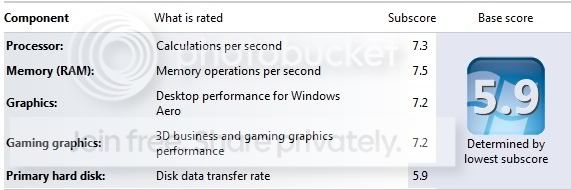
only 7.8 for my GPU! xfx hd 5870
what do you have to do for 7.9 crossfire?
and would have thought a 150gb velociraptor would have done better too :rolleyes:

unfortunately the highest you are going to get on a velociraptor is 5.9. i have the 300gig and that is as high as i get. one user has theirs at 6.3. their wei is hacked to get that.:):)

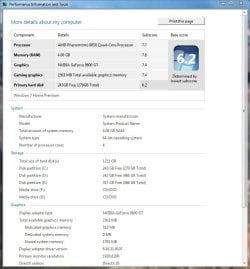
Not really all you have to do is disable write caching on the drive while doing the test. Not only did it increase my disk drive score from 5.9 to 6.2 it also helped my other score a bit. (In real life you need the caching on.) It show you how screwed up these artificial scores are.:sarc:


if you need the write caching in day to day use then the 6.2 score is a cheat. the idea of benchmarking is to see how a system will behave in normal day to day use.
 

My Computer

Computer Manufacturer/Model Number
InternetLord
OS
Windows 7 Eternity Build 7600 RTM Activated x86
CPU
Core2Duo E8400
Motherboard
Asus Rampage Formula
Memory
3gis DDR2 6400
Graphics Card(s)
Asus NVidia 9500 GTX 512mb
Sound Card
Sound Blaster X-Fi Xtreme Audio PCI-e
Monitor(s) Displays
SCEPTRE X22WG-1080P 22"
Screen Resolution
1680 x 1050
Hard Drives
Western Digital 300gig SATA VelociRaptor 10,000rpm
two 320gig SATA Seagate Barracuda 7,200rpm
PSU
700 Watt
Case
U2-UFO Black Powder Coat - Solid Top www.mountainmod.com
Cooling
7 x 120mm 2,500rpm case fans, Ultra ChillTEC Thermoelectric
Keyboard
Logitech diNovo Edge
Mouse
Logitech LX8 Laser Mouse
Internet Speed
7mbps
Other Info
Hauppauge WinTV HRV-1800 PCI-e
agree those Intel ssd's are great, 2 Intel SSD's in raid 0 outperform 3 OCZ Vertex's in raid 0.
I need a little more OC, but Win 7 doesn't inable my USB keyboard until after it's passed the Bios enter screen, so until I get a regulay keyboard, I'm locked out of Bios.

can you get hold of a PS2 keyboard? there will more than likely be a setting somewhere in the bios 'usb keyboard support' or something along those lines, hopefully if there is and you enable it it may fix your issue. i know both my 790i boards have that setting somewhere in them.

Nothing to do with Win 7.. It's USB Legacy Support in the BIOS.

which is why i said to get a ps2 (old round style plug) k/b to gain access to the bios, from there there should be a setting somewhere to enable USB K/B support, they usually also have a setting to enable USB mouse support as well. my old Asus 680i mobo had the same problem, but once i set that setting to enable it was fine with a usb k/b.
 

My Computer

Computer Manufacturer/Model Number
Mad Customs #4
OS
Windows 7 7600 x64 (16385) Ultimate,Windows Vista x64 Ultimate
CPU
Intel Quad core Q9550 [email protected](AS5 lapped)(1845FSB)
Motherboard
EVGA 790i FTW DIGITAL PWM (AS5 re-pasted)
Memory
2gbx4 GSkill1600MHz9/9/9/24/2T-1.8v@1677MHz9/9/9/18/1T-1.8v
Graphics Card(s)
x2 Leadtek 9800GX2 Quad SLI(re-pasted/no cases)755/1120/1820
Sound Card
Crapative XF-i Plat
Monitor(s) Displays
Chimei22"ws(DVI)/LG32"LCD(HDMI)/Samsung 40"LCD(HDMI)
Screen Resolution
1680x1050/1360x768/1920x1080 (1080P)
Hard Drives
Seagate 1TB "40NS" 32mb sata2, Hitachi 500gb 16mb sata2 (backup storage), Sandisk 16gb micro SD (mobile storage)
PSU
Zalman 850-HP 850watt x6 12v@18A
Case
Tiled floor (nice and cold-usually 18c idle)
Cooling
fan forced 120 Xtreme (lapped)with push/pull setup
Keyboard
Logitech Di Novo Edge
Mouse
MX 1100
Internet Speed
Bigpond 17mbit/s cable=Max witnessed 2.5Mbyte/s down 30kb up
Other Info
Enzotech SLF-1+Enzotech CNB-EVGAi chipset coolers/Sunbeamtech Rheobus Extreme 30 Watt x 6 channel fan controller/Zalman ZM-MFC2 fan controller-Watt meter/Logitech G25 Racing Wheel/Logitech cordless number pad/OCZ NIA//HTPC:7600 x64/[email protected]/2x2Gb ST Proj.X DDR3 1800 9-9-9-24/Nvidia 8400GS 512Mb/Asus HDAV1.3 Delux(changed OPAmps to OPA627)/250Gb 16Mb 7200/480W PSU/Custom made cardboard box!!
unfortunately the highest you are going to get on a velociraptor is 5.9. i have the 300gig and that is as high as i get. one user has theirs at 6.3. their wei is hacked to get that.:):)

Not really all you have to do is disable write caching on the drive while doing the test. Not only did it increase my disk drive score from 5.9 to 6.2 it also helped my other score a bit. (In real life you need the caching on.) It show you how screwed up these artificial scores are.:sarc:


if you need the write caching in day to day use then the 6.2 score is a cheat. the idea of benchmarking is to see how a system will behave in normal day to day use.

this is how i set up my o/s hdd, i always have set it up like this. the only problem is, is if your system is unstable and it crashes, you lose data.

other than that, there isnt a huge performance increase. it is more to do with command queuing for performance.
Captuxre.PNG
 

My Computer

Computer Manufacturer/Model Number
Mad Customs #4
OS
Windows 7 7600 x64 (16385) Ultimate,Windows Vista x64 Ultimate
CPU
Intel Quad core Q9550 [email protected](AS5 lapped)(1845FSB)
Motherboard
EVGA 790i FTW DIGITAL PWM (AS5 re-pasted)
Memory
2gbx4 GSkill1600MHz9/9/9/24/2T-1.8v@1677MHz9/9/9/18/1T-1.8v
Graphics Card(s)
x2 Leadtek 9800GX2 Quad SLI(re-pasted/no cases)755/1120/1820
Sound Card
Crapative XF-i Plat
Monitor(s) Displays
Chimei22"ws(DVI)/LG32"LCD(HDMI)/Samsung 40"LCD(HDMI)
Screen Resolution
1680x1050/1360x768/1920x1080 (1080P)
Hard Drives
Seagate 1TB "40NS" 32mb sata2, Hitachi 500gb 16mb sata2 (backup storage), Sandisk 16gb micro SD (mobile storage)
PSU
Zalman 850-HP 850watt x6 12v@18A
Case
Tiled floor (nice and cold-usually 18c idle)
Cooling
fan forced 120 Xtreme (lapped)with push/pull setup
Keyboard
Logitech Di Novo Edge
Mouse
MX 1100
Internet Speed
Bigpond 17mbit/s cable=Max witnessed 2.5Mbyte/s down 30kb up
Other Info
Enzotech SLF-1+Enzotech CNB-EVGAi chipset coolers/Sunbeamtech Rheobus Extreme 30 Watt x 6 channel fan controller/Zalman ZM-MFC2 fan controller-Watt meter/Logitech G25 Racing Wheel/Logitech cordless number pad/OCZ NIA//HTPC:7600 x64/[email protected]/2x2Gb ST Proj.X DDR3 1800 9-9-9-24/Nvidia 8400GS 512Mb/Asus HDAV1.3 Delux(changed OPAmps to OPA627)/250Gb 16Mb 7200/480W PSU/Custom made cardboard box!!
this is how i set up my o/s hdd, i always have set it up like this. the only problem is, is if your system is unstable and it crashes, you lose data.
I was looking at this today on my system.

Do you happen to know if it can cause data loss on the drive itself...meaning previously already written good data? Like can it destroy an mp3 collection, let's say, for, instance?
 

My Computer

Computer Manufacturer/Model Number
self built
OS
7600.20510 x86
CPU
P4 550 3.4 GHz HT running at 3.5 GHz
Motherboard
MSI PM8M3-V (MS-7211 v1.x) Micro-ATX mainboard
Memory
OCZ 2 GB(2x1GB) DDR400mHz running @ 414 mHz
Graphics Card(s)
HIS Radeon HD 3850 IceQ 3 Turbo HDMI Dual DL-DVI AGP
Sound Card
MOTU Traveler firewire studio interface 192 kHz 24 bit
Monitor(s) Displays
22" widescreen Acer X223W LCD, 17" Compaq P75 CRT
Screen Resolution
1680x1050 and 1280x1024
Hard Drives
SATA I x2 WD, 400 GB and 120 GB, SATA 2 WD Caviar Black 1 TB
PSU
350W generic
Case
Cybertronpc, it glows blue
Cooling
stock cpu fan, Ice-Q 3 gpu and system, many case fans
Keyboard
Logitch Classical Keyboard 200
Mouse
Logitech Mediaplay cordless
Internet Speed
1792/448 kbits/sec
Other Info
SATA II PCI fake RAID adapter, 1 GB Readyboost, original ATI Remote Wonder (even works with WMC perfectly), Logitech Rumblepad 2 game controller x2
WMIi5.jpg
 

My Computer

OS
Windows 7 Ultimate RTM (Build 7600) 64-bit
CPU
Intel Core i5-750 @ 2.66GHz (Stock Clock)
Motherboard
MSI P55-CD53
Memory
Corsair XMS3 4GB (2 x 2GB)
Graphics Card(s)
GeForce GTX 260 896MB @ 575MHz (Stock Clock)
Sound Card
Creative Sound Blaster Audigy 2
Monitor(s) Displays
Samsung SyncMaster 931BF (19')
Screen Resolution
1280x1024
Hard Drives
WD Raptor 150GB SATA 10000RPM (OS & Games);Samsung Spinpoint F1 750GB SATA 7200RPM (Apps & Storage);Seagate 320GB SATA 7200RPM (Storage)
PSU
OCZ GameXStream 600W
Case
Cool Master Centurion 5
Cooling
Front: 80mm & 120mm Fans; Rear: 120mm Fan.
Keyboard
Saitek Eclipse
Mouse
Logitech Wireless Mouse
Internet Speed
Cable (DL: 2738kb/s; UL: 849kb/s)
Hello Jerry03, welcome to Seven Forums!
 

My Computer

Computer Manufacturer/Model Number
* BFK Customs *
OS
W 7 64-bit Ultimate
CPU
Intel Q9550 Yorkfield
Motherboard
ASUS P5Q Pro
Memory
8GB Dominator 8500C5D
Graphics Card(s)
ATI : XFX 5870
Sound Card
Realtek HD Audio 7-1
Monitor(s) Displays
1x 47" LCD HDMI & 3x 26" LCD HDMI
Screen Resolution
1920x1080P & 1920x1200
Hard Drives
1x 80GB Intel X25-M G2 SSD : 1x 500GB & 1x 640GB WD Caviar Black(s)
PSU
Corsair 620HX
Case
Cooler Master RC-690
Cooling
Tuniq Tower 120, 2x 140mm and 3x 120mm case fans
Keyboard
Microsoft 500
Mouse
Razer Diamondback 3G
Internet Speed
14 Mb/s
Other Info
1x Koutech 3Gb/s SATA HDD Hot Swap Rack
can you get hold of a PS2 keyboard? there will more than likely be a setting somewhere in the bios 'usb keyboard support' or something along those lines, hopefully if there is and you enable it it may fix your issue. i know both my 790i boards have that setting somewhere in them.

Nothing to do with Win 7.. It's USB Legacy Support in the BIOS.

which is why i said to get a ps2 (old round style plug) k/b to gain access to the bios, from there there should be a setting somewhere to enable USB K/B support, they usually also have a setting to enable USB mouse support as well. my old Asus 680i mobo had the same problem, but once i set that setting to enable it was fine with a usb k/b.


A week ago I would have thought the same thing, For the last year I've been able to get into Bios, I have to watch the Keybord and mouse they have lights on them , as soon as I see the light flash I press deleat, the mother board beeps and the system goes into Bios, I've done that with Vista, and several RC versions, on the 3rd, I added two SSD's ( Intel X25-M ( Raid 0 )) and The ofical Win 7, Ultamate Full version, that is all I have changed, and now I cant get into Bios, the Mother board beeps before the lights flash on the Keyboard, so either the Win 7 Install, or the SSD's changed something enough so that I can not press delete fast enough. I guess I should have suspected the SSD's and not Win 7.
 

My Computer

Computer Manufacturer/Model Number
EVGA
OS
Windows 7
CPU
I-7 980X
Motherboard
EVGA X58
Memory
12 GB CORSEAIR XMS3
Graphics Card(s)
2 GTX295'S IN quad SLI
Sound Card
REALTECK ON BOARD
Monitor(s) Displays
LG HDTV, 35in 1080P
Screen Resolution
1920 X1080
Hard Drives
2 Seagate 7200 1TB SATAII IN RAID 0 for vista
3 Intel X25M-G80's Raid 0
PSU
CORSAIR HX1200W
Case
COOLER MASTER HAF-X
Cooling
H-70
Other Info
OC TO 4.0
Win 7 RC1 WEI 6.4
this is how i set up my o/s hdd, i always have set it up like this. the only problem is, is if your system is unstable and it crashes, you lose data.
I was looking at this today on my system.

Do you happen to know if it can cause data loss on the drive itself...meaning previously already written good data? Like can it destroy an mp3 collection, let's say, for, instance?

i couldnt tell you TBH, but any crash on a system has the opportunity to corrupt a hdd and in some cases the only fix is a format. i recently corrupted my registry (cant remember how) but i done a recovery with windows 7 (via usb) and instead of it fixing the issues, it simply copied a fresh registry to my system, causing all registries from installed programs to be lost, and in turn most of my software would no longer run.
which is why i am still setting up a fresh install (which is not always a bad thing).

this is from windows help on the setting

but from experience, in the event of a crash, only the data that is recent gets 'lost', but there is always that 'chance' of corruption. so use at your own risk, but i always use it on my main hdd, but not on my backup drive for obvious reasons (thats why its a backup drive :p)
Cache flushing


“Write caching” in a storage device refers to the use of high-speed volatile memory to collect write commands sent to data storage devices and cache them until the slower storage media (either physical disks or low-cost flash memory) can accommodate them. Most devices that use write caching require that power be supplied continuously.

By default, Windows employs cache flushing. This means that the system will periodically instruct the storage device to transfer all data waiting in the cache to the principal storage media. When you select Enable write caching on this device, you turn off these periodic commands to transfer the data. Not all devices support all of these features.
If high data transfer performance is your paramount concern, you should enable both settings: in the Removal Policy section, select the Better Performance option and in the Write-caching policy section, select Enable write caching on the device (if the system hardware and storage device support these features).

 

My Computer

Computer Manufacturer/Model Number
Mad Customs #4
OS
Windows 7 7600 x64 (16385) Ultimate,Windows Vista x64 Ultimate
CPU
Intel Quad core Q9550 [email protected](AS5 lapped)(1845FSB)
Motherboard
EVGA 790i FTW DIGITAL PWM (AS5 re-pasted)
Memory
2gbx4 GSkill1600MHz9/9/9/24/2T-1.8v@1677MHz9/9/9/18/1T-1.8v
Graphics Card(s)
x2 Leadtek 9800GX2 Quad SLI(re-pasted/no cases)755/1120/1820
Sound Card
Crapative XF-i Plat
Monitor(s) Displays
Chimei22"ws(DVI)/LG32"LCD(HDMI)/Samsung 40"LCD(HDMI)
Screen Resolution
1680x1050/1360x768/1920x1080 (1080P)
Hard Drives
Seagate 1TB "40NS" 32mb sata2, Hitachi 500gb 16mb sata2 (backup storage), Sandisk 16gb micro SD (mobile storage)
PSU
Zalman 850-HP 850watt x6 12v@18A
Case
Tiled floor (nice and cold-usually 18c idle)
Cooling
fan forced 120 Xtreme (lapped)with push/pull setup
Keyboard
Logitech Di Novo Edge
Mouse
MX 1100
Internet Speed
Bigpond 17mbit/s cable=Max witnessed 2.5Mbyte/s down 30kb up
Other Info
Enzotech SLF-1+Enzotech CNB-EVGAi chipset coolers/Sunbeamtech Rheobus Extreme 30 Watt x 6 channel fan controller/Zalman ZM-MFC2 fan controller-Watt meter/Logitech G25 Racing Wheel/Logitech cordless number pad/OCZ NIA//HTPC:7600 x64/[email protected]/2x2Gb ST Proj.X DDR3 1800 9-9-9-24/Nvidia 8400GS 512Mb/Asus HDAV1.3 Delux(changed OPAmps to OPA627)/250Gb 16Mb 7200/480W PSU/Custom made cardboard box!!
Nothing to do with Win 7.. It's USB Legacy Support in the BIOS.

which is why i said to get a ps2 (old round style plug) k/b to gain access to the bios, from there there should be a setting somewhere to enable USB K/B support, they usually also have a setting to enable USB mouse support as well. my old Asus 680i mobo had the same problem, but once i set that setting to enable it was fine with a usb k/b.


A week ago I would have thought the same thing, For the last year I've been able to get into Bios, I have to watch the Keybord and mouse they have lights on them , as soon as I see the light flash I press deleat, the mother board beeps and the system goes into Bios, I've done that with Vista, and several RC versions, on the 3rd, I added two SSD's ( Intel X25-M ( Raid 0 )) and The ofical Win 7, Ultamate Full version, that is all I have changed, and now I cant get into Bios, the Mother board beeps before the lights flash on the Keyboard, so either the Win 7 Install, or the SSD's changed something enough so that I can not press delete fast enough. I guess I should have suspected the SSD's and not Win 7.

Ok now i am seeing the rain a bit more clearly. as you figured out, any software does not affect the POST screen. the post is operated by the BIOS chip. so what you are saying is that since installing the SSD's you can no longer access the bios? maybe just try disconnecting the sata plug from the SSD's and see if then you can access it like you did before? that is defiantly strange that a hdd install causes that issue.

have you tried changing the k/b to a different usb slot?

But like i said before, if you can get access to the bios, go through all the settings and look for one that says USB k/b support and ensure it is set to enable (and mouse also if it has it listed). i would almost be certain that it will have the settings somewhere.

Also what EVGA x58 mobo do you have? there are 7 different models.
 

My Computer

Computer Manufacturer/Model Number
Mad Customs #4
OS
Windows 7 7600 x64 (16385) Ultimate,Windows Vista x64 Ultimate
CPU
Intel Quad core Q9550 [email protected](AS5 lapped)(1845FSB)
Motherboard
EVGA 790i FTW DIGITAL PWM (AS5 re-pasted)
Memory
2gbx4 GSkill1600MHz9/9/9/24/2T-1.8v@1677MHz9/9/9/18/1T-1.8v
Graphics Card(s)
x2 Leadtek 9800GX2 Quad SLI(re-pasted/no cases)755/1120/1820
Sound Card
Crapative XF-i Plat
Monitor(s) Displays
Chimei22"ws(DVI)/LG32"LCD(HDMI)/Samsung 40"LCD(HDMI)
Screen Resolution
1680x1050/1360x768/1920x1080 (1080P)
Hard Drives
Seagate 1TB "40NS" 32mb sata2, Hitachi 500gb 16mb sata2 (backup storage), Sandisk 16gb micro SD (mobile storage)
PSU
Zalman 850-HP 850watt x6 12v@18A
Case
Tiled floor (nice and cold-usually 18c idle)
Cooling
fan forced 120 Xtreme (lapped)with push/pull setup
Keyboard
Logitech Di Novo Edge
Mouse
MX 1100
Internet Speed
Bigpond 17mbit/s cable=Max witnessed 2.5Mbyte/s down 30kb up
Other Info
Enzotech SLF-1+Enzotech CNB-EVGAi chipset coolers/Sunbeamtech Rheobus Extreme 30 Watt x 6 channel fan controller/Zalman ZM-MFC2 fan controller-Watt meter/Logitech G25 Racing Wheel/Logitech cordless number pad/OCZ NIA//HTPC:7600 x64/[email protected]/2x2Gb ST Proj.X DDR3 1800 9-9-9-24/Nvidia 8400GS 512Mb/Asus HDAV1.3 Delux(changed OPAmps to OPA627)/250Gb 16Mb 7200/480W PSU/Custom made cardboard box!!
can you get hold of a PS2 keyboard? there will more than likely be a setting somewhere in the bios 'usb keyboard support' or something along those lines, hopefully if there is and you enable it it may fix your issue. i know both my 790i boards have that setting somewhere in them.

Nothing to do with Win 7.. It's USB Legacy Support in the BIOS.

which is why i said to get a ps2 (old round style plug) k/b to gain access to the bios, from there there should be a setting somewhere to enable USB K/B support, they usually also have a setting to enable USB mouse support as well. my old Asus 680i mobo had the same problem, but once i set that setting to enable it was fine with a usb k/b.

Oops, sorry about that, I meant that as a reply to "but Win 7 doesn't inable my USB keyboard until after it's passed the Bios enter screen" from the person you quoted.

But, due to having some beer I messed it up. Sorry.
 

My Computer

Computer Manufacturer/Model Number
Home Build
OS
Windows 7 Home Premium 64-Bit
CPU
Intel Core i7 2600K 3.4GHz Sandy Bridge
Motherboard
ASUS P8Z68-V Pro
Memory
8Gb Corsair Vengeance 1600MHz DDR3 CL8
Graphics Card(s)
Gigabyte GTX460 1Gb OC
Sound Card
Realtek HD, Logitech G35 7.1 USB Headset
Monitor(s) Displays
BenQ 24" Full HD 16:9 DVI
Screen Resolution
1920x1080
Hard Drives
Western Digital 640Gb 64Mb Cache SATA III
Maxtor 250Gb SATA
PSU
XFX 650W XXX Edition Modular
Case
CoolerMaster Elite 335
Cooling
Xilence Red Wing
Keyboard
Microsoft Sidewinder X4
Mouse
Logitech G500 Gaming Mouse
Internet Speed
20Mb Cable
Nothing to do with Win 7.. It's USB Legacy Support in the BIOS.

which is why i said to get a ps2 (old round style plug) k/b to gain access to the bios, from there there should be a setting somewhere to enable USB K/B support, they usually also have a setting to enable USB mouse support as well. my old Asus 680i mobo had the same problem, but once i set that setting to enable it was fine with a usb k/b.

Oops, sorry about that, I meant that as a reply to "but Win 7 doesn't inable my USB keyboard until after it's passed the Bios enter screen" from the person you quoted.

But, due to having some beer I messed it up. Sorry.

ok now it makes sense.;)
 

My Computer

Computer Manufacturer/Model Number
Mad Customs #4
OS
Windows 7 7600 x64 (16385) Ultimate,Windows Vista x64 Ultimate
CPU
Intel Quad core Q9550 [email protected](AS5 lapped)(1845FSB)
Motherboard
EVGA 790i FTW DIGITAL PWM (AS5 re-pasted)
Memory
2gbx4 GSkill1600MHz9/9/9/24/2T-1.8v@1677MHz9/9/9/18/1T-1.8v
Graphics Card(s)
x2 Leadtek 9800GX2 Quad SLI(re-pasted/no cases)755/1120/1820
Sound Card
Crapative XF-i Plat
Monitor(s) Displays
Chimei22"ws(DVI)/LG32"LCD(HDMI)/Samsung 40"LCD(HDMI)
Screen Resolution
1680x1050/1360x768/1920x1080 (1080P)
Hard Drives
Seagate 1TB "40NS" 32mb sata2, Hitachi 500gb 16mb sata2 (backup storage), Sandisk 16gb micro SD (mobile storage)
PSU
Zalman 850-HP 850watt x6 12v@18A
Case
Tiled floor (nice and cold-usually 18c idle)
Cooling
fan forced 120 Xtreme (lapped)with push/pull setup
Keyboard
Logitech Di Novo Edge
Mouse
MX 1100
Internet Speed
Bigpond 17mbit/s cable=Max witnessed 2.5Mbyte/s down 30kb up
Other Info
Enzotech SLF-1+Enzotech CNB-EVGAi chipset coolers/Sunbeamtech Rheobus Extreme 30 Watt x 6 channel fan controller/Zalman ZM-MFC2 fan controller-Watt meter/Logitech G25 Racing Wheel/Logitech cordless number pad/OCZ NIA//HTPC:7600 x64/[email protected]/2x2Gb ST Proj.X DDR3 1800 9-9-9-24/Nvidia 8400GS 512Mb/Asus HDAV1.3 Delux(changed OPAmps to OPA627)/250Gb 16Mb 7200/480W PSU/Custom made cardboard box!!
unfortunately the highest you are going to get on a velociraptor is 5.9. i have the 300gig and that is as high as i get. one user has theirs at 6.3. their wei is hacked to get that.:):)

Not really all you have to do is disable write caching on the drive while doing the test. Not only did it increase my disk drive score from 5.9 to 6.2 it also helped my other score a bit. (In real life you need the caching on.) It show you how screwed up these artificial scores are.:sarc:


if you need the write caching in day to day use then the 6.2 score is a cheat. the idea of benchmarking is to see how a system will behave in normal day to day use.

The point is you don't have to hack the WEI to get a better score. Howerver it is weird that a Windows "feature" that is supposed to increase disk performance actually results in a lower WEI score. Also their appears something wrong in the scaling or test criteria that a 10,000 rpm drive does not score better than 5.9 with disk caching turned on.
 

My Computer

Computer type
PC/Desktop
Computer Manufacturer/Model Number
Custom Build
OS
Windows 10 (64 bit)
CPU
AMD FX8320
Motherboard
Asus M5A99X EVO
Memory
16 GB
Graphics Card(s)
AMD 7870
I just tried leaving the WEI with the write caching on and turning off the write caching buffer flushing and I got identical scores to the ones I posted erlier (including the 6.2 score for the Western Digital hard drive). So if you use a back up power supply and turn off the write caching buffer flushing it is possible to break the 5.9 hard drive barrier with a fast hard drive. I still don't understand why my other scores also increased slightly when doing this but that's my WEI score!
 

Attachments

  • Capture.JPG
    Capture.JPG
    92.9 KB · Views: 51

My Computer

Computer type
PC/Desktop
Computer Manufacturer/Model Number
Custom Build
OS
Windows 10 (64 bit)
CPU
AMD FX8320
Motherboard
Asus M5A99X EVO
Memory
16 GB
Graphics Card(s)
AMD 7870
which is why i said to get a ps2 (old round style plug) k/b to gain access to the bios, from there there should be a setting somewhere to enable USB K/B support, they usually also have a setting to enable USB mouse support as well. my old Asus 680i mobo had the same problem, but once i set that setting to enable it was fine with a usb k/b.


A week ago I would have thought the same thing, For the last year I've been able to get into Bios, I have to watch the Keybord and mouse they have lights on them , as soon as I see the light flash I press deleat, the mother board beeps and the system goes into Bios, I've done that with Vista, and several RC versions, on the 3rd, I added two SSD's ( Intel X25-M ( Raid 0 )) and The ofical Win 7, Ultamate Full version, that is all I have changed, and now I cant get into Bios, the Mother board beeps before the lights flash on the Keyboard, so either the Win 7 Install, or the SSD's changed something enough so that I can not press delete fast enough. I guess I should have suspected the SSD's and not Win 7.

Ok now i am seeing the rain a bit more clearly. as you figured out, any software does not affect the POST screen. the post is operated by the BIOS chip. so what you are saying is that since installing the SSD's you can no longer access the bios? maybe just try disconnecting the sata plug from the SSD's and see if then you can access it like you did before? that is defiantly strange that a hdd install causes that issue.

have you tried changing the k/b to a different usb slot?

But like i said before, if you can get access to the bios, go through all the settings and look for one that says USB k/b support and ensure it is set to enable (and mouse also if it has it listed). i would almost be certain that it will have the settings somewhere.

Also what EVGA x58 mobo do you have? there are 7 different models.

Hey i was wondering if you had any luck yet? let me know what happens when you try it out. ;)
 

My Computer

Computer Manufacturer/Model Number
Mad Customs #4
OS
Windows 7 7600 x64 (16385) Ultimate,Windows Vista x64 Ultimate
CPU
Intel Quad core Q9550 [email protected](AS5 lapped)(1845FSB)
Motherboard
EVGA 790i FTW DIGITAL PWM (AS5 re-pasted)
Memory
2gbx4 GSkill1600MHz9/9/9/24/2T-1.8v@1677MHz9/9/9/18/1T-1.8v
Graphics Card(s)
x2 Leadtek 9800GX2 Quad SLI(re-pasted/no cases)755/1120/1820
Sound Card
Crapative XF-i Plat
Monitor(s) Displays
Chimei22"ws(DVI)/LG32"LCD(HDMI)/Samsung 40"LCD(HDMI)
Screen Resolution
1680x1050/1360x768/1920x1080 (1080P)
Hard Drives
Seagate 1TB "40NS" 32mb sata2, Hitachi 500gb 16mb sata2 (backup storage), Sandisk 16gb micro SD (mobile storage)
PSU
Zalman 850-HP 850watt x6 12v@18A
Case
Tiled floor (nice and cold-usually 18c idle)
Cooling
fan forced 120 Xtreme (lapped)with push/pull setup
Keyboard
Logitech Di Novo Edge
Mouse
MX 1100
Internet Speed
Bigpond 17mbit/s cable=Max witnessed 2.5Mbyte/s down 30kb up
Other Info
Enzotech SLF-1+Enzotech CNB-EVGAi chipset coolers/Sunbeamtech Rheobus Extreme 30 Watt x 6 channel fan controller/Zalman ZM-MFC2 fan controller-Watt meter/Logitech G25 Racing Wheel/Logitech cordless number pad/OCZ NIA//HTPC:7600 x64/[email protected]/2x2Gb ST Proj.X DDR3 1800 9-9-9-24/Nvidia 8400GS 512Mb/Asus HDAV1.3 Delux(changed OPAmps to OPA627)/250Gb 16Mb 7200/480W PSU/Custom made cardboard box!!
Reply

A week ago I would have thought the same thing, For the last year I've been able to get into Bios, I have to watch the Keybord and mouse they have lights on them , as soon as I see the light flash I press deleat, the mother board beeps and the system goes into Bios, I've done that with Vista, and several RC versions, on the 3rd, I added two SSD's ( Intel X25-M ( Raid 0 )) and The ofical Win 7, Ultamate Full version, that is all I have changed, and now I cant get into Bios, the Mother board beeps before the lights flash on the Keyboard, so either the Win 7 Install, or the SSD's changed something enough so that I can not press delete fast enough. I guess I should have suspected the SSD's and not Win 7.

Ok now i am seeing the rain a bit more clearly. as you figured out, any software does not affect the POST screen. the post is operated by the BIOS chip. so what you are saying is that since installing the SSD's you can no longer access the bios? maybe just try disconnecting the sata plug from the SSD's and see if then you can access it like you did before? that is defiantly strange that a hdd install causes that issue.

have you tried changing the k/b to a different usb slot?

But like i said before, if you can get access to the bios, go through all the settings and look for one that says USB k/b support and ensure it is set to enable (and mouse also if it has it listed). i would almost be certain that it will have the settings somewhere.

Also what EVGA x58 mobo do you have? there are 7 different models.

Hey i was wondering if you had any luck yet? let me know what happens when you try it out. ;)

I will post when I figureit out, but since it's not pressing I probably wont do anything for a while, will probably order a new PS2 keybord from newegg, or somewhere, and wait for ups to deliver. If it was pressing or a major issue I would run to Bestbuy and get one, but it's not that big of an issue, I can live with 7.7 for a while, I've been trying for 7.9 since rc1 came out, waiting another week wont kill me. besiddes if I can't pick up .2 with more OC, I'll have to wait on the I-9 anyway, and I think thats 3 or 4 months away.
 
Last edited:

My Computer

Computer Manufacturer/Model Number
EVGA
OS
Windows 7
CPU
I-7 980X
Motherboard
EVGA X58
Memory
12 GB CORSEAIR XMS3
Graphics Card(s)
2 GTX295'S IN quad SLI
Sound Card
REALTECK ON BOARD
Monitor(s) Displays
LG HDTV, 35in 1080P
Screen Resolution
1920 X1080
Hard Drives
2 Seagate 7200 1TB SATAII IN RAID 0 for vista
3 Intel X25M-G80's Raid 0
PSU
CORSAIR HX1200W
Case
COOLER MASTER HAF-X
Cooling
H-70
Other Info
OC TO 4.0
Win 7 RC1 WEI 6.4
Also what EVGA x58 mobo do you have? there are 7 different models.

I have a E-760 with a 920D0 in this system, and a E-758 with a 965EE C0/C1 in my other system, the 758 is a 7.2 because it only has a 260 graphics card, where as the 760 has 2(295's) . the 920 clocks better than the 965, strange that the $800 cpu could only hit 4.0, while the $300 cpu can hit 4.3
 
Last edited:

My Computer

Computer Manufacturer/Model Number
EVGA
OS
Windows 7
CPU
I-7 980X
Motherboard
EVGA X58
Memory
12 GB CORSEAIR XMS3
Graphics Card(s)
2 GTX295'S IN quad SLI
Sound Card
REALTECK ON BOARD
Monitor(s) Displays
LG HDTV, 35in 1080P
Screen Resolution
1920 X1080
Hard Drives
2 Seagate 7200 1TB SATAII IN RAID 0 for vista
3 Intel X25M-G80's Raid 0
PSU
CORSAIR HX1200W
Case
COOLER MASTER HAF-X
Cooling
H-70
Other Info
OC TO 4.0
Win 7 RC1 WEI 6.4
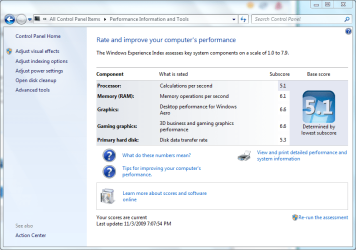
argh! my processor is holding me back :(
 

Attachments

  • dgenx210 WEI.PNG
    dgenx210 WEI.PNG
    149 KB · Views: 24

My Computer

Computer Manufacturer/Model Number
HP Pavilion dv6-1210ee Artist Edition 2 Notebook
OS
Windows 7 x64 Ultimate RTM
CPU
AMD Turion X2 Ultra Dual-Core Mobile ZM-85 @ 2.30 GHz
Memory
DDR2 800MHz 2GBx2
Graphics Card(s)
ATI Mobility Radeon 4650 1GB GDDR3
Screen Resolution
1366 x 768
Internet Speed
1Mbit ADSL
Status
Not open for further replies.
Back
Top