Windows 7 network password issue

WayCon

New member
Local time
11:57 PM
Messages
21
Hello,

When, in Win7, I try to access another computer on my tiny network from left side of the 'Computer' screen, I am asked for a password. I haven't assigned any password--my little network (through a router) doesn't need password security. How do I get rid of all this request for passwords that I never had on other computers with other OSs?

I thank you for your time.
 

My Computer My Computer

At a glance

Windows 7
OS
Windows 7
The required password will be the password used to login to the machine you are trying to access.
 

My Computer My Computer

At a glance

Windows 7 Ultimate x64AMD Turion(tm) 64 X2 Mobile Technology TL-563GB Nanya PC2-6400 DDR2-SDRAM SO-DIM (400MHz)NVIDIA GeForce Go 7600 256MB GDDR3 SDRAM
Computer Manufacturer/Model Number
HP Touchsmart IQ771.uk
OS
Windows 7 Ultimate x64
CPU
AMD Turion(tm) 64 X2 Mobile Technology TL-56
Motherboard
ASUS Pheonix
Memory
3GB Nanya PC2-6400 DDR2-SDRAM SO-DIM (400MHz)
Graphics Card(s)
NVIDIA GeForce Go 7600 256MB GDDR3 SDRAM
Sound Card
High Definition Intergrated NVIDIA MCP51
Monitor(s) Displays
46" Sony Bravia HDTV
Screen Resolution
1600x1200
Hard Drives
1.5TB Samsug
320GB Seagate ST3320820AS - SATA 3Gb/s 8MB
500GB Maxtor Basics STM305003EHD301-RK
Internet Speed
↓6.32 Mb/s ↑0.35 Mb/s ↔26ms
Other Info
BIOS - American Megatrends Inc. 5.07
Ethernet Port - NVIDIA nForce 10/100/1000 Mbps
DVD Drive - TSSTcorp DVDR/RW TS-T632L
Thank you, rsvr85, for answering so quickly.

I'm not logged onto either of the computers as anyone. In particular I'm not logged onto the computer using Win7 which is denying access to the other computer. Is the a default log-on name and pass code? Is there anyway to eliminate passwords within my network?

Thank you, again.

WayCon
 

My Computer My Computer

At a glance

Windows 7
OS
Windows 7
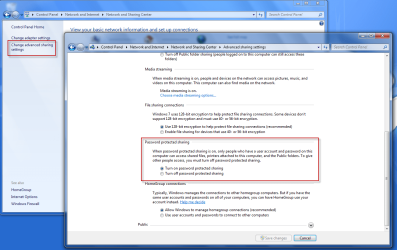
You can try turning off Password protected sharing?

ghfg.png
 

My Computer My Computer

At a glance

Windows 7 Ultimate x64AMD Turion(tm) 64 X2 Mobile Technology TL-563GB Nanya PC2-6400 DDR2-SDRAM SO-DIM (400MHz)NVIDIA GeForce Go 7600 256MB GDDR3 SDRAM
Computer Manufacturer/Model Number
HP Touchsmart IQ771.uk
OS
Windows 7 Ultimate x64
CPU
AMD Turion(tm) 64 X2 Mobile Technology TL-56
Motherboard
ASUS Pheonix
Memory
3GB Nanya PC2-6400 DDR2-SDRAM SO-DIM (400MHz)
Graphics Card(s)
NVIDIA GeForce Go 7600 256MB GDDR3 SDRAM
Sound Card
High Definition Intergrated NVIDIA MCP51
Monitor(s) Displays
46" Sony Bravia HDTV
Screen Resolution
1600x1200
Hard Drives
1.5TB Samsug
320GB Seagate ST3320820AS - SATA 3Gb/s 8MB
500GB Maxtor Basics STM305003EHD301-RK
Internet Speed
↓6.32 Mb/s ↑0.35 Mb/s ↔26ms
Other Info
BIOS - American Megatrends Inc. 5.07
Ethernet Port - NVIDIA nForce 10/100/1000 Mbps
DVD Drive - TSSTcorp DVDR/RW TS-T632L
Thank you, rsvr85, for getting back, again.

I tried what you suggested, but that didn't change things. I do have the new computer icon on my other computers My Network Places, but when I click on it, I still get the message:

xxx is not accessible

Access is denied.

Any other ideas?

Sincerely,

WayCon
 

My Computer My Computer

At a glance

Windows 7
OS
Windows 7
Now I have another problem. As I tried to walk through the steps about Password sharing, I saw the password for homegroups, and recorded it. When I reboot, I'm entirely locked out of my computer. The password doesn't seem to work. (I know the password is case sensitive.)

Windows 7 doesn't seem to be at all user friendly.
 

My Computer My Computer

At a glance

Windows 7
OS
Windows 7
Now I have another problem. As I tried to walk through the steps about Password sharing, I saw the password for homegroups, and recorded it. When I reboot, I'm entirely locked out of my computer. The password doesn't seem to work.

Windows 7 doesn't seem to be at all user friendly.

Windows 7 Homegroups does not seem to work very well for a lot of users. Usually only works between win7 computers on a network.

I like using a business type workgroup even for a small home network.

Not sure how you locked yourself out. Try booting into Safe Mode to see if you get an administrator acct that you can log into.
 

My Computer My Computer

At a glance

Win7 Enterprise, Win7 x86 (Ult 7600), Win7 x6...AMD fx8350 4ghz, AMD-32 2400mhz, AMD-64 3200m...2gb, 4gb on the Ult 7600, 4gb on Technet RTM,...Draw my own Graphics, several nVidia cards
Computer type
PC/Desktop
Computer Manufacturer/Model Number
Built them myself, Science Experiments !
OS
Win7 Enterprise, Win7 x86 (Ult 7600), Win7 x64 Ult 7600, TechNet RTM on AMD x64 (2.8Ghz)
CPU
AMD fx8350 4ghz, AMD-32 2400mhz, AMD-64 3200mhz, AMDx64 2.8G
Motherboard
SIS 755, ECS-K8M890M-M (Ult 7600), GigaByte & others
Memory
2gb, 4gb on the Ult 7600, 4gb on Technet RTM, 32gb on FX8350
Graphics Card(s)
Draw my own Graphics, several nVidia cards
Sound Card
on motherboard
Monitor(s) Displays
19" flat scr, 28" I-Inc widescr,22" Emprex Widescr, 23" Acer
Screen Resolution
1280 x 1024, 1440 x 900, 1920 x 1080
Hard Drives
6 pata Ide HD's & 2 Sata HD's
added 80gb external on Ult 7600 computer,
numerous extra 1tb, 2TB, 3Tb SATA HD's
A collection of ext HD Docks w/ HDs
PSU
430w, 550w, 600w, 700, 800, etc
Case
All Generic Full Towers
Cooling
Open Air & a few fans, some w/ colored LEDs
Keyboard
Compaq & Dell recycled from GoodWill
Mouse
Made in China Optical Wired Mouse
Internet Speed
Fast Cable InterNet
Antivirus
AVG Free on 24 different Desktops, NO Problems!
Browser
IE 8 is preferred, but use FireFox sometimes
Other Info
Linksys Routers, switches, & Hubs
Too Many USB Flash Drives to count, Biggest is 64GB !
Eight computers in my home network.
Sixteen computers at my business network.
Linked via TeamViewer !
Lots of old used spare computer parts everywhere!
Thank you, DocBrown,

You absolutely got me out of this problem. Now, I can go back to my other struggles with this very unfriendly OS.

Thank you, thank you,

Sincerely,

WayCon
 

My Computer My Computer

At a glance

Windows 7
OS
Windows 7
Thank you, DocBrown,

You absolutely got me out of this problem. Now, I can go back to my other struggles with this very unfriendly OS.

Thank you, thank you,

Sincerely,

WayCon


We are working hard analizing the problems. Glad I could help ;)
 

Attachments

  • Doc_Analizing_The_Problem.JPG
    Doc_Analizing_The_Problem.JPG
    40.7 KB · Views: 186

My Computer My Computer

At a glance

Win7 Enterprise, Win7 x86 (Ult 7600), Win7 x6...AMD fx8350 4ghz, AMD-32 2400mhz, AMD-64 3200m...2gb, 4gb on the Ult 7600, 4gb on Technet RTM,...Draw my own Graphics, several nVidia cards
Computer type
PC/Desktop
Computer Manufacturer/Model Number
Built them myself, Science Experiments !
OS
Win7 Enterprise, Win7 x86 (Ult 7600), Win7 x64 Ult 7600, TechNet RTM on AMD x64 (2.8Ghz)
CPU
AMD fx8350 4ghz, AMD-32 2400mhz, AMD-64 3200mhz, AMDx64 2.8G
Motherboard
SIS 755, ECS-K8M890M-M (Ult 7600), GigaByte & others
Memory
2gb, 4gb on the Ult 7600, 4gb on Technet RTM, 32gb on FX8350
Graphics Card(s)
Draw my own Graphics, several nVidia cards
Sound Card
on motherboard
Monitor(s) Displays
19" flat scr, 28" I-Inc widescr,22" Emprex Widescr, 23" Acer
Screen Resolution
1280 x 1024, 1440 x 900, 1920 x 1080
Hard Drives
6 pata Ide HD's & 2 Sata HD's
added 80gb external on Ult 7600 computer,
numerous extra 1tb, 2TB, 3Tb SATA HD's
A collection of ext HD Docks w/ HDs
PSU
430w, 550w, 600w, 700, 800, etc
Case
All Generic Full Towers
Cooling
Open Air & a few fans, some w/ colored LEDs
Keyboard
Compaq & Dell recycled from GoodWill
Mouse
Made in China Optical Wired Mouse
Internet Speed
Fast Cable InterNet
Antivirus
AVG Free on 24 different Desktops, NO Problems!
Browser
IE 8 is preferred, but use FireFox sometimes
Other Info
Linksys Routers, switches, & Hubs
Too Many USB Flash Drives to count, Biggest is 64GB !
Eight computers in my home network.
Sixteen computers at my business network.
Linked via TeamViewer !
Lots of old used spare computer parts everywhere!
Here is my current status:

When I'm on my Win7 computer, logged in as administrator, I can map to and read/write to the other computer. When I switch to a user on the Win7 computer and try to Map Network Drive, I'm asked to Enter Network Password. I don't have one.

When I try to see my Win7 computer (where I'm logged in either as adminstrator or user), I am told on my other computer in My Network Places, "Login Failure: user account retriction."

I have no need for security between my computers (which are side by side). How do I take eliminate all these passwords, etc.?

Thank you.

WayCon
 

My Computer My Computer

At a glance

Windows 7
OS
Windows 7
Here is my current status:

When I'm on my Win7 computer, logged in as administrator, I can map to and read/write to the other computer. When I switch to a user on the Win7 computer and try to Map Network Drive, I'm asked to Enter Network Password. I don't have one.

When I try to see my Win7 computer (where I'm logged in either as adminstrator or user), I am told on my other computer in My Network Places, "Login Failure: user account retriction."

I have no need for security between my computers (which are side by side). How do I take eliminate all these passwords, etc.?

Thank you.

WayCon
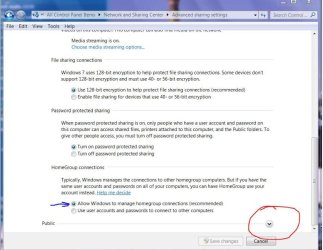
unselect the blue arrowed button , then click the public ( red circle ) and select allow to on thoose advance sharring settings. good luck to you.
advance share 3.JPG
 

My Computer My Computer

At a glance

Windows 7 Ulti. x64AMD Phenom 8450 triple-core 2.10 ghz4GBATI Radion HD 3200
Computer Manufacturer/Model Number
Gateway GT5692
OS
Windows 7 Ulti. x64
CPU
AMD Phenom 8450 triple-core 2.10 ghz
Memory
4GB
Graphics Card(s)
ATI Radion HD 3200
Monitor(s) Displays
Gateway FPD1775W
Screen Resolution
1280x720
Hard Drives
465.6613 Gibibytes
Thank you, mrzr7, for getting back to me so quickly. I have been going around in circles so much that I, now, can't remember how I got to the screen you are showing me. Could you remind me?

Again, thank you.

WayCon
 

My Computer My Computer

At a glance

Windows 7
OS
Windows 7
Found it.

Now do you suggest that I change to:

Turn off password protected sharing

?

Is the 128 bit encryption and/or the other questions significant for this?

As it is, the Win7 computer is still asking for a user name and password.
 

My Computer My Computer

At a glance

Windows 7
OS
Windows 7
I wanted you to select the password and all the other allows in public. You must have a password for admin are you typing that in. You should only have to type it in once then it will remember it? As for your xp to 7 you need to select start/my network places/veiw workgroup computers/ other places/workgroup
Hope this helps some. I agree it should not be this hard and it should work. I have 8 differnt pc's networked with diffent os's and all sharing but it does take some work to get it done. Good luck to you
 

My Computer My Computer

At a glance

Windows 7 Ulti. x64AMD Phenom 8450 triple-core 2.10 ghz4GBATI Radion HD 3200
Computer Manufacturer/Model Number
Gateway GT5692
OS
Windows 7 Ulti. x64
CPU
AMD Phenom 8450 triple-core 2.10 ghz
Memory
4GB
Graphics Card(s)
ATI Radion HD 3200
Monitor(s) Displays
Gateway FPD1775W
Screen Resolution
1280x720
Hard Drives
465.6613 Gibibytes
Thank you, myzr7, yet again.

My other computer is not on xp but 2000 pro.

Also (sorry to be dense), I'm not sure where you mean me to be when you say to "select password and other allows in public." I'm afraid I'm trying to run a bookstore and figure all this out on the fly. Could you walk me through this, or, if that is too much to ask (understandably), is there somewhere I can go to get up to speed?

In any case, I, again, thank you.

Sincerely,

WayCon
 

My Computer My Computer

At a glance

Windows 7
OS
Windows 7
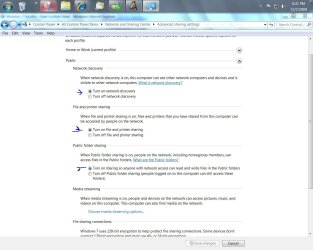
What I was going on about was I was thinking that you had not selected some settings that might help your cause. I am now trying to get a version of 2000 pro up and running so I can see about getting it shared. good luck to you.
advanced share public.JPG
 

My Computer My Computer

At a glance

Windows 7 Ulti. x64AMD Phenom 8450 triple-core 2.10 ghz4GBATI Radion HD 3200
Computer Manufacturer/Model Number
Gateway GT5692
OS
Windows 7 Ulti. x64
CPU
AMD Phenom 8450 triple-core 2.10 ghz
Memory
4GB
Graphics Card(s)
ATI Radion HD 3200
Monitor(s) Displays
Gateway FPD1775W
Screen Resolution
1280x720
Hard Drives
465.6613 Gibibytes
Thanks rsvr85

I have searched forever trying to solve an issue with homegroup and was lucky enough to find your post.

I have homegroup set up for my desktop and laptop computers. Everytime that I would open up the HomeGroup from my laptop, it wasn't asking me for my HomeGroup password. It would always ask me for my username and password for my desktop computer. I found this to totally un-secured. If I want to add another computer to someone else in the family, I don't want to have to supply them my login information to my computer.

Your article showed me how to solve this issue....Many, many thanks!
 

My Computer My Computer

At a glance

Windows 7
OS
Windows 7
Thank you myzr7 (and I just realized the word play in your name(!)),

I appreciate your effort. Hope to hear from you soon.

Sincerely,

WayCon
 

My Computer My Computer

At a glance

Windows 7
OS
Windows 7
unselect the blue arrowed button , then click the public ( red circle ) and select allow to on thoose advance sharring settings. good luck to you.
View attachment 35542

thanks! that was the trick, now I can copy files from my windows 7 to my wife's macbook pro
 

My Computer My Computer

At a glance

Windows 7
OS
Windows 7
Hello,my name is Edward.
I have the same problem,but mine told me about a Router (which I don't have,I just have a cable that gave me Internet haha). I uninstalled Windows 7 and get on XP to find out the problem.
I'll try what you said
 

My Computer My Computer

At a glance

Windows 7 Ultimate x86I716GBNvidia GeForce 690
Computer type
PC/Desktop
Computer Manufacturer/Model Number
Bolt
OS
Windows 7 Ultimate x86
CPU
I7
Motherboard
Asus
Memory
16GB
Graphics Card(s)
Nvidia GeForce 690
Antivirus
Kaspersky
Browser
Goole Chrome
Back
Top