Samsung SGH-Z810 not recognized

bpeet

New member
Local time
3:44 AM
Messages
3
Hi!

I installed Windows 7 on my toshiba notebook. Everything is fine, but I cant use my 3g modem. The samsung sgh-z810 works on vista and xp.

on xp and vista, when i plug in first time to machine, it install a virtual cd, and run setup.exe from it (it is modem's the flash ram). after setup xp and vista recognize this hardware as modem (and card reader) and works.

on w7 after the first step (when setup.exe closed) the w7 doesnt recognize the modem. the modem is not listed on device manager...

i read, that will works if i make virtual xp mode, but my laptop not support this mode. :(

i saved the drivers from XP with drivermagician, but i cant add device to the device manager. the hardware not shown in the list. :(

i want to "add as older hardware" to add device in device manager, but i cant use the driver .inf files. when i click on it, the device's list is empty, can't choose from the manufacturers / devices list.

i can use modem if i run virtual machine with installed XP on windows 7, but w7 "alone" cant recognize this s h i t. :S
 

My Computer My Computer

OS
w7
i see registry on xp and w7.

on xp in the hkey_local_machine\system\currentcontrolset\enum\usb
have a vid_04e8&pid_6601 key (this is the hardware device class id) and
it isnt on windows7. i want to add this key to enum\usb, but itsnt allowed
to add keys int \enum.

anyone?
 

My Computer My Computer

OS
w7
Hi!

I installed Windows 7 on my toshiba notebook. Everything is fine, but I cant use my 3g modem. The samsung sgh-z810 works on vista and xp.

on xp and vista, when i plug in first time to machine, it install a virtual cd, and run setup.exe from it (it is modem's the flash ram). after setup xp and vista recognize this hardware as modem (and card reader) and works.

on w7 after the first step (when setup.exe closed) the w7 doesnt recognize the modem. the modem is not listed on device manager...

i read, that will works if i make virtual xp mode, but my laptop not support this mode. :(

i saved the drivers from XP with drivermagician, but i cant add device to the device manager. the hardware not shown in the list. :(

i want to "add as older hardware" to add device in device manager, but i cant use the driver .inf files. when i click on it, the device's list is empty, can't choose from the manufacturers / devices list.

i can use modem if i run virtual machine with installed XP on windows 7, but w7 "alone" cant recognize this s h i t. :S

Welcome to the Windows 7 Forums!

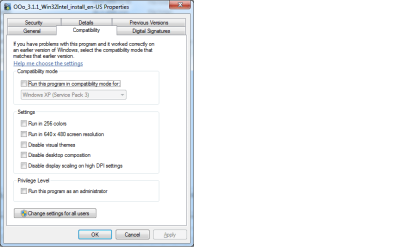
Did you try to select the setup.exe, then right-click, properties, then select Compatibility tab?

install-compatibility.png

Select the preferred Operating System, and it might work for you.

Best regards,

zx81
 

My Computer My Computer

Computer Manufacturer/Model Number
Dell Inpspiron 1720
OS
Windows 7 Home Premium x64
CPU
Intel 1720 Core 2 Duo 2.00GHz,800,2M
Memory
4GB 667MHz DDR2 SDRAM (2x2048)
Graphics Card(s)
NVIDIA Geforce Go 8600M GT 256MB DDR2
Sound Card
SigmaTel
Monitor(s) Displays
17.0" Widescreen WXGA+ (1440x900) TFT with TrueLife
Screen Resolution
1440x900
Hard Drives
2x160GB 5400RPM Serial ATA
Mouse
Logitech
zx81 said:
Select the preferred Operating System, and it might work for you.

Best regards,

zx81
I have the same problem even in:
- compatibility mode or administrator or both.
- trying to get latest driver form Samsung
And manual installation
Any other Idea or do we just have to wait until Samsung notice there is a problem?

Thanks if any one can help
 

My Computer My Computer

OS
win 7 ultimate english
Hi!

I installed Windows 7 on my toshiba notebook. Everything is fine, but I cant use my 3g modem. The samsung sgh-z810 works on vista and xp.

on xp and vista, when i plug in first time to machine, it install a virtual cd, and run setup.exe from it (it is modem's the flash ram). after setup xp and vista recognize this hardware as modem (and card reader) and works.

on w7 after the first step (when setup.exe closed) the w7 doesnt recognize the modem. the modem is not listed on device manager...

i read, that will works if i make virtual xp mode, but my laptop not support this mode. :(

i saved the drivers from XP with drivermagician, but i cant add device to the device manager. the hardware not shown in the list. :(

i want to "add as older hardware" to add device in device manager, but i cant use the driver .inf files. when i click on it, the device's list is empty, can't choose from the manufacturers / devices list.

i can use modem if i run virtual machine with installed XP on windows 7, but w7 "alone" cant recognize this s h i t. :S

Welcome to the Windows 7 Forums!

Did you try to select the setup.exe, then right-click, properties, then select Compatibility tab?

View attachment 35616

Select the preferred Operating System, and it might work for you.

Best regards,

zx81

yes, i tryed it before i started to hack the registry. :)

nothing happened. :(
 

My Computer My Computer

OS
w7
Back
Top