Hi all. Need solution for my graphic card problem.

Legendation

New member
Local time
5:34 AM
Messages
17
Hi all,

I am using a Sony vaio laptop VGN-SZ75GN. I recently upgraded my windows vista busniess 32-bit to a windows 7 ulitmate 64-bit using a clean installation.

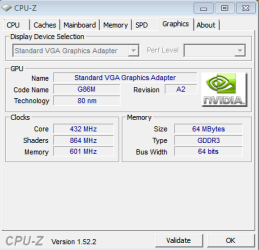
I have a external graphic card which is NVIDIA® GeForce® 8400M GS notebook graphics processing unit(GPU) (SPEED MODE) / Intel® Graphics Media Accelerator X3100 (STAMINA MODE). After installing Windows 7, it couldn't detect the graphic card. This was done by looking at the device manager saying that it only detected a stardard VGA Graphic Adapter. I tried to check for updates, but it said that the stardard VGA Graphic Adapter was the best driver software. I looked around the forum like a headless chicken and couldn't find a solution for my laptop.

Can anyone find a solution for my problem? Will be very much apprieciated.
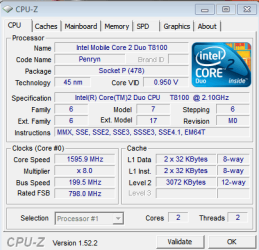
This are some of the pictures of my laptop's specs.

Yours Sincerely,
Legendation.
 

Attachments
  • CPU.PNG
    CPU.PNG
    13.9 KB · Views: 40
  • Graphic.PNG
    Graphic.PNG
    9.2 KB · Views: 19
  • MainBoard.PNG
    MainBoard.PNG
    8.1 KB · Views: 13

My Computer My Computer

OS
Windows 7 ultimate

My Computer My Computer

Computer Manufacturer/Model Number
self built
OS
7600.20510 x86
CPU
P4 550 3.4 GHz HT running at 3.5 GHz
Motherboard
MSI PM8M3-V (MS-7211 v1.x) Micro-ATX mainboard
Memory
OCZ 2 GB(2x1GB) DDR400mHz running @ 414 mHz
Graphics Card(s)
HIS Radeon HD 3850 IceQ 3 Turbo HDMI Dual DL-DVI AGP
Sound Card
MOTU Traveler firewire studio interface 192 kHz 24 bit
Monitor(s) Displays
22" widescreen Acer X223W LCD, 17" Compaq P75 CRT
Screen Resolution
1680x1050 and 1280x1024
Hard Drives
SATA I x2 WD, 400 GB and 120 GB, SATA 2 WD Caviar Black 1 TB
PSU
350W generic
Case
Cybertronpc, it glows blue
Cooling
stock cpu fan, Ice-Q 3 gpu and system, many case fans
Keyboard
Logitch Classical Keyboard 200
Mouse
Logitech Mediaplay cordless
Internet Speed
1792/448 kbits/sec
Other Info
SATA II PCI fake RAID adapter, 1 GB Readyboost, original ATI Remote Wonder (even works with WMC perfectly), Logitech Rumblepad 2 game controller x2
Hi Torrentg,

I cannot seem to find NV_DISP.inf anywhere? Thanks for the fast response.

Legendation.
 

My Computer My Computer

OS
Windows 7 ultimate
You're welcome.

If you ran the .exe that you downloaded in step one, it will have extracted to C:\NVIDIA folder.

The exact location of the .inf is inside this folder -

C:\NVIDIA\DisplayDriver\191.07\WinVista_Win7\English

Make note of that because you will have to click on it as part of the install process, after you edit it.

Let me know how it goes for you and also take special note of the condition for this to work for x64 users, in the OP.
 

My Computer My Computer

Computer Manufacturer/Model Number
self built
OS
7600.20510 x86
CPU
P4 550 3.4 GHz HT running at 3.5 GHz
Motherboard
MSI PM8M3-V (MS-7211 v1.x) Micro-ATX mainboard
Memory
OCZ 2 GB(2x1GB) DDR400mHz running @ 414 mHz
Graphics Card(s)
HIS Radeon HD 3850 IceQ 3 Turbo HDMI Dual DL-DVI AGP
Sound Card
MOTU Traveler firewire studio interface 192 kHz 24 bit
Monitor(s) Displays
22" widescreen Acer X223W LCD, 17" Compaq P75 CRT
Screen Resolution
1680x1050 and 1280x1024
Hard Drives
SATA I x2 WD, 400 GB and 120 GB, SATA 2 WD Caviar Black 1 TB
PSU
350W generic
Case
Cybertronpc, it glows blue
Cooling
stock cpu fan, Ice-Q 3 gpu and system, many case fans
Keyboard
Logitch Classical Keyboard 200
Mouse
Logitech Mediaplay cordless
Internet Speed
1792/448 kbits/sec
Other Info
SATA II PCI fake RAID adapter, 1 GB Readyboost, original ATI Remote Wonder (even works with WMC perfectly), Logitech Rumblepad 2 game controller x2
I had the EXACT same issue with 2 different chips. Install the old vista drivers in compatibility mode, reboot, then run the new drivers. Use the uninstaller first from the new graphics card. I wouldn't recommend disabling driver enforcement. It has its uses in a 64-bit environment.
 

My Computer My Computer

Computer Manufacturer/Model Number
Sony Vaio Z46GDU
OS
Windows 7 Ultimate x86-64
CPU
[email protected] 1066MHz FSB
Motherboard
Sony branded
Memory
6GB DDR3 1066MHz
Graphics Card(s)
9300M GS 256MB Dedicated (Speed) + Intel4500MHD (Stamina)
Sound Card
Realtek HD Audio
Monitor(s) Displays
13.1' WXGA
Screen Resolution
1600x900
Hard Drives
320GB 7200RPM w/ 16MB cache
Internet Speed
1MB/s
Hi torrentg,

I have extracted the driver file. This is the location -
Local Dick ( C : )-NVIDIA-DisplayDriver-186.81-International...
In the international folder there are Display folders, HDAudio Folder and other files. Dont' seem to see the NV_DISP.inf file.

Legendation.
 

My Computer My Computer

OS
Windows 7 ultimate
Go to C:\NVIDIA

In the top right search box, enter *.inf then hit enter.
 

My Computer My Computer

Computer Manufacturer/Model Number
self built
OS
7600.20510 x86
CPU
P4 550 3.4 GHz HT running at 3.5 GHz
Motherboard
MSI PM8M3-V (MS-7211 v1.x) Micro-ATX mainboard
Memory
OCZ 2 GB(2x1GB) DDR400mHz running @ 414 mHz
Graphics Card(s)
HIS Radeon HD 3850 IceQ 3 Turbo HDMI Dual DL-DVI AGP
Sound Card
MOTU Traveler firewire studio interface 192 kHz 24 bit
Monitor(s) Displays
22" widescreen Acer X223W LCD, 17" Compaq P75 CRT
Screen Resolution
1680x1050 and 1280x1024
Hard Drives
SATA I x2 WD, 400 GB and 120 GB, SATA 2 WD Caviar Black 1 TB
PSU
350W generic
Case
Cybertronpc, it glows blue
Cooling
stock cpu fan, Ice-Q 3 gpu and system, many case fans
Keyboard
Logitch Classical Keyboard 200
Mouse
Logitech Mediaplay cordless
Internet Speed
1792/448 kbits/sec
Other Info
SATA II PCI fake RAID adapter, 1 GB Readyboost, original ATI Remote Wonder (even works with WMC perfectly), Logitech Rumblepad 2 game controller x2
Hi torrentg,

Sorry for the mixed up. The driver that I'm suppose to install is the desktop driver? So if I have a 8400M GS, I'm suppose to download the 8400 driver?
Thanks for the response. Hope to hear from you soon.

Legendation.
 

My Computer My Computer

OS
Windows 7 ultimate
Yes. Follow what it says in the link I posted in #2 above.

You're going to have slight problems because of the intro to the post there, but you really should have installed x86 version on that machine. If you follow well, will work well though. Look down in the thread for how to disable driver enforcement.
 

My Computer My Computer

Computer Manufacturer/Model Number
self built
OS
7600.20510 x86
CPU
P4 550 3.4 GHz HT running at 3.5 GHz
Motherboard
MSI PM8M3-V (MS-7211 v1.x) Micro-ATX mainboard
Memory
OCZ 2 GB(2x1GB) DDR400mHz running @ 414 mHz
Graphics Card(s)
HIS Radeon HD 3850 IceQ 3 Turbo HDMI Dual DL-DVI AGP
Sound Card
MOTU Traveler firewire studio interface 192 kHz 24 bit
Monitor(s) Displays
22" widescreen Acer X223W LCD, 17" Compaq P75 CRT
Screen Resolution
1680x1050 and 1280x1024
Hard Drives
SATA I x2 WD, 400 GB and 120 GB, SATA 2 WD Caviar Black 1 TB
PSU
350W generic
Case
Cybertronpc, it glows blue
Cooling
stock cpu fan, Ice-Q 3 gpu and system, many case fans
Keyboard
Logitch Classical Keyboard 200
Mouse
Logitech Mediaplay cordless
Internet Speed
1792/448 kbits/sec
Other Info
SATA II PCI fake RAID adapter, 1 GB Readyboost, original ATI Remote Wonder (even works with WMC perfectly), Logitech Rumblepad 2 game controller x2
Hi torrentg,

Alright, thanks for the reply. Will get back to you once I'm working on it. Thanks.

Legendation.
 

My Computer My Computer

OS
Windows 7 ultimate
Hi torrentg,

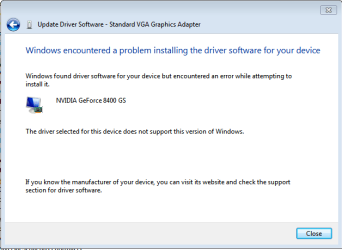
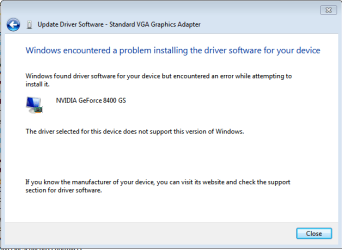
This is the box that came out once I installed.
 

Attachments

  • Updated.PNG
    Updated.PNG
    9.3 KB · Views: 9

My Computer My Computer

OS
Windows 7 ultimate
There's something you're doing wrong. Can't say for sure though.

Did you download the correct version for your Windows? Either x86 32-bit or x64 64-bit?
 

My Computer My Computer

Computer Manufacturer/Model Number
self built
OS
7600.20510 x86
CPU
P4 550 3.4 GHz HT running at 3.5 GHz
Motherboard
MSI PM8M3-V (MS-7211 v1.x) Micro-ATX mainboard
Memory
OCZ 2 GB(2x1GB) DDR400mHz running @ 414 mHz
Graphics Card(s)
HIS Radeon HD 3850 IceQ 3 Turbo HDMI Dual DL-DVI AGP
Sound Card
MOTU Traveler firewire studio interface 192 kHz 24 bit
Monitor(s) Displays
22" widescreen Acer X223W LCD, 17" Compaq P75 CRT
Screen Resolution
1680x1050 and 1280x1024
Hard Drives
SATA I x2 WD, 400 GB and 120 GB, SATA 2 WD Caviar Black 1 TB
PSU
350W generic
Case
Cybertronpc, it glows blue
Cooling
stock cpu fan, Ice-Q 3 gpu and system, many case fans
Keyboard
Logitch Classical Keyboard 200
Mouse
Logitech Mediaplay cordless
Internet Speed
1792/448 kbits/sec
Other Info
SATA II PCI fake RAID adapter, 1 GB Readyboost, original ATI Remote Wonder (even works with WMC perfectly), Logitech Rumblepad 2 game controller x2
Hi torrentg,

This is the box that came out once I installed the *inf file. What do I do next? Thanks for the continuous replies!

Legendation
 

Attachments

  • Updated.PNG
    Updated.PNG
    9.3 KB · Views: 8

My Computer My Computer

OS
Windows 7 ultimate
Hi torrentg,

It is a windows 7 64-bit.
 

My Computer My Computer

OS
Windows 7 ultimate
I have done it til step 10. About step 11, which setup file is it? The desktop driver or the mobile driver? Thanks.

Legendation.
 

My Computer My Computer

OS
Windows 7 ultimate
My graphic card is a Nivdia Geforce 8400M GS not a GT. Wonder if there is any effect on the rewriting of the strings for the post you made for making the decktop to laptop driver. Thanks.

Legendation.
 

My Computer My Computer

OS
Windows 7 ultimate
I have done it til step 10. About step 11, which setup file is it? The desktop driver or the mobile driver? Thanks.

Legendation.

If you made it to step 11, the video driver is now installed and ready for use. The setup.exe is the one you downloaded in step 1.

My graphic card is a Nivdia Geforce 8400M GS not a GT. Wonder if there is any effect on the rewriting of the strings for the post you made for making the decktop to laptop driver. Thanks.

Legendation.

GS, GT, anything, doesn't matter. You could name it after your first born child and it will work as long as strings and numbers are correct. Part in quotes makes no difference.
 

My Computer My Computer

Computer Manufacturer/Model Number
self built
OS
7600.20510 x86
CPU
P4 550 3.4 GHz HT running at 3.5 GHz
Motherboard
MSI PM8M3-V (MS-7211 v1.x) Micro-ATX mainboard
Memory
OCZ 2 GB(2x1GB) DDR400mHz running @ 414 mHz
Graphics Card(s)
HIS Radeon HD 3850 IceQ 3 Turbo HDMI Dual DL-DVI AGP
Sound Card
MOTU Traveler firewire studio interface 192 kHz 24 bit
Monitor(s) Displays
22" widescreen Acer X223W LCD, 17" Compaq P75 CRT
Screen Resolution
1680x1050 and 1280x1024
Hard Drives
SATA I x2 WD, 400 GB and 120 GB, SATA 2 WD Caviar Black 1 TB
PSU
350W generic
Case
Cybertronpc, it glows blue
Cooling
stock cpu fan, Ice-Q 3 gpu and system, many case fans
Keyboard
Logitch Classical Keyboard 200
Mouse
Logitech Mediaplay cordless
Internet Speed
1792/448 kbits/sec
Other Info
SATA II PCI fake RAID adapter, 1 GB Readyboost, original ATI Remote Wonder (even works with WMC perfectly), Logitech Rumblepad 2 game controller x2
Hi torrentg,

Sorry about the confusion. I think is the string that is needed to be retyped. I looked into the NV_DISP.inf file and saw a few of my Nvidia Geforce 8400M GS strings are ,"NVIDIA_DEV.0404.01 = "NVIDIA GeForce 8400 GS", NVIDIA_DEV.0422.01 = "NVIDIA GeForce 8400 GS " ,NVIDIA_DEV.06E4.01 = "NVIDIA GeForce 8400 GS " In your post about the desktop to laptop driver, it states on step 8 that you add this, 6&SUBSYS_9016104D to the back of the string. Do I need to type that on the back of my string which is me graphic card? Pretty confused right here. Thanks once again.

Legendation
 

My Computer My Computer

OS
Windows 7 ultimate
No, that's ok though.

You have to make the line precisely as yours is.

This is how you find your line:

"Open device manager. Right click on standard vga or your video card and choose properties. Details tab. Change drop down to hardware ids. The second line down is of interest here."

So edit to make exactly like the second line down when you do that (leave out the "PCI\" part.) Make the same but keep the format of it too.
 

My Computer My Computer

Computer Manufacturer/Model Number
self built
OS
7600.20510 x86
CPU
P4 550 3.4 GHz HT running at 3.5 GHz
Motherboard
MSI PM8M3-V (MS-7211 v1.x) Micro-ATX mainboard
Memory
OCZ 2 GB(2x1GB) DDR400mHz running @ 414 mHz
Graphics Card(s)
HIS Radeon HD 3850 IceQ 3 Turbo HDMI Dual DL-DVI AGP
Sound Card
MOTU Traveler firewire studio interface 192 kHz 24 bit
Monitor(s) Displays
22" widescreen Acer X223W LCD, 17" Compaq P75 CRT
Screen Resolution
1680x1050 and 1280x1024
Hard Drives
SATA I x2 WD, 400 GB and 120 GB, SATA 2 WD Caviar Black 1 TB
PSU
350W generic
Case
Cybertronpc, it glows blue
Cooling
stock cpu fan, Ice-Q 3 gpu and system, many case fans
Keyboard
Logitch Classical Keyboard 200
Mouse
Logitech Mediaplay cordless
Internet Speed
1792/448 kbits/sec
Other Info
SATA II PCI fake RAID adapter, 1 GB Readyboost, original ATI Remote Wonder (even works with WMC perfectly), Logitech Rumblepad 2 game controller x2
Hi torrentg,

Alright this is my device string found in the device manager - hardware ids

DE&DEV_0427&SUBSYS_9016104D

So what I do now, is I go to the NV_DISP, change one of the string to

%NVIDIA_DEV.0427.01% = Section010, PCI\VEN_10DE&DEV_0427&SUBSYS_9008104D ? Is this correct?

Thanks for the patience.

Legendation.
 

My Computer My Computer

OS
Windows 7 ultimate
Back
Top