Can have date, time, day displayed?

iKerry

New member
Local time
4:42 AM
Messages
22
I forget how I did it, possibly a 3rd party utility, but with Vista I had my day, date, and time always displayed in the tool bar-notifications area. With W7 I have to mouseover the time to see the day and date—even then there's a slight delay.

Any tricks?

Thanks,

Kerry
 

My Computer My Computer

Computer Manufacturer/Model Number
MSI
OS
Windows 7 Home Premium
CPU
INtel 3.0
Motherboard
MSI
Memory
2 GB
I forget how I did it, possibly a 3rd party utility, but with Vista I had my day, date, and time always displayed in the tool bar-notifications area. With W7 I have to mouseover the time to see the day and date—even then there's a slight delay.

Any tricks?

Thanks,

Kerry

Right click taskbar, properties, clear "small icons". That will give you large icons and the date and time.
 

My Computer My Computer

Computer Manufacturer/Model Number
Gateway, Toshiba Laptop, and Home Brew
OS
Windows 7 x64 HP, Windows 7 HP, Windows 7 Ult
CPU
Intel I3, Cerelon, Pentium 4 @ 3Ghz
Motherboard
Intel, Intel, Asus
Memory
8G, 3G, 3G
Graphics Card(s)
On-board Intel, On-board nVidia, nVIDIA card
Sound Card
on-board, on-board, SoundBlaster
Monitor(s) Displays
Hannspree HF237, Toshiba, SyncMaster 931B
Screen Resolution
default (all)
Hard Drives
1T internal, 320G internal, 160G internal, 1T networked
PSU
300w, unk, 650w
Case
black, black, grey
Cooling
air (all)
Keyboard
standard wired (all)
Mouse
standard wired (all)
Internet Speed
6M down, 768K up
Other Info
Home LAN through Linksys hub to 4 port and wireless switch/router. Networked HP 2600n. Wife's computer running Windows 7, and spare laptop running Ubuntu "Karmic Kola" (9.10).
I'm using Stoic Joker's T-Clock

Takes a little playing around with to get it configured, but I find it works well under Windows 7
 

My Computer My Computer

Computer Manufacturer/Model Number
Self-Built Jan 2010
OS
Windows 7 64-bit
CPU
Intel Core i5 750 2.66Ghz
Motherboard
Asus P7P55D Pro
Memory
Crucial 8GB (4x2GB) DDR3 1333MHz
Graphics Card(s)
Sapphire HD 5850 1GB GDDR5
Monitor(s) Displays
Benq G2420HDBL LED LCD 24" DVI-D 1920x1080
Screen Resolution
1680 x 1050
Hard Drives
Samsung SpinPoint F3 1TB SATAII 7200rpm 32MB Cache (x2)
PSU
Corsair HX 750W
Case
Antec 300
Cooling
Arctic Cooling Freezer 7 Pro rev 2
Keyboard
Microsoft Reclusa
Mouse
Microsoft IntelliMouse Explorer 3.0
Internet Speed
10 Mb/sec (cable modem)
Other Info
Sony AD7241S 24x DVD±RW SATA Dual Layer & RAM Burner + LightScribe
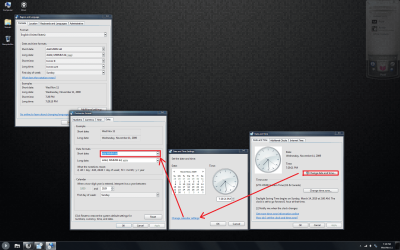
To add to what TheSchaft said:
You can also the appearance of the date from inside the date and time settings page.
Untitled.png
Untitled1.png
Right click on the time chose date/time properties then click change date and time. Next, click change calender settings and edit the short date
 

My Computer My Computer

Computer Manufacturer/Model Number
Dell Inspiron 1720
OS
Windows 7 Pro x64
CPU
Intel Core 2 Duo 2.2 GhzT7500
Motherboard
Dell BIOS Revision A09
Memory
3 Gigs
Graphics Card(s)
Nvidia GeForce 8600M GT
Sound Card
Intergrated HD Audio
Monitor(s) Displays
17" Laptop Screen
Screen Resolution
1920x1200
Hard Drives
160 GB Segate 5,400 RPM
250 GB Segate (external)
Case
Inspiron 172X Series
Mouse
Logitech MX 620
Internet Speed
DL: 9932 kbps (1241.5 KB/sec); UP: 969 kbps (121.1 KB/sec)
When I expand the taskbar up the date/time is fully displayed in the notification area. If I pause the pointer over the date time it shows me a second date/time for Australia.
 

My Computer My Computer

Computer Manufacturer/Model Number
Home Built
OS
Windows7 beta 7000
CPU
Intel E6550
Motherboard
Intel DP35DP
Memory
8Gb
Graphics Card(s)
Nvidia 8500 GT
Sound Card
Intel onboard sound
Monitor(s) Displays
Two Gateway 22" LCD monitors
Screen Resolution
1680x1050
Hard Drives
Two 500Gb 7200rpm SATA
You must have an additional clock set up.

Right click the clock and select adjust date and time, then look on the additional clocks tab. You can set up multiple clocks so that when you hover over the time, you will see not only the time where you are, but also in several other places..
 

My Computer My Computer

Computer Manufacturer/Model Number
Custom
OS
Windows 7 Ultimate
CPU
Amd 5400+ dual core overclocked to 3.0 ghz
Motherboard
EVGA 590 sli aM2
Memory
8gb 5-5-5-5-15 g-skill
Graphics Card(s)
Nvidia 9800gt 512mb
Sound Card
M-Audio Delta 2496
Monitor(s) Displays
Acer 22 inch lcd
Screen Resolution
1680 x 1050
Hard Drives
Hmm

4.0 terabytes total..
PSU
650 watts
Case
Antec Sonata II
Cooling
Zallmen Xpu cooler
Keyboard
some rubbish I found in my garage
Mouse
logitech
Internet Speed
caps at about 650kb down, 50kb up . Gigabit local network.
To add to what TheSchaft said:
You can also the appearance of the date from inside the date and time settings page.
View attachment 36318
View attachment 36319
Right click on the time chose date/time properties then click change date and time. Next, click change calender settings and edit the short date

Thanks, that works fine.

Kerry
 

My Computer My Computer

Computer Manufacturer/Model Number
MSI
OS
Windows 7 Home Premium
CPU
INtel 3.0
Motherboard
MSI
Memory
2 GB
Back
Top