
Ram issue? I have 4gb ram

Mag1c

Banned
Local time
1:25 PM
Messages
19
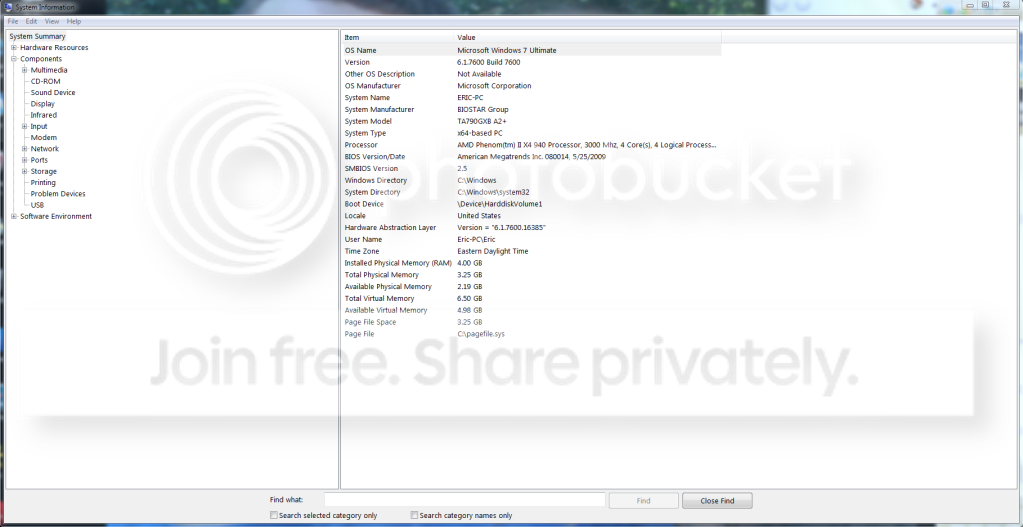
Windows 7 ultimate... heres a pic
rampic.png


help? i have 4gb ram only 3.25 usable and like 2 gb are being used... my windows experience score used to be 7.3 for proc and ram. now it is 7.3 for proc and 5.9 for ram... ideas?

i mean i just upgraded my video card driver... other than that im lost
 

My Computer My Computer

OS
Windows 7 Ultimate
CPU
Intel Core i7 2600k 3.7ghz
Motherboard
Gigabyte Z68MA-D2H-B3
Memory
12 gb DDR3
Graphics Card(s)
NVIDIA GeForce GTX 260
Monitor(s) Displays
Samsung s23a300b
Hard Drives
2 1tb hard drives on RAID 0
Case
Fractal Design
Keyboard
logitech
Mouse
logitech
I assume you are referring to the difference between 4.00 and 3.25??

That's normal. Windows 32-bit can only see about 3.25. If you want to use more, you have to go to 64-bit.
 

My Computer My Computer

Computer type
PC/Desktop
Computer Manufacturer/Model Number
Ignatz Special; 4 speed manual gearbox; factory air conditioning; one of one
OS
Windows 7 Home Premium SP1, 64-bit
CPU
Intel Skylake i5-6600K, not overclocked
Motherboard
AsRock Z170M Extreme 4, micro ATX
Memory
8 GB HyperX DDR4-2666 (2 x 4 GB)
Graphics Card(s)
none; graphics are integrated on CPU
Sound Card
onboard: Realtek ALC1150; external: USB Behringer UF0-202
Monitor(s) Displays
Dell S2340M 23 inch IPS
Screen Resolution
1600 x 900
Hard Drives
System: Crucial MX100 series SSD, 128 GB;
Data: Samsung Spinpoint 103SJ, 1 TB;
Backup: WD Caviar Green WD30EZRX-00D8PB0, 3 TB
PSU
Rosewill SilentNight 500 watt fanless, semi-modular
Case
Antec Solo II
Cooling
Noctua NH-U12S; Noctua F12 intake, Noctua S12A exhaust
Keyboard
Microsoft 200 6JH-00001 USB
Mouse
Dell or Microsoft optical wired; USB
Antivirus
Microsoft Security Essentials and Malwarebytes Premium
Browser
Pale Moon
Other Info
All fans PWM; speeds at idle: CPU circa 500 rpm; intake circa 600 rpm; exhaust circa 600 rpm; CPU temps 27 idle and 47 C load in a warm room (27 C/81 F) when running Intel Extreme Tuning Utility stress test.
I assume you are referring to the difference between 4.00 and 3.25??

That's normal. Windows 32-bit can only see about 3.25. If you want to use more, you have to go to 64-bit.

did you not look at my picture... i have windows 7 64 bit
 

My Computer My Computer

OS
Windows 7 Ultimate
CPU
Intel Core i7 2600k 3.7ghz
Motherboard
Gigabyte Z68MA-D2H-B3
Memory
12 gb DDR3
Graphics Card(s)
NVIDIA GeForce GTX 260
Monitor(s) Displays
Samsung s23a300b
Hard Drives
2 1tb hard drives on RAID 0
Case
Fractal Design
Keyboard
logitech
Mouse
logitech
Sorry, didn't catch that.

I have seen a post or 2 here recently with a similar complaint, but don't know if it was ever resolved or explained.
 

My Computer My Computer

Computer type
PC/Desktop
Computer Manufacturer/Model Number
Ignatz Special; 4 speed manual gearbox; factory air conditioning; one of one
OS
Windows 7 Home Premium SP1, 64-bit
CPU
Intel Skylake i5-6600K, not overclocked
Motherboard
AsRock Z170M Extreme 4, micro ATX
Memory
8 GB HyperX DDR4-2666 (2 x 4 GB)
Graphics Card(s)
none; graphics are integrated on CPU
Sound Card
onboard: Realtek ALC1150; external: USB Behringer UF0-202
Monitor(s) Displays
Dell S2340M 23 inch IPS
Screen Resolution
1600 x 900
Hard Drives
System: Crucial MX100 series SSD, 128 GB;
Data: Samsung Spinpoint 103SJ, 1 TB;
Backup: WD Caviar Green WD30EZRX-00D8PB0, 3 TB
PSU
Rosewill SilentNight 500 watt fanless, semi-modular
Case
Antec Solo II
Cooling
Noctua NH-U12S; Noctua F12 intake, Noctua S12A exhaust
Keyboard
Microsoft 200 6JH-00001 USB
Mouse
Dell or Microsoft optical wired; USB
Antivirus
Microsoft Security Essentials and Malwarebytes Premium
Browser
Pale Moon
Other Info
All fans PWM; speeds at idle: CPU circa 500 rpm; intake circa 600 rpm; exhaust circa 600 rpm; CPU temps 27 idle and 47 C load in a warm room (27 C/81 F) when running Intel Extreme Tuning Utility stress test.
Sorry, didn't catch that.

I have seen a post or 2 here recently with a similar complaint, but don't know if it was ever resolved or explained.

hmm really? i mean... it used to be fine i believe... i don't recall ever noticing this.

on a side note, i am going to get a new graphics card for christmas. what should i upgrade too in the 125 dollar and less range?

i wanna bump up my WEI score from 5.9 to around 7.0 if that gives any clues!

Thanks.
 

My Computer My Computer

OS
Windows 7 Ultimate
CPU
Intel Core i7 2600k 3.7ghz
Motherboard
Gigabyte Z68MA-D2H-B3
Memory
12 gb DDR3
Graphics Card(s)
NVIDIA GeForce GTX 260
Monitor(s) Displays
Samsung s23a300b
Hard Drives
2 1tb hard drives on RAID 0
Case
Fractal Design
Keyboard
logitech
Mouse
logitech
As far as I know, the WEI defaults to the lowest of the component scores.

I haven't heard of anyone getting above 5.9 I think with a traditional hard drive. So if you don't have an SSD, that might hold back your WEI, regardless of how fancy the video card was.
 

My Computer My Computer

Computer type
PC/Desktop
Computer Manufacturer/Model Number
Ignatz Special; 4 speed manual gearbox; factory air conditioning; one of one
OS
Windows 7 Home Premium SP1, 64-bit
CPU
Intel Skylake i5-6600K, not overclocked
Motherboard
AsRock Z170M Extreme 4, micro ATX
Memory
8 GB HyperX DDR4-2666 (2 x 4 GB)
Graphics Card(s)
none; graphics are integrated on CPU
Sound Card
onboard: Realtek ALC1150; external: USB Behringer UF0-202
Monitor(s) Displays
Dell S2340M 23 inch IPS
Screen Resolution
1600 x 900
Hard Drives
System: Crucial MX100 series SSD, 128 GB;
Data: Samsung Spinpoint 103SJ, 1 TB;
Backup: WD Caviar Green WD30EZRX-00D8PB0, 3 TB
PSU
Rosewill SilentNight 500 watt fanless, semi-modular
Case
Antec Solo II
Cooling
Noctua NH-U12S; Noctua F12 intake, Noctua S12A exhaust
Keyboard
Microsoft 200 6JH-00001 USB
Mouse
Dell or Microsoft optical wired; USB
Antivirus
Microsoft Security Essentials and Malwarebytes Premium
Browser
Pale Moon
Other Info
All fans PWM; speeds at idle: CPU circa 500 rpm; intake circa 600 rpm; exhaust circa 600 rpm; CPU temps 27 idle and 47 C load in a warm room (27 C/81 F) when running Intel Extreme Tuning Utility stress test.
As far as I know, the WEI defaults to the lowest of the component scores.

I haven't heard of anyone getting above 5.9 I think with a traditional hard drive. So if you don't have an SSD, that might hold back your WEI, regardless of how fancy the video card was.

haha i mean an individual score of 7.0 for the graphics card... and yes my hard disk gets 5.9 haha i want an SSD so bad, but i shall wait
 

My Computer My Computer

OS
Windows 7 Ultimate
CPU
Intel Core i7 2600k 3.7ghz
Motherboard
Gigabyte Z68MA-D2H-B3
Memory
12 gb DDR3
Graphics Card(s)
NVIDIA GeForce GTX 260
Monitor(s) Displays
Samsung s23a300b
Hard Drives
2 1tb hard drives on RAID 0
Case
Fractal Design
Keyboard
logitech
Mouse
logitech

My Computer My Computer

Computer Manufacturer/Model Number
Too many to list.
OS
XP, Seven, 2008R2
CPU
AMD, Intel, VIA
Motherboard
Various
Memory
Corsair, Kingston, etc.
Graphics Card(s)
ATI, NVIDIA
Monitor(s) Displays
Samsung
Hard Drives
Maxtor, Western Digital
Keyboard
qwerty
Internet Speed
22 Mb/s @ home, 1 Gb/s @ server
Other Info
All of my systems still run fastest on XP 32-bit for the most part. Win7 is fun to play with, but I still prefer XP for raw speed, security, and functionality.
i hope this will help you, START > msconfig > boot tab > advanced options > UNCHECK maximum memory...then restart.
 

My Computer My Computer

OS
winodws 7 x64
CPU
intel quad q6600
Motherboard
emaxx p35pro
Memory
4 gig corsair xms2 (gray)
Graphics Card(s)
power color ati HD 4770
Monitor(s) Displays
22" wide
Hard Drives
maxtor 200 gig
seagate 80 gig
PSU
corsair 620W modular
Case
lia-li pc62
Cooling
gigabyte
i hope this will help you, START > msconfig > boot tab > advanced options > UNCHECK maximum memory...then restart.

+1.

This seems to be the cause of things like that.
 

My Computer My Computer

Computer type
PC/Desktop
Computer Manufacturer/Model Number
Custom Built
OS
Windows 8.1 Pro x64
CPU
Intel Core i7 4790k
Motherboard
MSI Z97S Krait Edition
Memory
8GB Corsair Dominator 1600MHz
Graphics Card(s)
MSI TwinFrozr GeForce GTX770
Sound Card
ASUS Xonar DX/XD 7.1
Monitor(s) Displays
Dell 24" S2409W + Dell 20" E207WFP
Screen Resolution
1920x1080 + 1680x1050
Hard Drives
1x 120GB OCZ Agility 3, 1x 750GB Western Digital Caviar Black, 1x 1TB Western Digital Caviar Blue
PSU
Corsair HX850 modular
Case
Fractal Design Define R4
Cooling
Corsair H60 w/ twin Corsair SP120 fans
Keyboard
Logitech G510S Keyboard
Mouse
Logitech G500S Laser Mouse
Internet Speed
40Mbps
Antivirus
Microsoft Security Essentials
Browser
Google Chrome
Other Info
LG Blu-Ray player
Back
Top