Sony Vaio VGN-FZ140 Alps touchpad not working on Win 7

sft

New member
Local time
3:26 PM
Messages
10
Today I upgraded my Vaio VGN-FZ140 laptop from Vista Home Premium 32-Bit to Windows 7 Home Premium 32-Bit and everything is working great (motioneye camera, physical media controls buttons like vol up/down, etc.) except the Alps touchpad does not work at all. It is not listed in the Device Manager under Mice/Pointing Devices and I tried installing the Vista driver from the Sony website and nothing. I use an external USB mouse as-well and that works fine. Any way I can get this touchpad working?
 

My Computer My Computer

At a glance

Windows 7
OS
Windows 7
Yes, I tried installing the Vista driver from the Sony Support website for my laptop and it doesn't work. Win 7 states that there are known compatibility issues with the device/driver and Win 7. So I just have to hope that Alps will release a driver for it for Win 7 or otherwise I'm screwed?

Kind of bummed since everything else works perfect and I ran the Win 7 upgade utility program which didn't detect any issues.
 

My Computer My Computer

At a glance

Windows 7
OS
Windows 7
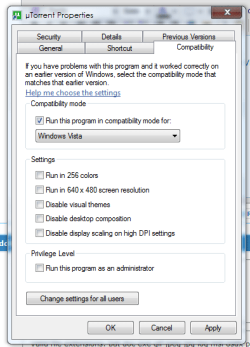
This you can try if you didnt do it already.

Right click the driver installer, and click properties.
Go to the compatibility tab and set it for Windows Vista

Click ok and try to install it.
It might work ;)
 

Attachments

  • 21134.PNG
    21134.PNG
    18.2 KB · Views: 566
Thanks. Didn't know about the compatibility tab so I tried it like that but still no luck unfortunately.
 

My Computer My Computer

At a glance

Windows 7
OS
Windows 7
Welcome to seven forums. First just so you know if you look at the bottom of any thread with a problem you'll see a list of related threads. That is where I found this http://social.answers.microsoft.com/...f-a1235aa7c4f0 Under the top one. Listed as Sony touch pad drivers. Post #7 in that thread says I found the soulution. Scroll down to the bottom (of the above linked page) for a Windows 7 Alps compatible driver. Hope this will solve your problem as well.Here is the link to the latest Alps touch pad driver version 7.5A. Fabe http://support.vaio.sony.eu/computi...zip&m=VPCX11S1E_B&ip=Preinstalled_Drivers.htm
 

My Computer My Computer

At a glance

Windows 7 ultimate 64 bit / XP Home sp3intel Core 2 Duo E8400 3.0ghz8 gigs 1066 OCZ Fata1tyEVGA GTX 580 Call of Duty Black Ops Edition
Computer Manufacturer/Model Number
Self Built
OS
Windows 7 ultimate 64 bit / XP Home sp3
CPU
intel Core 2 Duo E8400 3.0ghz
Motherboard
Asus P5ND bios 1401
Memory
8 gigs 1066 OCZ Fata1ty
Graphics Card(s)
EVGA GTX 580 Call of Duty Black Ops Edition
Sound Card
Creative Soundblaster Audigy 2zs
Monitor(s) Displays
Asus 24in LCD's 2MS X2
Screen Resolution
1920x1080p @60Hz
Hard Drives
WD Caviar 500 Black/ WD Caviar 200 Blue
PSU
OCZ 700W GameXtreme
Case
NZXT Apollo
Cooling
Corsair H50 CPU/120mm x3 /60mm x2 /Corsair Dominator Ram
Keyboard
Logitech Bluetooth Wireless MX5000
Mouse
Logitech Bluetooth Wireless MX1000
Internet Speed
Download 19.83 Upload 0.97
Other Info
Logitech Z2300 Speakers/ Bose Noise Cancelling Headphones/Avermedia PCI-e Hybrid TV Bravo/Epson NX415 all in one/ 4 Port Powered USB Hub/ LG 10x Bluray Burner /TSST Corp DVDRW External
Thanks for the further reply but even that driver would not work on my laptop. In the device manager I don't see anything listed. I can see that the driver gets installed in program files/apoint but when I click on Apoint.exe nothing happens no matter if I set it in compatability view or not. Not sure if there is anything else I can do at this point except contact Alps and see if they can suggest a solution or if a driver will be available for this particular alps touchpad?

When I try installing the 7.5 driver it it asks me if I want to install a version that is already on there even though I uninstall/reinstall it? I've tried that several times. Any further suggestions would be welcome!
 

My Computer My Computer

At a glance

Windows 7
OS
Windows 7
You said that you don't see anything in Device Manager ???
What does it show for "Mice and other pointing devices"...????
Does it show it as a PS2?? (It must show something!!).

I had similar problem with my Vaio FZ21E.
To get around it, I went to the Vaio website and logged in using my laptops serial number.
Once it recognised the model of laptop, I wnet to the download page for that specific model. opened up the tab for originally installed software, and at the bottom of the page was the original driver pack (all 113 mb of it !!).
Downloaded that to a temp folder and then opened device manager, right clicked on the PS2 mouse and asked windows to update the drivers from the C drive.
After a minute or so, Win 7 found everything it needed and I suddenly had a fully functioning touchpad.

If however the above doesn't fix it, go to the ALPS website and look for the following (or similar).
The drivers installed are - 7.0.501.8 (driver for Vaio) dated 23.05.2007.
Driver details frm ALPS Electric is file version 5.0.1.26

Let me know how you get on .
 

My Computer My Computer

At a glance

Windows 7
Computer Manufacturer/Model Number
Sony Vaio VGN FZ21E
OS
Windows 7
Thanks for the further reply. In the device manager all I see is a HID compliant device. I believe this is the external Logitech USB Bluetooth device I use? Nothing else. I have installed both the original Alps Vaio driver you mention from the Sony site (even in Comptability mode) and even the newer Alps driver that was mentioned above by another poster and nothing gives. They both install into a folder in C:/Program files/Apoint. When I look in C:/Windows/Drivers - I don't see a pointing device there.
 

My Computer My Computer

At a glance

Windows 7
OS
Windows 7
I have the same laptop, same problem. It was working perfectly yesterday that I installed Windows 7, but today the mouse isn't working.
 

My Computer My Computer

At a glance

Windows 7
OS
Windows 7
Richie05 - do you mean it was working after you installed Win 7 yesterday but that it isn't working today for some reason or do you mean it was working fine before Win 7 install but now doesn't work after the upgrade? Be helpful if you can clarify. Thanks.
 

My Computer My Computer

At a glance

Windows 7
OS
Windows 7
Yeah, it was working after I installed Win 7. I don't know what happened then.
 

My Computer My Computer

At a glance

Windows 7
OS
Windows 7
Hmm, beats me then. Sounds very odd. Do you know which version of the drivers you have?
 

My Computer My Computer

At a glance

Windows 7
OS
Windows 7

My Computer My Computer

At a glance

Windows 7
Computer Manufacturer/Model Number
Sony Vaio VGN FZ21E
OS
Windows 7
You said it worked after the Windows 7 install.....
Did you have full functionality...ie, auto scroll, etc,.
And did it stop working when you plugged in your USB mouse ??
 

My Computer My Computer

At a glance

Windows 7
Computer Manufacturer/Model Number
Sony Vaio VGN FZ21E
OS
Windows 7
Yes, I had full functionality the day I installed. But the next day, when I turn on the computer it wasn't working. I don't know what happened, I didn't do anything.
 

My Computer My Computer

At a glance

Windows 7
OS
Windows 7
Glad its all sorted out!! ;)
 

My Computer My Computer

At a glance

64-bit Windows 8.1 ProCore(TM) i5 CPU 4330 Haswell @ 3.20GHz12.00 GBIntel(R) HD Graphics
Computer type
PC/Desktop
Computer Manufacturer/Model Number
LENOVO K450 @3.0GHZ
OS
64-bit Windows 8.1 Pro
CPU
Core(TM) i5 CPU 4330 Haswell @ 3.20GHz
Motherboard
LENOVO
Memory
12.00 GB
Graphics Card(s)
Intel(R) HD Graphics
Sound Card
Intel HD integtrated
Monitor(s) Displays
HP 25' ISP Monitor
Screen Resolution
1900/1020
Hard Drives
(1) ST1000DM003-1CH162 (2) Generic STORAGE DEVICE USB Device (3) Generic STORAGE DEVICE USB Device
Internet Speed
100mb down/10mb up
Ok, seems to be working again. I only uninstalled the Alps pointing Device and installed again from Sony eSupport - VGN-FZ140E - Software Updates & Drivers.

Hope this work for you.


Thanks, that's the driver I have downloaded as-well. This is very odd. You have the exact same laptop yet your trackpad works with the driver. When you uninstalled the driver did you do it through Control Panel/Uninstall a Program? Then when you reinstalled it, did it tell you that there are known compatability issues with it? That's what it tells me, I then hit run program anyways (tried it in virtually all modes, xp mode, vista mode, etc.) and none of them do anything. I can't for the life of me figure out why it doesn't work. The newer firmware doesn't work either. Very frustrated.

Appreciate all you guys efforts to help out either ways.

EDIT: I wanted to ask - what do you have listed under Mice/Pointing Devices in the Device Manager? All I have is HID Compliant Device which I believe is my external USB Bluetooth mouse.

Also, after I uninstall and then when I try to reinstall it it asks me if I want to go ahead since there is already a better version on my laptop? How can there be a better version (that isn't working obviously) when I've uninstalled it using the Control Panel?
 

My Computer My Computer

At a glance

Windows 7
OS
Windows 7
When you uninstalled the driver did you do it through Control Panel/Uninstall a Program?

I used Revo Unistaller, but I believed it's the same in Control Panel. The program is Alps Pointing-Device for VAIO.

Then when you reinstalled it, did it tell you that there are known compatability issues with it?

Yes, it told me there were compability issues, but I ran the program anyway. It was installed and asked me to restart the computer. After that it was working normally.

EDIT: I wanted to ask - what do you have listed under Mice/Pointing Devices in the Device Manager? All I have is HID Compliant Device which I believe is my external USB Bluetooth mouse.

Yes, HID Compliant Device is the usb mouse. Mine is listed as Alps pointing-device for VAIO.

Also, after I uninstall and then when I try to reinstall it it asks me if I want to go ahead since there is already a better version on my laptop? How can there be a better version (that isn't working obviously) when I've uninstalled it using the Control Panel?

That didn't appear with me during the process.
 

My Computer My Computer

At a glance

Windows 7
OS
Windows 7
Back
Top