
Solved Can't change hard drive letter to needed letter

stevieray

New member
Guru
VIP
Local time
2:48 PM
Messages
632
Location
manasquan, nj
I lost my Event Viewer, and had to do a repair installation to fix it. Unfortunately, during the repair install, Windows decided to rename my second HD as the D: drive... it was K: before that. Now I cannot access any of my docs, pictures, music, or videos through the normal means... they don't show up in libraries or explorer, and apps like Restorator and Sure Thing (CD labeler) cannot find them. I think that means the paths are broken..?

It won't allow me to rename the HD back into K: (it's not listed as available). I can access the data by clicking Computer > D, and I can see the data is there, but its unusable as of now. Any ideas?
 
Last edited:

My Computer My Computer

At a glance

windows 7 x64 Home Premiumintel q6600g.skill 8gb ddr2 1066 (pc2 8500)evga geforce 9800 gtx 512 mb
Computer Manufacturer/Model Number
me / #1
OS
windows 7 x64 Home Premium
CPU
intel q6600
Motherboard
gigbyte ga ep45 ud3l
Memory
g.skill 8gb ddr2 1066 (pc2 8500)
Graphics Card(s)
evga geforce 9800 gtx 512 mb
Screen Resolution
1680 x 1050
Hard Drives
wd caviar black 500 gb
wd caviar black 1tb
wd elements 1tb external hd x2
PSU
raidmax 500w
Case
smilodon (yes, t'was the pretty blue lites that got me!)
Hello Stevie,

To be safe, you should create a restore point before doing this in case you make a mistake and need to use it to do a system restore.

http://www.sevenforums.com/tutorials/82994-drive-letter-add-change-remove-windows-7-a.html

1. If the K letter is not being used by another internal drive, then you can open regedit and navigate to:
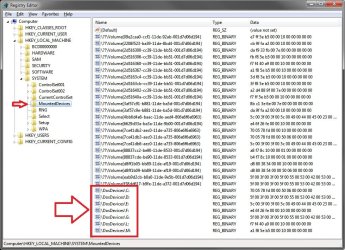
HKEY_LOCAL_MACHINE\SYSTEM\MountedDevices
2. In the left pane, Take ownership (step 2 in Option Two of METHOD TWO) of the registry key MountedDevices and "Allow" yourself "Full Control" of it as well.

3. In the right pane of MountedDevices, right click on \DosDevices\K: and click on Delete and OK.

4. Restart the computer to apply. You should now be able to change the second hard drive letter to K.

Step1.jpg

Hope this helps,
Shawn
 
Last edited:

My Computer My Computer

At a glance

64-bit Windows 11 Pro for WorkstationsIntel i7-8700K OC'd to 5 GHz64 GB (4x16GB) G.SKILL TridentZ RGB DDR4 3600...ASUS ROG-STRIX-GTX1080TI-O11G-GAMING
Computer type
PC/Desktop
Computer Manufacturer/Model Number
Self built custom
OS
64-bit Windows 11 Pro for Workstations
CPU
Intel i7-8700K OC'd to 5 GHz
Motherboard
ASUS ROG Maximus XI Formula Z390
Memory
64 GB (4x16GB) G.SKILL TridentZ RGB DDR4 3600 MHz
Graphics Card(s)
ASUS ROG-STRIX-GTX1080TI-O11G-GAMING
Sound Card
Integrated
Monitor(s) Displays
2 x Samsung Odyssey G7 27"
Screen Resolution
2560x1440
Hard Drives
1TB Samsung 990 PRO M.2,
4TB Samsung 990 PRO PRO M.2,
TerraMaster F8 SSD Plus NAS
PSU
Seasonic Prime Titanium 850W
Case
Thermaltake Core P3
Cooling
Corsair Hydro H115i
Keyboard
Logitech wireless K800
Mouse
Logitech MX Master 4
Internet Speed
2 Gb/s Download and 100 Mb/s Upload
Antivirus
Malwarebyte Anti-Malware Premium
Browser
Google Chrome
Other Info
Logitech Z625 speaker system,
Logitech BRIO 4K Pro webcam,
HP Color LaserJet Pro MFP M477fdn,
APC SMART-UPS RT 1000 XL - SURT1000XLI,
Galaxy S23 Plus phone
Thanks!

Oh nice... just to make things more fun, the "take ownership" context menu shortcut doesn't work in regedit... lovely.
 

My Computer My Computer

At a glance

windows 7 x64 Home Premiumintel q6600g.skill 8gb ddr2 1066 (pc2 8500)evga geforce 9800 gtx 512 mb
Computer Manufacturer/Model Number
me / #1
OS
windows 7 x64 Home Premium
CPU
intel q6600
Motherboard
gigbyte ga ep45 ud3l
Memory
g.skill 8gb ddr2 1066 (pc2 8500)
Graphics Card(s)
evga geforce 9800 gtx 512 mb
Screen Resolution
1680 x 1050
Hard Drives
wd caviar black 500 gb
wd caviar black 1tb
wd elements 1tb external hd x2
PSU
raidmax 500w
Case
smilodon (yes, t'was the pretty blue lites that got me!)
Nope, you will need to do it manually using step 2 in Option Two of METHOD TWO in the Take Ownership tutorial link above. :(
 

My Computer My Computer

At a glance

64-bit Windows 11 Pro for WorkstationsIntel i7-8700K OC'd to 5 GHz64 GB (4x16GB) G.SKILL TridentZ RGB DDR4 3600...ASUS ROG-STRIX-GTX1080TI-O11G-GAMING
Computer type
PC/Desktop
Computer Manufacturer/Model Number
Self built custom
OS
64-bit Windows 11 Pro for Workstations
CPU
Intel i7-8700K OC'd to 5 GHz
Motherboard
ASUS ROG Maximus XI Formula Z390
Memory
64 GB (4x16GB) G.SKILL TridentZ RGB DDR4 3600 MHz
Graphics Card(s)
ASUS ROG-STRIX-GTX1080TI-O11G-GAMING
Sound Card
Integrated
Monitor(s) Displays
2 x Samsung Odyssey G7 27"
Screen Resolution
2560x1440
Hard Drives
1TB Samsung 990 PRO M.2,
4TB Samsung 990 PRO PRO M.2,
TerraMaster F8 SSD Plus NAS
PSU
Seasonic Prime Titanium 850W
Case
Thermaltake Core P3
Cooling
Corsair Hydro H115i
Keyboard
Logitech wireless K800
Mouse
Logitech MX Master 4
Internet Speed
2 Gb/s Download and 100 Mb/s Upload
Antivirus
Malwarebyte Anti-Malware Premium
Browser
Google Chrome
Other Info
Logitech Z625 speaker system,
Logitech BRIO 4K Pro webcam,
HP Color LaserJet Pro MFP M477fdn,
APC SMART-UPS RT 1000 XL - SURT1000XLI,
Galaxy S23 Plus phone
Go to control panel - administrative tools - computer management -disc management.

Assign a different drive letter to the device using K:. Then change the current D: to K: and all should be well.

Luck-
 

My Computer My Computer

At a glance

Windows 7 Ultimate (64)i7-2600KG.SKILL Ripjaws X Series 8GB (2 x 4GB)ATI 5750
Computer Manufacturer/Model Number
Home Grown
OS
Windows 7 Ultimate (64)
CPU
i7-2600K
Motherboard
Asus P8P67-M Pro
Memory
G.SKILL Ripjaws X Series 8GB (2 x 4GB)
Graphics Card(s)
ATI 5750
Sound Card
On-Board
Monitor(s) Displays
LG W2486L
Screen Resolution
1920X1080
Hard Drives
Intel X-25M 80 Gig SSD | Intel X-25M 160 Gig SSD | WD Black 500MB - External eSata
PSU
Zalman ZM770-XT 770 Watts
Case
Antec 180 mini
Cooling
Cooler Master V8
Internet Speed
15MB - Cable
Other Info
Sissy OC - 4.6 @ 1.3175 24/7 | 18' Idle - 55' Load
YAY! It worked! I have my K: drive back, and I can access all of my stuff! :D

I couldn't figure out the correct file path for the command prompt method to take ownership, so I just granted myself full privileges and skipped the "take ownership" step... and it worked anyway! Although I might have inadvertently already taken ownership earlier... as I was trying to fix this problem before I turned to the forum... so that step might not have been skipped.

Thanks for the help!
 

My Computer My Computer

At a glance

windows 7 x64 Home Premiumintel q6600g.skill 8gb ddr2 1066 (pc2 8500)evga geforce 9800 gtx 512 mb
Computer Manufacturer/Model Number
me / #1
OS
windows 7 x64 Home Premium
CPU
intel q6600
Motherboard
gigbyte ga ep45 ud3l
Memory
g.skill 8gb ddr2 1066 (pc2 8500)
Graphics Card(s)
evga geforce 9800 gtx 512 mb
Screen Resolution
1680 x 1050
Hard Drives
wd caviar black 500 gb
wd caviar black 1tb
wd elements 1tb external hd x2
PSU
raidmax 500w
Case
smilodon (yes, t'was the pretty blue lites that got me!)
Go to control panel - administrative tools - computer management -disc management.

Assign a different drive letter to the device using K:. Then change the current D: to K: and all should be well.

Luck-
Unfortunately, I couldn't do it that way. There was no device with the letter K: listed in disc management, yet that letter was also not listed as available under "change letter of drive". I guess that during the repair install, it recognized the second HD as K:, locked out the use of that letter, and then renamed the drive to D:. Brink's registry fix forced the letter K: to be freed up so I could rename my data disc back to K:.
 

My Computer My Computer

At a glance

windows 7 x64 Home Premiumintel q6600g.skill 8gb ddr2 1066 (pc2 8500)evga geforce 9800 gtx 512 mb
Computer Manufacturer/Model Number
me / #1
OS
windows 7 x64 Home Premium
CPU
intel q6600
Motherboard
gigbyte ga ep45 ud3l
Memory
g.skill 8gb ddr2 1066 (pc2 8500)
Graphics Card(s)
evga geforce 9800 gtx 512 mb
Screen Resolution
1680 x 1050
Hard Drives
wd caviar black 500 gb
wd caviar black 1tb
wd elements 1tb external hd x2
PSU
raidmax 500w
Case
smilodon (yes, t'was the pretty blue lites that got me!)
Very cool, whatever works to get it done. Regards- Ken :)

Go to control panel - administrative tools - computer management -disc management.

Assign a different drive letter to the device using K:. Then change the current D: to K: and all should be well.

Luck-
Unfortunately, I couldn't do it that way. There was no device with the letter K: listed in disc management, yet that letter was also not listed as available under "change letter of drive". I guess that during the repair install, it recognized the second HD as K:, locked out the use of that letter, and then renamed the drive to D:. Brink's registry fix forced the letter K: to be freed up so I could rename my data disc back to K:.
 

My Computer My Computer

At a glance

Windows 7 Ultimate (64)i7-2600KG.SKILL Ripjaws X Series 8GB (2 x 4GB)ATI 5750
Computer Manufacturer/Model Number
Home Grown
OS
Windows 7 Ultimate (64)
CPU
i7-2600K
Motherboard
Asus P8P67-M Pro
Memory
G.SKILL Ripjaws X Series 8GB (2 x 4GB)
Graphics Card(s)
ATI 5750
Sound Card
On-Board
Monitor(s) Displays
LG W2486L
Screen Resolution
1920X1080
Hard Drives
Intel X-25M 80 Gig SSD | Intel X-25M 160 Gig SSD | WD Black 500MB - External eSata
PSU
Zalman ZM770-XT 770 Watts
Case
Antec 180 mini
Cooling
Cooler Master V8
Internet Speed
15MB - Cable
Other Info
Sissy OC - 4.6 @ 1.3175 24/7 | 18' Idle - 55' Load
Stevie,

I'm happy to hear that you got it sorted. :)
 
Last edited:

My Computer My Computer

At a glance

64-bit Windows 11 Pro for WorkstationsIntel i7-8700K OC'd to 5 GHz64 GB (4x16GB) G.SKILL TridentZ RGB DDR4 3600...ASUS ROG-STRIX-GTX1080TI-O11G-GAMING
Computer type
PC/Desktop
Computer Manufacturer/Model Number
Self built custom
OS
64-bit Windows 11 Pro for Workstations
CPU
Intel i7-8700K OC'd to 5 GHz
Motherboard
ASUS ROG Maximus XI Formula Z390
Memory
64 GB (4x16GB) G.SKILL TridentZ RGB DDR4 3600 MHz
Graphics Card(s)
ASUS ROG-STRIX-GTX1080TI-O11G-GAMING
Sound Card
Integrated
Monitor(s) Displays
2 x Samsung Odyssey G7 27"
Screen Resolution
2560x1440
Hard Drives
1TB Samsung 990 PRO M.2,
4TB Samsung 990 PRO PRO M.2,
TerraMaster F8 SSD Plus NAS
PSU
Seasonic Prime Titanium 850W
Case
Thermaltake Core P3
Cooling
Corsair Hydro H115i
Keyboard
Logitech wireless K800
Mouse
Logitech MX Master 4
Internet Speed
2 Gb/s Download and 100 Mb/s Upload
Antivirus
Malwarebyte Anti-Malware Premium
Browser
Google Chrome
Other Info
Logitech Z625 speaker system,
Logitech BRIO 4K Pro webcam,
HP Color LaserJet Pro MFP M477fdn,
APC SMART-UPS RT 1000 XL - SURT1000XLI,
Galaxy S23 Plus phone
Hello Stevie,

To be safe, you should create a restore point before doing this in case you make a mistake and need to use it to do a system restore.

Drive Letter - Add, Change, or Remove in Windows

1. If the K letter is not being used by another internal drive, then you can open regedit and navigate to:
HKEY_LOCAL_MACHINE\SYSTEM\MountedDevices
2. In the left pane, Take ownership (step 2 in Option Two of METHOD TWO) of the registry key MountedDevices and "Allow" yourself "Full Control" of it as well.

3. In the right pane of MountedDevices, right click on \DosDevices\K: and click on Delete and OK.

4. Restart the computer to apply. You should now be able to change the second hard drive letter to K.

View attachment 37230

Hope this helps,
Shawn

PLEASE RESPOND THIS MESSAGE PLEASE i lost my disc F: so i've been looking for this thread for 2 days and i finally found it like you said "you have to delete K:" you mean the disc i use like i use K: and i can't see that disk so i have to delete that ? like i can't see the F: so i have to delete disc F: ?
 

My Computer My Computer

At a glance

Windows 7asdasdasdas
Computer type
PC/Desktop
Computer Manufacturer/Model Number
asd
OS
Windows 7
CPU
asd
Motherboard
asdasd
Memory
asd
Graphics Card(s)
asdas
Hard Drives
asd
Antivirus
avast
Browser
asd

My Computer My Computer

At a glance

64-bit Windows 11 Pro for WorkstationsIntel i7-8700K OC'd to 5 GHz64 GB (4x16GB) G.SKILL TridentZ RGB DDR4 3600...ASUS ROG-STRIX-GTX1080TI-O11G-GAMING
Computer type
PC/Desktop
Computer Manufacturer/Model Number
Self built custom
OS
64-bit Windows 11 Pro for Workstations
CPU
Intel i7-8700K OC'd to 5 GHz
Motherboard
ASUS ROG Maximus XI Formula Z390
Memory
64 GB (4x16GB) G.SKILL TridentZ RGB DDR4 3600 MHz
Graphics Card(s)
ASUS ROG-STRIX-GTX1080TI-O11G-GAMING
Sound Card
Integrated
Monitor(s) Displays
2 x Samsung Odyssey G7 27"
Screen Resolution
2560x1440
Hard Drives
1TB Samsung 990 PRO M.2,
4TB Samsung 990 PRO PRO M.2,
TerraMaster F8 SSD Plus NAS
PSU
Seasonic Prime Titanium 850W
Case
Thermaltake Core P3
Cooling
Corsair Hydro H115i
Keyboard
Logitech wireless K800
Mouse
Logitech MX Master 4
Internet Speed
2 Gb/s Download and 100 Mb/s Upload
Antivirus
Malwarebyte Anti-Malware Premium
Browser
Google Chrome
Other Info
Logitech Z625 speaker system,
Logitech BRIO 4K Pro webcam,
HP Color LaserJet Pro MFP M477fdn,
APC SMART-UPS RT 1000 XL - SURT1000XLI,
Galaxy S23 Plus phone
Back
Top