Elevated Program Shortcut without UAC Prompt - Create

How to Create an Elevated Program Shortcut without a UAC Prompt in Windows


   Information
This will show you how to create an elevated "Run as administrator" shortcut of any installed program using Task Scheduler so that it will not give you a UAC prompt for permission when you start it while still having UAC turned on in Vista, Windows 7, and Windows 8.

In the tutorial, you will first create a new task, then a new shortcut to run the task. Afterwards, how to change the icon of the shortcut.

   Note
Special thanks to OEM for pointing this out, and the previous Vista version by DMEX.

   Warning


  • This shortcut and task can only be created and work while logged in as an administrator account.
  • This shortcut will not work in a standard user account.


Here's How:
1. Press the Windows + R keys to open the Run dialog, type taskschd.msc, and press Enter.
NOTE: This will open Task Scheduler. This file is located at:
C:\Windows\system32\taskschd.msc.

2. While having Task Scheduler Library selected in the left pane, click/tap on Create task in the far right pane. (see screenshot below)
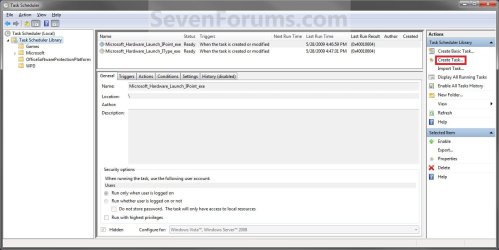
Step1.jpg
3. Under the General tab, type in the "Name" of the program you want to create this shortcut for. (see screenshot below)
NOTE: This will be the name of the task. As an example, I will use CCleaner for that program. Make note of this name, you will need it later in step 12 and 14 below.
Step2.jpg
4. Check the Run with highest privileges box. (See screenshot below)
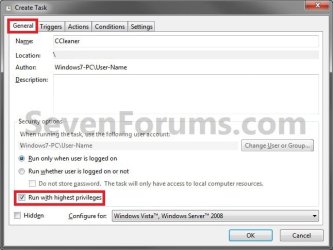
Step3.jpg
5. Click/tap on the Configure for drop down box to open it, and select Windows® 7, Windows Server™ 2008 R2 or the Windows you are currently in. (see screenshot above and below)
NOTE: This is like compatibility mode. If the program does not support running in Windows 7 normally, then you can select the OS that is does support running in instead to have it run in compatibility mode as if it was running in that OS instead of Windows 7.

Drop_Down_Box.jpg
6. Click/tap on the Actions tab, then on the New button. (see screenshot below)
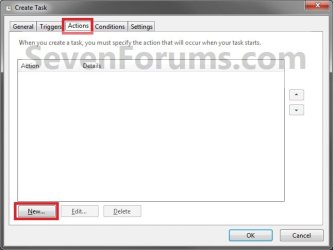
Step4.jpg
7. In the Program/script: box in the Actions tab, copy and paste the path below. (see screenshot below step 9)
NOTE: Thank you to chillz for the updated steps 7 and 8.
%windir%\System32\cmd.exe
8. In the Add arguments (optional): box in the Actions tab, type in the argument below. (see screenshot below step 9)

NOTE: Substitute Task Name in the argument below with the name you entered in step 3 (ex: CCleaner) within quotes, and substitute Full Path of Program in the argument below with the actual full path of the program's .exe file within quote.
/c start "Task Name" "Full Path of Program"


For example:

Code:
/c start "CCleaner" "C:\Program Files\CCleaner\CCleaner64.exe"
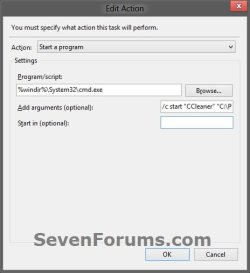
9. Click/tap on OK. (see screenshot below)
step7.jpg
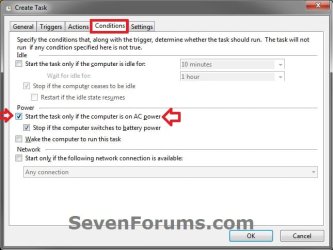
10. Click/tap on the Conditions tab, and uncheck the Stop if the computer switches to battery power box first, then uncheck the Start the task only if the computer is on AC power box. (see screenshots below)
NOTE: This step is mostly for laptops, so that you will be able to run the program when the laptop is running on battery power.
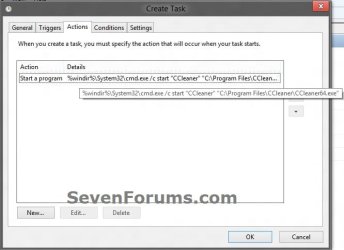
step8.jpg

Conditions.jpg

11. Click/tap on OK. (See screenshots above)

12. You will now see your new task created with the name (ex: CCleaner) you gave it in step 3. Close Task Scheduler. (see screenshot below)
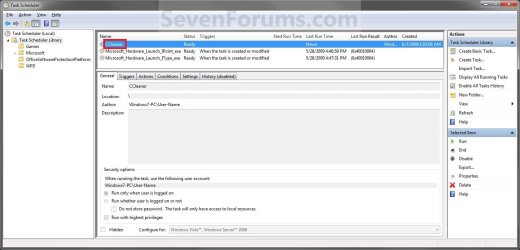
Step9.jpg
13. Right click or press and hold on an empty area of your desktop, then click/tap on New and Shortcut.

14. Type in the target below for the location field, then click/tap on the Next button. (see screenshot below)
NOTE: Subsitute task-name in the target with the name (ex: CCleaner) within quotes that you used in step 3.
schtasks /run /tn "task-name"

For example: For my task name CCleaner I used from step 3, I would type:
schtasks /run /tn "CCleaner"
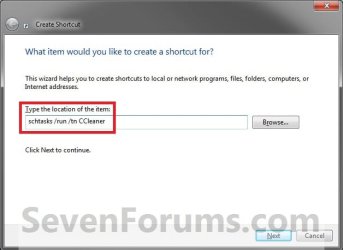
Step10.jpg
15. Type in a name you want for the shortcut (ex: CCleaner), then click/tap on the Finish button. (see screenshot below)
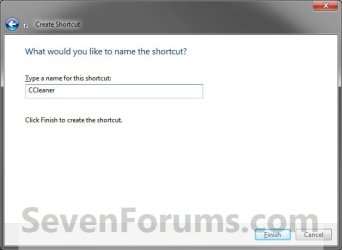
Step11.jpg
16. Right click on the new shortcut (ex: CCleaner) on the desktop, then click/tap on Properties.

17. Click/tap on the Shortcut tab, and on the Change Icon button. (see screenshot below)
Step12.jpg
18. Click/tap on OK. (see screenshot below)
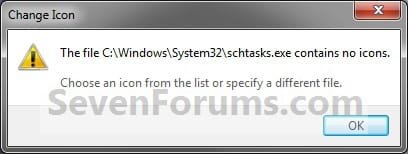
Step13.jpg
19. Click/tap on the Browse button. (see screenshot below)
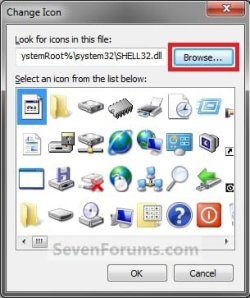
Step14.jpg
20. Navigate to the .exe file of the program that you have created this shortcut with, select it, and click/tap on Open. (see screenshot below)
NOTE: If you have a icon of your own that you would prefer to use instead, then navigate to where you have that icon saved at instead.
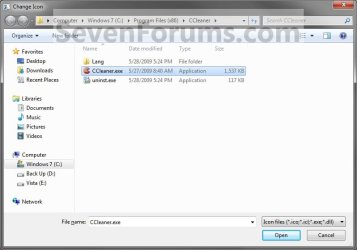
Step15.jpg
21. Select the icon you want for the shortcut, then click/tap on OK. (see screenshot below)
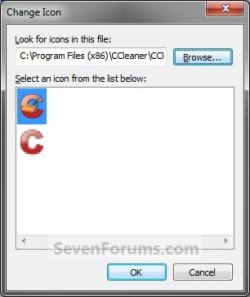
Step16.jpg
22. Click/tap on OK. (see screenshot below)
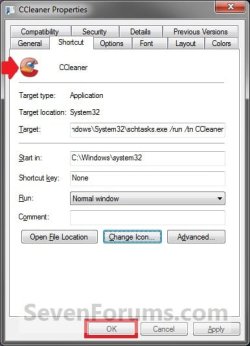
Step17.jpg
23. You can now use this elevated shortcut to run at startup in your "Startup" folder, run at startup as a task, Pin to Start Menu, Pin to Taskbar, assign a keyboard shortcut, or move to where you like for easy use.

24. When you run this new elevated shortcut, you will now no longer have to click/tap on YES to approve the UAC prompt to allow the program run as administrator.


   Tip
To Undo and Remove this Task:
  • While having Task Scheduler Library selected in the left pane, right click on the task in the right pane that you created in step 12, then click on Delete and Yes to approve.
  • Delete the shortcut.
That's it,
Shawn


Last edited:
Works like a charm. Thanks much.


That said, I find it bizarre that we must resort to such a convoluted method. I really expected to be able to just right-click on either the exe or a shortcut, select run as administrator, and be done with it.
 

My Computer

Computer Manufacturer/Model Number
Shuttle (SFF) / SP35P2 Pro
OS
Win 7 Pro 64 Bit
CPU
Q6600
Motherboard
Shuttle
Memory
4GB
Graphics Card(s)
8800GT
Sound Card
On Board
Monitor(s) Displays
Samsung 22"
Screen Resolution
1680x1050
Hard Drives
WD 640 Boot
WD 640 Data
WD 500 external backup
PSU
Shuttle 450 Watt
Case
Shuttle
Cooling
Fans...lots of them
Keyboard
Creative Fatal1ty
Mouse
Logitech MX518
Internet Speed
Wicked Fast
Other Info
Capricorn
You're welcome Steve.

Run as administrator is what is triggering UAC to ask you for permission to allow it to run elevated first. If you had UAC turned off, logged into the built-in Administrator account, or not using "run as administrator"; you would also not get the UAC prompt. However, you wouldn't get the UAC prompt for anything either which could pose a security risk. :(
 

My Computer

Computer type
PC/Desktop
Computer Manufacturer/Model Number
Self built custom
OS
64-bit Windows 11 Pro for Workstations
CPU
Intel i7-8700K OC'd to 5 GHz
Motherboard
ASUS ROG Maximus XI Formula Z390
Memory
64 GB (4x16GB) G.SKILL TridentZ RGB DDR4 3600 MHz
Graphics Card(s)
ASUS ROG-STRIX-GTX1080TI-O11G-GAMING
Sound Card
Integrated
Monitor(s) Displays
2 x Samsung Odyssey G7 27"
Screen Resolution
2560x1440
Hard Drives
1TB Samsung 990 PRO M.2,
4TB Samsung 990 PRO PRO M.2,
TerraMaster F8 SSD Plus NAS
PSU
Seasonic Prime Titanium 850W
Case
Thermaltake Core P3
Cooling
Corsair Hydro H115i
Keyboard
Logitech wireless K800
Mouse
Logitech MX Master 4
Internet Speed
2 Gb/s Download and 100 Mb/s Upload
Antivirus
Malwarebyte Anti-Malware Premium
Browser
Google Chrome
Other Info
Logitech Z625 speaker system,
Logitech BRIO 4K Pro webcam,
HP Color LaserJet Pro MFP M477fdn,
APC SMART-UPS RT 1000 XL - SURT1000XLI,
Galaxy S23 Plus phone
Thanks. OK, I tried this again via the Admin account. I carefully followed all the steps but once I try to run the task via shortcut, I get the following message: Failed to load url of version.ini. I even tried to run the task via the task scheduler and got the same error message. :(

I deleted the short cut and task and redid this and still got the same message. Any ideas? The game does work fine using the standard shortcut.

I am trying to do for CrossFire (free online FPS game). Thanks!

What program do you have to be started in step 7 for the task? Is it the normal shortcut that you use to start the game?
 
Last edited:

My Computer

Computer type
PC/Desktop
Computer Manufacturer/Model Number
Self built custom
OS
64-bit Windows 11 Pro for Workstations
CPU
Intel i7-8700K OC'd to 5 GHz
Motherboard
ASUS ROG Maximus XI Formula Z390
Memory
64 GB (4x16GB) G.SKILL TridentZ RGB DDR4 3600 MHz
Graphics Card(s)
ASUS ROG-STRIX-GTX1080TI-O11G-GAMING
Sound Card
Integrated
Monitor(s) Displays
2 x Samsung Odyssey G7 27"
Screen Resolution
2560x1440
Hard Drives
1TB Samsung 990 PRO M.2,
4TB Samsung 990 PRO PRO M.2,
TerraMaster F8 SSD Plus NAS
PSU
Seasonic Prime Titanium 850W
Case
Thermaltake Core P3
Cooling
Corsair Hydro H115i
Keyboard
Logitech wireless K800
Mouse
Logitech MX Master 4
Internet Speed
2 Gb/s Download and 100 Mb/s Upload
Antivirus
Malwarebyte Anti-Malware Premium
Browser
Google Chrome
Other Info
Logitech Z625 speaker system,
Logitech BRIO 4K Pro webcam,
HP Color LaserJet Pro MFP M477fdn,
APC SMART-UPS RT 1000 XL - SURT1000XLI,
Galaxy S23 Plus phone
Ahhh...thanks for the clarification Brink. I definitely want UAC in general. I just wanted to be able to configure a particular instance of a shortcut for when I don't want it. The soln here is very creative...but seems to indicate that MS is somehow missing the boat somewhere. Regardless, thanks much. I would have never guessed this approach. :)
 

My Computer

Computer Manufacturer/Model Number
Shuttle (SFF) / SP35P2 Pro
OS
Win 7 Pro 64 Bit
CPU
Q6600
Motherboard
Shuttle
Memory
4GB
Graphics Card(s)
8800GT
Sound Card
On Board
Monitor(s) Displays
Samsung 22"
Screen Resolution
1680x1050
Hard Drives
WD 640 Boot
WD 640 Data
WD 500 external backup
PSU
Shuttle 450 Watt
Case
Shuttle
Cooling
Fans...lots of them
Keyboard
Creative Fatal1ty
Mouse
Logitech MX518
Internet Speed
Wicked Fast
Other Info
Capricorn
No problem Steve. :)
 

My Computer

Computer type
PC/Desktop
Computer Manufacturer/Model Number
Self built custom
OS
64-bit Windows 11 Pro for Workstations
CPU
Intel i7-8700K OC'd to 5 GHz
Motherboard
ASUS ROG Maximus XI Formula Z390
Memory
64 GB (4x16GB) G.SKILL TridentZ RGB DDR4 3600 MHz
Graphics Card(s)
ASUS ROG-STRIX-GTX1080TI-O11G-GAMING
Sound Card
Integrated
Monitor(s) Displays
2 x Samsung Odyssey G7 27"
Screen Resolution
2560x1440
Hard Drives
1TB Samsung 990 PRO M.2,
4TB Samsung 990 PRO PRO M.2,
TerraMaster F8 SSD Plus NAS
PSU
Seasonic Prime Titanium 850W
Case
Thermaltake Core P3
Cooling
Corsair Hydro H115i
Keyboard
Logitech wireless K800
Mouse
Logitech MX Master 4
Internet Speed
2 Gb/s Download and 100 Mb/s Upload
Antivirus
Malwarebyte Anti-Malware Premium
Browser
Google Chrome
Other Info
Logitech Z625 speaker system,
Logitech BRIO 4K Pro webcam,
HP Color LaserJet Pro MFP M477fdn,
APC SMART-UPS RT 1000 XL - SURT1000XLI,
Galaxy S23 Plus phone
What program do you have to be started in step 6 for the task? Is it the normal shortcut that you use to start the game?

Sorry, I don't understand.

Step 6 just states: Under "Action", select Start a program and click on the Browse button. (See screenshot below). I have done this.

Are you referring to step 7? I am going into the game's folder and choosing the .exe file that normally starts the game.

Thank you
 

My Computer

OS
Windows 7 Home Premium x64
CPU
Intel Core2Duo E7200 OC'd to 3.0 Ghz
Motherboard
MSI Neo P55
Memory
4GB PC-6400
Graphics Card(s)
Nvidia GeForce 8600GT
Mkarias,

I'm not sure what that error is for. Since it is an online game, it may be part of the issue and may not work with this. :(
 
Last edited:

My Computer

Computer type
PC/Desktop
Computer Manufacturer/Model Number
Self built custom
OS
64-bit Windows 11 Pro for Workstations
CPU
Intel i7-8700K OC'd to 5 GHz
Motherboard
ASUS ROG Maximus XI Formula Z390
Memory
64 GB (4x16GB) G.SKILL TridentZ RGB DDR4 3600 MHz
Graphics Card(s)
ASUS ROG-STRIX-GTX1080TI-O11G-GAMING
Sound Card
Integrated
Monitor(s) Displays
2 x Samsung Odyssey G7 27"
Screen Resolution
2560x1440
Hard Drives
1TB Samsung 990 PRO M.2,
4TB Samsung 990 PRO PRO M.2,
TerraMaster F8 SSD Plus NAS
PSU
Seasonic Prime Titanium 850W
Case
Thermaltake Core P3
Cooling
Corsair Hydro H115i
Keyboard
Logitech wireless K800
Mouse
Logitech MX Master 4
Internet Speed
2 Gb/s Download and 100 Mb/s Upload
Antivirus
Malwarebyte Anti-Malware Premium
Browser
Google Chrome
Other Info
Logitech Z625 speaker system,
Logitech BRIO 4K Pro webcam,
HP Color LaserJet Pro MFP M477fdn,
APC SMART-UPS RT 1000 XL - SURT1000XLI,
Galaxy S23 Plus phone
You're welcome Steve.

Run as administrator is what is triggering UAC to ask you for permission to allow it to run elevated first. If you had UAC turned off, logged into the built-in Administrator account, or not using "run as administrator"; you would also not get the UAC prompt. However, you wouldn't get the UAC prompt for anything either which could pose a security risk. :(

(Sigh!) YES! THAT is why I recently and reluctantly turned UAC completely off. UAC didn't behave that perversely for me in Vista, and I just struggled along with UAC tamed by Norton UAC and UAC Snooze. Unfortunately in Win7 those two utilities cannot be used (the Norton simply refuses to install and UAC Snooze doesn't recognise the middle settings, so switches UAC either full on or full off). My whole point of elevating a program with 'run as administrator' is to avoid having UAC prompts when I run it, and, in some cases like my file manager (FreeCommander - the best!), the program being able to carry out file operations sometimes in system folders. For me as an actual computer user, it's completely perverse that to elevate a program's permissions actually causes it to elicit UAC prompts.

I did try the neat trick using the Scheduler to elevate particular programs, but I found that this resulted in a small delay when each program that was 'elevated' in that way was run - obviously because another program was being run first. A small issue, but tending over time to raise the stress level of working at the computer. Also, UAC (on upper middle setting) still caused problems with some programs, including ongoing nuisances with certain of my startup programs. I came to the conclusion that the general nuisance and stress caused by UAC and the methods used to 'elevate' programs was a bigger price to pay than the notional reduction in system security through turning UAC off (I'm very security conscious and have various layers of security, so UAC is for me not the big deal that it would be for the average Win7 user).

I'll consider restoring UAC if / when something like Norton UAC is available for Win7 and UAC Snooze is updated to work with Win7 - or such time as the Win7 developers actually change UAC so that it works properly for the user rather than against the user. So far they have not shown broad based intelligence on the subject - clearly thinking just of security and not of the needs of actual human beings who have to use this Behemoth of an operating system. The two middle settings for UAC are in my view just a lip-service to those who protested about UAC's obstructiveness in Vista, but the developers lacked the good sense to actually rewrite that part of Windows to behave completely differently - in particular using some sort of user accessible whitelist and blacklist of programs and processes.
 
Last edited:

My Computer

Computer Manufacturer/Model Number
Nofan A40-Z68 Silent PC
OS
Windows 7 Home Premium x64
CPU
Intel Core i3 2125 3.3GHz Sandy Bridge Dual Core
Motherboard
Gigabyte GA-Z68X-UD3H-B3 LGA1155 ATX
Memory
8 GB
Graphics Card(s)
On-board
Sound Card
On-board
Monitor(s) Displays
Xerox 700P LCD
Screen Resolution
1280x1024
Hard Drives
2 internal nominally 128 GB SSDs
plus intermittent use of USB-connected HDDs
PSU
Nofan 400W (fanless)
Case
Nofan CS-30
Cooling
Nofan IcePipe
Keyboard
Microsoft Natural Media
Mouse
Microsoft optical
Internet Speed
Nominal c. 17 mbps
Other Info
I have NO plans to return to the stressful noise of fan cooled computers, such time as I need to get a new system!
Brink - Thanks very much. I guess having a switch to say "always allow" would be too easy to blithely accept. This is a pleasure. Gotta have pain to appreciate the relief.
 

My Computer

Computer type
PC/Desktop
Computer Manufacturer/Model Number
Home built
OS
Windows 7 64 bit SP 1
CPU
Intel Core i7 CPU
Motherboard
Gigabyte X58A-UD3R
Memory
12 GB
Graphics Card(s)
ATI Radeon HD 4670 [Display adapter]
Sound Card
Realtek High Definition Audio Device
Monitor(s) Displays
ASUS VE258Q LCD
Screen Resolution
1920 x 1080
Hard Drives
C NTFS 167 GB
D SYSTEM RESERVED 99.9 MB
F NTFS 1.5 TB
G NTFS 1.5 TB
F & G SAME PHYSICAL DRIVE
H NTFS 4 TB
K EXTERNAL USB 3.0 3 TB
L EXTERNAL USB 3.0 1.5 TB
W EXTERNAL USB 3.0 4 TB
PSU
Corsair 650W
Case
Antec Twelve Hundred
Cooling
Fans came with case
Keyboard
Logitech wireless MK700
Mouse
Logitech wireless M705
Internet Speed
50mb/5mb
Antivirus
AVG free
Browser
Chrome 42 (and IE 11 when necessary)
You're most welcome Wooleysdad. :)
 

My Computer

Computer type
PC/Desktop
Computer Manufacturer/Model Number
Self built custom
OS
64-bit Windows 11 Pro for Workstations
CPU
Intel i7-8700K OC'd to 5 GHz
Motherboard
ASUS ROG Maximus XI Formula Z390
Memory
64 GB (4x16GB) G.SKILL TridentZ RGB DDR4 3600 MHz
Graphics Card(s)
ASUS ROG-STRIX-GTX1080TI-O11G-GAMING
Sound Card
Integrated
Monitor(s) Displays
2 x Samsung Odyssey G7 27"
Screen Resolution
2560x1440
Hard Drives
1TB Samsung 990 PRO M.2,
4TB Samsung 990 PRO PRO M.2,
TerraMaster F8 SSD Plus NAS
PSU
Seasonic Prime Titanium 850W
Case
Thermaltake Core P3
Cooling
Corsair Hydro H115i
Keyboard
Logitech wireless K800
Mouse
Logitech MX Master 4
Internet Speed
2 Gb/s Download and 100 Mb/s Upload
Antivirus
Malwarebyte Anti-Malware Premium
Browser
Google Chrome
Other Info
Logitech Z625 speaker system,
Logitech BRIO 4K Pro webcam,
HP Color LaserJet Pro MFP M477fdn,
APC SMART-UPS RT 1000 XL - SURT1000XLI,
Galaxy S23 Plus phone
Hello Brink,

Thank you again for a nice tutorial!

Best regards,

zx81
 

My Computer

Computer Manufacturer/Model Number
Dell Inpspiron 1720
OS
Windows 7 Home Premium x64
CPU
Intel 1720 Core 2 Duo 2.00GHz,800,2M
Memory
4GB 667MHz DDR2 SDRAM (2x2048)
Graphics Card(s)
NVIDIA Geforce Go 8600M GT 256MB DDR2
Sound Card
SigmaTel
Monitor(s) Displays
17.0" Widescreen WXGA+ (1440x900) TFT with TrueLife
Screen Resolution
1440x900
Hard Drives
2x160GB 5400RPM Serial ATA
Mouse
Logitech
Great tutorial....but I have a question since what I need to do actually involves a two step process. First, I am using Casio CW-100 Disk Title Printer Software and I was able to use your tutorial so that I have created a shortcut on my desktop that will open the program without the UAC warning. However, my favorite way of using that program actually involves a separate step. The program allows me to create a list of titles for the software. My list has about 2000 or so items which allows me to automatically enter the specific title into the program simply by double clicking on the name of a particular title on the list. So what I have done is to create a shortcut to that list of titles on my desktop. Then I double click on the particular title I want and it is added to the software...replacing whatever title was there before and then I print out the title on a cd.


The file type (i.e. .cte) is associated with the "regular" version of my Disk Title Printer software....not the version created by your tutorial. As a consequence, when I double click on the cte file I get the UAC warning. So (I think) either I need to somehow change the association of the .cte files to open the "Elevated" version of the software...or somehow create a "trigger" within the task scheduler that does this for me. However, I have not been able to figure out how to do either (or both) of these...assuming that is what needs to be done.

Do you have any suggestions for me?

Thanks
 

My Computer

OS
Windows 7
Hello Maineiac, and welcome to Seven Forums.

You can try to see if you can use Default Programs to change the "Current Default" program for the file extention to open with the shortcut instead.
 

My Computer

Computer type
PC/Desktop
Computer Manufacturer/Model Number
Self built custom
OS
64-bit Windows 11 Pro for Workstations
CPU
Intel i7-8700K OC'd to 5 GHz
Motherboard
ASUS ROG Maximus XI Formula Z390
Memory
64 GB (4x16GB) G.SKILL TridentZ RGB DDR4 3600 MHz
Graphics Card(s)
ASUS ROG-STRIX-GTX1080TI-O11G-GAMING
Sound Card
Integrated
Monitor(s) Displays
2 x Samsung Odyssey G7 27"
Screen Resolution
2560x1440
Hard Drives
1TB Samsung 990 PRO M.2,
4TB Samsung 990 PRO PRO M.2,
TerraMaster F8 SSD Plus NAS
PSU
Seasonic Prime Titanium 850W
Case
Thermaltake Core P3
Cooling
Corsair Hydro H115i
Keyboard
Logitech wireless K800
Mouse
Logitech MX Master 4
Internet Speed
2 Gb/s Download and 100 Mb/s Upload
Antivirus
Malwarebyte Anti-Malware Premium
Browser
Google Chrome
Other Info
Logitech Z625 speaker system,
Logitech BRIO 4K Pro webcam,
HP Color LaserJet Pro MFP M477fdn,
APC SMART-UPS RT 1000 XL - SURT1000XLI,
Galaxy S23 Plus phone
You can try to see if you can use Default Programs to change the "Current Default" program for the file extention to open with the shortcut instead.

Thanks for the suggestion I had tried that...but I can not come up with the correct program that will work. Let's say that the original program that ran was found in program files/casio/disk.exe. If I associate the file extension with that program then I get the usual UAC warning.

So what I want to do is to associate the file extension with the program...but as an elevated program. But if I try to associate it with: schtasks.exe /run /tn Disk I get an error message that the file name is not valid.

I also tried associating the extension with the shortcut that I created for the elevated program. That resulted in the file trying to be open with Windows Manages Scheduled Tasks....but that does not direct to the specific task...just the schtasks.exe file which by itself does me no good...so is there a way to direct it to the actual "Disk" task that I want to use?
 

My Computer

OS
Windows 7
Not that I know of then. :(
 

My Computer

Computer type
PC/Desktop
Computer Manufacturer/Model Number
Self built custom
OS
64-bit Windows 11 Pro for Workstations
CPU
Intel i7-8700K OC'd to 5 GHz
Motherboard
ASUS ROG Maximus XI Formula Z390
Memory
64 GB (4x16GB) G.SKILL TridentZ RGB DDR4 3600 MHz
Graphics Card(s)
ASUS ROG-STRIX-GTX1080TI-O11G-GAMING
Sound Card
Integrated
Monitor(s) Displays
2 x Samsung Odyssey G7 27"
Screen Resolution
2560x1440
Hard Drives
1TB Samsung 990 PRO M.2,
4TB Samsung 990 PRO PRO M.2,
TerraMaster F8 SSD Plus NAS
PSU
Seasonic Prime Titanium 850W
Case
Thermaltake Core P3
Cooling
Corsair Hydro H115i
Keyboard
Logitech wireless K800
Mouse
Logitech MX Master 4
Internet Speed
2 Gb/s Download and 100 Mb/s Upload
Antivirus
Malwarebyte Anti-Malware Premium
Browser
Google Chrome
Other Info
Logitech Z625 speaker system,
Logitech BRIO 4K Pro webcam,
HP Color LaserJet Pro MFP M477fdn,
APC SMART-UPS RT 1000 XL - SURT1000XLI,
Galaxy S23 Plus phone
Not that I know of then. :(

thanks anyway....as to this particular program I found a way around the problem. I had forgotten that when I ran the program in Vista that I had compatability problems so I had set it to run as an XP program. That status carried over to my system when I upgraded to Windows 7. I just eliminated the compatability mode designation and now when I click on a .cte file it opens up the program without the UAC problem.

So all is now well!! :D
 

My Computer

OS
Windows 7
That's great news Maineiac. I'm glad you got it sorted. :)
 

My Computer

Computer type
PC/Desktop
Computer Manufacturer/Model Number
Self built custom
OS
64-bit Windows 11 Pro for Workstations
CPU
Intel i7-8700K OC'd to 5 GHz
Motherboard
ASUS ROG Maximus XI Formula Z390
Memory
64 GB (4x16GB) G.SKILL TridentZ RGB DDR4 3600 MHz
Graphics Card(s)
ASUS ROG-STRIX-GTX1080TI-O11G-GAMING
Sound Card
Integrated
Monitor(s) Displays
2 x Samsung Odyssey G7 27"
Screen Resolution
2560x1440
Hard Drives
1TB Samsung 990 PRO M.2,
4TB Samsung 990 PRO PRO M.2,
TerraMaster F8 SSD Plus NAS
PSU
Seasonic Prime Titanium 850W
Case
Thermaltake Core P3
Cooling
Corsair Hydro H115i
Keyboard
Logitech wireless K800
Mouse
Logitech MX Master 4
Internet Speed
2 Gb/s Download and 100 Mb/s Upload
Antivirus
Malwarebyte Anti-Malware Premium
Browser
Google Chrome
Other Info
Logitech Z625 speaker system,
Logitech BRIO 4K Pro webcam,
HP Color LaserJet Pro MFP M477fdn,
APC SMART-UPS RT 1000 XL - SURT1000XLI,
Galaxy S23 Plus phone
Not able to run shortcut as user

Hi, I have the same problem as "mkarias1" - I create the shortcut as admin and then I cannot run it as a normal user. And I am domain admin (so I do not know to what else I should elevate myself to). If I run the shortcut at the command prompt it gives me '5 access denied'. Any idea how I could go on to troubleshoot this? any help would be greatly appreciated, thank you, Christoph
 

My Computer

OS
Win7
I was so disappointed that the UAC in Windows 7 still has no "exception" possibilities for trusted programs. Or a function like available in Zone Alarm like "remember", "always" or "never for this program"....

It's so annoying to click the warning everytime, but I also was to much a mouse to disable the UAC.

And now, after such a long time of suffering I found this solution.

YOU MADE MY DAY!!!!!

Thanks a lot, that so great, working and easy. Whenever you come to Switzerland let me know, I owe you at least a bear. Or some more... :D


kind regards,

Wolfgang
 

My Computer

Computer Manufacturer/Model Number
IBM / Lenovo Thinkpad T61p
OS
Vista Ultimate / soon Windows 7 Ultimate
Screen Resolution
1600 x 1200
Mouse
cute
Other Info
In my household there are so many computers around, there's no chance to list all of them here :-)

My Computer

Computer Manufacturer/Model Number
Intel(R) Core(TM)2 Duo
OS
Windows 7 Ultimate
CPU
E6750 @ 2.66 GHz
Motherboard
Intel(R) DG33TL Media Series
Memory
4.00 GB
Graphics Card(s)
NVIDIA GeForce 8600 GT 1024 MB
Sound Card
SoundBLASTER X-FI Titanium
Monitor(s) Displays
Philips 190WV (19inch LCD WIDE MONITOR 190WV7)
Hard Drives
SAMSUNG HD 753LJ 500 GB
SAMSUNG HD 502LJ 750 GB
SAMSUNG HD 753LJ 750 GB
Back
Top