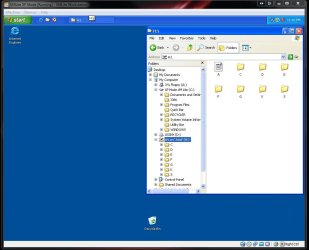
VMLite - an alternative Windows XP Mode impl

Will VMLite run other operating systems such as Linux? I would like to be able to run XP mode and Linux from a Windows 7 host.
 

My Computer My Computer

At a glance

Windows 7
OS
Windows 7
yes, it supports other OSes as guest: Linux, win2k and above
 

My Computer My Computer

At a glance

windows 7
OS
windows 7
That will likely turn out to be a good sub for SUN's Virtual Box since the full paid version rates higher from the start. Hopefully the Lite will remain a free for home user type release there.

Adding further to that what do you make of this one?

5 things missing in VMware's new virtual desktop app, View 4

By Eric Lai
November 13, 2009 06:53 AM ET

Computerworld - With VMware Inc.'s release of View 4 last week, the company is promising two things: Full desktop performance at a desktop price tag.

Desktop virtualization requires huge amounts of data to be constantly streamed from server to client. Moreover, the cost of building out a virtual desktop infrastructure (VDI), including servers, storage, network bandwidth, thin clients and software licenses, has generally outweighed potential savings in IT labor and security costs.

That is a "huge, huge change" in View 4, asserted Rick Jackson, chief marketing officer for VMware. View 4 is so efficient that some apps run faster virtually than when loaded from a local hard drive, he said. Moreover, the "acquisition cost barrier" has been "neutralized."

"I don't see how a CIO with a large desktop population doesn't look at this," Jackson said in an interview this week.

For all the sizzle, analysts cite five ways the steak isn't fully cooked.

More at: http://www.computerworld.com/s/arti...ng_in_VMware_s_new_virtual_desktop_app_View_4
 
Last edited:

My Computers My Computers

  • At a glance

    W7 Ultimate x64/W10 Pro x64/W11 Pro Triple Bo...AMD Phenom II X4 975 Deneb 3.6ghz - 965 2nd r...Kingston Hyper X DDR3 1600 1.5v 16gb - Hyper ...MSI HD Radeon 5750 1gb - MSI HD Radeon 6450 o...
    Computer type
    PC/Desktop
    Computer Manufacturer/Model Number
    Custom builds = 2
    OS
    W7 Ultimate x64/W10 Pro x64/W11 Pro Triple Boot - Main PC W7 Remote PC Micro ATX W7 Pro x64/W11 Pro
    CPU
    AMD Phenom II X4 975 Deneb 3.6ghz - 965 2nd remote pc
    Motherboard
    Gigabyte GA-790XTA-UD4-Gigabyte GA-880GM-D2H remote pc
    Memory
    Kingston Hyper X DDR3 1600 1.5v 16gb - Hyper X Fury 8gb 2nd
    Graphics Card(s)
    MSI HD Radeon 5750 1gb - MSI HD Radeon 6450 on mini tower
    Sound Card
    Creative Labs X-Fi Xtreme Audio P - Realtek onooard 2nd case
    Monitor(s) Displays
    ASUS VW199T-P 19" HP 2082a Main-HP 2082a 20" remote pc
    Screen Resolution
    Asus 1440x900 - HP 1600x900
    Hard Drives
    WD Black 1TB HD per OS W7, W10, and pending W11 presently on 500gb OS Drive - Pending Triple 1TB HDs for Spanned Storage/backup volume
    Single 2TB external USB enclosure, single 1TB System 7 Host/Boot drive, Pending 8TB external HD for system image b
    PSU
    Corsair 750TX - primary / Corsair CX600 - second
    Case
    Antec 900-2 - SSD compatible / NZXT Vulcan mini tower
    Cooling
    Zalman CNPS9900A
    Keyboard
    AZIO L70 Backlit Letters Gaming - ONN Cordless/USB
    Mouse
    MSI DS200 Programmable, Logitech Cordless
    Internet Speed
    30mbps upgrade - primary hard wired - mini tower usb WiFi
    Antivirus
    GFI VIPRE Internet Security 2014 on W7 2016 beta on W10,
    Browser
    Cyberfox, WaterFox 64bit FF variants, FireFox x64, Pale Moon
    Other Info
    Accomdata fan cooled usb 2.0 PIDE/Sata II, III external enclosure.
    Sambient usb/eSata PATA/Sata II, III external enclosure.
  • At a glance

    W7 Pro x64/W11 ProAMD Deneb 3.6ghz - 965Kingston Hyper X Fury 8gbMSI HD Radeon 6450 DVI Output
    Computer type
    PC/Desktop
    System Manufacturer/Model Number
    CUSTOM ASSEMBLY
    OS
    W7 Pro x64/W11 Pro
    CPU
    AMD Deneb 3.6ghz - 965
    Motherboard
    Gigabyte GA-880GM-D2H remote pc
    Memory
    Kingston Hyper X Fury 8gb
    Graphics Card(s)
    MSI HD Radeon 6450 DVI Output
    Sound Card
    Realtek onooard Creative or Other separate PENDING
    Monitor(s) Displays
    VIZIO 32" LCD TV Separate LCD Pending
    Screen Resolution
    1600x1080
    Hard Drives
    WD 500GB OS Host/Boot WD Green 1TB Storage/Backup
    PSU
    Corsair 600W - THERMALTAKE 600W spare case
    Case
    NZXT Vulcan mini tower
    Cooling
    Twin 120mm Top Fans - 240mm Side Cover
    Keyboard
    ONN Cordless/USB Logitech Cordless
    Mouse
    ONN USB/Cordless - Logitech Cordless
    Internet Speed
    DSL 5G
    Browser
    MS Edge, FireFox, WaterFox x64, FireFox Nightly
    Other Info
    OS Testing-Remote Access to Main TeamViewer
yes, VMLite will remain free as it stands today. We will add new unique features for the comercial version that are not avaible from any other vm vendors, e.g., a new way of creating a vm, direct boot of virtual disk files on physical machines, etc.
 

My Computer My Computer

At a glance

windows 7
OS
windows 7
hi despite is me recorded it doesn't make me never make the download,come? any other links?
:(
 

My Computer My Computer

At a glance

Windows 7 Home Premium 64 bitIntel core due duo E8500Corsair Dominetor 4 GbNvidia GTS 260
Computer Manufacturer/Model Number
Assemblato
OS
Windows 7 Home Premium 64 bit
CPU
Intel core due duo E8500
Motherboard
Asus Maxymus Formula
Memory
Corsair Dominetor 4 Gb
Graphics Card(s)
Nvidia GTS 260
Monitor(s) Displays
Samsung Sync Master 21"
Hard Drives
Hitachy 500 Gb
Western Digital 360 GB
Case
Cooler Master 840
Cooling
Zalman cs 9500
We activated all registered users, pls try to login and download the binary. Should work even if you didn't get the activation email. If you forgot your passwd, send us an email to reset.
 

My Computer My Computer

At a glance

windows 7
OS
windows 7
Hi there
what does this product ACTUALLY DO that is better / offers more than what's out there already. What's it's X-factor or WOW idea.

Even the new version of VMWARE PLAYER (Version 7) can CREATE VM's now and has full 3d video capability.

If you really want a FAST efficient vm system try vmware server R2 -- it's free and doesn't consume many system resources at all. It also allows you to run your virtual machines as system tasks and have them running in the background without needing you to actually be logged on to the host machine at all.

The Host can start the VM's without any user having to be logged on - great way if you also want to log on to your VM's remotely without having to start a usr session on the HOST.

I might have mis understood something here -- although I am normally very supportive of people developing products I can't see this one going beyond "Dustbin" stage.

Like those people in "The Dragons Den" I'm saying -- I'm Out on this one.

(If you have access to "Murdoch Vision --aka SKY TV in the UK -you can watch The dragons den on various of the satellite channels -- budding entrepreneurs have to make a sales pitch to 4 "dragons" who if the ideas are good will invest money in their ideas -- great program).

Cheers
jimbo
 

My Computer My Computer

At a glance

Linux CENTOS 7 / various Windows OS'es and se...Intel i7 Intel i58GB, 16GBOn Motherboard
Computer type
PC/Desktop
Computer Manufacturer/Model Number
Custom built, several laptops HP/ASUS
OS
Linux CENTOS 7 / various Windows OS'es and servers
CPU
Intel i7 Intel i5
Memory
8GB, 16GB
Graphics Card(s)
On Motherboard
Sound Card
Realtek HD audio
Monitor(s) Displays
Apple Cinema display, Samsung LCD
Screen Resolution
1920 X 1080
Hard Drives
4 X 1TB SATA
Mouse
Toshiba wireless laser
Internet Speed
> 20MB up
Even the new version of VMWARE PLAYER (Version 7) can CREATE VM's now and has full 3d video capability.
Hey, thanks for that information. I didn't realize they made those changes to the Player Product.

I usually use Sun Virtualbox at home as I don't like having to dork around with the VMWare Server web interface...but I don't like the way that VirtualBox stores the .vdi file which make cloning machines a pain as the UUID's are the same.

I'm going to give VMWare Player a shot at home and see if that becomes my new home platform of choice.

Workstation was never necessary as I didn't need the functionality of the paid-for product.
 

My Computer My Computer

At a glance

Windows 7 Ultimate x64Intel Q9550 2.83Ghz OC'd to 3.40Ghz8GB G.Skill PI DDR2-800, 4-4-4-12 timingsEVGA 1280MB Nvidia GeForce GTX570
Computer Manufacturer/Model Number
Self-Built in July 2009
OS
Windows 7 Ultimate x64
CPU
Intel Q9550 2.83Ghz OC'd to 3.40Ghz
Motherboard
Gigabyte GA-EP45-UD3R rev. 1.1, F12 BIOS
Memory
8GB G.Skill PI DDR2-800, 4-4-4-12 timings
Graphics Card(s)
EVGA 1280MB Nvidia GeForce GTX570
Sound Card
Realtek ALC899A 8 channel onboard audio
Monitor(s) Displays
23" Acer x233H
Screen Resolution
1920x1080
Hard Drives
Intel X25-M 80GB Gen 2 SSD
Western Digital 1TB Caviar Black, 32MB cache. WD1001FALS
PSU
Corsair 620HX modular
Case
Antec P182
Cooling
stock
Keyboard
ABS M1 Mechanical
Mouse
Logitech G9 Laser Mouse
Internet Speed
15/2 cable modem
Other Info
Windows and Linux enthusiast. Logitech G35 Headset.
yes, VMLite will remain free as it stands today. We will add new unique features for the comercial version that are not avaible from any other vm vendors, e.g., a new way of creating a vm, direct boot of virtual disk files on physical machines, etc.

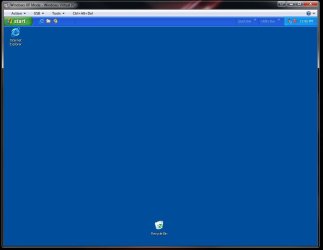
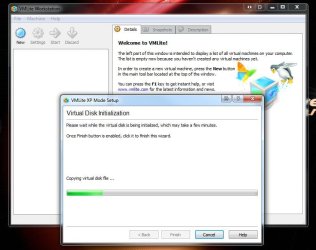
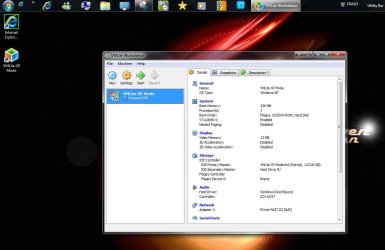
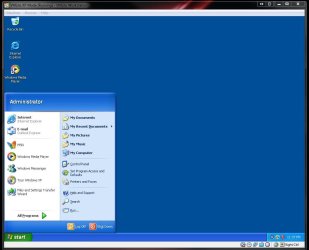
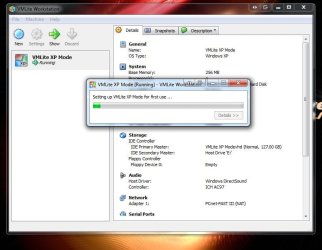
That's one good thing there! The images here will show how fast the XP Mode went on following the Virtual PC also installed first there just the same and then once running the "C:\Program Files\Window XP Mode" selection immediately added in the preconfigured XP Mode's vmc information in order to load from the vhd itself.

The one thing noticed right off was how the internal drives besides the XP Mode's C designation are all tucked away in the H folder rather then seeing them listed below individually.
 

Attachments

  • XP Mode Install.jpg
    XP Mode Install.jpg
    53 KB · Views: 18
  • XP Mode Preconfigured.jpg
    XP Mode Preconfigured.jpg
    35.5 KB · Views: 22
  • XP Mode Install on VM Ware.jpg
    XP Mode Install on VM Ware.jpg
    63 KB · Views: 21
  • XP Mode on VM Lite with new icons.jpg
    XP Mode on VM Lite with new icons.jpg
    85.3 KB · Views: 27
  • XP Mode running on VM Lite.jpg
    XP Mode running on VM Lite.jpg
    65 KB · Views: 15
  • XP Mode VM Lite Initialization.jpg
    XP Mode VM Lite Initialization.jpg
    59.7 KB · Views: 30
  • XP Mode VM Lite Drive Access.jpg
    XP Mode VM Lite Drive Access.jpg
    72.3 KB · Views: 26

My Computers My Computers

  • At a glance

    W7 Ultimate x64/W10 Pro x64/W11 Pro Triple Bo...AMD Phenom II X4 975 Deneb 3.6ghz - 965 2nd r...Kingston Hyper X DDR3 1600 1.5v 16gb - Hyper ...MSI HD Radeon 5750 1gb - MSI HD Radeon 6450 o...
    Computer type
    PC/Desktop
    Computer Manufacturer/Model Number
    Custom builds = 2
    OS
    W7 Ultimate x64/W10 Pro x64/W11 Pro Triple Boot - Main PC W7 Remote PC Micro ATX W7 Pro x64/W11 Pro
    CPU
    AMD Phenom II X4 975 Deneb 3.6ghz - 965 2nd remote pc
    Motherboard
    Gigabyte GA-790XTA-UD4-Gigabyte GA-880GM-D2H remote pc
    Memory
    Kingston Hyper X DDR3 1600 1.5v 16gb - Hyper X Fury 8gb 2nd
    Graphics Card(s)
    MSI HD Radeon 5750 1gb - MSI HD Radeon 6450 on mini tower
    Sound Card
    Creative Labs X-Fi Xtreme Audio P - Realtek onooard 2nd case
    Monitor(s) Displays
    ASUS VW199T-P 19" HP 2082a Main-HP 2082a 20" remote pc
    Screen Resolution
    Asus 1440x900 - HP 1600x900
    Hard Drives
    WD Black 1TB HD per OS W7, W10, and pending W11 presently on 500gb OS Drive - Pending Triple 1TB HDs for Spanned Storage/backup volume
    Single 2TB external USB enclosure, single 1TB System 7 Host/Boot drive, Pending 8TB external HD for system image b
    PSU
    Corsair 750TX - primary / Corsair CX600 - second
    Case
    Antec 900-2 - SSD compatible / NZXT Vulcan mini tower
    Cooling
    Zalman CNPS9900A
    Keyboard
    AZIO L70 Backlit Letters Gaming - ONN Cordless/USB
    Mouse
    MSI DS200 Programmable, Logitech Cordless
    Internet Speed
    30mbps upgrade - primary hard wired - mini tower usb WiFi
    Antivirus
    GFI VIPRE Internet Security 2014 on W7 2016 beta on W10,
    Browser
    Cyberfox, WaterFox 64bit FF variants, FireFox x64, Pale Moon
    Other Info
    Accomdata fan cooled usb 2.0 PIDE/Sata II, III external enclosure.
    Sambient usb/eSata PATA/Sata II, III external enclosure.
  • At a glance

    W7 Pro x64/W11 ProAMD Deneb 3.6ghz - 965Kingston Hyper X Fury 8gbMSI HD Radeon 6450 DVI Output
    Computer type
    PC/Desktop
    System Manufacturer/Model Number
    CUSTOM ASSEMBLY
    OS
    W7 Pro x64/W11 Pro
    CPU
    AMD Deneb 3.6ghz - 965
    Motherboard
    Gigabyte GA-880GM-D2H remote pc
    Memory
    Kingston Hyper X Fury 8gb
    Graphics Card(s)
    MSI HD Radeon 6450 DVI Output
    Sound Card
    Realtek onooard Creative or Other separate PENDING
    Monitor(s) Displays
    VIZIO 32" LCD TV Separate LCD Pending
    Screen Resolution
    1600x1080
    Hard Drives
    WD 500GB OS Host/Boot WD Green 1TB Storage/Backup
    PSU
    Corsair 600W - THERMALTAKE 600W spare case
    Case
    NZXT Vulcan mini tower
    Cooling
    Twin 120mm Top Fans - 240mm Side Cover
    Keyboard
    ONN Cordless/USB Logitech Cordless
    Mouse
    ONN USB/Cordless - Logitech Cordless
    Internet Speed
    DSL 5G
    Browser
    MS Edge, FireFox, WaterFox x64, FireFox Nightly
    Other Info
    OS Testing-Remote Access to Main TeamViewer
interesting to note that you got so many drives over there. Are some of them network mapped drives on host?

VMLite's file sharing is quite different from Microsoft XP Mode. Microsoft relies on the RDP/RemoteApp technology and treats the vm as a remote machine, all file sharing is done through network, which is also the reason that you see individual drives on top level.

Our implementation should be much faster. For Windows guest on Windows host, we actually forward kernel level file IRPs directly between host and vm to get them processed, this avoids lots of unnecessary conversions, which should be the best performed way.
 

My Computer My Computer

At a glance

windows 7
OS
windows 7
The drives here are actually mapped but see two for storage while the others are OS drives. When this went on I didn't have any flash drive plugged in.

I will say one thing. When you go to start up the XP Mode using the shortcut the desktop appears in an instant over the wait typically seen with the VPC or any custom install onto a vhd like with Virtual Box. The access time is rapid there for browsing hard drives other then the host drive giving this a thumbs up! :D
 

My Computers My Computers

  • At a glance

    W7 Ultimate x64/W10 Pro x64/W11 Pro Triple Bo...AMD Phenom II X4 975 Deneb 3.6ghz - 965 2nd r...Kingston Hyper X DDR3 1600 1.5v 16gb - Hyper ...MSI HD Radeon 5750 1gb - MSI HD Radeon 6450 o...
    Computer type
    PC/Desktop
    Computer Manufacturer/Model Number
    Custom builds = 2
    OS
    W7 Ultimate x64/W10 Pro x64/W11 Pro Triple Boot - Main PC W7 Remote PC Micro ATX W7 Pro x64/W11 Pro
    CPU
    AMD Phenom II X4 975 Deneb 3.6ghz - 965 2nd remote pc
    Motherboard
    Gigabyte GA-790XTA-UD4-Gigabyte GA-880GM-D2H remote pc
    Memory
    Kingston Hyper X DDR3 1600 1.5v 16gb - Hyper X Fury 8gb 2nd
    Graphics Card(s)
    MSI HD Radeon 5750 1gb - MSI HD Radeon 6450 on mini tower
    Sound Card
    Creative Labs X-Fi Xtreme Audio P - Realtek onooard 2nd case
    Monitor(s) Displays
    ASUS VW199T-P 19" HP 2082a Main-HP 2082a 20" remote pc
    Screen Resolution
    Asus 1440x900 - HP 1600x900
    Hard Drives
    WD Black 1TB HD per OS W7, W10, and pending W11 presently on 500gb OS Drive - Pending Triple 1TB HDs for Spanned Storage/backup volume
    Single 2TB external USB enclosure, single 1TB System 7 Host/Boot drive, Pending 8TB external HD for system image b
    PSU
    Corsair 750TX - primary / Corsair CX600 - second
    Case
    Antec 900-2 - SSD compatible / NZXT Vulcan mini tower
    Cooling
    Zalman CNPS9900A
    Keyboard
    AZIO L70 Backlit Letters Gaming - ONN Cordless/USB
    Mouse
    MSI DS200 Programmable, Logitech Cordless
    Internet Speed
    30mbps upgrade - primary hard wired - mini tower usb WiFi
    Antivirus
    GFI VIPRE Internet Security 2014 on W7 2016 beta on W10,
    Browser
    Cyberfox, WaterFox 64bit FF variants, FireFox x64, Pale Moon
    Other Info
    Accomdata fan cooled usb 2.0 PIDE/Sata II, III external enclosure.
    Sambient usb/eSata PATA/Sata II, III external enclosure.
  • At a glance

    W7 Pro x64/W11 ProAMD Deneb 3.6ghz - 965Kingston Hyper X Fury 8gbMSI HD Radeon 6450 DVI Output
    Computer type
    PC/Desktop
    System Manufacturer/Model Number
    CUSTOM ASSEMBLY
    OS
    W7 Pro x64/W11 Pro
    CPU
    AMD Deneb 3.6ghz - 965
    Motherboard
    Gigabyte GA-880GM-D2H remote pc
    Memory
    Kingston Hyper X Fury 8gb
    Graphics Card(s)
    MSI HD Radeon 6450 DVI Output
    Sound Card
    Realtek onooard Creative or Other separate PENDING
    Monitor(s) Displays
    VIZIO 32" LCD TV Separate LCD Pending
    Screen Resolution
    1600x1080
    Hard Drives
    WD 500GB OS Host/Boot WD Green 1TB Storage/Backup
    PSU
    Corsair 600W - THERMALTAKE 600W spare case
    Case
    NZXT Vulcan mini tower
    Cooling
    Twin 120mm Top Fans - 240mm Side Cover
    Keyboard
    ONN Cordless/USB Logitech Cordless
    Mouse
    ONN USB/Cordless - Logitech Cordless
    Internet Speed
    DSL 5G
    Browser
    MS Edge, FireFox, WaterFox x64, FireFox Nightly
    Other Info
    OS Testing-Remote Access to Main TeamViewer
yes, when you click the desktop vm icon, it will instantly switch to desktop mode for easy access
 

My Computer My Computer

At a glance

windows 7
OS
windows 7
That suggests it's already preloaded into memory instead of waiting for it to load up when started.
 

My Computers My Computers

  • At a glance

    W7 Ultimate x64/W10 Pro x64/W11 Pro Triple Bo...AMD Phenom II X4 975 Deneb 3.6ghz - 965 2nd r...Kingston Hyper X DDR3 1600 1.5v 16gb - Hyper ...MSI HD Radeon 5750 1gb - MSI HD Radeon 6450 o...
    Computer type
    PC/Desktop
    Computer Manufacturer/Model Number
    Custom builds = 2
    OS
    W7 Ultimate x64/W10 Pro x64/W11 Pro Triple Boot - Main PC W7 Remote PC Micro ATX W7 Pro x64/W11 Pro
    CPU
    AMD Phenom II X4 975 Deneb 3.6ghz - 965 2nd remote pc
    Motherboard
    Gigabyte GA-790XTA-UD4-Gigabyte GA-880GM-D2H remote pc
    Memory
    Kingston Hyper X DDR3 1600 1.5v 16gb - Hyper X Fury 8gb 2nd
    Graphics Card(s)
    MSI HD Radeon 5750 1gb - MSI HD Radeon 6450 on mini tower
    Sound Card
    Creative Labs X-Fi Xtreme Audio P - Realtek onooard 2nd case
    Monitor(s) Displays
    ASUS VW199T-P 19" HP 2082a Main-HP 2082a 20" remote pc
    Screen Resolution
    Asus 1440x900 - HP 1600x900
    Hard Drives
    WD Black 1TB HD per OS W7, W10, and pending W11 presently on 500gb OS Drive - Pending Triple 1TB HDs for Spanned Storage/backup volume
    Single 2TB external USB enclosure, single 1TB System 7 Host/Boot drive, Pending 8TB external HD for system image b
    PSU
    Corsair 750TX - primary / Corsair CX600 - second
    Case
    Antec 900-2 - SSD compatible / NZXT Vulcan mini tower
    Cooling
    Zalman CNPS9900A
    Keyboard
    AZIO L70 Backlit Letters Gaming - ONN Cordless/USB
    Mouse
    MSI DS200 Programmable, Logitech Cordless
    Internet Speed
    30mbps upgrade - primary hard wired - mini tower usb WiFi
    Antivirus
    GFI VIPRE Internet Security 2014 on W7 2016 beta on W10,
    Browser
    Cyberfox, WaterFox 64bit FF variants, FireFox x64, Pale Moon
    Other Info
    Accomdata fan cooled usb 2.0 PIDE/Sata II, III external enclosure.
    Sambient usb/eSata PATA/Sata II, III external enclosure.
  • At a glance

    W7 Pro x64/W11 ProAMD Deneb 3.6ghz - 965Kingston Hyper X Fury 8gbMSI HD Radeon 6450 DVI Output
    Computer type
    PC/Desktop
    System Manufacturer/Model Number
    CUSTOM ASSEMBLY
    OS
    W7 Pro x64/W11 Pro
    CPU
    AMD Deneb 3.6ghz - 965
    Motherboard
    Gigabyte GA-880GM-D2H remote pc
    Memory
    Kingston Hyper X Fury 8gb
    Graphics Card(s)
    MSI HD Radeon 6450 DVI Output
    Sound Card
    Realtek onooard Creative or Other separate PENDING
    Monitor(s) Displays
    VIZIO 32" LCD TV Separate LCD Pending
    Screen Resolution
    1600x1080
    Hard Drives
    WD 500GB OS Host/Boot WD Green 1TB Storage/Backup
    PSU
    Corsair 600W - THERMALTAKE 600W spare case
    Case
    NZXT Vulcan mini tower
    Cooling
    Twin 120mm Top Fans - 240mm Side Cover
    Keyboard
    ONN Cordless/USB Logitech Cordless
    Mouse
    ONN USB/Cordless - Logitech Cordless
    Internet Speed
    DSL 5G
    Browser
    MS Edge, FireFox, WaterFox x64, FireFox Nightly
    Other Info
    OS Testing-Remote Access to Main TeamViewer
Hi I am me recorded but you/he/she have not succeeded me to unload her/it
 

My Computer My Computer

At a glance

Windows 7 Home Premium 64 bitIntel core due duo E8500Corsair Dominetor 4 GbNvidia GTS 260
Computer Manufacturer/Model Number
Assemblato
OS
Windows 7 Home Premium 64 bit
CPU
Intel core due duo E8500
Motherboard
Asus Maxymus Formula
Memory
Corsair Dominetor 4 Gb
Graphics Card(s)
Nvidia GTS 260
Monitor(s) Displays
Samsung Sync Master 21"
Hard Drives
Hitachy 500 Gb
Western Digital 360 GB
Case
Cooler Master 840
Cooling
Zalman cs 9500
we activated all users, you should be able to login, pls retry it. If there are still problems, please send us an email.

By the way, VMLite has been warmly received these few days, and downloaded over 5,000 times by our registered users.

Hi I am me recorded but you/he/she have not succeeded me to unload her/it
 

My Computer My Computer

At a glance

windows 7
OS
windows 7
Right, I believe that Microsoft XP Mode needs to reboot the vm when you switch mode, which is why it takes almost 1 min

That suggests it's already preloaded into memory instead of waiting for it to load up when started.
 

My Computer My Computer

At a glance

windows 7
OS
windows 7
I'm going to give VMLite a try as a replacement to Microsoft XP Mode. I'm currently downloading VMLiteWorkstation.

Do I need to pay for VMLite or MyOldPCs? Do I HAVE to request MyOldPCs trial version to convert my current setup or can I do it through VMLite?
 

My Computer My Computer

At a glance

Windows 7 Professional (x64)AMD Phenom II X4 955 Black Edition6GB (3 x 2GB) Kingston DDR3 1333 SDRAMNVIDIA GeForce GTX 260
Computer Manufacturer/Model Number
Cyberpower, Inc.
OS
Windows 7 Professional (x64)
CPU
AMD Phenom II X4 955 Black Edition
Motherboard
Gigabyte AMD MA770T-UD3P AM3 DDR3 1666+/1333/1066
Memory
6GB (3 x 2GB) Kingston DDR3 1333 SDRAM
Graphics Card(s)
NVIDIA GeForce GTX 260
Sound Card
Onboard 7.1 Sound
Monitor(s) Displays
Samsung 24" SyncMaster 2422
Screen Resolution
1920 x 1200
Hard Drives
500GB Sata II 3.0GB 16MB 7200RPM,
Western Digital 1TB USB 2.0 External Hard Drive
PSU
Kingwin 700 Watt Power Supply
Case
Silver X-Cruiser 2 Mid No Power
Cooling
Asetek 120MM Watercooler
Keyboard
HTK-1001
Mouse
Razer Viper
Internet Speed
Incoming: 2496 kbps, Outgoing: 512 kbps
Just trying VMPlayer - fast, fairly easy to convert XPmode and looks to allow 3D acceleration. Impresive!
It has put an 'Unidentified network' flag on my internet access, but internet access works fine.
 

My Computer My Computer

At a glance

Windows 7 Professional 64 BitIntel i7 920 DO SLBEJ 2.66 Ghz6Gb (3x2GB) CorsairXMS3 DDR3 PC3-12800Ati 1GB XFX HD4890
Computer Manufacturer/Model Number
Self Built
OS
Windows 7 Professional 64 Bit
CPU
Intel i7 920 DO SLBEJ 2.66 Ghz
Motherboard
Asus P6T SE
Memory
6Gb (3x2GB) CorsairXMS3 DDR3 PC3-12800
Graphics Card(s)
Ati 1GB XFX HD4890
Sound Card
Onboard HD Audio
Monitor(s) Displays
Samsung SyncMaster T240
Screen Resolution
1920 x 1200
Hard Drives
1TB Samsung HD 103UJ Spinpoint F1
250Gb Seagate
PSU
850W Corsair 850HX
Case
Antec Twelve Hundred Full Tower
Cooling
Akasa Nero AK-967
Internet Speed
20Mb
So VMPlayer can convert my Windows XP virtual hard drive without any additional software?
 

My Computer My Computer

At a glance

Windows 7 Professional (x64)AMD Phenom II X4 955 Black Edition6GB (3 x 2GB) Kingston DDR3 1333 SDRAMNVIDIA GeForce GTX 260
Computer Manufacturer/Model Number
Cyberpower, Inc.
OS
Windows 7 Professional (x64)
CPU
AMD Phenom II X4 955 Black Edition
Motherboard
Gigabyte AMD MA770T-UD3P AM3 DDR3 1666+/1333/1066
Memory
6GB (3 x 2GB) Kingston DDR3 1333 SDRAM
Graphics Card(s)
NVIDIA GeForce GTX 260
Sound Card
Onboard 7.1 Sound
Monitor(s) Displays
Samsung 24" SyncMaster 2422
Screen Resolution
1920 x 1200
Hard Drives
500GB Sata II 3.0GB 16MB 7200RPM,
Western Digital 1TB USB 2.0 External Hard Drive
PSU
Kingwin 700 Watt Power Supply
Case
Silver X-Cruiser 2 Mid No Power
Cooling
Asetek 120MM Watercooler
Keyboard
HTK-1001
Mouse
Razer Viper
Internet Speed
Incoming: 2496 kbps, Outgoing: 512 kbps
No, VMLite Workstation is the only software you need. After download and install, it will auto launch, and you follow the steps. After about 10 mins, you will have XP Mode vm running.

VMLite Workstation finds the XPM if already installed on your pc. If not, it will auto download from Microsoft website.

I don't think anyone else can provide such simple way of doing XP Mode.

MyOldPCs is only used for converting your old PCs to a vm, it is not needed at all for running XP Mode.


I'm going to give VMLite a try as a replacement to Microsoft XP Mode. I'm currently downloading VMLiteWorkstation.

Do I need to pay for VMLite or MyOldPCs? Do I HAVE to request MyOldPCs trial version to convert my current setup or can I do it through VMLite?
 

My Computer My Computer

At a glance

windows 7
OS
windows 7
Back
Top