Can't add more icons to Taskbar

toglenn

New member
Member
Local time
12:50 PM
Messages
40
I seem to be limited to how many icons I can add to the Taskbar. Unlike XP where I had many icons in the Quick Launch bar, Win 7's Taskbar limits me to about 14 icons. If I use the right click menu and choose "Pin to Taskbar" the icon is not displayed although the right click menu now displays "Unpin from Taskbar".

Dragging short cuts to the Taskbar is refused. Yes the Taskbar is unlocked and expanding the Taskbar does not allow more icons to be displayed.

I've tried several searches but have not found a solution.

toglenn
 

My Computer My Computer

Computer Manufacturer/Model Number
Homebrew
OS
win 7 Pro - 64 bit
CPU
Intel i7 920 oc'd to 3.6G
Motherboard
ASARock Extreme
Memory
6G
Graphics Card(s)
4770
Sound Card
NA
Monitor(s) Displays
HP2475
Screen Resolution
1920 X 1200
Hard Drives
Intel 80G SSD
Hitachi Enterprise 750G
WD 640G
2TB External Storage
PSU
Corsair 750w
Case
atcs840
Cooling
Noctua U12p
Right-click on the taskbar and click on Properties. Then choose "Combine when taskbar is full".
 

My Computer My Computer

Computer Manufacturer/Model Number
Custom
OS
Windows 7 Professional x64
CPU
Intel i7 2600K OC'd @ 4620 MHz
Motherboard
Asus P8Z68-V Pro
Memory
16GB GSkill Sniper 2133 Mhz (4x4GB)
Graphics Card(s)
EVGA GeForce GTX 480 SuperClocked+
Sound Card
Realtek High Definition Audio
Monitor(s) Displays
2x Acer S273HLbmii 27"
Screen Resolution
2 x 1920x1080
Hard Drives
64GB Crucial M4 SSD

Storage: Hitachi 1TB 5400RPM, Samsung 1.5TB 5400RPM
PSU
Corsair HW Series 750w (modular)
Case
Cooler Master HAF 932 Advanced Blue Edition
Cooling
CM Hyper 212+ CPU cooler, 3x 230mm + 1x 140mm case fans
Keyboard
Logitech MK320 (wireless)
Mouse
Logitech MK320 (wireless)
Internet Speed
30 Mb/s : 2 Mb/s
Still have problem

Thanks for the suggestion but it does not help. I still have the same problem.

toglenn
 

My Computer My Computer

Computer Manufacturer/Model Number
Homebrew
OS
win 7 Pro - 64 bit
CPU
Intel i7 920 oc'd to 3.6G
Motherboard
ASARock Extreme
Memory
6G
Graphics Card(s)
4770
Sound Card
NA
Monitor(s) Displays
HP2475
Screen Resolution
1920 X 1200
Hard Drives
Intel 80G SSD
Hitachi Enterprise 750G
WD 640G
2TB External Storage
PSU
Corsair 750w
Case
atcs840
Cooling
Noctua U12p
If you find an empty space on the task bar and right click, is it locked; if so unlock? Hope that works.
 

My Computer My Computer

Computer type
PC/Desktop
Computer Manufacturer/Model Number
Dell XPS 420
OS
Windows 10, Home Clean Install
CPU
Intel Core2 processsor Q8200(2.33Ghz 1333FSB) Quad Core Tech
Motherboard
Dell
Memory
6 gb
Graphics Card(s)
ATI Radeon 256MB HD3650
Sound Card
Intergrated 7.1 Channel Audio
Monitor(s) Displays
Dell SP2009W 20"
Hard Drives
640 GB Serial ATA Hard drive
Cooling
Fan
Keyboard
Dell USB Keyboard
Mouse
Dell Premium Optical USB
Internet Speed
DSL 2.85
Yes, it's unlocked

If you find an empty space on the task bar and right click, is it locked; if so unlock? Hope that works.

Yes as I stated in original post the Taskbar is unlocked.
 

My Computer My Computer

Computer Manufacturer/Model Number
Homebrew
OS
win 7 Pro - 64 bit
CPU
Intel i7 920 oc'd to 3.6G
Motherboard
ASARock Extreme
Memory
6G
Graphics Card(s)
4770
Sound Card
NA
Monitor(s) Displays
HP2475
Screen Resolution
1920 X 1200
Hard Drives
Intel 80G SSD
Hitachi Enterprise 750G
WD 640G
2TB External Storage
PSU
Corsair 750w
Case
atcs840
Cooling
Noctua U12p

My Computer My Computer

Computer Manufacturer/Model Number
Custom
OS
Windows 7 Professional x64
CPU
Intel i7 2600K OC'd @ 4620 MHz
Motherboard
Asus P8Z68-V Pro
Memory
16GB GSkill Sniper 2133 Mhz (4x4GB)
Graphics Card(s)
EVGA GeForce GTX 480 SuperClocked+
Sound Card
Realtek High Definition Audio
Monitor(s) Displays
2x Acer S273HLbmii 27"
Screen Resolution
2 x 1920x1080
Hard Drives
64GB Crucial M4 SSD

Storage: Hitachi 1TB 5400RPM, Samsung 1.5TB 5400RPM
PSU
Corsair HW Series 750w (modular)
Case
Cooler Master HAF 932 Advanced Blue Edition
Cooling
CM Hyper 212+ CPU cooler, 3x 230mm + 1x 140mm case fans
Keyboard
Logitech MK320 (wireless)
Mouse
Logitech MK320 (wireless)
Internet Speed
30 Mb/s : 2 Mb/s
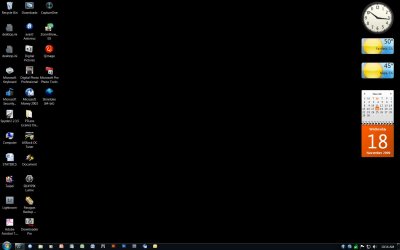
Screen Shot as Requested

Here is the screen shot;

screen_shot.jpg
 

My Computer My Computer

Computer Manufacturer/Model Number
Homebrew
OS
win 7 Pro - 64 bit
CPU
Intel i7 920 oc'd to 3.6G
Motherboard
ASARock Extreme
Memory
6G
Graphics Card(s)
4770
Sound Card
NA
Monitor(s) Displays
HP2475
Screen Resolution
1920 X 1200
Hard Drives
Intel 80G SSD
Hitachi Enterprise 750G
WD 640G
2TB External Storage
PSU
Corsair 750w
Case
atcs840
Cooling
Noctua U12p
The same thing happens to me. I can pin 15 items, no more. Perhaps there is an upper limit to how many icons can be pinned?
Nevermind, I made a mistake. I can pin a lot more than 15.
 

My Computer My Computer

Computer Manufacturer/Model Number
Custom
OS
Windows 7 Professional x64
CPU
Intel i7 2600K OC'd @ 4620 MHz
Motherboard
Asus P8Z68-V Pro
Memory
16GB GSkill Sniper 2133 Mhz (4x4GB)
Graphics Card(s)
EVGA GeForce GTX 480 SuperClocked+
Sound Card
Realtek High Definition Audio
Monitor(s) Displays
2x Acer S273HLbmii 27"
Screen Resolution
2 x 1920x1080
Hard Drives
64GB Crucial M4 SSD

Storage: Hitachi 1TB 5400RPM, Samsung 1.5TB 5400RPM
PSU
Corsair HW Series 750w (modular)
Case
Cooler Master HAF 932 Advanced Blue Edition
Cooling
CM Hyper 212+ CPU cooler, 3x 230mm + 1x 140mm case fans
Keyboard
Logitech MK320 (wireless)
Mouse
Logitech MK320 (wireless)
Internet Speed
30 Mb/s : 2 Mb/s
should be no limits. Did you install/uninstall stuff before you noticed the limit?

system restore & repair install - good friends to have.
 

My Computer My Computer

Computer Manufacturer/Model Number
Colonel Travis 5000
OS
Black Label 7 x64
CPU
AMD Phenom II X6 1055t
Motherboard
GA-890FXA-UD5
Memory
8GB Corsair XMS3
Graphics Card(s)
Radeon HD 6790
Sound Card
X-FI Titanium Fatal1ty Pro
Monitor(s) Displays
Acer AJ15
Screen Resolution
1600x900
Hard Drives
OCZ Agility 3 SSD 120GB |
Corsair Force GT SSD 120 GB |
Barracuda 7200 SATA 300GB |
WD Caviar Green SATA 500GB
PSU
OCZ ModXStream 700W
Cooling
50 billion case fans
Internet Speed
35Mbps/35Mbps
Always had Limited Icon Display

should be no limits. Did you install/uninstall stuff before you noticed the limit?

system restore & repair install - good friends to have.

I first installed Win 7 Beta, then Win 7 RC and then did a complete new install on a new solid state hard drive with full version of Windows 7 Professional and I've always had the same problem. During the Win 7 RC installation I replaced the motherboard, processor, memory, power supply, keyboard, case and monitor.No matter what I've tried I can never excede 14 icons.

Some working Taskbar icons are programs and some are folders. What I can't understand is why an icon is indicated as pinned (as in right click menu displaying the "unpin" option) but is not displayed.
 

My Computer My Computer

Computer Manufacturer/Model Number
Homebrew
OS
win 7 Pro - 64 bit
CPU
Intel i7 920 oc'd to 3.6G
Motherboard
ASARock Extreme
Memory
6G
Graphics Card(s)
4770
Sound Card
NA
Monitor(s) Displays
HP2475
Screen Resolution
1920 X 1200
Hard Drives
Intel 80G SSD
Hitachi Enterprise 750G
WD 640G
2TB External Storage
PSU
Corsair 750w
Case
atcs840
Cooling
Noctua U12p
If it shows as pinned, is it pinned to start menu?
 

My Computer My Computer

Computer type
PC/Desktop
Computer Manufacturer/Model Number
Dell XPS 420
OS
Windows 10, Home Clean Install
CPU
Intel Core2 processsor Q8200(2.33Ghz 1333FSB) Quad Core Tech
Motherboard
Dell
Memory
6 gb
Graphics Card(s)
ATI Radeon 256MB HD3650
Sound Card
Intergrated 7.1 Channel Audio
Monitor(s) Displays
Dell SP2009W 20"
Hard Drives
640 GB Serial ATA Hard drive
Cooling
Fan
Keyboard
Dell USB Keyboard
Mouse
Dell Premium Optical USB
Internet Speed
DSL 2.85
Sorry..no folders in taskbar icons

I was mistaken when I said there were folders among the taskbar incons, They are shortcuts on the desktop. All taskbar icons are programs;

MS Internet Explorer
Maxthon 2 Browser
MS Windows Explorer
MS Media Player
MS Power Point
MS Publisher
MS Excel
MS Word
Canon Digital Photo Processor
Adobe Photoshop CS3
Adobe Bridge
Adobe Lightroom
MSMoney 2003
MS Outlook
 

My Computer My Computer

Computer Manufacturer/Model Number
Homebrew
OS
win 7 Pro - 64 bit
CPU
Intel i7 920 oc'd to 3.6G
Motherboard
ASARock Extreme
Memory
6G
Graphics Card(s)
4770
Sound Card
NA
Monitor(s) Displays
HP2475
Screen Resolution
1920 X 1200
Hard Drives
Intel 80G SSD
Hitachi Enterprise 750G
WD 640G
2TB External Storage
PSU
Corsair 750w
Case
atcs840
Cooling
Noctua U12p
Pinned Taskbar Icons Displayed in Start Menu

If it shows as pinned, is it pinned to start menu?

Yes the icons displayed in the taskbar are also displayed on the Start Menu. Icons indicated as pinned to the taskbar but not displayed are also not displayed in the Start Menu.

Sorry but I don't see the relationship in your inquiry.
 

My Computer My Computer

Computer Manufacturer/Model Number
Homebrew
OS
win 7 Pro - 64 bit
CPU
Intel i7 920 oc'd to 3.6G
Motherboard
ASARock Extreme
Memory
6G
Graphics Card(s)
4770
Sound Card
NA
Monitor(s) Displays
HP2475
Screen Resolution
1920 X 1200
Hard Drives
Intel 80G SSD
Hitachi Enterprise 750G
WD 640G
2TB External Storage
PSU
Corsair 750w
Case
atcs840
Cooling
Noctua U12p
Boy - no clue. I've tried to replicate a limit through several ways and I can always add as many icons as I want. Sounds sorta like a registry problem but with all those installs I guess not.

Stumped, sorry. I'll be curious to find out an answer.
 

My Computer My Computer

Computer Manufacturer/Model Number
Colonel Travis 5000
OS
Black Label 7 x64
CPU
AMD Phenom II X6 1055t
Motherboard
GA-890FXA-UD5
Memory
8GB Corsair XMS3
Graphics Card(s)
Radeon HD 6790
Sound Card
X-FI Titanium Fatal1ty Pro
Monitor(s) Displays
Acer AJ15
Screen Resolution
1600x900
Hard Drives
OCZ Agility 3 SSD 120GB |
Corsair Force GT SSD 120 GB |
Barracuda 7200 SATA 300GB |
WD Caviar Green SATA 500GB
PSU
OCZ ModXStream 700W
Cooling
50 billion case fans
Internet Speed
35Mbps/35Mbps
Thanks for Your Efforts

Boy - no clue. I've tried to replicate a limit through several ways and I can always add as many icons as I want. Sounds sorta like a registry problem but with all those installs I guess not.

Stumped, sorry. I'll be curious to find out an answer.

I appreciate you help and I'm sorry I could not be more helpful. I've been fighting this problem for sometime and although Im not an expert on Windows 7 I have had a lot of computer experience dating back to 1981 and I'm also stumped.

The thought crossed my mind that it might be some sort of conflict with software I use but I don't know if that is the case. I did have some crashes of Windows 7 Pro after it was installed but that was due to a Logitech Wing Force joystick that had no drivers available. Once removed there was no more problem.

I was hoping someone else was having the same problem and found a fix. If I do stumble on a fix I will be sure to post it.
 

My Computer My Computer

Computer Manufacturer/Model Number
Homebrew
OS
win 7 Pro - 64 bit
CPU
Intel i7 920 oc'd to 3.6G
Motherboard
ASARock Extreme
Memory
6G
Graphics Card(s)
4770
Sound Card
NA
Monitor(s) Displays
HP2475
Screen Resolution
1920 X 1200
Hard Drives
Intel 80G SSD
Hitachi Enterprise 750G
WD 640G
2TB External Storage
PSU
Corsair 750w
Case
atcs840
Cooling
Noctua U12p
Boy - no clue. I've tried to replicate a limit through several ways and I can always add as many icons as I want. Sounds sorta like a registry problem but with all those installs I guess not.

Stumped, sorry. I'll be curious to find out an answer.

I appreciate you help and I'm sorry I could not be more helpful. I've been fighting this problem for sometime and although Im not an expert on Windows 7 I have had a lot of computer experience dating back to 1981 and I'm also stumped.

The thought crossed my mind that it might be some sort of conflict with software I use but I don't know if that is the case. I did have some crashes of Windows 7 Pro after it was installed but that was due to a Logitech Wing Force joystick that had no drivers available. Once removed there was no more problem.

I was hoping someone else was having the same problem and found a fix. If I do stumble on a fix I will be sure to post it.
Good luck!
 

My Computer My Computer

Computer Manufacturer/Model Number
Custom
OS
Windows 7 Professional x64
CPU
Intel i7 2600K OC'd @ 4620 MHz
Motherboard
Asus P8Z68-V Pro
Memory
16GB GSkill Sniper 2133 Mhz (4x4GB)
Graphics Card(s)
EVGA GeForce GTX 480 SuperClocked+
Sound Card
Realtek High Definition Audio
Monitor(s) Displays
2x Acer S273HLbmii 27"
Screen Resolution
2 x 1920x1080
Hard Drives
64GB Crucial M4 SSD

Storage: Hitachi 1TB 5400RPM, Samsung 1.5TB 5400RPM
PSU
Corsair HW Series 750w (modular)
Case
Cooler Master HAF 932 Advanced Blue Edition
Cooling
CM Hyper 212+ CPU cooler, 3x 230mm + 1x 140mm case fans
Keyboard
Logitech MK320 (wireless)
Mouse
Logitech MK320 (wireless)
Internet Speed
30 Mb/s : 2 Mb/s
You could try resetting the taskbar pinned list to see if that helps.
Kill explorer
Open regedit and navigate to HKCU\Software\Microsoft\Windows\CurrentVersion\Explorer
Delete the "Taskband" key
Go into the Advanced key and change StartMenuInit to 3
Start explorer back up

This should reset your taskbar pinned items to the default and maybe get you out of a bad state.
 

My Computer My Computer

OS
7
I Found the Problem

I found the problem I was having with the Taskbar icons. The reason no one knew the answer is because, unknowingly, I didn't give the complete picture and I'm sorry about that.

After reading the comments here I realized the problem is not common and might be unique to me so I started up a second computer loaded with Windows 7 Home Premium and found I had the same problem with that computer so I had to figure out what was comman with both computers. I thought it might be software but then I remembered something I did to both machines.

In an effort to remove the arrow from the desktop short cuts I read a post suggesting a mod to the registery. It removed the arrows alright but it also gave me the taskbar icon problem which I was not aware of at the time. The mod was;

HKEY_CLASSES_ROOT ->lnkfile (LNKFILE)
Delete "IsShortcut" key

Once I replaced this key everything appears to be normal and I have added a new icon to the Taskbar.

Again I'm sorry for the lack of information and thanks to everyone for their efforts.

Now does anyone know a good way to remove the arrows from the Desktop shortcuts (again sorry but I couldn't resist the temptation)?

toglenn
 

My Computer My Computer

Computer Manufacturer/Model Number
Homebrew
OS
win 7 Pro - 64 bit
CPU
Intel i7 920 oc'd to 3.6G
Motherboard
ASARock Extreme
Memory
6G
Graphics Card(s)
4770
Sound Card
NA
Monitor(s) Displays
HP2475
Screen Resolution
1920 X 1200
Hard Drives
Intel 80G SSD
Hitachi Enterprise 750G
WD 640G
2TB External Storage
PSU
Corsair 750w
Case
atcs840
Cooling
Noctua U12p
Thanks for explaining the solution. There are some programs floating around that remove the arrow. I cannot name them off the top of my head, but a few minutes on Google may work wonders.
 

My Computer My Computer

Computer Manufacturer/Model Number
Custom
OS
Windows 7 Professional x64
CPU
Intel i7 2600K OC'd @ 4620 MHz
Motherboard
Asus P8Z68-V Pro
Memory
16GB GSkill Sniper 2133 Mhz (4x4GB)
Graphics Card(s)
EVGA GeForce GTX 480 SuperClocked+
Sound Card
Realtek High Definition Audio
Monitor(s) Displays
2x Acer S273HLbmii 27"
Screen Resolution
2 x 1920x1080
Hard Drives
64GB Crucial M4 SSD

Storage: Hitachi 1TB 5400RPM, Samsung 1.5TB 5400RPM
PSU
Corsair HW Series 750w (modular)
Case
Cooler Master HAF 932 Advanced Blue Edition
Cooling
CM Hyper 212+ CPU cooler, 3x 230mm + 1x 140mm case fans
Keyboard
Logitech MK320 (wireless)
Mouse
Logitech MK320 (wireless)
Internet Speed
30 Mb/s : 2 Mb/s
You could try resetting the taskbar pinned list to see if that helps.
Kill explorer
Open regedit and navigate to HKCU\Software\Microsoft\Windows\CurrentVersion\Explorer
Delete the "Taskband" key
Go into the Advanced key and change StartMenuInit to 3
Start explorer back up

This should reset your taskbar pinned items to the default and maybe get you out of a bad state.

But if he's got the same problem after installing 3 different versions of 7, resetting the registry isn't going to help, right? Seems like a software/driver conflict.

toglenn, after you've installed the OS, did you try pinning programs that only came with 7 - load zero 3rd party software, only pin what came with your OS?
 

My Computer My Computer

Computer Manufacturer/Model Number
Colonel Travis 5000
OS
Black Label 7 x64
CPU
AMD Phenom II X6 1055t
Motherboard
GA-890FXA-UD5
Memory
8GB Corsair XMS3
Graphics Card(s)
Radeon HD 6790
Sound Card
X-FI Titanium Fatal1ty Pro
Monitor(s) Displays
Acer AJ15
Screen Resolution
1600x900
Hard Drives
OCZ Agility 3 SSD 120GB |
Corsair Force GT SSD 120 GB |
Barracuda 7200 SATA 300GB |
WD Caviar Green SATA 500GB
PSU
OCZ ModXStream 700W
Cooling
50 billion case fans
Internet Speed
35Mbps/35Mbps
Back
Top