I have all italics in IE8 & Outlook!!

djhallucn8

"To Punish & Enslave"
Power User
VIP
Local time
10:59 AM
Messages
307
Location
Brandon, FL
Well this issue started about a week ago, I still have not figured out what caused it or how to fix it, I tried some fixes I found on a Vista message board but they don't seem to work, & yes I went to the font settings & tried to make the changes plus changed them in IE8 & Outlook. If anyone knows how I can fix this issue I'd be so greatful.

I also sent feedback to M$.
 

My Computer My Computer

At a glance

XP Pro, Windows 7 Ultimate 64 & 32 Build 70226600 2.40 Ghz Intel Core 2 Duo4096 GB DDR2512 MB Nvidia GeForce 8400 GS PCI E
Computer Manufacturer/Model Number
Custom
OS
XP Pro, Windows 7 Ultimate 64 & 32 Build 7022
CPU
6600 2.40 Ghz Intel Core 2 Duo
Motherboard
Nvidia nForce 650i Ultra
Memory
4096 GB DDR2
Graphics Card(s)
512 MB Nvidia GeForce 8400 GS PCI E
Hard Drives
2 x 250 GB Western Digital SATA
1 x 500 GB Western Digital SATA
1 x 250 GB Western Digital SATA USB
1 x 80 GB Western Digital IDE
PSU
600 Watt
Case
Custom
Cooling
Zalman
Keyboard
Logitech Wireless Keyboard
Mouse
Logitech MX 700 Wireless Optical Mouse
Internet Speed
Fios
Other Info
Also a Dell Inspiron E1505 1.6 Core Duo with 2GB DDR2, 320GB HDD running dual boot Windows 7 32 build 7057 & XP Pro 32 SP3.
Can you please post screenshots of IE8 and Outlook so we can check what items are italicized?

Thanks ;)
 

My Computer My Computer

At a glance

Windows 7 Build 7048 x64Athlon 64 X2 Dual Core 4600+4 x 1GB Kingston 400MHz 6-6-6-18 (800MHz)ATI Radeon 3650
Computer Manufacturer/Model Number
Custom Build
OS
Windows 7 Build 7048 x64
CPU
Athlon 64 X2 Dual Core 4600+
Motherboard
EMX-AMD750G-PRO
Memory
4 x 1GB Kingston 400MHz 6-6-6-18 (800MHz)
Graphics Card(s)
ATI Radeon 3650
Sound Card
Realtek HD Audio
Monitor(s) Displays
22" AOC 2216Vw
Screen Resolution
1680x1050
Cooling
Arctic Cooling Freezer 64 Pro PWM
Keyboard
Generic Enhanced Natural Keyboard
Mouse
Logitech VX Nano
Other Info
Edifier M1550
Can you please post screenshots of IE8 and Outlook so we can check what items are italicized?

Thanks ;)


l_33eb0d08718144808eb3dca56d505c87.jpg


I hope this helps, I am tired of Italics.
 

My Computer My Computer

At a glance

XP Pro, Windows 7 Ultimate 64 & 32 Build 70226600 2.40 Ghz Intel Core 2 Duo4096 GB DDR2512 MB Nvidia GeForce 8400 GS PCI E
Computer Manufacturer/Model Number
Custom
OS
XP Pro, Windows 7 Ultimate 64 & 32 Build 7022
CPU
6600 2.40 Ghz Intel Core 2 Duo
Motherboard
Nvidia nForce 650i Ultra
Memory
4096 GB DDR2
Graphics Card(s)
512 MB Nvidia GeForce 8400 GS PCI E
Hard Drives
2 x 250 GB Western Digital SATA
1 x 500 GB Western Digital SATA
1 x 250 GB Western Digital SATA USB
1 x 80 GB Western Digital IDE
PSU
600 Watt
Case
Custom
Cooling
Zalman
Keyboard
Logitech Wireless Keyboard
Mouse
Logitech MX 700 Wireless Optical Mouse
Internet Speed
Fios
Other Info
Also a Dell Inspiron E1505 1.6 Core Duo with 2GB DDR2, 320GB HDD running dual boot Windows 7 32 build 7057 & XP Pro 32 SP3.
l_33eb0d08718144808eb3dca56d505c87.jpg


I hope this helps, I am tired of Italics.

Thanks for the screenies.

On IE: You can just go ahead and reset it to defaults;
Go to Tools>Internet Options then Advanced tab
Under Reset Internet Explorer setting, click on Reset
After that's done verify two settings;
1. Tools>Internet Options>General>Fonts
Language script: Latin
Webpage font: Times New Roman
Plain text font: Courier New
2. Tools>Internet Options>General>Accessibility
Nothing should have any check marks

On Outlook: The one shot solution is to just run Office Diagnostics
Open Outlook>Help>Office Diagnostics
It will ask you to reset everything to default and all customizations, just say yes.

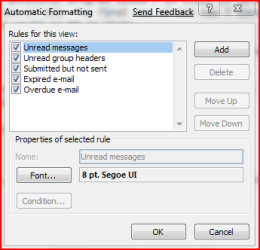
To verify if you have the correct font settings in Outlook
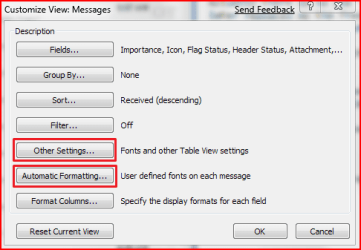
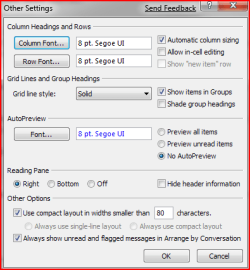
Open Outlook>View>Arrange By>Custom
Please refer to attachment on font settings

Cheers;)
 

Attachments

  • Capture.PNG
    Capture.PNG
    11.9 KB · Views: 29
  • Capture1.PNG
    Capture1.PNG
    13 KB · Views: 39
  • Capture2.PNG
    Capture2.PNG
    10.2 KB · Views: 50

My Computer My Computer

At a glance

Windows 7 Build 7048 x64Athlon 64 X2 Dual Core 4600+4 x 1GB Kingston 400MHz 6-6-6-18 (800MHz)ATI Radeon 3650
Computer Manufacturer/Model Number
Custom Build
OS
Windows 7 Build 7048 x64
CPU
Athlon 64 X2 Dual Core 4600+
Motherboard
EMX-AMD750G-PRO
Memory
4 x 1GB Kingston 400MHz 6-6-6-18 (800MHz)
Graphics Card(s)
ATI Radeon 3650
Sound Card
Realtek HD Audio
Monitor(s) Displays
22" AOC 2216Vw
Screen Resolution
1680x1050
Cooling
Arctic Cooling Freezer 64 Pro PWM
Keyboard
Generic Enhanced Natural Keyboard
Mouse
Logitech VX Nano
Other Info
Edifier M1550
Well I tried it & still I have italics, any other suggestions?
 

My Computer My Computer

At a glance

XP Pro, Windows 7 Ultimate 64 & 32 Build 70226600 2.40 Ghz Intel Core 2 Duo4096 GB DDR2512 MB Nvidia GeForce 8400 GS PCI E
Computer Manufacturer/Model Number
Custom
OS
XP Pro, Windows 7 Ultimate 64 & 32 Build 7022
CPU
6600 2.40 Ghz Intel Core 2 Duo
Motherboard
Nvidia nForce 650i Ultra
Memory
4096 GB DDR2
Graphics Card(s)
512 MB Nvidia GeForce 8400 GS PCI E
Hard Drives
2 x 250 GB Western Digital SATA
1 x 500 GB Western Digital SATA
1 x 250 GB Western Digital SATA USB
1 x 80 GB Western Digital IDE
PSU
600 Watt
Case
Custom
Cooling
Zalman
Keyboard
Logitech Wireless Keyboard
Mouse
Logitech MX 700 Wireless Optical Mouse
Internet Speed
Fios
Other Info
Also a Dell Inspiron E1505 1.6 Core Duo with 2GB DDR2, 320GB HDD running dual boot Windows 7 32 build 7057 & XP Pro 32 SP3.
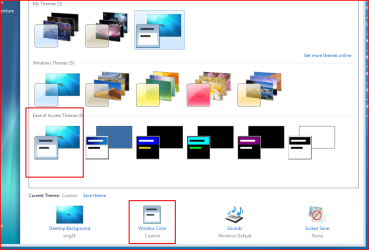
Right click the desktop>Personalize
Select the first scheme under Ease of Access Theme
After it has been applied
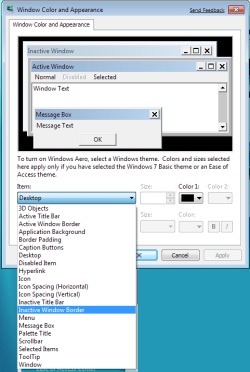
You can then click on Window Color
Here you can select the items you want and change fonts, font size, color, bold and
italic.

Cheers;)
 

Attachments

  • Capture.PNG
    Capture.PNG
    54.6 KB · Views: 105
  • Capture1.PNG
    Capture1.PNG
    19 KB · Views: 84

My Computer My Computer

At a glance

Windows 7 Build 7048 x64Athlon 64 X2 Dual Core 4600+4 x 1GB Kingston 400MHz 6-6-6-18 (800MHz)ATI Radeon 3650
Computer Manufacturer/Model Number
Custom Build
OS
Windows 7 Build 7048 x64
CPU
Athlon 64 X2 Dual Core 4600+
Motherboard
EMX-AMD750G-PRO
Memory
4 x 1GB Kingston 400MHz 6-6-6-18 (800MHz)
Graphics Card(s)
ATI Radeon 3650
Sound Card
Realtek HD Audio
Monitor(s) Displays
22" AOC 2216Vw
Screen Resolution
1680x1050
Cooling
Arctic Cooling Freezer 64 Pro PWM
Keyboard
Generic Enhanced Natural Keyboard
Mouse
Logitech VX Nano
Other Info
Edifier M1550
OK ,tried that & still italics.
 

My Computer My Computer

At a glance

XP Pro, Windows 7 Ultimate 64 & 32 Build 70226600 2.40 Ghz Intel Core 2 Duo4096 GB DDR2512 MB Nvidia GeForce 8400 GS PCI E
Computer Manufacturer/Model Number
Custom
OS
XP Pro, Windows 7 Ultimate 64 & 32 Build 7022
CPU
6600 2.40 Ghz Intel Core 2 Duo
Motherboard
Nvidia nForce 650i Ultra
Memory
4096 GB DDR2
Graphics Card(s)
512 MB Nvidia GeForce 8400 GS PCI E
Hard Drives
2 x 250 GB Western Digital SATA
1 x 500 GB Western Digital SATA
1 x 250 GB Western Digital SATA USB
1 x 80 GB Western Digital IDE
PSU
600 Watt
Case
Custom
Cooling
Zalman
Keyboard
Logitech Wireless Keyboard
Mouse
Logitech MX 700 Wireless Optical Mouse
Internet Speed
Fios
Other Info
Also a Dell Inspiron E1505 1.6 Core Duo with 2GB DDR2, 320GB HDD running dual boot Windows 7 32 build 7057 & XP Pro 32 SP3.
Well the only other option I could think of short of a full reinstall is doing a Repair Install.

Please do let us know the progress of your case ;)
 

My Computer My Computer

At a glance

Windows 7 Build 7048 x64Athlon 64 X2 Dual Core 4600+4 x 1GB Kingston 400MHz 6-6-6-18 (800MHz)ATI Radeon 3650
Computer Manufacturer/Model Number
Custom Build
OS
Windows 7 Build 7048 x64
CPU
Athlon 64 X2 Dual Core 4600+
Motherboard
EMX-AMD750G-PRO
Memory
4 x 1GB Kingston 400MHz 6-6-6-18 (800MHz)
Graphics Card(s)
ATI Radeon 3650
Sound Card
Realtek HD Audio
Monitor(s) Displays
22" AOC 2216Vw
Screen Resolution
1680x1050
Cooling
Arctic Cooling Freezer 64 Pro PWM
Keyboard
Generic Enhanced Natural Keyboard
Mouse
Logitech VX Nano
Other Info
Edifier M1550
I'm just going to leave the italics till RC1 comes out then I'll do a fresh install.
 

My Computer My Computer

At a glance

XP Pro, Windows 7 Ultimate 64 & 32 Build 70226600 2.40 Ghz Intel Core 2 Duo4096 GB DDR2512 MB Nvidia GeForce 8400 GS PCI E
Computer Manufacturer/Model Number
Custom
OS
XP Pro, Windows 7 Ultimate 64 & 32 Build 7022
CPU
6600 2.40 Ghz Intel Core 2 Duo
Motherboard
Nvidia nForce 650i Ultra
Memory
4096 GB DDR2
Graphics Card(s)
512 MB Nvidia GeForce 8400 GS PCI E
Hard Drives
2 x 250 GB Western Digital SATA
1 x 500 GB Western Digital SATA
1 x 250 GB Western Digital SATA USB
1 x 80 GB Western Digital IDE
PSU
600 Watt
Case
Custom
Cooling
Zalman
Keyboard
Logitech Wireless Keyboard
Mouse
Logitech MX 700 Wireless Optical Mouse
Internet Speed
Fios
Other Info
Also a Dell Inspiron E1505 1.6 Core Duo with 2GB DDR2, 320GB HDD running dual boot Windows 7 32 build 7057 & XP Pro 32 SP3.
Is there a chance some system fonts have been removed and it is reverting to another version?

If you do a SFC, make sure and reboot afterward.
 

My Computer My Computer

At a glance

Windows 7 x64i7-2600K8 GGTX 480
Computer Manufacturer/Model Number
Homebuilt
OS
Windows 7 x64
CPU
i7-2600K
Motherboard
Asus P8Z77-v Pro
Memory
8 G
Graphics Card(s)
GTX 480
Sound Card
Onboard
Monitor(s) Displays
LG W2753V
Screen Resolution
1920x1080
Hard Drives
Crucial M4 128 G SSD
I was having the same issue, and just put up with it until one of my programs failed to start because of this..

Issue;
Most windows fonts are in italics.

"Solutions" that did not work;
Resetting font settings to default
Changing advanced appearance settings
Editing fonts registry

Final solution that DID work.

Click "Start", Search "Fonts", click "View Installed Fonts", click "Segoe UI"
If there are only 4 fonts, and "Segoe UI Regular" is not listed... this is your problem.

Somehow the non-italic, non-bold, plane jane system default font file, has been deleted.

FIX; download this file Segoeui.rar, open the rar, open "Fonts", "Segoe UI", double click "segoeui.ttf, click install.

Restart your computer.


After much searching and frustration, I finally fixed the infamous "Italics" (and "Bold") font issue.

I hope this solution works for you, and anybody else who may have found this forum while searching online.
 

My Computer My Computer

At a glance

Windows 7 64bit
OS
Windows 7 64bit
hello twistdshade,
i tried using your method of reinstalling the font, it still didn't work. My fonts are still bold and google is still italic. it really makes me go crazy. italic fonts are so pain.:cry::cry:
 

My Computer My Computer

At a glance

Windows 7
OS
Windows 7
apparently, verdana fonts are also bold. just to update anyone who is also facing the same problem as mine. Really need help here D: :cry::cry:
 

My Computer My Computer

At a glance

Windows 7
OS
Windows 7
anyone solved this problem yet? D:
 

My Computer My Computer

At a glance

Windows 7
OS
Windows 7
Well, since you made sure you were not overriding fonts in IE, maybe you should try to override the fonts and see what happens. This would be the part under Tools, Internet Optiions, General, Accessibility NosferatuX was talking about.

You may also check Clear Type. Make sure it is turned on and it looks like there is a tuner for adjustment. Check Help and Support for Clear Type.
 

My Computer My Computer

At a glance

Windows 7 x64i7-2600K8 GGTX 480
Computer Manufacturer/Model Number
Homebuilt
OS
Windows 7 x64
CPU
i7-2600K
Motherboard
Asus P8Z77-v Pro
Memory
8 G
Graphics Card(s)
GTX 480
Sound Card
Onboard
Monitor(s) Displays
LG W2753V
Screen Resolution
1920x1080
Hard Drives
Crucial M4 128 G SSD
Saltgrass, I've tried the settings you said in IE and still its not working. Fonts are still bold and some are italic. As for the cleartype option, i`ve tried it also and it is not working still. OMG D:
 

My Computer My Computer

At a glance

Windows 7
OS
Windows 7
anyone found out how to resolve this problem?
 

My Computer My Computer

At a glance

Windows 7
OS
Windows 7
I do not know anything else to try you haven't. My first guess would have been a required font and been deleted and another one was being substituted. It appears that is not the case.

You have not set IE to override the normal fonts, so that is not a problem.

I don't know if some type of language setting would effect your situation.

And unless you have some software that has altered your fonts in some manner, I just do not know.

If I come across something, I will try to post back.
 

My Computer My Computer

At a glance

Windows 7 x64i7-2600K8 GGTX 480
Computer Manufacturer/Model Number
Homebuilt
OS
Windows 7 x64
CPU
i7-2600K
Motherboard
Asus P8Z77-v Pro
Memory
8 G
Graphics Card(s)
GTX 480
Sound Card
Onboard
Monitor(s) Displays
LG W2753V
Screen Resolution
1920x1080
Hard Drives
Crucial M4 128 G SSD
problem solved, apparently some of my fonts are being deleted for no reason. My tahoma, verdana, arial, times new roman regular is all being deleted. cheers
 

My Computer My Computer

At a glance

Windows 7
OS
Windows 7

Attachments

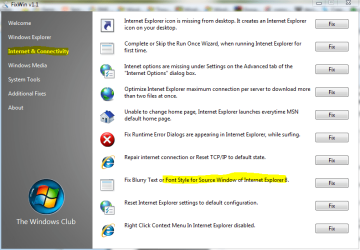
  • fixwin.PNG
    fixwin.PNG
    47.7 KB · Views: 198

My Computer My Computer

At a glance

Win 10 Pro x64Intel I5-2500K @3.3GHz16GB G.Skill Ripjaws X (4x4GB)EVGA GeForce 750 Ti SC 2GB
Computer type
PC/Desktop
Computer Manufacturer/Model Number
Self Built
OS
Win 10 Pro x64
CPU
Intel I5-2500K @3.3GHz
Motherboard
Asrock P67 Extreme4
Memory
16GB G.Skill Ripjaws X (4x4GB)
Graphics Card(s)
EVGA GeForce 750 Ti SC 2GB
Sound Card
ASUS Xonar DG 5.1 Channels 24-bit 96KHz PCI Interface Sound
Monitor(s) Displays
auria eq2367
Screen Resolution
1920 x 1080
Hard Drives
250GB Samsung 850 EVO SSD
1TB WD Blue
1TB Hitachi
PSU
SeaSonic X 650W 80 Plus Gold
Case
Corsair Obsidian 750D
Cooling
Corsair H60, Three 140mm case fans
Keyboard
Logitech Wireless Keyboard K520
Mouse
Logitech Wireless Mouse M310
Internet Speed
Wave Broadband ~ 100 dn 5 up
Antivirus
Windows Defender, Malwarebytes Premium
Browser
Edge, IE11, Chrome
Other Info
Laptop specs: HP g7-1365dx /
CPU: AMD A6-3420M APU with Radeon(tm) HD Graphics /
RAM: Crucial 8Gb (2x4Gb) /
SSD: Crucial M4-CT128M4SSD2 ATA Device/ FW 000F /
GFX: AMD Radeon HD 6520G /
OS: Windows 10 Pro x64
Back
Top