Upgraded to W7. No sound. Creative Xfi card. Help!

rocketdescends

New member
Member
Local time
11:24 AM
Messages
36
Location
Boston
I upgraded from Windows XP to Windows 7 Home Premium 32 bit. My sound card is a Creative X-Fi Audio Processor (WMD). I am not sure if that is the actual model name. That is the name that the device manager gives me. RE-installing drivers from Creative doesn't help. Tried the Daniel_K drivers and nothing seems to help. It just seems that Windows 7 is not even recognizing that there is a card installed at all! I have a Dell XPS 600 Pentium D 3.20 ghz 2 gig ram. I have spent several hours trying to figure this out. Please help!
 

My Computer My Computer

At a glance

Windows 7 Home Premium 32 bitIntel Pentium D2 gig DRMRadeon 1900XTX
Computer Manufacturer/Model Number
Dell XP 600
OS
Windows 7 Home Premium 32 bit
CPU
Intel Pentium D
Memory
2 gig DRM
Graphics Card(s)
Radeon 1900XTX
Sound Card
Creative XFi Audio Processor (WDM)
Hi.

In device manager, right click on the card. Properties. Details tab. Change dropdown to hardware ids. Copy and paste the results here and I'll see what I can do.

Please no screenshot as alternative. That only makes it more difficult for me. Thanks.
 

My Computer My Computer

At a glance

7600.20510 x86P4 550 3.4 GHz HT running at 3.5 GHzOCZ 2 GB(2x1GB) DDR400mHz running @ 414 mHzHIS Radeon HD 3850 IceQ 3 Turbo HDMI Dual DL-...
Computer Manufacturer/Model Number
self built
OS
7600.20510 x86
CPU
P4 550 3.4 GHz HT running at 3.5 GHz
Motherboard
MSI PM8M3-V (MS-7211 v1.x) Micro-ATX mainboard
Memory
OCZ 2 GB(2x1GB) DDR400mHz running @ 414 mHz
Graphics Card(s)
HIS Radeon HD 3850 IceQ 3 Turbo HDMI Dual DL-DVI AGP
Sound Card
MOTU Traveler firewire studio interface 192 kHz 24 bit
Monitor(s) Displays
22" widescreen Acer X223W LCD, 17" Compaq P75 CRT
Screen Resolution
1680x1050 and 1280x1024
Hard Drives
SATA I x2 WD, 400 GB and 120 GB, SATA 2 WD Caviar Black 1 TB
PSU
350W generic
Case
Cybertronpc, it glows blue
Cooling
stock cpu fan, Ice-Q 3 gpu and system, many case fans
Keyboard
Logitch Classical Keyboard 200
Mouse
Logitech Mediaplay cordless
Internet Speed
1792/448 kbits/sec
Other Info
SATA II PCI fake RAID adapter, 1 GB Readyboost, original ATI Remote Wonder (even works with WMC perfectly), Logitech Rumblepad 2 game controller x2
hi.

In device manager, right click on the card. Properties. Details tab. Change dropdown to hardware ids. Copy and paste the results here and i'll see what i can do.

Please no screenshot as alternative. That only makes it more difficult for me. Thanks.

pci\ven_1102&dev_0005&subsys_10031102&rev_00
pci\ven_1102&dev_0005&subsys_10031102
pci\ven_1102&dev_0005&cc_040100
pci\ven_1102&dev_0005&cc_0401
 

My Computer My Computer

At a glance

Windows 7 Home Premium 32 bitIntel Pentium D2 gig DRMRadeon 1900XTX
Computer Manufacturer/Model Number
Dell XP 600
OS
Windows 7 Home Premium 32 bit
CPU
Intel Pentium D
Memory
2 gig DRM
Graphics Card(s)
Radeon 1900XTX
Sound Card
Creative XFi Audio Processor (WDM)
Alright. I made you a little something somethin because it's so old, it needed it.

Download this link and extract it to a folder.

Then, right click on the audio device in the device manager.

Update driver software. Browse my computer. Let me pick. Have disk. Browse.

Now navigate to wdma_emu.inf in the extracted folder

and double click on it. Click ok. Click next and let it install.

You can then right click the speaker icon in the system tray near the clock and go to playback devices to set it as you want. You can right click on any shown and then set it to show disconnected and disabled devices, too.
 

My Computer My Computer

At a glance

7600.20510 x86P4 550 3.4 GHz HT running at 3.5 GHzOCZ 2 GB(2x1GB) DDR400mHz running @ 414 mHzHIS Radeon HD 3850 IceQ 3 Turbo HDMI Dual DL-...
Computer Manufacturer/Model Number
self built
OS
7600.20510 x86
CPU
P4 550 3.4 GHz HT running at 3.5 GHz
Motherboard
MSI PM8M3-V (MS-7211 v1.x) Micro-ATX mainboard
Memory
OCZ 2 GB(2x1GB) DDR400mHz running @ 414 mHz
Graphics Card(s)
HIS Radeon HD 3850 IceQ 3 Turbo HDMI Dual DL-DVI AGP
Sound Card
MOTU Traveler firewire studio interface 192 kHz 24 bit
Monitor(s) Displays
22" widescreen Acer X223W LCD, 17" Compaq P75 CRT
Screen Resolution
1680x1050 and 1280x1024
Hard Drives
SATA I x2 WD, 400 GB and 120 GB, SATA 2 WD Caviar Black 1 TB
PSU
350W generic
Case
Cybertronpc, it glows blue
Cooling
stock cpu fan, Ice-Q 3 gpu and system, many case fans
Keyboard
Logitch Classical Keyboard 200
Mouse
Logitech Mediaplay cordless
Internet Speed
1792/448 kbits/sec
Other Info
SATA II PCI fake RAID adapter, 1 GB Readyboost, original ATI Remote Wonder (even works with WMC perfectly), Logitech Rumblepad 2 game controller x2
Alright. I made you a little something somethin because it's so old, it needed it.

Download this link and extract it to a folder.

Then, right click on the audio device in the device manager.

Update driver software. Browse my computer. Let me pick. Have disk. Browse.

Now navigate to wdma_emu.inf in the extracted folder

and double click on it. Click ok. Click next and let it install.

You can then right click the speaker icon in the system tray near the clock and go to playback devices to set it as you want. You can right click on any shown and then set it to show disconnected and disabled devices, too.

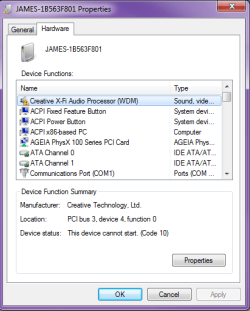
The "update driver" button is greyed out. It will not let me access that.
 

Attachments

  • james.png
    james.png
    13.3 KB · Views: 88

My Computer My Computer

At a glance

Windows 7 Home Premium 32 bitIntel Pentium D2 gig DRMRadeon 1900XTX
Computer Manufacturer/Model Number
Dell XP 600
OS
Windows 7 Home Premium 32 bit
CPU
Intel Pentium D
Memory
2 gig DRM
Graphics Card(s)
Radeon 1900XTX
Sound Card
Creative XFi Audio Processor (WDM)
Heh heh, immediately after right clicking on it, left click update driver software.
 

My Computer My Computer

At a glance

7600.20510 x86P4 550 3.4 GHz HT running at 3.5 GHzOCZ 2 GB(2x1GB) DDR400mHz running @ 414 mHzHIS Radeon HD 3850 IceQ 3 Turbo HDMI Dual DL-...
Computer Manufacturer/Model Number
self built
OS
7600.20510 x86
CPU
P4 550 3.4 GHz HT running at 3.5 GHz
Motherboard
MSI PM8M3-V (MS-7211 v1.x) Micro-ATX mainboard
Memory
OCZ 2 GB(2x1GB) DDR400mHz running @ 414 mHz
Graphics Card(s)
HIS Radeon HD 3850 IceQ 3 Turbo HDMI Dual DL-DVI AGP
Sound Card
MOTU Traveler firewire studio interface 192 kHz 24 bit
Monitor(s) Displays
22" widescreen Acer X223W LCD, 17" Compaq P75 CRT
Screen Resolution
1680x1050 and 1280x1024
Hard Drives
SATA I x2 WD, 400 GB and 120 GB, SATA 2 WD Caviar Black 1 TB
PSU
350W generic
Case
Cybertronpc, it glows blue
Cooling
stock cpu fan, Ice-Q 3 gpu and system, many case fans
Keyboard
Logitch Classical Keyboard 200
Mouse
Logitech Mediaplay cordless
Internet Speed
1792/448 kbits/sec
Other Info
SATA II PCI fake RAID adapter, 1 GB Readyboost, original ATI Remote Wonder (even works with WMC perfectly), Logitech Rumblepad 2 game controller x2
Heh heh, immediately after right clicking on it, left click update driver software.

Installed. Restarting computer now. I will let you know.
 

My Computer My Computer

At a glance

Windows 7 Home Premium 32 bitIntel Pentium D2 gig DRMRadeon 1900XTX
Computer Manufacturer/Model Number
Dell XP 600
OS
Windows 7 Home Premium 32 bit
CPU
Intel Pentium D
Memory
2 gig DRM
Graphics Card(s)
Radeon 1900XTX
Sound Card
Creative XFi Audio Processor (WDM)
The sound icon at on the system tray still has the red x by it. See attached picture. Says no devices are installed. I made sure to check off disabled devices too.
 

Attachments

  • james2.png
    james2.png
    9.3 KB · Views: 94

My Computer My Computer

At a glance

Windows 7 Home Premium 32 bitIntel Pentium D2 gig DRMRadeon 1900XTX
Computer Manufacturer/Model Number
Dell XP 600
OS
Windows 7 Home Premium 32 bit
CPU
Intel Pentium D
Memory
2 gig DRM
Graphics Card(s)
Radeon 1900XTX
Sound Card
Creative XFi Audio Processor (WDM)
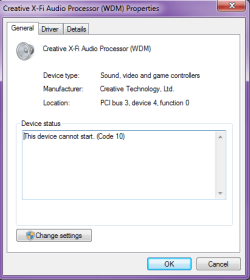
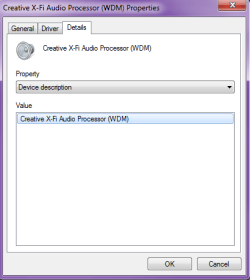
How does it look in the device manager? It should have installed well as I made the .inf specific for your device. Can you post a screenshot of it and also the general tab too?
 

My Computer My Computer

At a glance

7600.20510 x86P4 550 3.4 GHz HT running at 3.5 GHzOCZ 2 GB(2x1GB) DDR400mHz running @ 414 mHzHIS Radeon HD 3850 IceQ 3 Turbo HDMI Dual DL-...
Computer Manufacturer/Model Number
self built
OS
7600.20510 x86
CPU
P4 550 3.4 GHz HT running at 3.5 GHz
Motherboard
MSI PM8M3-V (MS-7211 v1.x) Micro-ATX mainboard
Memory
OCZ 2 GB(2x1GB) DDR400mHz running @ 414 mHz
Graphics Card(s)
HIS Radeon HD 3850 IceQ 3 Turbo HDMI Dual DL-DVI AGP
Sound Card
MOTU Traveler firewire studio interface 192 kHz 24 bit
Monitor(s) Displays
22" widescreen Acer X223W LCD, 17" Compaq P75 CRT
Screen Resolution
1680x1050 and 1280x1024
Hard Drives
SATA I x2 WD, 400 GB and 120 GB, SATA 2 WD Caviar Black 1 TB
PSU
350W generic
Case
Cybertronpc, it glows blue
Cooling
stock cpu fan, Ice-Q 3 gpu and system, many case fans
Keyboard
Logitch Classical Keyboard 200
Mouse
Logitech Mediaplay cordless
Internet Speed
1792/448 kbits/sec
Other Info
SATA II PCI fake RAID adapter, 1 GB Readyboost, original ATI Remote Wonder (even works with WMC perfectly), Logitech Rumblepad 2 game controller x2
How does it look in the device manager? It should have installed well as I made the .inf specific for your device. Can you post a screenshot of it and also the general tab too?

It says that the device cannot start.
 

Attachments

  • James3.png
    James3.png
    14.9 KB · Views: 26
  • James4.png
    James4.png
    10.5 KB · Views: 23
  • James5.png
    James5.png
    9.1 KB · Views: 17

My Computer My Computer

At a glance

Windows 7 Home Premium 32 bitIntel Pentium D2 gig DRMRadeon 1900XTX
Computer Manufacturer/Model Number
Dell XP 600
OS
Windows 7 Home Premium 32 bit
CPU
Intel Pentium D
Memory
2 gig DRM
Graphics Card(s)
Radeon 1900XTX
Sound Card
Creative XFi Audio Processor (WDM)
Alright. I guess the best things you can do at this point is to make sure the chipset drivers are the latest, even if you have to try out Vista ones from VIA (or whatever chipset the motherboard uses.)

And also, update the system bios to latest, then disable all unused ports like serial, parallel, floppy etc...

Then install the audio card driver again.
 

My Computer My Computer

At a glance

7600.20510 x86P4 550 3.4 GHz HT running at 3.5 GHzOCZ 2 GB(2x1GB) DDR400mHz running @ 414 mHzHIS Radeon HD 3850 IceQ 3 Turbo HDMI Dual DL-...
Computer Manufacturer/Model Number
self built
OS
7600.20510 x86
CPU
P4 550 3.4 GHz HT running at 3.5 GHz
Motherboard
MSI PM8M3-V (MS-7211 v1.x) Micro-ATX mainboard
Memory
OCZ 2 GB(2x1GB) DDR400mHz running @ 414 mHz
Graphics Card(s)
HIS Radeon HD 3850 IceQ 3 Turbo HDMI Dual DL-DVI AGP
Sound Card
MOTU Traveler firewire studio interface 192 kHz 24 bit
Monitor(s) Displays
22" widescreen Acer X223W LCD, 17" Compaq P75 CRT
Screen Resolution
1680x1050 and 1280x1024
Hard Drives
SATA I x2 WD, 400 GB and 120 GB, SATA 2 WD Caviar Black 1 TB
PSU
350W generic
Case
Cybertronpc, it glows blue
Cooling
stock cpu fan, Ice-Q 3 gpu and system, many case fans
Keyboard
Logitch Classical Keyboard 200
Mouse
Logitech Mediaplay cordless
Internet Speed
1792/448 kbits/sec
Other Info
SATA II PCI fake RAID adapter, 1 GB Readyboost, original ATI Remote Wonder (even works with WMC perfectly), Logitech Rumblepad 2 game controller x2
Alright. I guess the best things you can do at this point is to make sure the chipset drivers are the latest, even if you have to try out Vista ones from VIA (or whatever chipset the motherboard uses.)

And also, update the system bios to latest, then disable all unused ports like serial, parallel, floppy etc...

Then install the audio card driver again.

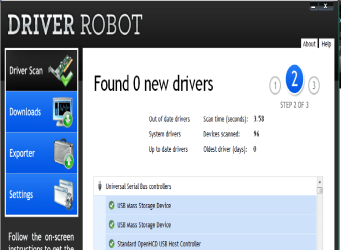
Windows Update says all my drivers are up to date, but Driver Updater Pro says my drivers are out of date. Should I shell out the $30 for this software? :P
 

My Computer My Computer

At a glance

Windows 7 Home Premium 32 bitIntel Pentium D2 gig DRMRadeon 1900XTX
Computer Manufacturer/Model Number
Dell XP 600
OS
Windows 7 Home Premium 32 bit
CPU
Intel Pentium D
Memory
2 gig DRM
Graphics Card(s)
Radeon 1900XTX
Sound Card
Creative XFi Audio Processor (WDM)
Alright. I guess the best things you can do at this point is to make sure the chipset drivers are the latest, even if you have to try out Vista ones from VIA (or whatever chipset the motherboard uses.)

And also, update the system bios to latest, then disable all unused ports like serial, parallel, floppy etc...

Then install the audio card driver again.

Windows Update says all my drivers are up to date, but Driver Updater Pro says my drivers are out of date. Should I shell out the $30 for this software? :P

No way. Those programs can and do mess up Windows installs very quickly.

Your best bet is to find another manufacturer and motherboard that uses the same exact chipset. Then install the chipset drivers from them, for yours. If you find something like that and need help, let me know. Look for Vista ones.
 

My Computer My Computer

At a glance

7600.20510 x86P4 550 3.4 GHz HT running at 3.5 GHzOCZ 2 GB(2x1GB) DDR400mHz running @ 414 mHzHIS Radeon HD 3850 IceQ 3 Turbo HDMI Dual DL-...
Computer Manufacturer/Model Number
self built
OS
7600.20510 x86
CPU
P4 550 3.4 GHz HT running at 3.5 GHz
Motherboard
MSI PM8M3-V (MS-7211 v1.x) Micro-ATX mainboard
Memory
OCZ 2 GB(2x1GB) DDR400mHz running @ 414 mHz
Graphics Card(s)
HIS Radeon HD 3850 IceQ 3 Turbo HDMI Dual DL-DVI AGP
Sound Card
MOTU Traveler firewire studio interface 192 kHz 24 bit
Monitor(s) Displays
22" widescreen Acer X223W LCD, 17" Compaq P75 CRT
Screen Resolution
1680x1050 and 1280x1024
Hard Drives
SATA I x2 WD, 400 GB and 120 GB, SATA 2 WD Caviar Black 1 TB
PSU
350W generic
Case
Cybertronpc, it glows blue
Cooling
stock cpu fan, Ice-Q 3 gpu and system, many case fans
Keyboard
Logitch Classical Keyboard 200
Mouse
Logitech Mediaplay cordless
Internet Speed
1792/448 kbits/sec
Other Info
SATA II PCI fake RAID adapter, 1 GB Readyboost, original ATI Remote Wonder (even works with WMC perfectly), Logitech Rumblepad 2 game controller x2
Alright. I guess the best things you can do at this point is to make sure the chipset drivers are the latest, even if you have to try out Vista ones from VIA (or whatever chipset the motherboard uses.)

And also, update the system bios to latest, then disable all unused ports like serial, parallel, floppy etc...

Then install the audio card driver again.

Windows Update says all my drivers are up to date, but Driver Updater Pro says my drivers are out of date. Should I shell out the $30 for this software? :P

No way. Those programs can and do mess up Windows installs very quickly.

Your best bet is to find another manufacturer and motherboard that uses the same exact chipset. Then install the chipset drivers from them, for yours. If you find something like that and need help, let me know. Look for Vista ones.

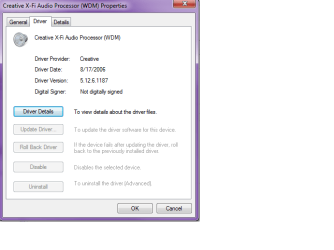
Going to the Dell website they don't even have Vista drivers for this old computer. I am at a loss on what to do. Should I buy a new card? Maybe this one is just too damn old. Could you suggest one? I play a lot of music and games. I know that I really need to invest in a new motherboard and a dual or quad core chip.
 

Attachments

  • James6.png
    James6.png
    11.3 KB · Views: 2
  • james7.png
    james7.png
    35.5 KB · Views: 6

My Computer My Computer

At a glance

Windows 7 Home Premium 32 bitIntel Pentium D2 gig DRMRadeon 1900XTX
Computer Manufacturer/Model Number
Dell XP 600
OS
Windows 7 Home Premium 32 bit
CPU
Intel Pentium D
Memory
2 gig DRM
Graphics Card(s)
Radeon 1900XTX
Sound Card
Creative XFi Audio Processor (WDM)
Buying a new card is probably not going to help.

Doesn't the motherboard have onboard audio that you can enable in the bios?

Wait a second though....nForce4? That should work.

Try installing chipset drivers from here.
 

My Computer My Computer

At a glance

7600.20510 x86P4 550 3.4 GHz HT running at 3.5 GHzOCZ 2 GB(2x1GB) DDR400mHz running @ 414 mHzHIS Radeon HD 3850 IceQ 3 Turbo HDMI Dual DL-...
Computer Manufacturer/Model Number
self built
OS
7600.20510 x86
CPU
P4 550 3.4 GHz HT running at 3.5 GHz
Motherboard
MSI PM8M3-V (MS-7211 v1.x) Micro-ATX mainboard
Memory
OCZ 2 GB(2x1GB) DDR400mHz running @ 414 mHz
Graphics Card(s)
HIS Radeon HD 3850 IceQ 3 Turbo HDMI Dual DL-DVI AGP
Sound Card
MOTU Traveler firewire studio interface 192 kHz 24 bit
Monitor(s) Displays
22" widescreen Acer X223W LCD, 17" Compaq P75 CRT
Screen Resolution
1680x1050 and 1280x1024
Hard Drives
SATA I x2 WD, 400 GB and 120 GB, SATA 2 WD Caviar Black 1 TB
PSU
350W generic
Case
Cybertronpc, it glows blue
Cooling
stock cpu fan, Ice-Q 3 gpu and system, many case fans
Keyboard
Logitch Classical Keyboard 200
Mouse
Logitech Mediaplay cordless
Internet Speed
1792/448 kbits/sec
Other Info
SATA II PCI fake RAID adapter, 1 GB Readyboost, original ATI Remote Wonder (even works with WMC perfectly), Logitech Rumblepad 2 game controller x2
Buying a new card is probably not going to help.

Doesn't the motherboard have onboard audio that you can enable in the bios?

Wait a second though....nForce4? That should work.

Try installing chipset drivers from here.

I installed those Nvidia drivers from that link. Btw that $30 program detected one less problem after those Nvidia drivers were installed. I am getting close to desperate and might buy it. The worse case scenario is I am out $30 and if it messes up my computer I can use do a system restore.

So anyways after installing those drivers I restarted then I reinstalled the audio driver you made for me and restarted. Nothing. Right now I deleted the entire driver. Dusted off my original Soundblaster Xfi Cd and starting from scratch.
 

My Computer My Computer

At a glance

Windows 7 Home Premium 32 bitIntel Pentium D2 gig DRMRadeon 1900XTX
Computer Manufacturer/Model Number
Dell XP 600
OS
Windows 7 Home Premium 32 bit
CPU
Intel Pentium D
Memory
2 gig DRM
Graphics Card(s)
Radeon 1900XTX
Sound Card
Creative XFi Audio Processor (WDM)
Buying a new card is probably not going to help.

Doesn't the motherboard have onboard audio that you can enable in the bios?

Wait a second though....nForce4? That should work.

Try installing chipset drivers from here.

I installed those Nvidia drivers from that link. Btw that $30 program detected one less problem after those Nvidia drivers were installed. I am getting close to desperate and might buy it. The worse case scenario is I am out $30 and if it messes up my computer I can use do a system restore.

So anyways after installing those drivers I restarted then I reinstalled the audio driver you made for me and restarted. Nothing. Right now I deleted the entire driver. Dusted off my original Soundblaster Xfi Cd and starting from scratch.


Ok so after reinstalling the whole driver from my original soundblaster disc and then installing the audio driver you gave me nothing has changed. I am really desperate at this point. *sigh*
 

My Computer My Computer

At a glance

Windows 7 Home Premium 32 bitIntel Pentium D2 gig DRMRadeon 1900XTX
Computer Manufacturer/Model Number
Dell XP 600
OS
Windows 7 Home Premium 32 bit
CPU
Intel Pentium D
Memory
2 gig DRM
Graphics Card(s)
Radeon 1900XTX
Sound Card
Creative XFi Audio Processor (WDM)

My Computer My Computer

At a glance

Windows 7 Home Premium x64 - Mac OS X 10.6.4 x64Intel Core 2 Duo T9300 2.5 GHz4GB Kingston DDR2-800NVIDIA Geforce 8600M GT (512MB Model)
Computer Manufacturer/Model Number
Compal JFT02 (Custom Build Laptop)
OS
Windows 7 Home Premium x64 - Mac OS X 10.6.4 x64
CPU
Intel Core 2 Duo T9300 2.5 GHz
Motherboard
JFT02
Memory
4GB Kingston DDR2-800
Graphics Card(s)
NVIDIA Geforce 8600M GT (512MB Model)
Sound Card
Realtek HD Audio
Monitor(s) Displays
WUXGA Standard Laptop Display
Screen Resolution
1680*1050
Hard Drives
Toshiba 320GB 5400RPM Laptop HD
PSU
Standard Laptop Power Supply
Case
Standard Laptop Case
Cooling
Standard Laptop Cooling
Keyboard
Standard Laptop 105 Key-Keyboard
Mouse
Synaptics Touchpad
Internet Speed
Verizion Online DSL 3360/864 kbs (dl/up)

My Computer My Computer

At a glance

Windows 7 Home Premium 32 bitIntel Pentium D2 gig DRMRadeon 1900XTX
Computer Manufacturer/Model Number
Dell XP 600
OS
Windows 7 Home Premium 32 bit
CPU
Intel Pentium D
Memory
2 gig DRM
Graphics Card(s)
Radeon 1900XTX
Sound Card
Creative XFi Audio Processor (WDM)
Awesome Zidane! +rep
 

My Computer My Computer

At a glance

7600.20510 x86P4 550 3.4 GHz HT running at 3.5 GHzOCZ 2 GB(2x1GB) DDR400mHz running @ 414 mHzHIS Radeon HD 3850 IceQ 3 Turbo HDMI Dual DL-...
Computer Manufacturer/Model Number
self built
OS
7600.20510 x86
CPU
P4 550 3.4 GHz HT running at 3.5 GHz
Motherboard
MSI PM8M3-V (MS-7211 v1.x) Micro-ATX mainboard
Memory
OCZ 2 GB(2x1GB) DDR400mHz running @ 414 mHz
Graphics Card(s)
HIS Radeon HD 3850 IceQ 3 Turbo HDMI Dual DL-DVI AGP
Sound Card
MOTU Traveler firewire studio interface 192 kHz 24 bit
Monitor(s) Displays
22" widescreen Acer X223W LCD, 17" Compaq P75 CRT
Screen Resolution
1680x1050 and 1280x1024
Hard Drives
SATA I x2 WD, 400 GB and 120 GB, SATA 2 WD Caviar Black 1 TB
PSU
350W generic
Case
Cybertronpc, it glows blue
Cooling
stock cpu fan, Ice-Q 3 gpu and system, many case fans
Keyboard
Logitch Classical Keyboard 200
Mouse
Logitech Mediaplay cordless
Internet Speed
1792/448 kbits/sec
Other Info
SATA II PCI fake RAID adapter, 1 GB Readyboost, original ATI Remote Wonder (even works with WMC perfectly), Logitech Rumblepad 2 game controller x2
Back
Top