Aero Theme issue on Dell Studio 1555

suryabalaji

New member
Local time
4:14 AM
Messages
5
I recently got a Dell Studio 1555 laptop and installed Windows 7 on it.
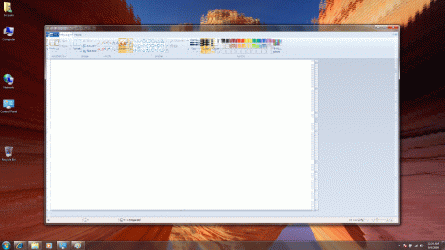
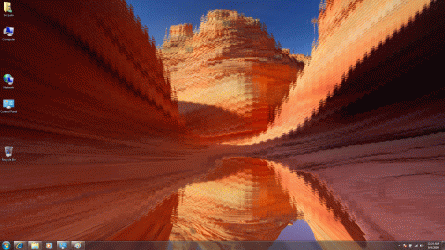
The Aero theme background really becomes funky and full of lines as seen in the attached images. Sometimes application window displays also get messed up as in the attached Paint window.

I installed the latest Driver for the Video from Dell site but that doesnt seem to solve the issue.

Following is the configuration of my laptop:
Intel® Pentium™ Dual Core T4200 (2.0GHz/800Mhz FSB/1MB cache)
3GB Shared Dual Channel DDR2 at 800MHz
15.6” Full High Definition (1080p) High Brightness LED Display with TrueLife™ and Camera
Intel Graphics Media Accelerator 4500MHD

Can you please help?
 

Attachments
  • AeroDisplay1.gif
    AeroDisplay1.gif
    904.5 KB · Views: 536
  • AeroDisplay2.gif
    AeroDisplay2.gif
    517.7 KB · Views: 421

My Computer My Computer

Computer Manufacturer/Model Number
Dell Studio 1555
OS
Windows 7
CPU
Pentium Dual Core
Memory
3 GB
Graphics Card(s)
Intel Graphics Media Accelerator
Sound Card
High Definition Audio
Monitor(s) Displays
15.6" Full High Definition (1080p) High Brightness LED
Hard Drives
250 GB SATA Harddrive
Hi, welcome to the forums.


You may want to try the troublshooter, type 'troubleshoot' into the start menu & click 'Troubleshooting'. There's a section for 'Appearance and Personalization', if you click that you should have 2 options
  • Aero
  • Display Quality
If you click both of those (1 at a time ;)) what information are you given?
 

My Computer My Computer

Computer Manufacturer/Model Number
Compaq Desktop
OS
Windows 7 Ultimate x64
CPU
AMD Sempron Dual Core
Memory
3GB
Graphics Card(s)
NVIDIA GeForce 6150SE nForce 430
Screen Resolution
1024x768
Hard Drives
150GB Sata
hmm:sarc: i'm thinking this is beyond driver issues, either the card is overheating or it's crapped out! wot does the POST screen look like? and what does the display look like on Vista? maybe u could try dual-booting and post back ur results. i think ur gonna end up RMA'ing this laptop for repair.
 

My Computer My Computer

OS
Windows 7 Ultimate 64Bit
CPU
AMD Athlon x4 650 3Ghz
Motherboard
ASUS
Memory
4gb
Graphics Card(s)
ATI Radeon 3000 series Onboard
It could also be that the Desktop Window Manager service is having a breakdown.

Could try running Command Prompt as Administrator (right-click) then run sfc /scannow just in case any system files have become unstable.

I does, as Matt pointed out, look like it could be a hardware issue, but lets hope it's not as that would mean a new GFX Card
 
Last edited:

My Computer My Computer

Computer Manufacturer/Model Number
Compaq Desktop
OS
Windows 7 Ultimate x64
CPU
AMD Sempron Dual Core
Memory
3GB
Graphics Card(s)
NVIDIA GeForce 6150SE nForce 430
Screen Resolution
1024x768
Hard Drives
150GB Sata
It could also be that the Desktop Window Manager service is having a breakdown.

Could try running Command Prompt as Administrator (right-click) then run sfc /scannow just in case any system files have become unstable.

I does, as Matt pointed out, look like it could be a hardware issue, but lets hope it's not as that would mean a new GFX Card

he said he got the laptop recently so he'll have a yrs warranty on that (and of course his statutory rights ;)) so there should be no problem in getting it repaired/replaced if he's at worst case scenario.
 
Last edited:

My Computer My Computer

OS
Windows 7 Ultimate 64Bit
CPU
AMD Athlon x4 650 3Ghz
Motherboard
ASUS
Memory
4gb
Graphics Card(s)
ATI Radeon 3000 series Onboard
u mean me right? he said he got the laptop recently so he'll have a yrs warranty on that (and of course his statutory rights ;)) so there should be no problem in getting it repaired/replaced if he's at worst case scenario.

Oops, sorry, post changed :o

That's quite right, there are sometimes even a Recovery Option during post (press F11 or F12) during the very first screen. Maybe that will still work :p
 

My Computer My Computer

Computer Manufacturer/Model Number
Compaq Desktop
OS
Windows 7 Ultimate x64
CPU
AMD Sempron Dual Core
Memory
3GB
Graphics Card(s)
NVIDIA GeForce 6150SE nForce 430
Screen Resolution
1024x768
Hard Drives
150GB Sata
This sounds like a GFX card overheating .. You may try reducing your resolution to reduce the power drain and see if this helps... Otherwise, I would call Dell for a RMA number ...
 

My Computer My Computer

Computer type
PC/Desktop
Computer Manufacturer/Model Number
LENOVO K450 @3.0GHZ
OS
64-bit Windows 8.1 Pro
CPU
Core(TM) i5 CPU 4330 Haswell @ 3.20GHz
Motherboard
LENOVO
Memory
12.00 GB
Graphics Card(s)
Intel(R) HD Graphics
Sound Card
Intel HD integtrated
Monitor(s) Displays
HP 25' ISP Monitor
Screen Resolution
1900/1020
Hard Drives
(1) ST1000DM003-1CH162 (2) Generic STORAGE DEVICE USB Device (3) Generic STORAGE DEVICE USB Device
Internet Speed
100mb down/10mb up
This sounds like a GFX card overheating .. You may try reducing your resolution to reduce the power drain and see if this helps... Otherwise, I would call Dell for a RTM number ...

that's fine for a diagnosis but i wouldn't stick with that as a resolution* i'd still get the RMA number and have it fixed properly. shame on dell :rolleyes:

*j/k see wot i did there? lol :p
 

My Computer My Computer

OS
Windows 7 Ultimate 64Bit
CPU
AMD Athlon x4 650 3Ghz
Motherboard
ASUS
Memory
4gb
Graphics Card(s)
ATI Radeon 3000 series Onboard
Most definately not!! Its just a way to narrow down the possible source of the problem..
 

My Computer My Computer

Computer type
PC/Desktop
Computer Manufacturer/Model Number
LENOVO K450 @3.0GHZ
OS
64-bit Windows 8.1 Pro
CPU
Core(TM) i5 CPU 4330 Haswell @ 3.20GHz
Motherboard
LENOVO
Memory
12.00 GB
Graphics Card(s)
Intel(R) HD Graphics
Sound Card
Intel HD integtrated
Monitor(s) Displays
HP 25' ISP Monitor
Screen Resolution
1900/1020
Hard Drives
(1) ST1000DM003-1CH162 (2) Generic STORAGE DEVICE USB Device (3) Generic STORAGE DEVICE USB Device
Internet Speed
100mb down/10mb up
You would think if it is hardware related it would affect the taskbar and icons too but they look fine in the picture. Dell will have built-in diagnostics that can be run by hitting F12 when you first turn the system on. Dell tech support will want the results from that scan before proceeding anyway.
 

My Computer My Computer

Computer Manufacturer/Model Number
ultraplanet - model 23
OS
Windows 7
CPU
P4 3.0 HT
Motherboard
Intel DQ965GF
Memory
4 gigs of Crucial DDR2
Graphics Card(s)
nVidia GeForce 7800GT 256MB 256-bit w/ ACCELS1 Rev 2
Sound Card
on board
Monitor(s) Displays
HP 2509m
Screen Resolution
1920x1080
Hard Drives
2x 320gb Seagate Barracuda's - SATA 3Gbit/s - RAID-0 array
PSU
650 watt
Case
Antec
Cooling
Cool Master
Keyboard
Logitech diNovo Media Desktop
Mouse
see keyboard
Internet Speed
comcast cable
Other Info
7 Ultimate and 7 Pro twice each at home - Gigabit on the Network - Tomato on the Linksys - I freely share my wireless with my neighbors (8-10 additional devices)
Thanks for all the replies.

The display issue happens only in Aero Theme mode. There is no issue in the Windows 7 Basic theme mode, which is what I have reverted to.

I tried running the Troubleshooting for both Aero and Display options but it didn't really detect anything. It just asked me to set the Display settings for Best Appearance. But that didnt change anything.

When I bought the laptop, it had Windows Vista 64-bit on it. I installed Windows 7 x64 Ultimate doing a clean install after formatting the OS partition.

But I checked the Device Manager and there are no missing drivers. Dell website has Windows 7 drivers for this laptop model and I downloaded and updated those as well.

Aero themes seemed really cool and I heard from many folks that Windows 7 is awesome. But my experience seems to be otherwise, unfortunately.

Please let me know if there is any other information that I can provide that can help on the diagnostics.
 

My Computer My Computer

Computer Manufacturer/Model Number
Dell Studio 1555
OS
Windows 7
CPU
Pentium Dual Core
Memory
3 GB
Graphics Card(s)
Intel Graphics Media Accelerator
Sound Card
High Definition Audio
Monitor(s) Displays
15.6" Full High Definition (1080p) High Brightness LED
Hard Drives
250 GB SATA Harddrive
Would Dell still provide support since I reinstalled a new OS on it?
 

My Computer My Computer

Computer Manufacturer/Model Number
Dell Studio 1555
OS
Windows 7
CPU
Pentium Dual Core
Memory
3 GB
Graphics Card(s)
Intel Graphics Media Accelerator
Sound Card
High Definition Audio
Monitor(s) Displays
15.6" Full High Definition (1080p) High Brightness LED
Hard Drives
250 GB SATA Harddrive
I also have recently purchased a 1555 with GM45 and 1080P display and I am having the same issue. The only difference is I am running 32-Bit Windows 7 Ultimate. I don't think a RMA is going to help on this; I think it will be a problem on all 1555 systems (maybe not the ATI cards though). I contacted Dell several times and got a different answer each time. One was the drivers were not available yet and would be released on Oct 22. I then asked why there was a 64 bit driver but not a 32-bit and was told the 64 bit was a beta and not the real driver. I also spoke with a guy that told me this laptop only supports 64-bit and I would need to upgrade to 4GB of RAM and upgrade to 64-bit (Dell only supports 64-bit with 4GB of RAM). I then asked why my 1555 with 3GB of RAM and Windows Vista Home Premium 32-bit was sold with a free upgrade to Windows 7 Home Premium 32-bit; he put me on hold and never returned! I do believe this is a driver issue; I checked the Intel site and found their driver was for the RC not the RTM or Retail (which is what I am running, got it from work to test this laptop). I would love to know if there are other 1555 owners out there with this problem. I'm not sure I want to keep it if there are going to be problems when upgrading to Windows 7.
 

My Computer My Computer

OS
Windows 7
the new drivers for win 7 make it worse

I went back to Vista 64 drivers and then tweaked the blur off to pure transparency and its now behaving.
 
Last edited:

My Computer My Computer

OS
Win 7 7100
Other Info
OS Name Microsoft Windows 7 Ultimate
Version 6.1.7077 Build 7077
Other OS Description Not Available
OS Manufacturer Microsoft Corporation
System Name DRBILL-PC
System Manufacturer Dell Inc.
System Model Latitude D420
System Type X86-based PC
Processor Genuine Intel(R) CPU U2500 @ 1.20GHz, 1200 Mhz, 2 Core(s), 2 Logical Processor(s)
BIOS Version/Date Dell Inc. A06, 2/2/2008
SM
Here is a little reading from over at Dell Community Board where is seems there may be a problem with the display itself. Several of the posts have a test you can run. Not sure if it helps....

Studio 15 screen flicker - DELL COMMUNITY
 

My Computer My Computer

Computer Manufacturer/Model Number
ultraplanet - model 23
OS
Windows 7
CPU
P4 3.0 HT
Motherboard
Intel DQ965GF
Memory
4 gigs of Crucial DDR2
Graphics Card(s)
nVidia GeForce 7800GT 256MB 256-bit w/ ACCELS1 Rev 2
Sound Card
on board
Monitor(s) Displays
HP 2509m
Screen Resolution
1920x1080
Hard Drives
2x 320gb Seagate Barracuda's - SATA 3Gbit/s - RAID-0 array
PSU
650 watt
Case
Antec
Cooling
Cool Master
Keyboard
Logitech diNovo Media Desktop
Mouse
see keyboard
Internet Speed
comcast cable
Other Info
7 Ultimate and 7 Pro twice each at home - Gigabit on the Network - Tomato on the Linksys - I freely share my wireless with my neighbors (8-10 additional devices)
This problem is resolved , i have same dell 1555 with 3 gb ram 2 gb + 1 gb ( both diffrent componey and may be diffrent freq ) just remove your 1 gb ram and see its work ,,,, cheeers
 

My Computer My Computer

Computer Manufacturer/Model Number
dell studio 1555
OS
windows 7 ulitmate
CPU
intel core 2 duo t6500
Memory
4 gb
Graphics Card(s)
mhd4500
Hard Drives
500 gb
So the 1gb ram solved it for you? WOW?
strange.
 

My Computer My Computer

OS
Win 7 7100
Other Info
OS Name Microsoft Windows 7 Ultimate
Version 6.1.7077 Build 7077
Other OS Description Not Available
OS Manufacturer Microsoft Corporation
System Name DRBILL-PC
System Manufacturer Dell Inc.
System Model Latitude D420
System Type X86-based PC
Processor Genuine Intel(R) CPU U2500 @ 1.20GHz, 1200 Mhz, 2 Core(s), 2 Logical Processor(s)
BIOS Version/Date Dell Inc. A06, 2/2/2008
SM
So the 1gb ram solved it for you? WOW?
strange.
not 1 gb i said 1gb+2gb both module is not match ::: now u understand ??? remove one of them module and try !!!
 

My Computer My Computer

Computer Manufacturer/Model Number
dell studio 1555
OS
windows 7 ulitmate
CPU
intel core 2 duo t6500
Memory
4 gb
Graphics Card(s)
mhd4500
Hard Drives
500 gb

My Computer My Computer

OS
Windows 7
do not update bios its desable aero permenent and u cant use aero peek , this is call they hiding there mistake on selecting ram module !!!

once again dont update A08 bios i dis but thanks i replaced again with A07

even no windows xp mode work , its work with A06 bios ( i just heared )

so if some one hase a06 bios file please send me on [email protected]
 

My Computer My Computer

Computer Manufacturer/Model Number
dell studio 1555
OS
windows 7 ulitmate
CPU
intel core 2 duo t6500
Memory
4 gb
Graphics Card(s)
mhd4500
Hard Drives
500 gb
Back
Top