The old Network issue with a spin..

HaisseM

New member
Local time
4:54 AM
Messages
7
Hi All,

Got a couple of computer issues that I need your help with.

I have two computers, 1 running Windows 7 and 1 running Windows XP. We'll call them 7 and XP.

Never computer can see shared files or directory even through both have it turned on through the "Network ICON"

So here is the spin

If I type \\Computername on 7 I can see all my shared directory and files (with access to copy them over without a problem) Same on XP

I've even installed the printer that is on XP onto 7 (although it's can't seem to actually print at this time)

Based on the fact that I can type \\computer name and get access on both computers I would imagine all my settings are correcct... but like my spelling.. something must be off :)

Any ideas?

Both computers can access the internet
 

My Computer

OS
Windows 7 and Windows XP
Try mapping by ip address. If it works without error, you have a dns issue. Possibly something to do with Bonjour service (mdnsresponder.exe in task manager.) Completely uninstall that if you have it. Google about it.
 

My Computer

Computer Manufacturer/Model Number
self built
OS
7600.20510 x86
CPU
P4 550 3.4 GHz HT running at 3.5 GHz
Motherboard
MSI PM8M3-V (MS-7211 v1.x) Micro-ATX mainboard
Memory
OCZ 2 GB(2x1GB) DDR400mHz running @ 414 mHz
Graphics Card(s)
HIS Radeon HD 3850 IceQ 3 Turbo HDMI Dual DL-DVI AGP
Sound Card
MOTU Traveler firewire studio interface 192 kHz 24 bit
Monitor(s) Displays
22" widescreen Acer X223W LCD, 17" Compaq P75 CRT
Screen Resolution
1680x1050 and 1280x1024
Hard Drives
SATA I x2 WD, 400 GB and 120 GB, SATA 2 WD Caviar Black 1 TB
PSU
350W generic
Case
Cybertronpc, it glows blue
Cooling
stock cpu fan, Ice-Q 3 gpu and system, many case fans
Keyboard
Logitch Classical Keyboard 200
Mouse
Logitech Mediaplay cordless
Internet Speed
1792/448 kbits/sec
Other Info
SATA II PCI fake RAID adapter, 1 GB Readyboost, original ATI Remote Wonder (even works with WMC perfectly), Logitech Rumblepad 2 game controller x2
All of my computers run iTunes and have the bonjour service running, and I don't have any problems with networking. Exactly what is bonjour supposed to be doing that completely interrupts networking?


To HaisseM - have you followed any of the Windows 7/XP/Vista sharing guides that are available on the 'net? Do you have any third party security or antivirus applications on your computers?
 

My Computer

Computer Manufacturer/Model Number
Dell XPS 15 L502x
OS
Windows 7 Ultimate x64 SP1
CPU
Core i7-2670QM
Memory
8GB DDR3 PC3-10600
Graphics Card(s)
Intel HD Graphics 3000 + GeForce GT 540M
Screen Resolution
1920x1080
Hard Drives
1TB 5400RPM Seagate
Try mapping by ip address. If it works without error, you have a dns issue. Possibly something to do with Bonjour service (mdnsresponder.exe in task manager.) Completely uninstall that if you have it. Google about it.
Mapping by IP works, just like mapping by computername works (works in both services (I don't have Bonjour services installed on my computer.. I uninstall it every time I have every installed Itunes

All of my computers run iTunes and have the bonjour service running, and I don't have any problems with networking. Exactly what is bonjour supposed to be doing that completely interrupts networking?


To HaisseM - have you followed any of the Windows 7/XP/Vista sharing guides that are available on the 'net? Do you have any third party security or antivirus applications on your computers?
I have read many of the sharing guides out there, also the ones on this site. They mainly say just change the advanced sharing settings
 

My Computer

OS
Windows 7 and Windows XP

My Computer

Computer Manufacturer/Model Number
self built
OS
7600.20510 x86
CPU
P4 550 3.4 GHz HT running at 3.5 GHz
Motherboard
MSI PM8M3-V (MS-7211 v1.x) Micro-ATX mainboard
Memory
OCZ 2 GB(2x1GB) DDR400mHz running @ 414 mHz
Graphics Card(s)
HIS Radeon HD 3850 IceQ 3 Turbo HDMI Dual DL-DVI AGP
Sound Card
MOTU Traveler firewire studio interface 192 kHz 24 bit
Monitor(s) Displays
22" widescreen Acer X223W LCD, 17" Compaq P75 CRT
Screen Resolution
1680x1050 and 1280x1024
Hard Drives
SATA I x2 WD, 400 GB and 120 GB, SATA 2 WD Caviar Black 1 TB
PSU
350W generic
Case
Cybertronpc, it glows blue
Cooling
stock cpu fan, Ice-Q 3 gpu and system, many case fans
Keyboard
Logitch Classical Keyboard 200
Mouse
Logitech Mediaplay cordless
Internet Speed
1792/448 kbits/sec
Other Info
SATA II PCI fake RAID adapter, 1 GB Readyboost, original ATI Remote Wonder (even works with WMC perfectly), Logitech Rumblepad 2 game controller x2
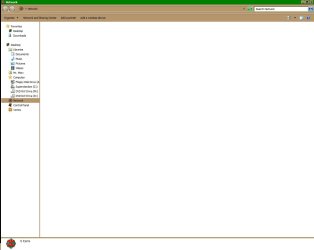
My issue is when I click on "Network Icon" on my desktop I should see all available network options for my computer running windows xp (the folders that have been set to share) however I don't see anything.
 

My Computer

OS
Windows 7 and Windows XP
As I asked previously, do you have any third party security/antivirus applications running on either machine? If so, uninstall them and see if you continue to have issues.

Have you properly configured both computers for file/printer sharing?
 

My Computer

Computer Manufacturer/Model Number
Dell XPS 15 L502x
OS
Windows 7 Ultimate x64 SP1
CPU
Core i7-2670QM
Memory
8GB DDR3 PC3-10600
Graphics Card(s)
Intel HD Graphics 3000 + GeForce GT 540M
Screen Resolution
1920x1080
Hard Drives
1TB 5400RPM Seagate
Can you take a snapshot of what you're looking at and upload it for us to see?
 

My Computer

Computer type
PC/Desktop
Computer Manufacturer/Model Number
Bruce ... somewhere in his 40's
OS
Windows 7 Ultimate 32bit SP1
CPU
Intel(R) Core(TM)2 Quad CPU @ 2.40GHz, 2400 MHz
Motherboard
INTEL/D975XBX2
Memory
4 GB
Graphics Card(s)
ATI Radeon HD 2600 Pro
Monitor(s) Displays
Samsung SyncMaster 914v
Screen Resolution
1280 x 1024
Hard Drives
2/500GB each ... ST3500630AS ATA Device.
One is not connected
PSU
Rocketfish 700 W
Case
G.Skill Gigabyte Chassis
Keyboard
Standard PS/2 Keyboard
Mouse
Microsoft PS/2 Mouse
Internet Speed
DSL
Antivirus
Avira Internet Security
Browser
IE 11
Other Info
ATI HDMI Audio
Can you take a snapshot of what you're looking at and upload it for us to see?
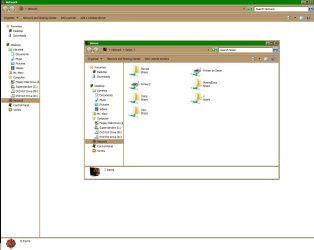
Attached

Computername shows what I see if I do the \\Computername

Network Icon is what I see when I click on the network icon from my desktop


As I asked previously, do you have any third party security/antivirus applications running on either machine? If so, uninstall them and see if you continue to have issues.

Have you properly configured both computers for file/printer sharing?

Sorry I have Comodo on both computers and a old version of Zonealarm (which have been disabled|

I also have the free avg on both computers
 

Attachments

  • Computername.jpg
    Computername.jpg
    74 KB · Views: 8
  • Network Icon.jpg
    Network Icon.jpg
    36.2 KB · Views: 6

My Computer

OS
Windows 7 and Windows XP
AVG is causing massive headaches for users. Completely uninstall that.

Uninstall ZoneAlarm too as disabling does not do the same thing as uninstall.

Isolate Comodo as the only firewall on the systems then test from there.
 

My Computer

Computer Manufacturer/Model Number
self built
OS
7600.20510 x86
CPU
P4 550 3.4 GHz HT running at 3.5 GHz
Motherboard
MSI PM8M3-V (MS-7211 v1.x) Micro-ATX mainboard
Memory
OCZ 2 GB(2x1GB) DDR400mHz running @ 414 mHz
Graphics Card(s)
HIS Radeon HD 3850 IceQ 3 Turbo HDMI Dual DL-DVI AGP
Sound Card
MOTU Traveler firewire studio interface 192 kHz 24 bit
Monitor(s) Displays
22" widescreen Acer X223W LCD, 17" Compaq P75 CRT
Screen Resolution
1680x1050 and 1280x1024
Hard Drives
SATA I x2 WD, 400 GB and 120 GB, SATA 2 WD Caviar Black 1 TB
PSU
350W generic
Case
Cybertronpc, it glows blue
Cooling
stock cpu fan, Ice-Q 3 gpu and system, many case fans
Keyboard
Logitch Classical Keyboard 200
Mouse
Logitech Mediaplay cordless
Internet Speed
1792/448 kbits/sec
Other Info
SATA II PCI fake RAID adapter, 1 GB Readyboost, original ATI Remote Wonder (even works with WMC perfectly), Logitech Rumblepad 2 game controller x2
AVG is causing massive headaches for users. Completely uninstall that.

Uninstall ZoneAlarm too as disabling does not do the same thing as uninstall.

Isolate Comodo as the only firewall on the systems then test from there.

AVG has been uninstalled from both computers. Because I have a much older version of Zonealarm I'm hesitant to remove it without knowing it will fix my issue. The one thing I do want to stress is I can access my networked items via \\ipaddress or \\computername and my printer was able to install (not print) via the \\computername thing as well
 

My Computer

OS
Windows 7 and Windows XP
AVG is causing massive headaches for users. Completely uninstall that.

Uninstall ZoneAlarm too as disabling does not do the same thing as uninstall.

Isolate Comodo as the only firewall on the systems then test from there.

AVG has been uninstalled from both computers. Because I have a much older version of Zonealarm I'm hesitant to remove it without knowing it will fix my issue. The one thing I do want to stress is I can access my networked items via \\ipaddress or \\computername and my printer was able to install (not print) via the \\computername thing as well

With Comodo on system(s), the only way to go is to uninstall ZA. Then also, disable the Windows Firewall too.
 

My Computer

Computer Manufacturer/Model Number
self built
OS
7600.20510 x86
CPU
P4 550 3.4 GHz HT running at 3.5 GHz
Motherboard
MSI PM8M3-V (MS-7211 v1.x) Micro-ATX mainboard
Memory
OCZ 2 GB(2x1GB) DDR400mHz running @ 414 mHz
Graphics Card(s)
HIS Radeon HD 3850 IceQ 3 Turbo HDMI Dual DL-DVI AGP
Sound Card
MOTU Traveler firewire studio interface 192 kHz 24 bit
Monitor(s) Displays
22" widescreen Acer X223W LCD, 17" Compaq P75 CRT
Screen Resolution
1680x1050 and 1280x1024
Hard Drives
SATA I x2 WD, 400 GB and 120 GB, SATA 2 WD Caviar Black 1 TB
PSU
350W generic
Case
Cybertronpc, it glows blue
Cooling
stock cpu fan, Ice-Q 3 gpu and system, many case fans
Keyboard
Logitch Classical Keyboard 200
Mouse
Logitech Mediaplay cordless
Internet Speed
1792/448 kbits/sec
Other Info
SATA II PCI fake RAID adapter, 1 GB Readyboost, original ATI Remote Wonder (even works with WMC perfectly), Logitech Rumblepad 2 game controller x2
So I uninstalled AVG and removed zonealarm and nothing has changed. No antivirus programs running, no firewall programs running. Windows firewall is not active... Any other ideas
 

My Computer

OS
Windows 7 and Windows XP
Do both computers belong to the same workgroup?
 

My Computer

Computer Manufacturer/Model Number
Dell XPS 15 L502x
OS
Windows 7 Ultimate x64 SP1
CPU
Core i7-2670QM
Memory
8GB DDR3 PC3-10600
Graphics Card(s)
Intel HD Graphics 3000 + GeForce GT 540M
Screen Resolution
1920x1080
Hard Drives
1TB 5400RPM Seagate
Back
Top