Drives appearing on my computer in windows 7

JohnHarvis

New member
Local time
12:45 PM
Messages
39
As i know, windows doesnt show any drives unless memory cards are inserted in, and then only it appears in my computer. Iv started to notice that the drives letters randomly show up even though theres nothing inserted inside. Does this happen for anyone else? Is there a fix for this?
 

My Computer My Computer

At a glance

FreeBSD
OS
FreeBSD
JH

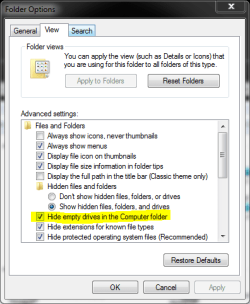
There is a checkbox for hide empty drives. I just cant remember whrere. Im going to have to look for it

K
 

My Computer My Computer

At a glance

Win 8 Release candidate 8400[email protected]4 gigsNvidia 9600M
Computer Manufacturer/Model Number
HP Pavillion dv-7 1005 Tx
OS
Win 8 Release candidate 8400
CPU
[email protected]
Memory
4 gigs
Graphics Card(s)
Nvidia 9600M
Sound Card
HD built-in
Monitor(s) Displays
17" Wxga
Screen Resolution
1440x900
Cooling
none
Internet Speed
45Mb down 5Mb up
Just to let you know its the drive icons that appear when nothings inserted inside the memory slots. Bit weird
 

My Computer My Computer

At a glance

FreeBSD
OS
FreeBSD
JH

There is a checkbox for hide empty drives. I just cant remember whrere. Im going to have to look for it

K
Ken - Don't forget your ALT key in Explorer. Tools, Folder Options, View.

Don't think it is the issue though.
 
anything on this?
 

My Computer My Computer

At a glance

FreeBSD
OS
FreeBSD
As i know, windows doesnt show any drives unless memory cards are inserted in, and then only it appears in my computer.

Where are they not appearing?

Iv started to notice that the drives letters randomly show up even though theres nothing inserted inside.

Don't forget your ALT key in Explorer. Tools, Folder Options, View.

Did you do this?
 
Duh. I knew that. Just didnt remember it thanks A
 

My Computer My Computer

At a glance

Win 8 Release candidate 8400[email protected]4 gigsNvidia 9600M
Computer Manufacturer/Model Number
HP Pavillion dv-7 1005 Tx
OS
Win 8 Release candidate 8400
CPU
[email protected]
Memory
4 gigs
Graphics Card(s)
Nvidia 9600M
Sound Card
HD built-in
Monitor(s) Displays
17" Wxga
Screen Resolution
1440x900
Cooling
none
Internet Speed
45Mb down 5Mb up
Ken - Don't forget your ALT key in Explorer. Tools, Folder Options, View.

Don't think it is the issue though.
Organize > "Folder and search options" does the same...
 

My Computer My Computer

At a glance

Windows 10 Pro (x64)Intel Core i7-3930K (3.2GHz - 4.5GHz)4x Samsung 4GB PC3-12800 DDR3 (16GB 1600MHz)Nvidia Geforce GTX 690
Computer type
PC/Desktop
Computer Manufacturer/Model Number
Alienware Aurora ALX R4
OS
Windows 10 Pro (x64)
CPU
Intel Core i7-3930K (3.2GHz - 4.5GHz)
Motherboard
Alienware Aurora-R4 x79
Memory
4x Samsung 4GB PC3-12800 DDR3 (16GB 1600MHz)
Graphics Card(s)
Nvidia Geforce GTX 690
Sound Card
SteelSeries Siberia Elite
Monitor(s) Displays
Dell UltraSharp U3011
Screen Resolution
2560x1600
Hard Drives
Samsung 850 Pro 256 GB, Seagate 1TB Desktop Hybrid HDD, 2x Western Digital 4TB Green HDD
PSU
875W Some Dell PSU <.<
Case
Alienware Aurora ALX
Cooling
Custom Liquid Cooling (EK CPU & GPU blocks) dual EK 480RAD
Keyboard
Logitech G710+ Mechanical
Mouse
Logitech G700s
Internet Speed
Verizon Fios (50 mbps average)
Other Info
Server: Intel NUC D54250WYK: i5-4250U, 16GB, 256 GB mSATA, Windows Server 2012 R2
Chuckle. Start (search), Control Panel, Folder Options does the same thing.
 
I think this is a serious bug in windows 7. Windows 7 is only ment to show the drive letters when something, either a memory card or a flash stick has been inserted in. But upon browinsg my computer without anything being inserted in, it shows all the drives :mad:

The only temporary soloution iv found to this is either a restart or uninstalling the drivers from disk manager and rescanning so windows reinstalls them which makes the memory card drives dissappear from my computer.

A screenshot to explain what I mean:

My Computer showing memory card drives that are not physically inserted in but still show up as being inserted!?
 

Attachments

  • Capture.PNG
    Capture.PNG
    9.7 KB · Views: 67

My Computer My Computer

At a glance

FreeBSD
OS
FreeBSD
It is not a bug. Just do as the gurus told you above.

Check Hide empty drives in the Computer folder in Control Panel > Folder Options > View.

Kari
 

Attachments

  • empty_drives.PNG
    empty_drives.PNG
    15.5 KB · Views: 36

My Computer My Computer

At a glance

Windows 10 Pro x64 EN-GB1.6 GHz Intel Core i7-720QM Processor6 GBATI Mobility Radeon HD 5850 Graphics
Computer type
Laptop
Computer Manufacturer/Model Number
HP ENVY 17-1150eg
OS
Windows 10 Pro x64 EN-GB
CPU
1.6 GHz Intel Core i7-720QM Processor
Memory
6 GB
Graphics Card(s)
ATI Mobility Radeon HD 5850 Graphics
Sound Card
Beats sound system with integrated subwoofer
Monitor(s) Displays
17" laptop display, 22" LED and 32" Full HD TV through HDMI
Screen Resolution
1600*900 (1), 1920*1080 (2&3)
Hard Drives
Internal: 2 x 500 GB SATA Hard Disk Drive 7200 rpm
External: 2TB for backups, 3TB USB3 network drive for media
Cooling
As Envy runs a bit warm, I have it on a Cooler Master pad
Keyboard
Logitech diNovo Media Desktop Laser (bluetooth)
Mouse
Logitech Performance Mouse MX
Internet Speed
50/10 Mbps VDSL
Antivirus
Windows Defender 4.3.9431.0
Browser
Maxthon 3.5.2., IE11
Dude, mine already has a tick next to that option you have highlighted, and the drives STILL appear, hence me thinking this is a bug.
 

My Computer My Computer

At a glance

FreeBSD
OS
FreeBSD
Mobo or peripheral?

Are the card slots built in to the Computer, or are they on a USB?
FWIW my PC's empty card slots don't appear.
But the ones on my card readers do, if I plug one in.
 

My Computer My Computer

At a glance

Win 7Intel core 2 duo4 gig
Computer Manufacturer/Model Number
Mesh PC
OS
Win 7
CPU
Intel core 2 duo
Memory
4 gig
Hard Drives
1 x250 gig
1 x 500 gig
Mouse
MS lasermouse 5000 -'cos it scrolls smoothly, no wheel click
Internet Speed
10mb - cable
Other Info
The mouse took most research. I hate that click on the wheel, this one has the old fashioned smooth wheel. There aren't many about.
They are built into the computer
 

My Computer My Computer

At a glance

FreeBSD
OS
FreeBSD
Are the card slots built in to the Computer, or are they on a USB?

What odds would that make? Card Readers connect to your motherboards USB headers if not to a physical USB port - so all of them are USB in truth at the end of the day... ;)

If you don't believe me then check under USB in Device Manager...
 

My Computer My Computer

At a glance

W7 x64Intel Q9300 2.5Ghz Quad LGA775 (Would like Q9...4Gb OCZ Gold 1,333MhzPalit HD4850 O/C Sonic 512Mb DDR3, Dual DViD's
Computer Manufacturer/Model Number
Custom built machine
OS
W7 x64
CPU
Intel Q9300 2.5Ghz Quad LGA775 (Would like Q9650)
Motherboard
Gigabyte GA-EP45T-UD3R (F6 Bios)
Memory
4Gb OCZ Gold 1,333Mhz
Graphics Card(s)
Palit HD4850 O/C Sonic 512Mb DDR3, Dual DViD's
Sound Card
Azalia to twin Samson 50w Studio Monitors
Monitor(s) Displays
Twin Dell (E-IPS) U2311H 23.6" Screens
Screen Resolution
1920 x 1080 @ 60Hz
Hard Drives
Crucial M4 SSD, archives on twin Western Digital Caviar Black WD2002FAEX, 2TB, 7200rpm HDD's, Samsung Ritemaster CD/DVD Burner...
PSU
OCZ 600w
Case
Lian-Li PC8 acoustifoamed' aluminium tower
Cooling
Scythe 140mm Zipang
Keyboard
Cherry PS/2 custom model
Mouse
Lenovo USB laser "Thinkpad" Mouse
Internet Speed
ADSL2+ @14Mbps downstream & Cat6 Gigabit Ethernet
Antivirus
NOD32
Browser
Opera
Other Info
Silicon Dust HD Homerun Dual FTA (Ethernet) TV Tuners, Dray Tek Vigor 2850Vn router and 8x HP Gigabit Switch. Lian-Li CR26 Card Reader, Canon MF4430 iSensys laser printer/scanner.
i could see how annoying it would be! i've got a multimedia card reader on my rig mounted in a floppy bay on one of the motherboard's usb headers like qdos is saying, but my drives only show up if theres a card in it...just check 'Don't show hidden files, folders or drives' and u should be set ;)
 

My Computer My Computer

At a glance

Windows 7 Ultimate 64BitAMD Athlon x4 650 3Ghz4gbATI Radeon 3000 series Onboard
OS
Windows 7 Ultimate 64Bit
CPU
AMD Athlon x4 650 3Ghz
Motherboard
ASUS
Memory
4gb
Graphics Card(s)
ATI Radeon 3000 series Onboard
I think this is a serious bug in windows 7. Windows 7 is only ment to show the drive letters when something, either a memory card or a flash stick has been inserted in. But upon browinsg my computer without anything being inserted in, it shows all the drives :mad:

The only temporary soloution iv found to this is either a restart or uninstalling the drivers from disk manager and rescanning so windows reinstalls them which makes the memory card drives dissappear from my computer.

A screenshot to explain what I mean:

My Computer showing memory card drives that are not physically inserted in but still show up as being inserted!?

This is not correct. Mine have ALWAYS showed whether there is a card inserted or not.
 

My Computer My Computer

At a glance

Windows 7 Ultimate RTM (Technet)3.00 gigahertz Intel Core2 Duo E84004GBATI Radeon X1950 Pro
Computer Manufacturer/Model Number
Custom
OS
Windows 7 Ultimate RTM (Technet)
CPU
3.00 gigahertz Intel Core2 Duo E8400
Motherboard
ASUSTeK Computer INC. P5K/EPU Rev 1.xx
Memory
4GB
Graphics Card(s)
ATI Radeon X1950 Pro
Sound Card
Built in HD Audio
Monitor(s) Displays
22" Gateway LCD
Screen Resolution
1920 x 1200
Hard Drives
ST3160023A [Hard drive] (160.04 GB) -- drive 0, rev 8.01, ST3500630AS [Hard drive] (500.11 GB) -- drive 2, rev 3.AAK
ST3500630AS [Hard drive] (500.11 GB) -- drive 1, rev 3.AAK
Keyboard
Logitech G11
Mouse
Microsoft Wireless Laser Mouse 5000
Internet Speed
13.44 Mbps
Are the card slots built in to the Computer, or are they on a USB?

Card Readers connect to your motherboards USB headers.......

I've always assumed that the USB card reader that I can plug into my PC is a device,with its own drivers.
And, like it or not, that's the behaviour I get. Built in card "slots" are invisible unless used. The portable, USB connected ones are always visible, leaving me to click on them until I find the right one with my SD card in it.
 

My Computer My Computer

At a glance

Win 7Intel core 2 duo4 gig
Computer Manufacturer/Model Number
Mesh PC
OS
Win 7
CPU
Intel core 2 duo
Memory
4 gig
Hard Drives
1 x250 gig
1 x 500 gig
Mouse
MS lasermouse 5000 -'cos it scrolls smoothly, no wheel click
Internet Speed
10mb - cable
Other Info
The mouse took most research. I hate that click on the wheel, this one has the old fashioned smooth wheel. There aren't many about.
Are the card slots built in to the Computer, or are they on a USB?

Card Readers connect to your motherboards USB headers.......

I've always assumed that the USB card reader that I can plug into my PC is a device,with its own drivers.
And, like it or not, that's the behaviour I get. Built in card "slots" are invisible unless used. The portable, USB connected ones are always visible, leaving me to click on them until I find the right one with my SD card in it.

Not sure why you're quoting me in this context. I didn't give any opinions regards drives being visible or not if you read back thru' the thread. Mine show up quasi-permanently, but it could depend upon the motherboard BIOS and how it interacts with W7 - which may explain other peoples various experiences differing...
 

My Computer My Computer

At a glance

W7 x64Intel Q9300 2.5Ghz Quad LGA775 (Would like Q9...4Gb OCZ Gold 1,333MhzPalit HD4850 O/C Sonic 512Mb DDR3, Dual DViD's
Computer Manufacturer/Model Number
Custom built machine
OS
W7 x64
CPU
Intel Q9300 2.5Ghz Quad LGA775 (Would like Q9650)
Motherboard
Gigabyte GA-EP45T-UD3R (F6 Bios)
Memory
4Gb OCZ Gold 1,333Mhz
Graphics Card(s)
Palit HD4850 O/C Sonic 512Mb DDR3, Dual DViD's
Sound Card
Azalia to twin Samson 50w Studio Monitors
Monitor(s) Displays
Twin Dell (E-IPS) U2311H 23.6" Screens
Screen Resolution
1920 x 1080 @ 60Hz
Hard Drives
Crucial M4 SSD, archives on twin Western Digital Caviar Black WD2002FAEX, 2TB, 7200rpm HDD's, Samsung Ritemaster CD/DVD Burner...
PSU
OCZ 600w
Case
Lian-Li PC8 acoustifoamed' aluminium tower
Cooling
Scythe 140mm Zipang
Keyboard
Cherry PS/2 custom model
Mouse
Lenovo USB laser "Thinkpad" Mouse
Internet Speed
ADSL2+ @14Mbps downstream & Cat6 Gigabit Ethernet
Antivirus
NOD32
Browser
Opera
Other Info
Silicon Dust HD Homerun Dual FTA (Ethernet) TV Tuners, Dray Tek Vigor 2850Vn router and 8x HP Gigabit Switch. Lian-Li CR26 Card Reader, Canon MF4430 iSensys laser printer/scanner.
Mine dont show up, but even if they did, so what? .. It doesnt interfere with the performance of my system, so Im not going to spend a lot of time worrying about it... ;)
 

My Computer My Computer

At a glance

64-bit Windows 8.1 ProCore(TM) i5 CPU 4330 Haswell @ 3.20GHz12.00 GBIntel(R) HD Graphics
Computer type
PC/Desktop
Computer Manufacturer/Model Number
LENOVO K450 @3.0GHZ
OS
64-bit Windows 8.1 Pro
CPU
Core(TM) i5 CPU 4330 Haswell @ 3.20GHz
Motherboard
LENOVO
Memory
12.00 GB
Graphics Card(s)
Intel(R) HD Graphics
Sound Card
Intel HD integtrated
Monitor(s) Displays
HP 25' ISP Monitor
Screen Resolution
1900/1020
Hard Drives
(1) ST1000DM003-1CH162 (2) Generic STORAGE DEVICE USB Device (3) Generic STORAGE DEVICE USB Device
Internet Speed
100mb down/10mb up
Back
Top