
Solved Windows Installer broken... how to fix it?

stevieray

New member
Guru
VIP
Local time
1:38 PM
Messages
632
Location
manasquan, nj
I just noticed today that I cannot install or uninstall any programs that depend on Windows Installer (.cab files?). Utilities/programs that come as zip files install just fine. I think my Windows Installer is broken.

I tried to download and install Windows Installer Cleanup... it downloaded fine, but cannot install (Of course! Why doesn't MS offer a zipped version of this utility? I mean, if people want to repair their Installers, why offer the file only as an Installer dependent app??!!).

I did a restore, rolling back about a week. No help.

I tried Acronis and replaced the Windows Installer file... no love.

I opened my external HD and copied the oldest version of Installer from the archive and moved it to Windows... still get the same 2203 error.

Any ideas? Please don't suggest a Repair Install, I just did one two weeks ago, and I'm not doing it again. It took me two whole evenings to get my system back the way I like it.

Are there any other windows files (besides Installer) that I can try replacing/restoring? Can I copy files directly off my Win7 dvd?

Thanks!
 

My Computer

Computer Manufacturer/Model Number
me / #1
OS
windows 7 x64 Home Premium
CPU
intel q6600
Motherboard
gigbyte ga ep45 ud3l
Memory
g.skill 8gb ddr2 1066 (pc2 8500)
Graphics Card(s)
evga geforce 9800 gtx 512 mb
Screen Resolution
1680 x 1050
Hard Drives
wd caviar black 500 gb
wd caviar black 1tb
wd elements 1tb external hd x2
PSU
raidmax 500w
Case
smilodon (yes, t'was the pretty blue lites that got me!)
Try creating a new user with admin status - see if that new user can add/remove/install applications.
 

My Computer

Computer Manufacturer/Model Number
Dell XPS 15 L502x
OS
Windows 7 Ultimate x64 SP1
CPU
Core i7-2670QM
Memory
8GB DDR3 PC3-10600
Graphics Card(s)
Intel HD Graphics 3000 + GeForce GT 540M
Screen Resolution
1920x1080
Hard Drives
1TB 5400RPM Seagate
- From the Administrative Tools menu, open Computer Management.
- Expand the Services & Applications menu item.
- Double-click Services.
- Double-click Windows Installer, then stop the service.
- Launch regedit.
- Open HKEY_LOCAL_MACHINE\SYSTEM\CurrentControlSet\Services\MSIServer.
- Select the MSIServer subkey and delete it.
- Exit regedit and reboot the computer.
- Download and install the latest version of Windows installer from the http://www.microsoft.com/downloads/en/default.aspx
 

My Computer

Computer type
PC/Desktop
Computer Manufacturer/Model Number
Custom
OS
Windows 7 64bit
CPU
Intel I7 4770k @4.5
Motherboard
Asus z87-pro
Memory
16GB corsair Vengence
Graphics Card(s)
EVGA GTX 980 TI SC acx2.0
Sound Card
XFI fatality gamer
Monitor(s) Displays
Samsung
Screen Resolution
1920 x 1080
Hard Drives
OCZ ssd Baracuda 1tb x2
PSU
Corsair 1200 watt
Case
NZXT Noctis 450
Cooling
Kraken X61
Keyboard
Logitech G510
Mouse
Razer naga
Internet Speed
100 down 25 up
Other Info
Nzxt Hue +
- From the Administrative Tools menu, open Computer Management.
- Expand the Services & Applications menu item.
- Double-click Services.
- Double-click Windows Installer, then stop the service.
- Launch regedit.
- Open HKEY_LOCAL_MACHINE\SYSTEM\CurrentControlSet\Services\MSIServer.
- Select the MSIServer subkey and delete it.
- Exit regedit and reboot the computer.
- Download and install the latest version of Windows installer from the Microsoft Download Center

I don't think there is a installer redistributable for Windows 7... at least, I cannot find it.
 

My Computer

Computer Manufacturer/Model Number
me / #1
OS
windows 7 x64 Home Premium
CPU
intel q6600
Motherboard
gigbyte ga ep45 ud3l
Memory
g.skill 8gb ddr2 1066 (pc2 8500)
Graphics Card(s)
evga geforce 9800 gtx 512 mb
Screen Resolution
1680 x 1050
Hard Drives
wd caviar black 500 gb
wd caviar black 1tb
wd elements 1tb external hd x2
PSU
raidmax 500w
Case
smilodon (yes, t'was the pretty blue lites that got me!)
Try creating a new user with admin status - see if that new user can add/remove/install applications.

I'll give that a try. Thanks!
 

My Computer

Computer Manufacturer/Model Number
me / #1
OS
windows 7 x64 Home Premium
CPU
intel q6600
Motherboard
gigbyte ga ep45 ud3l
Memory
g.skill 8gb ddr2 1066 (pc2 8500)
Graphics Card(s)
evga geforce 9800 gtx 512 mb
Screen Resolution
1680 x 1050
Hard Drives
wd caviar black 500 gb
wd caviar black 1tb
wd elements 1tb external hd x2
PSU
raidmax 500w
Case
smilodon (yes, t'was the pretty blue lites that got me!)
Nope. The new user couldn't even open the DVD. Many normal functions wouldn't work,it couldn't set up a proper desktop, it couldn't search through explore, it couldn't access any libraries, it couldn't save any snips...

I kept getting an error message that it could find a certain file: C;\Windows\system32\config\systemprofile\Desktop

I should mention that I run custom themes, start orbs, and icons, and I have patched some system files... but the file named in the above error isn't one of them.
 

My Computer

Computer Manufacturer/Model Number
me / #1
OS
windows 7 x64 Home Premium
CPU
intel q6600
Motherboard
gigbyte ga ep45 ud3l
Memory
g.skill 8gb ddr2 1066 (pc2 8500)
Graphics Card(s)
evga geforce 9800 gtx 512 mb
Screen Resolution
1680 x 1050
Hard Drives
wd caviar black 500 gb
wd caviar black 1tb
wd elements 1tb external hd x2
PSU
raidmax 500w
Case
smilodon (yes, t'was the pretty blue lites that got me!)
If you've patched system files and installed custom themes, standard troubleshooting probably isn't going to help. With Windows 7 being so new, it's hard to tell what side effects could pop up with the things you've done.

I know you don't want to hear this, but.... I recommend a repair install. Sorry, that's the only way to ensure the damaged dlls and everything else are replaced. Then, install applications and device drivers, but don't modify any system files or install any custom themes. Backup the system partition - then install and modify your custom files. If you end up screwing things up again, then you restore the entire partition and you'll only have to "screw up your system again with your modified system files". ;)
 

My Computer

Computer Manufacturer/Model Number
Dell XPS 15 L502x
OS
Windows 7 Ultimate x64 SP1
CPU
Core i7-2670QM
Memory
8GB DDR3 PC3-10600
Graphics Card(s)
Intel HD Graphics 3000 + GeForce GT 540M
Screen Resolution
1920x1080
Hard Drives
1TB 5400RPM Seagate
Easy places to check to see if malware is installed

msconfig (check the startup program)
hkey_local_machine>software>microsoft>windows>currentversion>run I believe?

AHAHA I was right, just checked myself. Blah who needs AV when you know where everything starts from. haha

A good place to start for unwanted processes is hijack this. No really, google hijackthis and download the most recent. do a scan and save the log, it's a neat little program that will show every active process =) I likes it because if something is running or starting that I can't find in msconf or the registry it helps me out a lot.
 

My Computer

Computer Manufacturer/Model Number
Custom
OS
Windows 7, Linux
CPU
AMD Phemon II x2 3@3750
Motherboard
ASRock M3A770DE
Memory
1G Crucial 1666
Graphics Card(s)
8800GT OC (custom OC)
Sound Card
Sound Blaster Live! (never changes!)
Monitor(s) Displays
Vivitron 22"
Screen Resolution
1600x1200
Hard Drives
Western Digital 120G/160G SATA
Maxtor 80G IDE
PSU
450w
Case
Unknown
Cooling
Custom Air cooled
Keyboard
Logitech
Mouse
Logitech M-BZ15A Laser
Internet Speed
Cable 10mbit
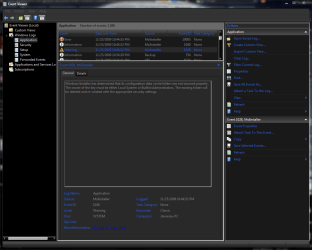
I took a stroll through the Event Viewer logs, and I think I found a few clues.
Installer Error.PNG
Installation Error III.PNG
Installation Error V.PNG
That first snip leads me to think its a permissions issue. I'm gonna play around with that stuff for a while before I do a repair install... and if the simple patches I did to get a few decent themes is enough to cripple the OS, well, I'm gonna seriously consider dumping it for something else. I'm not gonna choose between MS's craptastic themes, and monthly Repair Installs to fix cascading file corruption.
 

My Computer

Computer Manufacturer/Model Number
me / #1
OS
windows 7 x64 Home Premium
CPU
intel q6600
Motherboard
gigbyte ga ep45 ud3l
Memory
g.skill 8gb ddr2 1066 (pc2 8500)
Graphics Card(s)
evga geforce 9800 gtx 512 mb
Screen Resolution
1680 x 1050
Hard Drives
wd caviar black 500 gb
wd caviar black 1tb
wd elements 1tb external hd x2
PSU
raidmax 500w
Case
smilodon (yes, t'was the pretty blue lites that got me!)
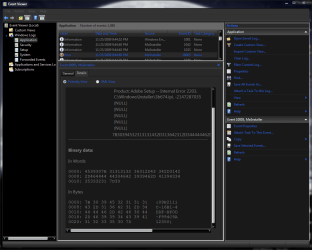
I took a stroll through the Event Viewer logs, and I think I found a few clues.
View attachment 38703
View attachment 38704
View attachment 38705
That first snip leads me to think its a permissions issue. I'm gonna play around with that stuff for a while before I do a repair install... and if the simple patches I did to get a few decent themes is enough to cripple the OS, well, I'm gonna seriously consider dumping it for something else. I'm not gonna choose between MS's craptastic themes, and monthly Repair Installs to fix cascading file corruption.

Why not use my method for custom themes...there is no risk!
http://www.sevenforums.com/tutorials/34579-enabling-custom-themes-windows-7-a.html
 

My Computer

Computer Manufacturer/Model Number
Compal JFT02 (Custom Build Laptop)
OS
Windows 7 Home Premium x64 - Mac OS X 10.6.4 x64
CPU
Intel Core 2 Duo T9300 2.5 GHz
Motherboard
JFT02
Memory
4GB Kingston DDR2-800
Graphics Card(s)
NVIDIA Geforce 8600M GT (512MB Model)
Sound Card
Realtek HD Audio
Monitor(s) Displays
WUXGA Standard Laptop Display
Screen Resolution
1680*1050
Hard Drives
Toshiba 320GB 5400RPM Laptop HD
PSU
Standard Laptop Power Supply
Case
Standard Laptop Case
Cooling
Standard Laptop Cooling
Keyboard
Standard Laptop 105 Key-Keyboard
Mouse
Synaptics Touchpad
Internet Speed
Verizion Online DSL 3360/864 kbs (dl/up)

My Computer

Computer Manufacturer/Model Number
me / #1
OS
windows 7 x64 Home Premium
CPU
intel q6600
Motherboard
gigbyte ga ep45 ud3l
Memory
g.skill 8gb ddr2 1066 (pc2 8500)
Graphics Card(s)
evga geforce 9800 gtx 512 mb
Screen Resolution
1680 x 1050
Hard Drives
wd caviar black 500 gb
wd caviar black 1tb
wd elements 1tb external hd x2
PSU
raidmax 500w
Case
smilodon (yes, t'was the pretty blue lites that got me!)
I don't have any custom anything regarding windows themes. I have no patches system files and i'm having the same issue on Windows 7 x64 ultimate. I can't get vmplayer to install giving a similar permissions issue even though i'm the at home system builder and administrator on that account. How did you fix this issue with permissions?
 

My Computer

Computer Manufacturer/Model Number
I'm a hobyist system builder
OS
Windows 7 Ultimate x64
CPU
Phenom x4 black eddition 2.x ghz
Motherboard
asrock atx board... terrible choice
Memory
2 gigs ddr 2 1066
Graphics Card(s)
femi geforece 450 gts
Sound Card
onboard optical
Monitor(s) Displays
samsung 22 inch lcd
Hard Drives
7200 rpm 500 gb sata drive
PSU
650 watt atx psu
Case
atx mid tower with adaquate cooling...
Cooling
sycthe ninja 92mm fan + heatsinc
Back
Top