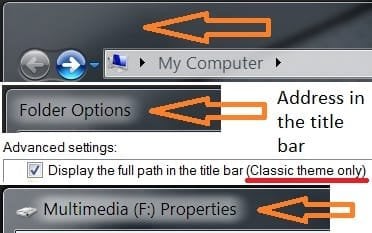
Full path in the title bar of explorer windows

Marvos

New member
Local time
7:49 PM
Messages
5
I've done a search around here and I couldn't find a topic about this, google yields nothing as well :(

Anyway, I bet someone's aleady thought about reenabling this? You know, the whole path of the folder you are looking at in explorer (top left corner)(it is fu**ing empty now, and I have no idea why microsoft would do that.)

The problem here is this :

  • other windows with the same transparancy (such as firefox) have titles displayed quite perfectly (yeah sure call me captain obvious :D)

  • When a program stops to respond a "(not responding)" is added to the end of the title and when explorer stops responding you can actually SEE the damn path just perfectly (with not responding added to it)
So my question is, has a hack for this thing been released yet/is it possible to enable it somehow (using aero of course, not classic theme)?
 

Attachments

  • Title bar.jpg
    Title bar.jpg
    17.7 KB · Views: 79
Last edited:

My Computer My Computer

OS
Windows 7 ultimate 32-bit
If you click the address part...you get the full title...

Look at my pic
Proof.jpg
 

My Computer My Computer

Computer Manufacturer/Model Number
Compal JFT02 (Custom Build Laptop)
OS
Windows 7 Home Premium x64 - Mac OS X 10.6.4 x64
CPU
Intel Core 2 Duo T9300 2.5 GHz
Motherboard
JFT02
Memory
4GB Kingston DDR2-800
Graphics Card(s)
NVIDIA Geforce 8600M GT (512MB Model)
Sound Card
Realtek HD Audio
Monitor(s) Displays
WUXGA Standard Laptop Display
Screen Resolution
1680*1050
Hard Drives
Toshiba 320GB 5400RPM Laptop HD
PSU
Standard Laptop Power Supply
Case
Standard Laptop Case
Cooling
Standard Laptop Cooling
Keyboard
Standard Laptop 105 Key-Keyboard
Mouse
Synaptics Touchpad
Internet Speed
Verizion Online DSL 3360/864 kbs (dl/up)
I dont want that, I just want to see the whole path in the title bar like XP had. I'm just really used to it, thats all. you could call it eye candy.
 

My Computer My Computer

OS
Windows 7 ultimate 32-bit
I just want to see the whole path in the title bar like XP had. I'm just really used to it, thats all. you could call it eye candy.

I'm guessing you don't want to use the Classic Theme, but just in case, it works there :)
 

My Computer My Computer

OS
w7-64, w2k
Try Control Panel/Folder Options. Should fix it there.

Jim Pickering
 

My Computer My Computer

Computer Manufacturer/Model Number
HP 6233se
OS
Windows 7 Ultimate RTM
CPU
AMD Turion
Memory
2 GB
Graphics Card(s)
NVIDIA GeForce 6150
Sound Card
Onboard
Monitor(s) Displays
LCD
Screen Resolution
1280x800
Hard Drives
1 250 GB SATA w/3 partitions
Tweaker and Jim, did you two even READ my first post? :shock:

NO classic theme, aero!

Jim, do you use aero theme and have ever looked at folder options? there is an option there to display the full path in the title bar, yes, but your happiness only lasts as long as you dont read the last part ---> (classic theme ONLY).

I want a hack/registry edit that will do something that microsoft has cut out. There is no way to enable the full path in the title bar from normal options found in win7.

Future posters please atleast read my first post and not just the title.
 

My Computer My Computer

OS
Windows 7 ultimate 32-bit
Future posters please atleast read my first post and not just the title.
I like having the system menu icon/titlebar text showing and I'm using an app called AeroBarIco to show the icon and tiltebar text. I just went into folder options and selected to show full path and it works. Yes, I'm using Aero. For me, it had to be version 1.3 before it would work. Previous versions would only show the titlebar text and are easier to find on the net. For some reason version 1.3 was difficult to find. I'm also thinking that if you just want the titlebar text(without icon), you can rename the AeroBarIco.exe to just AeroBar.exe and it's suppose to just show the text without the icon.
 

My Computer My Computer

Computer Manufacturer/Model Number
Averatec 6130HS-20
OS
Windows 7 Professional 32-bit (6.1, Build 7600)
CPU
Intel(R) Pentium(R) 4 3.00 GHz HT
Memory
2.0 GB
Graphics Card(s)
ATI Mobility Radeon 9600 64MB
Sound Card
Realtek AC'97 Audio
Screen Resolution
1280 x 800
Hard Drives
Seagate 96023A 60GB 7200RPM -
Seagate FreeAgentDesktop 250GB
Cooling
20 Inch Box Fan
Mouse
Targus PAWM10 Wireless Optical Laptop Mouse
I cant find it. You're right, it's damn hard to find.
Can you attach the .exe to your next reply or upload it to rapidshare?
 

My Computer My Computer

OS
Windows 7 ultimate 32-bit
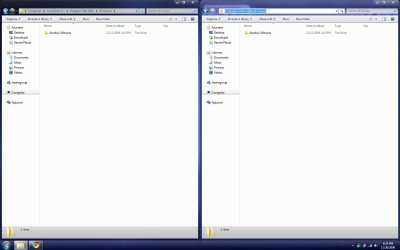
Well, I'm glad this is solved, Greg S sent me the program AeroBarIco and it works! (Screenshot below)

For anyone else looking for this, here is a rapidshare link
http: //rapidshare.com /files/ 313395803 /AeroBarIco.exe.html (remove spaces)
(It may say the file can only be downloaded by a premium, try again in a few minutes, you dont have to be premium)
 

Attachments

  • AeroBarIco.jpg
    AeroBarIco.jpg
    14.1 KB · Views: 430

My Computer My Computer

OS
Windows 7 ultimate 32-bit
Hello all, can someone please repost Aerobar.exe...I tried to use the rapishare link but that link has since been taken down.
 

My Computer My Computer

OS
XP/currently testing 7
You may try Classic Shell: Welcome to Classic Shell - showing the path in the title is one of its many features. If you don't want the classic start menu, make sure you uncheck during installation.
 

My Computer My Computer

Computer Manufacturer/Model Number
Me :) I build all my PCs
OS
Windows 7 Home 64, Vista Ultimate 64
Thank you Ivo, that looks like a great program!
 

My Computer My Computer

OS
XP/currently testing 7
Back
Top