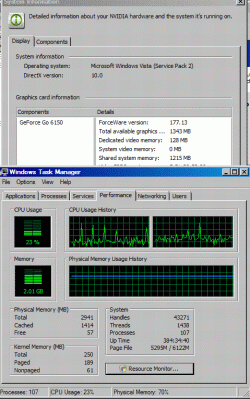
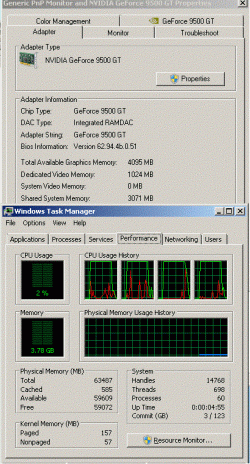
To prevent thread drift in http://www.sevenforums.com/performa...-my-memory-mia-help-me-find-3.html#post403581, I've moved the non OP topics to this one.
 Quote: Originally Posted by mushroomboy
What your saying is my 512MB GFX card gets mirrored? I only have 1G in the system right now, if I'm running a game that utalizes all 512MB of gfx, plus the 60% plus the 450MB the program is using... That's somewhere around 1.5 to 2G that's being used when I game.......... I know I've got a paige file but damn that doesn't have sound math there.
In reality the math is quite sound, Take a look at how “backwards compatible” hardware is, and how old ways of doing things have stuck with us for years long after they should have died a painful death.
your vid card does use 512Mb of memory, check out your Device Manager, first view hidden devices, then (Device Manager, View -> Resources By Type) , and look at all the little things taking up memory. Look at memory and IO each and every little thing in there is a bit of communication with another device if you map the ranges, you will find some gaps, and some intentional overlaps. All that is how your machine works.
Quote:
I only see X GB of ram, but I have 4GB, what is wrong with my memory? - OCZ Forum
The computer reserves blocks of MMIO addresses for Video RAM, then buses, bridges, BIOS, then DRAM.
Quote: Originally Posted by mushroomboy
. Basically if your theory held true if you had a 2G video card and 2G onboard then where is the computers ram!? Gone because you have to mirror the video cards image so it knows what to see?
yep, it happens in real life, you have a machine with so little usable memory in real life that it swaps to disk whenever you try to run anything.
Lets see what Microsoft says about memory mapping, and how it relates to usable memory.
Quote:
The system memory that is reported in the System Information dialog box in Windows Vista is less than you expect if 4 GB of RAM is installed
For example, if you have a video card that has 256 MB of onboard memory, that memory must be mapped within the first 4 GB of address space. If 4 GB of system memory is already installed, part of that address space must be reserved by the graphics memory mapping. Graphics memory mapping overwrites a part of the system memory. These conditions reduce the total amount of system memory that is available to the operating system.
...
the total system memory that is available to the operating system is always less than the physical RAM that is installed
how about the mac-vs pc argument when apple had 64 bit support, and PC's 64 bit support sucked?
Quote:
AppleInsider | Road to Mac OS X Snow Leopard: 64-bits, Santa Rosa, and more
OEMs will encourage customers to upgrade a 2GB machine to 4GB, even though the usable RAM might be limited to 2.3GB. This is especially a problem on high-end gaming machines that have huge graphics cards as well as lots of RAM."
Go to Device Manager, View -> Resources By Connection . Then do the math for your system and see how much memory each item is sucking up.
Quote:
Ask Dan: What's with the 3Gb memory barrier?
4Gb of RAM, and a pair of Nvidia's oddball 1Gb GeForce 7950 GX2 cards. Result: 56.25% of the installed memory absent without leave. You might as well have only bought 2Gb
Are all these people from the past so wrong about how pc hardware works? Or has Windows 7 changed the fundamentals of how computer hardware works?
Quote: Originally Posted by mushroomboy
It's independent, just as off board sound was created so the computer doesn't spend resources on sound. It's ingenious! adding external devices so that we don't have our CPU do the work!? What shall we call these devices? PCI!? GREAT!!!
yep, that's the physical structure/protocol but HOW do you move things around, where does the CPU write the bits that get moved? Where does the vid/sound card READ the bits from? It all has to get stored someplace...
computer does spend resources on sound, and other things, just not as much if the device is “hardware” vs “ a port on a stick”
Quote:
Softmodem - Wikipedia, the free encyclopedia
A Softmodem, or software modem, is a modem with minimal hardware capacities, designed to use a host computer's resources (mostly CPU power and RAM but sometimes even audio hardware) to perform most of the tasks performed by dedicated hardware in a traditional modem.
other things like non hardware raid, soft soundcards, USB , and other stuff uses the cpu/mem to get the job done. if your moving a few hundred gigs of data across a USB port you will see more CPU usage than if you used the same speed fireware, because 1394 does more "in hardware" than USB.
Quote: Originally Posted by mushroomboy
[edit] Infact, what happens if you have a video card with more ram than the PC!? OMG We created a problem!
you can “lock up” the pc during boot (POST fail), or the vid card will not have “all” the memory on it in use.
if you want to try and see what happens when you have a vid card outstrip your memory, get a couple of Newegg.com - PNY VCQFX5800-PCIE-PB Quadro FX5800 4GB 512-bit GDDR3 PCI Express 2.0 x16 SLI Supported Workstation Video Card - Workstation Graphics / Video Cards and be sure to disable swap (if it will let ya) and see what happens..
Quote: Originally Posted by mushroomboy
Think outside the box. Sometimes the better answers are so crazy they just work.
see if your explanation, or my explanation works in real life, how does the data get transferred from one device to another? Lots of ways, one of those ways is the memory location.
once more, are all these people from the past so wrong about how pc hardware works? Or has Windows 7 changed the fundamentals of how computer hardware works?
Even Wikipedia has some good stuff on this very issue
Quote:
Memory-mapped I/O - Wikipedia, the free encyclopedia
Memory-mapped I/O (MMIO) and port I/O (also called port-mapped I/O or PMIO) are two complementary methods of performing input/output between the CPU and peripheral devices in a computer.
Quote:
Framebuffer - Wikipedia, the free encyclopedia
While framebuffers are commonly accessed via a memory mapping directly to the CPU memory space, this is not the only method by which they may be accessed.
Toms hardware has this very same question answered... in 2007...
Quote:
http://www.tomshardware.com/forum/243662-30-does-video-card-count-system-memory
tlreaves 07-17-2007 at 08:39:44 PM
To answer your question, yes the video card memory shows up as system memory in the strictest sense of the word.
…
But when you have 2GB of physical memory, and your video card has 768MB, and windows is assigning the rest to your sound card, pci busses, etc... there are no addresses left over for your extra RAM to operate. This is why 32-bit XP usually does not "register" more than 3.2-3.5 GB of physical memory.
What your saying is my 512MB GFX card gets mirrored? I only have 1G in the system right now, if I'm running a game that utalizes all 512MB of gfx, plus the 60% plus the 450MB the program is using... That's somewhere around 1.5 to 2G that's being used when I game.......... I know I've got a paige file but damn that doesn't have sound math there.
In reality the math is quite sound, Take a look at how “backwards compatible” hardware is, and how old ways of doing things have stuck with us for years long after they should have died a painful death.
your vid card does use 512Mb of memory, check out your Device Manager, first view hidden devices, then (Device Manager, View -> Resources By Type) , and look at all the little things taking up memory. Look at memory and IO each and every little thing in there is a bit of communication with another device if you map the ranges, you will find some gaps, and some intentional overlaps. All that is how your machine works.
Quote:
I only see X GB of ram, but I have 4GB, what is wrong with my memory? - OCZ Forum
The computer reserves blocks of MMIO addresses for Video RAM, then buses, bridges, BIOS, then DRAM.
. Basically if your theory held true if you had a 2G video card and 2G onboard then where is the computers ram!? Gone because you have to mirror the video cards image so it knows what to see?
yep, it happens in real life, you have a machine with so little usable memory in real life that it swaps to disk whenever you try to run anything.
Lets see what Microsoft says about memory mapping, and how it relates to usable memory.
Quote:
The system memory that is reported in the System Information dialog box in Windows Vista is less than you expect if 4 GB of RAM is installed
For example, if you have a video card that has 256 MB of onboard memory, that memory must be mapped within the first 4 GB of address space. If 4 GB of system memory is already installed, part of that address space must be reserved by the graphics memory mapping. Graphics memory mapping overwrites a part of the system memory. These conditions reduce the total amount of system memory that is available to the operating system.
...
the total system memory that is available to the operating system is always less than the physical RAM that is installed
how about the mac-vs pc argument when apple had 64 bit support, and PC's 64 bit support sucked?
Quote:
AppleInsider | Road to Mac OS X Snow Leopard: 64-bits, Santa Rosa, and more
OEMs will encourage customers to upgrade a 2GB machine to 4GB, even though the usable RAM might be limited to 2.3GB. This is especially a problem on high-end gaming machines that have huge graphics cards as well as lots of RAM."
Go to Device Manager, View -> Resources By Connection . Then do the math for your system and see how much memory each item is sucking up.
Quote:
Ask Dan: What's with the 3Gb memory barrier?
4Gb of RAM, and a pair of Nvidia's oddball 1Gb GeForce 7950 GX2 cards. Result: 56.25% of the installed memory absent without leave. You might as well have only bought 2Gb
Are all these people from the past so wrong about how pc hardware works? Or has Windows 7 changed the fundamentals of how computer hardware works?
It's independent, just as off board sound was created so the computer doesn't spend resources on sound. It's ingenious! adding external devices so that we don't have our CPU do the work!? What shall we call these devices? PCI!? GREAT!!!
yep, that's the physical structure/protocol but HOW do you move things around, where does the CPU write the bits that get moved? Where does the vid/sound card READ the bits from? It all has to get stored someplace...
computer does spend resources on sound, and other things, just not as much if the device is “hardware” vs “ a port on a stick”
Quote:
Softmodem - Wikipedia, the free encyclopedia
A Softmodem, or software modem, is a modem with minimal hardware capacities, designed to use a host computer's resources (mostly CPU power and RAM but sometimes even audio hardware) to perform most of the tasks performed by dedicated hardware in a traditional modem.
other things like non hardware raid, soft soundcards, USB , and other stuff uses the cpu/mem to get the job done. if your moving a few hundred gigs of data across a USB port you will see more CPU usage than if you used the same speed fireware, because 1394 does more "in hardware" than USB.
[edit] Infact, what happens if you have a video card with more ram than the PC!? OMG We created a problem!
you can “lock up” the pc during boot (POST fail), or the vid card will not have “all” the memory on it in use.
if you want to try and see what happens when you have a vid card outstrip your memory, get a couple of Newegg.com - PNY VCQFX5800-PCIE-PB Quadro FX5800 4GB 512-bit GDDR3 PCI Express 2.0 x16 SLI Supported Workstation Video Card - Workstation Graphics / Video Cards and be sure to disable swap (if it will let ya) and see what happens..
Think outside the box. Sometimes the better answers are so crazy they just work.
see if your explanation, or my explanation works in real life, how does the data get transferred from one device to another? Lots of ways, one of those ways is the memory location.
once more, are all these people from the past so wrong about how pc hardware works? Or has Windows 7 changed the fundamentals of how computer hardware works?
Even Wikipedia has some good stuff on this very issue
Quote:
Memory-mapped I/O - Wikipedia, the free encyclopedia
Memory-mapped I/O (MMIO) and port I/O (also called port-mapped I/O or PMIO) are two complementary methods of performing input/output between the CPU and peripheral devices in a computer.
Quote:
Framebuffer - Wikipedia, the free encyclopedia
While framebuffers are commonly accessed via a memory mapping directly to the CPU memory space, this is not the only method by which they may be accessed.
Toms hardware has this very same question answered... in 2007...
Quote:
http://www.tomshardware.com/forum/243662-30-does-video-card-count-system-memory
tlreaves 07-17-2007 at 08:39:44 PM
To answer your question, yes the video card memory shows up as system memory in the strictest sense of the word.
…
But when you have 2GB of physical memory, and your video card has 768MB, and windows is assigning the rest to your sound card, pci busses, etc... there are no addresses left over for your extra RAM to operate. This is why 32-bit XP usually does not "register" more than 3.2-3.5 GB of physical memory.
My Computer
At a glance
win 7, R24x 88564gbgeneric pny 9500gt
- OS
- win 7, R2
- CPU
- 4x 885
- Motherboard
- uniwide
- Memory
- 64gb
- Graphics Card(s)
- generic pny 9500gt
- Sound Card
- road7
- Monitor(s) Displays
- generic
- Screen Resolution
- 80 columns
- Hard Drives
- 4x 300gb raid0
- PSU
- 3x500w , hot swap
- Case
- , nut
- Cooling
- , very
- Keyboard
- qwerty
- Mouse
- , eak, a!
- Internet Speed
- 70 baud