Aero Peek - Turn On or Off

How to Turn Aero Peek On or Off in Windows 7


   Information
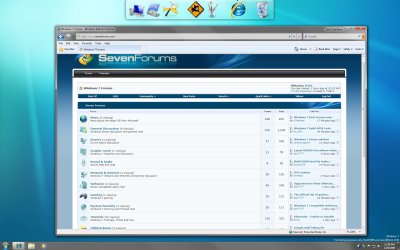
This will show you how to turn Windows 7 Aero Peek, also known as Desktop Preview, On or Off to temporarily make all open windows on the desktop transparent when you place the mouse pointer on the button at the far right end of the taskbar.
   Warning

  • When turned on, Desktop Preview will only work if you have more than one window opened.
  • You will need to have a Aero Theme selected and not one of the Basic and High Contrast Themes for Desktop Preview to work.
Aero Requirements to be Enabled in Windows 7

NOTE: If Aero is not enabled, then Aero Peek will not work even when turned on.
  • Aero is not included in Windows 7 Home Basic or Windows 7 Starter editions.
  • 1 GHz 32-bit or 64-bit processor
  • 1 GB of system memory
  • Support for DirectX 9 graphics with 128 MB memory (in order to enable Aero theme)
  • You must be have True Color (32 bit) set instead of High Color (16 bit).
  • The Desktop Window Manager Session Manager and Themes Services need to be set as Started and Automatic.
  • Refresh or update your WEI score. You will need an WEI score minimum of 2.0 in both Graphics & Gaming graphics in order for Aero to be activated.
  • The desktop composition and Animate controls and elements inside windows options need to be enabled in Visual Effects.

EXAMPLE: Aero Peek
NOTE: This is before (left screenshot) and after (right screenshot) hovering the mouse pointer over the Show Desktop button on the taskbar, or pressing the Windows Key + Spacebar. Before.jpg
Preview.jpg


OPTION ONE

Turn Aero Peek On or Off in Taskbar and Start Menu Properties

1. Right click on the Start button and click on Properties. A) Go to step 3.
OR

2. Right click on a empty area on the taskbar and click on Properties.

3. Click on the Taskbar tab. (See screenshot below) Properties.jpg
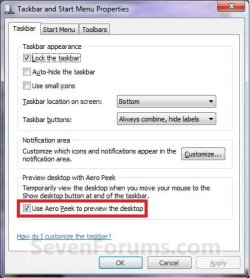
4. To Turn Off Aero Peek A) Uncheck the Use Aero Peek to preview the desktop box. (See screenshot above)

B) Go to step 6.
5. To Turn On Aero Peek
NOTE: By default, Desktop is turned on in Windows 7. A) Check the Use Aero Peek to preview the desktop box. (See screenshot below step 3)
6. Click on OK. (See screenshot below step 3)


OPTION TWO

Turn Aero Peek On or Off with Show Desktop Button on Taskbar
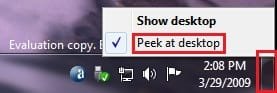
1. Right click on the button at the far right of the taskbar. (See screenshot below) Taskbar-2.jpg
2. To Turn Off Aero Peek A) Right click on the far right taskbar button and select Peek at desktop to uncheck it. (See screenshot above)
3. To Turn On Aero Peek
NOTE: By default, Preview desktop is checked in Windows 7. A) Right click on the far right taskbar button and select Peek at desktop to check it. (See screenshot below step 1)


OPTION THREE

Turn Aero Peek On or Off in Visual Effects


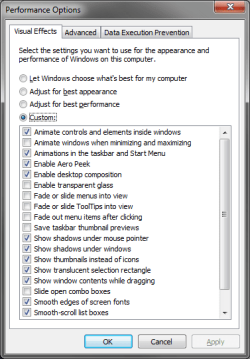
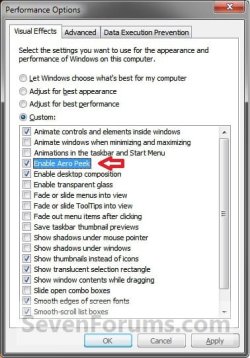
NOTE: This option will also enable or disable taskbar thumbnail live previews. 1. Open the Visual Effects settings.

2. To Enable Areo Peek A) Check the Enable Aero Peek box. (See screenshot below step 4)

B) Go to step 4.
3. To Disable Areo Peek
NOTE: This will gray out the settings in OPTION ONE and OPTION TWO above. A) Uncheck the Enable Aero Peek box. (See screenshot below step 4)
4. Click on OK. Visual_Effects.jpg


OPTION FOUR

Turn Aero Peek On or Off Using a REG File Download


NOTE: This option will not work if Aero Peek was disabled using OPTION THREE above. 1. To Enable Aero Peek A) Click on the Download button below to download the file below. Enabled_Aero_Peek.reg

Download


B) Go to step 3.
2. To Disable Aero Peek A) Click on the Download button below to download the file below. Disabled_Aero_Peek.reg


Download


3. Click on Save, and save the .reg file to the desktop.

4. Right click on the downloaded .reg file and click on Merge.

5. Click on Run, Yes, Yes, and OK when prompted.

6. Log off and log on, or restart the computer.

7. When done, you can delete the downloaded .reg file if you like.
That's it,
Shawn


Attachments

Last edited:
indeed i have, and it was ok until i got the RTM of 7

Did you do a clean or upgrade install to the RTM? It may be one of those upgrade issues where something corrupted in the process.
 

My Computer My Computer

At a glance

64-bit Windows 11 Pro for WorkstationsIntel i7-8700K OC'd to 5 GHz64 GB (4x16GB) G.SKILL TridentZ RGB DDR4 3600...ASUS ROG-STRIX-GTX1080TI-O11G-GAMING
Computer type
PC/Desktop
Computer Manufacturer/Model Number
Self built custom
OS
64-bit Windows 11 Pro for Workstations
CPU
Intel i7-8700K OC'd to 5 GHz
Motherboard
ASUS ROG Maximus XI Formula Z390
Memory
64 GB (4x16GB) G.SKILL TridentZ RGB DDR4 3600 MHz
Graphics Card(s)
ASUS ROG-STRIX-GTX1080TI-O11G-GAMING
Sound Card
Integrated
Monitor(s) Displays
2 x Samsung Odyssey G7 27"
Screen Resolution
2560x1440
Hard Drives
1TB Samsung 990 PRO M.2,
4TB Samsung 990 PRO PRO M.2,
TerraMaster F8 SSD Plus NAS
PSU
Seasonic Prime Titanium 850W
Case
Thermaltake Core P3
Cooling
Corsair Hydro H115i
Keyboard
Logitech wireless K800
Mouse
Logitech MX Master 4
Internet Speed
2 Gb/s Download and 100 Mb/s Upload
Antivirus
Malwarebyte Anti-Malware Premium
Browser
Google Chrome
Other Info
Logitech Z625 speaker system,
Logitech BRIO 4K Pro webcam,
HP Color LaserJet Pro MFP M477fdn,
APC SMART-UPS RT 1000 XL - SURT1000XLI,
Galaxy S23 Plus phone
Aero peek

Clean i'm afraid, wish it was that easy.
All seems to check out ok visually with settings so must be something under the hood.

will continue to meddle and intefere with the OS. will let kyou know if i get any joy
 

My Computer My Computer

At a glance

windows 7 ProfessionalP4 550 HT 3.4Ghz2G DDR SDRAM PC3200XFX Geforce 8600 GT 256MB
Computer Manufacturer/Model Number
custom
OS
windows 7 Professional
CPU
P4 550 HT 3.4Ghz
Motherboard
GA81915PM
Memory
2G DDR SDRAM PC3200
Graphics Card(s)
XFX Geforce 8600 GT 256MB
Sound Card
SB Audigy 4 pro
Monitor(s) Displays
2x Dell 19" flp
Hard Drives
250G x2
80 x1
PSU
450 W
Case
custom
Cooling
standard
I have fixed it! go to advanced system settings -> performance -> settings and put a tick in Save taskbar thumbnail Previews.
for some reason it works with but not without.
 

My Computer My Computer

At a glance

windows 7 ProfessionalP4 550 HT 3.4Ghz2G DDR SDRAM PC3200XFX Geforce 8600 GT 256MB
Computer Manufacturer/Model Number
custom
OS
windows 7 Professional
CPU
P4 550 HT 3.4Ghz
Motherboard
GA81915PM
Memory
2G DDR SDRAM PC3200
Graphics Card(s)
XFX Geforce 8600 GT 256MB
Sound Card
SB Audigy 4 pro
Monitor(s) Displays
2x Dell 19" flp
Hard Drives
250G x2
80 x1
PSU
450 W
Case
custom
Cooling
standard
Jack,

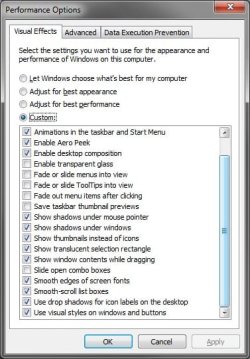
Strange, I have that option unchecked in Advanced System Settings, and the taskbar option is not grayed out for me. Here's a copy of what I have set there so you can compare to see if it may be something else as well.

A.pngB.jpg
 

My Computer My Computer

At a glance

64-bit Windows 11 Pro for WorkstationsIntel i7-8700K OC'd to 5 GHz64 GB (4x16GB) G.SKILL TridentZ RGB DDR4 3600...ASUS ROG-STRIX-GTX1080TI-O11G-GAMING
Computer type
PC/Desktop
Computer Manufacturer/Model Number
Self built custom
OS
64-bit Windows 11 Pro for Workstations
CPU
Intel i7-8700K OC'd to 5 GHz
Motherboard
ASUS ROG Maximus XI Formula Z390
Memory
64 GB (4x16GB) G.SKILL TridentZ RGB DDR4 3600 MHz
Graphics Card(s)
ASUS ROG-STRIX-GTX1080TI-O11G-GAMING
Sound Card
Integrated
Monitor(s) Displays
2 x Samsung Odyssey G7 27"
Screen Resolution
2560x1440
Hard Drives
1TB Samsung 990 PRO M.2,
4TB Samsung 990 PRO PRO M.2,
TerraMaster F8 SSD Plus NAS
PSU
Seasonic Prime Titanium 850W
Case
Thermaltake Core P3
Cooling
Corsair Hydro H115i
Keyboard
Logitech wireless K800
Mouse
Logitech MX Master 4
Internet Speed
2 Gb/s Download and 100 Mb/s Upload
Antivirus
Malwarebyte Anti-Malware Premium
Browser
Google Chrome
Other Info
Logitech Z625 speaker system,
Logitech BRIO 4K Pro webcam,
HP Color LaserJet Pro MFP M477fdn,
APC SMART-UPS RT 1000 XL - SURT1000XLI,
Galaxy S23 Plus phone
peek not working

must be something else messing with it but as soon as i put the tick in the box, the oprion was no longeer greyed out and it worked.
i will continue to dig for your sake
 

My Computer My Computer

At a glance

windows 7 ProfessionalP4 550 HT 3.4Ghz2G DDR SDRAM PC3200XFX Geforce 8600 GT 256MB
Computer Manufacturer/Model Number
custom
OS
windows 7 Professional
CPU
P4 550 HT 3.4Ghz
Motherboard
GA81915PM
Memory
2G DDR SDRAM PC3200
Graphics Card(s)
XFX Geforce 8600 GT 256MB
Sound Card
SB Audigy 4 pro
Monitor(s) Displays
2x Dell 19" flp
Hard Drives
250G x2
80 x1
PSU
450 W
Case
custom
Cooling
standard
Aero peek keyboard shortcut

When I enable Aero peek it works fine when hovering or clicking the button in the taskbar. It also works when hitting the key combination <Win>+<Space>.

When I disable Aero peek nothing happens when clicking or hovering the button in the taskbar, as expected. But, the key combination <Win>+<Space> still does Aero peek!

That irritates me to no end since I would like to bind that key combination to something else. The perferct solution for me would be to just disable the keyboard shortcut and still have the button in the taskbar work.

Suggestions are welcome!
 

My Computer My Computer

At a glance

Windows 7
OS
Windows 7

My Computer My Computer

At a glance

64-bit Windows 11 Pro for WorkstationsIntel i7-8700K OC'd to 5 GHz64 GB (4x16GB) G.SKILL TridentZ RGB DDR4 3600...ASUS ROG-STRIX-GTX1080TI-O11G-GAMING
Computer type
PC/Desktop
Computer Manufacturer/Model Number
Self built custom
OS
64-bit Windows 11 Pro for Workstations
CPU
Intel i7-8700K OC'd to 5 GHz
Motherboard
ASUS ROG Maximus XI Formula Z390
Memory
64 GB (4x16GB) G.SKILL TridentZ RGB DDR4 3600 MHz
Graphics Card(s)
ASUS ROG-STRIX-GTX1080TI-O11G-GAMING
Sound Card
Integrated
Monitor(s) Displays
2 x Samsung Odyssey G7 27"
Screen Resolution
2560x1440
Hard Drives
1TB Samsung 990 PRO M.2,
4TB Samsung 990 PRO PRO M.2,
TerraMaster F8 SSD Plus NAS
PSU
Seasonic Prime Titanium 850W
Case
Thermaltake Core P3
Cooling
Corsair Hydro H115i
Keyboard
Logitech wireless K800
Mouse
Logitech MX Master 4
Internet Speed
2 Gb/s Download and 100 Mb/s Upload
Antivirus
Malwarebyte Anti-Malware Premium
Browser
Google Chrome
Other Info
Logitech Z625 speaker system,
Logitech BRIO 4K Pro webcam,
HP Color LaserJet Pro MFP M477fdn,
APC SMART-UPS RT 1000 XL - SURT1000XLI,
Galaxy S23 Plus phone
Thank you for the quick reply, but there are some of the Win+X shortcuts I use extensively, so unless someone discovers a registry hack at some point, I guess I will have to accept that Win+Space is now occupied by Windows :)
 

My Computer My Computer

At a glance

Windows 7
OS
Windows 7
Anyone solved this yet? I'm having the same exact issue as described, been running 7700 (RTM) since August with an ATI Radeon 4870 1GB.

Now the Aero Peek Preview option is checked but greyed out. I've tried all drivers known to man and after some serious messing around here is what I found.

I was able to get it working once I fully uninstalled the ATI driver, then remove the driver from the Device Manager.
Upon the first reboot Win7 will auto detect the card and install the default driver. You will at the point need to restart the machine once more.
Upon the next reboot the system works as expected with no issues with the peek feature.
Then as soon as the system is rebooted the feature gets disabled again.

Anyone else able to replicate the steps above so that we can hopefully troubleshoot this annoyance once in for all.
 

My Computer My Computer

At a glance

Win7
OS
Win7
I have fixed it! go to advanced system settings -> performance -> settings and put a tick in Save taskbar thumbnail Previews.
for some reason it works with but not without.

Many thanks thejackr - I had the exact same problem (WEI of 4.5, greyed out Aero Peek but check-marked) and the registry entry didn't work, but your suggestion actually did!

I may have been some registry editing I've been doing thanks to the good folks here (love the customization options) and it's nice to have Aero Peek working agin.

Thanks again!
 

My Computer My Computer

At a glance

Windows 7 UltimatePentium D 8202GBSapphire Radeon HD 4670
Computer Manufacturer/Model Number
Dell Dimension E510
OS
Windows 7 Ultimate
CPU
Pentium D 820
Motherboard
Dell BTX Proprietary
Memory
2GB
Graphics Card(s)
Sapphire Radeon HD 4670
Sound Card
Integrated Sigmatel Audio
Monitor(s) Displays
Dell 2208WFP, HP L1910, Dell 1907FP
Screen Resolution
1680x1050, 1280x1024 (times two)
Hard Drives
500GB SATA, 1TB SATA
PSU
400W Thermaltake (replaced broken Dell unit)
Case
Dell proprietary
Internet Speed
Comcast HSI (10Mb)
Other Info
Windows Experience Rating 4.5
use the troubleshoot wizard

Hi

all Aero features work except the Peak so i found out that the problem is the video card, it needs a new driver.
to find out what's wrong with yours, Right-click on the desktop, select Personalize then use the "troubleshoot problems with transperancy and other Aero affects"

follow the wizard and it should tell you what the problem is.

Waz
 

My Computer My Computer

At a glance

windows 7
OS
windows 7
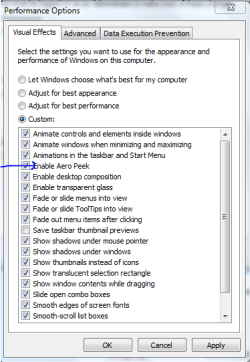
Option 4:
Capture.PNG
 

My Computer My Computer

At a glance

Windows® 8 Pro (64-bit)Intel® Core™ i5 Processor 2467M (1.60GHz, 3MB...6GB DDR3 System Memory at 1,333MHz (on BD 4GB...AMD Radeon™ HD7550M 1GB DDR3 (Ext. Graphic)
Computer Manufacturer/Model Number
Samsung NP530U4B-S02IN
OS
Windows® 8 Pro (64-bit)
CPU
Intel® Core™ i5 Processor 2467M (1.60GHz, 3MB L3 Cache)
Motherboard
Samsung Electronics
Memory
6GB DDR3 System Memory at 1,333MHz (on BD 4GB + 2GB x 1)
Graphics Card(s)
AMD Radeon™ HD7550M 1GB DDR3 (Ext. Graphic)
Sound Card
Realtek High Definition Audio
Monitor(s) Displays
35.56cm (14.0) SuperBright 300nit HD LED Display
Screen Resolution
1366x768
Hard Drives
1TB S-ATA II Hard Drive (5400RPM) with ExpressCache 16GB SSD
Internet Speed
sucks
Antivirus
Microsoft Security Essentials
Browser
Google Chrome (Sync enabled)
Thank you Dinesh. Added. :)
 

My Computer My Computer

At a glance

64-bit Windows 11 Pro for WorkstationsIntel i7-8700K OC'd to 5 GHz64 GB (4x16GB) G.SKILL TridentZ RGB DDR4 3600...ASUS ROG-STRIX-GTX1080TI-O11G-GAMING
Computer type
PC/Desktop
Computer Manufacturer/Model Number
Self built custom
OS
64-bit Windows 11 Pro for Workstations
CPU
Intel i7-8700K OC'd to 5 GHz
Motherboard
ASUS ROG Maximus XI Formula Z390
Memory
64 GB (4x16GB) G.SKILL TridentZ RGB DDR4 3600 MHz
Graphics Card(s)
ASUS ROG-STRIX-GTX1080TI-O11G-GAMING
Sound Card
Integrated
Monitor(s) Displays
2 x Samsung Odyssey G7 27"
Screen Resolution
2560x1440
Hard Drives
1TB Samsung 990 PRO M.2,
4TB Samsung 990 PRO PRO M.2,
TerraMaster F8 SSD Plus NAS
PSU
Seasonic Prime Titanium 850W
Case
Thermaltake Core P3
Cooling
Corsair Hydro H115i
Keyboard
Logitech wireless K800
Mouse
Logitech MX Master 4
Internet Speed
2 Gb/s Download and 100 Mb/s Upload
Antivirus
Malwarebyte Anti-Malware Premium
Browser
Google Chrome
Other Info
Logitech Z625 speaker system,
Logitech BRIO 4K Pro webcam,
HP Color LaserJet Pro MFP M477fdn,
APC SMART-UPS RT 1000 XL - SURT1000XLI,
Galaxy S23 Plus phone
No problem Shawn. :)
 

My Computer My Computer

At a glance

Windows® 8 Pro (64-bit)Intel® Core™ i5 Processor 2467M (1.60GHz, 3MB...6GB DDR3 System Memory at 1,333MHz (on BD 4GB...AMD Radeon™ HD7550M 1GB DDR3 (Ext. Graphic)
Computer Manufacturer/Model Number
Samsung NP530U4B-S02IN
OS
Windows® 8 Pro (64-bit)
CPU
Intel® Core™ i5 Processor 2467M (1.60GHz, 3MB L3 Cache)
Motherboard
Samsung Electronics
Memory
6GB DDR3 System Memory at 1,333MHz (on BD 4GB + 2GB x 1)
Graphics Card(s)
AMD Radeon™ HD7550M 1GB DDR3 (Ext. Graphic)
Sound Card
Realtek High Definition Audio
Monitor(s) Displays
35.56cm (14.0) SuperBright 300nit HD LED Display
Screen Resolution
1366x768
Hard Drives
1TB S-ATA II Hard Drive (5400RPM) with ExpressCache 16GB SSD
Internet Speed
sucks
Antivirus
Microsoft Security Essentials
Browser
Google Chrome (Sync enabled)
I've tried all 4 options in the tutorial but I can't disable Aero Peek. Any other tricks?
 

My Computer My Computer

At a glance

Win7 x64 SP1Intel Core i5-2500K2 x 4GB G.Skill RipJaws DDR3-1333Powercolor Radeon HD 5850
Computer Manufacturer/Model Number
Custom
OS
Win7 x64 SP1
CPU
Intel Core i5-2500K
Motherboard
Asus P8P67 Pro
Memory
2 x 4GB G.Skill RipJaws DDR3-1333
Graphics Card(s)
Powercolor Radeon HD 5850
Monitor(s) Displays
BenQ V2400W, BenQ G2200W
Screen Resolution
1920x1200, 1920x1080
Hard Drives
Intel X25-M G2 80GB
Hitachi Deskstar 7K1000.C 1TB
PSU
Seasonic S12II 500W
Case
Cooler Master Centurion 590
Cooling
Xigmatek HDT-S1283
Hello Amorek,

Just to be sure, disabling Aero Peek does not remove the button on the far right side of the taskbar. It only disables Aero Peek itself so that you do not get the right example screenshot at the top of the tutorial when you hover over it.

Do you mean that Aero Peek still works when you hover the mouse pointer over the button even after you have disabled it?
 

My Computer My Computer

At a glance

64-bit Windows 11 Pro for WorkstationsIntel i7-8700K OC'd to 5 GHz64 GB (4x16GB) G.SKILL TridentZ RGB DDR4 3600...ASUS ROG-STRIX-GTX1080TI-O11G-GAMING
Computer type
PC/Desktop
Computer Manufacturer/Model Number
Self built custom
OS
64-bit Windows 11 Pro for Workstations
CPU
Intel i7-8700K OC'd to 5 GHz
Motherboard
ASUS ROG Maximus XI Formula Z390
Memory
64 GB (4x16GB) G.SKILL TridentZ RGB DDR4 3600 MHz
Graphics Card(s)
ASUS ROG-STRIX-GTX1080TI-O11G-GAMING
Sound Card
Integrated
Monitor(s) Displays
2 x Samsung Odyssey G7 27"
Screen Resolution
2560x1440
Hard Drives
1TB Samsung 990 PRO M.2,
4TB Samsung 990 PRO PRO M.2,
TerraMaster F8 SSD Plus NAS
PSU
Seasonic Prime Titanium 850W
Case
Thermaltake Core P3
Cooling
Corsair Hydro H115i
Keyboard
Logitech wireless K800
Mouse
Logitech MX Master 4
Internet Speed
2 Gb/s Download and 100 Mb/s Upload
Antivirus
Malwarebyte Anti-Malware Premium
Browser
Google Chrome
Other Info
Logitech Z625 speaker system,
Logitech BRIO 4K Pro webcam,
HP Color LaserJet Pro MFP M477fdn,
APC SMART-UPS RT 1000 XL - SURT1000XLI,
Galaxy S23 Plus phone
Do you mean that Aero Peek still works when you hover the mouse pointer over the button even after you have disabled it?

Yup. I have it disabled but it still peeks when I hover over taskbar items. I have 3 Win7 systems (Home Premium 32-bit, Ultimate 32-bit, Ultimate 64-bit) and I can't disable it on any of them.
 

My Computer My Computer

At a glance

Win7 x64 SP1Intel Core i5-2500K2 x 4GB G.Skill RipJaws DDR3-1333Powercolor Radeon HD 5850
Computer Manufacturer/Model Number
Custom
OS
Win7 x64 SP1
CPU
Intel Core i5-2500K
Motherboard
Asus P8P67 Pro
Memory
2 x 4GB G.Skill RipJaws DDR3-1333
Graphics Card(s)
Powercolor Radeon HD 5850
Monitor(s) Displays
BenQ V2400W, BenQ G2200W
Screen Resolution
1920x1200, 1920x1080
Hard Drives
Intel X25-M G2 80GB
Hitachi Deskstar 7K1000.C 1TB
PSU
Seasonic S12II 500W
Case
Cooler Master Centurion 590
Cooling
Xigmatek HDT-S1283
Amourek,

Where did you get your Windows 7 from (ex: retail, torrent....) , and how did you install (ex: upgrade, clean...) it?
 

My Computer My Computer

At a glance

64-bit Windows 11 Pro for WorkstationsIntel i7-8700K OC'd to 5 GHz64 GB (4x16GB) G.SKILL TridentZ RGB DDR4 3600...ASUS ROG-STRIX-GTX1080TI-O11G-GAMING
Computer type
PC/Desktop
Computer Manufacturer/Model Number
Self built custom
OS
64-bit Windows 11 Pro for Workstations
CPU
Intel i7-8700K OC'd to 5 GHz
Motherboard
ASUS ROG Maximus XI Formula Z390
Memory
64 GB (4x16GB) G.SKILL TridentZ RGB DDR4 3600 MHz
Graphics Card(s)
ASUS ROG-STRIX-GTX1080TI-O11G-GAMING
Sound Card
Integrated
Monitor(s) Displays
2 x Samsung Odyssey G7 27"
Screen Resolution
2560x1440
Hard Drives
1TB Samsung 990 PRO M.2,
4TB Samsung 990 PRO PRO M.2,
TerraMaster F8 SSD Plus NAS
PSU
Seasonic Prime Titanium 850W
Case
Thermaltake Core P3
Cooling
Corsair Hydro H115i
Keyboard
Logitech wireless K800
Mouse
Logitech MX Master 4
Internet Speed
2 Gb/s Download and 100 Mb/s Upload
Antivirus
Malwarebyte Anti-Malware Premium
Browser
Google Chrome
Other Info
Logitech Z625 speaker system,
Logitech BRIO 4K Pro webcam,
HP Color LaserJet Pro MFP M477fdn,
APC SMART-UPS RT 1000 XL - SURT1000XLI,
Galaxy S23 Plus phone
Amourek,

Where did you get your Windows 7 from (ex: retail, torrent....) , and how did you install (ex: upgrade, clean...) it?

Home Prem: upgrade, clean install
Ultimates: one OEM, one retail, clean installs
 

My Computer My Computer

At a glance

Win7 x64 SP1Intel Core i5-2500K2 x 4GB G.Skill RipJaws DDR3-1333Powercolor Radeon HD 5850
Computer Manufacturer/Model Number
Custom
OS
Win7 x64 SP1
CPU
Intel Core i5-2500K
Motherboard
Asus P8P67 Pro
Memory
2 x 4GB G.Skill RipJaws DDR3-1333
Graphics Card(s)
Powercolor Radeon HD 5850
Monitor(s) Displays
BenQ V2400W, BenQ G2200W
Screen Resolution
1920x1200, 1920x1080
Hard Drives
Intel X25-M G2 80GB
Hitachi Deskstar 7K1000.C 1TB
PSU
Seasonic S12II 500W
Case
Cooler Master Centurion 590
Cooling
Xigmatek HDT-S1283
Amourek,

I must admit that I do not know why it is still working for you. It should not when disabled. Especially if you used OPTION FOUR and restarted afterwards. :(
 

My Computer My Computer

At a glance

64-bit Windows 11 Pro for WorkstationsIntel i7-8700K OC'd to 5 GHz64 GB (4x16GB) G.SKILL TridentZ RGB DDR4 3600...ASUS ROG-STRIX-GTX1080TI-O11G-GAMING
Computer type
PC/Desktop
Computer Manufacturer/Model Number
Self built custom
OS
64-bit Windows 11 Pro for Workstations
CPU
Intel i7-8700K OC'd to 5 GHz
Motherboard
ASUS ROG Maximus XI Formula Z390
Memory
64 GB (4x16GB) G.SKILL TridentZ RGB DDR4 3600 MHz
Graphics Card(s)
ASUS ROG-STRIX-GTX1080TI-O11G-GAMING
Sound Card
Integrated
Monitor(s) Displays
2 x Samsung Odyssey G7 27"
Screen Resolution
2560x1440
Hard Drives
1TB Samsung 990 PRO M.2,
4TB Samsung 990 PRO PRO M.2,
TerraMaster F8 SSD Plus NAS
PSU
Seasonic Prime Titanium 850W
Case
Thermaltake Core P3
Cooling
Corsair Hydro H115i
Keyboard
Logitech wireless K800
Mouse
Logitech MX Master 4
Internet Speed
2 Gb/s Download and 100 Mb/s Upload
Antivirus
Malwarebyte Anti-Malware Premium
Browser
Google Chrome
Other Info
Logitech Z625 speaker system,
Logitech BRIO 4K Pro webcam,
HP Color LaserJet Pro MFP M477fdn,
APC SMART-UPS RT 1000 XL - SURT1000XLI,
Galaxy S23 Plus phone
Back
Top