Extra partitions for personal files

DaRonRon

New member
Many people have told me, and i've read in many places that its better to create a separate partition for my files (documents, videos, music etc.) so that whenever i format or something goes wrong i will still have my files available.

However the only thing holding me back from doing this is privacy. If i have windows seven installed on drive C, and all my files on drive D, whats stopping a guest from accessing those files? That is if someone logs into windows 7 on the guest account, can they still access that drive D?

If there is a way to block them from doing so then i'll go and partition my hdd.

Look forward to your replies!
 

My Computer

Computer Manufacturer/Model Number
Sony
OS
Main OS: Windows 7 64 bit, Secondary: Vista 32 bit
CPU
Intel Core 2 Duo P8400 @ 2.26 Ghz
Motherboard
Intel PM45
Memory
4GB DDR2
Graphics Card(s)
ATI Radeon Mobility HD3470
Sound Card
Integrated Realtek
Monitor(s) Displays
Integrated (Laptop) 16.4 inch
Screen Resolution
1600x900
Hard Drives
320 GB
Mouse
Logitech
Internet Speed
1 Mb/s
Many people have told me, and i've read in many places that its better to create a separate partition for my files (documents, videos, music etc.) so that whenever i format or something goes wrong i will still have my files available.

However the only thing holding me back from doing this is privacy. If i have windows seven installed on drive C, and all my files on drive D, whats stopping a guest from accessing those files? That is if someone logs into windows 7 on the guest account, can they still access that drive D?

If there is a way to block them from doing so then i'll go and partition my hdd.

Look forward to your replies!

Hi! Users on the guest account shouldn't be able to view anything. And you can stop other users from this as well.

See here: How to set, view, change, or remove special permissions for files and folders in Windows XP


Thanks,
ZeshanA
If I helped, please rep me.
 
thanks for the quick reply. I switched on the guest account right now, logged into it and checked to see if i can see my vista partition.. and i can. That goes against what you said about Guests not being able to see anything.

Anyway i will check out the link you posted when i have some time. thanks for that.

And repped :P
 

My Computer

Computer Manufacturer/Model Number
Sony
OS
Main OS: Windows 7 64 bit, Secondary: Vista 32 bit
CPU
Intel Core 2 Duo P8400 @ 2.26 Ghz
Motherboard
Intel PM45
Memory
4GB DDR2
Graphics Card(s)
ATI Radeon Mobility HD3470
Sound Card
Integrated Realtek
Monitor(s) Displays
Integrated (Laptop) 16.4 inch
Screen Resolution
1600x900
Hard Drives
320 GB
Mouse
Logitech
Internet Speed
1 Mb/s
Many people have told me, and i've read in many places that its better to create a separate partition for my files (documents, videos, music etc.) so that whenever i format or something goes wrong i will still have my files available.

However the only thing holding me back from doing this is privacy. If i have windows seven installed on drive C, and all my files on drive D, whats stopping a guest from accessing those files? That is if someone logs into windows 7 on the guest account, can they still access that drive D?

If there is a way to block them from doing so then i'll go and partition my hdd.

Look forward to your replies!

I have followed that method since the early '90s.

As to privacy, use an encription program on your personal drive but don't forget your password! Be sure to give the password to your attorney or lock it in a bank vault so if the unthinkable happens your family will have acess to your records.

Regards,
GEWB
 

My Computer

Computer type
PC/Desktop
Computer Manufacturer/Model Number
(7 different computers booting up to 10 systems)
OS
Linux Mint / XP / Win7 Home, Pro, Ultimate / Win8.1 / Win10
Other Info
Four desktops, two laptops, one notebook and one tablet
Many people have told me, and i've read in many places that its better to create a separate partition for my files (documents, videos, music etc.) so that whenever i format or something goes wrong i will still have my files available.

However the only thing holding me back from doing this is privacy. If i have windows seven installed on drive C, and all my files on drive D, whats stopping a guest from accessing those files? That is if someone logs into windows 7 on the guest account, can they still access that drive D?

If there is a way to block them from doing so then i'll go and partition my hdd.

Look forward to your replies!

I have followed that method since the early '90s.

As to privacy, use an encription program on your personal drive but don't forget your password! Be sure to give the password to your attorney or lock it in a bank vault so if the unthinkable happens your family will have acess to your records.

Regards,
GEWB

I like the idea of an encryption program. Are there any you recommend? A quick google search doesnt bring up anything noteworthy..
 

My Computer

Computer Manufacturer/Model Number
Sony
OS
Main OS: Windows 7 64 bit, Secondary: Vista 32 bit
CPU
Intel Core 2 Duo P8400 @ 2.26 Ghz
Motherboard
Intel PM45
Memory
4GB DDR2
Graphics Card(s)
ATI Radeon Mobility HD3470
Sound Card
Integrated Realtek
Monitor(s) Displays
Integrated (Laptop) 16.4 inch
Screen Resolution
1600x900
Hard Drives
320 GB
Mouse
Logitech
Internet Speed
1 Mb/s
thanks for the quick reply. I switched on the guest account right now, logged into it and checked to see if i can see my vista partition.. and i can. That goes against what you said about Guests not being able to see anything.

Go back to the posted link and read the "permissions" section. Guests can't see anything unless granted permission.....my guess is you have no permission restrictions set.
 

My Computer

Computer Manufacturer/Model Number
Home Built
OS
Windows 7 - 64 bit
CPU
i7 920
Motherboard
Asus Rampage II Extreme
Memory
Mushkin 998692
Graphics Card(s)
GTX 295 FTW Edition 1792MB
Sound Card
Sounblaster Xi Fi Extreme
Monitor(s) Displays
Dekk U2410
Hard Drives
Seagate 7200.12
PSU
Antec SG-850
Case
Antec 1200
Cooling
Prolimatech Megashadow
You have to either set permissions on the files to keep people out or use an encryption application to encrypt the data within a container file. The encryption app that I recommend is True Crypt (it's free).
 

My Computer

Computer Manufacturer/Model Number
Self-Built in July 2009
OS
Windows 7 Ultimate x64
CPU
Intel Q9550 2.83Ghz OC'd to 3.40Ghz
Motherboard
Gigabyte GA-EP45-UD3R rev. 1.1, F12 BIOS
Memory
8GB G.Skill PI DDR2-800, 4-4-4-12 timings
Graphics Card(s)
EVGA 1280MB Nvidia GeForce GTX570
Sound Card
Realtek ALC899A 8 channel onboard audio
Monitor(s) Displays
23" Acer x233H
Screen Resolution
1920x1080
Hard Drives
Intel X25-M 80GB Gen 2 SSD
Western Digital 1TB Caviar Black, 32MB cache. WD1001FALS
PSU
Corsair 620HX modular
Case
Antec P182
Cooling
stock
Keyboard
ABS M1 Mechanical
Mouse
Logitech G9 Laser Mouse
Internet Speed
15/2 cable modem
Other Info
Windows and Linux enthusiast. Logitech G35 Headset.
ok i was just testing out permissions for the D drive and now i've done something bad. I denied users of my laptop permission to access the drive, but now it wont let me access it! Im the administrator, shouldnt i be allowed? I tried to perform a system restore but it says i dont have any. Oh man. Can anyone help me here?
 

My Computer

Computer Manufacturer/Model Number
Sony
OS
Main OS: Windows 7 64 bit, Secondary: Vista 32 bit
CPU
Intel Core 2 Duo P8400 @ 2.26 Ghz
Motherboard
Intel PM45
Memory
4GB DDR2
Graphics Card(s)
ATI Radeon Mobility HD3470
Sound Card
Integrated Realtek
Monitor(s) Displays
Integrated (Laptop) 16.4 inch
Screen Resolution
1600x900
Hard Drives
320 GB
Mouse
Logitech
Internet Speed
1 Mb/s
ok i was just testing out permissions for the D drive and now i've done something bad. I denied users of my laptop permission to access the drive, but now it wont let me access it! Im the administrator, shouldnt i be allowed? I tried to perform a system restore but it says i dont have any. Oh man. Can anyone help me here?

You will have to ownership and then reassign permissions. You can find in the advanced options section of the permission tabs.

Permissions are handled at the most restrictive possible. So, if you are a member of a group with Read and Write, but then also a member of a group that just has read...the least restrictive permission is read...thus you would only be able to read.
 

My Computer

Computer Manufacturer/Model Number
Self-Built in July 2009
OS
Windows 7 Ultimate x64
CPU
Intel Q9550 2.83Ghz OC'd to 3.40Ghz
Motherboard
Gigabyte GA-EP45-UD3R rev. 1.1, F12 BIOS
Memory
8GB G.Skill PI DDR2-800, 4-4-4-12 timings
Graphics Card(s)
EVGA 1280MB Nvidia GeForce GTX570
Sound Card
Realtek ALC899A 8 channel onboard audio
Monitor(s) Displays
23" Acer x233H
Screen Resolution
1920x1080
Hard Drives
Intel X25-M 80GB Gen 2 SSD
Western Digital 1TB Caviar Black, 32MB cache. WD1001FALS
PSU
Corsair 620HX modular
Case
Antec P182
Cooling
stock
Keyboard
ABS M1 Mechanical
Mouse
Logitech G9 Laser Mouse
Internet Speed
15/2 cable modem
Other Info
Windows and Linux enthusiast. Logitech G35 Headset.
ok i was just testing out permissions for the D drive and now i've done something bad. I denied users of my laptop permission to access the drive, but now it wont let me access it! Im the administrator, shouldnt i be allowed? I tried to perform a system restore but it says i dont have any. Oh man. Can anyone help me here?

You will have to ownership and then reassign permissions. You can find in the advanced options section of the permission tabs.

Permissions are handled at the most restrictive possible. So, if you are a member of a group with Read and Write, but then also a member of a group that just has read...the least restrictive permission is read...thus you would only be able to read.

oh thank you, that sorted it out.

So if i wanted guests to not access the drive then which user should i change permissions for? There is listed Authenticated users, System, Administrators and Users. I tried Users and that's what caused me (as an administrator) to not be able to access the drive.
 

My Computer

Computer Manufacturer/Model Number
Sony
OS
Main OS: Windows 7 64 bit, Secondary: Vista 32 bit
CPU
Intel Core 2 Duo P8400 @ 2.26 Ghz
Motherboard
Intel PM45
Memory
4GB DDR2
Graphics Card(s)
ATI Radeon Mobility HD3470
Sound Card
Integrated Realtek
Monitor(s) Displays
Integrated (Laptop) 16.4 inch
Screen Resolution
1600x900
Hard Drives
320 GB
Mouse
Logitech
Internet Speed
1 Mb/s
Don't deny access to any particular group. Instead, just give your account modify or full access. Therefore, it's just you listed with permissions. Everybody else by default would have none.
 

My Computer

Computer Manufacturer/Model Number
Self-Built in July 2009
OS
Windows 7 Ultimate x64
CPU
Intel Q9550 2.83Ghz OC'd to 3.40Ghz
Motherboard
Gigabyte GA-EP45-UD3R rev. 1.1, F12 BIOS
Memory
8GB G.Skill PI DDR2-800, 4-4-4-12 timings
Graphics Card(s)
EVGA 1280MB Nvidia GeForce GTX570
Sound Card
Realtek ALC899A 8 channel onboard audio
Monitor(s) Displays
23" Acer x233H
Screen Resolution
1920x1080
Hard Drives
Intel X25-M 80GB Gen 2 SSD
Western Digital 1TB Caviar Black, 32MB cache. WD1001FALS
PSU
Corsair 620HX modular
Case
Antec P182
Cooling
stock
Keyboard
ABS M1 Mechanical
Mouse
Logitech G9 Laser Mouse
Internet Speed
15/2 cable modem
Other Info
Windows and Linux enthusiast. Logitech G35 Headset.
Don't deny access to any particular group. Instead, just give your account modify or full access. Therefore, it's just you listed with permissions. Everybody else by default would have none.

by "your account" which one do you mean?
 

My Computer

Computer Manufacturer/Model Number
Sony
OS
Main OS: Windows 7 64 bit, Secondary: Vista 32 bit
CPU
Intel Core 2 Duo P8400 @ 2.26 Ghz
Motherboard
Intel PM45
Memory
4GB DDR2
Graphics Card(s)
ATI Radeon Mobility HD3470
Sound Card
Integrated Realtek
Monitor(s) Displays
Integrated (Laptop) 16.4 inch
Screen Resolution
1600x900
Hard Drives
320 GB
Mouse
Logitech
Internet Speed
1 Mb/s
Whichever one you are using when you are logged into the machine. For example, I logon with pat...as this is my name and my user account.
 

My Computer

Computer Manufacturer/Model Number
Self-Built in July 2009
OS
Windows 7 Ultimate x64
CPU
Intel Q9550 2.83Ghz OC'd to 3.40Ghz
Motherboard
Gigabyte GA-EP45-UD3R rev. 1.1, F12 BIOS
Memory
8GB G.Skill PI DDR2-800, 4-4-4-12 timings
Graphics Card(s)
EVGA 1280MB Nvidia GeForce GTX570
Sound Card
Realtek ALC899A 8 channel onboard audio
Monitor(s) Displays
23" Acer x233H
Screen Resolution
1920x1080
Hard Drives
Intel X25-M 80GB Gen 2 SSD
Western Digital 1TB Caviar Black, 32MB cache. WD1001FALS
PSU
Corsair 620HX modular
Case
Antec P182
Cooling
stock
Keyboard
ABS M1 Mechanical
Mouse
Logitech G9 Laser Mouse
Internet Speed
15/2 cable modem
Other Info
Windows and Linux enthusiast. Logitech G35 Headset.
But i am the administrator so i am part of SYSTEM, Administrators, and Users.

2nrly0i.jpg


Which one exactly?

sorry if im misunderstanding..
 

My Computer

Computer Manufacturer/Model Number
Sony
OS
Main OS: Windows 7 64 bit, Secondary: Vista 32 bit
CPU
Intel Core 2 Duo P8400 @ 2.26 Ghz
Motherboard
Intel PM45
Memory
4GB DDR2
Graphics Card(s)
ATI Radeon Mobility HD3470
Sound Card
Integrated Realtek
Monitor(s) Displays
Integrated (Laptop) 16.4 inch
Screen Resolution
1600x900
Hard Drives
320 GB
Mouse
Logitech
Internet Speed
1 Mb/s
No problem. Just remove Users...rather than denying it. You can leave System and Admins since you are part of those...but the users you want to keep out are not.
 

My Computer

Computer Manufacturer/Model Number
Self-Built in July 2009
OS
Windows 7 Ultimate x64
CPU
Intel Q9550 2.83Ghz OC'd to 3.40Ghz
Motherboard
Gigabyte GA-EP45-UD3R rev. 1.1, F12 BIOS
Memory
8GB G.Skill PI DDR2-800, 4-4-4-12 timings
Graphics Card(s)
EVGA 1280MB Nvidia GeForce GTX570
Sound Card
Realtek ALC899A 8 channel onboard audio
Monitor(s) Displays
23" Acer x233H
Screen Resolution
1920x1080
Hard Drives
Intel X25-M 80GB Gen 2 SSD
Western Digital 1TB Caviar Black, 32MB cache. WD1001FALS
PSU
Corsair 620HX modular
Case
Antec P182
Cooling
stock
Keyboard
ABS M1 Mechanical
Mouse
Logitech G9 Laser Mouse
Internet Speed
15/2 cable modem
Other Info
Windows and Linux enthusiast. Logitech G35 Headset.
Are you sure removing Users will not cause me to be unable to access the drive? And u mean by clicking edit and then remove right?
 

My Computer

Computer Manufacturer/Model Number
Sony
OS
Main OS: Windows 7 64 bit, Secondary: Vista 32 bit
CPU
Intel Core 2 Duo P8400 @ 2.26 Ghz
Motherboard
Intel PM45
Memory
4GB DDR2
Graphics Card(s)
ATI Radeon Mobility HD3470
Sound Card
Integrated Realtek
Monitor(s) Displays
Integrated (Laptop) 16.4 inch
Screen Resolution
1600x900
Hard Drives
320 GB
Mouse
Logitech
Internet Speed
1 Mb/s
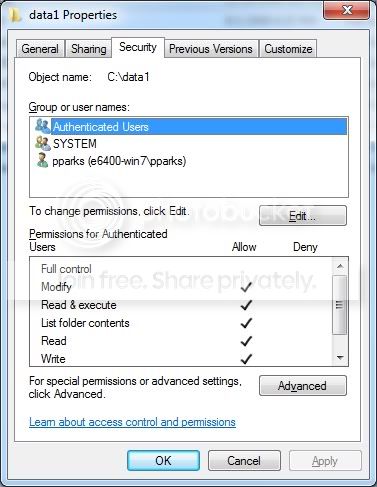
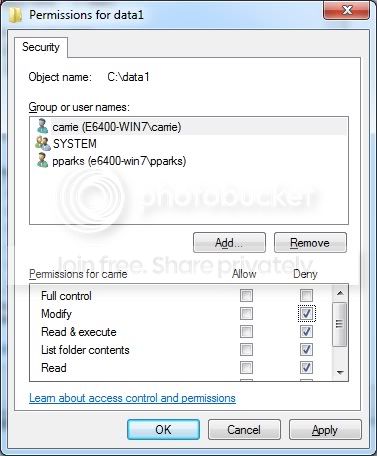
Yes, as an example...I have 2 user accounts
pparks : me and I am an admin
carrie : my wife and she is just a standard user

I have one folder, C:\data1 that I want to protect. I don't want anybody but pparks to have access.


This would NOT work, as carrie is a member of authenticated users and it is allowing acces.
AuthenticatedUsers.jpg


This would work, as it gives pparks access, but doesn't give access to anybody else. (but it also doesn't explicitly deny anybody.
WifeCannotAccess.jpg


This works as my wife is flat out denied access. So she cannot access, but pparks can
CarrieDenied.jpg


This wouldn't allow EITHER of us to access as we are both members of users and it was explicitly denied access
EverybodyDenied.jpg
 

My Computer

Computer Manufacturer/Model Number
Self-Built in July 2009
OS
Windows 7 Ultimate x64
CPU
Intel Q9550 2.83Ghz OC'd to 3.40Ghz
Motherboard
Gigabyte GA-EP45-UD3R rev. 1.1, F12 BIOS
Memory
8GB G.Skill PI DDR2-800, 4-4-4-12 timings
Graphics Card(s)
EVGA 1280MB Nvidia GeForce GTX570
Sound Card
Realtek ALC899A 8 channel onboard audio
Monitor(s) Displays
23" Acer x233H
Screen Resolution
1920x1080
Hard Drives
Intel X25-M 80GB Gen 2 SSD
Western Digital 1TB Caviar Black, 32MB cache. WD1001FALS
PSU
Corsair 620HX modular
Case
Antec P182
Cooling
stock
Keyboard
ABS M1 Mechanical
Mouse
Logitech G9 Laser Mouse
Internet Speed
15/2 cable modem
Other Info
Windows and Linux enthusiast. Logitech G35 Headset.
wow thank you so much. it worked! :D

i just hope that Linux Mint which i plan to install soon on a new partition can see the drive though!
 

My Computer

Computer Manufacturer/Model Number
Sony
OS
Main OS: Windows 7 64 bit, Secondary: Vista 32 bit
CPU
Intel Core 2 Duo P8400 @ 2.26 Ghz
Motherboard
Intel PM45
Memory
4GB DDR2
Graphics Card(s)
ATI Radeon Mobility HD3470
Sound Card
Integrated Realtek
Monitor(s) Displays
Integrated (Laptop) 16.4 inch
Screen Resolution
1600x900
Hard Drives
320 GB
Mouse
Logitech
Internet Speed
1 Mb/s
wow thank you so much. it worked! :D

i just hope that Linux Mint which i plan to install soon on a new partition can see the drive though!

It will. The permissions and such are only applicable to the OS running on the machine. Meaning that if I physically removed your hard drive and placed it into my box..I would be able to see the files and such. Therefore, when you place the second OS on the computer (Linux Mint) in your case...it will not adhere to the permissions and such which you defined under Windows.
 

My Computer

Computer Manufacturer/Model Number
Self-Built in July 2009
OS
Windows 7 Ultimate x64
CPU
Intel Q9550 2.83Ghz OC'd to 3.40Ghz
Motherboard
Gigabyte GA-EP45-UD3R rev. 1.1, F12 BIOS
Memory
8GB G.Skill PI DDR2-800, 4-4-4-12 timings
Graphics Card(s)
EVGA 1280MB Nvidia GeForce GTX570
Sound Card
Realtek ALC899A 8 channel onboard audio
Monitor(s) Displays
23" Acer x233H
Screen Resolution
1920x1080
Hard Drives
Intel X25-M 80GB Gen 2 SSD
Western Digital 1TB Caviar Black, 32MB cache. WD1001FALS
PSU
Corsair 620HX modular
Case
Antec P182
Cooling
stock
Keyboard
ABS M1 Mechanical
Mouse
Logitech G9 Laser Mouse
Internet Speed
15/2 cable modem
Other Info
Windows and Linux enthusiast. Logitech G35 Headset.
oh thats great to hear. i cannot thank you enough kind sir.
 

My Computer

Computer Manufacturer/Model Number
Sony
OS
Main OS: Windows 7 64 bit, Secondary: Vista 32 bit
CPU
Intel Core 2 Duo P8400 @ 2.26 Ghz
Motherboard
Intel PM45
Memory
4GB DDR2
Graphics Card(s)
ATI Radeon Mobility HD3470
Sound Card
Integrated Realtek
Monitor(s) Displays
Integrated (Laptop) 16.4 inch
Screen Resolution
1600x900
Hard Drives
320 GB
Mouse
Logitech
Internet Speed
1 Mb/s
Back
Top