Warning! when deleting Factory image drive

xXSevenXx

New member
Member
VIP
Local time
12:22 PM
Messages
419
I have a factory image of Vista on my D; drive that I would like to delete, as I have recently installed Windows 7 on my C; drive.
fimage.jpg


The problem is when I tried to delete it, I got this message;
errorhn.jpg


I also tried to delete it using cmd, same warning;
cmderror.jpg

Does anyone know why I get these warnings, and how to delete this drive?
 
Last edited:

My Computer My Computer

Computer type
PC/Desktop
Computer Manufacturer/Model Number
Home Built
OS
Windows 7 Ultimate SP1 64- bit
CPU
Intel Core i7-3770K @3.50ghz
Motherboard
EVGA Z77 FTW
Memory
Kingston Technology 16GB (2x 8GB) 2133MHz DDR3 Non-ECC
Graphics Card(s)
EVGA GTX 670 4gb SC
Sound Card
Nil
Monitor(s) Displays
Samsung 22"
Screen Resolution
1920 x 1080 60hz
Hard Drives
OCZ Vertex 4 SSD 128GB
SAMSUNG Spinpoint F3 HD502HJ 500GB 7200 RPM
PSU
Enermax Platinax EPM1000EWT Special OC Edition
Case
Cooler Master HAF Full Tower nVIDIA Edition
Cooling
CoolerMaster Hyper 212 Plus
Keyboard
HP Wireless Keyboard
Mouse
Corsair Vengeance M90
Internet Speed
20 Mb
Other Info
ASUS DRW-24B1ST/BLK/B/AS Black SATA 24X DVD Burner
Im not too sure, but i think its because the D drive contains boot data needed to boot the laptop. You must first set drive C as active, then you can delete Vista. Again im not sure if im 100% right..
 

My Computer My Computer

Computer Manufacturer/Model Number
Sony
OS
Main OS: Windows 7 64 bit, Secondary: Vista 32 bit
CPU
Intel Core 2 Duo P8400 @ 2.26 Ghz
Motherboard
Intel PM45
Memory
4GB DDR2
Graphics Card(s)
ATI Radeon Mobility HD3470
Sound Card
Integrated Realtek
Monitor(s) Displays
Integrated (Laptop) 16.4 inch
Screen Resolution
1600x900
Hard Drives
320 GB
Mouse
Logitech
Internet Speed
1 Mb/s
Is this a dell, if so that is the drive that can put your computer back to factory settings.
 

My Computer My Computer

Computer type
PC/Desktop
Computer Manufacturer/Model Number
Dell XPS 420
OS
Windows 10, Home Clean Install
CPU
Intel Core2 processsor Q8200(2.33Ghz 1333FSB) Quad Core Tech
Motherboard
Dell
Memory
6 gb
Graphics Card(s)
ATI Radeon 256MB HD3650
Sound Card
Intergrated 7.1 Channel Audio
Monitor(s) Displays
Dell SP2009W 20"
Hard Drives
640 GB Serial ATA Hard drive
Cooling
Fan
Keyboard
Dell USB Keyboard
Mouse
Dell Premium Optical USB
Internet Speed
DSL 2.85
As the c: drive is the active drive I think the warning may well be due to the use of a non standard format for the recovery partition - this is not unusual, and can cause confusion for disk utilities.

I assume you have the win7 install DVD to hand - If so I would proceed with the deletion , as if boot files are on the recovery partition (very unlikely) you can perform a start-up repair quite simply by booting the DVD
 

My Computers My Computers

System One System Two

  • Computer type
    PC/Desktop
    Computer Manufacturer/Model Number
    ChillBlast - Custom to my design
    OS
    Windows 11 Pro x64 [Latest Release and Release Preview]
    CPU
    Ryzen 9 5950X, 3.8 - 5.2 MHz
    Motherboard
    Asus Prime X570-Pro
    Memory
    64GB [2 x 32GB] DDR4 3200MHz
    Graphics Card(s)
    4GB NVIDIA GEFORCE GTX 1650 Ti
    Sound Card
    On-board SPDIF to 5.1 System + HDMI [5.1 system]
    Monitor(s) Displays
    32" UHD 32 Bit HDR Monitor + 43" UHD 4K 32Bit HDR TV
    Screen Resolution
    2 x 3840 x 2160 @60Hz
    Hard Drives
    1TB M2 SSD OS, 500GB Fast Access SSD, 2 x 8TB Data + Various Externals from 1TB to 4TB, 10TB NAS
    PSU
    NZXT C750 80 PLUS Gold 750W Modular PSU
    Case
    Workstation Case [Matt Black]
    Cooling
    NZXT Kraken X63 280mm CPU Cooler +2x Quiet Case fans
    Keyboard
    Logitech Wireless MX Keys & K400 + others
    Mouse
    Logitech Wireless MX Master 3S
    Internet Speed
    920 MB Down 50 MB Up
    Antivirus
    BitDefender Total Security Pro
    Browser
    Chrome (always run latest Non-Beta)
    Other Info
    Also run ...
    Laptop - Quad 8GB - Windows 10 Pro x64
    Nexus 7 Android tablet x2
    Samsung 10.2" tablet
    Blackview TAB 8 4G Android Tablet c/w Keyboard
    Wacom Intuos Pro Medium Pen Pad
    Wacom Intuos Pro Small Pen Pad
    Wacom Expresskeys Remote
    Loopdeck+ Graphics Controller
    Shuttle Pro v2 Control
  • Computer type
    Laptop
    System Manufacturer/Model Number
    Dell XPS 17 10750H
    OS
    Windows 11 Pro x64 Latest RP
    CPU
    Intel I7 10750H 5.0GHz
    Motherboard
    Dell XPS
    Memory
    32GB [2x16GB] DDR4 2933 MHz
    Graphics Card(s)
    nVidia GTX1650Ti 4 GB GDDR6
    Sound Card
    Stock [Realtek] 4 Speaker
    Monitor(s) Displays
    17" IPS UHD+ Infinity Edge Touchscreen
    Screen Resolution
    3840 x 2400
    Hard Drives
    2TB M2 NVMe, 4TB External + various 500GB & 1TB External NVMe (also have access to spinner HDD from
    PSU
    Stock
    Case
    Stock XPS Aluminium & Carbon Fibre
    Cooling
    Stock - Active Fan Control
    Keyboard
    Backlit + Various Logitech
    Mouse
    Stock Track Pad + Logitech MX Trackball
    Internet Speed
    72 MB Down 18MB Up
    Browser
    Chrome
    Other Info
    Also run ...
    Laptop - Quad 8GB - Windows 10 Pro x64
    Nexus 7 Android tablet x2
    10.2" tablet
    Sony Z3 Android Smartphone
    Wacom Intuos Pro Medium Pen Pad
    Wacom Intuos Pro Small Pen Pad
    Wacom Expresskeys Remote
    Loopdeck+ Graphics Controller
    Shuttle Pro v2 Control Pad
    10TB NAS
I believe that DaRon is correct. You may or may not ruin your MBR "master boot record" by delating the Vista partition but you can usually repair the Widows 7 MBR by running a "start up repair" from the Windows 7 CD. You may need to run the repair a few times before it works.

You can delate the drive from the disk properties window but your Windows 7 may become unbootable until you run the START UP REPAIR from the Windows 7 CD.
 

My Computer My Computer

Computer type
PC/Desktop
Computer Manufacturer/Model Number
Home built
OS
Windows 7 Ult, Windows 8.1 Pro,
CPU
Q9650-4.275GHz, E8600 4.5GHz, E6750-3.8GHz
Motherboard
Evga 780i FTW
Memory
G.Skill PC2 9600 1200Mhz 5 5 5 15 2T
Graphics Card(s)
GTX480
Sound Card
Asus Xonar D2
Monitor(s) Displays
HannsG
Screen Resolution
1680X1050
Hard Drives
GSkill Phoenix Pro 120GB SSD
PSU
ThermalTake Toughpower 1000Watt modular
Case
ThermalTake XaserV
Cooling
Xigmatek S1283
Keyboard
Logitech G15
Mouse
Logitech G9
Internet Speed
T1
Im not too sure, but i think its because the D drive contains boot data needed to boot the laptop. You must first set drive C as active, then you can delete Vista. Again im not sure if im 100% right..
It's a HP Pavillion Desktop, and the C drive is active!
 

My Computer My Computer

Computer type
PC/Desktop
Computer Manufacturer/Model Number
Home Built
OS
Windows 7 Ultimate SP1 64- bit
CPU
Intel Core i7-3770K @3.50ghz
Motherboard
EVGA Z77 FTW
Memory
Kingston Technology 16GB (2x 8GB) 2133MHz DDR3 Non-ECC
Graphics Card(s)
EVGA GTX 670 4gb SC
Sound Card
Nil
Monitor(s) Displays
Samsung 22"
Screen Resolution
1920 x 1080 60hz
Hard Drives
OCZ Vertex 4 SSD 128GB
SAMSUNG Spinpoint F3 HD502HJ 500GB 7200 RPM
PSU
Enermax Platinax EPM1000EWT Special OC Edition
Case
Cooler Master HAF Full Tower nVIDIA Edition
Cooling
CoolerMaster Hyper 212 Plus
Keyboard
HP Wireless Keyboard
Mouse
Corsair Vengeance M90
Internet Speed
20 Mb
Other Info
ASUS DRW-24B1ST/BLK/B/AS Black SATA 24X DVD Burner
Is this a dell, if so that is the drive that can put your computer back to factory settings.
It's a HP, please read 1st post!
 

My Computer My Computer

Computer type
PC/Desktop
Computer Manufacturer/Model Number
Home Built
OS
Windows 7 Ultimate SP1 64- bit
CPU
Intel Core i7-3770K @3.50ghz
Motherboard
EVGA Z77 FTW
Memory
Kingston Technology 16GB (2x 8GB) 2133MHz DDR3 Non-ECC
Graphics Card(s)
EVGA GTX 670 4gb SC
Sound Card
Nil
Monitor(s) Displays
Samsung 22"
Screen Resolution
1920 x 1080 60hz
Hard Drives
OCZ Vertex 4 SSD 128GB
SAMSUNG Spinpoint F3 HD502HJ 500GB 7200 RPM
PSU
Enermax Platinax EPM1000EWT Special OC Edition
Case
Cooler Master HAF Full Tower nVIDIA Edition
Cooling
CoolerMaster Hyper 212 Plus
Keyboard
HP Wireless Keyboard
Mouse
Corsair Vengeance M90
Internet Speed
20 Mb
Other Info
ASUS DRW-24B1ST/BLK/B/AS Black SATA 24X DVD Burner
Moving/recreating the MBR to the Windows 7 partition in advance could be wise :geek:
 

My Computer My Computer

Computer type
PC/Desktop
OS
Windows 7 x64
CPU
Intel Core2Duo P8500
Motherboard
Asus P5Q3
Memory
2x 2048 DDR3
Graphics Card(s)
Asus GTX280
Sound Card
24/96 Audiophile
Screen Resolution
1900x1080
Case
Coolermaster
Cooling
Zallman CPU Cooling
Mouse
Logitech G500
Moving/recreating the MBR to the Windows 7 partition in advance could be wise :geek:

As the windows 7 drive is the active and boot drive, (as shown in the screenshot of the disk manager), this should not be an issue in this case
 

My Computers My Computers

System One System Two

  • Computer type
    PC/Desktop
    Computer Manufacturer/Model Number
    ChillBlast - Custom to my design
    OS
    Windows 11 Pro x64 [Latest Release and Release Preview]
    CPU
    Ryzen 9 5950X, 3.8 - 5.2 MHz
    Motherboard
    Asus Prime X570-Pro
    Memory
    64GB [2 x 32GB] DDR4 3200MHz
    Graphics Card(s)
    4GB NVIDIA GEFORCE GTX 1650 Ti
    Sound Card
    On-board SPDIF to 5.1 System + HDMI [5.1 system]
    Monitor(s) Displays
    32" UHD 32 Bit HDR Monitor + 43" UHD 4K 32Bit HDR TV
    Screen Resolution
    2 x 3840 x 2160 @60Hz
    Hard Drives
    1TB M2 SSD OS, 500GB Fast Access SSD, 2 x 8TB Data + Various Externals from 1TB to 4TB, 10TB NAS
    PSU
    NZXT C750 80 PLUS Gold 750W Modular PSU
    Case
    Workstation Case [Matt Black]
    Cooling
    NZXT Kraken X63 280mm CPU Cooler +2x Quiet Case fans
    Keyboard
    Logitech Wireless MX Keys & K400 + others
    Mouse
    Logitech Wireless MX Master 3S
    Internet Speed
    920 MB Down 50 MB Up
    Antivirus
    BitDefender Total Security Pro
    Browser
    Chrome (always run latest Non-Beta)
    Other Info
    Also run ...
    Laptop - Quad 8GB - Windows 10 Pro x64
    Nexus 7 Android tablet x2
    Samsung 10.2" tablet
    Blackview TAB 8 4G Android Tablet c/w Keyboard
    Wacom Intuos Pro Medium Pen Pad
    Wacom Intuos Pro Small Pen Pad
    Wacom Expresskeys Remote
    Loopdeck+ Graphics Controller
    Shuttle Pro v2 Control
  • Computer type
    Laptop
    System Manufacturer/Model Number
    Dell XPS 17 10750H
    OS
    Windows 11 Pro x64 Latest RP
    CPU
    Intel I7 10750H 5.0GHz
    Motherboard
    Dell XPS
    Memory
    32GB [2x16GB] DDR4 2933 MHz
    Graphics Card(s)
    nVidia GTX1650Ti 4 GB GDDR6
    Sound Card
    Stock [Realtek] 4 Speaker
    Monitor(s) Displays
    17" IPS UHD+ Infinity Edge Touchscreen
    Screen Resolution
    3840 x 2400
    Hard Drives
    2TB M2 NVMe, 4TB External + various 500GB & 1TB External NVMe (also have access to spinner HDD from
    PSU
    Stock
    Case
    Stock XPS Aluminium & Carbon Fibre
    Cooling
    Stock - Active Fan Control
    Keyboard
    Backlit + Various Logitech
    Mouse
    Stock Track Pad + Logitech MX Trackball
    Internet Speed
    72 MB Down 18MB Up
    Browser
    Chrome
    Other Info
    Also run ...
    Laptop - Quad 8GB - Windows 10 Pro x64
    Nexus 7 Android tablet x2
    10.2" tablet
    Sony Z3 Android Smartphone
    Wacom Intuos Pro Medium Pen Pad
    Wacom Intuos Pro Small Pen Pad
    Wacom Expresskeys Remote
    Loopdeck+ Graphics Controller
    Shuttle Pro v2 Control Pad
    10TB NAS
Hello Seven, and welcome to Seven Forums.

You might consider creating a set of HP Vista Recovery Discs in case you ever decide to reinstall Vista on that computer again. Once you delete the recovery partition it's gone with no chance of creating them.

Using HP Backup and Recovery Manager in Vista - HP Customer Care (United States - English)

You should be able to click on Yes to proceed to delete the recovery partition without any problems though. :)
 

My Computer My Computer

Computer type
PC/Desktop
Computer Manufacturer/Model Number
Self built custom
OS
64-bit Windows 11 Pro for Workstations
CPU
Intel i7-8700K OC'd to 5 GHz
Motherboard
ASUS ROG Maximus XI Formula Z390
Memory
64 GB (4x16GB) G.SKILL TridentZ RGB DDR4 3600 MHz
Graphics Card(s)
ASUS ROG-STRIX-GTX1080TI-O11G-GAMING
Sound Card
Integrated
Monitor(s) Displays
2 x Samsung Odyssey G7 27"
Screen Resolution
2560x1440
Hard Drives
1TB Samsung 990 PRO M.2,
4TB Samsung 990 PRO PRO M.2,
TerraMaster F8 SSD Plus NAS
PSU
Seasonic Prime Titanium 850W
Case
Thermaltake Core P3
Cooling
Corsair Hydro H115i
Keyboard
Logitech wireless K800
Mouse
Logitech MX Master 4
Internet Speed
2 Gb/s Download and 100 Mb/s Upload
Antivirus
Malwarebyte Anti-Malware Premium
Browser
Google Chrome
Other Info
Logitech Z625 speaker system,
Logitech BRIO 4K Pro webcam,
HP Color LaserJet Pro MFP M477fdn,
APC SMART-UPS RT 1000 XL - SURT1000XLI,
Galaxy S23 Plus phone
Im not too sure, but i think its because the D drive contains boot data needed to boot the laptop. You must first set drive C as active, then you can delete Vista. Again im not sure if im 100% right..

As the c: drive is the active drive I think the warning may well be due to the use of a non standard format for the recovery partition - this is not unusual, and can cause confusion for disk utilities.

I assume you have the win7 install DVD to hand - If so I would proceed with the deletion , as if boot files are on the recovery partition (very unlikely) you can perform a start-up repair quite simply by booting the DVD

I believe that DaRon is correct. You may or may not ruin your MBR "master boot record" by delating the Vista partition but you can usually repair the Widows 7 MBR by running a "start up repair" from the Windows 7 CD. You may need to run the repair a few times before it works.

You can delate the drive from the disk properties window but your Windows 7 may become unbootable until you run the START UP REPAIR from the Windows 7 CD.

Moving/recreating the MBR to the Windows 7 partition in advance could be wise :geek:

Hello Seven, and welcome to Seven Forums.

You might consider creating a set of HP Vista Recovery Discs in case you ever decide to reinstall Vista on that computer again. Once you delete the recovery partition it's gone with no chance of creating them.

Using HP Backup and Recovery Manager in Vista - HP Customer Care (United States - English)

You should be able to click on Yes to proceed to delete the recovery partition without any problems though. :)
I don't want to re-install Vista, so I'm going to delete it, fingers crossed here goes.
Ps If I don't post back today, then you'll know that I've FAILED!
 

My Computer My Computer

Computer type
PC/Desktop
Computer Manufacturer/Model Number
Home Built
OS
Windows 7 Ultimate SP1 64- bit
CPU
Intel Core i7-3770K @3.50ghz
Motherboard
EVGA Z77 FTW
Memory
Kingston Technology 16GB (2x 8GB) 2133MHz DDR3 Non-ECC
Graphics Card(s)
EVGA GTX 670 4gb SC
Sound Card
Nil
Monitor(s) Displays
Samsung 22"
Screen Resolution
1920 x 1080 60hz
Hard Drives
OCZ Vertex 4 SSD 128GB
SAMSUNG Spinpoint F3 HD502HJ 500GB 7200 RPM
PSU
Enermax Platinax EPM1000EWT Special OC Edition
Case
Cooler Master HAF Full Tower nVIDIA Edition
Cooling
CoolerMaster Hyper 212 Plus
Keyboard
HP Wireless Keyboard
Mouse
Corsair Vengeance M90
Internet Speed
20 Mb
Other Info
ASUS DRW-24B1ST/BLK/B/AS Black SATA 24X DVD Burner
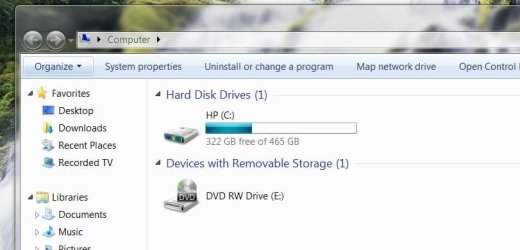
Success!
I deleted it, and extended my C; drive.
The thing is I didn't get any 'warning' messages. Strange.
Computer.jpg

Thanks for most of the replies. lol
 

Attachments

  • Computer.JPG
    Computer.JPG
    41.9 KB · Views: 12

My Computer My Computer

Computer type
PC/Desktop
Computer Manufacturer/Model Number
Home Built
OS
Windows 7 Ultimate SP1 64- bit
CPU
Intel Core i7-3770K @3.50ghz
Motherboard
EVGA Z77 FTW
Memory
Kingston Technology 16GB (2x 8GB) 2133MHz DDR3 Non-ECC
Graphics Card(s)
EVGA GTX 670 4gb SC
Sound Card
Nil
Monitor(s) Displays
Samsung 22"
Screen Resolution
1920 x 1080 60hz
Hard Drives
OCZ Vertex 4 SSD 128GB
SAMSUNG Spinpoint F3 HD502HJ 500GB 7200 RPM
PSU
Enermax Platinax EPM1000EWT Special OC Edition
Case
Cooler Master HAF Full Tower nVIDIA Edition
Cooling
CoolerMaster Hyper 212 Plus
Keyboard
HP Wireless Keyboard
Mouse
Corsair Vengeance M90
Internet Speed
20 Mb
Other Info
ASUS DRW-24B1ST/BLK/B/AS Black SATA 24X DVD Burner
I'm happy to hear that all went well. :)
 

My Computer My Computer

Computer type
PC/Desktop
Computer Manufacturer/Model Number
Self built custom
OS
64-bit Windows 11 Pro for Workstations
CPU
Intel i7-8700K OC'd to 5 GHz
Motherboard
ASUS ROG Maximus XI Formula Z390
Memory
64 GB (4x16GB) G.SKILL TridentZ RGB DDR4 3600 MHz
Graphics Card(s)
ASUS ROG-STRIX-GTX1080TI-O11G-GAMING
Sound Card
Integrated
Monitor(s) Displays
2 x Samsung Odyssey G7 27"
Screen Resolution
2560x1440
Hard Drives
1TB Samsung 990 PRO M.2,
4TB Samsung 990 PRO PRO M.2,
TerraMaster F8 SSD Plus NAS
PSU
Seasonic Prime Titanium 850W
Case
Thermaltake Core P3
Cooling
Corsair Hydro H115i
Keyboard
Logitech wireless K800
Mouse
Logitech MX Master 4
Internet Speed
2 Gb/s Download and 100 Mb/s Upload
Antivirus
Malwarebyte Anti-Malware Premium
Browser
Google Chrome
Other Info
Logitech Z625 speaker system,
Logitech BRIO 4K Pro webcam,
HP Color LaserJet Pro MFP M477fdn,
APC SMART-UPS RT 1000 XL - SURT1000XLI,
Galaxy S23 Plus phone

My Computer My Computer

Computer type
PC/Desktop
Computer Manufacturer/Model Number
Home Built
OS
Windows 7 Ultimate SP1 64- bit
CPU
Intel Core i7-3770K @3.50ghz
Motherboard
EVGA Z77 FTW
Memory
Kingston Technology 16GB (2x 8GB) 2133MHz DDR3 Non-ECC
Graphics Card(s)
EVGA GTX 670 4gb SC
Sound Card
Nil
Monitor(s) Displays
Samsung 22"
Screen Resolution
1920 x 1080 60hz
Hard Drives
OCZ Vertex 4 SSD 128GB
SAMSUNG Spinpoint F3 HD502HJ 500GB 7200 RPM
PSU
Enermax Platinax EPM1000EWT Special OC Edition
Case
Cooler Master HAF Full Tower nVIDIA Edition
Cooling
CoolerMaster Hyper 212 Plus
Keyboard
HP Wireless Keyboard
Mouse
Corsair Vengeance M90
Internet Speed
20 Mb
Other Info
ASUS DRW-24B1ST/BLK/B/AS Black SATA 24X DVD Burner
Dang I was too late. I have a HP Pavillion as well.

I just formatted it and it didnt cause any problems.
 

My Computer My Computer

Computer Manufacturer/Model Number
HP Pavillion Desktop & HP Mini 2133 Notebook
OS
Windows 7 32-bit
CPU
AMD Phenom 9500 Quad & VIA C7-M
Memory
3GB (Desktop) & 2GB (Notebook)
Graphics Card(s)
nVidia GeForce 8500 GT (Desktop)
Sound Card
Bose Acoutimas Sound Module
Monitor(s) Displays
HP w2009v

My Computer My Computer

Computer type
PC/Desktop
Computer Manufacturer/Model Number
Self built custom
OS
64-bit Windows 11 Pro for Workstations
CPU
Intel i7-8700K OC'd to 5 GHz
Motherboard
ASUS ROG Maximus XI Formula Z390
Memory
64 GB (4x16GB) G.SKILL TridentZ RGB DDR4 3600 MHz
Graphics Card(s)
ASUS ROG-STRIX-GTX1080TI-O11G-GAMING
Sound Card
Integrated
Monitor(s) Displays
2 x Samsung Odyssey G7 27"
Screen Resolution
2560x1440
Hard Drives
1TB Samsung 990 PRO M.2,
4TB Samsung 990 PRO PRO M.2,
TerraMaster F8 SSD Plus NAS
PSU
Seasonic Prime Titanium 850W
Case
Thermaltake Core P3
Cooling
Corsair Hydro H115i
Keyboard
Logitech wireless K800
Mouse
Logitech MX Master 4
Internet Speed
2 Gb/s Download and 100 Mb/s Upload
Antivirus
Malwarebyte Anti-Malware Premium
Browser
Google Chrome
Other Info
Logitech Z625 speaker system,
Logitech BRIO 4K Pro webcam,
HP Color LaserJet Pro MFP M477fdn,
APC SMART-UPS RT 1000 XL - SURT1000XLI,
Galaxy S23 Plus phone
I had my C: drive with my XP and a D: drive with my factory restore files. Before I installed Win 7, I d/l Partition Wizard and formated D:. I got none of the messages that you did. I then installed Win 7 using a clean install and it went fine. I don't see why you got the messages.
 

My Computer My Computer

Computer type
PC/Desktop
Computer Manufacturer/Model Number
Custom Build
OS
Windows 7 Home Premium 32-Bit - Build 7600 SP1
CPU
Intel Core i3-2120 3.30Ghz
Motherboard
Asus P8Z68-V LX Intel Z68 Socket H2 ATX
Memory
Kingston 4 GB DDR3 1333 mhz
Graphics Card(s)
AMD Radeon HD6670
Sound Card
Sound Blaster Audigy SE 24-Bit
Monitor(s) Displays
Asus VE228
Screen Resolution
1440 X 900
Hard Drives
OCZ Vertex 3 120 GB Sata 3 SSD ==
Kingston SH103/S3 120 G Hyper X 120 GB SSD ==
Western Digital 500 GB Caviar Green 7200 RPM ==
PSU
Corsair CX600M == 600 Watt
Case
NZXT Apollo - Silver with Clear Side Panel
Cooling
Three 120 mm Fans
Keyboard
Microsoft Natural 4000
Mouse
Microsoft Custom Optical 3000
Internet Speed
AT&T Fiber Optic Wireless Network
Antivirus
Microsoft Security Essentials
Browser
Chrome
Other Info
120 mm Blue LED Fan -- Three Blue LED Lazer Light Sticks
Back
Top