I am having a problem where everything suddenly gets VERY slow. I may be doing anything at that moment; it appears to happen most often when I am surfing the Web with Firefox, but then I do it a lot and this may be just statistical bias. It has happened in other circumstances as well, and likewise, I've had long Firefox sessions without it happening. It is unpredictable - it may happen minutes after I log on, or many hours later.
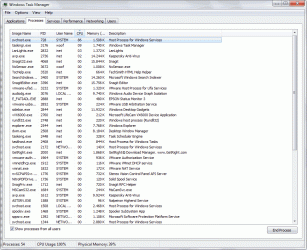
When it happens and I press CTRL+ALT+DELETE to run Task Manager, just reaching that screen can take several minutes, with the screen all black and the green wheel cursor whirling forever. When I finally get to Task Manager, I see a certain instance of svchost.exe eating up most of the CPU time, as shown in the first screen capture (I caught it at 86% CPU time in this capture, but it can easily reach 99%).
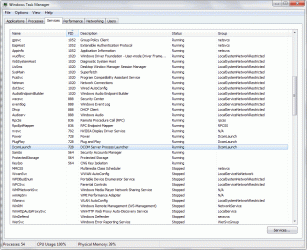
Since svchost.exe is the running shell of a lot of Windows' services, I looked at the running services to see what did that process ID (PID) correspond to. It is a 3-in-1 PID, hosting the DcomLaunch, Plug and Play and Power services, but all three in group DcomLaunch, as shown in the second screen capture.
The only way to get out of this mess is rebooting, as the process will keep going runaway indefinitely, and killing it will result in Windows showing an error message that it has to reboot anyway because the Plug and Play service has stopped running. A scan for malware found nothing.
Any hint as to what may be causing this, and how to solve it? Thanks a lot.
When it happens and I press CTRL+ALT+DELETE to run Task Manager, just reaching that screen can take several minutes, with the screen all black and the green wheel cursor whirling forever. When I finally get to Task Manager, I see a certain instance of svchost.exe eating up most of the CPU time, as shown in the first screen capture (I caught it at 86% CPU time in this capture, but it can easily reach 99%).
Since svchost.exe is the running shell of a lot of Windows' services, I looked at the running services to see what did that process ID (PID) correspond to. It is a 3-in-1 PID, hosting the DcomLaunch, Plug and Play and Power services, but all three in group DcomLaunch, as shown in the second screen capture.
The only way to get out of this mess is rebooting, as the process will keep going runaway indefinitely, and killing it will result in Windows showing an error message that it has to reboot anyway because the Plug and Play service has stopped running. A scan for malware found nothing.
Any hint as to what may be causing this, and how to solve it? Thanks a lot.
Attachments
My Computer
At a glance
Windows 8.1 Pro Update 1 x64AMD Phenom II X6 1090T @stock speed (3.2 GHz)16 GB DDR3-1866 (4 x 4 GB Corsair Vengeance)Zotac GeForce GTX650Ti 2 GB
- Computer Manufacturer/Model Number
- self-built
- OS
- Windows 8.1 Pro Update 1 x64
- CPU
- AMD Phenom II X6 1090T @stock speed (3.2 GHz)
- Motherboard
- Gigabyte GA-970A-DS3P
- Memory
- 16 GB DDR3-1866 (4 x 4 GB Corsair Vengeance)
- Graphics Card(s)
- Zotac GeForce GTX650Ti 2 GB
- Sound Card
- on-board Realtek ALC887
- Monitor(s) Displays
- LG IPS236V, 23" IPS LED + Samsung T200M, 20" LCD
- Screen Resolution
- 1920 x 1080 (LG), 1680 x 1050 (Samsung)
- Hard Drives
- OCZ Vertex 3 SSD, 120 GB; Western Digital Black WD-1502FAEX (1.5 TB, SATA III, 7200 rpm)
- PSU
- XFX 750W Black Edition
- Case
- Cooler Master CM 690
- Cooling
- several fans, Akasa Nero 2 for CPU
- Keyboard
- Logitech MK270 Wireless
- Mouse
- Logitech M185 (MK270) Wireless
- Internet Speed
- 10 Mbps fiber optic
- Antivirus
- Kaspersky Antivirus 2015
- Other Info
- Microsoft LX-1000 headset, Logitech C270 HD webcam