CPU usage suddenly skyrockets and stays that way

goyta

New member
Member
Local time
7:54 PM
Messages
32
Location
São Paulo, Brazil
I am having a problem where everything suddenly gets VERY slow. I may be doing anything at that moment; it appears to happen most often when I am surfing the Web with Firefox, but then I do it a lot and this may be just statistical bias. It has happened in other circumstances as well, and likewise, I've had long Firefox sessions without it happening. It is unpredictable - it may happen minutes after I log on, or many hours later.

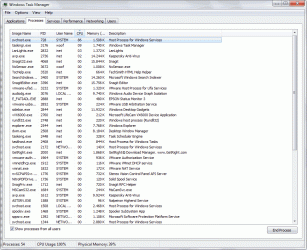
When it happens and I press CTRL+ALT+DELETE to run Task Manager, just reaching that screen can take several minutes, with the screen all black and the green wheel cursor whirling forever. When I finally get to Task Manager, I see a certain instance of svchost.exe eating up most of the CPU time, as shown in the first screen capture (I caught it at 86% CPU time in this capture, but it can easily reach 99%).

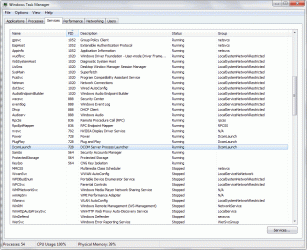
Since svchost.exe is the running shell of a lot of Windows' services, I looked at the running services to see what did that process ID (PID) correspond to. It is a 3-in-1 PID, hosting the DcomLaunch, Plug and Play and Power services, but all three in group DcomLaunch, as shown in the second screen capture.

The only way to get out of this mess is rebooting, as the process will keep going runaway indefinitely, and killing it will result in Windows showing an error message that it has to reboot anyway because the Plug and Play service has stopped running. A scan for malware found nothing.

Any hint as to what may be causing this, and how to solve it? Thanks a lot.
 

Attachments
  • capture1.gif
    capture1.gif
    65.4 KB · Views: 68
  • capture2.gif
    capture2.gif
    60.9 KB · Views: 56

My Computer My Computer

At a glance

Windows 8.1 Pro Update 1 x64AMD Phenom II X6 1090T @stock speed (3.2 GHz)16 GB DDR3-1866 (4 x 4 GB Corsair Vengeance)Zotac GeForce GTX650Ti 2 GB
Computer Manufacturer/Model Number
self-built
OS
Windows 8.1 Pro Update 1 x64
CPU
AMD Phenom II X6 1090T @stock speed (3.2 GHz)
Motherboard
Gigabyte GA-970A-DS3P
Memory
16 GB DDR3-1866 (4 x 4 GB Corsair Vengeance)
Graphics Card(s)
Zotac GeForce GTX650Ti 2 GB
Sound Card
on-board Realtek ALC887
Monitor(s) Displays
LG IPS236V, 23" IPS LED + Samsung T200M, 20" LCD
Screen Resolution
1920 x 1080 (LG), 1680 x 1050 (Samsung)
Hard Drives
OCZ Vertex 3 SSD, 120 GB; Western Digital Black WD-1502FAEX (1.5 TB, SATA III, 7200 rpm)
PSU
XFX 750W Black Edition
Case
Cooler Master CM 690
Cooling
several fans, Akasa Nero 2 for CPU
Keyboard
Logitech MK270 Wireless
Mouse
Logitech M185 (MK270) Wireless
Internet Speed
10 Mbps fiber optic
Antivirus
Kaspersky Antivirus 2015
Other Info
Microsoft LX-1000 headset, Logitech C270 HD webcam
Run Process Explorer (as Admin of course) and double click on the offending process.
Process Explorer

You want to inspect the Threads tab which might reveal some clues for us.
 

My Computer My Computer

At a glance

Windows 10 Pro (x64)Intel Core i7-3930K (3.2GHz - 4.5GHz)4x Samsung 4GB PC3-12800 DDR3 (16GB 1600MHz)Nvidia Geforce GTX 690
Computer type
PC/Desktop
Computer Manufacturer/Model Number
Alienware Aurora ALX R4
OS
Windows 10 Pro (x64)
CPU
Intel Core i7-3930K (3.2GHz - 4.5GHz)
Motherboard
Alienware Aurora-R4 x79
Memory
4x Samsung 4GB PC3-12800 DDR3 (16GB 1600MHz)
Graphics Card(s)
Nvidia Geforce GTX 690
Sound Card
SteelSeries Siberia Elite
Monitor(s) Displays
Dell UltraSharp U3011
Screen Resolution
2560x1600
Hard Drives
Samsung 850 Pro 256 GB, Seagate 1TB Desktop Hybrid HDD, 2x Western Digital 4TB Green HDD
PSU
875W Some Dell PSU <.<
Case
Alienware Aurora ALX
Cooling
Custom Liquid Cooling (EK CPU & GPU blocks) dual EK 480RAD
Keyboard
Logitech G710+ Mechanical
Mouse
Logitech G700s
Internet Speed
Verizon Fios (50 mbps average)
Other Info
Server: Intel NUC D54250WYK: i5-4250U, 16GB, 256 GB mSATA, Windows Server 2012 R2
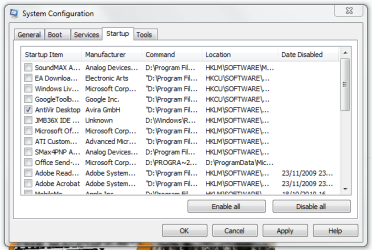
Go to Start > Run,. and type msconfig,. click the startup tab and uncheck everything except for your anti-virus software, spyware detector and personal firewall if you have on.

You can also disable services you don't use nu going to Star > Run ,and type services.msc

Go to Black Viper's site for indformation on sercices:
Windows 7 Service Configurations by Black Viper
 

My Computer My Computer

At a glance

Windows 7 Pro & Vista Home PremiumAthlon 64 3800+ (Orleans) 2.40GHz2GB DDR2 RAM DIMMNVIDIA GeForce 8500 GT 512 MB memory HDMI out
Computer Manufacturer/Model Number
Cheap $399.00 E-Machine
OS
Windows 7 Pro & Vista Home Premium
CPU
Athlon 64 3800+ (Orleans) 2.40GHz
Motherboard
Winfast
Memory
2GB DDR2 RAM DIMM
Graphics Card(s)
NVIDIA GeForce 8500 GT 512 MB memory HDMI out
Sound Card
creative X-Fi Exteme 7..1 channel
Monitor(s) Displays
Acer V223W 22" widescreen DVI
Screen Resolution
1680x1050
Hard Drives
WDC WD5 500GB
WDC WD25 250GB
PSU
OCZ 550 watt
Case
Gateway
Cooling
2 fans
Keyboard
Dell
Mouse
Sony Vaio
Internet Speed
18MB/s down - .72MB /s up
Hi, will you go back into Processes and click on the word Memory at the top of the list,
it will bring all the processes that are using the most of your CPU to the top, and then post that picture,Please.
 

My Computer My Computer

At a glance

Vista Ult64, Win7600Intel Core 2 Quad Q6600 @ 2400 MHz 64bit OS4096 MB DDR3-SDRAMATI Radeon HD 3870 Series x2 Crossfired
Computer Manufacturer/Model Number
Self Build 64bit
OS
Vista Ult64, Win7600
CPU
Intel Core 2 Quad Q6600 @ 2400 MHz 64bit OS
Motherboard
Asus P5E3 Deluxe WiFi @p 64 bit OS
Memory
4096 MB DDR3-SDRAM
Graphics Card(s)
ATI Radeon HD 3870 Series x2 Crossfired
Sound Card
Realtek on board
Monitor(s) Displays
Samsung SyncMaster - 23 inches
Screen Resolution
1680x1050 pixels at 60 Hz in True Colors
Hard Drives
Hitachi (250 GB)/Samsung 750 GB. /Barracuda 160 GB.
My Book 1 TB external..
PSU
Cooler Master 1000w
Case
Cooler Master Cosmos 1000.
Cooling
Fans and fresh air,
Keyboard
Wireless
Mouse
Wireless
Internet Speed
Never fast enough
Other Info
I use a Magnum.
Yes,. I should have included that:)
 

My Computer My Computer

At a glance

Windows 7 Pro & Vista Home PremiumAthlon 64 3800+ (Orleans) 2.40GHz2GB DDR2 RAM DIMMNVIDIA GeForce 8500 GT 512 MB memory HDMI out
Computer Manufacturer/Model Number
Cheap $399.00 E-Machine
OS
Windows 7 Pro & Vista Home Premium
CPU
Athlon 64 3800+ (Orleans) 2.40GHz
Motherboard
Winfast
Memory
2GB DDR2 RAM DIMM
Graphics Card(s)
NVIDIA GeForce 8500 GT 512 MB memory HDMI out
Sound Card
creative X-Fi Exteme 7..1 channel
Monitor(s) Displays
Acer V223W 22" widescreen DVI
Screen Resolution
1680x1050
Hard Drives
WDC WD5 500GB
WDC WD25 250GB
PSU
OCZ 550 watt
Case
Gateway
Cooling
2 fans
Keyboard
Dell
Mouse
Sony Vaio
Internet Speed
18MB/s down - .72MB /s up
OK, I will run Process Explorer (the Sysinternals utility, right?), look at Threads and also capture the Processes screen sorted by memory usage - next time it happens, which is unpredictable.

As for using msconfig to load a minimum configuration, I didn't understand that suggestion. I don't think that will help for a problem that happens intermittently, at unpredictable times, and never straight away at logon. It will probably even mask it. Like, "OK, I've loaded this barebones Windows, now what?"

I already have a lot of disabled services, for example all related to NetBIOS and local networking, since I only have one desktop PC here and its only network connection is to a cable modem and the Internet (which works, as does Bluetooth, for example).
 
Last edited:

My Computer My Computer

At a glance

Windows 8.1 Pro Update 1 x64AMD Phenom II X6 1090T @stock speed (3.2 GHz)16 GB DDR3-1866 (4 x 4 GB Corsair Vengeance)Zotac GeForce GTX650Ti 2 GB
Computer Manufacturer/Model Number
self-built
OS
Windows 8.1 Pro Update 1 x64
CPU
AMD Phenom II X6 1090T @stock speed (3.2 GHz)
Motherboard
Gigabyte GA-970A-DS3P
Memory
16 GB DDR3-1866 (4 x 4 GB Corsair Vengeance)
Graphics Card(s)
Zotac GeForce GTX650Ti 2 GB
Sound Card
on-board Realtek ALC887
Monitor(s) Displays
LG IPS236V, 23" IPS LED + Samsung T200M, 20" LCD
Screen Resolution
1920 x 1080 (LG), 1680 x 1050 (Samsung)
Hard Drives
OCZ Vertex 3 SSD, 120 GB; Western Digital Black WD-1502FAEX (1.5 TB, SATA III, 7200 rpm)
PSU
XFX 750W Black Edition
Case
Cooler Master CM 690
Cooling
several fans, Akasa Nero 2 for CPU
Keyboard
Logitech MK270 Wireless
Mouse
Logitech M185 (MK270) Wireless
Internet Speed
10 Mbps fiber optic
Antivirus
Kaspersky Antivirus 2015
Other Info
Microsoft LX-1000 headset, Logitech C270 HD webcam
Msconfig can have a lot of useless entries,.

Removing them speeds up your computer because they don't load at startup/

Trust me, there will be less proccess running
 

My Computer My Computer

At a glance

Windows 7 Pro & Vista Home PremiumAthlon 64 3800+ (Orleans) 2.40GHz2GB DDR2 RAM DIMMNVIDIA GeForce 8500 GT 512 MB memory HDMI out
Computer Manufacturer/Model Number
Cheap $399.00 E-Machine
OS
Windows 7 Pro & Vista Home Premium
CPU
Athlon 64 3800+ (Orleans) 2.40GHz
Motherboard
Winfast
Memory
2GB DDR2 RAM DIMM
Graphics Card(s)
NVIDIA GeForce 8500 GT 512 MB memory HDMI out
Sound Card
creative X-Fi Exteme 7..1 channel
Monitor(s) Displays
Acer V223W 22" widescreen DVI
Screen Resolution
1680x1050
Hard Drives
WDC WD5 500GB
WDC WD25 250GB
PSU
OCZ 550 watt
Case
Gateway
Cooling
2 fans
Keyboard
Dell
Mouse
Sony Vaio
Internet Speed
18MB/s down - .72MB /s up
I prefer either manual or disabled settings in "Services", rather than msconfg in start up, but each to their own preference. :)
 

My Computer My Computer

At a glance

Windows 7 Ultimate 32bit SP1Intel(R) Core(TM)2 Quad CPU @ 2.40GHz, 2400 MHz4 GBATI Radeon HD 2600 Pro
Computer type
PC/Desktop
Computer Manufacturer/Model Number
Bruce ... somewhere in his 40's
OS
Windows 7 Ultimate 32bit SP1
CPU
Intel(R) Core(TM)2 Quad CPU @ 2.40GHz, 2400 MHz
Motherboard
INTEL/D975XBX2
Memory
4 GB
Graphics Card(s)
ATI Radeon HD 2600 Pro
Monitor(s) Displays
Samsung SyncMaster 914v
Screen Resolution
1280 x 1024
Hard Drives
2/500GB each ... ST3500630AS ATA Device.
One is not connected
PSU
Rocketfish 700 W
Case
G.Skill Gigabyte Chassis
Keyboard
Standard PS/2 Keyboard
Mouse
Microsoft PS/2 Mouse
Internet Speed
DSL
Antivirus
Avira Internet Security
Browser
IE 11
Other Info
ATI HDMI Audio
I would do as reghakr suggests and untick all the boxes, except your Anti Virus, in the Start/ Msconfig,
and then reboot.

11.PNG
 

My Computer My Computer

At a glance

Vista Ult64, Win7600Intel Core 2 Quad Q6600 @ 2400 MHz 64bit OS4096 MB DDR3-SDRAMATI Radeon HD 3870 Series x2 Crossfired
Computer Manufacturer/Model Number
Self Build 64bit
OS
Vista Ult64, Win7600
CPU
Intel Core 2 Quad Q6600 @ 2400 MHz 64bit OS
Motherboard
Asus P5E3 Deluxe WiFi @p 64 bit OS
Memory
4096 MB DDR3-SDRAM
Graphics Card(s)
ATI Radeon HD 3870 Series x2 Crossfired
Sound Card
Realtek on board
Monitor(s) Displays
Samsung SyncMaster - 23 inches
Screen Resolution
1680x1050 pixels at 60 Hz in True Colors
Hard Drives
Hitachi (250 GB)/Samsung 750 GB. /Barracuda 160 GB.
My Book 1 TB external..
PSU
Cooler Master 1000w
Case
Cooler Master Cosmos 1000.
Cooling
Fans and fresh air,
Keyboard
Wireless
Mouse
Wireless
Internet Speed
Never fast enough
Other Info
I use a Magnum.
I prefer either manual or disabled settings in "Services", rather than msconfg in start up, but each to their own preference. :)

I agree with Jacee. If you use msconfig, it isnt global, services is. Big difference

Ken
 

My Computer My Computer

At a glance

Win 8 Release candidate 8400[email protected]4 gigsNvidia 9600M
Computer Manufacturer/Model Number
HP Pavillion dv-7 1005 Tx
OS
Win 8 Release candidate 8400
CPU
[email protected]
Memory
4 gigs
Graphics Card(s)
Nvidia 9600M
Sound Card
HD built-in
Monitor(s) Displays
17" Wxga
Screen Resolution
1440x900
Cooling
none
Internet Speed
45Mb down 5Mb up
I just meant entries in startup under msconfig.

I stred to run services.msc
 

My Computer My Computer

At a glance

Windows 7 Pro & Vista Home PremiumAthlon 64 3800+ (Orleans) 2.40GHz2GB DDR2 RAM DIMMNVIDIA GeForce 8500 GT 512 MB memory HDMI out
Computer Manufacturer/Model Number
Cheap $399.00 E-Machine
OS
Windows 7 Pro & Vista Home Premium
CPU
Athlon 64 3800+ (Orleans) 2.40GHz
Motherboard
Winfast
Memory
2GB DDR2 RAM DIMM
Graphics Card(s)
NVIDIA GeForce 8500 GT 512 MB memory HDMI out
Sound Card
creative X-Fi Exteme 7..1 channel
Monitor(s) Displays
Acer V223W 22" widescreen DVI
Screen Resolution
1680x1050
Hard Drives
WDC WD5 500GB
WDC WD25 250GB
PSU
OCZ 550 watt
Case
Gateway
Cooling
2 fans
Keyboard
Dell
Mouse
Sony Vaio
Internet Speed
18MB/s down - .72MB /s up
I've got exactly the same issue without the error message. Did you manage to resolve it yet or find out anymore?

Scotty
 

My Computer My Computer

At a glance

Win7E2160OCZ ReaperGTX275
OS
Win7
CPU
E2160
Motherboard
Biostar Tpower i45
Memory
OCZ Reaper
Graphics Card(s)
GTX275
Monitor(s) Displays
BenQ G2220HDA
Hard Drives
Samsung F1
PSU
Antec 650w
Case
Antec 300
Cooling
Corsair H50
jfar.

To permanently get rid of those unchecked boxes open Regedit and navigate to HKEY_LOCAL_MACHINE\SOFTWARE\Microsoft\Shared Tools\Msconfig\startupreg and delete the entries there.
 

My Computer My Computer

At a glance

Windows 7 Pro & Vista Home PremiumAthlon 64 3800+ (Orleans) 2.40GHz2GB DDR2 RAM DIMMNVIDIA GeForce 8500 GT 512 MB memory HDMI out
Computer Manufacturer/Model Number
Cheap $399.00 E-Machine
OS
Windows 7 Pro & Vista Home Premium
CPU
Athlon 64 3800+ (Orleans) 2.40GHz
Motherboard
Winfast
Memory
2GB DDR2 RAM DIMM
Graphics Card(s)
NVIDIA GeForce 8500 GT 512 MB memory HDMI out
Sound Card
creative X-Fi Exteme 7..1 channel
Monitor(s) Displays
Acer V223W 22" widescreen DVI
Screen Resolution
1680x1050
Hard Drives
WDC WD5 500GB
WDC WD25 250GB
PSU
OCZ 550 watt
Case
Gateway
Cooling
2 fans
Keyboard
Dell
Mouse
Sony Vaio
Internet Speed
18MB/s down - .72MB /s up
I'm pretty sure that Kapersky is causing your issue. This same problem has already come up serveral times before and the symptoms were the same with the high CPU usage. It only seems to occur on certain systems.

As I recall you can't just disable it, you have to uninstall it completely in order to fix the problem.
 

My Computer My Computer

At a glance

Windows 7 Ult, Windows 8.1 Pro,Q9650-4.275GHz, E8600 4.5GHz, E6750-3.8GHzG.Skill PC2 9600 1200Mhz 5 5 5 15 2TGTX480
Computer type
PC/Desktop
Computer Manufacturer/Model Number
Home built
OS
Windows 7 Ult, Windows 8.1 Pro,
CPU
Q9650-4.275GHz, E8600 4.5GHz, E6750-3.8GHz
Motherboard
Evga 780i FTW
Memory
G.Skill PC2 9600 1200Mhz 5 5 5 15 2T
Graphics Card(s)
GTX480
Sound Card
Asus Xonar D2
Monitor(s) Displays
HannsG
Screen Resolution
1680X1050
Hard Drives
GSkill Phoenix Pro 120GB SSD
PSU
ThermalTake Toughpower 1000Watt modular
Case
ThermalTake XaserV
Cooling
Xigmatek S1283
Keyboard
Logitech G15
Mouse
Logitech G9
Internet Speed
T1
I had the same high cpu issue when I first installed AVG, which was resolved with a re-installation, so try that.
 

My Computer My Computer

At a glance

Windows 7 Ultimate x64 ®™Intel Core 2 Duo (2.2 GHz)2x 2GB Corsair (667 MHz)NVIDIA 8600M GS (256MB)
Computer Manufacturer/Model Number
Sony Vaio FZ21Z
OS
Windows 7 Ultimate x64 ®™
CPU
Intel Core 2 Duo (2.2 GHz)
Motherboard
Sony (Intel Chipset)
Memory
2x 2GB Corsair (667 MHz)
Graphics Card(s)
NVIDIA 8600M GS (256MB)
Sound Card
Sigmatel
Monitor(s) Displays
15.4" TFT X-Black
Screen Resolution
1280x800
Hard Drives
Western Digital 300GB Scorpio Black (7200rpm)
Mouse
Logitech Anywhere MX
Internet Speed
Sky 5MB
@Chev65
It's a good answer - I have Kasperky installed!! - I'll try a reinstall and report back.
I used Process Explorer to trace the problem and it seemed to point to plug and play being the problem. It seems to open several repeated processes in the thread and eventually blogs out.

Take a look at this screen shot and see what you guys think


My Computer My Computer

At a glance

Win7E2160OCZ ReaperGTX275
OS
Win7
CPU
E2160
Motherboard
Biostar Tpower i45
Memory
OCZ Reaper
Graphics Card(s)
GTX275
Monitor(s) Displays
BenQ G2220HDA
Hard Drives
Samsung F1
PSU
Antec 650w
Case
Antec 300
Cooling
Corsair H50
Back
Top