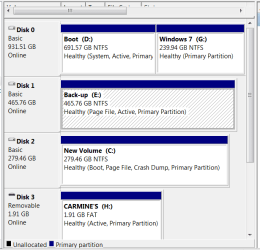
I recently upgraded Vista and W7RC to W7 64bit with no problems. I installed 7 on a new disk (WD VelociRaptor 300GB) and have yet to remove the RC and Vista. I want to format the 1T Samsung where RC and Vista were installed and use it for a back-up disk. I have been using a WD 500g for backup which I will now move to another computer.
W7 will not let me format either disk.
Disk 0 is the Samsung
Disk 1 the WD 500g
Disk 2 is the new disk where my new instillation is installed.
Do I need to worry about this disk order?
I think I got myself into a real bind. Reading some other posts it looks like by doing a clean install on my new disk I may still be booting from my old disk with everything but my boot sector on the new disk. Anyone have any ideas how I to fix this with out doing a totally new install?
I changed the disk order in my bios with the new disk first and it will not boot.
When I changed it back again it boots fine, showing tripple boot options:
1.Windows 7
2. Windows 7
3. Vista
My Computer
At a glance
Windows 10 Pro 64-bit Build 17134Intel(R) Core(TM) i7-6850K CPU @ 3.60GHzG.Skill TridentZ Series 32GB (4 x 8GB) DDR4-3...NVIDIA GeForce GTX 1080
Computer type
PC/Desktop
Computer Manufacturer/Model Number
Custom Built
OS
Windows 10 Pro 64-bit Build 17134
CPU
Intel(R) Core(TM) i7-6850K CPU @ 3.60GHz
Motherboard
ASUS STRIX X99 GAMING Bios 1801
Memory
G.Skill TridentZ Series 32GB (4 x 8GB) DDR4-3200 Memory
Graphics Card(s)
NVIDIA GeForce GTX 1080
Sound Card
USB Audio Device
Monitor(s) Displays
HP Omen 32"
Screen Resolution
2560 x 1440
Hard Drives
Samsung 950 PRO 512GB M.2-2280 Solid State Drive
Samsung 960 Pro 1.0TB M.2-2280 Solid State Drive
HGST Deskstar NAS 3.5-Inch 3TB HDD
My new volumn labeled c: has the new instal on a single 300g partition.
Vista and the old 7 are on the 1T drive dual partitions D: and G:
With my old backup drive 500g labeled E: single partition.
See snip below.
Attachments
Capture.PNG
15.3 KB
· Views: 12
My Computer
At a glance
Windows 10 Pro 64-bit Build 17134Intel(R) Core(TM) i7-6850K CPU @ 3.60GHzG.Skill TridentZ Series 32GB (4 x 8GB) DDR4-3...NVIDIA GeForce GTX 1080
Computer type
PC/Desktop
Computer Manufacturer/Model Number
Custom Built
OS
Windows 10 Pro 64-bit Build 17134
CPU
Intel(R) Core(TM) i7-6850K CPU @ 3.60GHz
Motherboard
ASUS STRIX X99 GAMING Bios 1801
Memory
G.Skill TridentZ Series 32GB (4 x 8GB) DDR4-3200 Memory
Graphics Card(s)
NVIDIA GeForce GTX 1080
Sound Card
USB Audio Device
Monitor(s) Displays
HP Omen 32"
Screen Resolution
2560 x 1440
Hard Drives
Samsung 950 PRO 512GB M.2-2280 Solid State Drive
Samsung 960 Pro 1.0TB M.2-2280 Solid State Drive
HGST Deskstar NAS 3.5-Inch 3TB HDD
Regardless, startup Repair in Win7 is fully automated and runs all former bootrec and bootsect commands so after testing and trying bootrec repairs, it will run the bootsect command to rewrite MBR on the second or third attempt.
My new volumn labeled c: has the new instal on a single 300g partition.
Vista and the old 7 are on the 1T drive dual partitions D: and G:
With my old backup drive 500g labeled E: single partition.
See snip below.
Confirmed. Your MBR is on the old RC/Vista partition.
Disconnect it and Backup partition and move new Win7 into it's cable in 0 slot. You will not now need to change BIOS boot order but check it to be sure it boots after DVD.
Boot into Win7 DVD Repair console and run startup repair 3 times to recover MBR into 7.
Plug back in drive(s) you want to keep, and format.
So I should give it a try? Disconnect the two older drives, move the new disk to 0 and set to boot after the DVD.
Run repair 3 times.
Will try it and report back.
For future reference--I should have disconnected the 2 older drives before I did the initial clean install?
thanks
My Computer
At a glance
Windows 10 Pro 64-bit Build 17134Intel(R) Core(TM) i7-6850K CPU @ 3.60GHzG.Skill TridentZ Series 32GB (4 x 8GB) DDR4-3...NVIDIA GeForce GTX 1080
Computer type
PC/Desktop
Computer Manufacturer/Model Number
Custom Built
OS
Windows 10 Pro 64-bit Build 17134
CPU
Intel(R) Core(TM) i7-6850K CPU @ 3.60GHz
Motherboard
ASUS STRIX X99 GAMING Bios 1801
Memory
G.Skill TridentZ Series 32GB (4 x 8GB) DDR4-3200 Memory
Graphics Card(s)
NVIDIA GeForce GTX 1080
Sound Card
USB Audio Device
Monitor(s) Displays
HP Omen 32"
Screen Resolution
2560 x 1440
Hard Drives
Samsung 950 PRO 512GB M.2-2280 Solid State Drive
Samsung 960 Pro 1.0TB M.2-2280 Solid State Drive
HGST Deskstar NAS 3.5-Inch 3TB HDD
Don't worry, this one is easy. We do a couple per day where we have to move Win7 over to the first partition deleted XP/Vista, sometimes jumping data partitions. It only gets risky when you move/copy data.
Merely rewriting the MBR is automated in Windows 7.
Well unfortunately it didn't work.
Here is what I did:
unpluged cables on the 1T samsung and the WD 500 gig
Pluged the WD VelociRaptor 300GB into the port 0
Ran the startup repair now 6 times.
In the bios the WD VR isn't recognized only the DVD drive is recognized, however in the Boot Device Priority the WD VR is there second after the DVD.
When I check the details section of the startup repair it looks like it should be fixed.
Message:
Roor cause found
The partition table does not have a valid partition
Repair Action: Partition tool repair
Result: Completed successsully, error code 0x0
time taken = 2137 ms (the ms change each time I retry)
Any thoughts?
My Computer
At a glance
Windows 10 Pro 64-bit Build 17134Intel(R) Core(TM) i7-6850K CPU @ 3.60GHzG.Skill TridentZ Series 32GB (4 x 8GB) DDR4-3...NVIDIA GeForce GTX 1080
Computer type
PC/Desktop
Computer Manufacturer/Model Number
Custom Built
OS
Windows 10 Pro 64-bit Build 17134
CPU
Intel(R) Core(TM) i7-6850K CPU @ 3.60GHz
Motherboard
ASUS STRIX X99 GAMING Bios 1801
Memory
G.Skill TridentZ Series 32GB (4 x 8GB) DDR4-3200 Memory
Graphics Card(s)
NVIDIA GeForce GTX 1080
Sound Card
USB Audio Device
Monitor(s) Displays
HP Omen 32"
Screen Resolution
2560 x 1440
Hard Drives
Samsung 950 PRO 512GB M.2-2280 Solid State Drive
Samsung 960 Pro 1.0TB M.2-2280 Solid State Drive
HGST Deskstar NAS 3.5-Inch 3TB HDD
It was recognized as sata 6 and the settings were the same.
It is now recognized as sata 1 and it 2nd order on the boot sequence.
It looked like it was going to work but still won't boot. The ".../force" command said something like"
C: <\\?\ Volume............
Successfully updated NTFS filesystem bootcode
Bootcode was successfully updated on all targeted volumes
My Computer
At a glance
Windows 10 Pro 64-bit Build 17134Intel(R) Core(TM) i7-6850K CPU @ 3.60GHzG.Skill TridentZ Series 32GB (4 x 8GB) DDR4-3...NVIDIA GeForce GTX 1080
Computer type
PC/Desktop
Computer Manufacturer/Model Number
Custom Built
OS
Windows 10 Pro 64-bit Build 17134
CPU
Intel(R) Core(TM) i7-6850K CPU @ 3.60GHz
Motherboard
ASUS STRIX X99 GAMING Bios 1801
Memory
G.Skill TridentZ Series 32GB (4 x 8GB) DDR4-3200 Memory
Graphics Card(s)
NVIDIA GeForce GTX 1080
Sound Card
USB Audio Device
Monitor(s) Displays
HP Omen 32"
Screen Resolution
2560 x 1440
Hard Drives
Samsung 950 PRO 512GB M.2-2280 Solid State Drive
Samsung 960 Pro 1.0TB M.2-2280 Solid State Drive
HGST Deskstar NAS 3.5-Inch 3TB HDD