Which is the best uninstaller?

Ok i tested=
Revo Unistaller
[FONT=&quot]Uninstall Tool[/FONT]
Your Uninstaller
Total-Uninstall
With the same games,software etc.
Revo Unistaller (i ran the Advanced mode),[FONT=&quot]Uninstall Tool and [/FONT]Your Uninstaller they didn't found all the leftovers files.
Total-Uninstall cleans everything!
So revo WAS my favorite,NOW is Total-Uninstall.
 
Last edited:

My Computer

Computer Manufacturer/Model Number
Custom Built by me.
OS
Windows 7 Ultimate 64bit SP1
CPU
Intel Core 2 Quad Q6600
Motherboard
Gigabyte GA-X38-DS4
Memory
2X2GB DDR2 PC6400 800MHZ DUAL CHANNEL
Graphics Card(s)
XFX RADEON HD 6850 1GB GDDR5
Sound Card
2/4/5.1/7.1-channel Realtek High Definition
Monitor(s) Displays
Samsung LE40A656F1 1080p 100Hz LCD HD TV 50,000:1
Screen Resolution
1366x768 in Desktop,1920x1080p in gaming and video
Hard Drives
C:\WD VelociRaptor 150 GB,10,000 RPM
E:\WESTERN DIGITAL WD15EADS 1.5TB CAVIAR GREEN SATA2 F:\WESTERN DIGITAL WD15EADS 1.5TB CAVIAR GREEN SATA2
PSU
THERMALTAKE W0229 TOUGHPOWER XT 750W
Case
A-Case Twin Engine BB
Cooling
3 x thermaltake smart case fan II + 1 arctic cooling fan
Keyboard
Wireless Logitech LX710
Mouse
Logitech Wireless Gaming Mouse G700
Internet Speed
ADSL 12000 plus
Other Info
Mouse Logitech G700,with 13 buttons who needs keyboard in RPG?

D:\Sony high speed sata Dvd Rewriter
Logitech Cordless Rumblepad 2
Did you search the registry for company name or file name?

You might be surprixed
 

My Computer

Computer Manufacturer/Model Number
Cheap $399.00 E-Machine
OS
Windows 7 Pro & Vista Home Premium
CPU
Athlon 64 3800+ (Orleans) 2.40GHz
Motherboard
Winfast
Memory
2GB DDR2 RAM DIMM
Graphics Card(s)
NVIDIA GeForce 8500 GT 512 MB memory HDMI out
Sound Card
creative X-Fi Exteme 7..1 channel
Monitor(s) Displays
Acer V223W 22" widescreen DVI
Screen Resolution
1680x1050
Hard Drives
WDC WD5 500GB
WDC WD25 250GB
PSU
OCZ 550 watt
Case
Gateway
Cooling
2 fans
Keyboard
Dell
Mouse
Sony Vaio
Internet Speed
18MB/s down - .72MB /s up
If I'm not mistaken, Revo doesn't support x64 systems, isn't that correct?

Edit: Yes, I just checked, according to their site x64 systems and W7 are not supported, although it appears people are using it successfully on W7 systems.

Personally, I use Your Uninstaller Pro, but would have like to try Revo if it worked on x64 Os's.

In any event, there is no doubt that the regular Windows uninstaller from Control Panel leaves a lot of stuff behind in almost every single uninstall that it performs, so I feel there is real value in using an uninstaller that digs into the registry and removes most, if not all, of those entries that the regular uninstaller leaves behind.

Of course, one can also get rid of these left over registry entries by using a registry cleaner. I realize Registry cleaners have a bad name around here, but I haven't had a problem using them and initially thousands of entries are usually flagged for removal the first time a cleaner is run on a system that has been in use for a while.

I usually use the registry cleaner in TuneUp Utilities which either automatically backs up the registry or records exactly what it is cleaning before it performs any cleaning, so any actions it performs can very easily be undone if there should be a problem, however, I have never experienced a problem using that particular registry cleaner. It is not the most aggressive cleaner out there, but it seems to be very safe, ime.
 

My Computer

Computer Manufacturer/Model Number
HP DV8t quad
OS
Windows 7 Ultimate x64 (Retail)
CPU
i7-Q 720
Motherboard
Motherboard Chipset Intel Ibex Peak-M PM55, Intel Lynnfield
Memory
6 GB
Graphics Card(s)
nVidia GeForce GT 230M (1GB)
Sound Card
IDT High Definition Audio CODEC
Monitor(s) Displays
18.4 inch HP Infinity FHD (Samsung 184HT03-001)
Screen Resolution
1920 x 1080
Hard Drives
Hitachi 500GB 7200 rpm (x2)
Seagate FreeAgent 1.5 TB External USB (x2)
Thermaltake BlacX eSATA/USB 2.0 3.5/2.5 HD dock
Cooling
Zalman NC-2000 notebook cooling pad
Keyboard
laptop
Mouse
Logitech VX Revolution
Other Info
Backup Unit: Lenovo T61p
Just ordered Your Uninstaller Pro. In my opinion it's the fastest by far. Grab it at cyber monday discount today! Love it!
 

My Computer

OS
MacOS
If I'm not mistaken, Revo doesn't support x64 systems, isn't that correct?

Edit: Yes, I just checked, according to their site x64 systems and W7 are not supported, although it appears people are using it successfully on W7 systems.

Personally, I use Your Uninstaller Pro, but would have like to try Revo if it worked on x64 Os's.

In any event, there is no doubt that the regular Windows uninstaller from Control Panel leaves a lot of stuff behind in almost every single uninstall that it performs, so I feel there is real value in using an uninstaller that digs into the registry and removes most, if not all, of those entries that the regular uninstaller leaves behind.

Of course, one can also get rid of these left over registry entries by using a registry cleaner. I realize Registry cleaners have a bad name around here, but I haven't had a problem using them and initially thousands of entries are usually flagged for removal the first time a cleaner is run on a system that has been in use for a while.

I usually use the registry cleaner in TuneUp Utilities which either automatically backs up the registry or records exactly what it is cleaning before it performs any cleaning, so any actions it performs can very easily be undone if there should be a problem, however, I have never experienced a problem using that particular registry cleaner. It is not the most aggressive cleaner out there, but it seems to be very safe, ime.

I successfully used Revo on a x64 system with no problems, i didn't use the reg cleaner, just the junk file cleaner ;)
 

My Computer

Computer Manufacturer/Model Number
HP Touchsmart IQ771.uk
OS
Windows 7 Ultimate x64
CPU
AMD Turion(tm) 64 X2 Mobile Technology TL-56
Motherboard
ASUS Pheonix
Memory
3GB Nanya PC2-6400 DDR2-SDRAM SO-DIM (400MHz)
Graphics Card(s)
NVIDIA GeForce Go 7600 256MB GDDR3 SDRAM
Sound Card
High Definition Intergrated NVIDIA MCP51
Monitor(s) Displays
46" Sony Bravia HDTV
Screen Resolution
1600x1200
Hard Drives
1.5TB Samsug
320GB Seagate ST3320820AS - SATA 3Gb/s 8MB
500GB Maxtor Basics STM305003EHD301-RK
Internet Speed
↓6.32 Mb/s ↑0.35 Mb/s ↔26ms
Other Info
BIOS - American Megatrends Inc. 5.07
Ethernet Port - NVIDIA nForce 10/100/1000 Mbps
DVD Drive - TSSTcorp DVDR/RW TS-T632L
If I'm not mistaken, Revo doesn't support x64 systems, isn't that correct?

Edit: Yes, I just checked, according to their site x64 systems and W7 are not supported, although it appears people are using it successfully on W7 systems.

Personally, I use Your Uninstaller Pro, but would have like to try Revo if it worked on x64 Os's.

Have it installed on a 64bit win 7, and it works just fine...
 

My Computer

Computer Manufacturer/Model Number
Optima
OS
Windows 7 home Premium x64
CPU
IntelDuoCore 2.85ghz
Memory
4GB
Graphics Card(s)
onboard
Sound Card
on board
Hard Drives
2x320GB SATA
Keyboard
Logitech
Mouse
Logitech
Other Info
Litescribe CD/DVD RW
I'll give it a try then, however, it is a little worrisome that they expressly state x64 systems are not supported.
 

My Computer

Computer Manufacturer/Model Number
HP DV8t quad
OS
Windows 7 Ultimate x64 (Retail)
CPU
i7-Q 720
Motherboard
Motherboard Chipset Intel Ibex Peak-M PM55, Intel Lynnfield
Memory
6 GB
Graphics Card(s)
nVidia GeForce GT 230M (1GB)
Sound Card
IDT High Definition Audio CODEC
Monitor(s) Displays
18.4 inch HP Infinity FHD (Samsung 184HT03-001)
Screen Resolution
1920 x 1080
Hard Drives
Hitachi 500GB 7200 rpm (x2)
Seagate FreeAgent 1.5 TB External USB (x2)
Thermaltake BlacX eSATA/USB 2.0 3.5/2.5 HD dock
Cooling
Zalman NC-2000 notebook cooling pad
Keyboard
laptop
Mouse
Logitech VX Revolution
Other Info
Backup Unit: Lenovo T61p
Total Uninstall is definitely the best uninstaller. Works onboth Windows 7 x86 and x64.
 
Total Uninstall is definitely the best uninstaller. Works onboth Windows 7 x86 and x64.
Be a good idea to put "imo" after a statement like that. :rolleyes: ;)
 

My Computer

Computer Manufacturer/Model Number
HP DV8t quad
OS
Windows 7 Ultimate x64 (Retail)
CPU
i7-Q 720
Motherboard
Motherboard Chipset Intel Ibex Peak-M PM55, Intel Lynnfield
Memory
6 GB
Graphics Card(s)
nVidia GeForce GT 230M (1GB)
Sound Card
IDT High Definition Audio CODEC
Monitor(s) Displays
18.4 inch HP Infinity FHD (Samsung 184HT03-001)
Screen Resolution
1920 x 1080
Hard Drives
Hitachi 500GB 7200 rpm (x2)
Seagate FreeAgent 1.5 TB External USB (x2)
Thermaltake BlacX eSATA/USB 2.0 3.5/2.5 HD dock
Cooling
Zalman NC-2000 notebook cooling pad
Keyboard
laptop
Mouse
Logitech VX Revolution
Other Info
Backup Unit: Lenovo T61p
after using revo or ccleaner to uninstall use regseeker [free] to search for leftovers using key words you will be surprised how much these two miss.

BUT READ CAREFULLY EACH LINE BEFORE DELETING
 

My Computer

Computer Manufacturer/Model Number
self build
OS
vista xp w7
CPU
ci920 quad core
Motherboard
msi x58
Memory
3gb ddr3
Graphics Card(s)
ati hd4350
Sound Card
ati hd4350
Monitor(s) Displays
samsung t240hd
Hard Drives
sata2 c drive
ide backups
PSU
700
Case
no name
Cooling
standard intel cpu fan
Hi there
not quite the answer you want but IMO the BEST method for "uninstalling" anything is as follows

1) BEFORE installing anything - image your system with something like Acronis.

2) If you need to Uninstall the product - just restore the previous image.

A typical Windows 7 partition takes around 7 - 15 mins to backup / restore on most reasonably powered machines -- certainly no more than 30 mins.

IMO a no brainer compared with messing around with Registry cleaners / uninstall products.

(Another OK idea -- why not try stuff in a Virtual Machine before installing it on a real machine -- where possible -- OK this takes more time but is also a valid test method).

Cheers
jimbo
 

My Computer

Computer type
PC/Desktop
Computer Manufacturer/Model Number
Custom built, several laptops HP/ASUS
OS
Linux CENTOS 7 / various Windows OS'es and servers
CPU
Intel i7 Intel i5
Memory
8GB, 16GB
Graphics Card(s)
On Motherboard
Sound Card
Realtek HD audio
Monitor(s) Displays
Apple Cinema display, Samsung LCD
Screen Resolution
1920 X 1080
Hard Drives
4 X 1TB SATA
Mouse
Toshiba wireless laser
Internet Speed
> 20MB up
While you are all swearing, could you also mutter under your breath - are you using the free version or the Pro version (not free).
If you re all using the free version, you might ask the question - why does Revo think their free version is inadequate ?
They would not need to sell the Pro version, if the free version was removing everything ? ? ?
 

My Computer

OS
XP Pro
I use Revo Pro. Of course the free version doesn't remove as well as the pro version. Doesn't mean the free version is "inadequate"
 

My Computer

Computer Manufacturer/Model Number
tw33k
OS
Windows 7 Ultimate (x64) SP1
CPU
Intel 3770k 4.6GHz
Motherboard
ASUS Maximus V Formula
Memory
8GB (2x 4GB) Crucial Ballistix
Graphics Card(s)
Sapphire 7950 (1060/1600)
Sound Card
On Board Realtek HD Audio
Monitor(s) Displays
27" Acer B273HU (via HDMI)
Screen Resolution
2048 x 1152
Hard Drives
Crucial M4 128GB
2TB WD Black
1TB Samsung F3 SATA
1TB WD Elite External
2TB WD USB 3.0
PSU
Corsair AX750 Gold
Case
Corsair Obsidian 800DW
Cooling
Corsair H100 (2x AP-121/2x UK-3000 push/pull)
Keyboard
Microsoft Wireless 5000
Mouse
Microsoft Wireless 5000
Internet Speed
5mb/s
Other Info
Logitech z-2300 2.1 speakers
Lamptron FC-5 v2
FWIW, I had been using the free version for many years, and was very happy with its results.

I looked at upgrading to the Pro version as my donation for my past use. ;)
 

My Computer

Computer Manufacturer/Model Number
Custom
OS
Windows 7 Ultimate SP1 64-Bit
CPU
i7-950 4.140GHz OC'd
Motherboard
P6T Deluxe V2
Memory
12G
Hard Drives
1-3T, 15T total
PSU
Corsair HX850W
Case
Antec P183
Cooling
Noctua NH-D14
Internet Speed
30/30
I find it hard to believe that the uninstaller does a better job in the pro version.

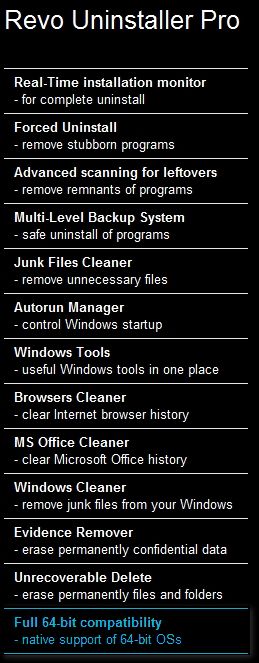
Included in the Pro version are

1.) Forced Uninstall
2.) Real-Time Installation Monitor
3.) Multi-Level Backup System

For those running the Pro version, open regedit and navigate to the HKEY_LOCAL_MACHINE and look for company or program name of software you previosly uninstalled using Revo Pro.

I think you'll be surprised
 

My Computer

Computer Manufacturer/Model Number
Cheap $399.00 E-Machine
OS
Windows 7 Pro & Vista Home Premium
CPU
Athlon 64 3800+ (Orleans) 2.40GHz
Motherboard
Winfast
Memory
2GB DDR2 RAM DIMM
Graphics Card(s)
NVIDIA GeForce 8500 GT 512 MB memory HDMI out
Sound Card
creative X-Fi Exteme 7..1 channel
Monitor(s) Displays
Acer V223W 22" widescreen DVI
Screen Resolution
1680x1050
Hard Drives
WDC WD5 500GB
WDC WD25 250GB
PSU
OCZ 550 watt
Case
Gateway
Cooling
2 fans
Keyboard
Dell
Mouse
Sony Vaio
Internet Speed
18MB/s down - .72MB /s up
You left out the more advanced scanning algorithms. I have done just what you suggested and found nothing in the registry.
 

My Computer

Computer Manufacturer/Model Number
tw33k
OS
Windows 7 Ultimate (x64) SP1
CPU
Intel 3770k 4.6GHz
Motherboard
ASUS Maximus V Formula
Memory
8GB (2x 4GB) Crucial Ballistix
Graphics Card(s)
Sapphire 7950 (1060/1600)
Sound Card
On Board Realtek HD Audio
Monitor(s) Displays
27" Acer B273HU (via HDMI)
Screen Resolution
2048 x 1152
Hard Drives
Crucial M4 128GB
2TB WD Black
1TB Samsung F3 SATA
1TB WD Elite External
2TB WD USB 3.0
PSU
Corsair AX750 Gold
Case
Corsair Obsidian 800DW
Cooling
Corsair H100 (2x AP-121/2x UK-3000 push/pull)
Keyboard
Microsoft Wireless 5000
Mouse
Microsoft Wireless 5000
Internet Speed
5mb/s
Other Info
Logitech z-2300 2.1 speakers
Lamptron FC-5 v2
FWIW, I also have, and bought, Total Uninstall, which I also like, and find myself using more often. Note that this is a non-scientific choice, as I am now a bit chronologically challenged. ;)
 

My Computer

Computer Manufacturer/Model Number
Custom
OS
Windows 7 Ultimate SP1 64-Bit
CPU
i7-950 4.140GHz OC'd
Motherboard
P6T Deluxe V2
Memory
12G
Hard Drives
1-3T, 15T total
PSU
Corsair HX850W
Case
Antec P183
Cooling
Noctua NH-D14
Internet Speed
30/30
If you are correct and no doubt you are, it sucks that RevoUninstaller Free states it cleans out leftover files and registry entries.

In other words, you could call Revo Free as crippled software.

Revo free cleans out a lot but not everything. It's like every company that offers a free version; it never does as good a job as the paid for version. I think of free versions as like advertising. "If you like what the free version does, you're gonna love what the pro version can do"
 

My Computer

Computer Manufacturer/Model Number
tw33k
OS
Windows 7 Ultimate (x64) SP1
CPU
Intel 3770k 4.6GHz
Motherboard
ASUS Maximus V Formula
Memory
8GB (2x 4GB) Crucial Ballistix
Graphics Card(s)
Sapphire 7950 (1060/1600)
Sound Card
On Board Realtek HD Audio
Monitor(s) Displays
27" Acer B273HU (via HDMI)
Screen Resolution
2048 x 1152
Hard Drives
Crucial M4 128GB
2TB WD Black
1TB Samsung F3 SATA
1TB WD Elite External
2TB WD USB 3.0
PSU
Corsair AX750 Gold
Case
Corsair Obsidian 800DW
Cooling
Corsair H100 (2x AP-121/2x UK-3000 push/pull)
Keyboard
Microsoft Wireless 5000
Mouse
Microsoft Wireless 5000
Internet Speed
5mb/s
Other Info
Logitech z-2300 2.1 speakers
Lamptron FC-5 v2
Revo Uninstaller Free and Revo Uninstaller Pro have many similarities, but full native support of 64 bit Operating Systems is not one of them...

f90cac9d.jpg


~Maxx~
.
da59fa57.png
 

My Computer

Computer Manufacturer/Model Number
HP HPE 270f
OS
Windows 7 x64 Home Premium
CPU
Intel Core i7 930 @ 2.8 Ghz Socket 1366 LGA
Motherboard
Pegatron Truckee v1.04E41
Memory
8 GB 1366 Mhz DDR3 (PC3-10700) RAM
Graphics Card(s)
ATI Radeon 5770 1 GB DDR5 RAM
Sound Card
Realtech High Definition
Monitor(s) Displays
32" Sony Bravia
Screen Resolution
1366 X 768
Hard Drives
Intel 25nm 120 GB Series 320 SSD HD Tune- 265 MBps Read/ 130 MBps Write

LaCie 1TB + 1TB RAID 0 eSATA Drive HD Tune- 160 MBps Read/ 90 MBps Write
Keyboard
Logitech Illuminated
Mouse
Logitech MX Revolution
Internet Speed
36.4 Mbps Maximum on a 37 Mbps Motorola SB501 Modem
I have always used Revo and it has never caused me any problems.
However, it is surprising that a native 64-bit version of Revo is not available.
 

My Computer

Computer type
PC/Desktop
Computer Manufacturer/Model Number
Me
OS
Windows 7 Ultimate 64-bit
CPU
Intel Core i7 3770K
Motherboard
Asus P8Z77-V PRO
Memory
G.Skill ARES DDR3 1600 - 3 x 4GB
Graphics Card(s)
ASUS HD7770-DC-1GD5-V2
Sound Card
on board
Monitor(s) Displays
ASUS PB278Q PLS LED LCD 6ms
Screen Resolution
2560 x 1440
Hard Drives
Samsung 840 EVO SSD 500GB
2 x Seagate SATA3 2TB 64Mb Cache (ST2000DM001)
PSU
Corsair HX-650
Case
Coolermaster Centurion 5 II
Cooling
Coolermaster Hyper 212 Plus
Keyboard
Logitech K290
Mouse
MS Wireless Laser Mouse 5000
Internet Speed
100Mb down / 2.5Mb up
Other Info
Leadtek DTV2000DS Dual HD TV Tuner
USB3 kit for 2 front panel USB3 ports
Back
Top