how to install win7 witout losing vista on my laptop!

Professional

New member
Local time
11:39 AM
Messages
42
hi guys.:D
i have a Sony Vaio VGN-CS325J that comes with Windows Vista Home Premium x64,now i am going to install windows seven x64 on my laptop but i don't want to lose my vista as a matter of fact i want to have dual boot win vista & seven.
is it possible?
(my Vista is installed at Drive C and i have an empty Drive that is F with NTFS file system and 50GB space)
regards:geek:
 

My Computer My Computer

At a glance

Windows Vista Home Premium x64
OS
Windows Vista Home Premium x64
Internet Speed
ADSL 100 Mbps
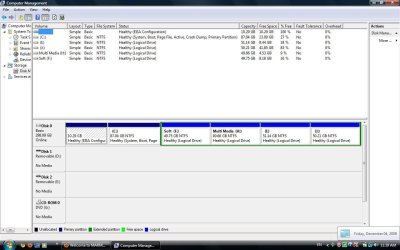
Could you post a screen shot of Disk management?

I;m not quite sure about the upgrade path,. but I';ll find out.
 

My Computer My Computer

At a glance

Windows 7 Pro & Vista Home PremiumAthlon 64 3800+ (Orleans) 2.40GHz2GB DDR2 RAM DIMMNVIDIA GeForce 8500 GT 512 MB memory HDMI out
Computer Manufacturer/Model Number
Cheap $399.00 E-Machine
OS
Windows 7 Pro & Vista Home Premium
CPU
Athlon 64 3800+ (Orleans) 2.40GHz
Motherboard
Winfast
Memory
2GB DDR2 RAM DIMM
Graphics Card(s)
NVIDIA GeForce 8500 GT 512 MB memory HDMI out
Sound Card
creative X-Fi Exteme 7..1 channel
Monitor(s) Displays
Acer V223W 22" widescreen DVI
Screen Resolution
1680x1050
Hard Drives
WDC WD5 500GB
WDC WD25 250GB
PSU
OCZ 550 watt
Case
Gateway
Cooling
2 fans
Keyboard
Dell
Mouse
Sony Vaio
Internet Speed
18MB/s down - .72MB /s up
i wouldnt recommend to do dual boot.. if you want to try windows 7 just install in virtual machine like MS virtual pc 2007 and try it, if you like then just back up your whole system into a image file using utillites like "macrium reflect", save the image somewhere for future use (if you need vista later) and do a clean install of windows 7, you feel so much better

or

if you really need windows 7 as dual boot, just insert the installation disk, boot through the disk, during installation select the hard drive you want to install windows 7.. that is it windows will handle boot loader, you dont have to configure anything for dual boot. if you decided to play around with boot loader then use the application called "Easy BCD".

all the applications i mentioned above are free.. Google it.
these are just my personal opinion, if like take it otherwise just ignore!
 

My Computer My Computer

At a glance

windows 7 ultimate x64i7 9206gp dominatorati 4870
Computer Manufacturer/Model Number
custom built
OS
windows 7 ultimate x64
CPU
i7 920
Motherboard
asus p6t
Memory
6gp dominator
Graphics Card(s)
ati 4870
Sound Card
onboard
Monitor(s) Displays
samsung 2494hs
Screen Resolution
1080p
Hard Drives
1.5tp seagate
PSU
650wt coolermaster
Case
thermaltake m9
Cooling
Nectua c12p-se14
Keyboard
logitech wave pro
Mouse
logitech m110
Internet Speed
adsl 2+
sure.

I made a mistake the Drive that i want to install it is J that now has 41.8GB free space:D
but my problem is not which drive shoud i install,my problem is that has anyone tested dual boot vista and seven?
 

Attachments

  • Untitled.jpg
    Untitled.jpg
    100.7 KB · Views: 60

My Computer My Computer

At a glance

Windows Vista Home Premium x64
OS
Windows Vista Home Premium x64
Internet Speed
ADSL 100 Mbps
i wouldnt recommend to do dual boot.. if you want to try windows 7 just install in virtual machine like MS virtual pc 2007 and try it, if you like then just back up your whole system into a image file using utillites like "macrium reflect", save the image somewhere for future use (if you need vista later) and do a clean install of windows 7, you feel so much better

or

if you really need windows 7 as dual boot, just insert the installation disk, boot through the disk, during installation select the hard drive you want to install windows 7.. that is it windows will handle boot loader, you dont have to configure anything for dual boot. if you decided to play around with boot loader then use the application called "Easy BCD".

all the applications i mentioned above are free.. Google it.
these are just my personal opinion, if like take it otherwise just ignore!

thanks for your respnse.
before i have installed win7 on my pc and i love it,so i decided to install it on my laptop.
actually i don't want to miss win vista because for my laptops some drives hasn't released yet.
u told just insert installation DVD and install ony my appropriate drive,and after that what will hapeen at boot loader?
 

My Computer My Computer

At a glance

Windows Vista Home Premium x64
OS
Windows Vista Home Premium x64
Internet Speed
ADSL 100 Mbps
Yes you can install it there and WIndows 7 will configure the dual boot perfectly. Boot from the Windows 7 DVD and choose Custom install for the Advanced drive tools to format the partition first. You will also want to plug in ethernet so you can stay connected to the internet during install as the installer is so driver complete it will update itself during install and deliver more in first Windows Updates.

MS funded the WHQL partnership with all manufacturers to build Windows 7 drivers so they have them first now, unlike before.

When you start up, check the Device manager for any missing drivers: use Driver tab on Device to Update driver, browsing to the Vista Windows/system32/drivers and /driverstore files to find those drivers.

When you are ready to get rid of Vista, you'll want to remove that EISA partition (google for special Diskpart commands) in the prime disk position since it is only able to perform recovery for Vista while Vista is still installed. The MBR will stay in Vista for now, but can be recovered into Win7 later using Startup Repair.

People are wanting to bail out of dual boots in hours and days now instead of weeks and months that it took us beta testers. We do many of them each day, and each is its own special puzzle, but doable with about a 90% success rate. Your best bet is a dual boot to acclimate to Win7 and transfer files, since you can't easily plug in another HD.

We're here when you are ready to say Hasta La Vista.
 
Last edited:
Yes you can install it there and WIndows 7 will configure the dual boot perfectly. Boot from the Windows 7 DVD and choose Custom install for the Advanced drive tools to format the partition first. You will also want to plug in ethernet so you can stay connected to the internet during install as the installer is so driver complete it will update itself during install and deliver more in first Windows Updates.

When you start up, check the Device manager for any missing drivers and use Driver tab on hadware item to Update driver, browsing to the Vista Windows/system32/drivers and driverstore files to pluck those drivers. You may need to get your LAN driver there, then you can get online and check Windows Updates.

When you are ready to get rid of Vista, you'll want to remove that EISA partition since it is only able to perform recovery for Vista while Vista is still installed.

People are wanting to bail out of dual boots in hours and days now instead of weeks and months that it took us beta testers. We do many of them each day, and each is its own special puzzle, but doable with about a 90% success rate.
wooooooooooooooow niceeee:D yes i'll format it manually before starting installation.
u mean on boot loader i'll have two choice between them?
 

My Computer My Computer

At a glance

Windows Vista Home Premium x64
OS
Windows Vista Home Premium x64
Internet Speed
ADSL 100 Mbps
Yes, Windows 7 bootmanager will take over as such, and write it to the boot [partition. That is to say, when you install win7 on J, you will have WIndows 7 as your default install and Vista will be the secondary one... so all should be fine.

however, most likely, when you log into windows 7 , J will become C and when you are on Vista , it will be also C. This can be somewhat annoying and also create some discrepancies in hardcoded paths (eg. created by yourself).

What you can do, which I often do , since C is reminaed as C... is to do in windows 7 cmd >

bcdedit [/enum all] > bcdwin7.txt (nevermind the /enum all option really)

save it on D lets say or whatever but easy to find even if drive letters change

then cmd : bcdedit > d:\bcdVista.txt

Log back into Vista..

in cmd type :

bcdedit /export D:\bcdbackup

also :
and then cmd (RUN AS ADMINISTRATOR!!) type > bootsect.exe /nt60 all /force

(YOu might need ot go to c:\windows\boot}

now do bcdedit again and compare with your bcdwin7 and bcdvista txt files to see if you nderstand whats happening...

in either case... you will see you will have to do somethign like:

current (now is vista) , osdevice and device must be changed to C: if they r not

to do this: bcdedit /set {current} device partition=C:
bcdedit /set {current} osdevice partition=C:

for the win 7 which you will recognise by studying your two files , having somethign like {XXXXXXXxxxxxXXXxxxx-XXXXXXXx--XXXX} (i dont remember right now , im doing this just off the top of my head) but anyway, when you have recognized which one it is

you do bcdedit /set {THE WIN 7 GUID yes that long number, copy n paste from text file)} device partition=J:
bcdedit /set {GUID} osdevice=J:

good luck.. if it fails dont panic... come back here n have another computer ready or recommended!!! a winpe disk on usb

solar
 

My Computer My Computer

At a glance

Vista U32 , now Win7 64
Computer Manufacturer/Model Number
laptop
OS
Vista U32 , now Win7 64

My Computer My Computer

At a glance

Windows Vista Home Premium x64
OS
Windows Vista Home Premium x64
Internet Speed
ADSL 100 Mbps
Here is the Seven Forums tutorial: http://www.sevenforums.com/tutorials/5166-dual-boot-installation-windows-7-vista.html

It leaves out formatting so be sure after booting from the DVD and choosing Custom install, to click on the partition where you want to install, choose Advanced drive tools and format the drive you have highlighted.

]

u mean on boot loader i'll have two choice between them?

Windows 7 configures the dual boot leaving the MBR in Vista but with boot files in Win7.

It configures a dual boot menu appearing at boot-up which will let you choose which OS you want to enter. The timeout on the menu is set for 30 seconds after which it will enter Windows 7.

You can change this timeout, the default OS, or even hide the menu in Start>right click Computer>Properties>Advanced Tools>Startup and recovery.
 
yup all tryue gregrocker.. thank you... however, windows 7 on J will revert to C.. its good as such in fact, however, can be a lil annoying so if one lets the vista OS be the dominant, in the way I explained, drive letters are preserved I think.... don't remember without running a test.. either way, the way windows 7 behaves is kinda more logical :D I merely mention it to let OP be aware of potential problems/wishes.
 

My Computer My Computer

At a glance

Vista U32 , now Win7 64
Computer Manufacturer/Model Number
laptop
OS
Vista U32 , now Win7 64
yup all tryue gregrocker.. thank you... however, windows 7 on J will revert to C.. its good as such in fact, however, can be a lil annoying so if one lets the vista OS be the dominant, in the way I explained, drive letters are preserved I think.... don't remember without running a test.. either way, the way windows 7 behaves is kinda more logical :D I merely mention it to let OP be aware of potential problems/wishes.

Yes you are correct Solar, ever since the RTM WIndows 7 will see itself as the C drive in many configs, which takes some getting used to, but is actually a convenience which has no effect on programs or files whatsoever.
 
so i'll do the stpes that u told.
if i had problem,i'll let u know:)
 
Last edited:

My Computer My Computer

At a glance

Windows Vista Home Premium x64
OS
Windows Vista Home Premium x64
Internet Speed
ADSL 100 Mbps
sure professional.. but as a recommendation... make a winre disk... u have it in windows 7 or even dowbload one n put it on a windows 7.. see, your situation is EXACTLY why I just wrote a script doing all this for people with these issues and am asking if it saved people hours and hours of trouble, is it worth a donation of a few dollars lol ;)

anyway good luck and sure, people on the forum will always help you.. but just so you know, if somehow it screws up.. your system is NOT AT ALL destroyed , its just messed up in its head so to speak and is "easily rebuilt" by people who know how.. aka on the forums there are enough people, but if you understood my messy instructions (I'm teaching right now so in a hurry), then you should be fine :)
 

My Computer My Computer

At a glance

Vista U32 , now Win7 64
Computer Manufacturer/Model Number
laptop
OS
Vista U32 , now Win7 64
oh and for the record senthil, virtual PC 2007 or any desktop virtual machine do not* support x64 guest systems, not to mention laptops often do not have hardware virtualization enabled.
 

My Computer My Computer

At a glance

Vista U32 , now Win7 64
Computer Manufacturer/Model Number
laptop
OS
Vista U32 , now Win7 64
yes dear Solar i know what you say because i have installed windows seven dual boot with xp before on my PC,and that happend for me.
however tnx for your advice.
 

My Computer My Computer

At a glance

Windows Vista Home Premium x64
OS
Windows Vista Home Premium x64
Internet Speed
ADSL 100 Mbps
hi guys,another question on my laptop there is a offer that says:
offer expires 1/31/10
Upgrade to Windows 7
detail at sony.com/windows7
doese anyone know what shoud i do?:D

i have bought it on 11 september 2009,i think i can use the offer
 

My Computer My Computer

At a glance

Windows Vista Home Premium x64
OS
Windows Vista Home Premium x64
Internet Speed
ADSL 100 Mbps
Absolutely, that is the free Upgrade Kit manufacturers promoted to keep customers buying Vista computers. You have until Jan 31 to order it but I would order now to get it asap!

As it turns out this is the best possible situation for buyers because:

1) If you had held out to buy a Win7 computer, you would have had to deal with the manufacturer's bloatware added at factory, which is nearly impossible to get off since uninstalling corrupts system files, and there is no longer a clean copy of Win7 DVD included. Plus manufacturers actually enforce their bloatware by refusing to support your own clean install with a borrowed or downloaded copy of Win7 that can activate with the license locked to your mobo.

2) thanks to MS insistence that manufacturers allow buyers to have a clean install, these Upgrade Kits include a clean copy Windows 7 DVD, along with a apps/drivers CD to choose what you want to install after you clean install Win7, booting from the DVD to get the cleanest possible formatted install. The DVD is already nearly driver-complete, with other drivers/apps being on the Support Downloads page for your model.
 
thanks for your advice ,but my problem is that i am in Asia untill that time and i can't come back to US.
actually i am in iran so i can't buy it online what shoud i do?
 

My Computer My Computer

At a glance

Windows Vista Home Premium x64
OS
Windows Vista Home Premium x64
Internet Speed
ADSL 100 Mbps
You showed that you qualify for the free Upgrade Kit for your new laptop. Order it and have it sent to your permanent address then have it forwarded to you or catch up with it later.

It normally takes about a month to get the kit, but there can be longer delays since they are swamped with Upgrade orders.

If you don't take advantage of this FREE Upgrade Kit offer before deadline in Jan., you are throwing away $119.
 
Back
Top